
Models and AI Gateway Overview
Agentbase v2.10.0 provides enterprise-grade AI applications with a two-layer model access and governance system: Models (LLM Gateway) and AI Gateway. The two systems coexist within a project with clear boundaries of responsibility and neither takes over the other — Models (LLM Gateway) focuses on project-level model provider connection registration, preset model catalog synchronization, model health probing, and underlying compute supply for the platform's internal AI engines (knowledge base vectorization, reranking, memory extraction, agent workbench, observability evaluation); AI Gateway, on the other hand, provides a unified data plane entry with gateway instance isolation for multi-team, multi-agent production environments, supporting logical model dynamic routing, primary-backup disaster recovery switching, Semantic Cache, security guardrails (Guardrail & OPA policies), multi-protocol proxying (OpenAI / Anthropic / MCP / A2A / HTTP Agent), and fine-grained Token/QPS budget governance.
Feature Overview
When implementing an enterprise-grade AI middle platform, development and architecture teams typically face two very different model management needs:
Project foundation compute connections (carried by "Models / LLM Gateway"):
The project's knowledge base (Knowledge Base) requires a stable Embedding model (e.g.,
text-embedding-v3) for chunk vectorization, a Rerank model (e.g.,qwen3.7-text-rerank) for multi-path retrieval reranking, a multimodal vision model (e.g.,qwen-vl-max) for scanned documents and architecture diagram interpretation, and a large language model (e.g.,qwen-plus) to drive GraphRAG knowledge graph extraction, RAPTOR recursive clustering, Wiki compilation, and synthetic question answering.The Memory center (Memory) requires Chat and Embedding models to perform long-term fact extraction, profile summarization, context dream consolidation (Dreaming), and skill distillation.
The Agent Runtime (Agent Workbench) and Observability Evaluations likewise read directly from the Provider and model catalog registered on the project's Models page.
Meanwhile, business services can call standard interfaces such as
/v1/ai/chat/completions,/v1/ai/embeddings,/v1/ai/rerank, and/v1/ai/messagesusing project-scoped restricted keys issued viaabk_....
Multi-gateway-instance production traffic governance (carried by AI Gateway):
When an enterprise exposes LLM and agent capabilities to external business lines, partners, or multi-tenant end users, a logical abstraction layer must be built on top of the physical models (for example, wrapping the primary model
qwen-plusand backup modelqwen-turbointo a unified logical modellm-enterprise-chat).Unified content safety guardrails (Guardrail Profile, such as PII privacy masking, prompt injection defense, and sensitive-word blocking) and OPA policy pre-checks need to be applied to inbound prompts and outbound generated results.
Semantic caching based on vector similarity needs to be enabled so that high-frequency repeated queries hit the cache directly, significantly reducing time-to-first-token (TTFT) and token costs.
Gateway instances (e.g.,
/ai-gateway/g/gw_7194685489feb1e169548619/v1/...) need to centrally govern MCP tool approvals, A2A agent calls, principals & credentials, and multi-cycle hard budgets.
Core Concepts and Architecture
Two-Layer Model Access and Governance Architecture Diagram
The following architecture diagram shows how the Models (LLM Gateway) and the AI Gateway collaborate within the Agentbase platform and across external business call chains:
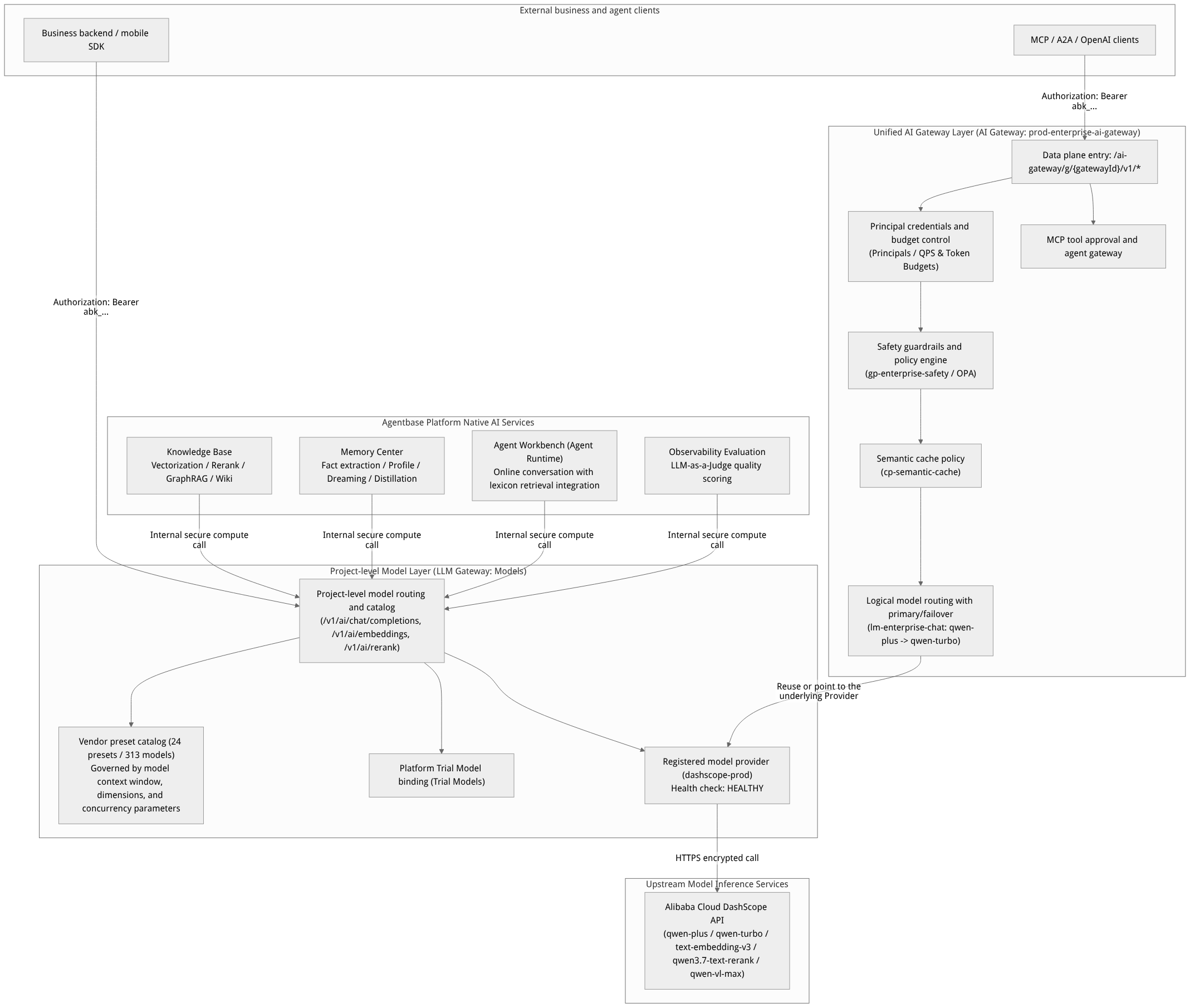
Flow diagram, not a runtime screenshot; read the relationships between steps or states along the arrows.
View the flow diagram in full size
Core Concepts and Capability Comparison Table
| Dimension | Models (LLM Gateway) | Unified AI Gateway |
|---|---|---|
| Console navigation entry | Project left navigation bar Models | Project left navigation bar AI Gateway |
| Core positioning | Project-level foundation model provider connection pool, model catalog, and internal platform AI compute foundation | Enterprise-grade AI traffic gateway with multi-gateway-instance isolation: logical routing, guardrails, caching, and tool governance plane |
| Default enablement status | Enabled by default after project creation (client access controlled by the AI Gateway service switch in project settings) | Gateway instances enabled on demand by default; coexists with LLM Gateway and neither overrides nor takes over the other |
| Data plane request path | /v1/ai/chat/completions, /v1/ai/embeddings, /v1/ai/rerank, /v1/ai/messages, /v1/ai/models | Gateway instance ID mandatory: /ai-gateway/g/{gatewayId}/v1/chat/completions, /responses, /embeddings, /rerank, /messages and /mcp, /a2a |
| Model addressing method | Directly uses physical model identifiers (e.g., qwen-plus, text-embedding-v3) or connection ID + model name | Supports Logical Models (e.g., lm-enterprise-chat), routing to multiple physical deployment targets at the underlying layer by weight and priority |
| Platform-native service dependencies | Directly depended upon: knowledge base, memory, Agent Runtime, and observability evaluations all read Provider configuration from here | No coupling: enabling or modifying an AI Gateway instance does not change existing model call behavior of the knowledge base or memory modules |
| Security and caching policies | Basic gateway key (abk_...) whitelist, monthly token limits, and per-minute request rate limits (RPM) | Full Guardrail Profiles, Semantic Cache, OPA policy dry-run, tool approval state machine, and multi-granularity budget controls |
| Typical example configuration | Connection dashscope-prod (integrating qwen-plus, qwen-turbo, text-embedding-v3, qwen3.7-text-rerank, qwen-vl-max), gateway key gw-key-support-bot | Gateway instance prod-enterprise-ai-gateway (gw_7194685489feb1e169548619), logical model lm-enterprise-chat, guardrail gp-enterprise-safety, cache cp-semantic-cache |
Roles, Entry Points, and Relationships
Roles and Permission Matrix
Within an organization (e.g., Agentbase 企业智能中台, ID: 69c6d1aa00062e6bb60) and a project (e.g., 企业智能客服与知识中台, ID: enterprise-ai-hub-210), the operation permissions of different roles over the two systems are as follows:
| Role Name | Models (LLM Gateway) Permissions | AI Gateway Permissions |
|---|---|---|
| Owner / Admin (organization owner / administrator) | Full permissions: create/edit/delete Providers, run health probes, issue and revoke Gateway Keys, view full token billing | Full permissions: create gateway instances, configure logical models and deployment targets, publish safety guardrails and cache policies, approve high-risk MCP tools, and archive runtime snapshots |
| Developer | Can view registered Providers and model parameters, run health probes, bind models in the knowledge base/memory/Agent Runtime, and view call statistics | Can view gateway instances, debug logical model routing, run policy Dry-Runs, and view traffic and quality metrics |
Gateway key callers (abk_... clients) | May only call authorized whitelisted model execution endpoints (Chat / Embedding / Rerank); strictly forbidden from accessing management plane APIs | May only call data plane inference and tool endpoints under their bound gatewayId, subject to real-time principal budget and guardrail policy constraints |
Console Entries and Upstream/Downstream Relationships
Console entry path:
Models (LLM Gateway): Log in to the Console -> select project
企业智能客服与知识中台 (enterprise-ai-hub-210)-> click Models in the left navigation bar (route:/console/project-default-enterprise-ai-hub-210/llm-gateway).AI Gateway: In the same project's left navigation bar, click AI Gateway (route:
/console/project-default-enterprise-ai-hub-210/ai-gateway).
Relationships with upstream and downstream modules:
Knowledge Base: When creating knowledge base
kb_enterprise_support, you must select an embedding model (e.g.,text-embedding-v3, 1024 dimensions) from Providers with theembeddingcapability enabled on the Models page; when enabling multimodal image understanding, you must select a model with thevlmcapability (e.g.,qwen-vl-max); when enabling reranking in hybrid retrieval (searchMode=hybrid), you must select a model with thererankcapability (e.g.,qwen3.7-text-rerank).Memory: Memory extraction, profile generation, dream consolidation, and experience/skill distillation rely on the default Chat and Embedding models configured on the Models page.
Agent Runtime (Agent Workbench): Configure the primary conversation model (e.g.,
qwen-plus) in the workbench and associate knowledge basekb_enterprise_supportand lexicons (lex_enterprise_synonyms,lex_support_stopwords) to achieve out-of-the-box enterprise-grade knowledge Q&A.Limits & Observability: Regardless of whether model calls are made through the LLM Gateway or the AI Gateway, the resulting Prompt Tokens, Completion Tokens, latency, and error rates are automatically aggregated into the project's Observability and Usage Limits dashboards.
Feature Details and Operation Guide
Scenario One: Selection Decision — When to Use Models (LLM Gateway) vs. AI Gateway
In real-world engineering delivery, it is recommended to follow the standard path of foundation first, gateway evolution on demand:
| Business Stage and Scenario | Recommended Module | Key Configuration Actions |
|---|---|---|
| Stage 1: Connect an LLM compute foundation for the project (supporting knowledge base ingestion, hybrid retrieval reranking, memory extraction, and Agent Runtime Q&A) | Models (LLM Gateway) | In Models -> Model Providers, register dashscope-prod via the Alibaba Cloud Bailian (DashScope) preset, import qwen-plus, qwen-turbo, text-embedding-v3, qwen3.7-text-rerank, and qwen-vl-max with one click, and complete the health probe. |
| Stage 2: Single business application directly calls the unified compatible interface (backend microservices need to call Qwen models in OpenAI SDK standard format) | Models (LLM Gateway) | In Models -> Gateway Keys, issue gw-key-support-bot (limited to the model whitelist and monthly token budget), and point base_url to https://appbuild.oceanbase.com/v1/ai on the business side. |
| Stage 3: Enterprise multi-agent / multi-channel production-grade traffic governance (requiring seamless primary-backup failover, sensitive information interception, semantic cache cost reduction, and MCP tool authentication approval) | AI Gateway | In AI Gateway -> Gateways, create instance prod-enterprise-ai-gateway, configure logical model lm-enterprise-chat (primary route qwen-plus, backup failover qwen-turbo), and attach guardrail gp-enterprise-safety and semantic cache cp-semantic-cache. |
Scenario Two: End-to-End Integration of Model Foundation -> AI Gateway Instance -> Business Calls
Step 1: Complete Provider Registration and Health Probe in Models (LLM Gateway)
Go to the Models page of project
enterprise-ai-hub-210, and click Add provider on the Providers tab.Select the built-in vendor preset Tongyi Qianwen (DashScope), enter
dashscope-prodas the connection name; the Base URL is auto-filled ashttps://dashscope.aliyuncs.com/compatible-mode/v1, and enter<DASHSCOPE_API_KEY>.Check and enable the four capabilities
chat,embedding,rerank, andvlm, then import and retain the following 5 core models:Chat models:
qwen-plus(default primary model),qwen-turbo(high-concurrency lightweight model)Embedding models:
text-embedding-v3(default dimension1024, maximum input tokens8192)Rerank models:
qwen3.7-text-rerank(maximum concurrency and document chunk reranking)Vision models (VLM):
qwen-vl-max(used for multimodal chart and scanned document understanding in the knowledge base)
After saving, click Health Check on the connection row and confirm the status badge updates to green
HEALTHY.
Step 2: Build Highly Available Logical Models and Safety Policies in AI Gateway
Switch to the AI Gateway page in the left navigation bar and create a gateway instance on the Gateways tab:
Gateway name:
prod-enterprise-ai-gatewayGateway instance ID:
gw_7194685489feb1e169548619
Go to the Model routing tab and create logical model
lm-enterprise-chat:Point the Primary Target to
qwen-plusunderdashscope-prod(weight100, priority1).Point the Fallback Target to
qwen-turbounderdashscope-prod(priority2; it takes over automatically when the primary model times out or returns 5xx/429).
Go to the Policies & Credentials tab:
Create and bind the guardrail configuration
gp-enterprise-safety(enabling inbound Prompt injection detection and outbound masking of phone numbers, ID card numbers, and secrets).Create and bind the semantic cache policy
cp-semantic-cache(cosine similarity threshold0.95, TTL3600seconds).Issue a dedicated key bound to this gateway instance for the customer service bot principal, and set hard quotas (e.g., QPS cap
20, monthly budget50,000,000Tokens).
Step 3: Verify independent invocation of the two data-plane endpoints
Use curl to verify the inference endpoints of the project-level LLM Gateway and the instance-level AI Gateway separately, confirming that both coexist and each applies its own policies:
# 1. Call the project-level LLM Gateway standard endpoint (directly specifying the physical model qwen-plus)
curl -X POST "https://appbuild.oceanbase.com/v1/ai/chat/completions" \
  -H "Authorization: Bearer <APPBASE_GATEWAY_KEY>" \
  -H "Content-Type: application/json" \
  -d '{
    "model": "qwen-plus",
    "messages": [
      {"role": "system", "content": "你是企业智能客服助手。"},
      {"role": "user", "content": "请简述 OceanBase 分布式事务的两阶段提交机制。"}
    ],
    "temperature": 0.2
  }'

# 2. Call the unified AI Gateway instance endpoint (specify the logical model lm-enterprise-chat; automatically passes through guardrails and the semantic cache)
curl -X POST "https://appbuild.oceanbase.com/ai-gateway/g/gw_7194685489feb1e169548619/v1/chat/completions" \
  -H "Authorization: Bearer <APPBASE_AI_GATEWAY_KEY>" \
  -H "Content-Type: application/json" \
  -d '{
    "model": "lm-enterprise-chat",
    "messages": [
      {"role": "system", "content": "你是企业智能客服助手。"},
      {"role": "user", "content": "请简述 OceanBase 分布式事务的两阶段提交机制。"}
    ],
    "temperature": 0.2
  }'
Verification result:
The first request is routed by the LLM Gateway directly to
qwen-plusunderdashscope-prod, with usage recorded in the Models -> Usage tab.The second request passes through gateway instance
gw_7194685489feb1e169548619, wheregp-enterprise-safetyguardrail scanning andcp-semantic-cachesemantic cache registration are completed before routing tolm-enterprise-chat; an identical follow-up question will hit the semantic cache directly at millisecond level, with detailed traces and hit rates recorded in the AI Gateway -> Traffic & Quality tab.
FAQ and Troubleshooting
Q1: After enabling the "AI Gateway (AI Gateway)" and configuring logical models, will it affect model calls of the knowledge base or memory modules?
No. Agentbase's "Models (LLM Gateway)" and "AI Gateway (AI Gateway)" adopt a fully decoupled, coexisting design. The knowledge base (vectorization, reranking, knowledge graph extraction, Wiki compilation), the memory hub, and the agent workspace always read registered Provider and physical model parameters through the project-level "Models (LLM Gateway)"; the AI Gateway only processes data-plane traffic explicitly sent to /ai-gateway/g/{gatewayId}/... and never hijacks or alters the LLM Gateway's existing routing.
Q2: What should I do if a gateway key starting with abk_ returns 401 Unauthorized or 403 Forbidden when calling /ai-gateway/g/{gatewayId}/v1/chat/completions?
Troubleshoot in the following order:
Check the key's scope: an ordinary project-level key created in the "Models (LLM Gateway)" tab can only access the
/v1/ai/*endpoint; accessing/ai-gateway/g/{gatewayId}/v1/*requires gateway credentials issued and bound under thatgatewayIdinstance.Check the model whitelist and logical model mapping: confirm that the
modelfield in the request body is filled with a logical model name already published under that gateway instance (e.g.,lm-enterprise-chat) or an imported standard model, and that the current credential's role policy allows access to that model.Check the budget circuit-breaker status: go to AI Gateway -> Policies & Credentials and check whether the Token or QPS hard quota (Budget) associated with the credential has reached its cycle limit.
Q3: Why can't I see the models I just filled in for the DashScope Provider in the dropdown when creating a knowledge base or enabling hybrid retrieval Rerank?
This is because when adding or editing a Provider in "Models (LLM Gateway)", you must not only fill in the model names in the model list (e.g., text-embedding-v3 or qwen3.7-text-rerank), but alsocheck the enable switches for the corresponding capabilities (embedding / rerank / vlm), and accurately fill the models into the dedicated model lists for those capabilities (e.g., put text-embedding-v3 into the Embedding model list and qwen3.7-text-rerank into the Rerank model list). It is recommended to import models preferentially via Vendor Presets (Preset Catalog); the system will automatically complete capability classification and parameter binding such as context window and vector dimensions.
Q4: What is the impact of turning off the AI Gateway switch in project settings (Settings -> Services)?
When the service switch in project settings is turned off, it only blocks model inference requests initiated by external clients via the Client API / gateway keys; internal platform system tasks (such as queued knowledge base ingestion, background memory consolidation, and server-side Server API Key management calls) still run securely with their respective permissions, and no saved Provider or gateway policy configuration is lost.