
Business Tool Gateway (AI Gateway / MCP), Client Tools, and Skill Packages
This manual corresponds to Agentbase v2.10.0 (same version as the Console).
To upgrade agents from "knowledge advisors that can look up information and answer questions" to "business agents that can query support tickets, call APIs, and follow standard operating procedures (SOPs) to complete complex tasks", Agentbase Agent Runtime Workbench provides a complete tool and skill extension system: discover and execute authorized business tools through the project's unified AI Gateway (AI Gateway / MCP) binding, let the frontend or host application safely participate in local action execution via the Client Tool pause-and-resume protocol, inject standardized domain operation guides into the model on demand via Skill packages (SKILL.md), and deeply integrate with Agent Observability (Observability / AgentOps) to enable end-to-end Trace tracking and four-dimensional Dataset RAG quality evaluation.
Feature Overview
In enterprise production projects (e.g., 企业智能客服与知识中台, ID: enterprise-ai-hub-210, OceanBase Shared V2 mode), tool invocation and skill governance often face challenges such as blurred security boundaries, interrupted frontend-backend coordination, and difficulty in quantitatively evaluating effectiveness. Agent Runtime builds a secure and controllable action loop through the following four pillars:
AI Gateway and MCP server-side business tool mounting (
/v1/agent-runtime/project/gateway):Bind the Agent Runtime workbench with one click to an activated (
ACTIVE) unified AI Gateway instance with a published regional snapshot under the same project (e.g.,prod-enterprise-ai-gateway, ID:gw_7194685489feb1e169548619).The Runtime automatically discovers from the bound Gateway snapshot the tool definitions permitted for the current invocation context, and strictly validates model-generated parameters against the tool's
inputSchemabefore invocation; tool permissions and external authentication are fully enforced server-side by the Gateway, so the model cannot escalate privileges by forging tool names.
Client Tool 5-step pause, return, and same-Run resume protocol (
/runs/{runId}/tool-messages):When the agent needs to perform an action that must be completed locally by the business application or client (such as reading local context, popping up a dialog for the user to confirm an order operation, or calling intranet-restricted components), the model issues a
toolCallSource: "CLIENT"tool call, the currentRunautomatically pauses and enters theWAITING_CLIENT_TOOLstate.After the host application completes the local operation, it returns the structured result (if the tool declared
outputSchema, the server automatically validates the returned content) or error information viaPOST /v1/agent-runtime/project/runs/{runId}/tool-messages, and the sameRunis immediately re-enqueued (QUEUED→RUNNING) to continue reasoning until a terminal state, with no need to create a second Run.
Project-level Skill package full lifecycle management (
/v1/agent-runtime/project/skills):Supports uploading standardized skill packages in
.zip,.tar.gz, or.tgzformats (<= 10 MiB), whose root directory contains aSKILL.mdwith YAML Frontmatter plus auxiliary reference documents; supports list queries (returningskill_count,skill_limit, andskill_catalog_hash), detail retrieval, full-package replacement, and deletion.During ReAct reasoning, the model can autonomously discover and read on demand the operation guidance of relevant Skills as the task requires, avoiding stuffing hundreds or thousands of lines of full business SOPs into
system_promptand consuming the fixed context window.
End-to-end Trace navigation and Dataset RAG four-dimensional quality evaluation loop:
Each
ASSISTANTmessage generated by a run carries an associatedtrace_id, supporting one-click navigation to Agent Observability → Traces to view theATIF-v1.8-compliant trace and waterfall diagram.In Agent Observability → Datasets, the project Agent Runtime workbench can be selected directly as an evaluation target, running the four RAG metric evaluations — retrieval query quality, context relevance, answer faithfulness, and answer accuracy — with one click, and enabling model-assisted root cause analysis (RCA) to generate actionable optimization suggestions.
Core Concepts and Architecture
Sequence diagram for coordinated execution of server-side tools (MCP), client tools (Client Tool), and Skills
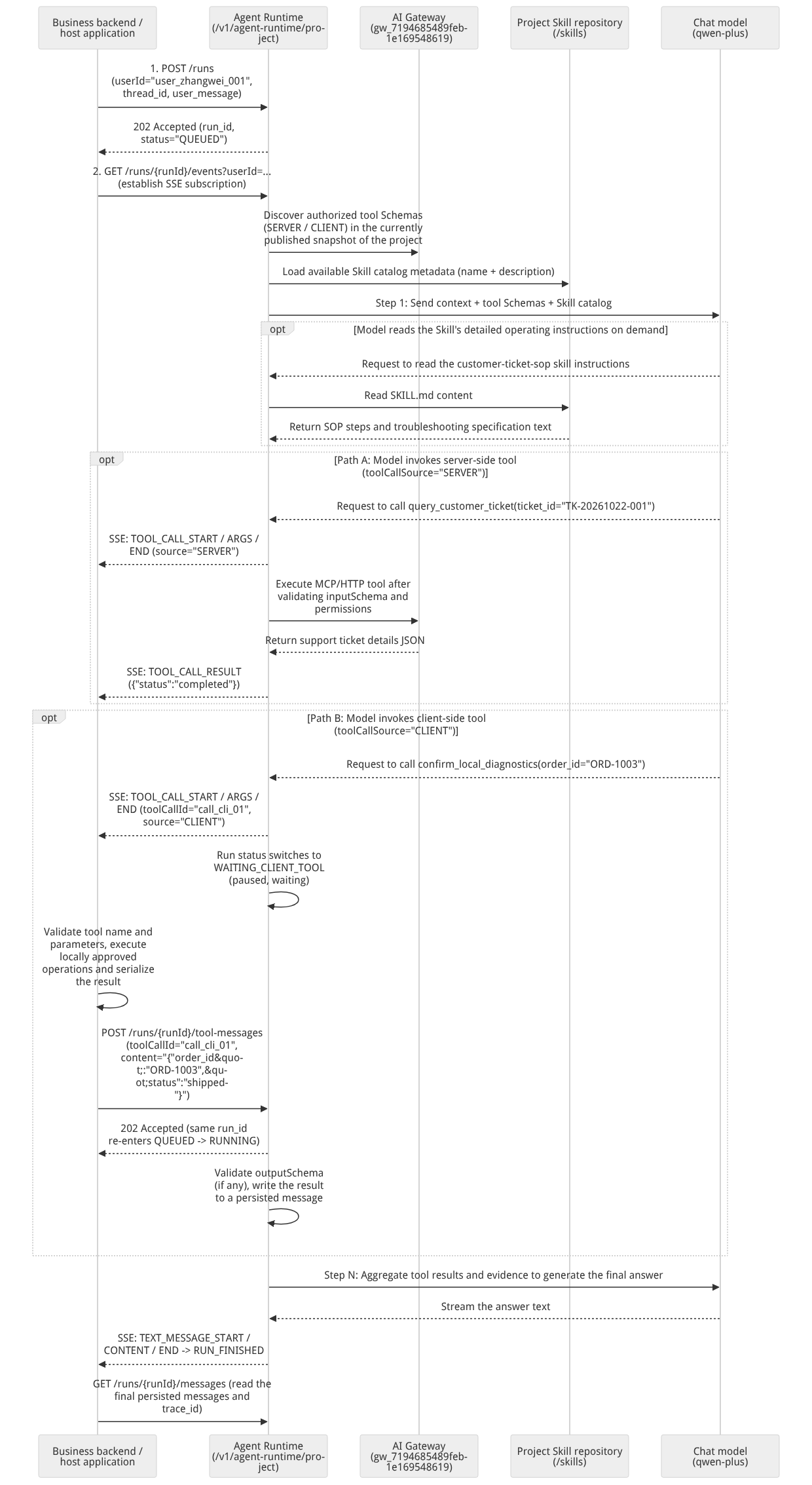
Flow diagram, not a runtime screenshot; read the relationships between steps or states along the arrows.
View the flow diagram in full size
Boundary comparison table of the three extension capabilities (Gateway Server Tool / Client Tool / Skill)
| Dimension | Server-side business tool (Gateway / MCP Tool) | Client Tool | Skill package |
|---|---|---|---|
| Core purpose | Invoked directly by the platform backend to call enterprise internal microservices, database queries, or external MCP Server APIs | Executed locally by the customer's frontend or business host application, with results returned to the same Run | Provides the model with on-demand reference of standardized task instructions (SKILL.md), domain specifications, and reference materials |
| Definition and management location | Registered, approved, and published as a Gateway snapshot in the same project's AI Gateway (/ai-gateway), bound via PUT /project/gateway | Registered in the same project's AI Gateway as a CLIENT source tool (including inputSchema and optional outputSchema) | Uploaded directly via the Skills panel on the right side of the Agent Runtime workbench or via /v1/agent-runtime/project/skills as an archive |
| Execution entity and run state | Automatically executed by the Runtime server-side; the Run stays in the RUNNING state until the tool returns | Executed by the host application/client; the Run pauses in WAITING_CLIENT_TOOL and resumes upon receiving /tool-messages | Executes no code or external calls; only read by the model as textual reference material during reasoning |
| Security and idempotency constraints | Server-side enforcement of inputSchema validation and Gateway authorization policies; parameters in SSE may be masked as {"redacted":true} | The application must deduplicate by toolCallId, validate tool names and parameters, and use business idempotency keys for write operations; returns are validated against outputSchema | Uploading a Skill does not automatically execute scripts in the package, and does not automatically grant the model any additional tool invocation permissions |
Roles, Entry Points, and Relationships
Tool Gateway, Client Tool return, and Skill management API matrix
| Functional module | HTTP method and full path | Whether userId is required | Success status code | Prerequisites and permission Scope (uniform requirement: agent-runtime.project) |
|---|---|---|---|---|
| Query the bound AI Gateway | GET /v1/agent-runtime/project/gateway | Not required (project-shared) | 200 OK (returns 404 when unbound) | The project must be in OceanBase Shared V2 mode and have the AI Gateway service enabled |
| Set / switch AI Gateway binding | PUT /v1/agent-runtime/project/gateway | Not required (project-shared) | 200 OK | The request body passes {"gateway_id": "..."}; the target Gateway must belong to the current project, be in the ACTIVE state, and have a published regional snapshot |
| Return client tool execution results | POST /v1/agent-runtime/project/runs/{runId}/tool-messages | Required (JSON body userId) | 202 Accepted | The target Run is in the WAITING_CLIENT_TOOL state, and userId, toolCallId strictly match the original call |
| Upload a new Skill package | POST /v1/agent-runtime/project/skills | Not required (project-shared) | 201 Created | multipart/form-data Upload the file field (.zip/.tar.gz/.tgz, <= 10 MiB), not exceeding skill_limit |
| List all project Skills | GET /v1/agent-runtime/project/skills | Not required (project-shared) | 200 OK | Returns {items: Skill[], skill_catalog_hash, skill_count, skill_limit} |
| Query a single Skill's metadata | GET /v1/agent-runtime/project/skills/{skillId} | Not required (project-shared) | 200 OK | Returns Skill metadata, front_matter, and content_hash (does not directly download the binary archive) |
| Fully replace an existing Skill | PUT /v1/agent-runtime/project/skills/{skillId} | Not required (project-shared) | 200 OK | multipart/form-data Upload a new complete archive file, updating content_hash and updated_at |
| Delete a specified Skill | DELETE /v1/agent-runtime/project/skills/{skillId} | Not required (project-shared) | 204 No Content | Removes the Skill from the current project workbench |
Feature Details and Operation Guide
1. Bind the project AI Gateway and validate tool input/output Schema
1. Prerequisites: confirm the Shared V2 mode and the published Gateway snapshot
Table mode requirement: AI Gateway mounting and client tools require the project to run in OceanBase
Shared V2storage mode (traditionalJsonTableprojects do not support enabling AI Gateway).Gateway instance and snapshot ready: In the project's left navigation AI Gateway (
/ai-gateway), confirm that the Gateway instanceprod-enterprise-ai-gateway(ID:gw_7194685489feb1e169548619) has been created, business tools have been registered and authorized in Tools & Agents (/ai-gateway/tools-agents), and a runtime snapshot available in the current region has been published (see Unified AI Gateway).
2. Bind the AI Gateway to the Agent Runtime workbench (PUT / GET /v1/agent-runtime/project/gateway)
In the Console /console/project-default-enterprise-ai-hub-210/agent-runtime right-side configuration panel, select prod-enterprise-ai-gateway in the Tools Gateway area, or bind via the API:
export APPBASE_ENDPOINT="https://appbuild.oceanbase.com/v1"
export APPBASE_PROJECT_ID="enterprise-ai-hub-210"
export APPBASE_API_KEY="<APPBASE_API_KEY>"

# 1. Bind the project agent workbench to the AI Gateway of a published snapshot (no userId required)
curl -fsSL -X PUT "${APPBASE_ENDPOINT}/agent-runtime/project/gateway" \
  -H "X-Appwrite-Project: ${APPBASE_PROJECT_ID}" \
  -H "X-Appwrite-Key: ${APPBASE_API_KEY}" \
  -H "Content-Type: application/json" \
  -d '{
    "gateway_id": "gw_7194685489feb1e169548619"
  }'
Expected successful response (HTTP 200 OK):
{
  "gateway_id": "gw_7194685489feb1e169548619",
  "created_at": "2026-10-22T09:10:00Z"
}# 2. Query the AI Gateway currently bound to the workbench
curl -fsSL -X GET "${APPBASE_ENDPOINT}/agent-runtime/project/gateway" \
-H "X-Appwrite-Project: ${APPBASE_PROJECT_ID}" \
-H "X-Appwrite-Key: ${APPBASE_API_KEY}"Note: Each project binds one Gateway at a time; you can switch to another Gateway in the same project by calling
PUT /gatewayagain. If you attempt to bind a Gateway that has not published a snapshot, the API returns HTTP400. The current project API does not support unbinding by passing an empty string"".
3. Tool inputSchema and outputSchema bidirectional validation mechanism
The tool schema is defined centrally in AI Gateway (there is no need to pass tool definitions in every POST /runs request). Taking an order/support ticket status query tool as an example:
Input constraints (
inputSchema): When the model initiates a tool call, the Runtime automatically validates the parameter JSON generated by the model usinginputSchema:{ "type": "object", "properties": { "order_id": { "type": "string", "minLength": 1 } }, "required": ["order_id"], "additionalProperties": false }Output constraints (
outputSchema, optional): If the client tool declares anoutputSchemain the Gateway, when the application callsPOST /runs/{runId}/tool-messagesto return a successful result, the Runtime strictly validates the JSON structure aftercontentdeserialization against theoutputSchemasaved for this call:{ "type": "object", "properties": { "order_id": { "type": "string" }, "status": { "type": "string", "enum": ["processing", "shipped", "delivered"] } }, "required": ["order_id", "status"], "additionalProperties": false }
2. Client Tool: Complete Hands-on of the 5-Step Pause, Return, and Resume
When a client tool with toolCallSource: "CLIENT" is configured in the gateway and the model decides to call it during execution, strictly follow the following 5-step standard protocol to complete local execution and result return:
Step 1: Capture the CLIENT tool call request from the SSE event stream
When subscribing to /runs/{runId}/events, you receive the following three types of events in sequence:
TOOL_CALL_START:{"type": "TOOL_CALL_START", "toolCallId": "call_cli_9001", "toolCallName": "query_order_status", "toolCallSource": "CLIENT"}— the application creates a local pending record keyed by the uniquetoolCallId;TOOL_CALL_ARGS: concatenatedeltastring fragments according totoolCallId;TOOL_CALL_END: parameter transmission is complete; parse the concatenated JSON to obtain{"order_id": "ORD-1003"}.
Step 2: Confirm the Run has entered the WAITING_CLIENT_TOOL state and verify the persisted call
Query GET /v1/agent-runtime/project/runs/{runId}?userId=user_zhangwei_001 to confirm the state has changed to "status": "WAITING_CLIENT_TOOL". If you need the tool's complete output_schema metadata, read the payload of message_type === "TOOL_CALL" in GET /runs/{runId}/messages (containing call_id, tool_name, arguments, source: "CLIENT", and optional output_schema).
Step 3: Safely execute the local action in the host application
Before executing locally, the application must validate toolCallName and parameter legitimacy; never blindly execute arbitrary unauthorized commands. If the tool involves external write side effects such as creating orders or charging payments, be sure to use toolCallId as the business idempotency key to prevent duplicate execution during SSE disconnect replays.
Step 4: Call POST /runs/{runId}/tool-messages to return the execution result
Serialize the local execution result into a JSON string and put it in the content field (note: content must be of type string; do not pass an unserialized JSON Object directly):
ToolMessage Field | Type | Required | Specification and Constraint Description |
|---|---|---|---|
userId | string | Required | Must exactly match the business user userId that created the Run (e.g., "user_zhangwei_001"). |
id | string | Required | A unique tool message ID generated by the client (e.g., "tmsg_ord1003_001"); when retrying the same return due to network timeout, the same id must be reused. |
role | string | Required | Fixed as "tool". |
toolCallId | string | Required | Must strictly match the toolCallId (e.g., "call_cli_9001") in the server-side TOOL_CALL_START / TOOL_CALL message. |
content | string | Required | The JSON-serialized string of the successful result (e.g., "{\"order_id\":\"ORD-1003\",\"status\":\"shipped\"}"); pass "{}" on failure. |
error | string | Optional | When the client tool execution fails, pass a readable error reason description (e.g., "订单系统内网连接超时"). |
Example of returning a successful result curl:
curl -fsSL -X POST "${APPBASE_ENDPOINT}/agent-runtime/project/runs/run_01j8x9p1q2r3s4t5u6v7w8x9y0/tool-messages" \
  -H "X-Appwrite-Project: ${APPBASE_PROJECT_ID}" \
  -H "X-Appwrite-Key: ${APPBASE_API_KEY}" \
  -H "Content-Type: application/json" \
  -d '{
    "userId": "user_zhangwei_001",
    "id": "tmsg_ord1003_001",
    "role": "tool",
    "toolCallId": "call_cli_9001",
    "content": "{\"order_id\":\"ORD-1003\",\"status\":\"shipped\"}"
  }'
Example of returning a tool execution failure curl:
curl -fsSL -X POST "${APPBASE_ENDPOINT}/agent-runtime/project/runs/run_01j8x9p1q2r3s4t5u6v7w8x9y0/tool-messages" \
  -H "X-Appwrite-Project: ${APPBASE_PROJECT_ID}" \
  -H "X-Appwrite-Key: ${APPBASE_API_KEY}" \
  -H "Content-Type: application/json" \
  -d '{
    "userId": "user_zhangwei_001",
    "id": "tmsg_ord1003_001",
    "role": "tool",
    "toolCallId": "call_cli_9001",
    "content": "{}",
    "error": "订单子系统暂不可用,请稍后重试"
  }'
Step 5: Resume observing the same Run until SUCCEEDED
After the return API is successfully accepted, it responds with HTTP 202 Accepted:
{
  "run_id": "run_01j8x9p1q2r3s4t5u6v7w8x9y0",
  "status": "QUEUED",
  "created_at": "2026-10-22T09:20:00Z"
}
Note: Returning a tool result does not create a new run_id; instead, the original run_id re-enters QUEUED → RUNNING from WAITING_CLIENT_TOOL, and after the model reads the tool result it generates the final answer and pushes RUN_FINISHED.
3. Skill Package Creation, Upload, and Full Lifecycle Management (/v1/agent-runtime/project/skills)
When an enterprise has multiple sets of standard operating procedures for niche scenarios (e.g., "OceanBase Lock Conflict Troubleshooting Skill", "VIP Support Ticket Escalation Verification Skill"), they can be packaged as Skill packages and uploaded to the Agent Workbench.
1. Create a Compliant Skill Archive (SKILL.md Specification)
Archive format and size limits: Only
.zip,.tar.gz, or.tgzformats are supported; a single archive must be at most<= 10 MiB, and the archive must not contain path traversal (..) or illegal symbolic links.Root directory
SKILL.mdand YAML Frontmatter specification: The archive root directory must contain aSKILL.mdfile, and the beginning of the file must include the following YAML Frontmatter metadata:name: Required, length of1~64characters; only lowercase English letters, digits, or a single hyphen-are allowed (regex:^[a-z0-9]+(-[a-z0-9]+)*$; uppercase letters, underscores, or consecutive hyphens--are forbidden);description: Required, length of1~1024characters; briefly describes the applicable scenario of the skill (the model decides when to read the full skill text on demand based on this description).
Standard SKILL.md example:
---
name: ob-troubleshooting-sop
description: 处理 OceanBase 分布式事务锁冲突(4024)与向量索引内存不足(4013)的标准排障作业流程。
---

# OceanBase 核心故障标准排障流程

1. **确认故障码与版本**:首先确认用户报错码是 `-4013`(向量内存不足)还是 `-4024`(行锁等待超时),并核实集群是否为 OceanBase 4.3 Shared V2 模式。
2. **检索权威分块**:调用 `knowledge_retrieve` 检索 `kb_enterprise_support` 知识库中的《OceanBase分布式事务与向量索引排障指南.md》。
3. **输出结构化结论**:按「根因定位 → 诊断 SQL/视图 → 参数调整建议 → 风险提示」四段式输出,并保留知识库文档出处。
Package it locally into ob-troubleshooting-sop.zip:
zip -r ob-troubleshooting-sop.zip SKILL.md2. Upload, List, Query, Replace, and Delete Skills (Console and curl Hands-on)
# 1. Upload a new Skill package (POST /v1/agent-runtime/project/skills)
# Note: using --form 'file=@...' automatically generates the multipart/form-data boundary; do not hand-write the Content-Type boundary
curl -fsSL -X POST "${APPBASE_ENDPOINT}/agent-runtime/project/skills" \
  -H "X-Appwrite-Project: ${APPBASE_PROJECT_ID}" \
  -H "X-Appwrite-Key: ${APPBASE_API_KEY}" \
  --form 'file=@./ob-troubleshooting-sop.zip'
Expected response (HTTP 201 Created):
{
  "skill_id": "skl_01j8xa1b2c3d4e5f6g7h8j9k0m",
  "name": "ob-troubleshooting-sop",
  "description": "处理 OceanBase 分布式事务锁冲突(4024)与向量索引内存不足(4013)的标准排障作业流程。",
  "front_matter": {
    "name": "ob-troubleshooting-sop",
    "description": "处理 OceanBase 分布式事务锁冲突(4024)与向量索引内存不足(4013)的标准排障作业流程。"
  },
  "content_hash": "sha256_8a9b0c1d2e3f4a5b6c7d8e9f0a1b2c3d",
  "created_by": "user_admin_001",
  "created_at": "2026-10-22T09:25:00Z",
  "updated_at": "2026-10-22T09:25:00Z"
}# 2. List all uploaded Skills and capacity quota for the current project (GET /v1/agent-runtime/project/skills)
curl -fsSL -X GET "${APPBASE_ENDPOINT}/agent-runtime/project/skills" \
-H "X-Appwrite-Project: ${APPBASE_PROJECT_ID}" \
-H "X-Appwrite-Key: ${APPBASE_API_KEY}"Expected response (HTTP 200 OK):
{
  "items": [
    {
      "skill_id": "skl_01j8xa1b2c3d4e5f6g7h8j9k0m",
      "name": "ob-troubleshooting-sop",
      "description": "处理 OceanBase 分布式事务锁冲突(4024)与向量索引内存不足(4013)的标准排障作业流程。",
      "front_matter": {
        "name": "ob-troubleshooting-sop",
        "description": "处理 OceanBase 分布式事务锁冲突(4024)与向量索引内存不足(4013)的标准排障作业流程。"
      },
      "content_hash": "sha256_8a9b0c1d2e3f4a5b6c7d8e9f0a1b2c3d",
      "created_by": "user_admin_001",
      "created_at": "2026-10-22T09:25:00Z",
      "updated_at": "2026-10-22T09:25:00Z"
    }
  ],
  "skill_catalog_hash": "cat_7f6e5d4c3b2a1908",
  "skill_count": 1,
  "skill_limit": 10
}
Quota judgment guideline: The application should dynamically read
skill_countandskill_limitin the response to determine the remaining uploadable slots; never hardcode a fixed limit in business code.
# 3. Query a single Skill's metadata (GET /v1/agent-runtime/project/skills/{skillId})
curl -fsSL -X GET "${APPBASE_ENDPOINT}/agent-runtime/project/skills/skl_01j8xa1b2c3d4e5f6g7h8j9k0m" \
  -H "X-Appwrite-Project: ${APPBASE_PROJECT_ID}" \
  -H "X-Appwrite-Key: ${APPBASE_API_KEY}"

# 4. Replace an existing Skill with a new version archive (PUT /v1/agent-runtime/project/skills/{skillId})
curl -fsSL -X PUT "${APPBASE_ENDPOINT}/agent-runtime/project/skills/skl_01j8xa1b2c3d4e5f6g7h8j9k0m" \
  -H "X-Appwrite-Project: ${APPBASE_PROJECT_ID}" \
  -H "X-Appwrite-Key: ${APPBASE_API_KEY}" \
  --form 'file=@./ob-troubleshooting-sop-v2.zip'

# 5. Delete an unused Skill (DELETE /v1/agent-runtime/project/skills/{skillId} -> 204 No Content)
curl -i -X DELETE "${APPBASE_ENDPOINT}/agent-runtime/project/skills/skl_01j8xa1b2c3d4e5f6g7h8j9k0m" \
  -H "X-Appwrite-Project: ${APPBASE_PROJECT_ID}" \
  -H "X-Appwrite-Key: ${APPBASE_API_KEY}"
4. Linked Agent Operations (Observability): Trace Drill-down and Dataset RAG Four-Dimension Evaluation
1. One-Click Jump from Workbench Conversation to the Trace Waterfall
When agentops.runtimeExportEnabled is enabled on the platform, every Run in the Agent Workbench is automatically reported as an OpenTelemetry trace tagged with capability:agent and organized into the ATIF-v1.8 standard format.
At the bottom of each answer round in the Agent Workbench (or via the
trace_idfield in the persistedASSISTANTmessage), click View Trace to go directly to/console/project-default-enterprise-ai-hub-210/observability/tracesand drill down into the time share and input/output details of each hop:GENERATION(LLM call),RETRIEVER(knowledge base retrieval), andTOOL(gateway tool execution) (see Traces, Sessions, and User Analysis).
2. Perform RAG Four-Dimension Quality Evaluation and Root Cause Analysis on the Agent Workbench in Datasets
The Agent Workbench has no isolated popup evaluation button; instead, it deeply reuses the unified evaluation pipeline of Agent Operations → Datasets (/observability/datasets) (see Evaluation Dataset Management and Evaluation, Scoring, and Index Quality Assessment):
Start a dataset evaluation run:
Go to Agent Operations → Datasets, select the golden evaluation set (e.g.,
enterprise-support-golden-v1) → switch to the Runs tab → click Create run;Step One (Select evaluation target): Select the Agent Workbench and the current run configuration;
Step Two (Select RAG evaluators): Check all four core RAG metrics at once from the built-in evaluator library (keep an independent variable mapping for each metric, and use the project's default Judge LLM evaluation model).
Table of the Four RAG Evaluation Metrics and Evidence Judgment Criteria:
| Evaluation Metric Name | Real-Run Evidence Compared for Scoring | Quality Measurement Dimension | Key Prerequisites and Boundary Notes |
|---|---|---|---|
| Retrieval Query Quality | The user's original question in this round vs the knowledge_retrieve retrieval Query actually issued by the agent | Evaluates whether the retrieval terms rewritten or generated by the evaluation model faithfully preserve user intent and key qualifiers (e.g., error code 4013) | Requires that this Run actually saved trusted RAG retrieval evidence consistent with the sample identity |
| Context Relevance | User question vs the set of retrieved chunks actually fed into the final answer step (including image understanding descriptions and source localization) | Evaluates how relevant the document chunks retrieved from the knowledge base are to the user's question | Multiple retrieval steps are merged in the order of the final model messages; if evidence is missing or truncated by compressed summaries, it is marked as "insufficient evidence" rather than forcibly scored with empty context |
| Answer Faithfulness | The agent's final answer vs the retrieved chunks actually sent to the model | Evaluates whether the factual claims in the answer are well-grounded and whether there are hallucinations detached from the retrieval evidence | Strictly compares the retrieval chunks frozen for the current run; it does not re-query the current knowledge base to supply evidence for historical runs |
| Answer Accuracy | The agent's final answer vs the frozen standard answer (expectedOutput) in the dataset sample | Evaluates whether the final answer is correct and completely covers the core points of the standard answer | A sample standard answer (expectedOutput) must be provided; even if answer faithfulness is high, if key troubleshooting steps are omitted, answer accuracy can still keenly identify the low score |
View model-assisted Root Cause Analysis (RCA) and optimization suggestions: After the evaluation completes, open the Score Details of low-scoring samples. When the project's "use model for root cause analysis" is enabled, the system automatically compares "user question → retrieval Query → retrieved chunks → final answer → frozen standard answer" to pinpoint whether the issue is retrieval rewrite deviation, insufficient knowledge base chunk relevance, or model summarization omission, and provides actionable tuning suggestions based on the currently active configuration parameters (the administrator confirms and independently decides whether to modify the Workbench configuration; the system will not automatically tamper with the online configuration without authorization).
FAQ and Troubleshooting
Q1: Why does calling PUT /v1/agent-runtime/project/gateway to bind a gateway return HTTP 400 or 412?
Cause and troubleshooting steps:
Check the project table schema and service toggles: Binding the AI Gateway requires the project to use the OceanBase
Shared V2table schema, and the AI Gateway service must already be enabled in Settings → Overview → Services.Check the gateway status and region snapshot: The target
gateway_id(e.g.,gw_7194685489feb1e169548619) must belong to the current project, be in theACTIVEstate, and have successfully published at least one available snapshot in the AI Gateway Console (binding an empty gateway that has never published a snapshot stably returns400).
Q2: Why does returning client tool results to /runs/{runId}/tool-messages return 400 INVALID_REQUEST?
Cause and troubleshooting steps: The two most common causes are as follows:
The
contentfield is not serialized as a string:ToolMessage.contentmust be a JSON-serialized string (e.g.,"{\"status\":\"shipped\"}"); if a JSON object is passed directly,{"status": "shipped"}will be rejected due to a type mismatch.Violation of the tool's declared
outputSchema: If the client tool defines anoutputSchemain AI Gateway (e.g., requiring the mandatoryorder_idand enum valuestatus), but the returnedcontentJSON is missing required fields or contains extra fields forbidden byadditionalProperties: false, the server-side Schema validator will directly reject the return.
Q3: Uploading a Skill archive fails with an error — how to quickly determine whether it is a format problem or a metadata problem?
Cause and troubleshooting steps: Please check the archive item by item against the following checklist:
Archive structure: After extraction,
SKILL.mdmust be located directly at the archive root directory (i.e.,unzip -l your-skill.zipshould show a top-levelSKILL.md, not nested one level under amy-folder/SKILL.mdsubdirectory);YAML Frontmatter format: the
SKILL.mdfile must begin with---wrappingnameanddescription;namemay only contain1~64lowercase letters, digits, and single hyphens (e.g.customer-support-v1); uppercase letters, spaces, underscores_, or consecutive hyphens--are not allowed;Size and quantity quota: the archive size must not exceed
10 MiB, and theskill_countalready uploaded in the current project must not have reached theskill_limitreturned byGET /skills.
Related Documentation
Agent workbench (Agent Runtime) overview, architecture, and quick start
Agent model, prompts, context compaction, and lexicon interception configuration
Multi-turn conversations (Threads), asynchronous Runs, and resumable SSE event streams
Mounting enterprise knowledge base retrieval, long-term memory, and PowerContext synergy
Evaluations, scoring, and index quality assessment (Observability Evaluations)