
Memory Management (Creating, Retrieving, and Deleting Memories)
Feature overview and core scenarios
Memory Management (Memories) is the core data-plane operations center of Agentbase Memory (v2.10.0), responsible for single and batch memory writes, multimodal document/image parsing and ingestion, session historical context inference, five-way hybrid retrieval (Hybrid / Vector / Sparse / Keyword / Graph), unified retrieval with a Token budget (Recall), data import/export, and compliant forgetting and deletion.
In the 企业智能客服与知识中台 (enterprise-ai-hub-210) project of Agentbase 企业智能中台 (69c6d1aa00062e6bb60), the intelligent customer service system serves enterprise customers at different tiers through memory management capabilities:
For core accounting architect
user_zhangwei_001, the system not only synchronously records their cluster topology parameters and SLA tier throughdirect write (infer=false), but also supports parsing cluster architecture diagrams (PNG) and troubleshooting reports (PDF) uploaded to theagent_multimedia_bucketbucket into long-term memory;For frontline operations engineer
user_lina_002, the system enableson-workflow intelligent extraction (infer=true) in multi-turn support ticket conversations and passes it intosessionId, automatically extracting self-contained technical facts combined with the most recent 12 turns of historical conversation, and intelligently performing create (ADD), update (UPDATE), conflict deletion (DELETE), or duplicate skip (NONE), ensuring the memory base always accurately reflects the latest system state.
Core Concepts and Architecture
Memory's write and retrieval pipelines adopt a dual-engine architecture of "synchronous deterministic direct write + asynchronous model inference pipeline" and "multi-way index projection + reranking fusion".
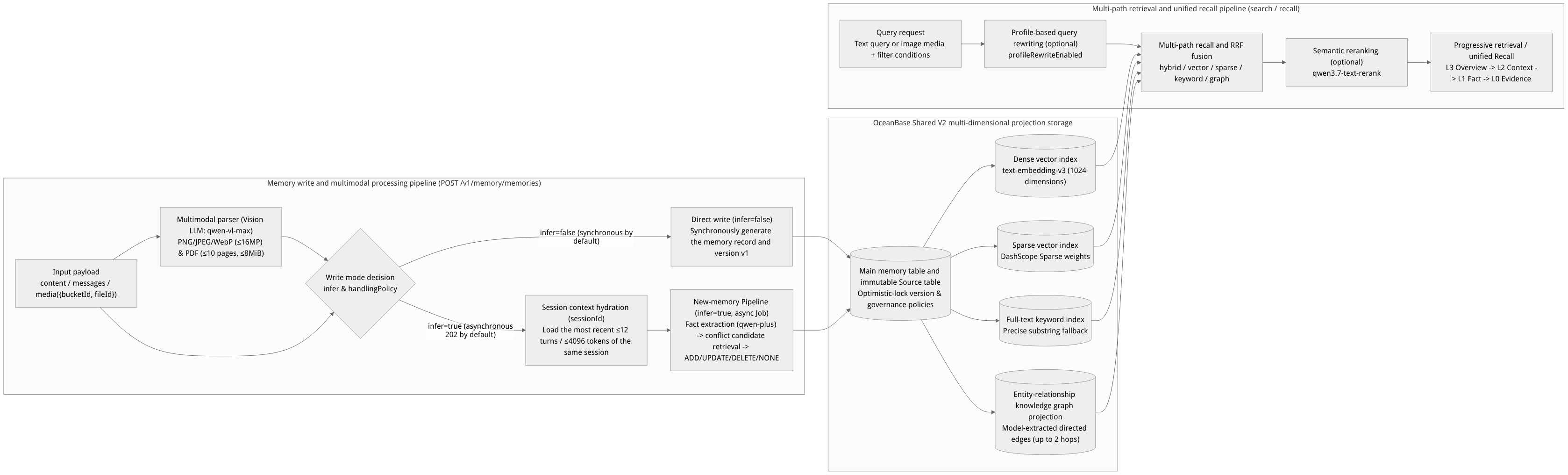
Flow diagram, not a runtime screenshot; read the relationships between steps or states along the arrows.
View the flow diagram in full size
Core Concepts and Governance Attributes Table
| Attribute dimension | Parameter field | Enumerated values | Detailed semantics and security governance rules |
|---|---|---|---|
| Visibility scope | scope | private, strict_private, user, group, project | - strict_private / private: strictly private memory, sessionId historical session context backfill is disabled, preventing implicit cross-turn association; - user: attributed to a specific userId (e.g., user_zhangwei_001), the most commonly used personal long-term memory scope; - group: attributed to a specific business group, groupId must be passed simultaneously, and the caller's group membership is verified at retrieval time; - project: project-level shared memory, visible to authorized principals within the project. |
| Sensitivity level | sensitivity | normal (default), confidential, restricted | Marks the business sensitivity level of memory data. Note: passing secret will be rejected outright by the server (Fail-closed); never write keys, passwords, or unmasked private data as memories. |
| Model processing policy | handlingPolicy | standard (default), no_embedding, no_model | - standard: allows Chat model inference and Embedding vectorization; - no_embedding: allows model text processing and keyword retrieval, but no vector projection is generated; - no_model: any LLM access to this data is strictly forbidden; requires explicitly setting infer=false, and rejects multimodal media parsing. |
| Record kind | recordKind | fact, conversation, action | Distinguishes distilled objective facts (fact), raw conversation fragments (conversation), and agent tool execution actions (action), each subject to different retention-day policies under the retention namespace. |
| Memory type | memoryType | preference, fact, long_term, short_term, working, conversation, action or a custom string | Business classification tag. Specified by the caller during infer=false direct write; automatically classified and generated by the create-memory Pipeline during infer=true workflow processing. |
| Retrieval mode | searchMode | hybrid (default), vector, sparse, keyword, graph | - hybrid: combines dense vectors, sparse vectors, and full-text indexes with RRF fusion; - vector: pure dense semantic vector retrieval; - sparse: high-dimensional term-weight retrieval based on DashScope sparse vectors; - keyword: full-text retrieval (short words of 1–2 characters such as "table lock" automatically trigger a parameterized exact substring fallback); - graph: performs graph traversal retrieval of up to 2 hops over "entity–relation–entity" directed edges extracted by the model. |
Feature Entrypoints and Permission Matrix
Operation Entries and Role Permission Matrix
The Console entry is located at: Project enterprise-ai-hub-210 → Memory → Memory tab.
| Operation scenario | Console operation entry | REST API endpoint | Required API Key scope | Associated modules and dependencies |
|---|---|---|---|---|
| Create a single/conversational memory | Add Memory button | POST /v1/memory/memories | memories.write (multimodal additionally requires files.read) | Related to the create-memory Pipeline in Configuration Center and Storage |
| Query asynchronous write tasks | Submission receipt popup auto-polling | GET /v1/memory/jobs/{jobId} | memories.write or memories.read | Related to Memory Audit and Tracing |
| Listing and source traceability | Memory list Query | GET /v1/memory/memories, GET /v1/memory/memories/{memoryId}/sources | memories.read | Provides underlying evidence for User Profile and Context Governance |
| Multi-way retrieval and progressive recall | Search box + retrieval mode dropdown | POST /v1/memory/memories/search, POST /v1/memory/memories/recall | memories.read | Provides real-time context injection for the Agent Workbench |
| Update and single/batch delete | Delete button at the end of memory list rows | PATCH /v1/memory/memories/{memoryId}, DELETE /v1/memory/memories/{memoryId}, DELETE /v1/memory/memories | memories.write (update) / memories.delete (delete) | Triggers the background Compactor to clean up vector and graph projections |
| Batch write and import/export | API / SDK batch entry | POST /v1/memory/memories/batch, /imports, /exports | memories.write / memories.export | Depends on the internal Artifact Broker and object storage |
Feature Details and Operation Guide
1. Writing deterministic facts directly in the Console (infer=false)
When the business application has already clearly organized user preferences or system environment facts and no LLM rewriting is needed, use the direct write mode (synchronous persistence):
Go to the Memory → Memory tab of project
enterprise-ai-hub-210, and click Add Memory in the upper-right corner.Fill in the parameters in the popup according to the table below:
User ID (
userId): enteruser_zhangwei_001(or the demo accountdemo-user).Visibility scope (
scope): selectuser.Processing method: select Direct write (corresponding to API
infer: false, async: false).Memory type (
memoryType): enter or selectpreference.Record kind (
recordKind): select Fact (fact).Content (
content): enter non-empty text (UTF-8 encoded, up to 20,000 bytes), e.g.,用户张伟(核心账务架构师)偏好直接查看 OceanBase V4 分布式死锁排查 SQL 与向量索引 HNSW 参数说明。.Metadata (
metadata): enter a valid JSON object, e.g.,{"ticketId": "TK-20261022-001", "env": "production"}.
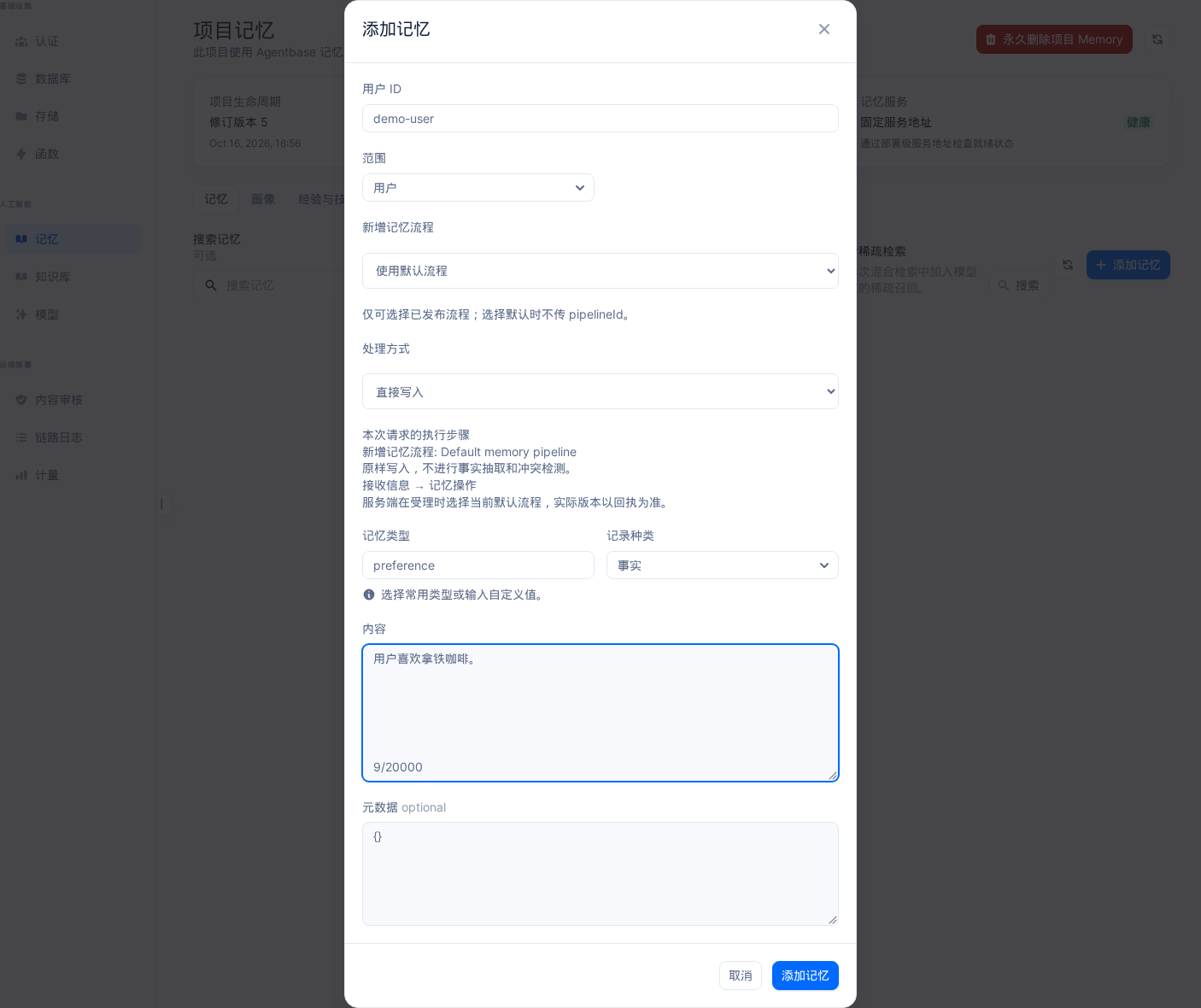
Interface reference: reuses previously registered historical screenshots; demo data may differ from the current project; no new screenshots were taken this time.
Click Save; the page shows an execution receipt with status
completed, processing modesimple, the generatedmemoryId, and actionADD.

Interface reference: reuses previously registered historical screenshots; demo data may differ from the current project; no new screenshots were taken this time.
2. Asynchronous intelligent memory extraction from multi-turn conversations (infer=true and session history backfill)
In real customer service conversations, key user information is often spread across multiple turns of Q&A (e.g., the agent gives options A/B in one turn, and the user replies only "I choose A" in the next). In such cases, use workflow processing (infer=true):
In the Add Memory popup, switch Processing method to Workflow processing.
Select Use default Pipeline or a published create-memory pipeline (draft-state pipelines cannot be used for production writes). At this point you do not need to fill in
memoryTypemanually; it is determined automatically by the fact-extraction node inside the Pipeline (callingqwen-plus).Enter the conversation content and submit. Intelligent extraction defaults to asynchronous execution (HTTP 202), returning
status: "queued",jobId, andsourceId.Session context inference (
sessionIdhistory backfill):When calling via API/SDK and simultaneously satisfying
infer=truewith non-emptysessionId(up to 128 characters) andscopebeinguser/group/project, Memory automatically reads back the most recent 12 historical turns of the same session (total budget of about 4,096 tokens) as inference background, within the same project, same user, sameagentId, and governance boundary.Historical messages only help the model understand references in the current turn (e.g., restoring "I choose A" to "the user chooses to enable the OceanBase vector index asynchronous rebuild strategy"), and never tamper with the current Source original text.
After the background task completes fact extraction, it retrieves existing similar memories and the model performs conflict determination:
ADD: create an independent new fact;UPDATE: merge into or correct the existing fact (automatically incrementing the target memory'sversion);DELETE: when the new fact explicitly overturns the old fact, automatically forget the conflicting old memory;NONE: judged as small talk or fully duplicated information; skip the write (in this case the task completes successfully but the number of created entries is 0, which is normal).
3. Multimodal Image and PDF Memory Ingestion and Retrieval
In technical support tickets, customers often upload error screenshots or architecture PDFs. The application can first upload the file to the same project's Storage bucket (e.g., agent_multimedia_bucket), then pass the file reference {bucketId, fileId} to the Memory API:
# Submit an architecture diagram or PDF manual from Storage for asynchronous visual parsing and ingestion
curl -fsS -X POST "${APPBASE_ENDPOINT}/memory/memories" \
  -H "X-Appwrite-Project: enterprise-ai-hub-210" \
  -H "X-Appwrite-Key: <APPBASE_API_KEY>" \
  -H "Idempotency-Key: multimodal-ticket-001" \
  -H "Content-Type: application/json" \
  --data '{
    "userId": "user_zhangwei_001",
    "scope": "user",
    "memoryType": "long_term",
    "recordKind": "fact",
    "media": {
      "bucketId": "agent_multimedia_bucket",
      "fileId": "ob_cluster_topology_2026.pdf"
    },
    "content": "客户核心账务 OceanBase 集群三中心拓扑与 OBProxy 路由表配置文档",
    "infer": true
  }' | jq .
Multimodal input technical boundaries and constraints:
Supported formats and sizes: supports a single
PNG,JPEG,WebP, orPDFfile, with file size from1 byteto8 MiB; image resolution capped at16,000,000pixels (16 MP); PDF page count capped at1~10pages.Execution mechanism: Multimodal writes are fixed to async mode (returns HTTP 202 and
jobId; ifasync: falseis explicitly passed, 400 is returned). The backend parses media into structured text via the internal Documents Parser and the project-configured vision modelqwen-vl-max(together with attachmentscontent, not exceeding 20,000 UTF-8 bytes), and freezes it in the immutable Source's_appbaseMemoryMediametadata (including SHA-256, page boundaries, and character offsets).Permission and policy constraints: The calling credential must have both
memories.writeand Storagefiles.readpermissions; media input is rejected whenhandlingPolicy=no_model; image-assisted search (passingmediatoPOST /v1/memory/memories/search) only supports image formats and does not support initiating searches directly with PDFs.
4. Multi-route hybrid search, progressive retrieval, and unified recall (Recall)
At the top of the Console Memory → Memory tab, enter the target user ID (e.g.,
user_zhangwei_001ordemo-user).Enter a natural language question in the search box (e.g.,
用户负责哪个集群,排障偏好是什么?), select Hybrid Search (hybrid), Vector (vector), Sparse Vector (sparse), Keyword (keyword), or Graph Search (graph) in the retrieval mode dropdown, and click Query.
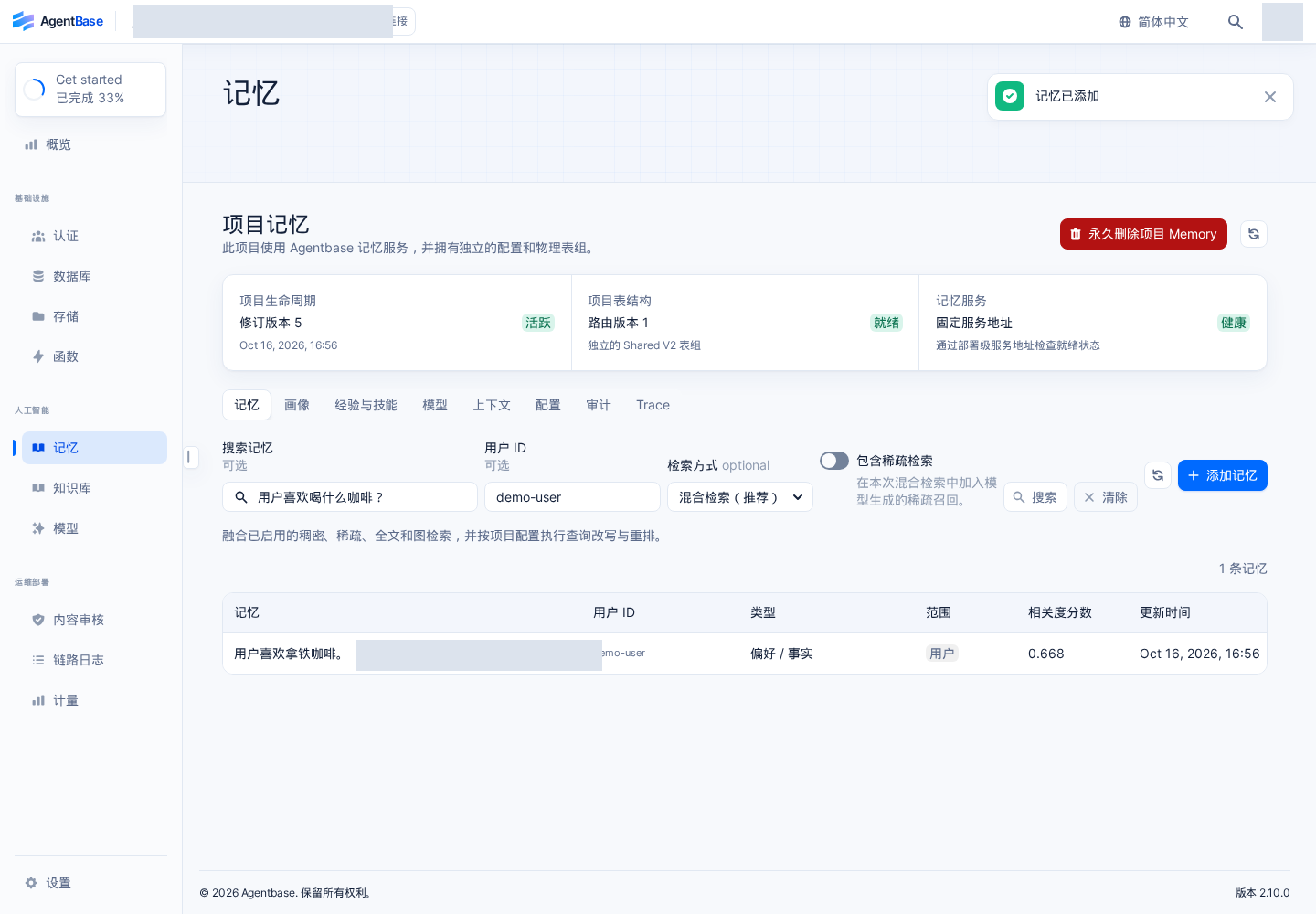
Interface reference: reuses previously registered historical screenshots; demo data may differ from the current project; no new screenshots were taken this time.
Use
agentbase-node-sdk@2.10.0in the business service backend to perform progressive retrieval and unified recall: When an agent needs to assemble the user's regular memory, user profile, experiences (Experience), and skills (Skill) simultaneously before a single inference run, while strictly controlling the number of tokens injected into the Prompt, the unified recall interfacePOST /v1/memory/memories/recallor progressive retrieval strategy is recommended:
// Use the official server SDK: agentbase-node-sdk@2.10.0
import { Client, Memory } from 'agentbase-node-sdk';

const client = new Client()
    .setEndpoint('https://appbuild.oceanbase.com/v1')
    .setProject('enterprise-ai-hub-210')
    .setKey(process.env.APPBASE_API_KEY);

const memory = new Memory(client);

// 1. Progressive multi-way retrieval (L3 Overview -> L2 Context -> L1 Fact)
const searchResult = await memory.searchMemories({
    userId: 'user_zhangwei_001',
    scope: 'user',
    query: 'OceanBase 分布式事务锁冲突与向量索引排障偏好',
    searchMode: 'hybrid',
    limit: 10,
    retrieval: {
        strategy: 'progressive',
        entryLevel: 'auto',
        maxDepth: 2,
        tokenBudget: 1200,
        deadlineMs: 450
    }
});

// 2. Unified retrieval with a Token budget (integrating memory, profile, experience, and skills)
const recallBundle = await memory.recall({
    userId: 'user_zhangwei_001',
    agentId: 'enterprise-support-agent',
    query: '如何处理 TK-20261022-001 工单中的向量索引重建超时问题?',
    tokenBudget: 2000
});
5. Optimistic-lock updates, single/batch deletion, and anti-relearning protection
Optimistic-lock update (
PATCH /v1/memory/memories/{memoryId}): First obtain the memory's currentversion(e.g.,1) viaGET, then include{"version": 1, "content": "...", "metadata": {...}}in thePATCHrequest body. If concurrent modification causes a version mismatch, the server returns409 Conflict, and you must re-read the latest version before resubmitting.Single and bounded batch deletion (
DELETE):Click Delete at the end of a memory list row in the Console and confirm, or call
DELETE /v1/memory/memories/{memoryId}; the memory status immediately becomesforgottenand it stops being recalled by any retrieval, while the background Compactor asynchronously cleans up physical vectors and graph indexes.Active deletion is not restricted by the “permanent forgetting (permanent_forgetting_enabled)” toggle and always takes effect immediately, but it does not delete the original files in the same project's Storage.When calling
DELETE /v1/memory/memoriesto batch-clean by user, each request executes one bounded batch (limitranges from1~500, default100). The application must check thehasMoreboolean in the response, call in a loop untilhasMore: false, and verify whether thefailedcount is0.
Protection against accidental relearning and explicit
reRemember: Memory content actively deleted by a user records a deletion tombstone fingerprint. If the application resubmits the same content merely with a changedIdempotency-Key, the system blocks the rewrite by default to protect the user's privacy-related deletion intent; only when the user explicitly requests “re-remember this fact” may"reRemember": truebe explicitly passed in the creation request.
FAQ (Frequently Asked Questions and Troubleshooting)
1. Why does the task status show succeeded after submitting “process per workflow (infer=true)”, but the new record cannot be found in the memory list?
Cause analysis:
infer=truedelegates to a large language model (qwen-plus) to determine whether the input contains facts worth long-term preservation and to compare it against the user's existing memories. If the input contains only pleasantries with no substantive facts (e.g., “hello, thanks”), or if the input fact is an exact duplicate of an existing memory, the model outputs theNONEaction. Additionally, if checked too early, the task may still be in thequeuedorrunningstate.Resolution: Check the
result.actionsarray of the correspondingjobIdin the submission receipt or memory audit. If the action isNONE, this is normal deduplication behavior; if the content must be stored as-is regardless, use direct write (infer=false) instead.
2. A memory that was just written successfully is visible in the list, but why can't it be found using vector search (vector) or graph search (graph)?
Cause analysis: After the memory's primary record is stored, the dense/sparse vector projection and entity-relationship knowledge graph (Graph) projection may still be building asynchronously; or the memory was written with
handlingPolicy: "no_embedding"/"no_model"set, and the system skipped vectorization per governance requirements. Also, if no Chat model is configured, the Graph projection remains empty.Resolution: Verify whether the memory's
handlingPolicyisstandard, and check thedegradedfields in the search response (e.g.,degraded.embedding,degraded.rerank). To check projection integrity, callGET /v1/memory/memories/projections/verificationto verify.
3. How to troubleshoot when a multimodal image/PDF memory write returns 400 or the asynchronous task fails (failed)?
Cause analysis: Common causes include: ①
async: falsewas explicitly passed (multimodal writes are forced asynchronous); ② the project has not configured a matched pair ofvisionProviderRefandvisionModel(e.g.,qwen-vl-max) in Memory → Models or the corresponding Pipeline; ③ the calling API Key lacks the Storagefiles.readpermission; ④ the file exceeds 8 MiB, the image exceeds 16,000,000 pixels, the PDF exceeds 10 pages, or the total parsed text exceeds 20,000 UTF-8 bytes.Resolution: Use
GET /v1/memory/jobs/{jobId}to viewerrorCodeandreason, and confirm that vision model routing is enabled and the Storage files meet the size and permission requirements.