
Multi-turn Sessions (Threads), Asynchronous Runs, and Resumable SSE Event Streams
This manual corresponds to Agentbase v2.10.0 (same version as the Console).
In the agent workspace (Agent Runtime), session (Thread) and run (Run) form the core state skeleton of agent interactions: Thread continuously carries multi-turn conversation history for a business user (userId), while each user question triggers an asynchronously executed Run. The platform decouples the background-persisted task state machine from the frontend-bounded, resumable AG-UI SSE (Server-Sent Events) real-time event stream — even if the client's network drops or the browser tab is closed, the background ReAct reasoning task continues to execute reliably; upon reconnection, simply include Last-Event-ID to seamlessly resume the stream, or use the message_seq cursor to precisely fill in the final messages.
Feature Overview
When building a multi-turn troubleshooting assistant or a complex business agent in an enterprise production environment, a single task often involves multiple knowledge base retrievals, multiple external tool calls, and long-text generation, with durations ranging from seconds to minutes. The traditional synchronous HTTP request-response model is extremely fragile in the face of gateway timeouts, mobile background disconnections, or users repeatedly tapping to resend.
The Agent Runtime session, asynchronous run, and event stream subsystems provide the following four production-grade guarantees:
Strictly per-business-user multi-turn session lifecycle (Threads):
Supports creating an independent session (
POST /threads) for a specifieduserId(e.g.,user_zhangwei_001,user_lina_002), listing active sessions in reverse order of last update time (GET /threads?limit=100), reading the full message history with cursor pagination by the incremental in-session sequence numbermessage_seq(GET /threads/{threadId}/messages), and archiving sessions no longer in use (DELETE /threads/{threadId}).Archived sessions are decoupled from long-term memory: archiving a session (status changes to
ARCHIVED) only ends the display of the current conversation window and never deletes the cross-session memory and user profile accumulated in the user's project long-term memory (Memory) or PowerContext.
Asynchronous run state machine, per-session concurrency serialization lock, and request idempotent replay (Runs):
Submitting a task (
POST /runs) immediately returns HTTP202 Acceptedandrun_id; the task goes through the full state transitionsSUBMITTING→QUEUED→RUNNING↔WAITING_CLIENT_TOOL→SUCCEEDED/FAILED/CANCELLEDin the background.Single-active-task-per-session constraint: the same
Threadallows at most oneRunthat has not reached a terminal state at any given moment (concurrent submissions return409 THREAD_BUSY), ensuring strict ordering of multi-turn context.Native
Idempotency-Keyidempotency guarantee: when retrying the same message submission, include the sameIdempotency-Key(1–128 bytes); the server directly returns the originalRun(HTTP200 OKwith the"idempotent_replay": trueflag), eliminating duplicate billing and duplicate tool executions caused by network jitter.
Standard AG-UI SSE real-time event stream with
Last-Event-IDcheckpoint resume:The real-time incremental stream (
GET /runs/{runId}/events) fully outputs run start/stop, model thinking fragments (REASONING_*), answer text deltas (TEXT_MESSAGE_*), tool call parameters and result notifications (TOOL_CALL_*), and platform extension events (CUSTOM).Each run event stream is retained by default for 30 minutes after the task deadline (a single run caches at most about 8,192 events). When the client reconnects after a disconnection, it only needs to pass the last received outer frame's
idvia the request headerLast-Event-IDto precisely resume; if the cursor is beyond the retention window (returning409 stream_cursor_expired), the client can first recover completed facts from the persisted messages endpoint, then resubscribe to the remaining stream fromearliest_event_id - 1.
Per-step model invocation and token detail auditing (Model Invocations):
A single
Runmay involve multiple steps of model reasoning, automatic context trimming, and memory retrieval. ThroughGET /runs/{runId}/model-invocations, you can inspect input/output/cache/thinking token consumption, upstream request IDs (provider_request_id), and per-step latency step by step, by step (model_step) and purpose (AGENT_RESPONSE,CONTEXT_COMPACTION,MEMORY).
Core Concepts and Architecture
Asynchronous Run full lifecycle state machine
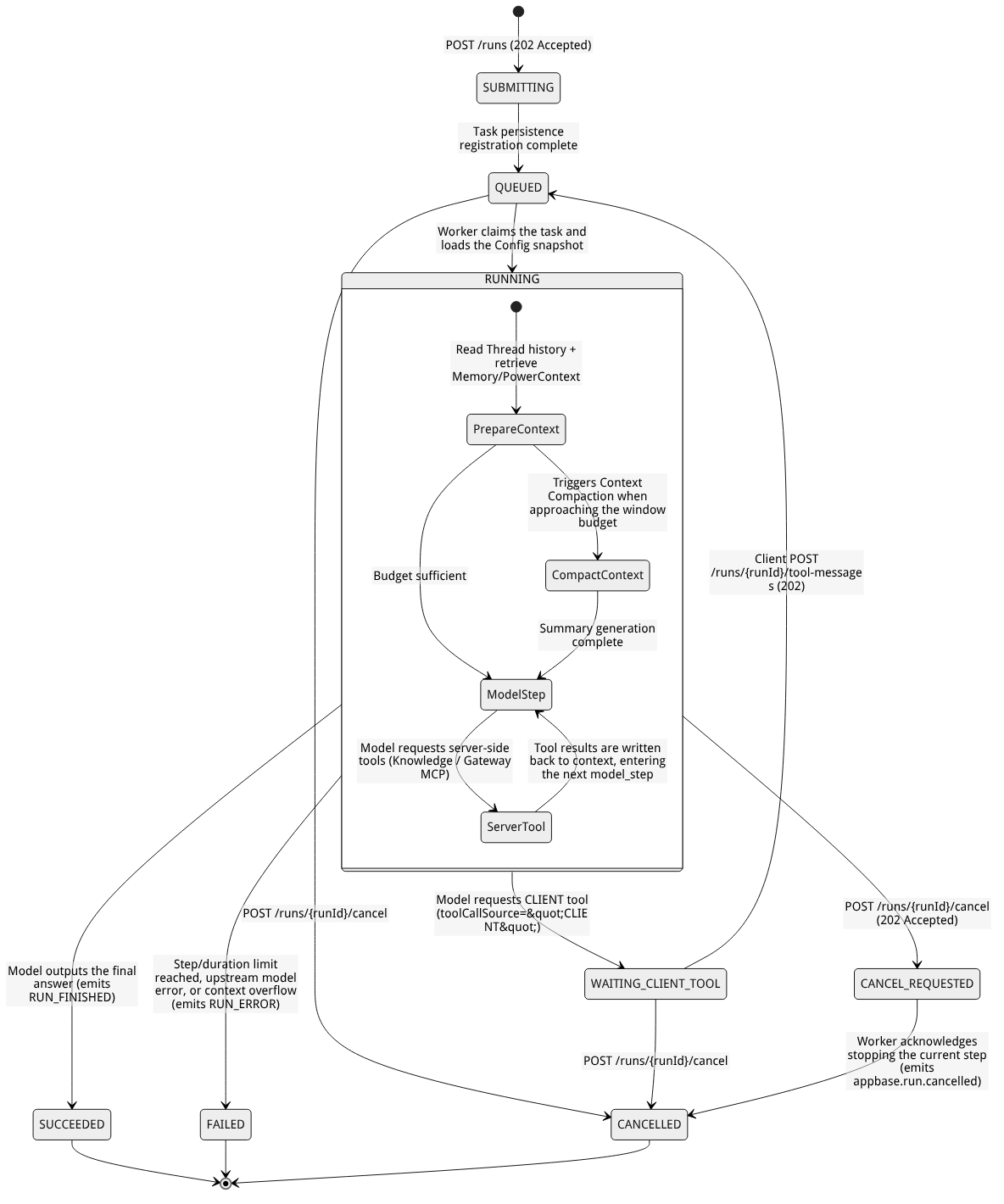
Flow diagram, not a runtime screenshot; read the relationships between steps or states along the arrows.
View the flow diagram in full size
Run status enum and client handling specification table
Status value (status) | Terminal state? | Status meaning | Standard handling by client and business backend |
|---|---|---|---|
SUBMITTING | No (in progress) | The request has passed authentication and entered the persisted registration stage. | Save run_id, continue polling status or establish an SSE subscription; do not send duplicate new requests. |
QUEUED | No (in progress) | The task has entered the scheduling queue (or was just re-queued after receiving a client tool result), waiting for Worker execution. | Keep observing; the Thread is now occupied, and a second Run cannot be submitted. |
RUNNING | No (in progress) | The Worker is executing multi-turn ReAct reasoning, retrieval, or server-side tool calls. | Render reasoning and answer deltas in real time via SSE; to terminate mid-run, you must explicitly call POST /runs/{runId}/cancel. |
WAITING_CLIENT_TOOL | No (paused, waiting) | The model issued a toolCallSource: "CLIENT" client tool call and is waiting for the application to return the result. | Note: the session is still occupied by this Run (not idle). The application must execute the local tool and call POST /runs/{runId}/tool-messages to resume the same Run, or call /cancel to cancel. |
CANCEL_REQUESTED | No (cancel transition state) | The cancellation request has been accepted (HTTP 202), waiting for the currently executing model or tool step to safely exit. | Keep querying or listening for events until the status finally becomes CANCELLED (or already became SUCCEEDED just before cancellation). |
SUCCEEDED | Yes (success terminal state) | The task completed successfully, and the final ASSISTANT message has been persisted to the database. | Call GET /runs/{runId}/messages or /threads/{threadId}/messages to read the authoritative persisted messages and cited sources, and release the session input lock. |
FAILED | Yes (failure terminal state) | The task terminated due to model rate limiting, context overflow, timeout (RUN_DEADLINE_EXCEEDED), or other causes. | Read Run.error (including code and message) to display a friendly message, and inspect saved partial messages or model-invocations to investigate the root cause. |
CANCELLED | Yes (cancellation terminal state) | The task has been confirmed as canceled per a user or system request. | Important boundary: cancellation only stops subsequent reasoning steps and cannot automatically roll back external business side effects that have already occurred (e.g., external write APIs already called); verify external state using business idempotency keys. |
Roles, Entry Points, and Relationships
Session, run, event, and model invocation endpoint matrix
All 11 endpoints covered in this document belong to user-level data plane resources. When called with a project API Key (Scope: agent-runtime.project), every request must explicitly include the target business user's userId (POST in the JSON request body, GET/DELETE in URL Query parameters):
| Endpoint category | HTTP method and full path | userId Parameter location | Success status code | Response structure and core use |
|---|---|---|---|---|
| Create session | POST /v1/agent-runtime/project/threads | JSON body | 201 Created | Returns Thread ({thread_id, title, status: "ACTIVE"}) |
| List sessions | GET /v1/agent-runtime/project/threads | URL Query | 200 OK | Supports limit (default 100, range 1–1000); returns the Thread[] array in reverse order of last update time |
| Query single session | GET /v1/agent-runtime/project/threads/{threadId} | URL Query | 200 OK | Returns the Thread metadata of the specified thread_id |
| Archive session | DELETE /v1/agent-runtime/project/threads/{threadId} | URL Query | 204 No Content | Archives the session (ARCHIVED); ensure there is no active Run before archiving |
| Read session messages | GET /v1/agent-runtime/project/threads/{threadId}/messages | URL Query | 200 OK | Supports after (default 0; pass the message_seq) and limit (1–1000). Returns the conversation’s complete Message[]. |
| Create and submit a run | POST /v1/agent-runtime/project/runs | JSON body | 202 Accepted (idempotent replay 200 OK) | Pass in {userId, thread_id, user_message} and the optional Idempotency-Key header, returns Run |
| Query run status | GET /v1/agent-runtime/project/runs/{runId} | URL Query | 200 OK | Returns Run ({run_id, status, created_at, idempotent_replay?, error?}) |
| Cancel a run | POST /v1/agent-runtime/project/runs/{runId}/cancel | JSON body | 202 Accepted or 200 OK | Pass in {"userId": "..."} to request stopping the current Run, returns CANCEL_REQUESTED or the terminal state Run |
| Read messages of a single run | GET /v1/agent-runtime/project/runs/{runId}/messages | URL Query | 200 OK | Returns only the Message[] produced by this run_id; pagination parameters after / limit are the same as for session messages |
| Subscribe to the SSE event stream | GET /v1/agent-runtime/project/runs/{runId}/events | URL Query | 200 OK (cursor expired 409) | The header carries Accept: text/event-stream and, on resume, Last-Event-ID; pushes the AG-UI event stream in real time |
| Read model invocation records | GET /v1/agent-runtime/project/runs/{runId}/model-invocations | URL Query | 200 OK | Returns {items: ModelInvocation[]}, auditing the token usage and latency of every model invocation hop within this Run |
Feature Details and Operation Guide
1. Full lifecycle management of multi-turn conversations (Threads) and message_seq cursor-based pagination
1. Manage conversations and view the execution timeline in the Console workbench
Go to
/console/project-default-enterprise-ai-hub-210/agent-runtime; the conversation list on the left shows the active conversations currently created (ACTIVE).Click
+(New Conversation) in the upper-left corner to start a brand-new conversation context; click an existing conversation entry to switch to it immediately and restore the full history from the persisted message store.In the conversation flow, click the Expand execution steps (Execution Steps) collapsible bar above any answer to view hop by hop the model's reasoning process in that Run, the names and parameters of the tools invoked, the knowledge base retrieval status, and whether automatic context condensation was triggered.
2. Create, list, and cursor-paginate messages, and archive conversations via the API
export APPBASE_ENDPOINT="https://appbuild.oceanbase.com/v1"
export APPBASE_PROJECT_ID="enterprise-ai-hub-210"
export APPBASE_API_KEY="<APPBASE_API_KEY>"

# 1. Create a new session for user user_zhangwei_001 (POST request places userId in the JSON body)
curl -fsSL -X POST "${APPBASE_ENDPOINT}/agent-runtime/project/threads" \
  -H "X-Appwrite-Project: ${APPBASE_PROJECT_ID}" \
  -H "X-Appwrite-Key: ${APPBASE_API_KEY}" \
  -H "Content-Type: application/json" \
  -d '{
    "userId": "user_zhangwei_001"
  }'

# 2. List the user's first 50 recently updated active sessions (GET request places userId in the Query)
curl -fsSL -X GET "${APPBASE_ENDPOINT}/agent-runtime/project/threads?userId=user_zhangwei_001&limit=50" \
  -H "X-Appwrite-Project: ${APPBASE_PROJECT_ID}" \
  -H "X-Appwrite-Key: ${APPBASE_API_KEY}"
Read session history messages with message_seq cursor-based pagination (GET /threads/{threadId}/messages): Persisted messages are ordered by a strictly increasing integer message_seq (1-based) within each conversation. For the first fetch, pass after=0&limit=100; if a full page of data was returned, take the message_seq of the last message on this page as the after parameter of the next request when fetching the next page (Note:message_seq is the persisted message sequence number — never confuse it with the SSE event stream's id):
# Read the first 100 messages in the conversation with message_seq > 0
curl -fsSL -X GET "${APPBASE_ENDPOINT}/agent-runtime/project/threads/thd_01j8x9k2m4n6p8q0r2s4t6u8v0/messages?userId=user_zhangwei_001&after=0&limit=100" \
  -H "X-Appwrite-Project: ${APPBASE_PROJECT_ID}" \
  -H "X-Appwrite-Key: ${APPBASE_API_KEY}"
Detailed description of the four types of message_type structures of the persisted Message objects:
message_type | payload JSON value type | tool_call_id | Typical payload Example and key points for business interpretation |
|---|---|---|---|
USER | string (plain text string) | null | "OceanBase 报 4013 向量内存不足怎么排查?" (Note: it is a plain string, not a {"content": "..."} object) |
ASSISTANT | string (plain text string) | null | "针对错误码 4013 (OB_ALLOCATE_MEMORY_FAILED),请按以下步骤排查..." (with the associated trace_id) |
TOOL_CALL | object (structured JSON) | "call_kb_001" | {"call_id": "call_kb_001", "tool_name": "knowledge_retrieve", "arguments": {"query": "OceanBase 4013 OB_ALLOCATE_MEMORY_FAILED"}, "source": "SERVER"} |
TOOL_RESULT | object (structured JSON) | "call_kb_001" | Contains the real structured results returned by tools (such as document titles, chunk text, and scores hit by knowledge base retrieval). The frontend must read knowledge citation sources (Citations) from here for display. |
Archive a conversation (DELETE /threads/{threadId}): Once a test session or support ticket conversation has ended, confirm that no Run is still running in that conversation, then call DELETE to archive it (returns 204 No Content):
curl -i -X DELETE "${APPBASE_ENDPOINT}/agent-runtime/project/threads/thd_01j8x9k2m4n6p8q0r2s4t6u8v0?userId=user_zhangwei_001" \
  -H "X-Appwrite-Project: ${APPBASE_PROJECT_ID}" \
  -H "X-Appwrite-Key: ${APPBASE_API_KEY}"
2. Submitting asynchronous runs (Run), idempotent replay, and explicit cancellation
1. Submit a task with Idempotency-Key (POST /v1/agent-runtime/project/runs)
curl -fsSL -X POST "${APPBASE_ENDPOINT}/agent-runtime/project/runs" \
  -H "X-Appwrite-Project: ${APPBASE_PROJECT_ID}" \
  -H "X-Appwrite-Key: ${APPBASE_API_KEY}" \
  -H "Content-Type: application/json" \
  -H "Accept: application/json" \
  -H "Idempotency-Key: zhangwei-thd01-turn02-20261022" \
  -d '{
    "userId": "user_zhangwei_001",
    "thread_id": "thd_01j8x9k2m4n6p8q0r2s4t6u8v0",
    "user_message": "请结合知识库进一步说明 ob_vector_memory_limit_percentage 参数的推荐配置比例。"
  }'
First successful acceptance: returns HTTP
202 Acceptedand{"run_id": "run_01j8x9p1q2r3s4t5u6v7w8x9y0", "status": "QUEUED", "created_at": "2026-10-22T09:20:00Z"}.Network retry with the same
Idempotency-Keyand the same request body: returns HTTP200 OKand the originalRunobject, along with"idempotent_replay": true, without creating the task again.Same
Idempotency-Keywith a different request body: returns HTTP409 IDEMPOTENCY_KEY_CONFLICT.
2. Why doesn't closing the browser or disconnecting SSE cancel a running Run?
Agent Runtime is a server-side state-driven asynchronous engine. The SSE connection is merely a "read-only telescope" for observing task progress; disconnecting SSE or closing the web page does not send an interruption signal to the Worker. If you genuinely need to abort a task that is queued (QUEUED), running (RUNNING), or waiting on a client tool (WAITING_CLIENT_TOOL), you must explicitly call the cancellation endpoint (POST /runs/{runId}/cancel) or click the Stop (Cancel) button next to the Console input box:
# Explicitly request cancellation of a running Run (for POST requests, userId goes in the JSON body)
curl -fsSL -X POST "${APPBASE_ENDPOINT}/agent-runtime/project/runs/run_01j8x9p1q2r3s4t5u6v7w8x9y0/cancel" \
  -H "X-Appwrite-Project: ${APPBASE_PROJECT_ID}" \
  -H "X-Appwrite-Key: ${APPBASE_API_KEY}" \
  -H "Content-Type: application/json" \
  -d '{
    "userId": "user_zhangwei_001"
  }'
Expected response (HTTP 202 Accepted):
{
  "run_id": "run_01j8x9p1q2r3s4t5u6v7w8x9y0",
  "status": "CANCEL_REQUESTED",
  "created_at": "2026-10-22T09:20:00Z"
}
The Worker then stops subsequent steps and sets the Run to the terminal state "status": "CANCELLED".
3. Full protocol specification of the AG-UI SSE event stream and Last-Event-ID resumable streaming
1. Complete table of AG-UI SSE event types (type)
After connecting to GET /v1/agent-runtime/project/runs/{runId}/events?userId=..., the server pushes event frames in standard text/event-stream format. Each frame contains the outer optional cursor id: <integer>, event: <TYPE>, and data: <JSON>:
type Event | data Core JSON fields (except type and timestamp) | Event trigger timing and client handling rules |
|---|---|---|
RUN_STARTED | runId: string, threadId: string | The Run starts executing; the frontend initializes the loading animation and the step timeline container. |
REASONING_START / REASONING_END | messageId: string | Marks the start and end of the model's reasoning phase (Reasoning). |
REASONING_MESSAGE_START | messageId: string, role: "reasoning" | Creates the collapsible block for deep-thinking content. |
REASONING_MESSAGE_CONTENT | messageId: string, delta: string | Streams and appends reasoning text fragments per messageId. |
REASONING_MESSAGE_END | messageId: string | The current reasoning message fragment has finished being output. |
TOOL_CALL_START | toolCallId: string, toolCallName: string, toolCallSource: "SERVER" | "CLIENT" | The model initiates a tool call; the client creates a tool call status card per toolCallId (note that multiple different toolCallId may appear in parallel within the same round). |
TOOL_CALL_ARGS | toolCallId: string, toolCallSource: string, delta: string | Appends tool argument JSON string fragments per toolCallId (internal server-side tools may be shown redacted in SSE as {"redacted":true}). |
TOOL_CALL_END | toolCallId: string, toolCallSource: string | Tool argument transmission is complete. If toolCallSource === "CLIENT", the client should query the Run status at this point to confirm it has entered WAITING_CLIENT_TOOL and execute the local tool. |
TOOL_CALL_RESULT | toolCallId: string, messageId: string, role: "tool", content: string | Notifies that the tool result for that toolCallId has been submitted (abbreviated by default in SSE as {"status":"completed"}; the full structured result is read via the persisted messages endpoint). |
TEXT_MESSAGE_START | messageId: string, role: "assistant" | Creates the container bubble for the agent's answer body. |
TEXT_MESSAGE_CONTENT | messageId: string, delta: string | Streams and appends Markdown answer body increments per messageId. |
TEXT_MESSAGE_END | messageId: string | This segment of the answer text has finished streaming (Note: this does not mean the entire Run has ended; wait for RUN_FINISHED). |
RUN_FINISHED | runId: string, threadId: string | The entire Run has finished; the client fetches GET /runs/{runId} and GET /runs/{runId}/messages to verify the terminal state and knowledge citations. |
RUN_ERROR | runId: string, threadId: string, message: string, code?: string | An exception occurred during the run or it was cancelled; stop streaming and waiting, and read GET /runs/{runId} for the terminal state details. |
CUSTOM | name: string, value: object | Platform extension events (see the CUSTOM event dictionary table below). |
2. CUSTOM platform extension event dictionary table
CUSTOM Event name | value Object field structure | Trigger scenario and client response actions |
|---|---|---|
appbase.context.compaction | {runId, threadId, status: "started" | "completed" | "failed", eventSeq: integer, failureCode?: string} | Conversation history triggered automatic context condensation. The frontend may show markers in the timeline such as "Condensing earlier conversation context / Context condensation completed". |
appbase.run.cancelled | {runId: string} | Task cancellation confirmation notification (may be followed by a code="RUN_CANCELLED" event with RUN_ERROR). The final state is determined by Run.status === "CANCELLED". |
appbase.stream.attempt_aborted | {runId, threadId, abandonedInvocationId: string, oldWorkerEpoch: integer, newWorkerEpoch: integer} | Due to an underlying Worker failover takeover, the previous unfinished temporary streaming output attempt was abandoned. The client should discard the temporary streaming assembly cache of that unfinished message and re-align its display based on the persisted message endpoint. |
3. Using Last-Event-ID to resume from a checkpoint and handling 409 stream_cursor_expired
While parsing the SSE stream, the client should record in real time the most recently received non-empty outer frame id (e.g., id: 24). On network blip reconnection, carry Last-Event-ID: 24 in the request header:
# Continue subscribing to the same Run's event stream from after the last received event cursor id=24
curl -N -X GET "${APPBASE_ENDPOINT}/agent-runtime/project/runs/run_01j8x9p1q2r3s4t5u6v7w8x9y0/events?userId=user_zhangwei_001" \
  -H "X-Appwrite-Project: ${APPBASE_PROJECT_ID}" \
  -H "X-Appwrite-Key: ${APPBASE_API_KEY}" \
  -H "Accept: text/event-stream" \
  -H "Last-Event-ID: 24"
If the client has been disconnected for more than 30 minutes, or the number of events produced by this Run exceeded the bounded cache window (about 8,192 entries), so that the provided Last-Event-ID has been evicted, the server will return HTTP 409 Conflict:
{
  "code": "stream_cursor_expired",
  "earliest_event_id": 120,
  "latest_event_id": 385
}
Standard recovery steps:
First call
GET /v1/agent-runtime/project/runs/{runId}?userId=...andGET .../runs/{runId}/messages?userId=...to restore all persisted messages and the current run status;If the Run is still running (
RUNNING) and you need to keep listening to the remaining real-time stream, updateLast-Event-IDtoearliest_event_id - 1(i.e.,119) and re-initiate the SSE connection.
4. Auditing the model invocation details of a single run (GET /runs/{runId}/model-invocations)
When a Run involves multiple rounds of tool calls or context condensation, you can use the model-invocations endpoint to precisely account for the token cost and latency of each model invocation hop:
curl -fsSL -X GET "${APPBASE_ENDPOINT}/agent-runtime/project/runs/run_01j8x9p1q2r3s4t5u6v7w8x9y0/model-invocations?userId=user_zhangwei_001" \
  -H "X-Appwrite-Project: ${APPBASE_PROJECT_ID}" \
  -H "X-Appwrite-Key: ${APPBASE_API_KEY}"
Expected response (HTTP 200 OK):
{
  "items": [
    {
      "invocation_id": "inv_01j8x9p2a1b2c3d4e5f6g7h8j9",
      "model_step": 1,
      "purpose": "AGENT_RESPONSE",
      "attempt": 1,
      "model_id": "qwen-plus",
      "input_tokens": 1850,
      "output_tokens": 95,
      "cached_tokens": 1024,
      "reasoning_tokens": null,
      "provider_usage_available": true,
      "provider_request_id": "req-dashscope-987654321",
      "duration_ms": 1120,
      "status": "SUCCEEDED",
      "started_at": "2026-10-22T09:20:01Z",
      "finished_at": "2026-10-22T09:20:02.120Z"
    },
    {
      "invocation_id": "inv_01j8x9p5k9m8n7p6q5r4s3t2u1",
      "model_step": 2,
      "purpose": "AGENT_RESPONSE",
      "attempt": 1,
      "model_id": "qwen-plus",
      "input_tokens": 3420,
      "output_tokens": 410,
      "cached_tokens": 1536,
      "reasoning_tokens": null,
      "provider_usage_available": true,
      "provider_request_id": "req-dashscope-987654399",
      "duration_ms": 2340,
      "status": "SUCCEEDED",
      "started_at": "2026-10-22T09:20:03Z",
      "finished_at": "2026-10-22T09:20:05.340Z"
    }
  ]
}
Interpreting the audit fields:
purpose: distinguishes whether the invocation is main model reasoning (AGENT_RESPONSE), automatic context condensation (CONTEXT_COMPACTION), or memory-related processing (MEMORY).
status: supportsRUNNING,SUCCEEDED,FAILED,CANCELLED, orABANDONED(attempts abandoned during Worker retries or failover).
duration_ms: reflects only the latency of that single model inference step; it is not the same as the end-to-end total duration of the entire Run (the entire Run also includes queuing, knowledge base retrieval, and external tool waiting time).
FAQ and Troubleshooting
Q1: Why does submitting a new message to an existing conversation return HTTP 409 THREAD_BUSY?
Cause and troubleshooting steps: Agent Runtime enforces that within a single Thread there can be at most one active Run at a time. When the previous Run is still in SUBMITTING, QUEUED, RUNNING, WAITING_CLIENT_TOOL, or CANCEL_REQUESTED state, submitting a new Run to the same thread_id will return 409 THREAD_BUSY.
Troubleshooting method: call
GET /v1/agent-runtime/project/runs/{lastRunId}?userId=...to check the status of the previous task:If it is in
WAITING_CLIENT_TOOL: this means the previous turn triggered a client tool call but the application has not yet returned the result; first callPOST /runs/{runId}/tool-messagesto return the tool result, or callPOST /runs/{runId}/cancelto cancel the previous task;If it is in
RUNNING: wait for it to finish naturally or explicitly call/cancelbefore sending a new message.
Q2: Why does a segment of the "Reasoning" I saw earlier disappear after refreshing the Console page or reconnecting, while the final answer and tool results are still there?
Cause and troubleshooting steps: This is determined by the layered design of temporary streaming events versus persisted messages:
User input (
USER), the model's final answer (ASSISTANT), tool calls (TOOL_CALL), and tool results (TOOL_RESULT) are written as authoritative facts into the persisted message table and are permanently queryable;Whereas the model's intermediate reasoning increments streamed during output (
REASONING_MESSAGE_CONTENT) are only broadcast in real time via a bounded SSE event stream and are not permanently stored as independent persisted messages. Therefore, when the retention window of the event stream is exceeded or a full page refresh re-fetches/messages, the page only restores persisted messages and tool steps.
Q3: Why did the SSE subscription already return HTTP 200 OK, but the task still failed afterward?
Cause and troubleshooting steps: The HTTP 200 OK returned when the SSE connection is established only indicates that the event stream subscription channel handshake succeeded; it does not mean the background asynchronous Run has executed successfully. If a subsequent inference step encounters upstream model rate limiting (MODEL_RATE_LIMITED), a model service error (MODEL_UPSTREAM_FAILED), or exceeds the maximum run duration (RUN_DEADLINE_EXCEEDED), the HTTP status code will not revert to 500; instead, an event: RUN_ERROR event is pushed via SSE and Run.status is updated to FAILED. The client must treat the terminal state delivered via RUN_FINISHED or RUN_ERROR as authoritative once GET /runs/{runId} is received.
Related Documentation
Agent workbench (Agent Runtime) overview, architecture, and quick start
Agent model, prompts, context compaction, and lexicon interception configuration
Mounting enterprise knowledge base retrieval, long-term memory, and PowerContext synergy
Business tool gateway (AI Gateway / MCP), client-side tools and skill packages (Skills)