
Unified AI Gateway (AI Gateway)
Unified AI Gateway (AI Gateway) is the advanced AI data-plane governance center of Agentbase v2.10.0, built for enterprise multi-agent, multi-model, and multi-tool production environments. Through the AI Gateway page in the left navigation bar of the Console, architects and operations teams can build isolated inference and tool entry points per gateway instance (e.g., prod-enterprise-ai-gateway), and uniformly orchestrate Logical Models, Fallback Deployments, Guardrail Profiles, Semantic Cache Policies, MCP tool approvals and agent proxying, Principals & Budgets, and full-dimension traffic quality observability.
Feature Overview
When enterprise AI applications move from single-point prototypes to production-scale delivery, simple model API forwarding can no longer meet the requirements for high availability, compliance security, and lean cost control. The Unified AI Gateway provides full lifecycle governance capabilities through the following five feature tabs:
Gateways:
Create and manage independent gateway instances (e.g.,
prod-enterprise-ai-gateway, instance ID:gw_7194685489feb1e169548619).View the gateway's dedicated data-plane endpoint (
/ai-gateway/g/{gatewayId}/v1/...), mounted logical models, guardrails, semantic cache policies, and the state of the immutable Runtime Snapshot.
Model Routing:
Define business-decoupled Logical Models (e.g.,
lm-enterprise-chat) with multiple physical model deployment targets mounted underneath (Deployments, e.g., primary modelqwen-plusand fallback modelqwen-turbo), supporting weighted traffic splitting and automatic disaster-recovery failover by priority.Supports one-click discovery and import of a standard model catalog from Providers already registered in the project (e.g.,
dashscope-prod), and configuration of a model Rate Card for precise invocation cost accounting.
Tools & Agents:
Centrally register MCP (Model Context Protocol) servers, OpenAPI tools, inline APIs, Serverless Functions, as well as managed AppBase standard models and AppBase RAG connection templates.
Built-in strict tool approval state machine (No approval required / Approve by policy / Always approve), forcibly blocking unreviewed or high-risk tools from going live directly in "No approval required" mode.
Supports unified access and protocol proxying for A2A (Agent-to-Agent) and HTTP Agents.
Policies & Credentials:
Manage guardrail configurations (such as
gp-enterprise-safety) and semantic caching policies (such ascp-semantic-cache).Provides policy version diff comparison, policy decision explanations, and OPA (Open Policy Agent) Dry-Run rehearsals.
Manage access principals, issue API Key credentials bound to the current gateway instance, and enforce cross-period hard budget and quota controls (Budgets: QPS / burst concurrency / request count / total Tokens, supporting minute, hour, day, and month periods).
Traffic & Quality:
Collects in real time the trace of every inference and tool call passing through the gateway, aggregating and analyzing request volume, time to first token (TTFT), P95/P99 latency, semantic cache hit rate, guardrail interception rate, and Token cost across multiple dimensions such as credential / role / logical model / physical deployment / tool / agent.
Historical error state example: the image shows 503 / AI Gateway project schema is not available. First check the project gateway configuration and service status; this image is for identifying an abnormal page. No new screenshot was captured this time.
Core Concepts and Architecture
Unified AI Gateway Request Processing and Governance Pipeline
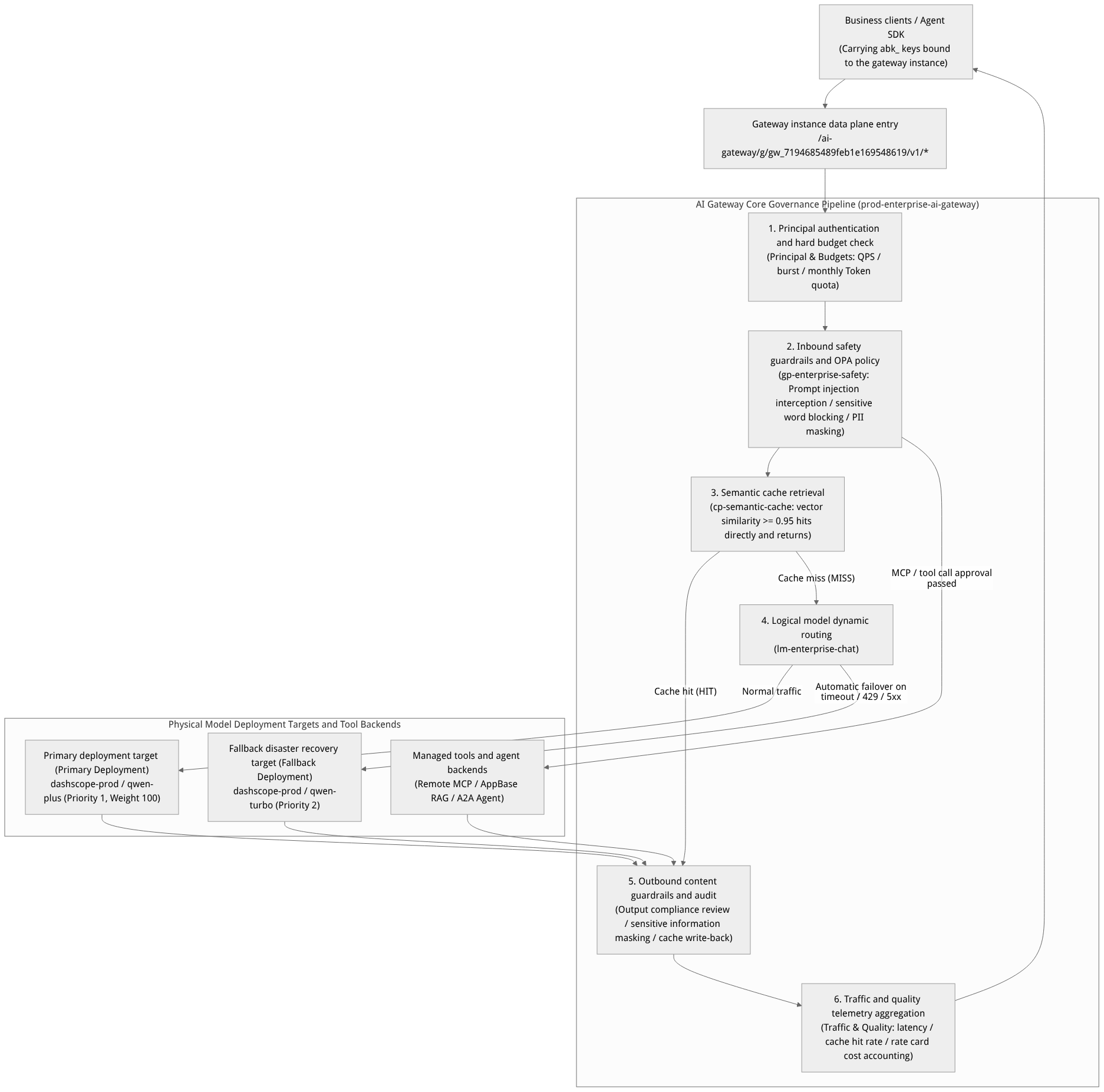
Flow diagram, not a runtime screenshot; read the relationships between steps or states along the arrows.
View the flow diagram in full size
Core Concepts and Configuration Entities Table
| Entity Name | English Identifier | Benchmark Example | Core Responsibility Description |
|---|---|---|---|
| Gateway instance | Gateway Instance | prod-enterprise-ai-gateway (gw_7194685489feb1e169548619) | An independent data-plane traffic entry point and policy attachment boundary. Each instance has a unique gatewayId and an immutable runtime configuration snapshot (Snapshot). |
| Logical model | Logical Model | lm-enterprise-chat | A virtual model name exposed to the business. Business code consistently requests lm-enterprise-chat without needing to be aware of underlying physical model switches, upgrades, or cross-vendor failover. |
| Model deployment target | Model Deployment / Target | Primary: qwen-plusSecondary: qwen-turbo | The specific Provider model bound beneath a logical model, along with routing weights, priority, concurrency limits, and per-target timeout parameters. |
| Guardrail configuration | Guardrail Profile | gp-enterprise-safety | Defines inbound (Input) and outbound (Output) content safety detection rules, covering jailbreak/injection attack blocking, automatic masking or rejection of PII (phone numbers / ID numbers / bank cards / secret keys), and compliance keyword filtering. |
| Semantic caching policy | Cache Policy | cp-semantic-cache | An intelligent caching mechanism based on Embedding vector similarity. When the semantic vector of a new request reaches the cosine similarity threshold against a historical cache entry (e.g., 0.95), the cached response is returned directly. |
| Principals and credentials | Principal & Credential | principal-support-agent | Business identity principals calling the gateway and their bound abk_ gateway keys, role tags, and the logical model/tool scope they are allowed to access. |
| Hard budget quota | Budget | budget-monthly-support | Hard limits bound at the gateway, principal, or key dimension, supporting circuit breaking on QPS, burst request count (Burst), total request count, and total Token consumption on minute/hour/day/month periods. |
Roles, Entry Points, and Relationships
Prerequisites and Permission Matrix
The Unified AI Gateway is a project-level advanced governance service and is disabled by default. To access the AI Gateway entry in the left navigation bar, two conditions must be met simultaneously:
The project service is enabled: The organization administrator or project Owner has enabled the AI Gateway service in Project Settings (Settings -> Services).
The member has the corresponding RBAC permissions: The currently logged-in member has AI Gateway read or management permissions in the organization/project.
| Permission Dimension | Owner / Admin | Developer | Security/Compliance Auditor |
|---|---|---|---|
| Create/modify gateway instances and seal runtime snapshots | Supported | Not supported | Read-only viewing of snapshot history |
Configure logical models (lm-enterprise-chat) and primary/secondary deployment routing | Supported | Supported | Read-only |
Edit guardrails (gp-enterprise-safety), OPA policies, and execute Dry-Run | Supported | Supports Dry-Run debugging | Supports approval and audit viewing |
| Approve high-risk MCP tool releases and manage connection templates | Supported | Can submit tool registration requests | Supports security review |
| Issue gateway-specific credentials and adjust hard budgets (Budgets) | Supported | Personal test credentials only | Read-only viewing of budget consumption |
Synergy with Other Modules
Relationship with "Models (LLM Gateway)": When configuring deployment targets for logical models, the AI Gateway can directly import physical models such as
qwen-plus,qwen-turbo,text-embedding-v3, andqwen3.7-text-rerankfrom thedashscope-prodregistered on the "Models" page, enabling secure reuse of underlying connection credentials; meanwhile, the two data-plane entry points are fully independent.Relationship with "Knowledge Base (Knowledge Base)": In the Tools & Agents tab, the AI Gateway includes the AppBase RAG managed connection template, which can wrap the knowledge base
kb_enterprise_supportdirectly as a standard MCP tool mounted on a gateway instance for unified invocation by external Agents.Relationship with "Observability": Tracing spans, guardrail hit events, semantic cache hit metrics, and model deployment health produced at the gateway layer are synchronized in real time to the Observability center.
Feature Details and Operation Guide
Part One: Creating a Gateway Instance (prod-enterprise-ai-gateway) and Snapshot Governance
Log in to the Console, enter project
企业智能客服与知识中台 (enterprise-ai-hub-210), and click AI Gateway in the left navigation bar.In the default Gateways tab, click the Create gateway button and fill in the following configuration:
| Field Name | Parameter Identifier | Benchmark Configuration Value | Description |
|---|---|---|---|
| Gateway name | name | prod-enterprise-ai-gateway | Unified gateway for production enterprise intelligent customer service and knowledge middle platform |
| Gateway identifier (ID) | gatewayId | gw_7194685489feb1e169548619 | A system-generated or custom unique instance ID, used as part of the data-plane URL path |
| Description | description | 承载客服对话主备路由、安全护栏与语义缓存的生产网关 | Describes the gateway's business purpose and owning team |
| Default guardrails | defaultGuardrailProfile | gp-enterprise-safety | Instance-level default inbound/outbound guardrail policies attached to the instance |
| Default caching policy | defaultCachePolicy | cp-semantic-cache | Instance-level default semantic caching policy attached to the instance |
Runtime snapshot sealing (Runtime Snapshot):
After completing the logical model, guardrail, and permission policy configurations, click Seal Runtime Snapshot at the top right of the gateway detail page.
The system generates an immutable configuration snapshot with a version number and SHA-256 digest, facilitating online change auditing and one-click rollback when anomalies occur.
Part Two: Configuring Logical Models (lm-enterprise-chat) and Primary/Secondary Failover Routing
Switch to the Model routing tab, click Import from Provider, select
dashscope-prod, importqwen-plus,qwen-turbo,text-embedding-v3, andqwen3.7-text-rerankinto the gateway's standard model catalog, and configure the corresponding Token rate cards (used to automatically calculate cost per thousand Tokens).Click Create logical model and configure
lm-enterprise-chat:
| Configuration Item | Parameter Name | Benchmark Configuration Value | Routing Behavior Description |
|---|---|---|---|
| Logical model name | logicalModelName | lm-enterprise-chat | The logical name filled in the model field of the client request body |
| Capability type | capability | chat | Supports the OpenAI Chat Completions, Responses, and Anthropic Messages protocols |
| Routing policy | routingStrategy | priority_failover (priority-based primary/secondary failover) | Routes preferentially to the Priority 1 deployment target; when the primary target experiences timeouts, 429 rate limiting, or 5xx errors, it automatically switches without interruption to the Priority 2 secondary target |
| Primary deployment target (Target 1) | deployments[0] | Provider: dashscope-prodModel: qwen-plusPriority: 1, Weight: 100Timeout: 60s | The primary high-inference-capability model carrying normal production traffic |
| Secondary deployment target (Target 2) | deployments[1] | Provider: dashscope-prodModel: qwen-turboPriority: 2, Weight: 100Timeout: 30s | The automatic fallback model when qwen-plus encounters upstream rate limiting or high latency |
Part Three: Configuring Guardrails (gp-enterprise-safety) and Semantic Caching (cp-semantic-cache)
Switch to the Policies & Credentials tab to configure guardrails, semantic caching, and hard budgets respectively:
1. Guardrail configuration (gp-enterprise-safety)
| Guardrail Rule Item | Direction | Benchmark Configuration Value | Trigger Action |
|---|---|---|---|
| Prompt injection and jailbreak detection | Inbound | enabled = true (strict mode) | Block the request (BLOCK), returning a standard compliance message and 400 GuardrailBlocked |
| PII sensitive private data masking | Inbound + Outbound (Both) | Detect phone numbers, ID numbers, bank card numbers, and API keys | Automatically replace with masks (REDACT, e.g., 138****5678) before sending to the model or returning to the client |
| Enterprise prohibited-word and competitor malicious steering filter | Inbound + Outbound (Both) | Reference the enterprise compliance lexicon | Block generation and record a security audit event |
| OPA policy dry-run | Pre-release policy validation | Input a test JSON payload | Preview policy allow/deny decisions and rule hit details without changing live traffic |
2. Semantic caching policy configuration (cp-semantic-cache)
| Cache Parameter Item | Parameter Name | Benchmark Configuration Value | Description |
|---|---|---|---|
| Policy name | name | cp-semantic-cache | Semantic caching policy for high-frequency enterprise customer service Q&A |
| Embedding model | embeddingModel | text-embedding-v3 (1024 dimensions) | The embedding model used to compute semantic vectors of user questions |
| Similarity hit threshold | similarityThreshold | 0.95 | Semantic equivalence and a cache hit are determined only when the cosine similarity is $\ge 0.95$, balancing accuracy and retrieval rate |
| Cache TTL | ttlSeconds | 3600 (1 hours) | The automatic expiration time of cache entries; after a knowledge base version is released, associated caches can be purged with one click |
| Exclusion conditions | bypassWhen | temperature > 0.7 or carrying X-AI-Gateway-No-Cache: true | High-randomness creative requests or requests explicitly requiring real-time computation automatically bypass the cache |
3. Credential issuance and hard budgets (Budgets)
In the Credentials & Budgets area, create a dedicated abk_ gateway key for the customer service business entity (enforced binding to gw_7194685489feb1e169548619), and configure multi-dimensional hard quotas:
QPS limit:
20requests/second, burst limit (Burst):40.Daily request quota:
100,000requests/day.Monthly Token hard budget:
50,000,000Tokens/month (an alert is triggered at80%; at100%a hard circuit breaker immediately blocks overspending).
Step Four: Configure Tools & Agents and the approval workflow
Switch to the Tools & Agents tab.
Click Create from template:
You can select the managed template AppBase RAG and bind it to the
kb_enterprise_supportknowledge base within the project; or choose Remote MCP / OpenAPI / Function to integrate an external support ticket query tool.
Set the tool approval mode (Approval Mode):
无需审批(None): Only low-risk read-only tools that have completed the security review (such as public document retrieval) are allowed; high-risk or unreviewed tools are strictly prohibited by the system from being published in the "No Approval" mode.按策略审批(Policy-based): Whether manual or upstream confirmation is required is dynamically determined based on the caller's role and the parameter scope.始终审批(Always): Tools involving production database write operations, support ticket status changes, or sending external notifications must undergo explicit approval.
Step Five: Verify multi-protocol data plane calls and traffic quality observability
Using the gateway key bound to gw_7194685489feb1e169548619, verify the OpenAI Chat Completions, Responses, and Anthropic Messages compatible interfaces:
# 1. Call the gateway instance's OpenAI Chat Completions compatible endpoint
curl -X POST "https://appbuild.oceanbase.com/ai-gateway/g/gw_7194685489feb1e169548619/v1/chat/completions" \
  -H "Authorization: Bearer <APPBASE_AI_GATEWAY_KEY>" \
  -H "Content-Type: application/json" \
  -d '{
    "model": "lm-enterprise-chat",
    "messages": [
      {"role": "user", "content": "我的工单号是 TK-20261022-001,联系电话 13800138000,请帮我解释 OceanBase 向量索引排障步骤。"}
    ]
  }'

# 2. Call the Anthropic Messages-compatible endpoint of the gateway instance
curl -X POST "https://appbuild.oceanbase.com/ai-gateway/g/gw_7194685489feb1e169548619/v1/messages" \
  -H "x-api-key: <APPBASE_AI_GATEWAY_KEY>" \
  -H "anthropic-version: 2023-06-01" \
  -H "Content-Type: application/json" \
  -d '{
    "model": "lm-enterprise-chat",
    "max_tokens": 1024,
    "messages": [
      {"role": "user", "content": "请总结智能客服 SOP 标准作业手册中的工单升级时限要求。"}
    ]
  }'
Verification result:
In the first request, the
gp-enterprise-safetyguardrail automatically desensitizes the phone number13800138000to138****8000before sending it tolm-enterprise-chat(served by the underlyingqwen-plus).Switch to the Traffic & Quality tab; in call records and multi-dimensional usage tables, you can view the status code, latency, Token count, rate-card converted cost, and guardrail/cache hit labels of this call by credential, logical model
lm-enterprise-chat, and physical deploymentqwen-plus.
FAQ and Troubleshooting
Q1: Can the logical model lm-enterprise-chat be called directly via /v1/ai/chat/completions without the /ai-gateway/g/{gatewayId} prefix?
No. The design principle of the unified AI Gateway is "strict isolation per gateway instance; no inference alias routing without a Gateway ID". The logical model lm-enterprise-chat, guardrail gp-enterprise-safety, and cache cp-semantic-cache are all mounted under a specific gateway instance gw_7194685489feb1e169548619, so access must go through the /ai-gateway/g/gw_7194685489feb1e169548619/v1/... path.
Q2: After registering a new MCP tool, why can't its approval mode be set to "No Approval"?
To prevent unauthorized tool calls from causing data privilege violations or production incidents, the AI Gateway has a mandatory security gate: any tool marked as High Risk or Unreviewed is strictly prohibited from being published directly in the "No Approval" mode, both at the API and Console level. First have a project administrator complete the tool security review and confirm the risk level as low-risk read-only, or switch to the "Approval by Policy / Always Approve" mode.
Q3: The semantic cache (cp-semantic-cache) returned answers from an old knowledge version after a hit; how do I refresh it immediately?
When a knowledge base (such as kb_enterprise_support) releases a new version or a major business rule change occurs, you can:
Include
X-AI-Gateway-No-Cache: truein the header of a single debug request to force a cache bypass and update the result;Go to AI Gateway -> Policies & Credentials, find
cp-semantic-cache, click Purge Cache, or raise the similarity threshold or shorten the TTL.
Q4: When the primary model qwen-plus triggers automatic failover to the fallback model qwen-turbo, does the client need to modify code and retry?
No. Failover is completed transparently inside the AI Gateway. The client only needs to make a single request to the logical model lm-enterprise-chat; after the gateway detects that the primary deployment target timed out or returned 429/5xx, it automatically switches to the fallback deployment target qwen-turbo within the same request lifecycle, and annotates the actually executed physical deployment target in the response metadata and Traffic & Quality observability logs.