
Project Overview
A project (Project) is the independent isolation boundary for all application backend resources and AI-native capabilities in Agentbase 2.10.0. Business databases, object storage buckets, cloud functions, messaging channels, content moderation policies, as well as large model provider credentials, AI gateway, enterprise knowledge base, intervention lexicon, long-term memory, and agent workspace configurations, all strictly belong to a specific Project. This chapter comprehensively describes project creation and context boundaries, client platform registration (Platforms, supporting 15 client types), and the full lifecycle management of server-side access keys (API Keys and Dev Keys).
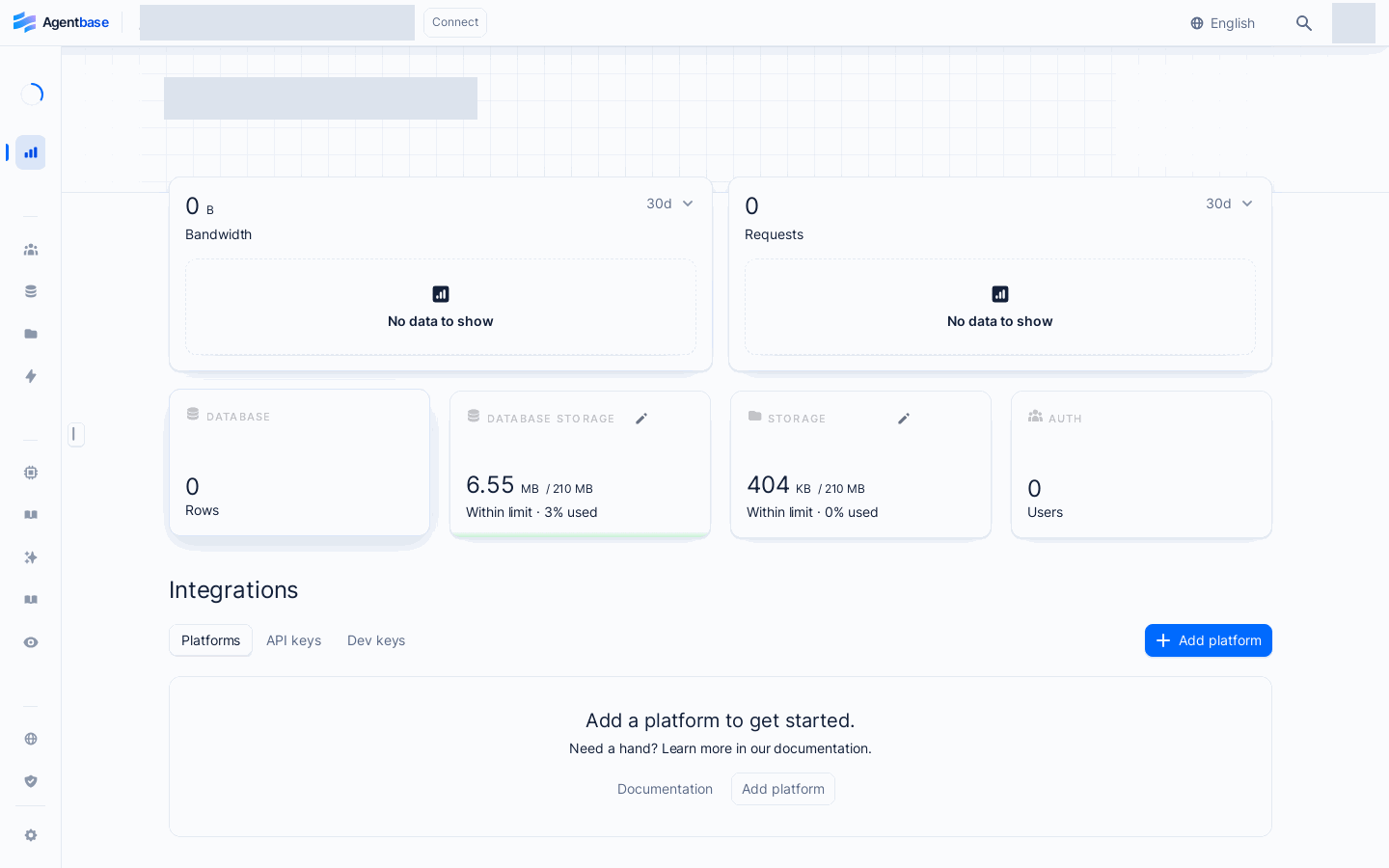
Interface reference: reuses previously registered historical screenshots; demo data may differ from the current project; no new screenshots were taken this time.
Feature Overview
Taking the enterprise production template "Enterprise Intelligent Customer Service and Knowledge Hub" (Project ID: enterprise-ai-hub-210, belonging organization: Agentbase 企业智能中台 69c6d1aa00062e6bb60) as an example, when a team enters a project Console, the first screen is the Overview page. This module carries three core responsibilities:
Real-time insight into project operating watermarks: The first-screen dashboard centrally presents the current project's Requests (API request throughput), Bandwidth (network bandwidth consumption), Databases (database document/row counts and read-write trends), Storage (storage bucket usage), Auth (registered end-user count), and Realtime connections (concurrent realtime long connections) within the selected time window.
Client platform origin whitelist governance (Platforms): Register legitimate
Hostname, AndroidPackage name, or AppleBundle IDfor web browser applications (React / Vue / Next.js / SvelteKit, etc.), mobile native applications (iOS / Android), and cross-platform frameworks (Flutter / React Native / Unity). Any client SDK request from an unregistered origin is security-intercepted at the gateway layer.Server-side API Keys and development environment Dev Keys issuance governance:
API Key (
standard_prefix): For production environment backend microservices, scheduled tasks, and external Agent orchestrators; implements least-privilege authorization via the 12 major category Scope permission selector, supporting expiration time settings, Secret masking protection, and smooth rotation.Dev Key (
X-Appwrite-Dev-Key): For local development and integration debugging; temporarily exempts request rate limits (Ratelimit) and browser CORS cross-origin interception within a maximum validity of 30 days, and returns detailed diagnostic stacks.
| Submodule name | Console route suffix | Applicable invocation plane | Required write permission Scope / role |
|---|---|---|---|
| Overview real-time dashboard | /overview | Control plane visual monitoring | Readable by any project member (including billing / analyst) |
| Platforms (platform registration) | /overview/platforms | Client access plane (Web SDK / mobile SDK) | platforms.write (organization roles owner / admin / developer / editor) |
| API keys (production keys) | /overview/api-keys · .../api-keys/{keyId} | Server access plane (Server SDK / REST API / Agent Runtime) | keys.write (Secret reading forcibly protected by server-side visibility boundary) |
| Dev keys (development keys) | /overview/dev-keys · .../dev-keys/{keyId} | Local development debugging environment (bypasses CORS and rate limits) | keys.write (validity forcibly limited to 1 / 7 / 30 days) |
| Legacy getting-started route | /get-started | Redirects to /overview/platforms; continue on the platform registration page | Readable by any project member |
Core Concepts and Architecture
Inside a project's enterprise-ai-hub-210, the project context (region, table schema, service switches) together with the three integration configurations in the Integrations area (Platforms, API Keys, Dev Keys) form the access control gateway for data plane traffic:
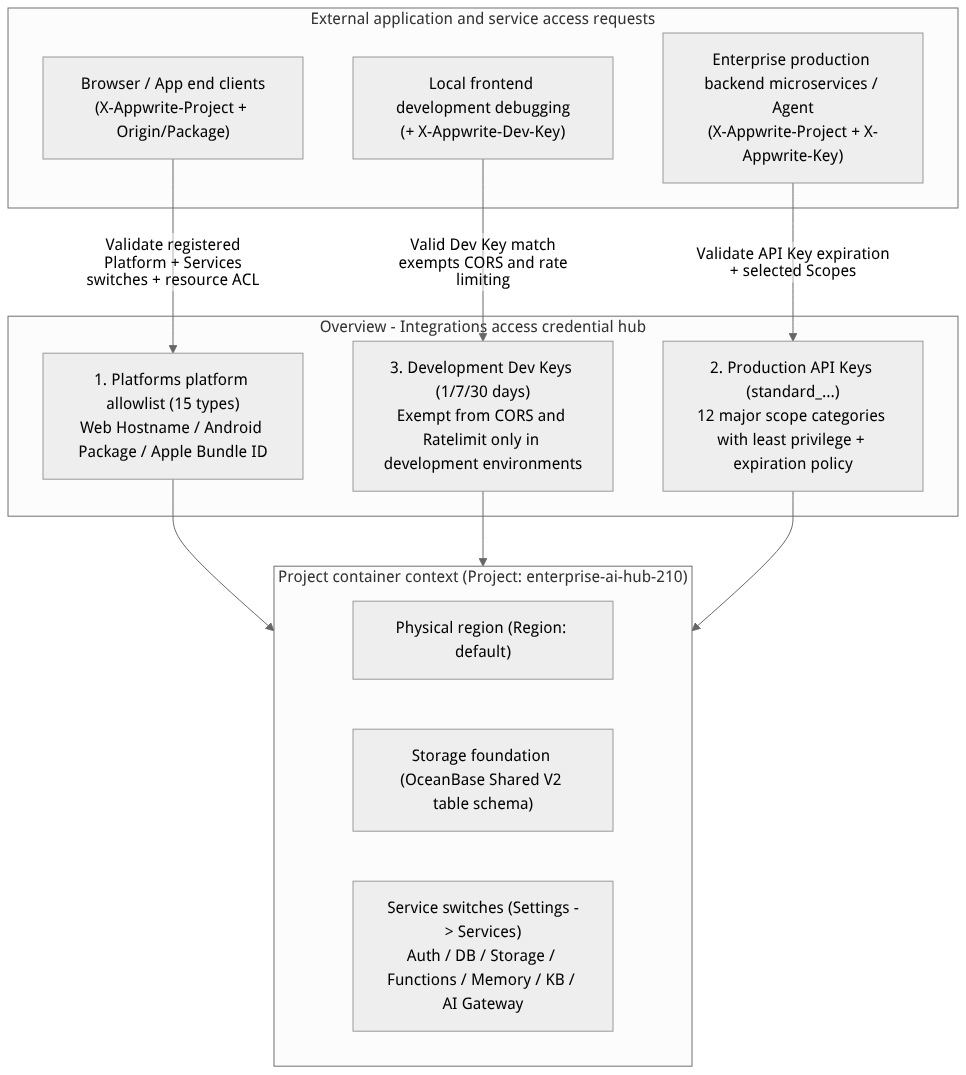
Flow diagram, not a runtime screenshot; read the relationships between steps or states along the arrows.
View the flow diagram in full size
Table of the project's four core context attributes
| Context attribute | Configuration timing and modification location | Global impact on resources within the project |
|---|---|---|
Project ID ($id) and name | Specified when creating the project $id (e.g., enterprise-ai-hub-210); the name can be changed in Settings | $id Once created, it cannot be changed; all SDK initialization and REST requests must carry this identifier via X-Appwrite-Project: enterprise-ai-hub-210. |
| Physical region (Region) | Selected when creating a project via | ; determines the physical compute and storage cluster location for databases, buckets, cloud functions, and knowledge base indexes under that project. |
| Project table mode (Table Mode) | Initialized at creation time; can be converted in Settings → Project Table Mode | Determines whether business data uses shared tables, exclusive tables, deeply exclusive tables, or the OceanBase Shared V2 mode; among these, the AI Memory long-term memory service requires the Shared V2 mode. |
| Service switches (Services) | Settings → Overview → Services | Controls client SDK reachability for each service item by item; note thatthe unified AI Gateway (AI Gateway) is disabled by default, and the entry only appears in the left sidebar after enabling it here. |
Roles, Entry Points, and Relationships
1. Console Navigation Entries and Permission Requirements
Enter the project overview: select the organization
Agentbase 企业智能中台in the top navigation, click the project企业智能客服与知识中台, and the project root redirects to/console/project-{region}-{project}/overview/platforms. Use the actual region and project identifier; Figure 1 is a historical interface reference.Switch among the three Integrations tabs: in the Integrations area in the lower half of the project overview page, you can click the Platforms, API keys, or Dev keys tabs to switch management views directly.
Server-side read security boundary for the API Key Secret:
When reading the plaintext
secretof an API Key via the Console or the management API, the server enforces a strict identity boundary check: only theownerof the organization the project belongs to, the creator of that API Key, and platform privileged members can read the fullsecret.When other members query the Key list or details via the API, the server automatically blanks the
secretfield to prevent lateral privilege escalation and theft of production keys.
2. Core Positioning Comparison of API Keys and Dev Keys
| Comparison dimension | Production API Key (API keys) | Development debugging key (Dev keys) |
|---|---|---|
| Design positioning | Dedicated to production and staging server-side use: allows backend services, cloud functions, and external agents to securely call project APIs | Local development environment only: helps frontend developers bypass platform rate limiting and browser CORS errors during local debugging |
| Request header name | X-Appwrite-Key: standard_<secret> | X-Appwrite-Dev-Key: <secret> |
| Permission scope (Scopes) | Fine-grained control: select Scopes as needed from 12 major categories at creation time; bypasses row-level ACL | No Scope concept: grants no additional data read/write permissions; only exempts CORS/Ratelimit and enables detailed error logging |
| Optional validity period | Never (never expires) / 7 Days / 30 days / 90 days / 1 Year / Custom Date | Forced short-term: only 1 Day / 7 Days / 30 Days are allowed (creating a permanently valid Dev Key is strictly forbidden) |
| Production red line | Never hardcode into frontend browser/mobile code | Strictly forbidden in production environments (otherwise rate limiting and cross-origin protection are lost) |
Feature Details and Operation Guide
1. Registering and Managing Client Platforms
When your enterprise intelligent customer service frontend (Web portal, iOS/Android clients, or Flutter cross-platform apps) accesses Agentbase directly through the client SDK, the gateway verifies whether the request's Origin (Web) or app package name has been registered in Platforms.
Step 1: Open the platform creation wizard
In the project's Overview → Integrations area, stay on the Platforms tab (path
/overview/platforms).Click the Add platform button on the right and select the client platform type from the dropdown menu (backend APIs correspond to
POST /v1/projects/{projectId}/platforms). The system supports a whitelist of 15 granular platform types in total.
Step 2: Fill in identifier fields by platform type
| Platform category | Granular platform type identifiers (type whitelist) | Required fields and server-side validation constraints | Production configuration examples and how to obtain them |
|---|---|---|---|
| Web app | web | Name (≤128 characters) + Hostname (a valid hostname or wildcard domain) | Name: 企业客服 Web 门户; Hostname: support.enterprise.example.com (use localhost for local development). The wizard supports selecting React / Next.js / Vue / Nuxt / Svelte / Angular to generate initialization code. |
| Android native | android | Name (≤128 characters) + Package name (key ≤256 characters) + optional store | The Package name must exactly match the applicationId in the Android project's app/build.gradle (e.g., com.enterprise.aihub). |
| Apple native | apple-ios · apple-macos · apple-watchos · apple-tvos | Name (≤128 characters) + Bundle ID (key ≤256 characters) + optional store | Register separately for each target Apple device OS; the Bundle ID comes from the main Target in Xcode → General → Identity → Bundle Identifier. |
| Flutter cross-platform | flutter-web · flutter-android · flutter-ios · flutter-linux · flutter-macos · flutter-windows | Register separately for each target compilation platform: fill in Hostname for Web and Package name / Bundle ID for the others | If one Flutter codebase is released simultaneously on Web, iOS, and Android, you must add 3 platform records of the corresponding types under Platforms. |
| React Native | react-native-android · react-native-ios | Android uses Package name; iOS uses Bundle ID | Corresponding to the package identifiers in android/app/build.gradle and ios/*.xcodeproj respectively. |
| Unity engine | unity | Name + the target platform's Package name / Bundle ID | Used for client access to 3D digital human customer service or interactive terminal applications. |
Step 3: Modify and delete registered platforms
Click any registered platform in the list to enter its detail page, where you can modify the Name, Hostname / Package name / Bundle ID, and app store ID (
store, ≤256 characters) at any time.Deletion risk warning: after clicking delete at the bottom of the platform detail page and confirming, frontend requests from that domain or client package name will immediately fail origin verification, and the browser will start receiving
401or CORS cross-origin interception errors.
2. Creating and Managing Server-side API Keys (Including Details of 12 Major Scope Categories)
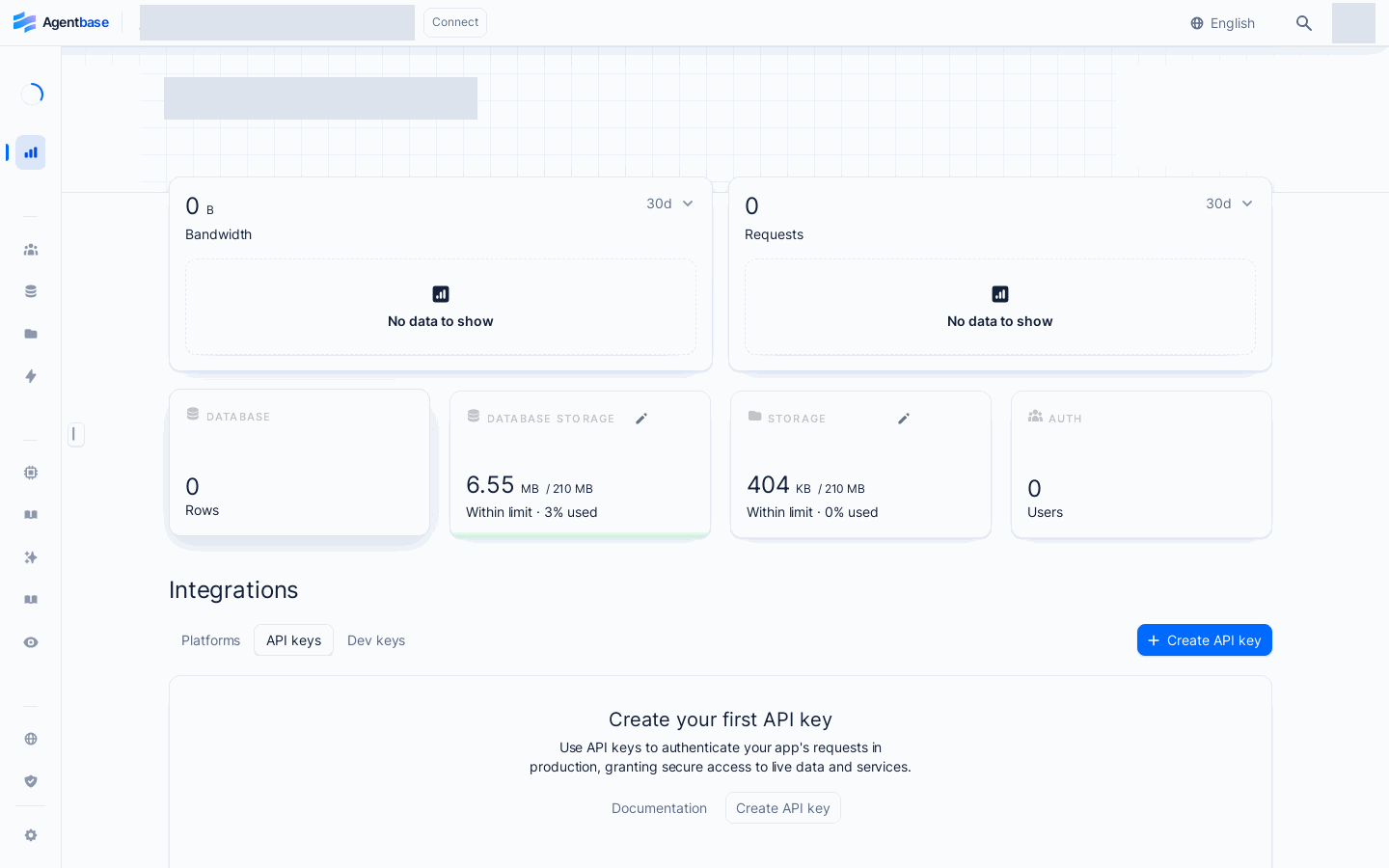
Interface reference: reuses previously registered historical screenshots; demo data may differ from the current project; no new screenshots were taken this time.
Step 1: Create an API Key and configure its validity period
In the Overview → Integrations area, click to switch to the API keys tab (path
/overview/api-keys, as shown in Figure 2), and click Create API key in the upper right corner.Fill in the Configuration area:
Name (required): enter a clear usage identifier (up to 128 characters, e.g.,
cs-backend-prod-keyorkb-ingestion-worker-key).Expiration (validity period): supports selecting
Never,7 Days,30 days,90 days,1 Year, orCustom Date(custom date, earliest the next day). For production environments, setting90 daysor1 Yearcombined with a regular rotation policy is recommended.
Step 2: Select Scopes from 12 Major Categories Following the Principle of Least Privilege
The Scopes area of the creation wizard divides all platform permissions into 12 collapsible category panels, supporting one-click Select all / Deselect all or fine-grained selection by category:
| Number | Scope category panel name | Examples of core permission identifiers covered | Typical applicable business scenarios |
|---|---|---|---|
| 1 | Auth | users.read · users.write · teams.read · teams.write · sessions.write | Backend synchronization of enterprise employee accounts, management of customer service agent teams, forced logout of abnormal user sessions |
| 2 | Database | databases.read/write · tables.read/write · columns.read/write · indexes.read/write · rows.read/write (and cloud backup policies.* / archives.* / restorations.*) | Backend microservices reading and writing the enterprise_biz_db database and customer_tickets support ticket tables (when the new-style tables/columns/rows Scope is selected, the system automatically includes the legacy collections/attributes/documents compatibility variant) |
| 3 | Functions | functions.read · functions.write · execution.read · execution.write | Triggering asynchronous cloud functions, uploading Java 17 JAR deployment packages, and querying function execution records by path |
| 4 | Memory | Scopes related to memory service read/write, user profiles, experience/skill distillation, and Pipeline management | Backend agent orchestrators writing multi-turn conversation memory, retrieving user profiles, and executing context compression |
| 5 | Storage | buckets.read · buckets.write · files.read · files.write | Managing kb_enterprise_docs and agent_multimedia_bucket buckets and uploading/downloading files |
| 6 | Messaging | messages.read/write · topics.read/write · subscribers.read/write · providers.read/write | Automatically triggering email, SMS, or App Push notifications during backend support ticket workflow |
| 7 | Sites | sites.read · sites.write · deployments.read/write | CI/CD pipelines automatically triggering frontend site build deployments and one-click rollbacks |
| 8 | AI Gateway | Scopes for the unified AI gateway, logical model routing, safety guardrails, and cache policy management | Automating configuration of and calls to the prod-enterprise-ai-gateway gateway plane |
| 9 | Knowledge Base | Scopes for knowledge base, document ingestion, lexicon, hybrid retrieval, and advanced index construction | Automatically syncing enterprise Wiki documents to the kb_enterprise_support and performing retrieval augmentation |
| 10 | Observability | Trace/Observation queries, evaluation tasks (including knowledge index quality assessment), Prompt parsing and dataset Scope | Automatically trigger RAG parsing evaluation and GraphRAG/Wiki index quality assessment via CI quality gates |
| 11 | Trace Logs | Project-level trace log query Scope | Ops automation scripts pull trace logs of anomalous requests |
| 12 | Other | health.read · locale.read · avatars.read and other general auxiliary permissions | Monitor system call health checks, region dictionaries, and avatar services |
Step 3: Copy, View, and Smoothly Rotate API Keys
After clicking Create, the page automatically redirects to the Key's detail page (
/overview/api-keys/{keyId}), where a notification bar appears at the top offering Copy API key (copy the full Secret starting withstandard_) and Copy endpoint (copy the current region's API endpoint, e.g.https://appbuild.oceanbase.com/v1).Routine inspection and status monitoring:
In the API keys list, you can view each key's Last accessed (shown as
neverif never called) and Expiration date.When fewer than 14 days remain before expiration, the interface automatically highlights the
Expires soonwarning badge; once expired,Expiredis displayed and all calls are rejected immediately.
Standard zero-downtime rotation workflow (Key Rotation) in production:
Step One: On the API keys tab, click Create API key, select exactly the same Scopes as the old Key, and generate the new Key
cs-backend-prod-key-v2.Step Two: Update the new Key Secret in your enterprise configuration center or Kubernetes Secret, and roll-restart the application services.
Step Three: Once the old Key's Last accessed time stops changing and the new Key's Last accessed refreshes normally, go to the bottom of the old Key's detail page and click Delete API key (or select batch delete on the list page) to fully revoke the old key.
3. Creating and Using Development Environment Dev Keys
In the Overview → Integrations area, click the Dev keys tab (path
/overview/dev-keys), then click Create dev key.In the dialog, enter a Name (e.g.
local-frontend-debug), select1 Day,7 Daysor30 Daysin the validity period dropdown, and click Create.Copy the generated Dev Key Secret and attach the HTTP header
X-Appwrite-Dev-Key: <DEV_KEY>to requests in your local development environment (or pass it via the client SDK'ssetDevKey()method), so you can avoid the hassle of frequently modifying the CORS domain whitelist and triggering rate limits during local debugging.
FAQ and Troubleshooting
Q1: Why does the Secret field appear empty or fail to copy when I open the detail page of an API Key created by a colleague in the Console?
Cause and troubleshooting steps: This is the key visibility security boundary enforced by the Agentbase server side: to prevent ordinary collaborating members from exporting production credentials they are not responsible for, the server specifies that only the Owner of the organization that owns the project, the creator of that API Key themselves, and platform privileged administrators can read the secret plaintext; when other members query it, the server blanks the secret in the response layer. If you need to integrate with a service, please use your own account (with keys.write permission) to create a dedicated minimal-privilege API Key; never share the same key across multiple people.
Q2: After deploying the frontend web app to a new domain, API calls report a CORS cross-origin error or 401, but it works fine locally with localhost?
Cause and troubleshooting steps: This is because previously only localhost was registered in Overview → Integrations → Platforms (or locally you used Dev Key to bypass CORS validation), while the new production/staging domain has not yet been registered. Please go to the Platforms tab, click Add platform → Web app, and add the newly launched full business domain (Hostname, without the https:// protocol prefix and path suffix, e.g. chat.enterprise.example.com) to the whitelist. After saving, frontend cross-origin requests are allowed immediately.
Q3: My legacy code uses outdated permission concepts like collections.read or documents.write, but I can't find them in the Scopes panel when creating a new API Key?
Cause and troubleshooting steps: The Agentbase 2.10.0 Console uniformly adopts relational and tabular terminology (tables.*, columns.*, rows.*), and legacy prefixes (collections.*, attributes.*, documents.*) are not listed separately in UI selectors. You only need to check the corresponding new-style Scopes such as tables.read, columns.read, and rows.write under the Database category; when the Console submits the save to the server, it automatically attaches the corresponding legacy-compatible Scope variants at the underlying layer, so legacy SDK and REST API calls are completely unaffected.