
Schema Versions and Rollback
Feature Overview
Schema versions and rollback (Schema Versions) provide the Agentbase structured databases (Databases / TablesDB) with production-grade database structure snapshots, schema diff comparison, physical structure prerequisite validation, concurrent change mutual exclusion, and zero-data-loss second-level version rollback capabilities. During continuous iteration on enterprise-grade AI and business systems (such as the example project 企业智能客服与知识中台, Project ID: enterprise-ai-hub-210, under 企业智能客服业务库 enterprise_biz_db), if developers directly and piecemeal add columns, drop columns, or change indexes by hand on production databases, multi-environment schema drift, concurrent DDL conflicts being overwritten, or mid-release failures causing service outages can easily occur.
By introducing database-level Schema Versioning, every structural change to tables, columns, indexes, and business comments within enterprise_biz_db is committed as an immutable version snapshot (SchemaVersion). Before activating a new version, the system automatically compares and validates the underlying OceanBase physical structure (compatible with both Shared V2 and JsonTable storage modes): the active version pointer is atomically switched only when the physical tables, columns, and indexes are fully materialized and validation passes; if validation fails (including after one automatic retry), the currently active active version continues to serve seamlessly, completely preventing production incidents caused by "half-finished structures" going live.
Core Concepts and Architecture
The Schema versioning engine builds a closed loop around "Baseline adoption or incremental Migration → normalization and hash idempotency (Schema Hash) → database-level single-writer mutex → asynchronous materialization and physical reconciliation → CAS atomic activation / pointer rollback". The following diagram shows the complete architecture of a Schema version from submission, physical validation, and state transitions to rollback:
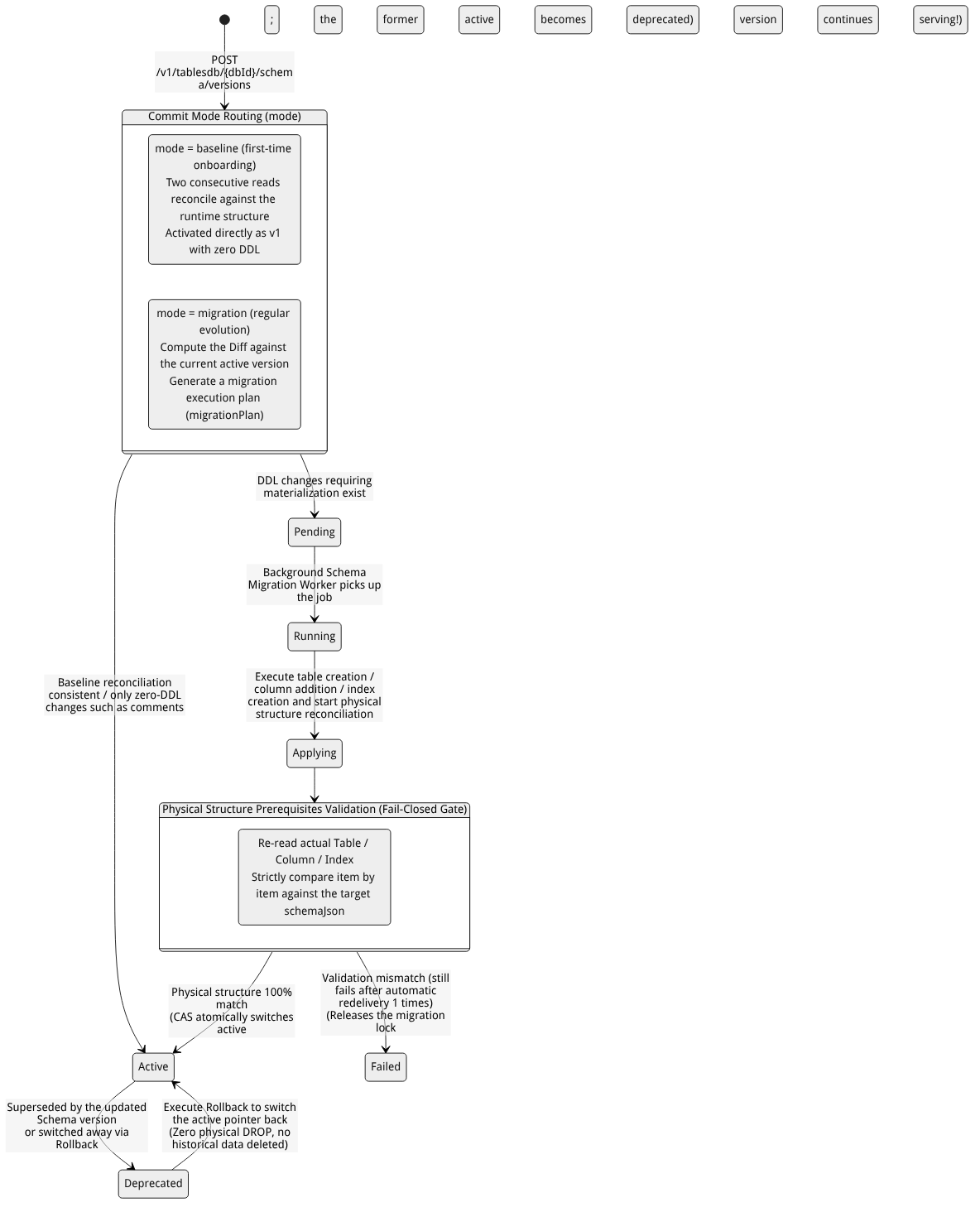
Flow diagram, not a runtime screenshot; read the relationships between steps or states along the arrows.
View the flow diagram in full size
Core Objects (SchemaVersion) and State Machine Description
Every version record retrieved via the Schema Versions tab in enterprise_biz_db or via the API contains the following core metadata and state semantics:
| Core field / state | Values and types | Architecture semantics and production behavior |
|---|---|---|
schemaVersion | Positive integer (1, 2, 3...) | A monotonically increasing version number within the database; the list is sorted by version number in descending order (most recently submitted version on top). |
schemaHash | 64-bit hexadecimal hash string | A deterministic digest computed over the normalized target tables, columns, and index structures. If a request is submitted repeatedly with the same schemaHash as an existing non-failed version, the API directly returns 200 and the existing version object per idempotent semantics. |
status = pending / running / applying | Processing intermediate states | Indicates the version is currently queued, executing underlying structural changes, or undergoing pre-activation physical reconciliation. When a version in any of these three states exists in the same database, new structure submissions and the rollback button are automatically disabled (the API returns 409). |
status = active | Currently active state | A database has at most one active version at any moment. Data-plane read/write requests use the schemaJson of the current active version as the authoritative projection baseline for visible tables and columns. |
status = deprecated | Historical retired state | Historical versions that previously served as the active active version but were superseded by a newer version (or switched away from due to a rollback). They can be used at any time as the target of Rollback. |
status = failed | Failed closed state | The migration execution or pre-activation physical structure validation failed (the system automatically retries retryable errors at most 1 time; if it fails again, the state settles as failed). At this point the original active version remains unchanged and continues serving normally, and the errorMessage field records the detailed reason for correction and resubmission. |
stepsTotal / stepsCompleted | Integer progress indicators | Shows the total and completed step counts in the current version's migration plan (migrationPlanJson), working with lastHeartbeatAt to reflect execution progress in real time. |
Roles, Entry Points, and Relationships
Console Entry Point and Permission Requirements
Navigation path: Sign in to the Agentbase Console → go to project
企业智能客服与知识中台(enterprise-ai-hub-210) → click Databases in the left sidebar → open database企业智能客服业务库(enterprise_biz_db) → click the Schema Versions tab at the top.Route URL:
/console/project-{region}-{project}/databases/database-{databaseId}/schema-versionsOperation permission gates:
Viewing the Schema version list, version numbers, structure hashes, and diff details requires
databases.readpermission (owner,admin,developer,editor,analyst).Submitting a new Schema version (Baseline or Migration) and performing a version rollback (Rollback) requires
databases.writepermission (owner,admin,developer,editor).
Relationships with Other Modules
Mutual exclusion coordination with standalone table/column/index write endpoints:
Within the same database (
projectId + databaseId), table creation/deletion, column creation/modification/deletion, index creation/deletion, and Schema version creation/rollback are strictly serialized and mutually exclusive.When a database has Schema versioning enabled and a version in the
activestate exists, ad-hoc calls to single-table/single-column structure change endpoints return a409protection message, guiding developers to submit changes as a complete version viacreateSchemaVersion(or viaupdateTablepassing a fullcolumns/indexes).Exception (zero-DDL comment updates): Modifying a column comment (
updateColumnComment) involves no physical DDL and is allowed to execute directly even when aactiveversion exists, automatically generating a new zero-DDLactivemetadata version.
Coordination with dual storage modes (
Shared V2&JsonTable):In
Shared V2mode, Schema versions drive the addition and reconciliation of underlying OceanBase physical columns and native indexes.In
JsonTablemode, Schema versions manage the_jt_table_cataloglogical catalog and side-table index state; version rollback only switches the currently visible logical Schema projection and never physically erases historical field key-values already written in_dataJSON.
Boundary distinction from database Backups:
Schema Versions protect the consistency of table structure definitions and visibility (structure-level versioning); rolling back a version does not delete or revert business row data. To restore the row content within tables to a past point in time, use Backups and Restore (Backups) in combination.
Feature Details and Operation Guide
1. Two version submission modes: initial Baseline (baseline) vs incremental evolution (migration)
When bringing a business database (such as enterprise_biz_db) under multi-version Schema governance, Agentbase offers two submission modes:
| Submission mode | When to use | Underlying execution and validation mechanism | Key return codes and constraints |
|---|---|---|---|
baseline (baseline adoption mode) | database enables Schema version control for the first time (the current database has no existing SchemaVersion records yet), and wants to adopt the already stable production table structures (such as customer_tickets) as-is as the 1st version (v1). | The server reads the complete runtime canonical structure (Canonical Schema) twice consecutively and performs a strict consistency comparison against the schema submitted with the request. When the comparison is fully consistent, no physical table creation/column addition/index creation Workers are triggered; instead, within a single transaction it directly writes v1 and sets it to active (stepsTotal=0). | If the database already has version records, using baseline is forbidden; if the comparison finds that the submitted structure does not match the current actual running structure, or concurrent drift occurs during export, it returns 409 schema_baseline_stale. |
migration (regular migration mode, default) | Day-to-day iterative evolution (such as adding a satisfactionScore score column or resolvedAt resolution-time column to the customer_tickets table, or adding a composite index). | Computes the structural diff between the submitted target schema and the current active version snapshot: if it contains only zero-DDL changes such as comments, it activates directly; if it contains physical changes such as new tables/columns/indexes, a migration plan is generated and executed by a background Worker, then activated as the new active version after physical reconciliation. | Directly modifying the physical type (Type) of an existing column or shrinking a string column's size (Size) is not allowed; such destructive changes are directly intercepted with 400, and the Expand-Contract pattern of "add a new column + migrate data + hide the old column in a new version" is recommended. |
2. Viewing the Schema version list, structure diffs, and state diagnostics
After entering the Schema Versions tab on the database details page:
Browse the version timeline: The list displays recent version records sorted by version number (
schemaVersion) from high to low (returning at most the most recent 50 versions); each row clearly shows version number (e.g.,v3,v2,v1), state badge (active,deprecated,applying,failed), structure hash (schemaHash), step progress (stepsCompleted / stepsTotal), and submission time ($createdAt).Inspect version snapshots and structure diffs (Diff Inspection):
Click any version row to view the complete
schemaJsonstructure snapshot saved for that version (covering alltables[],columns[],indexes[], commentscomment, and the encrypted-column filter markerfilters: ["encrypt"]).For versions in the
failedstate because Prerequisites validation failed, the details section directly displayserrorMessage(for example, an index build conflict or an asynchronous table deletion that has not yet completed), and you will see the previousactiveversion remains green and active, with zero interruption to production reads and writes.
Concurrency protection behavior:
When the list contains versions in the
pending,running, orapplyingstate, or there is a table deletion task (Pending table deletion) running asynchronously in the background, the create submission and rollback actions on the page are automatically locked to prevent concurrent DDL races from breaking metadata consistency.
3. Steps to perform a safe rollback (Rollback Schema Version)
When a newly published Schema version (for example, v3 added several experimental fields) is decided to be withdrawn during business integration testing and you want to immediately switch back to the previous stable version (e.g., v2), you can perform the rollback as follows:
Go to the Schema Versions tab of
enterprise_biz_dband confirm there are no tasks currently in thepending/running/applyingprocessing states.In the historical version list, locate the target stable version whose status is
deprecated(e.g.,v2).Click the Rollback button to the right of the version, verify the target version number and structure summary in the confirmation dialog, and then confirm the submission.
Immediate effects of rollback and the physical safety boundary (extremely important):
Active pointer switches within seconds: The rollback operation only switches the status of the target version (
v2) back toactivewithin a transaction and marks the original version (v3) asdeprecated, while synchronously updating the column'sschemaStatusobservable state and comment snapshot.Physical
DROP COLUMN/DROP TABLEis never executed: To completely prevent an accidental rollback from permanently losing production data, the rollback operation executes no destructive physical DDL and does not delete any underlying row data already written. New column data written during thev3period is safely retained in the underlying storage; it is merely hidden from the application layer under theactiveprojection ofv2.How to fully realign the physical structure with the target version: If further adjustments to physical indexes or adding other fields are needed after the rollback, simply modify the structure definition based on
v2and submit a newmigrationversion again.
4. Code example for orchestrating Schema version publishing via Server / Console SDK
In enterprise CI/CD release pipelines, it is recommended to use agentbase-node-sdk@2.10.0 (or agentbase-console-sdk@2.10.0) to bring database structure changes into the code repository for declarative version management:
// Use the Agentbase SDK version pinned to @2.10.0 to perform declarative Schema version release and rollback
// Corresponding REST endpoint: POST /v1/tablesdb/{databaseId}/schema/versions

async function deployTicketSchemaVersion(tablesDB) {
    // 1. Submit an incremental schema version (mode: "migration")
    const version = await tablesDB.createSchemaVersion({
        databaseId: 'enterprise_biz_db',
        mode: 'migration', // When first connecting without a repository, you may pass 'baseline'
        schema: {
            tables: [
                {
                    tableId: 'customer_tickets',
                    name: '客户工单表',
                    comment: '企业智能客服工单主表(含 SLA 与满意度评分)',
                    columns: [
                        { key: 'ticketNo', type: 'varchar', size: 64, required: true, comment: '工单唯一业务编号' },
                        { key: 'title', type: 'varchar', size: 256, required: true, comment: '工单问题摘要标题' },
                        { key: 'priority', type: 'enum', elements: ['P0', 'P1', 'P2'], required: true, comment: '紧急程度' },
                        { key: 'status', type: 'enum', elements: ['open', 'processing', 'resolved', 'closed'], required: true, comment: '处理状态' },
                        { key: 'creatorUserId', type: 'varchar', size: 36, required: true, comment: '提单终端用户 ID' },
                        { key: 'satisfactionScore', type: 'float', required: false, comment: '结单客户满意度评分 (1.0-5.0)' }
                    ],
                    indexes: [
                        { key: 'uk_ticket_no', type: 'unique', attributes: ['ticketNo'], orders: ['ASC'] },
                        { key: 'idx_status_priority', type: 'key', attributes: ['status', 'priority'], orders: ['ASC', 'ASC'] },
                        { key: 'ft_title', type: 'fulltext', attributes: ['title'] }
                    ]
                }
            ]
        }
    });

    console.log(`已提交 Schema 版本 v${version.schemaVersion},当前状态: ${version.status}`);

    // 2. To roll back within seconds to a specified historical versionId when a release goes wrong:
    // const rolledBack = await tablesDB.rollbackSchemaVersion({
    //     databaseId: 'enterprise_biz_db',
    //     versionId: '<PREVIOUS_ACTIVE_VERSION_ID>'
    // });
}
FAQ and Troubleshooting
Q1: Submitting a new Schema version or calling the create-column API alone returns 409 Conflict, indicating there is already an ongoing migration or an active version exists. How should this be handled?
Root cause analysis:
Unfinished asynchronous operations exist in the same database: Under the current database (
enterprise_biz_db) there are Schema versions in thepending,running, orapplyingstate, or the background Worker task for the just-executed table deletion/index creation has not yet finished.Single-column APIs are gated by the active version guard: When the database is already managed by Schema Versions and an
activeversion exists, directly calling the traditional single-table/single-column physical change API will be intercepted to prevent schema drift that bypasses version snapshots.
Troubleshooting steps:
Go to the Databases →
enterprise_biz_db→ Schema Versions tab to check the progress of the latest version (stepsCompleted / stepsTotal). Once it becomesactiveorfailed, the lock is released automatically.For databases already managed by Schema Versions, please uniformly manage schema evolution by submitting a new Schema version (
createSchemaVersion) or using theupdateTableAPI with the complete structure.
Q2: When using mode: "baseline" to initialize the first version, why does it return 409 schema_baseline_stale?
Root cause analysis: The baseline mode is designed with the intent of “zero-DDL adoption of the current live structure as-is as v1”. When processing an baseline request, the server reads the database's actual running structure twice in succession and compares it with the schema passed in your request body. If the request body includes columns/tables that do not yet exist online, omits columns that already exist online, or someone else happens to be modifying the table structure at the moment of adoption, the server triggers Fail-Closed protection and returns 409 schema_baseline_stale.
Troubleshooting steps: First ensure there are no other concurrent DDL operations. If your goal is to add columns or modify the structure while adopting, first execute baseline with a structure that exactly matches the live one to generate v1, then use the default mode: "migration" to submit an v2 version that includes the new columns.
Q3: After performing a Schema version rollback (e.g., from v4 back to v3), why was a support ticket row previously deleted by mistake in v4 not restored?
Answer: Schema version rollback only applies to table structure and field visibility (Schema Projection); it does not revert business row data (Row Data). The rollback operation only switches the active Schema snapshot pointer back to v3 (and does not perform a physical DROP), but it does not restore business row records that have already been modified by DML DELETE or UPDATE. If you need to recover business row data that was accidentally deleted, go to Backup and Restore (Backups) and select a Complete backup point from before the mistaken operation to perform the restore.
Related Documentation
Databases Overview: Understand the overall database architecture and the
Shared V2/JsonTablestorage modes.Tables, Columns, Rows, and Indexes (Tables): View the tables managed by Schema versions, column types, comments, and index details.
Backup and Restore (Backups): Combine data-level backup snapshots with Schema version control to build a dual line of defense for structure and data.
SQL Access Layer (SQL Proxy): Understand how controlled DDL and queries are executed at the SQL layer.