
Search Testing and Q&A Debugging (Search)
Search testing (Search) is a Console page for validating retrieval results, tuning retrieval strategies, and verifying sources. Hybrid, vector, and full-text modes, as well as the available rerank, GraphRAG, and Wiki options, are operated on this page; answer synthesis, anchor tag filtering, and cross-library retrieval are accessed via API / SDK. This document describes these entry points separately and does not treat API parameters as page controls.
Feature overview and core scenarios
In an enterprise-grade RAG system, merely completing document chunking and vector storage does not equal a high-quality Q&A experience. Different business questions place very different demands on retrieval strategy: for example, querying a specific error code (such as OB_ALLOCATE_MEMORY_FAILED or support ticket number TK-20261022-001) relies on precise full-text keyword matching, while asking about conceptual troubleshooting approaches (such as “how to tune when vector building runs out of memory”) relies on high-dimensional semantic vector matching.
Agentbase retrieval capabilities include the following categories. Among them, item 3 (answer synthesis) and the explicit filtering parameters of item 4 are accessed via API / SDK; Console Search has no corresponding input controls:
Three retrieval modes (
searchMode) and dynamic weight fusion:Supports
hybrid(default hybrid retrieval),vector(semantic vector retrieval), andfulltext(full-text keyword retrieval).In
hybridmode, the fusion ratio between vector similarity scores and full-text retrieval scores can be dynamically adjusted viavectorWeight(0.0to1.0).
Optional semantic rerank (Rerank) and enhanced retrieval degradation:
The first stage uses coarse retrieval (
recallLimit, defaulting tomin(100, max(limit * 4, 20))when reranking is enabled) to quickly screen candidate chunks from a large volume of chunks;The second stage calls the project's available rerank models (for example
qwen3.7-text-rerank) to reorder candidates. Rerank is disabled by default; the model name is an example and must be replaced with the project's actual configuration;Rerank failure is handled according to the model selection method: when
rerankModelorrerankProviderRefis explicitly passed in, upstream exceptions are returned to the caller; automatic rerank with neither specified can fall back to the original ordering and returnreranked: false.allowDegradedindependently controls degradable errors in GraphRAG / RAPTOR / Wiki enhanced retrieval; single-library responses report status viacapabilitiesanddegradedCapabilities.
Grounded answer synthesis (
answer=true) and citation evidence tracing:When
answer=trueis enabled, the system automatically calls the knowledge base's configured Chat model (such asqwen-plus) to generate a structured answer of no more than 1024 Tokens based on the reranked top evidence chunks (up to 12 evidence items), along with answer status, generation time, model used, and source text preview (View Source).
Lexicon query rewriting and multi-dimensional metadata filtering:
Automatically applies the bound synonym dictionary (
lex_enterprise_synonyms) and stopword dictionary (lex_support_stopwords) to complete query preprocessing.Supports precise scope narrowing via
documentTag(exact match),subProductId(sub-product AND filtering), and cross-library retrieval'smetadataFilter.
Core Concepts and Architecture
Multi-path hybrid retrieval, rerank, and answer synthesis pipeline
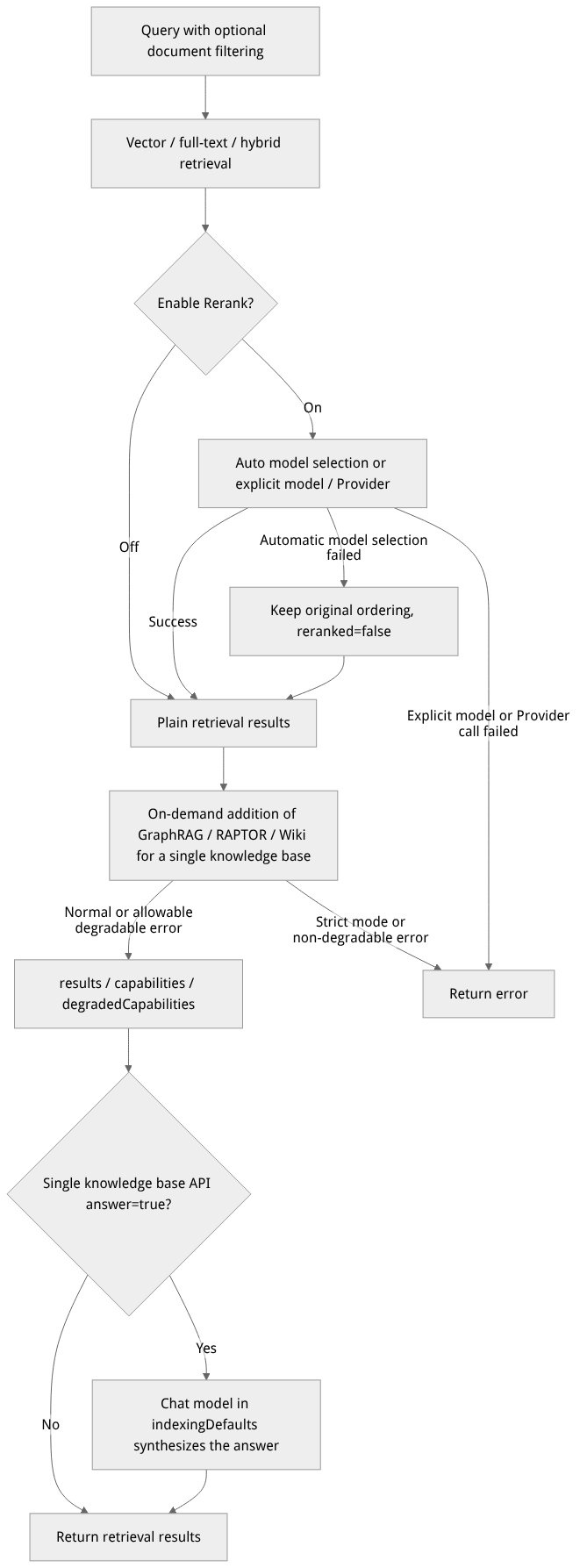
Flow diagram, not a runtime screenshot; read the relationships between steps or states along the arrows.
View the flow diagram in full size
allowDegraded controls the enhanced retrieval stage; rerank failures are handled separately depending on whether a model or Provider is explicitly selected. This diagram illustrates the single-library API flow; the Console does not provide answer synthesis controls.
Complete retrieval parameter reference
| Parameter name | Field identifier | Type | Default value | Value range and behavior |
|---|---|---|---|---|
| Query text | query | string | Required | Natural-language question or combination of keywords entered by the user. |
| Retrieval mode | searchMode | string | hybrid | Options: hybrid (vector + full-text hybrid), vector (pure vector retrieval), fulltext (pure full-text retrieval). |
| Number of returned results | limit | integer | Console 5 / API 10 | Number of items finally returned, range 1 to 100. |
| Pagination offset | offset | integer | 0 | Cross-library retrieval range 0–5000. |
| Similarity threshold | similarityThreshold | float | Uses the knowledge base default (0.35 in this example) | Range 0.0 to 1.0. Only applies to vector retrieval and the vector retrieval branch of hybrid; not used for the full-text branch, and it cannot guarantee answer correctness. |
| Vector weight | vectorWeight | float | Uses the knowledge base default (0.7 in this example) | Only effective under searchMode=hybrid (range 0.0 to 1.0). Controls the vector score proportion; the full-text score proportion is automatically 1 - vectorWeight. |
| Enable semantic rerank | rerank | boolean | false | When enabled, uses a rerank model to reorder the coarse retrieval candidate set. |
| Rerank model | rerankModel | string | Auto-select | You can also explicitly select a model with rerank capability enabled; explicit model or Provider call failures return an error. |
| Coarse retrieval candidate limit | recallLimit | integer | When omitted in the API, min(100, max(limit * 4, 20)); Console generates max(limit * 4, 20) by default and sends it explicitly | Only used when rerank is enabled; explicit values are 1–100 and must not be less than limit. When the Console's Limit is greater than 25, a valid value must be filled in manually; otherwise the generated value exceeds 100 and will be rejected by the API. |
| Allow enhanced retrieval degradation | allowDegraded | boolean | true | When GraphRAG / RAPTOR / Wiki encounters a degradable error, normal results are preserved; check capabilities / degradedCapabilities; it does not control rerank model failures. |
| Synthesize grounded answer | answer | boolean | false (can be enabled as needed) | Single-library API only: uses indexingDefaults.chatModel and optional chatProviderRef to synthesize an answer based on up to 12 evidence items, capped at 1024 Tokens. |
| Document anchor tag filter | documentTag | string | Optional | Exact match on {subProductId}_{sectionCode}_{fileKey}; first segment a letter or digit, second segment digits (both may be empty), last segment 32 hexadecimal characters. |
| Sub-product code filter | subProductId | string | Optional | Non-empty values are limited to 1–64 letters or digits; when passed together with documentTag, the AND (intersection) semantics apply. |
| Metadata filter conditions | metadataFilter | object | Optional | For a single knowledge base, use logic / conditions; for cross-knowledge-base search, key by knowledge base ID, and "*" only serves as the fallback for knowledge bases without dedicated configuration. |
Feature Entrypoints and Permission Matrix
Console Entry Points, REST API, SDK Methods, and Permission Matrix
| Console entrypoint / feature module | Frontend route path | Corresponding REST API endpoint | Server SDK method (Node.js / Python) | Required RBAC role / API Key scope | Cross-module dependency |
|---|---|---|---|---|---|
| Single knowledge base interactive retrieval and Q&A debugging | /console/project-default-enterprise-ai-hub-210/knowledge-base/kb-kb_enterprise_support/search | POST /v1/knowledgebases/{kbId}/search | createSearch() / create_search() | Roles: owner, admin, developer, memberScope: knowledgebases.read | Automatically applies the bound project-level lexicon (lex_enterprise_synonyms, lex_support_stopwords) |
| Semantic reranking (Rerank) | "Semantic Rerank (Rerank)" toggle on the retrieval test page | POST /v1/knowledgebases/{kbId}/search (rerank: true) | createSearch() / create_search() | Roles: owner, admin, developer, memberScope: knowledgebases.read | Depends on a qwen3.7-text-rerank model of dashscope-prod |
Grounded answer synthesis (Grounded Answer, answer=true) | In this version, access is via API / SDK; Console Search has no such toggle | POST /v1/knowledgebases/{kbId}/search (answer: true) | createSearch() / create_search() | Roles: owner, admin, developer, memberScope: knowledgebases.read | Depends on the qwen-plus model of dashscope-prod and indexingDefaults.chatModel in the knowledge base settings |
Knowledge-graph-enhanced multi-hop retrieval (useKnowledgeGraph=true) | "Enable knowledge graph enhancement" toggle on the retrieval test page (shown when enabled at deployment) | POST /v1/knowledgebases/{kbId}/search (useKnowledgeGraph: true) | createSearch() / create_search() | Roles: owner, admin, developer, memberScope: knowledgebases.read | Depends on GraphRAG being ready in Advanced index build (see knowledge graph exploration) |
| Federated search across multiple knowledge bases (Multi-KB Search) | Server-side API / agent workbench multi-KB mounting | POST /v1/knowledgebases/search | createMultiSearch() / create_multi_search() | Roles: owner, admin, developer, memberScope: knowledgebases.read | Supports unified cross-KB reranking, metadataFilter and offset pagination |
Feature Details and Operation Guide
One. Debugging hybrid retrieval and semantic reranking in the Console
Go to the Retrieval Test (Search) tab of
kb_enterprise_support.In the retrieval parameters area of the page, the following example values are for initial reference only; validate them against your project data before adjusting parameters:
Search mode: select
Hybrid(混合检索).Limit (number of results returned): set to
5.Similarity Threshold: set to
0.35.Vector Weight: enter
0.70(i.e., 70% semantic vector weight + 30% full-text keyword weight).Semantic reranking (Rerank): turn on the toggle, select a rerank model actually available to the project, and in the advanced options set Recall Limit (number of coarse retrieval candidates) to
20. Once a specific model is selected, a failed call returns an error.
In the query input box at the top, enter a typical compound customer service question:
OceanBase 向量索引构建报 4013 内存不足时如何排障?如果一线坐席无法解决,工单升级 SOP 是什么?Click the Search button and review the result list below the parameters area:
Retrieved Chunks (result list): lists the top 5 reranked chunk cards in order; each card shows the score, available source information, and a content excerpt; defer to the actual results returned this time.
View Source (source preview): when the source is available (
source.status=available) and asourceDocumentIdcan be parsed, the card shows a View source button. Click it to open the original document preview; results with an unavailable source or no document ID do not show this button.
Two. Using documentTag and subProductId for precise scope filtering
When the knowledge base contains multiple sub-product lines or multiple types of specification documents, and the business frontend clearly knows which specific sub-product (e.g., subProductId = "ob") or specific manual the user is asking about, you can pass scoping filter conditions with the retrieval request:
Filter values must correspond to actual documents; model, project, and knowledge base names must also be replaced according to the actual configuration.
In this version, Console Search has no documentTag / subProductId input controls. To limit scope, pass these fields via the API / SDK and check the sources in the returned results; when both fields are specified, filtering is by intersection.
Three. Calling single-KB retrieval and multi-KB cross-KB retrieval via the REST API
Business backends can integrate knowledge base retrieval capabilities through the following two standard endpoints:
1. Single knowledge base hybrid retrieval and answer synthesis (POST /v1/knowledgebases/{knowledgeBaseId}/search)
curl -X POST "https://appbuild.oceanbase.com/v1/knowledgebases/kb_enterprise_support/search" \
  -H "X-Appwrite-Project: enterprise-ai-hub-210" \
  -H "X-Appwrite-Key: <APPBASE_API_KEY>" \
  -H "Content-Type: application/json" \
  -d '{
    "query": "AI 网关的逻辑模型主备容灾和语义缓存是如何工作的?",
    "searchMode": "hybrid",
    "vectorWeight": 0.7,
    "similarityThreshold": 0.35,
    "limit": 5,
    "rerank": true,
    "rerankModel": "qwen3.7-text-rerank",
    "recallLimit": 20,
    "allowDegraded": true,
    "answer": true,
    "subProductId": "aigw"
  }'
2. Federated retrieval across multiple knowledge bases (POST /v1/knowledgebases/search)
When an organization has split knowledge bases by department and needs to retrieve across knowledge bases in a single request with unified reranking, call the multi-KB retrieval endpoint (supports metadataFilter and offset pagination). This endpoint does not provide the single-KB enhanced retrieval toggles or answer synthesis. Filter objects are keyed by knowledge base ID; "*" only serves as the fallback for knowledge bases without dedicated configuration, and a specific knowledge base's configuration overrides the fallback rather than merging with it. The example requires the documents to have the corresponding metadata fields extracted:
curl -X POST "https://appbuild.oceanbase.com/v1/knowledgebases/search" \
  -H "X-Appwrite-Project: enterprise-ai-hub-210" \
  -H "X-Appwrite-Key: <APPBASE_API_KEY>" \
  -H "Content-Type: application/json" \
  -d '{
    "knowledgeBaseIds": ["kb_enterprise_support"],
    "query": "分布式事务两阶段提交与工单流转规范",
    "searchMode": "hybrid",
    "vectorWeight": 0.65,
    "limit": 10,
    "offset": 0,
    "rerank": true,
    "rerankModel": "qwen3.7-text-rerank",
    "metadataFilter": {
      "*": {"logic": "and", "conditions": [{"name": "category", "comparison": "is", "value": "sop"}]}
    }
  }'
Completing a retrieval
In the Query field, enter a specific question, keeping the default Limit (5) and
hybridmode to establish a baseline.Check the relevance scores, available source information, and content excerpts in the result cards.
When the source status is available and the result includes a document ID, click View source to compare against the original text; PDF sources can also be previewed. After confirming that the excerpt genuinely supports the question, decide whether the result is usable. When there is no source entry, go back to Documents to locate the document and check whether the source is still accessible.
When comparing retrieval strategies, change only one option at a time and repeat the same question; with multiple knowledge base versions, first confirm which version is currently selected.
Retrieval scores are for ranking, not answer accuracy. If a high-score result cannot support the question, defer to the source's original text; if the expected source is missing, first go back to Documents to check ingestion status, chunks, and the selected knowledge base version.
Adjustable retrieval options
Limit: Console default is 5, range 1–100; defaults to 10 when not passed in the API.
Search mode:
hybrid(default) /vector/fulltext;similarityThresholddefaults to the knowledge base's retrieval defaults; in hybrid modevectorWeightis adjustable.Rerank: off by default; when enabled, you can auto-select or specify a Provider model. When the advanced fields are left blank, the Console generates
max(limit * 4, 20)and sends it explicitly. When Limit > 25, you must manually enter a value of 1–100 that is not less than Limit; otherwise the request exceeds the interface range and is rejected. This behavior differs from the server-side default when the API omits this parameter entirely.GraphRAG / Wiki: toggles appear only when the corresponding capability is enabled at deployment; keep them off for first comparisons; before enabling, confirm the corresponding index has been built and is available.
Allow fallback (
allowDegraded): enabled by default on the page; when an enhanced capability is unavailable, fallback results can be returned. CheckcapabilitiesanddegradedCapabilitiesto determine whether the expected index was used; when disabled, an unavailable enhanced capability may cause the request to fail.
For how to integrate filtering by document tags, cross-KB retrieval, and answer synthesis, see the knowledge base topics under the site's API / SDK navigation; this version of the Console Search page provides no corresponding controls.
Result troubleshooting
| Symptom | Next checks |
|---|---|
| Expected document not found | Go back to Documents to confirm document status and chunks, then check the selected version and similarity threshold |
| Relevant document hit but excerpt incomplete | Verify the original text in the source preview and check the document's parsing and chunk results |
| High score but content does not support the question | Defer to the source's original text; adjust the Query or retrieval options and compare again; do not interpret scores as answer accuracy |
FAQ (Frequently Asked Questions and Troubleshooting)
Q1: When should vectorWeight (vector weight) be raised or lowered?
Root cause analysis:
vectorWeightcontrols the weighting ratio between thetext-embedding-v3cosine similarity score and the full-text BM25 keyword match score in hybrid retrieval (searchMode=hybrid). Different business queries vary in sensitivity to literal precision versus semantic generalization.Resolution:
Raising
vectorWeight(e.g.,0.75–0.85): suitable for scenarios where user questions are highly colloquial, phrased in varied ways, and have low literal overlap with the documents' standard terminology (relying ontext-embedding-v3to capture deeper semantic similarity).Lowering
vectorWeight(e.g.,0.30–0.50, increasing full-text retrieval weight): suitable for scenarios where users often type exact error codes (e.g.,-4013), configuration parameter names (e.g.,chunkTokenNum), support ticket numbers (e.g.,TK-20261022-001), or API paths. In this case, combined with the project-level lexicon (lex_enterprise_synonyms), you can achieve excellent exact hit rates.
Q2: Why is no answer produced after enabling answer=true?
First read answer.status, then check the configuration and evidence:
| Status | Meaning and handling |
|---|---|
not_configured | Not configured indexingDefaults.chatModel; first configure an available Chat model and the chatProviderRef as needed. |
no_evidence | Model is configured, but no evidence is available for synthesis; check document ingestion, versions, and filter conditions. |
failed | Model call failed or returned an empty answer; troubleshoot together with answer.error, model availability, and rate limiting. |
succeeded | Text has been generated; you still need to verify whether the sources in results support the answer. |
The answer object contains status, text, model, latencyMs, and error. Sources come from the source / locator of the retrieval results; do not assume the answer object has a separate structured reference array. The answer model is taken from indexingDefaults; retrievalDefaults provides retrieval defaults such as vector weight and similarity threshold.
Q3: Why do some paragraphs that clearly contain the keywords not appear in the final Top 5 results?
Root cause analysis: Candidate chunks may have been truncated by an excessively high similarity threshold (
similarityThreshold), failed to reach the Rerank stage because they fell outside the first-stage coarse retrieval (recallLimit) window, or been excluded by thedocumentTag/subProductIdfilter conditions in the request.Resolution: Troubleshoot in the following three steps:
Check whether
similarityThresholdis too high: if the threshold is set too high (e.g.,0.85), the vector retrieval branch may filter out valid candidates; the full-text branch is not filtered by this threshold, so it is recommended to first lower the threshold to0.25–0.40and observe the raw score distribution;Check whether
recallLimitis too small: if Rerank is enabled, only chunks within the first-stage coarse retrieval toprecallLimitget a chance to participate in reranking; it is recommended to keeprecallLimit >= 20;Check whether excluded by
documentTagorsubProductIdfilters: confirm that no mismatched scoping filter conditions remain in the request.
Related Documentation
External data source integration and incremental sync with Yuque
GraphRAG, RAPTOR, and Advanced Knowledge Index Build Governance
Knowledge Graph Visualization Exploration and Community Reports
Knowledge Base Wiki Compilation, Conflict Adjudication, and Memory Export
Knowledge Base Immutable Version Management and Release Rollback
Project-level lexicons and retrieval/knowledge graph/agent collaborative governance
Knowledge Base Settings Hub, Default Policies, and Multimodal Image Understanding (VLM)