
Mounting enterprise knowledge base retrieval, long-term memory, and PowerContext collaboration
This manual corresponds to Agentbase v2.10.0 (same version as the Console).
A pure LLM conversation relies solely on the model's pre-trained parameters, so it can neither answer questions about the enterprise's private technical white papers and customer service SOP specifications, nor remember a returning customer's architecture environment and past troubleshooting preferences in a newly started session (Thread). The Agentbase agent workbench (Agent Runtime) natively integrates three context enhancement engines — enterprise knowledge base retrieval (Knowledge Search), long-term memory (Memory), and persistent context (PowerContext) — enabling the agent in every ReAct loop to both “retrieve the enterprise's authoritative documents accurately and display traceable citations” and “carry personalized user memory across sessions or hand off complex tasks”.
Feature Overview
In the flagship project 企业智能客服与知识中台 (enterprise-ai-hub-210, OceanBase Shared V2 mode), the agent workbench provides three composable integration capabilities with strict boundary governance around “domain knowledge injection” and “cross-session state continuity”:
Enterprise knowledge base retrieval integration with traceable source display (Knowledge Search):
After
knowledge_search_enabled: trueis enabled, you can bind 1 to 100 knowledge bases in ready status within the current project (e.g.,knowledge_base_ids: ["kb_enterprise_support"]).During reasoning, the agent autonomously decides whether to invoke the built-in
knowledge_retrieveretrieval tool (supportinghybridhybrid retrieval,vectorvector retrieval, andfulltextfull-text retrieval, withhybridas the default).Verifiable knowledge sources (Knowledge Sources): the Console automatically renders expandable knowledge source tags and document chunk previews below each answer; business applications can extract precise document citation information by reading the
TOOL_RESULTpayload in persisted messages.
Long-term memory integration (Memory, exclusive to
Shared V2):Once the project has initialized and enabled the memory (Memory) service, enable
memory_enabled: truein the agent workbench (and alignmemory_embedding_model_id: "text-embedding-v3"withmemory_embedding_dimensions: 1024).Each time the Runtime starts a
Runand prepares context, it automatically retrieves the user's personal profile and highly relevant multi-level factual memories (L0–L3) according to theuserIdof the current request (e.g.,user_zhangwei_001), and asynchronously consolidates valuable long-term facts during the conversation. Even if a brand-newThreadis created for the sameuserId, the agent still remembers the user's historical technology stack preferences.
PowerContext persistent context and cross-session task handoff integration:
Once the project has initialized the context (PowerContext) service, enabling
powercontext_enabled: truegrants the agent persistent context retrieval, precise source citation verification, user-explicitly-triggered cross-session task handoff (Task Handoff), and the ability to generate experience/skill candidates from troubleshooting evidence (Experience / Skill Candidates).
Memory and PowerContext strict either-or mutual exclusion contract:
In any valid Runtime configuration,
memory_enabledandpowercontext_enabledare strictly mutually exclusive (at most one may be enabled, and both may be disabled simultaneously); meanwhile, theknowledge_search_enabledknowledge base retrieval switch is fully independent and can be combined with Memory or PowerContext in any combination.
Core Concepts and Architecture
Architecture diagram of knowledge base retrieval, long-term memory, and PowerContext collaboration
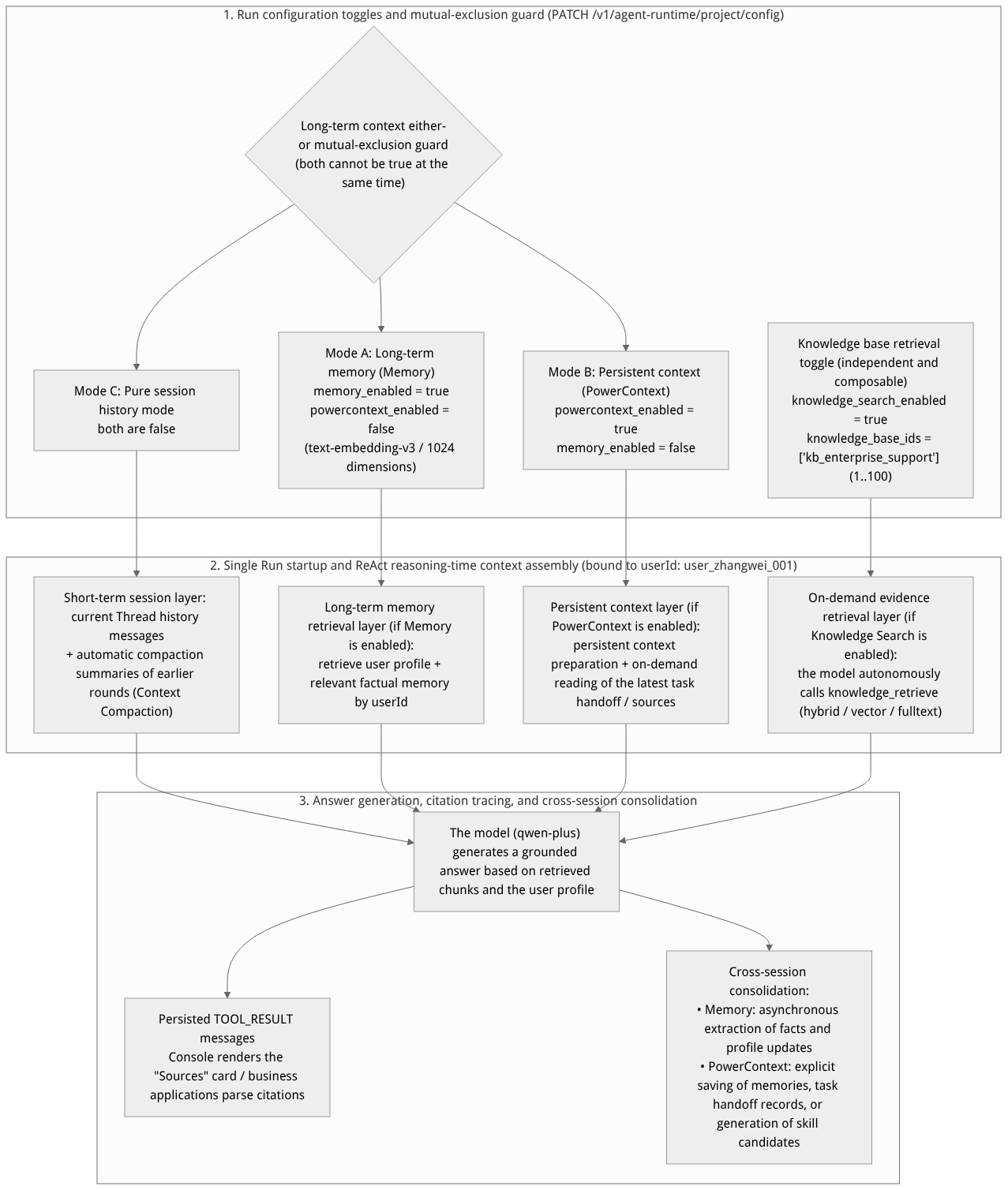
Flow diagram, not a runtime screenshot; read the relationships between steps or states along the arrows.
View the flow diagram in full size
Comparison table of the core responsibilities and boundaries of the four context mechanisms
In actual engineering, developers often conflate “thread history (Thread History)”, “context compaction (Context Compaction)”, “long-term memory (Memory / PowerContext)”, and “enterprise knowledge base (Knowledge Base)”. The table below clearly delineates the division of responsibilities and lifecycle of the four within Agent Runtime:
| Dimension | Thread History | Automatic Context Compaction | Long-term Memory / Persistent Context (Memory / PowerContext) | Enterprise Knowledge Base Retrieval (Knowledge Search) |
|---|---|---|---|---|
| Core problem solved | “What was said earlier in this conversation?” (maintaining referential coherence within the current single session window) | “What if the current session is too long to fit into the model window?” (compressing earlier turns of the current session to control input tokens) | “What personal background, preferences, or unfinished tasks has this user left in past sessions?” | “What do the enterprise policies, product architecture white papers, and troubleshooting manuals stipulate?” |
| Data isolation scope | Single project + single userId + single thread_id | Single project + single userId + single thread_id | Single project + across all thread_id (shared by userId) | Project-level sharing (limited to the 1–100 knowledge bases checked in knowledge_base_ids) |
| Impact of creating or archiving a Thread | Creating a Thread starts a blank conversation history; archiving a Thread hides that conversation | Exists only with its owning Thread; a new Thread starts computing the window budget from zero | Fully preserved and effective across sessions: archiving old Threads never deletes extracted long-term memories or task handoffs | Fully independent: knowledge base documents and chunks are unaffected by any session creation or archiving |
| Trigger mechanism | Automatically read in order on every Run | Automatically triggered when a single Run's input approaches context_window_tokens - reserved_output_tokens | Automatically retrieves profile/context at the start of a Run, or the model invokes memory/handoff tools on demand during reasoning | The model autonomously decides during the ReAct loop whether to invoke knowledge_retrieve |
Roles, Entry Points, and Relationships
Prerequisites, permission scopes, and configuration mapping matrix
| Integration capability | Required project prerequisites | Workbench Config Key fields | Scopes required by the caller's API Key | Permission and security boundary notes |
|---|---|---|---|---|
| Enterprise knowledge base retrieval (Knowledge Search) | 1. A knowledge base has been created under knowledge base (/knowledge-base) (e.g., kb_enterprise_support); 2. Documents have been uploaded and asynchronous ingestion completed (document status is ready). | knowledge_search_enabled: trueknowledge_base_ids: ["kb_enterprise_support"] | Only agent-runtime.project is required (the Runtime internally retrieves bound knowledge bases via server-side trusted credentials, so there is no need to grant knowledgebases.read to the calling Key) | The model can only retrieve knowledge bases within the knowledge_base_ids whitelist that belong to the current project; prompts cannot access other unbound knowledge bases beyond their authorization. |
| Long-term memory (Memory) | 1. The project must use the OceanBase Shared V2 table mode; 2. Initialization has been completed under memory ( /memory) with status active (locking text-embedding-v3 1024 dimensions). | memory_enabled: truepowercontext_enabled: falsememory_embedding_model_id: "text-embedding-v3"memory_embedding_dimensions: 1024 | Only agent-runtime.project is required (memory.read / memory.write is only needed when directly calling the /v1/memory/* public API to manage memory) | Memory is retrieved in strict isolation by the userId passed in with the request; merely turning on the memory_enabled switch will not automatically create Memory table groups for projects that have not been initialized. |
| Persistent context (PowerContext) | Project-level PowerContext service initialization has been completed under context (/powercontext). | powercontext_enabled: truememory_enabled: false | Only agent-runtime.project is required | Strictly mutually exclusive with memory_enabled (only one of the two); both task handoff (Handoff) and skill candidate approval require explicit user instruction to trigger. |
Feature Details and Operation Guide
1. Mounting the enterprise knowledge base (kb_enterprise_support) and verifying traceable Q&A
1. Enabling Knowledge Search in the Console workbench and verifying citation cards
Confirm that the 4 core technical documents under project knowledge base
kb_enterprise_support(企业智能客服与技术支持知识库) (including “OceanBase Distributed Transactions and Vector Index Troubleshooting Guide.md”, “AI Gateway Model Routing and Rate Limiting Billing Specification.md”, etc.) are all inreadystatus (see knowledge base overview).Go to
/console/project-default-enterprise-ai-hub-210/agent-runtimeand locate the knowledge base retrieval (Knowledge Search) section in the right-side configuration panel:Turn on the enable knowledge base retrieval switch (corresponding to
knowledge_search_enabled: true);In the knowledge base multi-select list, check
kb_enterprise_support(Enterprise Intelligent Customer Service and Technical Support Knowledge Base) (up to 100 different knowledge bases can be selected; if the retrieval switch is temporarily turned off later, the selected knowledge base list will be preserved in the configuration for easy one-click re-enabling next time);Wait for the top-right corner of the configuration panel to show all changes saved.
Create a new session in the middle dialog and enter a question:
当 OceanBase 向量索引构建报 4013 错误时,核心根因是什么?应该调整哪个租户级参数?Verify the retrieval steps and knowledge source cards:
Expand the execution process above the answer to see that the agent issued a
knowledge_retrievetool call (by default using thehybridvector + full-text hybrid retrieval mode, automatically expanding4013intoOB_ALLOCATE_MEMORY_FAILEDusing the bound lexicon);Below the answer body generated by the model, click to expand the knowledge sources (Knowledge Sources) tab to view the specific document names hit in this retrieval round (“OceanBase Distributed Transactions and Vector Index Troubleshooting Guide.md”), chunk preview text, and locating metadata.
Accurately understanding “knowledge sources”: the “knowledge sources” displayed below the answer are the set of reference segments actually retrieved by
knowledge_retrievein this round'sRunand fed into the model context, used for traceability verification; it does not mean the model verbatim cited every retrieved segment in the final answer.
2. Enabling knowledge base retrieval via the server-side API and parsing citation sources from TOOL_RESULT
Note: SSE streaming text delta events (TEXT_MESSAGE_CONTENT) only transmit answer text and do not include the complete structured source list. If the enterprise frontend needs to render clickable citation document cards below the answer, it should read the TOOL_CALL and TOOL_RESULT records in the persisted message API GET /runs/{runId}/messages after Run completes (or after receiving the TOOL_CALL_RESULT notification):
# 1. Update the project Runtime configuration, enable knowledge base retrieval and bind kb_enterprise_support
curl -fsSL -X PATCH "${APPBASE_ENDPOINT}/agent-runtime/project/config" \
  -H "X-Appwrite-Project: ${APPBASE_PROJECT_ID}" \
  -H "X-Appwrite-Key: ${APPBASE_API_KEY}" \
  -H "Content-Type: application/json" \
  -d '{
    "knowledge_search_enabled": true,
    "knowledge_base_ids": [
      "kb_enterprise_support"
    ]
  }'

# 2. After the Run completes, fetch all persisted messages of this run (including TOOL_CALL and TOOL_RESULT)
curl -fsSL -X GET "${APPBASE_ENDPOINT}/agent-runtime/project/runs/run_01j8x9p1q2r3s4t5u6v7w8x9y0/messages?userId=user_zhangwei_001&after=0&limit=100" \
  -H "X-Appwrite-Project: ${APPBASE_PROJECT_ID}" \
  -H "X-Appwrite-Key: ${APPBASE_API_KEY}"
Example of the paired structure of TOOL_CALL and TOOL_RESULT in the response:
[
  {
    "message_id": "msg_usr_101",
    "thread_id": "thd_01j8x9k2m4n6p8q0r2s4t6u8v0",
    "run_id": "run_01j8x9p1q2r3s4t5u6v7w8x9y0",
    "message_seq": 3,
    "message_type": "USER",
    "payload": "当 OceanBase 向量索引构建报 4013 错误时,应该调整哪个租户级参数?",
    "tool_call_id": null,
    "created_at": "2026-10-22T09:20:00Z"
  },
  {
    "message_id": "msg_tc_102",
    "thread_id": "thd_01j8x9k2m4n6p8q0r2s4t6u8v0",
    "run_id": "run_01j8x9p1q2r3s4t5u6v7w8x9y0",
    "message_seq": 4,
    "message_type": "TOOL_CALL",
    "payload": {
      "call_id": "call_kb_8801",
      "tool_name": "knowledge_retrieve",
      "source": "SERVER",
      "arguments": {
        "query": "OceanBase 向量索引 4013 OB_ALLOCATE_MEMORY_FAILED 租户参数",
        "search_mode": "hybrid",
        "knowledge_base_ids": ["kb_enterprise_support"]
      }
    },
    "tool_call_id": "call_kb_8801",
    "created_at": "2026-10-22T09:20:02Z"
  },
  {
    "message_id": "msg_tr_103",
    "thread_id": "thd_01j8x9k2m4n6p8q0r2s4t6u8v0",
    "run_id": "run_01j8x9p1q2r3s4t5u6v7w8x9y0",
    "message_seq": 5,
    "message_type": "TOOL_RESULT",
    "payload": {
      "call_id": "call_kb_8801",
      "tool_name": "knowledge_retrieve",
      "status": "succeeded",
      "chunks": [
        {
          "knowledge_base_id": "kb_enterprise_support",
          "document_id": "doc_ob_troubleshooting",
          "document_title": "OceanBase分布式事务与向量索引排障指南.md",
          "chunk_id": "chk_ob_4013_01",
          "score": 0.918,
          "content": "错误码 -4013 (OB_ALLOCATE_MEMORY_FAILED):在构建 HNSW 向量索引时若触发 4013 报错,表明租户向量内存区配额不足。请将租户参数 ob_vector_memory_limit_percentage 从默认值调高至 30%~40%。"
        }
      ]
    },
    "tool_call_id": "call_kb_8801",
    "created_at": "2026-10-22T09:20:03Z"
  },
  {
    "message_id": "msg_ast_104",
    "thread_id": "thd_01j8x9k2m4n6p8q0r2s4t6u8v0",
    "run_id": "run_01j8x9p1q2r3s4t5u6v7w8x9y0",
    "trace_id": "7f8e9d0c1b2a3f4e5d6c7b8a9f0e1d2c",
    "message_seq": 6,
    "message_type": "ASSISTANT",
    "payload": "根据《OceanBase分布式事务与向量索引排障指南.md》,构建 HNSW 向量索引时报 `-4013`(`OB_ALLOCATE_MEMORY_FAILED`)是因为租户向量内存区配额不足。建议将租户级参数 `ob_vector_memory_limit_percentage` 调高至 **30%~40%**。",
    "tool_call_id": null,
    "created_at": "2026-10-22T09:20:05Z"
  }
]
2. Enabling long-term memory (Memory) for cross-session user profile and factual retrieval
When an enterprise wants the intelligent customer service agent to continuously remember VIP customer Zhang Wei's (user_zhangwei_001) production cluster specifications and troubleshooting habits across different support ticket sessions (different Thread), it can enable Memory integration:
Confirm the project's Memory is ready: go to the Console's left navigation memory (
/memory), confirm that the memory service status of projectenterprise-ai-hub-210is可用(Active), and that the bound Embedding model istext-embedding-v3underdashscope-prod(1024dimensions) (see memory overview and enablement).Enable Memory in the agent workbench (and disable PowerContext at the same time): In the right-side configuration panel of the workbench, turn on the long-term memory (Memory) switch (the Console will automatically switch the mutually exclusive PowerContext to off), or configure it via API:
curl -fsSL -X PATCH "${APPBASE_ENDPOINT}/agent-runtime/project/config" \
  -H "X-Appwrite-Project: ${APPBASE_PROJECT_ID}" \
  -H "X-Appwrite-Key: ${APPBASE_API_KEY}" \
  -H "Content-Type: application/json" \
  -d '{
    "memory_enabled": true,
    "powercontext_enabled": false,
    "memory_embedding_model_id": "text-embedding-v3",
    "memory_embedding_dimensions": 1024,
    "knowledge_search_enabled": true,
    "knowledge_base_ids": ["kb_enterprise_support"]
  }'
Verify cross-Thread memory continuity:
In session A (
thd_session_a), send a message with"userId": "user_zhangwei_001":"我负责的核心交易集群运行在 OceanBase 4.3 Shared V2 模式下,租户规格为 32C128G,请帮我记住这个环境信息。"Then, for the same
"userId": "user_zhangwei_001", create a brand-new session B (thd_session_b) and ask directly:"基于我负责的集群租户规格,如果将 ob_vector_memory_limit_percentage 设为 30%,大约会分配多少 GB 的向量内存?"At the
Runstartup of session B, the Runtime automatically retrieves Zhang Wei's user profile and32C128Genvironment facts from the Memory service viauser_zhangwei_001, and directly computes approximately38.4 GBusing the computation rules fromkb_enterprise_support, so the user does not need to re-explain the context in every new session.If another engineer
"userId": "user_lina_002"creates a session at this point and asks the same question, becauseuserIdenforces strict physical isolation, the agent will not read any of Zhang Wei's cluster information.
3. Enabling PowerContext for persistent context and cross-session task handoff
If your business scenario emphasizes explicit cross-session handoff (Task Handoff) of long-cycle complex tasks, precise verification of raw source citations, and distilling experience/skill candidates from real task traces (Experience / Skill Candidates), you can switch to PowerContext mode after completing the project's context (/powercontext) initialization:
Switch the configuration to PowerContext mode (
powercontext_enabled: true):curl -fsSL -X PATCH "${APPBASE_ENDPOINT}/agent-runtime/project/config" \ -H "X-Appwrite-Project: ${APPBASE_PROJECT_ID}" \ -H "X-Appwrite-Key: ${APPBASE_API_KEY}" \ -H "Content-Type: application/json" \ -d '{ "powercontext_enabled": true, "memory_enabled": false, "knowledge_search_enabled": true, "knowledge_base_ids": ["kb_enterprise_support"] }'Explicitly trigger cross-session task handoff and new-session continuation:
Important mechanism note: when an ordinary
Runends, a task handoff record is not automatically generated; a task handoff must be triggered by the user issuing an explicit handoff instruction in the conversation.Save the handoff in the current troubleshooting session: when troubleshooting is halfway done and you need to change shifts or start a new session, send the instruction:
"请整理当前工单 TK-20261022-001 的排障目标、已确认的事实、未完成检查项和下一步计划,并保存一份任务交接记录。"The Runtime will call the internal handoff tool to save the current task state in a structured way.Resume and continue the task in a new session: after creating a new
Thread, send the instruction:"请读取最新的任务交接记录,继续完成未排查的检查项。"The agent will then pull the handoff checklist and associated reference sources saved from the previous session and seamlessly continue the unfinished work.Governance of experience and skill candidates: in PowerContext mode, the agent can also, at the user's request, generate Experience or Skill candidates from verified troubleshooting evidence, and update candidate status when the user explicitly instructs approval or rejection (note: generating a candidate does not equal automatic approval taking effect, and reading a skill description does not equal automatically obtaining tool execution authorization).
FAQ and Troubleshooting
Q1: When both memory_enabled and powercontext_enabled are set to true, why does the API return HTTP 400 INVALID_REQUEST?
Cause and troubleshooting steps: In the Agent Runtime architecture, the standalone Memory service and the PowerContext persistent context service are two long-term context systems with overlapping responsibilities but different underlying storage and tool contracts, so the runtime configuration enforces strict either-or mutual exclusivity.
In the Console UI, turning on one switch automatically turns off the other;
When calling via
PATCH /v1/agent-runtime/project/config, to switch from Memory to PowerContext you must explicitly pass{"powercontext_enabled": true, "memory_enabled": false}in the same JSON request body.
Q2: With knowledge_search_enabled: true enabled and a knowledge base checked, why is no "Knowledge Sources" shown below an answer in a certain conversation?
Cause and troubleshooting steps: Please troubleshoot in the following three steps:
Check whether the model initiated a retrieval call: expand the execution process above that answer (or check whether
GET /runs/{runId}/messagescontains atool_name: "knowledge_retrieve"forTOOL_CALL). For pure greetings (such as“你好”) or common-sense questions, the model may judge that retrieval is unnecessary and answer directly. To force retrieval, you can state explicitly insystem_prompt: "before answering any product or technical question, you must first callknowledge_retrieveto search the knowledge base."Check knowledge base document status and scope: confirm that documents in the checked knowledge base (e.g.,
kb_enterprise_support) are all inreadystatus (rather thanuploadedorfailed), and that retrieval returned non-empty chunks (thechunksarray is not empty).Distinguish Runtime internal retrieval from knowledge base public APIs: the Runtime's built-in
knowledge_retrieveuses the knowledge base's basic retrieval results (hybrid/vector/fulltext), which does not automatically invoke all standalone advanced knowledge graph exploration APIs on the knowledge base public API.
Q3: Why does saving the configuration with memory_enabled: true enabled throw an error saying the Memory service is not ready?
Cause and troubleshooting steps: Turning on the memory_enabled switch in the agent workbench only establishes a binding relationship; it does not automatically initialize the Memory service for the project. Please check first:
Whether the current project runs in the OceanBase
Shared V2table storage mode (JsonTableprojects do not support Memory);Go to the Memory (
/memory) page in the left navigation and confirm that first-time initialization is complete and the top status shows可用(Active);Confirm that the
memory_embedding_model_id(e.g.,"text-embedding-v3") andmemory_embedding_dimensions(e.g.,1024) filled inPATCH /configare fully compatible with the vector model and dimensions actually initialized for the project's Memory.
Related Documentation
Agent workbench (Agent Runtime) overview, architecture, and quick start
Agent model, prompts, context compaction, and lexicon interception configuration
Multi-turn conversations (Threads), asynchronous Runs, and resumable SSE event streams
Business tool gateway (AI Gateway / MCP), client-side tools and skill packages (Skills)
Multi-way hybrid retrieval, reranking, and grounded QA synthesis
Experience and skill knowledge distillation (Memory Evolution)