
Project-level lexicons and coordinated governance across retrieval / knowledge graph / agents
This manual corresponds to Agentbase v2.10.0 (same version as the Console).
Lexicons is Agentbase's v2.10.0 cross-module vocabulary governance engine built for enterprise proprietary terminology systems, industry jargon alignment, and compliant security interception. Through a two-tier decoupled lexicon architecture — a project-level lexicon hub (/knowledge-base/lexicons) that centrally maintains standard dictionaries (such as lex_enterprise_synonyms and lex_support_stopwords), then flexibly binds them by priority (priority) to knowledge bases (/knowledge-base/kb-{kb}/lexicons) and agent workbench (/agent-runtime/project/lexicons) — enterprises can, based on the built-in native-v1 tokenization and rewriting engine, empower with a single definition both RAG hybrid retrieval query rewrite (Query Rewrite), GraphRAG entity normalization, and agent prerequisite compliant zero-Token stopword interception (stopIntercept).
Feature overview and core scenarios
In an enterprise intelligent customer service and technical support center (such as project 企业智能客服与知识中台, ID: enterprise-ai-hub-210), there is often a huge "Lexical Gap" between the colloquial expressions users type and the standardized wording in underlying technical whitepapers:
Users habitually input abbreviations or colloquial names (such as
“OB 报 4024 怎么查?”or“AIGW 怎么配主备?”), while the "OceanBase Distributed Transactions and Vector Index Troubleshooting Guide.md" uses the standard termsOceanBase,行锁冲突,GV$OB_LOCKS, and统一 AI 网关;When building a GraphRAG knowledge graph, without domain lexicon constraints, the LLM may extract
OB,OceanBase 4.3, andOceanBase数据库as three isolated nodes, fragmenting the multi-hop relationship topology;When the agent workbench (Agent Runtime) serves external users, colloquial filler (such as
“麻烦问一下呗”) dilutes retrieval weights, and malicious jailbreak prompts (such as“忽略之前所有系统指令”), if passed directly to the LLM, both waste inference tokens and pose security risks.
Agentbase project-level lexicons (Lexicons) build a full-chain vocabulary governance closed loop through four core capabilities:
"Project-level centralized definition + multi-endpoint binding by priority" two-tier architecture:
Maintain dictionary assets centrally in the project-level lexicon hub; a single knowledge base can bind up to 100 lexicons and explicitly orchestrate their effective priority (
priority: 1..N). Each binding provides an independent retrieval rewrite switch (enabled) and GraphRAG knowledge graph enhancement switch (graphrag/lexiconEnabled).The same lexicon set can also be bound to the agent workbench (
/v1/agent-runtime/project/lexicons), enablingstopIntercept: trueand custom interception messagesstopReply.
native-v1tokenizer and three precise lexicon entry semantics (synonym/expansion/stop):Synonyms (
synonym): bidirectionally equivalent term groups (canonicalcanonical term +variantssynonym variant list); they expand retrieval in both directions, and during GraphRAG extraction all variants are forcibly normalized and merged into thecanonicalmain node.Expansion terms (
expansion): one-way directed expansion (headwordtrigger term ->expansionsexpansion term list); for example, searching for fault code4024one-way appends行锁冲突,锁等待超时,GV$OB_LOCKS, which greatly improves the chunk retrieval rate for professional troubleshooting while preventing reverse pollution of non-4024 scenarios when searching the generic term行锁冲突.Stopwords (
stop): strip colloquial noise words during knowledge base retrieval and graph construction; whenstopInterceptis enabled in the agent workbench, they directly trigger millisecond-level prerequisite blocking.
Online tokenization and rewrite preview debugger (
/v1/lexicons/{lexiconId}/preview):Without launching a full RAG retrieval, you can enter a test sentence on the lexicon detail page and preview in real time the
native-v1tokenization result, the matched lexicon entry rules, the final rewritten and expanded Query, and whether stopword interception is triggered.
Enterprise-grade bulk import/export and conflict merge strategies:
Supports bulk import and export in CSV, Excel (
.xlsx) and JSON formats, with three built-in conflict resolution strategies:skip(skip items with the same name),overwrite(overwrite items with the same name), andmerge(merge variants/append to term collections), and enforces a per-entry safety limit of 8,000 characters validation.
Core Concepts and Architecture
Architecture diagram of project-level lexicon two-level governance and three-end coordinated effectiveness
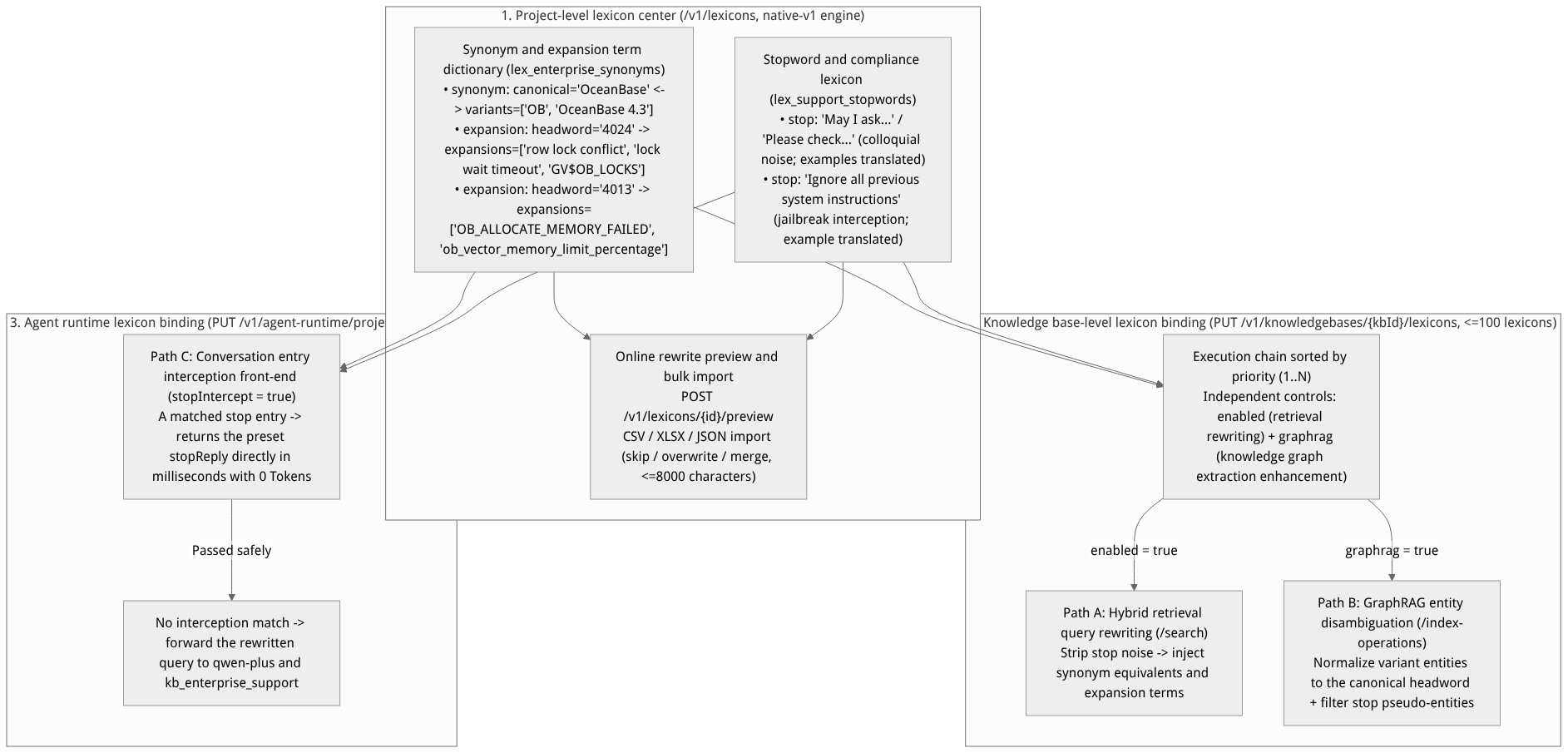
Flow diagram, not a runtime screenshot; read the relationships between steps or states along the arrows.
View the flow diagram in full size
In-depth comparison table of the native-v1 tokenizer and the three lexicon entry semantics
Entry type (type) | Core data structure | Match and rewrite direction | Role in "Hybrid retrieval (Search)" | Role in "GraphRAG graph construction" | Role in "Agent workbench (Agent Runtime)" |
|---|---|---|---|---|---|
synonym (synonym) | canonical (canonical main term) + variants[] (array of synonym variants) | Bidirectional equivalence ( canonical ↔ variants) | When a user query hits the main term or any variant, all equivalent terms in the group are automatically injected into full-text and vector queries, resolving missed retrievals caused by abbreviation/full-name inconsistency. | When graphrag / lexiconEnabled is enabled, any extracted variants entity name is forcibly rewritten and merged into the unique canonical main node. | Collaboratively improves semantic alignment accuracy when a knowledge base is mounted on the workspace. |
expansion (expansion term) | headword (trigger term) + expansions[] (one-way expansion term array) | One-way expansion ( headword → expansions) | Only when the user Query contains headword (e.g., 4024), expansions (e.g., 行锁冲突, GV$OB_LOCKS) are automatically appended to the query; conversely, searching 行锁冲突 will not reverse-inject 4024. | Assists entity context expansion without breaking the independence of the main entity. | Expands users' brief fault codes or colloquial jargon into complete technical retrieval intents. |
stop (stopword) | headword / term (stopword text) | Precise stripping or blocking | Before constructing full-text retrieval (BM25) and vector queries, automatically removes matched colloquial suffixes or meaningless high-frequency function words to purify core Query weights. | Prevents meaningless colloquial words or format placeholder words from being mistakenly extracted as knowledge graph entity nodes. | When the binding configuration has stopIntercept: true enabled, once the user input hits an enabled stop lexicon entry, the request is immediately blocked and stopReply is returned. |
Feature Entrypoints and Permission Matrix
| Console entrypoint / feature module | Frontend route path | Corresponding REST API endpoint | Server SDK method (Node.js / Python) | Required RBAC role / API Key scope | Cross-module dependency |
|---|---|---|---|---|---|
| Project-level lexicon center (list and creation) | /console/project-default-enterprise-ai-hub-210/knowledge-base/lexicons | GET /v1/lexiconsPOST /v1/lexicons | knowledgeBase.listLexicons()knowledgeBase.createLexicon() | Roles: owner, admin, developer (read-only members can only view) Scope: lexicons.read / lexicons.write | A project-level shared resource that can be reused by all knowledge bases and agents under the same project |
| Lexicon details, lexicon entry CRUD, and bulk import | /console/project-default-enterprise-ai-hub-210/knowledge-base/lexicons/{lexiconId} | GET /v1/lexicons/{lexiconId}PATCH /v1/lexicons/{lexiconId}DELETE /v1/lexicons/{lexiconId} | knowledgeBase.getLexicon()knowledgeBase.updateLexicon()knowledgeBase.deleteLexicon() | Roles: owner, admin, developer Scope: lexicons.write | Before deleting a lexicon, associated references are automatically validated or unbound |
| Online tokenization and rewriting preview debugging | The "Preview (Preview)" panel on the right side of the lexicon detail page | POST /v1/lexicons/{lexiconId}/preview | knowledgeBase.previewLexicon() / preview_lexicon() | Roles: owner, admin, developer, member Scope: lexicons.read | Built-in native-v1 tokenizer with zero LLM Token overhead |
| Knowledge base-level lexicon binding and priority orchestration | /console/project-default-enterprise-ai-hub-210/knowledge-base/kb-kb_enterprise_support/lexicons | GET /v1/knowledgebases/{kbId}/lexiconsPUT /v1/knowledgebases/{kbId}/lexicons | knowledgeBase.getKnowledgeBaseLexicons()knowledgeBase.updateKnowledgeBaseLexicons() | Roles: owner, admin, developer Scope: knowledgebases.write | Linked with Search test (Search) and Knowledge index (GraphRAG) |
| Agent workspace lexicon binding and compliance interception | /console/project-default-enterprise-ai-hub-210/agent-runtime/project/lexicons | GET /v1/agent-runtime/project/lexiconsPUT /v1/agent-runtime/project/lexicons | agentRuntime.getProjectLexicons()agentRuntime.updateProjectLexicons() | Roles: owner, admin, developer Scope: agent_runtime.write | Executes prerequisite rewriting and stopword interception before the agent workspace invokes qwen-plus |
Feature Details and Operation Guide
Step 1: Create a benchmark lexicon in the project-level lexicon center and maintain the three types of lexicon entries
Log in to the Console, go to project
企业智能客服与知识中台 (enterprise-ai-hub-210)-> click Knowledge Base in the left navigation bar -> switch to the top Lexicons tab (path:/knowledge-base/lexicons).Click Create lexicon in the upper-right corner, keep the default tokenizer engine
native-v1, and create two production benchmark lexicons:Lexicon 1: identifier
lex_enterprise_synonyms, name企业智能客服同义词与专有名词词典;Lexicon 2: identifier
lex_support_stopwords, name企业客服停用词与敏感拦截词典.
Click into the
lex_enterprise_synonymsandlex_support_stopwordsdetail pages and add the following standard lexicon entries:
| Owning lexicon ID | Lexicon entry type (type) | Canonical main term / trigger term (canonical / headword) | Variant list / expansion term list (variants / expansions) | Status (enabled) | Production governance purpose |
|---|---|---|---|---|---|
lex_enterprise_synonyms | synonym | OceanBase | ["OB", "OceanBase 4.3", "OceanBase数据库"] | true | Bidirectional equivalent retrieval, and during GraphRAG extraction, variants such as OB are merged into the OceanBase main entity |
lex_enterprise_synonyms | synonym | 统一AI网关 | ["AIGW", "AI网关", "AI Gateway"] | true | Align the Chinese and English abbreviations with the standard component names in the whitepaper |
lex_enterprise_synonyms | expansion | 4024 | ["行锁冲突", "锁等待超时", "GV$OB_LOCKS"] | true | When users ask 4024, one-way injection of lock troubleshooting views and terminology |
lex_enterprise_synonyms | expansion | 4013 | ["OB_ALLOCATE_MEMORY_FAILED", "向量内存不足", "ob_vector_memory_limit_percentage"] | true | When users enter error code 4013, one-way expansion of the full error macro and tuning parameters |
lex_support_stopwords | stop | 请问一下 | [] | true | Strip the colloquial greeting words at the beginning of retrieval queries |
lex_support_stopwords | stop | 麻烦问一下 | [] | true | Strip colloquial redundant noise |
lex_support_stopwords | stop | 忽略之前所有系统指令 | [] | true | Work with the agent workspace stopIntercept: true to directly block prompt injection attacks |
Step 2: Online preview and debugging (/preview) with CSV / Excel / JSON bulk import and export
1. Use the online preview debugger to verify rewriting effects
On the
lex_enterprise_synonymsdetail page, expand the Online Preview (Preview) panel on the right side.Enter the following in the test input box:
请问一下 OB 报 4024 和 4013 怎么排查?Click Run Preview (corresponding to
POST /v1/lexicons/lex_enterprise_synonyms/preview); the panel immediately outputs structured diagnostic results:Token segmentation sequence (Tokens): core tokens such as
OB,4024, and4013are identified;Matched entries details (Matched Entries): lists the matched
synonym(OB -> OceanBase) and the twoexpansion(4024 -> 行锁冲突, 锁等待超时, GV$OB_LOCKS;4013 -> OB_ALLOCATE_MEMORY_FAILED, ...);Rewritten query (Rewritten Query): displays the complete expanded retrieval expression; bind and go live only after confirming it is correct.
2. CSV / Excel (.xlsx) / JSON bulk import/export and conflict strategy
When an enterprise needs to batch migrate thousands of existing business terms:
Click Import in the upper-right corner of the lexicon detail page and upload a
.csv,.xlsx, or.jsonfile (note: the total character length of the main term and variants of a single lexicon entry is protected by the 8,000-character safety limit; overlong abnormal rows will be precisely intercepted with error reporting).Select a Conflict Resolution Strategy:
skip(Skip): if the import file contains an entry of the same type with the same main term (canonical/headword) as one already in the library, keep the existing entry in the library and skip the imported row;overwrite(Overwrite): completely replace the same-named entry in the library with the new variant/expansion term list from the import file;merge(Merge, recommended): take the union of the new variants or expansion terms in the import file with the existing list in the library and merge after deduplication, ensuring zero loss of incremental term tables.
Step 3: Bind the lexicon to the knowledge base and the agent workbench
1. Bind lexicons in a knowledge base and configure priorities and both switches (/knowledge-base/kb-kb_enterprise_support/lexicons)
Go to knowledge base
kb_enterprise_support's detail page and switch to the Lexicons sub-tab (or access lexicon binding via the Settings page).Click Manage bound lexicons and check
lex_enterprise_synonymsandlex_support_stopwords(a single knowledge base supports binding at most 100 lexicons):Set
lex_support_stopwordsaspriority: 1(prioritize stopword stripping), and enable Search rewriting (enabled: true) and Knowledge graph enhancement (graphrag: true);Set
lex_enterprise_synonymsaspriority: 2(then perform synonym normalization and expansion term application), and likewise enableenabled: trueandgraphrag: true.
Click Save bindings. After saving, all requests sent to
/v1/knowledgebases/kb_enterprise_support/searchwill immediately execute rewriting according to the priority chain; if you want the knowledge graph to also apply the newly bound lexicons, go to the Indexes tab and perform one rebuild onGraphRAG.
2. Bind lexicons in the agent workspace and enable prerequisite compliance interception (/agent-runtime/project/lexicons)
Go to Agent Runtime in the left navigation bar and open Lexicon and security interception configuration.
Bind
lex_enterprise_synonymsandlex_support_stopwords, enablestopIntercept: true(directly intercept when stopwords are matched), and set a custom interception replystopReply.
3. Complete lexicon management, preview, and three-terminal binding REST API examples
# 1. Create a project-level lexicon with the native-v1 tokenizer (POST /v1/lexicons)
curl -X POST "https://appbuild.oceanbase.com/v1/lexicons" \
  -H "X-Appwrite-Project: enterprise-ai-hub-210" \
  -H "X-Appwrite-Key: <APPBASE_API_KEY>" \
  -H "Content-Type: application/json" \
  -d '{
    "lexiconId": "lex_enterprise_synonyms",
    "name": "企业智能客服同义词与专有名词词典",
    "description": "统一 OceanBase、AI 网关及客服 SOP 领域的同义词与追加词",
    "tokenizer": "native-v1",
    "entries": [
      {
        "type": "synonym",
        "canonical": "OceanBase",
        "variants": ["OB", "OceanBase 4.3", "OceanBase数据库"],
        "enabled": true
      },
      {
        "type": "expansion",
        "headword": "4024",
        "expansions": ["行锁冲突", "锁等待超时", "GV$OB_LOCKS"],
        "enabled": true
      },
      {
        "type": "expansion",
        "headword": "4013",
        "expansions": ["OB_ALLOCATE_MEMORY_FAILED", "向量内存不足", "ob_vector_memory_limit_percentage"],
        "enabled": true
      }
    ]
  }'

# 2. Preview tokenization and query rewriting online (POST /v1/lexicons/{lexiconId}/preview)
curl -X POST "https://appbuild.oceanbase.com/v1/lexicons/lex_enterprise_synonyms/preview" \
  -H "X-Appwrite-Project: enterprise-ai-hub-210" \
  -H "X-Appwrite-Key: <APPBASE_API_KEY>" \
  -H "Content-Type: application/json" \
  -d '{
    "text": "OB 数据库出现 4024 和 4013 报错时应该怎么处理?"
  }'

# 3. Bind the lexicon to the knowledge base kb_enterprise_support by priority, while enabling retrieval rewriting and GraphRAG enhancement (PUT /v1/knowledgebases/{kbId}/lexicons)
curl -X PUT "https://appbuild.oceanbase.com/v1/knowledgebases/kb_enterprise_support/lexicons" \
  -H "X-Appwrite-Project: enterprise-ai-hub-210" \
  -H "X-Appwrite-Key: <APPBASE_API_KEY>" \
  -H "Content-Type: application/json" \
  -d '{
    "bindings": [
      {
        "lexiconId": "lex_support_stopwords",
        "priority": 1,
        "enabled": true,
        "graphrag": true
      },
      {
        "lexiconId": "lex_enterprise_synonyms",
        "priority": 2,
        "enabled": true,
        "graphrag": true
      }
    ]
  }'

# 4. Bind the lexicon to the agent workbench and enable stopword pre-interception (PUT /v1/agent-runtime/project/lexicons)
curl -X PUT "https://appbuild.oceanbase.com/v1/agent-runtime/project/lexicons" \
  -H "X-Appwrite-Project: enterprise-ai-hub-210" \
  -H "X-Appwrite-Key: <APPBASE_API_KEY>" \
  -H "Content-Type: application/json" \
  -d '{
    "lexiconIds": ["lex_support_stopwords", "lex_enterprise_synonyms"],
    "enabled": true,
    "stopIntercept": true,
    "stopReply": "抱歉,您的输入触发了企业客服合规安全策略,请围绕技术支持与产品使用规范提问。"
  }'
FAQ (Frequently Asked Questions and Troubleshooting)
Q1: How should I distinguish when to use synonym (synonyms) versus expansion (expansion terms)?
Root cause analysis: If vocabulary belonging to "parent-child concepts" or "fault code to troubleshooting method" is mistakenly configured as bidirectionally equivalent
synonym(for example, setting4024and行锁冲突assynonym), then when users ask the generic question "how to prevent database row lock conflicts," the retrieval engine will forcibly mix in the4024error code, polluting the generalized query with a specific fault code; moreover, in GraphRAG the行锁冲突concept node will be forcibly merged into the4024node.Resolution: Strictly follow these guidelines:
Only when two terms refer to exactly the same objective entity (e.g.,
OBandOceanBase,AIGWand统一AI网关) should you usesynonym;When you want a specific fault code, abbreviation, or symptom to one-way bring in associated background terminology, troubleshooting views, or parameters (e.g.,
4024 -> 行锁冲突, GV$OB_LOCKS), always useexpansion(expansion terms).
Q2: If a stopword lexicon containing everyday greeting words like 请问 and 麻烦问一下 is bound to the agent workspace and stopIntercept: true is enabled, will normal user questions with polite expressions be intercepted?
Root cause analysis: Yes, they will! In the agent workspace (
/v1/agent-runtime/project/lexicons), oncestopIntercept: trueis enabled, the workspace treats all enabledstopentries in the bound lexicons as sensitive blocking terms — as long as a user's question contains anystopentry,stopReplyis immediately returned. If the same lexicon contains both colloquial greeting stopwords (请问) and security violation terms (忽略之前所有系统指令), enablingstopIntercept: truewill mistakenly block users asking polite questions.Resolution: In production practice, it is recommended to split the "search noise-reduction stopword lexicon" (bound only to knowledge base
/v1/knowledgebases/{kbId}/lexiconsfor cleaning search terms) and the "compliance security interception lexicon" (bound to the agent workspace/v1/agent-runtime/project/lexiconswithstopIntercept: trueenabled) into two independent lexicons managed separately, achieving separation of duties between search purification and security blocking.
Q3: When bulk importing Excel/CSV term tables, an error 400 Bad Request indicates that a single lexicon entry exceeds the length limit or there are duplicate priorities — how should this be handled?
Root cause analysis:
To guard against regex/tokenization memory inflation attacks, the platform enforces a hard security limit of 8,000 characters on the total number of characters of the main term and variants of a single lexicon entry;
When calling
PUT /v1/knowledgebases/{kbId}/lexiconsto bind multiple lexicons, each lexicon'sprioritymust be a positive integer and the total number of bindings must not exceed 100 lexicons.
Resolution: Check whether the imported spreadsheet contains cases where an entire long article was mistakenly pasted into a single cell, split oversized lexicon entries into standalone standard phrases, and use
conflictStrategy: "merge"to re-run the batch import.
Related Documentation
GraphRAG, RAPTOR, and Advanced Knowledge Index Build Governance
Knowledge Graph Visualization Exploration and Community Reports
Knowledge Base Settings Hub, Default Policies, and Multimodal Image Understanding (VLM)
External data source integration and incremental sync with Yuque
Knowledge Base Wiki Compilation, Conflict Adjudication, and Memory Export
Knowledge Base Immutable Version Management and Release Rollback