
Documents and Ingestion Management
Documents & Ingestion is the core production workshop where a knowledge base (such as kb_enterprise_support) transforms raw unstructured files into high-quality retrievable Chunks and vectors. Through the Documents tab on the knowledge base detail page, users can batch-upload or bind bucket files, flexibly configure document parsers (text / vlm / mineru) and five chunk strategies (general / title / smart / regex / faq), manage hierarchical category tags and precise locator identifiers (documentTag, subProductId), track the asynchronous ingestion state machine (202 queued -> processing -> ready), and review, edit, and verify image understanding results for generated chunks online.
Feature overview and core scenarios
High-quality RAG Q&A performance depends on "accurate parsing, reasonable chunking, and fine-grained tags." Agentbase v2.10.0 provides fine-grained full-lifecycle control capabilities in the Documents and Ingestion module:
Dual-mode file access and batch upload:
Console batch direct upload: the file picker supports uploading up to 50 files per batch, automatically persisting raw files to the knowledge base's dedicated bucket (e.g.,
kb_enterprise_docs) and creating document records; by default, asynchronous ingestion is triggered immediately after upload.Storage file ID binding: supports referencing files already uploaded to the project bucket (Storage) via
fileIdto create documents and start ingestion through the API directly, avoiding repeated transfer of large files.
Three types of multimodal document parsers:
Supports ultra-fast parsing for plain text/Markdown (
text), vision large model parsing for complex scanned documents and architecture diagrams (vlm, drivingqwen-vl-max), and deep layout restoration for complex two-column PDFs, cross-page tables, and mathematical formulas (mineru).Supports structured chunking of Excel (
.xlsx/.xls) by Sheet, and can be combined with Image Understanding to automatically extract semantic descriptions of embedded charts.
Five parameterizable chunk strategies (Chunking Parsers):
Built-in
general(generic fixed-length sliding window),title(splitting by Markdown/document heading hierarchy),smart(intelligent semantic boundary chunking),regex(custom regular expression splitting), andfaq(Q&A pair structure splitting), with fine-grained tuning of parameters such aschunkTokenNum,overlapPercent,titleLevel, andminChunkTokens.
Two-tier tag governance system (hierarchical directory tags +
documentTaglocator identifiers):Supports slash-separated parent-child hierarchical tags (e.g.,
技术支持/数据库/OceanBase), providing a tag tree directory view and a flat list view.v2.10.0 adds locator identifiers
documentTagandsubProductId: following the{subProductId}_{sectionCode}_{fileKey}standard specification, they support precise filtering by sub-product or document locator code in the document list, hybrid retrieval, and Wiki conflict adjudication.
Chunk-level transparent review and online hot-fixing:
Once document ingestion becomes
ready, you can view each chunk's text, Token length, and associated image understanding summaries on the document detail page, and edit/fix chunk text or delete noisy chunks online; after modification, the corresponding vectors are automatically recomputed.
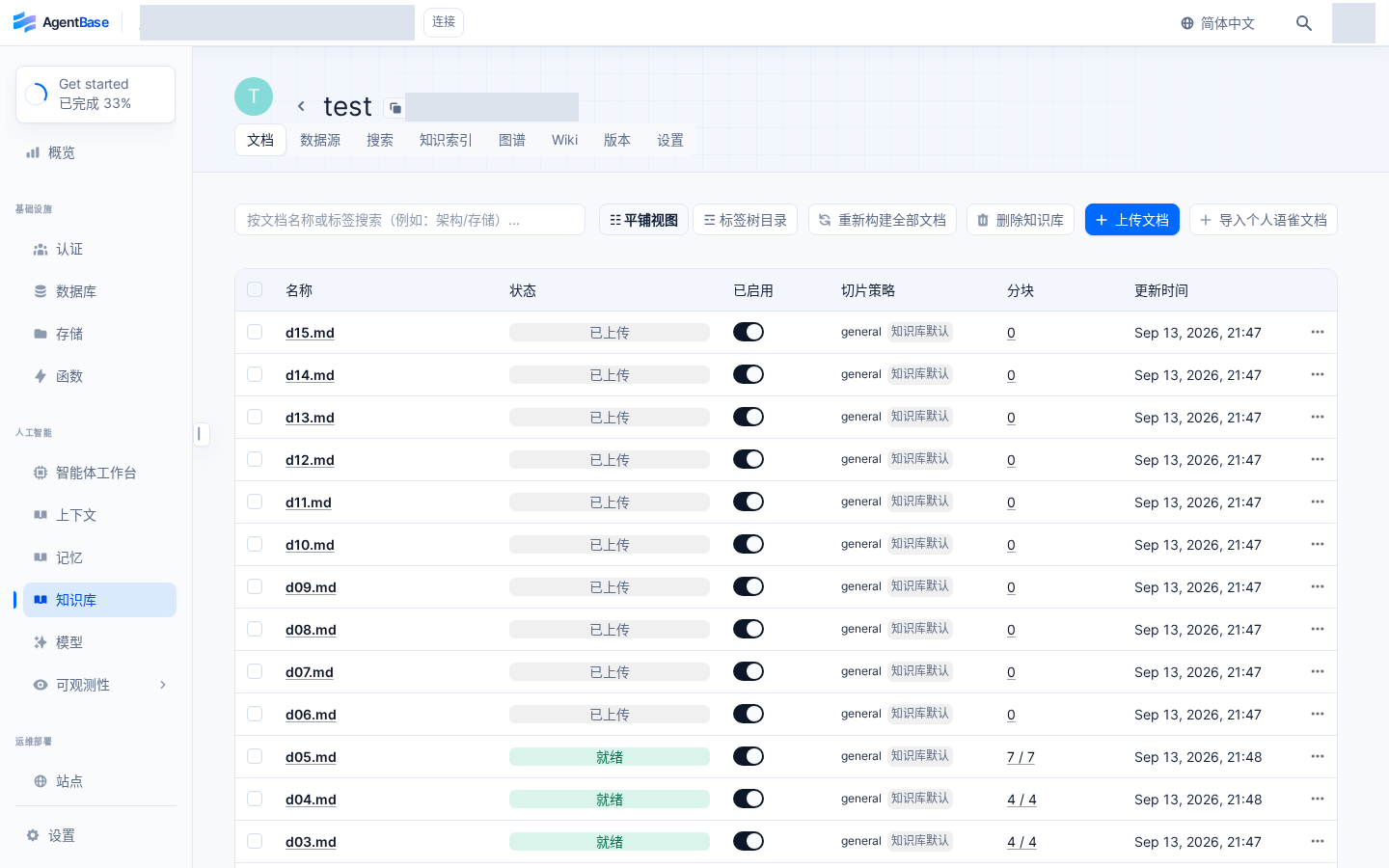
Interface reference: reuses previously registered historical screenshots; demo data may differ from the current project; no new screenshots were taken this time.
Core Concepts and Architecture
Document Asynchronous Ingestion and Chunk Vectorization State Machine
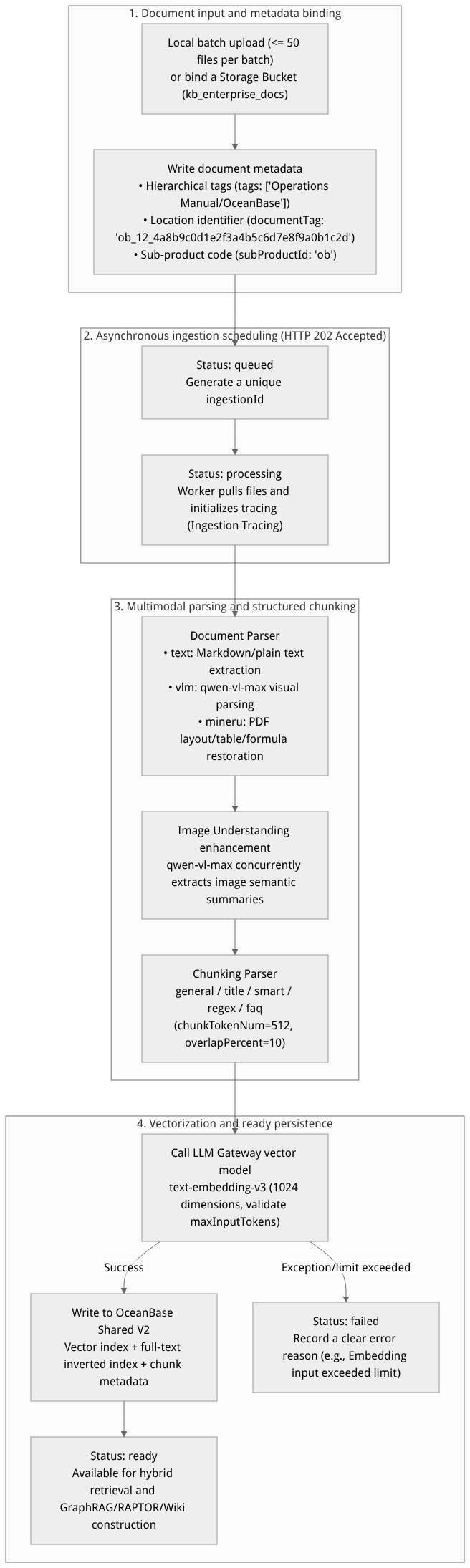
Flow diagram, not a runtime screenshot; read the relationships between steps or states along the arrows.
View the flow diagram in full size
Parser and Chunker Core Concepts Table
| Component dimension | Available types | Applicable document scenarios and core logic |
|---|---|---|
Document Parser (documentParser) | text | Best suited for well-structured .md, .txt, .docx, .html and regular born-digital documents, with the fastest parsing speed and zero extra visual model overhead. |
Document Parser (documentParser) | vlm | Invokes the project's registered visual large model (such as qwen-vl-max under dashscope-prod) to recognize complex layouts, scanned documents, handwritten annotations, and architecture flowcharts page by page. |
Document Parser (documentParser) | mineru | Designed for academic papers, technical white papers, and complex financial statement PDFs, precisely recognizing multi-column layouts, cross-page tables, and LaTeX formulas and converting them into structured Markdown. |
Chunk Parser (chunkingParser) | general | General sliding-window chunking. Splits by a fixed chunkTokenNum (default 512) and overlapPercent (default 10%), suitable for long texts without clear heading structure. |
Chunk Parser (chunkingParser) | title | Splits chapters by document heading hierarchy (titleLevel, default 3, i.e., ###) and automatically injects the parent heading path into the chunk context, ideal for architecture white papers and troubleshooting manuals. |
Chunk Parser (chunkingParser) | smart | Dynamically merges fragmented paragraphs and splits overly long paragraphs based on paragraph boundaries, semantic coherence, and the minimum chunk threshold (minChunkTokens, default 128). |
Chunk Parser (chunkingParser) | regex | Splits documents by a user-specified regular expression (regexPattern), suitable for log archives, specific-format legal provisions, or standardized entry files. |
Chunk Parser (chunkingParser) | faq | Specifically designed for "Question: ... Answer: ..." or two-column Q&A tables, ensuring each Q&A pair is fully preserved within the same independent chunk without truncation. |
Feature Entrypoints and Permission Matrix
Console Entry Points, REST API, SDK Methods, and Permission Matrix
| Console entrypoint / feature module | Frontend route path | Corresponding REST API endpoint | Server SDK method (Node.js / Python) | Required RBAC role / API Key scope | Cross-module dependency |
|---|---|---|---|---|---|
Document List, Folder Tree, and documentTag Filtering | /console/project-default-enterprise-ai-hub-210/knowledge-base/kb-kb_enterprise_support/documents | GET /v1/knowledgebases/{kbId}/documents | knowledgeBase.listDocuments() / list_documents() | Roles: owner, admin, developer, member (read-only) Scope: knowledgebases.read | Supports filtering by hierarchy tags, documentTag, subProductId |
| Batch upload documents or bind storage bucket files | /console/.../kb-kb_enterprise_support/documents (click "Upload documents") | POST /v1/knowledgebases/{kbId}/documents | knowledgeBase.createDocument() / create_document() | Roles: owner, admin, developerScope: knowledgebases.write | Document creation returns HTTP 201; ingestion runs asynchronously |
| Query Asynchronous Ingestion Progress and Trigger Re-ingestion | Document list status badges and row action "Re-ingest" | POST /v1/knowledgebases/{kbId}/documents/{docId}/ingestionsGET .../ingestions/{ingestionId} | knowledgeBase.createIngestion()knowledgeBase.getIngestion() | Roles: owner, admin, developerScope: knowledgebases.write / read | Depends on the text-embedding-v3 (1024 dimensions) and qwen-vl-max of dashscope-prod (see knowledge base settings) |
| Edit Document Tags and Positioning Identifiers | Document row action "Edit tags" | PATCH /v1/knowledgebases/{kbId}/documents/{docId} | knowledgeBase.updateDocument() | Roles: owner, admin, developerScope: knowledgebases.write | documentTag Integrates with hybrid retrieval, knowledge graph, and the Wiki conflict workbench |
| Transparent Chunk Review and Online Hot Fixing | /console/.../kb-kb_enterprise_support/documents/{docId} | GET /v1/knowledgebases/{kbId}/documents/{docId}/chunksPATCH .../chunks/{chunkId} | knowledgeBase.listChunks()knowledgeBase.updateChunk() | Roles: owner, admin, developer (read-only members can view only) Scope: knowledgebases.write | After editing a chunk, the 1024-dimension vector is automatically recomputed and the advanced knowledge index is marked as stale (chunk_updated) |
| Import Yuque URLs and External Data Source Sync | Document page "Import Yuque URL" or the data sources tab | POST /v1/knowledgebases/{kbId}/datasources/{id}/sync | knowledgeBase.syncDataSource() | Roles: owner, admin, developerScope: knowledgebases.write | For the complete OAuth2 and personal token sync guide, see external data source integration and Yuque incremental sync |
Feature Details and Operation Guide
Step One: Upload Enterprise Knowledge Documents and Configure Chunking Parameters
In the benchmark knowledge base kb_enterprise_support, we ingested 4 core production documents. Here are the detailed steps:
On the knowledge base Documents tab, click Upload documents in the upper-right corner.
Drag and drop or select local files (up to 50 files per upload):
Agentbase企业架构白皮书.md智能客服SOP标准作业手册.mdOceanBase分布式事务与向量索引排障指南.mdAI网关模型路由与限流计费规范.md
In the upload configuration panel, set parsing and chunking parameters (you can keep the knowledge base defaults or customize them for the current batch):
| Parameter Name | Field Identifier | Recommended Configuration | Value Range and Description |
|---|---|---|---|
| Start Ingestion Immediately | autoIngest | true (enabled) | Creates an asynchronous ingestion task immediately after upload (returns 202) |
| Document Parser | documentParser | text (choose mineru or vlm for PDFs) | Options: text / vlm / mineru |
| Chunk Parser | chunkingParser | title | Options: general / title / smart / regex / faq |
| Target Chunk Token Count | chunkTokenNum | 512 | Recommended range 128–2048; must be less than the embedding model's maxInputTokens |
| Chunk Overlap Ratio (%) | overlapPercent | 10 | Adjacent chunks retain 10% overlapping context to prevent semantic breaks across chunks |
| Heading Split Levels | titleLevel | 3 | Only takes effect in title mode; splits chapters by H1/H2/H3 headings |
| Minimum Chunk Token Count | minChunkTokens | 128 | Short chapters below this threshold are automatically merged with adjacent same-level paragraphs |
| Enable Image Understanding | imageUnderstanding.enabled | true | Invokes qwen-vl-max (concurrency 1–8, recommended 4) to generate textual interpretations of images |
Step Two: Manage Hierarchical Tags and Positioning Identifiers (documentTag & subProductId)
To enable millisecond-level targeted retrieval and directory governance across massive documents, Agentbase supports two complementary tagging mechanisms:
1. Hierarchical Tags
In the document list, click Edit tags to the right of the target document.
Enter parent-child hierarchical tags separated by
/, for example:Add a tag to
OceanBase分布式事务与向量索引排障指南.md:技术支持/数据库/OceanBaseAdd a tag to
AI网关模型路由与限流计费规范.md:技术支持/AI平台/AI网关Add a tag to
智能客服SOP标准作业手册.md:客服运营/标准作业/SOP
Click the view toggle button in the upper-left corner of the document list to freely switch between the Folder Tree View and the Flat View.
2. Document Positioning Identifiers (documentTag and subProductId)
Starting from v2.10.0, every document can be bound with a structured positioning identifier documentTag and a sub-product code subProductId:
Format specification:
documentTagmust conform to the{subProductId}_{sectionCode}_{fileKey}format, wherefileKeyis a 32-character hexadecimal string (e.g.,ob_12_4a8b9c0d1e2f3a4b5c6d7e8f9a0b1c2d).Automatic derivation rule: On creation or update, if a non-empty
documentTagis submitted whilesubProductIdis omitted or cleared, the system derives the sub-product code from the first segment of the positioning identifier.Clearing and valid filter values: On update, passing
subProductId: ""without also submitting a non-emptydocumentTagdeletes the standalone field; however, reads and filtering still fall back to the first segment of the existing positioning identifier. To remove both sub-product associations, clear bothsubProductIdanddocumentTag; this also removes the document positioning identifier, so confirm first that callers no longer depend on that positioning value.Example: Updating a Document Positioning Identifier and Querying Ingestion Status via API:
# 1. Write documentTag and hierarchical tags to the document
curl -X PATCH "https://appbuild.oceanbase.com/v1/knowledgebases/kb_enterprise_support/documents/doc_ob_troubleshooting" \
  -H "X-Appwrite-Project: enterprise-ai-hub-210" \
  -H "X-Appwrite-Key: <APPBASE_API_KEY>" \
  -H "Content-Type: application/json" \
  -d '{
    "documentTag": "ob_12_4a8b9c0d1e2f3a4b5c6d7e8f9a0b1c2d",
    "subProductId": "ob",
    "tags": ["技术支持/数据库/OceanBase", "核心排障"]
  }'

# 2. Trigger re-ingestion of a single document (returns HTTP 202 Accepted and an ingestionId)
curl -i -X POST "https://appbuild.oceanbase.com/v1/knowledgebases/kb_enterprise_support/documents/doc_ob_troubleshooting/ingestions" \
  -H "X-Appwrite-Project: enterprise-ai-hub-210" \
  -H "X-Appwrite-Key: <APPBASE_API_KEY>"

# 3. Poll the ingestion task status until it becomes ready
curl -X GET "https://appbuild.oceanbase.com/v1/knowledgebases/kb_enterprise_support/documents/doc_ob_troubleshooting/ingestions/ing_9f8e7d6c5b4a3210" \
  -H "X-Appwrite-Project: enterprise-ai-hub-210" \
  -H "X-Appwrite-Key: <APPBASE_API_KEY>"
Step Three: Review and Edit Chunks and Rebuild the Entire Knowledge Base (Reindex)
View the chunk list: In the document list, confirm that
Agentbase企业架构白皮书.mdand the other 4 documents all show a greenreadystatus, then click the document name to enter the Document Details page.Inspect and edit chunks online:
The page displays all split chunk cards in order, each showing the chunk index, token count, section path, and body content.
If image understanding is enabled, chunks containing images display the Image Caption / VLM Summary generated by
qwen-vl-maxbelow the chunk.Click Edit in the upper-right corner of any chunk card to directly fix typos, add key context, or update proprietary parameters; after saving, the system automatically calls
text-embedding-v3to recompute the chunk's1024-dimension vector and update the OceanBase index.
Rebuild the entire knowledge base (Reindex):
After you modify the global default chunking strategy in the knowledge base settings (e.g., changing
chunkTokenNumfrom512to800), return to the top of the Documents tab and click Reindex; the system will batch-dispatch asynchronous re-ingestion tasks for all documents in the knowledge base.
External Data Sources and Yuque Sync Management
Step One: Configure the Yuque Data Source Connection
Connect an enterprise Yuque technical documentation space in the kb_enterprise_support knowledge base, supporting both OAuth 2.0 authorized access and Access Token access:
Step 1: Open the new data source wizard
Go to the detail page of knowledge base
kb_enterprise_supportand switch to the Data sources tab.Click the Add data source button in the upper-right corner, and select Yuque as the data source type.
Step 2: Complete identity authentication and space binding
Fill in the data source connection parameters according to your enterprise security policies:
| Configuration Item | Parameter Name | Benchmark Configuration Example | Description and Validation Rules |
|---|---|---|---|
| Data Source Name | name | 企业技术支持语雀知识库 | A readable name within the knowledge base, used to distinguish Yuque spaces of different teams |
| Data Source Type | type | yuque | Currently, the Yuque knowledge base connector is built in |
| Authentication Method | authType | oauth or token | OAuth one-click redirect authorization is recommended; automated pipelines can use a Yuque Personal Access Token |
| Yuque Service Address | baseUrl | https://www.yuque.com (or the enterprise's dedicated Yuque domain) | Automatically passes server-side secure URL whitelist and DNS validation |
| Access Token | accessToken | <YUQUE_ACCESS_TOKEN> | Encrypted at storage; read APIs never return it in plaintext |
| Target Knowledge Space Identifier | namespace / repoId | ob-support/kb-handbook | Format is 团队或个人Login/知识库Slug or a Yuque Book numeric ID |
| Default label prefix | defaultTags | ["语雀同步/技术支持"] | Documents synced into the knowledge base are automatically tagged with this hierarchical label, making them easy to organize in the document directory tree |
| Default sub-product code | subProductId | ob | Automatically associates a sub-product identifier with documents synced in |
Click Test & Create; the system will verify read permissions on the remote space and generate a unique dataSourceId (e.g., ds_yuque_enterprise_01).
Two. Selectively bulk importing documents from external data sources
If you only need to import some core documents from a Yuque space into the knowledge base (for example, "Intelligent Customer Service SOP Operations Manual" and "AI Gateway Model Routing and Rate Limiting Billing Specification"), you can use the interactive directory tree import feature:
In the Data sources list, click Browse & Import to the right of
企业技术支持语雀知识库.The left side of the dialog loads the table of contents (TOC) of the remote Yuque knowledge base in real time, showing each document's title, Slug, and last updated time.
Check the target documents to import, and confirm the parsing configuration on the right:
Document parser: select
text(if the Yuque documents contain many flowcharts and architecture screenshots, it is recommended to enable Image Understanding and chooseqwen-vl-max).Chunking strategy: select
title(chunkTokenNum = 512,overlapPercent = 10).
Click Start Import; the system will fetch the Markdown source code and image attachments of the selected documents in the background, write them to the
kb_enterprise_docsstorage bucket, and automatically dispatch asynchronous ingestion tasks.
Three. Triggering incremental sync jobs (Sync Runs) and monitoring status
When troubleshooting guides or SOPs in the remote Yuque knowledge base are routinely revised, you can trigger a data source sync job via the Console or the API:
1. Console triggering and monitoring
In the Data sources tab, find the target data source
ds_yuque_enterprise_01and click Sync now.Expand the Sync runs panel below the data source to view, in real time, the execution state machine and statistics counters of each sync job:
| Sync status | Status indicator | Description |
|---|---|---|
| Queued | queued | The sync request has been accepted and is waiting to be scheduled by the background sync Worker |
| Syncing | running | Fetching the remote Yuque TOC, comparing document revisions, and triggering re-ingestion of changed documents |
| Completed | completed | All new and changed documents have been successfully fetched and submitted to the ingestion pipeline |
| Partially failed | partial_failed | Most documents synced successfully; individual documents failed due to restricted remote permissions or format issues (view error details and retry) |
| Failed | failed | The sync was interrupted because the remote token expired, the network was unreachable, or the space was deleted |
2. Managing data sources and triggering syncs via the REST API
Backend developers or CI/CD scheduled pipelines can automatically trigger incremental syncs through the following standard interface:
# 1. Query the list of data sources mounted to the knowledge base
curl -X GET "https://appbuild.oceanbase.com/v1/knowledgebases/kb_enterprise_support/datasources" \
  -H "X-Appwrite-Project: enterprise-ai-hub-210" \
  -H "X-Appwrite-Key: <APPBASE_API_KEY>"

# 2. Trigger an incremental sync job for the specified data source (POST /v1/knowledgebases/{knowledgeBaseId}/datasources/{dataSourceId}/syncs)
curl -X POST "https://appbuild.oceanbase.com/v1/knowledgebases/kb_enterprise_support/datasources/ds_yuque_enterprise_01/syncs" \
  -H "X-Appwrite-Project: enterprise-ai-hub-210" \
  -H "X-Appwrite-Key: <APPBASE_API_KEY>" \
  -H "Content-Type: application/json" \
  -d '{
    "syncMode": "incremental",
    "triggerIngest": true
  }'

# 3. Query sync job run records and change statistics
curl -X GET "https://appbuild.oceanbase.com/v1/knowledgebases/kb_enterprise_support/datasources/ds_yuque_enterprise_01/syncs" \
  -H "X-Appwrite-Project: enterprise-ai-hub-210" \
  -H "X-Appwrite-Key: <APPBASE_API_KEY>"
Verification result:
The API returns the newly created sync run record (including
syncId,status,addedCount,updatedCount,skippedCount,failedCount).Return to the Documents tab: you can see that updated documents have automatically completed re-chunking and vector updates, their status restored to
ready, and the source links (View Source) in the Search test can directly jump to or preview the latest content.
Uploading and ingesting documents
Go to the knowledge base → Upload documents: the file picker supportsup to 50 files per batch; files are uploaded to the knowledge base's dedicated storage and document records are created. By default, ingestion starts immediately after upload, but automatic ingestion can also be disabled.
Wait until the document status becomes Ready before opening the document details to view chunks. If a document is not ready, first check its status and processing result; do not treat documents whose ingestion has not completed as retrievable content.
If you need to adjust the parser or chunking parameters, modify them in the document's configuration first, then re-ingest the affected documents. Configuration changes are not written back to already-ingested old documents.
Reindex re-runs ingestion and indexing for all documents in the knowledge base; when only a few documents need updating, prefer per-document re-ingestion.
URL / external data sources: connected via Data sources; the currently built-in data source type is Yuque (including OAuth-authorized import and URL import), with support for viewing sync runs and managing data sources.
Document and chunk management
The document list supports searching by name or tag, deleting documents, and opening document details; the details page organizes ingested content by chunk.
Hierarchical labels are used to organize documents and can be browsed via a tag tree or a flat view; locators (documentTag, 2.10.0) are used to precisely mark the product, section, and file. They serve different purposes—do not write hierarchical label paths into
documentTag.Locator fields can be written when creating / updating documents; for format, derivation, and clearing boundaries, see the "Document locators" section on this page. After writing, you can filter documents in the document list and in retrieval by actual locator values (see Search test).
Chunks support editing and deletion; after enabling image understanding, the image understanding results of a chunk can be viewed in the document details.
Excel ingestion: spreadsheets are parsed and sliced by sheet; you can configureimage enhancement (image interpretation model, prompt, and concurrency 1–8) to improve ingestion quality for image-containing spreadsheets and documents.
Embedding input limit: the embedding model's maximum input Token is configured in the Provider form "Maximum input tokens" under Models (LLM Gateway); ingestion inputs exceeding the limit fail explicitly.
Interface reference: reuses previously registered historical screenshots; demo data may differ from the current project; no new screenshots were taken this time.
FAQ (Frequently Asked Questions and Troubleshooting)
Q1: A document's ingestion status becomes failed with an error saying the embedding input exceeds the limit—how do I troubleshoot and fix it?
Root cause analysis: When the Token length of a single chunk exceeds the
maxInputTokensconfigured indashscope-prodfortext-embedding-v3, the ingestion task fails explicitly to prevent truncation and data loss.Resolution:
Go to Models (LLM Gateway) -> Model providers and check the maximum input Token configuration for
text-embedding-v3(it can be set to8192);Click Parser Config to the right of the failed document, reduce
chunkTokenNum(e.g.,512) or change the chunker fromregextosmart/title, then click Re-ingest.
Q2: For a scanned PDF or a document containing many architecture diagrams, what should I do if the default text parser cannot extract text?
Root cause analysis: The default
textparser only extracts the document's embedded native text streams; it does not perform visual OCR or topology understanding on rasterized images or scanned pages.Resolution:
First confirm that the
vlmcapability has been enabled in thedashscope-prodconnection under Models (LLM Gateway) and thatqwen-vl-maxhas been imported;Switch the document parser for that document to
vlmormineru, enable the Multimodal Image Understanding (Image Understanding) toggle in Knowledge Base Settings, then re-run ingestion.
Q3: What format validation requirements does documentTag have? What happens if the format is invalid?
Root cause analysis:
documentTagfollows the three-segment specification of{subProductId}_{sectionCode}_{fileKey}: the first segment allows only letters or digits, the second segment allows only digits, and both may be empty; the last segmentfileKeymust be 32 hexadecimal characters (case is accepted and normalized to lowercase on write). A standalonesubProductIdwith a non-empty value is limited to 1–64 letters or digits, and does not accept hyphens, underscores, or spaces.Resolution: If the input string does not conform to the format constraints, the API returns a
400 Bad Requestparameter validation error. Make sure to construct it according to{subProductId}_{sectionCode}_{32位hex}, or if you only need free-text classification, use the document's hierarchical label (tags) field.
Q4: How is an uploaded Excel spreadsheet split and vectorized?
Root cause analysis: Spreadsheet data has rigid row-column structural associations; splitting it with an ordinary plain-text sliding window would cause data rows to become detached from the header and lose semantics.
Resolution: Excel files (
.xlsx/.xls) are structurally sliced by the built-in spreadsheet parser per Sheet, automatically preserving the correspondence between the header and data rows in each chunk; if the spreadsheet contains embedded business screenshots and image understanding is enabled, the system callsqwen-vl-maxat the configured concurrency to generate image captions and assigns them to the chunks of the corresponding Sheet.
Related Documentation
External data source integration and incremental sync with Yuque
GraphRAG, RAPTOR, and Advanced Knowledge Index Build Governance
Knowledge Graph Visualization Exploration and Community Reports
Knowledge Base Wiki Compilation, Conflict Adjudication, and Memory Export
Knowledge Base Immutable Version Management and Release Rollback
Project-level lexicons and retrieval/knowledge graph/agent collaborative governance
Knowledge Base Settings Hub, Default Policies, and Multimodal Image Understanding (VLM)