
Experience and Skill Distillation Evolution
Feature overview and core scenarios
Experience and skill evolution (Memory Evolution; the Console tab is Experience & Skills) is the core capability by which Agentbase Memory (v2.10.0) enables agents to “self-learn from real-world practice and accumulate knowledge.” In enterprise customer service and ops troubleshooting scenarios, agents perform large volumes of multi-turn conversations and tool executions every day. Ordinary memories focus on recording “objective facts and preferences about the user,” whereas experience and skill distillation extracts cross-session reusable troubleshooting experience (Experience) and standardized operational skills (Skill) from real task execution traces and troubleshooting conversation evidence.
In the flagship project 企业智能客服与知识中台 (enterprise-ai-hub-210) of Agentbase 企业智能中台 (69c6d1aa00062e6bb60), the system completed two typical production distillation tasks (dst_3e5b09f456c5d5c332507ec1dbe3eb6d and dst_adc2cfda21c940fb5d5e4a3263ae56f9) via the distillation pipeline (calling dashscope-prod's qwen-plus and text-embedding-v3):
Distilling the successful troubleshooting traces for ticket
TK-20261022-001(OceanBase vector index build timeout and out-of-memory) andTK-20261022-002(AI gateway rate-limit 429 failover) into structured experience (Experience) and multi-step skills (Skill);Supporting
shadow -> activelifecycle governance, confidence- and independent-session-count-based automatic activation policies (evolution.activation), and, for high-compliance scenarios, self-evolution secondary human confirmation (evolution.requireConfirmation), ensuring that every experience and skill entering online retrieval carries complete, traceable provenance.
Core Concepts and Architecture
Experience and skill distillation extracts candidate knowledge from raw conversations or tool traces, then goes through semantic deduplication and merging with existing knowledge, model self-consistency validation, and activation threshold checks (or secondary human confirmation), finally building vector indexes for online retrieval and unified recall.
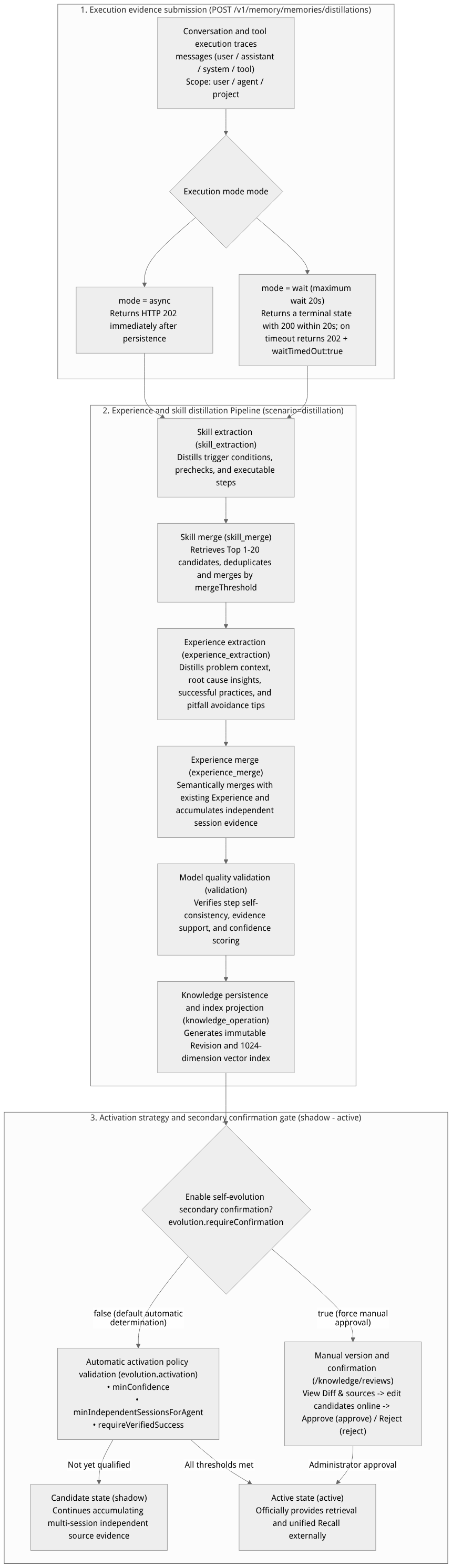
Flow diagram, not a runtime screenshot; read the relationships between steps or states along the arrows.
View the flow diagram in full size
Core Differences and Attribute Table of Experience vs. Skill
| Comparison dimension | Experience | Skill |
|---|---|---|
| Positioning and form | Reusable situational insights and pitfall-avoidance experience: records “what problem was encountered in which scenario, which approaches worked, and which approaches lead to failure.” | Reusable standardized operating steps (SOP): records “to achieve a specific goal, which checks, commands, or tool calls should be executed in what order.” |
| Core structured fields | Title (title), summary (summary), applicable context (context), key insights/recommendations (insights / lesson), confidence (confidence), tags (tags). | Name (name), description (description), trigger conditions (triggers), ordered step list (steps, including action descriptions and inputs parameter templates), verification criteria (verification). |
Scope of ownership (scope) | Supports user (user level), agent (agent level, requires specifying agentId), and project (project global level). | Supports user, agent, project; agent-level skills require reproduction validation across multiple independent sessions (minIndependentSessionsForAgent) before automatic activation. |
| Lifecycle states | shadow (candidate/observation state, not yet meeting the activation threshold or awaiting human confirmation) -> active (activated and in effect) -> forgotten (forgotten, removed from retrieval). | shadow -> active -> forgotten; additionally, when an experience depends on an unapproved Skill version, skill_dependency_not_approved blocking protection is triggered. |
| Retrieval and provenance APIs | GET /v1/memory/memories/experiences, POST .../experiences/search, GET .../experiences/{knowledgeId}/sources | GET /v1/memory/memories/skills, POST .../skills/search, GET .../skills/{knowledgeId}/sources |
Feature Entrypoints and Permission Matrix
Console Entry Points and API Permission Matrix
The Console entry point is located at: Project enterprise-ai-hub-210 → Memory → Experience & Skills tab.
| Function module | Console operation entry | REST API path | Required permissions and authentication requirements |
|---|---|---|---|
| Submit distillation task | Manual distillation area → Submit distillation | POST /v1/memory/memories/distillations | memories.write |
| Query and replay distillation tasks | Distillation task list | GET /v1/memory/memories/distillations, GET .../{distillationId}, POST .../{distillationId}/replay | memories.read / memories.write |
| Query and retrieve experiences/skills | Experience / Skill lists and search box | GET/POST /v1/memory/memories/experiences(/search), GET/POST /v1/memory/memories/skills(/search) | memories.read |
| Query knowledge source evidence | Expand experience/skill details → Source evidence | GET /v1/memory/memories/experiences/{knowledgeId}/sources, /skills/{knowledgeId}/sources | memories.read |
| Version comparison and manual secondary confirmation | Versions and Confirmations sub-tab | GET/PATCH /v1/memory/memories/knowledge/reviews/{reviewId}, POST .../approve, POST .../reject, POST .../{knowledgeId}/rollback | Must use real user credentials with project management permissions (Console session or administrator JWT) + memories.write; an ordinary subject-less API Key cannot replace a human approver |
| Stop reuse (forget knowledge) | End of Experience/Skill row Forget button | DELETE /v1/memory/memories/experiences/{knowledgeId}, /skills/{knowledgeId} | memories.delete |
Feature Details and Operation Guide
1. Select the ownership scope and submit execution evidence for distillation (POST /v1/memory/memories/distillations)
Log in to the Agentbase Console, enter project
企业智能客服与知识中台(enterprise-ai-hub-210), and open the Memory (Memory) → Experiences and Skills tab.Set the knowledge scope in the ownership scope bar at the top of the page:
Select a scope (
user,agent, orproject);Enter the target user ID (e.g.,
user_zhangwei_001oruser_lina_002); if theagentscope is selected, you must also fill in the targetagentId(e.g.,enterprise-support-agent), then click apply scope.
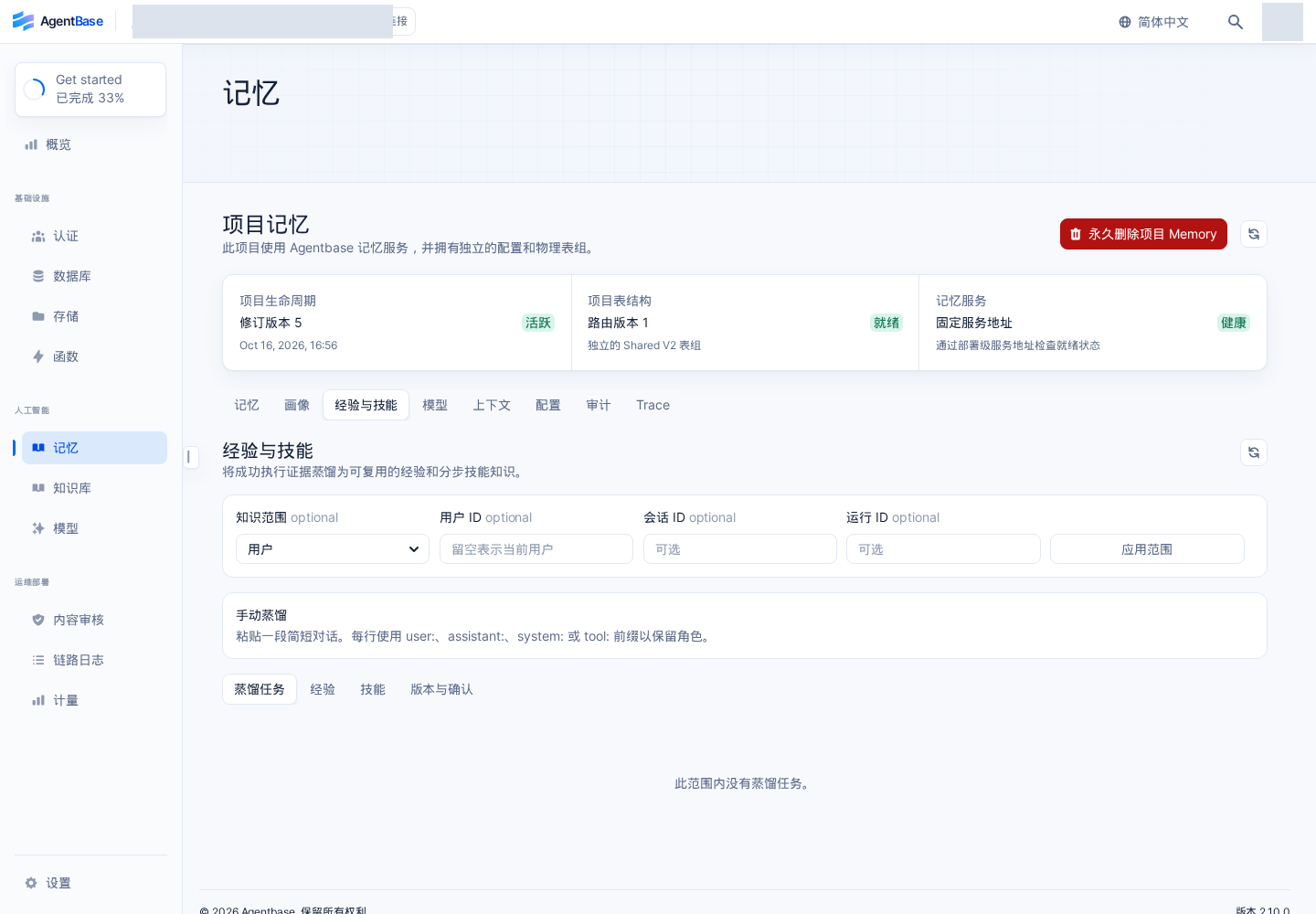
Interface reference: reuses previously registered historical screenshots; demo data may differ from the current project; no new screenshots were taken this time.
In the manual distillation area, enter the desensitized customer support troubleshooting conversation or tool invocation evidence (you may use the
user:,assistant:,system:,tool:prefixes to mark roles), select use default Pipeline (or specify a published Experiences and Skills Pipeline), and click submit.API invocation and
mode=async | waitdual-mode explanation: When submitting distillation via API, two waiting semantics are supported:mode: "async": immediately returns HTTP 202 after the task is persisted and enqueued; the response includesdistillationId(e.g.,dst_3e5b09f456c5d5c332507ec1dbe3eb6d) andstatus: "queued";mode: "wait": the server holds the connection and waits for up to 20 seconds. If the task reaches a terminal state (succeeded,partial_failed,failed, ordead) within the 20-second window, HTTP 200 and complete output references are returned directly; if more than 20 seconds pass and it is stillqueuedorrunning, HTTP 202 is returned along with"waitTimedOut": trueand theLocationstatus query URL (the waiting timeout only ends the current HTTP blocking and never cancels the distillation task already running in the background).
# Submit the troubleshooting trajectory of support ticket TK-20261022-001 for experience and skill distillation (mode=wait)
curl -fsS -X POST "https://appbuild.oceanbase.com/v1/memory/memories/distillations" \
  -H "X-Appwrite-Project: enterprise-ai-hub-210" \
  -H "X-Appwrite-Key: <APPBASE_API_KEY>" \
  -H "Idempotency-Key: distill-ticket-20261022-001" \
  -H "Content-Type: application/json" \
  --data '{
    "userId": "user_zhangwei_001",
    "agentId": "enterprise-support-agent",
    "scope": "user",
    "sessionId": "sess_ticket_TK_20261022_001",
    "runId": "run_9f8e7d6c5b4a",
    "mode": "wait",
    "verifiedSuccess": true,
    "messages": [
      {
        "role": "user",
        "content": "工单 TK-20261022-001:OceanBase Shared V2 表在写入 1024 维向量时报错 OB_ALLOCATE_MEMORY_FAILED (错误码 -4013),如何快速恢复?"
      },
      {
        "role": "tool",
        "content": "{\"tool\":\"sql_diagnostics\",\"output\":\"tenant_vector_memory_limit_percentage=10%, current usage=98.7%\"}"
      },
      {
        "role": "assistant",
        "content": "经排查为租户向量内存池配额不足。标准处置步骤:1. 查询 GV$OB_VECTOR_MEMORY_INFO 核实当前租户向量内存水位;2. 将 ob_vector_memory_limit_percentage 从 10 调升至 30;3. 重新触发增量向量索引构建并核验 schema.status=ready。已执行验证恢复成功。"
      }
    ]
  }' | jq .
Check task progress in the distillation task list (e.g.,
dst_3e5b09f456c5d5c332507ec1dbe3eb6danddst_adc2cfda21c940fb5d5e4a3263ae56f9in the benchmark environment) and verify the output statistics:created: the number of newly created Experiences or Skills;merged: the number of items highly semantically overlapping with existing knowledge whose evidence was merged and versions advanced;skipped: the number of items skipped because the model determined the conversation contained no reusable methodology;blocked: the number of items not activated because validation failed or a governance policy blocked them.
2. Activation policy configuration (evolution.activation) and the shadow -> active lifecycle
Whether newly distilled knowledge immediately becomes active by default is controlled by the evolution namespace in Memory → Configuration → Basic Configuration:
| Configuration field path | Type | Default value / value range | Function and activation determination logic |
|---|---|---|---|
evolution.enabled | boolean | true | Whether to enable project-level Experiences and Skills evolution capability. |
evolution.autoDistillEnabled | boolean | false | Whether to automatically trigger background knowledge distillation on regular session writes. |
evolution.requireConfirmation | boolean | false | Self-evolution secondary confirmation switch. When enabled, all newly added or merged knowledge candidates remain in shadow status and generate pending approval confirmation records (pending); they must be manually approved by a project administrator before transitioning to active. |
evolution.allowSingleVerifiedUserActivation | boolean | true | Under the user scope, whether a single verified successful task is allowed to directly activate personal Experiences and Skills. |
evolution.activation.minConfidence | number | 0.0 ~ 1.0 (e.g., 0.8) | The confidence score given during the model validation stage must be no lower than this threshold; otherwise the item stays in shadow status. |
evolution.activation.minIndependentSessionsForAgent | integer | Positive integer (e.g., 2 or 3) | For agent scope knowledge, promotion from shadow to active is allowed only after it has been repeatedly distilled and confirmed in at least N distinct independent sessionId, preventing a single accidental conversation from polluting the global Agent skill library. |
evolution.activation.requireVerifiedSuccess | boolean | true | Whether the source task submitted for distillation must carry an explicit verification success marker (verifiedSuccess: true). |
3. Version comparison, manual secondary confirmation, and rollback (版本与确认)
When self-evolution secondary confirmation (evolution.requireConfirmation: true) is enabled or an administrator proactively initiates a knowledge revision:
In the Experiences and Skills tab, switch to the Versions and Confirmations sub-view and filter
pending(pending confirmation) records.Expand the target confirmation record; the page fully displays:
candidate body and structured steps, source evidence list (Provenance, showing at most 100 entries plus the total count), reuse scope;
Version Diff: a field-by-field comparison of additions, modifications, or deletions between the candidate version (
candidateRevisionId) and the currently effective online baseline (baseActiveRevisionId).
Edit the candidate online (optional): if the administrator finds that candidate step wording needs minor adjustment, click edit candidate, modify the content, fill in the reason, and save. The backend starts an asynchronous edit validation task (
editJob), revalidating all source governance policies and recomputing vector projections.Approve or Reject:
After validation is ready (
canApprove: true, with no blocking reasons ofprojections_not_ready,verified_success_required,skill_dependency_not_approved, orsource_set_changed), fill in the approval reason and click approve; the candidate version atomically switches to the currentactiveversion;If reject is clicked, the candidate is discarded and the previously effective version remains online.
Historical version rollback (Rollback): select any historical revision in the historical versions list that was previously approved and whose underlying sources are still valid, fill in the reason, and safely roll back.
4. Retrieving Experiences and Skills and provenance queries (agentbase-node-sdk@2.10.0)
Applications can retrieve matching active Experiences and Skills before agent reasoning via the dedicated search interface or unified retrieval (recall), and verify their source evidence at any time:
// Use the official server SDK: agentbase-node-sdk@2.10.0
import { Client, Memory } from 'agentbase-node-sdk';

const client = new Client()
    .setEndpoint('https://appbuild.oceanbase.com/v1')
    .setProject('enterprise-ai-hub-210')
    .setKey(process.env.APPBASE_API_KEY);

const memory = new Memory(client);

// 1. Semantic retrieval of activated troubleshooting experiences (Experiences)
const expResults = await memory.searchExperiences({
    userId: 'user_zhangwei_001',
    scope: 'user',
    query: 'OceanBase 向量索引构建内存不足 -4013 排障经验',
    limit: 5
});

// 2. Semantic retrieval of activated standardized skills (Skills)
const skillResults = await memory.searchSkills({
    userId: 'user_zhangwei_001',
    scope: 'user',
    query: 'AI 网关 429 限流与故障转移配置步骤',
    limit: 5
});

// 3. Query the immutable provenance source chain of a skill (Provenance Sources)
if (skillResults.items?.length > 0) {
    const provenance = await memory.listSkillSources({
        knowledgeId: skillResults.items[0].knowledgeId,
        limit: 20
    });
    console.log('支撑该技能的原始会话来源数:', provenance.total);
}
FAQ (Frequently Asked Questions and Troubleshooting)
1. Why does the distillation task status show succeeded, but no new records appear in the active Experiences and Skills list?
Cause analysis: there may be three reasons: ① the conversation content is too brief or contains only greetings and conclusions, and the model determines it has no general reuse value (
skipped); ② the project has enabledevolution.requireConfirmation: true, or the knowledge belongs to theagentscope and has not yet accumulatedminIndependentSessionsForAgentindependent session sources, so the generated record is inshadow(candidate status); ③ the extracted confidence is belowevolution.activation.minConfidence.Solution: switch the status in the list filter to
shadow, or open the Versions and Confirmations sub-tab to check. If it is pending confirmation, the administrator verifies the Diff and clicks approve to activate and go live.
2. When clicking Approve in “Versions and Confirmations”, why is the button disabled with the prompt projections_not_ready or source_set_changed?
Root cause analysis:
projections_not_ready: the candidate version (or the newly manually edited revision) is computingtext-embedding-v3vector projections in the background and is not yet ready in storage;source_set_changed: between opening the detail page and clicking Approve, new session evidence was merged into the same knowledge item in the background, advancingcandidateRevisionId, or a user deleted an underlying source, changing the evidence set.
Solution: refresh the current confirmation record detail page. If it is index preparation, waiting a few seconds and refreshing suffices; if it is version advancement, re-review the latest Diff and source evidence before submitting the approval.
3. After turning off the “self-evolution secondary confirmation (evolution.requireConfirmation)” switch, will previously backlogged pending candidates be published automatically?
Cause analysis: for production safety boundary reasons, turning off the
requireConfirmationswitchonly restores automatic activation rules for distillation tasks newly produced afterward; it will never silently batch-publish pending confirmation records that historically remained inpendingstatus.Solution: for pending confirmation records generated before the switch was turned off, the administrator must still review each item in the Versions and Confirmations page and click approve or reject.