
FAQ
This chapter compiles the most frequently encountered technical issues, the HTTP error code diagnostic matrix, and configuration troubleshooting solutions for enterprises running Agentbase 2.10.0 in production. Content is organized into six major topics: architecture and storage modes (JsonTable / Shared V2), authentication and API Key permission scopes, model gateway and DashScope access, knowledge base hybrid retrieval and lexicon binding, memory enablement and distillation evolution, and the agent workbench and AgentOps observability.
Feature Overview
When developers or operators are blocked while working in the Console, or receive non-2xx responses from data-plane APIs via the SDK / REST API, quickly distinguishing “instance deployment-level restrictions (Capability)”, “project-level service switches (Services)”, and “permission and credential scope (RBAC / Scope)” from “upstream model/storage dependency failures” is key to shortening MTTR (mean time to recovery).
This chapter provides a standardized troubleshooting decision path, helping R&D and operations teams independently locate and resolve over 95% of common errors without reading the underlying source code.
| Troubleshooting topic classification | Core modules and scenarios covered | Typical associated status codes or error identifiers |
|---|---|---|
| One: Architecture, versions, and storage modes | Version verification, SDK response format negotiation, JsonTable vs Shared V2 table mode conversion, project independent read-only fence | 400 (format mismatch), 409 (state conflict), 412 (table mode or deployment unsupported), 503 (drain window) |
| Two: Authentication, sessions, and API Key permission scopes | Console login MFA/email verification guards, missing API Key Scope, Dev Key restrictions, frontend CORS blocking | 401 general_unauthorized_scope, 401 user_unauthorized, 403 (CORS / platform not registered) |
| Three: Model gateway and DashScope access | Vendor preset import, API Key masking, logical model primary/backup routing, semantic cache miss, token budget exceeded | 401 (upstream vendor Key invalid), 429 (RPM/TPM or monthly budget exceeded), 502/504 (upstream timeout) |
| Four: Knowledge base hybrid retrieval and lexicon binding | Document parsing failures, Embedding 1024-dimension validation, synonym/stopword lexicon effective timing, GraphRAG/Wiki build interruption | 400 (dimension mismatch), 412 (advanced index not enabled), document status failed |
| Five: Memory enablement and distillation evolution | Shared V2 prerequisite checks, asynchronous write jobId polling, partial_failed diagnostics, four pipeline types and skill secondary confirmation | 412 (not Shared V2), LLM_REQUEST_REJECTED, task status partial_failed / failed |
| Six: Agent workbench and AgentOps operations | Workbench API Key authentication, sidebar hidden entries (Messaging / Reports), index quality review pending area, restricted identity function errors | Sandbox 502/503/504, evaluation status pending_review, empty report panel explanation |
Core Concepts and Architecture
When troubleshooting any Agentbase Console or API issue, we recommend following the five-layer gate diagnostic model of the system request processing chain. A request is only executed against the underlying business logic after passing through the following five gates in sequence:
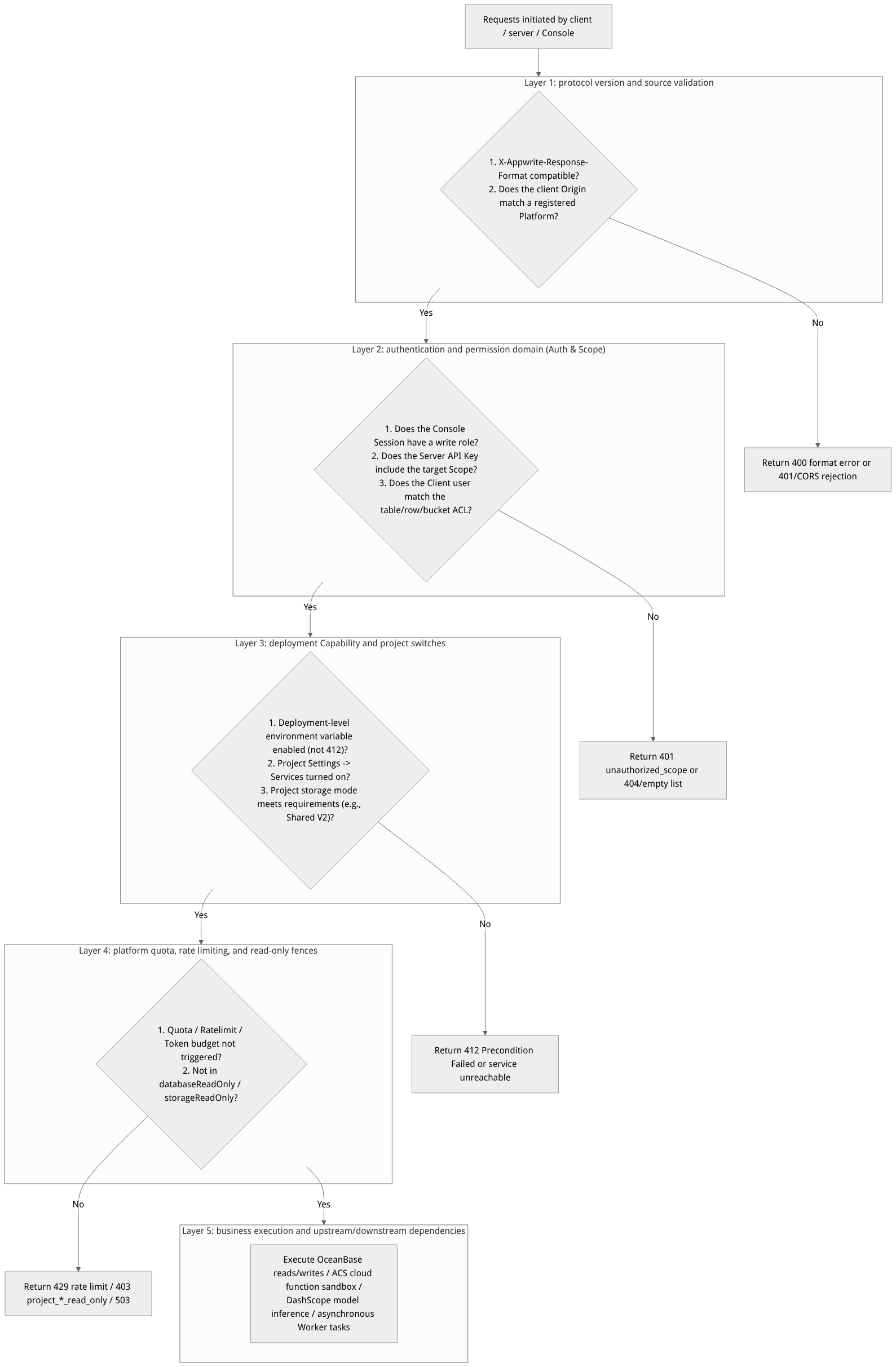
Flow diagram, not a runtime screenshot; read the relationships between steps or states along the arrows.
View the flow diagram in full size
Quick Reference Table of High-Frequency HTTP Status Codes and Error Types
| HTTP status code | Error type or characteristic identifier | Root cause layer | Standard remediation action |
|---|---|---|---|
| 400 | general_argument_invalid / response format mismatch | Protocol and parameter layer | Check required parameters and field length constraints; if using a custom SDK (e.g. agentbase-node-sdk@2.10.0), make sure X-AppBase-SDK: true and X-Appwrite-Response-Format: 2.10.0 are sent. |
| 401 | general_unauthorized_scope | API Key permission layer | Go to project Overview → Integrations → API keys and check the missing scopes for that key (e.g. users.read, databases.write). |
| 401 | user_unauthorized / CORS error | Origin and session layer | On the server side, check that X-Appwrite-Key is passed correctly; on the frontend Web/mobile side, check that the current hostname or package name is registered in Overview → Platforms. |
| 403 | project_database_read_only / project_storage_read_only | Platform read-only governance layer | The current project has been placed in database read-only or file storage read-only state by the platform administrator; immediate deletion of a single row/file is still possible, while regular writes require the administrator to lift the read-only state before retrying. |
| 409 | document_already_exists / state version conflict | Concurrency and idempotency layer | A duplicate custom $id, or the expected version number (version / expectedDatabase) passed when updating a memory or switching read-only state does not match the latest online state; re-read the latest record first. |
| 412 | Precondition Failed (Capability or prerequisites not ready) | Deployment capability and prerequisite layer | 1. The instance has not deployed the optional capability (e.g. advanced indexes or Sites); 2. The project table mode is not Shared V2 (memory cannot be enabled);3. The required model provider has not been configured. |
| 429 | general_rate_limit_exceeded / Gateway token limit exceeded | Rate limit and budget layer | The platform request rate limit or the LLM Gateway Key's monthly token budget/RPM threshold has been triggered; a Dev Key can be used in development environments, while production environments need raised quotas or backoff retries. |
| 502 / 503 / 504 | Function sandbox exception / read-only switch drain window / upstream model timeout | Execution and infrastructure layer | Distinguish platform-level errors (function sandbox creation 503, startup timeout 504, read-only switch drain 503) from business code exceptions (500); apply exponential backoff retries during the 503 drain window. |
Roles, Entry Points, and Relationships
Different categories of production issues need to be verified and fixed on the corresponding governance pages in the Console. The table below lists the Console entry points and the required role permissions for each troubleshooting scenario:
| Troubleshooting scenario | Console verification entry | Exact route path | Role / permission required to fix |
|---|---|---|---|
| Verify account MFA, recovery codes, and pending project deletion recovery | Top navigation Account | /console/account (Overview / Sessions / Project cleanup / Table mode conversions) | The account owner (project recovery requires organization owner) |
| Verify frontend cross-origin and API Key scope | Project Overview → Integrations | /console/project-{region}-{project}/overview/platforms · .../api-keys | owner / admin / developer / editor (platforms.write / keys.write) |
| Verify project table mode and client service switches | Project Settings → Overview | /console/project-{region}-{project}/settings | owner / admin / developer / editor (column deletion only in owner) |
| Verify missing 30-day usage and quota levels | Project Metering / organization Usage | /console/project-{region}-{project}/usage/aggregates | Any project member (including billing / analyst read-only roles) |
| Verify model provider connectivity and Key budget | Project Models / AI Gateway | /console/project-{region}-{project}/llm-gateway · .../ai-gateway | Project members with models and gateway write permission |
| Verify slow requests, low-scoring replies, and parsing evaluations | Project AgentOps | /console/project-{region}-{project}/observability · /logs | Any project member (evaluation tasks require write permission) |
Feature Details and Operation Guide
This section answers frequently asked difficult questions one by one across the six major production topics and provides step-by-step operational guidance.
Topic One: Architecture, version compatibility, and storage modes (JsonTable / Shared V2)
1. How to accurately verify the server version of the current deployment instance? Why do SDK requests report a response format mismatch?
Verify the version: directly request the public unauthenticated endpoint
GET /v1/health/version. Agentbase 2.10.0 instances stably return{"version":"2.10.0"}.Response format negotiation mechanism:
Agentbase official first-party SDKs (e.g.
agentbase-node-sdk@2.10.0,agentbase-web-sdk@2.10.0,agentbase-console-sdk@2.10.0) automatically carry the request headerX-AppBase-SDK: trueand setX-Appwrite-Response-Formatto2.10.0, thereby obtaining the full set of 2.10.0 fields.Native community Appwrite SDKs do not carry the
X-AppBase-SDKidentifier, and the server applies a separate compatibility version cap to them (by default up to1.9.0); this cap is not automatically raised when the Agentbase stable version upgrades.If a custom HTTP client does not send
X-AppBase-SDK: truebut passesX-Appwrite-Response-Format: 2.10.0, the request is rejected outright in strict mode, and the response header returnsX-Appwrite-Warningin lenient mode. Please addX-AppBase-SDK: truein your custom wrapper.
2. How to choose and convert between a project's shared tables (JsonTable), exclusive tables, and the OceanBase Shared V2 table mode?
Selection recommendation: all newly created enterprise-grade AI and agent projects (e.g.
enterprise-ai-hub-210) should adopt theShared V2mode.Shared V2is not only the performance foundation for high-concurrency relational and vector mixed workloads, but also a hard prerequisite for enabling the AI Memory (long-term memory) service.Conversion constraints and steps:
Go to the project's Settings → Overview → project table mode card.
Shared tables and exclusive tables support online mutual conversion, but deeply exclusive tables do not support conversion.
If the project contains collections with
relationship(relationship) attributes, the system will proactively block the conversion with a clear prompt; clean up the related collections before submitting.After submitting the conversion, the card shows an in-progress state; do not perform concurrent schema structure changes during conversion. Historical conversion task records can be viewed in Account → Table mode conversions.
3. What causes the error project_database_read_only / project_storage_read_only or 503 when writing to the database or uploading files?
Cause explanation: since 2.10.0, the platform supports enabling database read-only (
databaseReadOnly) and file storage read-only (storageReadOnly) switches independently per project, for platform-side bans, data migration, and fault isolation governance.Behavior boundaries:
While read-only is enabled, all regular writes, batch deletions, SQL
DELETE, and database/table/bucket deletion operations are rejected; however, reads, file previews, and immediate deletion of a single document/row/file (the cleanup channel) still work normally.Within the drain window right after an administrator triggers a read-only state switch (waiting for existing HTTP / Worker / Indexer / SQL Proxy write leases to drain), concurrent requests may receive HTTP
503; retry later. Regular project API keys are not authorized to change the read-only state; contact the platform administrator.
Topic Two: Authentication, Sessions, Sidebar Visibility, and API Key Permission Scopes
4. Why can't I see “AI Gateway”, “Messaging”, “Sites”, or “Reports” in the Console's left sidebar?
The reasons these entries are hidden differ; use the following checklist to find your case:
AI Gateway: The project-level service toggle is off by default. Go to the project's Settings → Overview → Services and turn on the AI Gateway toggle; the sidebar will display immediately.
Messaging: The feature is fully functional, but the current version hides this navigation item in the sidebar by default. Access it directly via the URL
/console/project-{region}-{project}/messagingor through the top command center.Agent Observability Reports: The pages and routes (
/console/project-{region}-{project}/observability/reports/overview,.../agents,.../quality) are retained, but the sidebar entry is currently hidden; access via direct links.Sites: Controlled by the deployment environment variable
_APP_SITES_ENABLED=trueand the instance's email allowlist; unavailable if not enabled or if the current account/team Owner's email is not on the allowlist.
5. After logging in, I keep being bounced back to the login page, or I am forcibly redirected to /console/verify-email or /console/mfa?
Bounced back to
/console/verify-emailor/console/mfa: This is the normal login security guard flow. Accounts that have not completed email verification must verify their email first; accounts with multi-factor authentication enabled must complete the second verification step using an authenticator app, an email verification code, an SMS verification code, or a one-time recovery code. If you lost your phone's authenticator, you can switch to/console/mfaand select Recovery code to log in; after entering Account → Overview, re-bind and regenerate recovery codes (all old recovery codes are immediately invalidated).Still bounced back after entering the correct password
/console/login: Check whether the browser has disabled cookies, whether the reverse proxy correctly forwards the HTTPSX-Forwarded-Protoheader (Secure Cookies require an HTTPS environment), or whether the current IP has triggered the login rate limit.
Topic Three: Model Gateway, AI Gateway, and DashScope Integration
6. What is the difference between LLM Gateway (models) and AI Gateway (unified AI gateway)? Can their credentials be mixed?
Difference in positioning:
Models (LLM Gateway
/llm-gateway): Responsible for managing underlying model provider credentials (such asdashscope-prod), importing model capability catalogs (Chat / Embedding / Rerank / Vision), and issuing Gateway Keys with monthly Token budgets, for direct use by knowledge bases, memory, and the agent workspace within a project.AI Gateway (AI Gateway
/ai-gateway): Responsible for enterprise-grade traffic governance (such asprod-enterprise-ai-gateway), providing cross-provider logical model routing (lm-enterprise-chat), input/output safety guardrails (gp-enterprise-safety), semantic caching (cp-semantic-cache), and tool/agent registration management.
Credential isolation from content moderation: The DashScope API Key configured in the model gateway is used only for model inference and must never be mixed with the Alibaba Cloud Green content safety AK/SK on the project's Moderation page; the two are completely independent credential systems.
Topic Four: Knowledge Base Hybrid Retrieval, Lexicon Intervention, and Advanced Indexes
7. After binding a synonym lexicon and a stopword lexicon to the knowledge base, do I need to re-upload and re-chunk all documents? What should I do if GraphRAG / Wiki construction gets stuck?
Lexicon effect mechanism: Updates to synonym lexicon entries (such as
lex_enterprise_synonyms) or stopword lexicon entries (such aslex_support_stopwords) in Knowledge base → Lexicon take effect hot on the query side (retrieval rewriting and keyword expansion); if the change involves the underlying full-text inverted index tokenization strategy, re-indexing can be triggered as needed.Document tag filtering (2.10.0): Supports using
documentTagin{subProductId}_{sectionCode}_{fileKey}format as well as the standalone fieldsubProductIdto precisely filter single-library retrieval, cross-library retrieval, and document lists.Advanced index (GraphRAG / RAPTOR / Wiki) troubleshooting:
Make sure the knowledge base contains at least 1 document with status
readyand is bound to a highly available Chat model (such asqwen-plus).On the Indexes (knowledge index) page you can view construction progress in real time, and you can cancel tasks that take too long or are quota-limited (Cancel), then re-trigger after adjusting prompt or timeout parameters.
Topic Five: Enabling Long-Term Memory, Asynchronous Writes, and Skill Distillation
8. Why can't I find memories after the Memory write API returns HTTP 202, or why does the task status show partial_failed?
Asynchronous extraction mechanism: Memory's intelligent fact extraction uses an asynchronous task queue by default. Receiving HTTP
202 Acceptedonly means the task was successfully enqueued; the caller must poll the task's terminal state using the returnedjobId, and check bothresult.statusand the per-itemactionsarray. Never treat HTTP202directly as business write completion.Error code diagnosis: If the task status is
failedorpartial_failed, checkerrorCode(a string type; for example,LLM_REQUEST_REJECTEDmeans the upstream model refused or triggered content risk control) and theretryableboolean flag.Experience and skill second confirmation (2.10.0): In Memory → Experience and Skills (Evolution), if “self-evolution second confirmation (
evolution.requireConfirmation)” is enabled, newly distilled skills (such asdst_3e5b09f456c5d5c332507ec1dbe3eb6d) first generate candidate versions; you must review the evidence and Diff in the Console and click Approve before they are officially published and take effect.
Topic Six: Agent Workspace, Cloud Functions, and AgentOps Observability
9. When a cloud Function execution fails, how do I distinguish a platform sandbox issue from a business code bug? How do I deploy a JAR package directly with Java 17?
Failure attribution: Open the failed record in the Functions → Executions list:
Status codes
503(sandbox creation failed),504(instance startup timeout), and502(execution pipeline error) are platform sandbox-layer exceptions;Status code
500is a business code uncaught exception; even when execution fails, the Console fully retains business stdout and error logs for troubleshooting.If the error message says “identity does not meet security conditions”, it is because Functions forcibly runs as a restricted non-root identity; check whether the startup command attempts to write to read-only system directories or escalate privileges.
Java 17 pre-built JAR deployment (2.10.0): When creating or deploying a function with Runtime
java-17.0, you can setartifactModetojava-jarand directly upload a pre-built.jarfile (default size limit of 100 MB, additionally subject to the plan's deployment limit; the entry point comes from the manifest'sMain-Class, andIndex.javais only a compatibility marker), with no need to upload.tar.gzsource code for recompilation.
10. Why do some records in AgentOps knowledge index quality evaluation have no generated scores, or why is the Reports dashboard's Token waste panel empty?
Index quality evaluation pending-review zone: The knowledge index quality evaluation in 2.10.0 (covering GraphRAG, RAPTOR, and LLM Wiki) introduces an independent model review step before scores are published. If the review model deems an evaluation result insufficiently confident or it fails review, the record enters the pending-review zone, no numeric quality score is generated, and it does not participate in capability-level average aggregation (to avoid polluting the overall dashboard score).
Reports attribution panel empty: The “Token waste breakdown”, “cache hit”, and “bad case attribution” panels in Reports depend on the business write side explicitly setting tags in the Observation's
metadata(wasteReason,cache.status,badCaseCategory). If the upstream has not yet embedded these tags, an empty panel is normal and means tag coverage has not been established, not “zero waste” or a system failure.
Versions and Compatibility
How do I confirm the deployment version? Call the public endpoint GET /v1/health/version to read the target instance's version. A service version of 2.10.0 should return {"version":"2.10.0"}; do not substitute the local source code version or results from other environments for what the target instance returns.
SDK requests report a response format mismatch? Clients using Agentbase's in-house SDK should send X-AppBase-SDK: true and set X-Appwrite-Response-Format to match the target instance's service version (for example, use 2.10.0 for a 2.10.0 instance); official Appwrite SDKs use a separate compatibility ceiling (by default at most 1.9.0). In strict mode, mismatched requests are rejected; in lenient mode, they are only flagged in the response header X-Appwrite-Warning. Actual behavior is governed by the deployment environment variables.
FAQ and Troubleshooting
In addition to the six topics above, the following three cross-module operations FAQs supplement the guide:
Q1: What does it mean when a day in the recent 30 UTC-day usage view (Usage Aggregates) shows “Missing” or “Incomplete”?
Cause and troubleshooting steps: The 30 UTC-day aggregate views provided by Agentbase at the account, organization, and project levels strictly distinguish between actual usage of 0 and missing/incomplete metering data. When the underlying metering source is delayed, checkpoints are missing, or subranges are not aligned, the interface explicitly marks “Incomplete” along with the specific reason, and never incorrectly renders missing data as 0. When you see an “Incomplete” notice, refer to the reason shown on the page and wait for the metering level to catch up; never use the understated values from an incomplete state as the basis for final billing reconciliation.
Q2: I batch-deleted inactive projects on the organization's Project cleanup page and now regret it—can they be recovered?
Cause and troubleshooting steps: Recovery is possible, but you must act before the background physical cleanup task officially starts. After the organization Owner submits deletion in Organization → Project cleanup, the project first enters a Pending deletion (pending deletion) buffer state. Immediately go to the top navigation tab Account → Project cleanup, locate the target project in the pending deletion list, confirm its status is still Pending (not yet entered Purging), and click the Restore button on the right to cancel the physical deletion and restore all project resources without loss.
Q3: How do I quickly find all historical execution records of a specific HTTP request path in a cloud Function?
Cause and troubleshooting steps: There is no need to page through the full execution history. Go to the target Function → Executions page and use the Execution Paths feature: first browse the deduplicated, lexicographically sorted list of request paths page by page; in 2.10.0 you can filter by path (exact full-path match or regex match pathMatch=exact|regex) and method (such as POST, GET). After selecting the target path, you can drill down directly to view all historical execution durations, response codes, and logs for that path.