
Authentication Overview
Feature Overview
The Agentbase Authentication (Auth) service provides enterprise-grade, full-lifecycle account systems, diverse Identity Providers, multi-tenant Teams & RBAC Roles, fine-grained Permission Strings, and secure session management for End Users within a Project. When building enterprise-grade AI agents, knowledge platforms, and business applications (such as the example project 企业智能客服与知识中台, Project ID: enterprise-ai-hub-210), the Auth service not only handles registration, login, and multi-factor authentication (MFA) for Web and mobile users, but also serves as the core identity foundation for underlying data security (Databases row-level ACL, Storage file-level ACL, Memory per-user memory isolation, and Messaging target delivery).
In Agentbase's two-layer permission architecture, Project Auth (project end-user authentication) and Console Organization Auth (Console organization management authentication) are strictly physically isolated:
Console administrators (Organization Members): belong to an organization (e.g.
Agentbase 企业智能中台, ID:69c6d1aa00062e6bb60), log in to the Console using one of the six fixed governance rolesowner,admin,developer,editor,billing,analyst, and are responsible for creating projects, configuring the AI Gateway, and managing the underlying infrastructure.Project end users (Project Users): belong to a specific business project (e.g.
enterprise-ai-hub-210), including real business-side users such as the customer's CTO Zhang Wei (user_zhangwei_001) and senior support engineer Li Na (user_lina_002). End users log in via client SDKs (e.g.agentbase-web-sdk@2.10.0) or the HTTP REST API, obtain session credentials constrained by project-level security policies, and join in-project teams as needed (e.g.team_support_opsVIP Customer Support Group), thereby accessing business database tablescustomer_ticketsor storage bucketskb_enterprise_docsby role.
Core Concepts and Architecture
Agentbase Auth builds a complete identity security closed loop around “user identity lifecycle → authentication credential issuance → team and label mapping → resource ACL authorization evaluation”. The diagram below shows the full architecture chain for an end user from initiating authentication to accessing protected project resources:
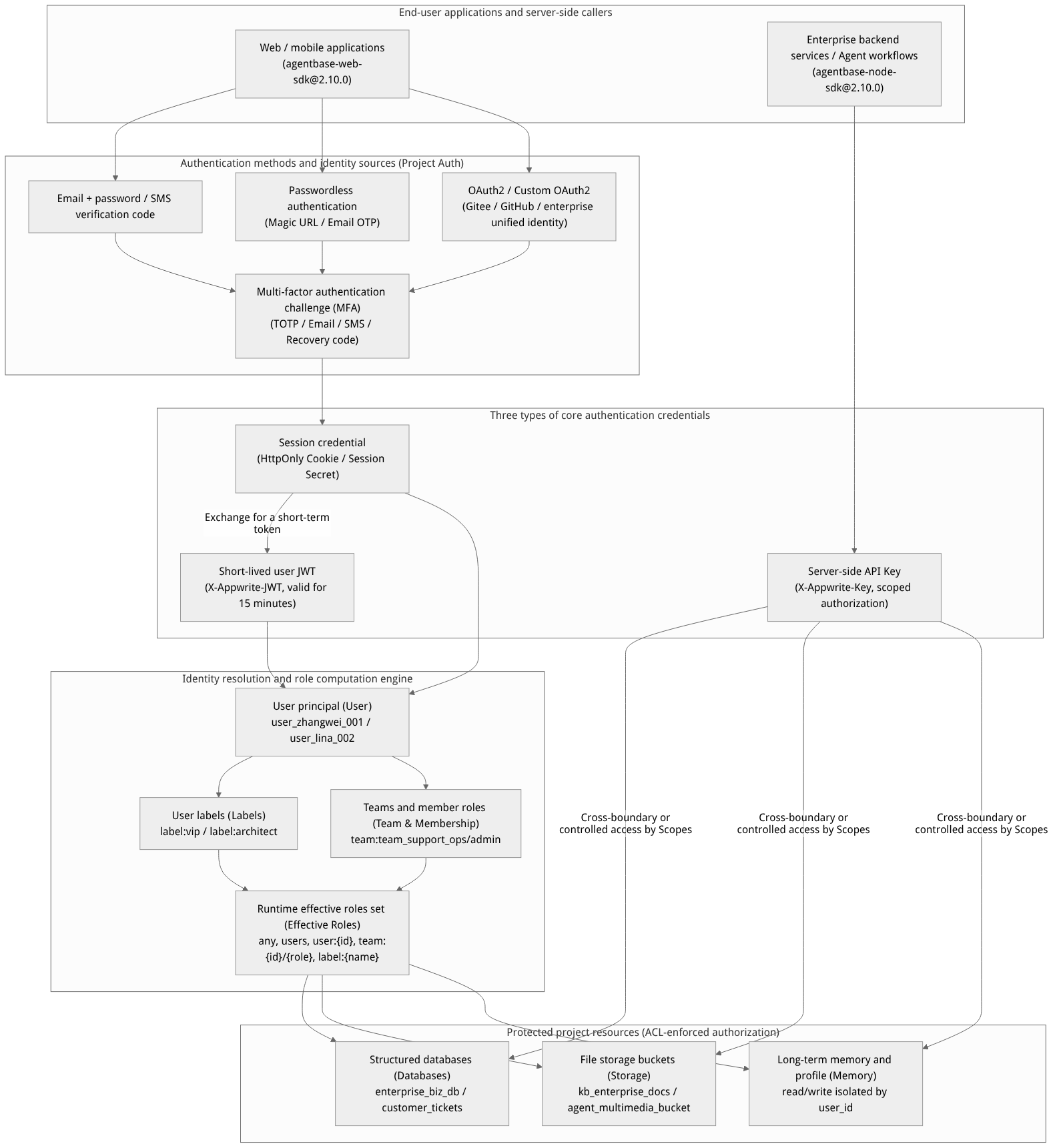
Flow diagram, not a runtime screenshot; read the relationships between steps or states along the arrows.
View the flow diagram in full size
Core Concepts
| Core concept | Identifier and format example | Technical definition and lifecycle description |
|---|---|---|
| User | user_zhangwei_001, user_lina_002 | A unique natural person or business account entity within the project. Contains name (name), unique email (email), E.164-format phone number (phone), verification status (emailVerification / phoneVerification), account enabled/disabled status (status), preference key-values (prefs), and custom labels (labels). |
| Session | Session ID + HTTP Cookie | A persistent context created after the user logs in successfully via email/password, OTP, Magic URL, or OAuth2. Sessions are governed by the project-level Session length (validity period) and Sessions limit (maximum concurrent sessions per user), and support kicking out a single session or revoking all sessions. |
| User JWT (JSON Web Token) | X-Appwrite-JWT: eyJhbG... | A short-lived stateless token (fixed 15-minute validity) issued when a logged-in client calls account.createJWT(), dedicated to securely passing the current end-user identity from the frontend to an enterprise self-built backend service or SQL Proxy user-context endpoint, so the backend executes operations with that end user's permissions. |
| Server API Key | X-Appwrite-Key: <APPBASE_API_KEY> | A project-level server-side management key bound to fine-grained functional permission domains (Scopes, such as users.read, users.write, teams.write, databases.write). Restricted to trusted backends only (e.g. agentbase-node-sdk@2.10.0); it must never be exposed in browser frontends. |
| Third-party identity (Identity) | Identity ID + Provider UID | When a user signs in via public OAuth2 (such as GitHub, Google) or custom OAuth2 (Custom OAuth2, such as Gitee or enterprise SSO), the system creates an association record binding the external identity source's Subject UID, access token, and the in-project User. |
| User Labels | vip, architect, internal | Alphanumeric attribute labels applied to users by administrators via the Console or Server SDK. Labels are automatically mapped to runtime permission roles label:<name> (e.g. Role.label('vip')), suitable for flat, cross-team hierarchical authorization. |
| Teams & Memberships | team_support_ops, team_kb_governance | Multi-tenant organizational units within a project for end users. After joining a team, a user becomes a member (Membership) and can be assigned fully custom in-team roles (e.g. owner, admin, support_lead, auditor), enabling department-level or customer-tenant-level data sharing. |
| Targets | Email / SMS / Push Target | Notification delivery endpoints associated with a user. When a user is created with an email or phone number, the corresponding Email / SMS Target is automatically generated for the Messaging service to deliver notifications, alerts, and support ticket status changes. |
Roles, Entry Points, and Relationships
Console Entry and Routes
Main navigation path: Log in to the Agentbase Console → select organization
Agentbase 企业智能中台(69c6d1aa00062e6bb60) → enter project企业智能客服与知识中台(enterprise-ai-hub-210) → in the left navigation bar, the Infrastructure group → click Auth.Route URL:
/console/project-{region}-{project}/auth(the Users tab is shown by default; the shortcut command center supports navigating directly to the/auth/securitySecurity policy page by pressinggthene).Page tab structure:
Users: End-user list, search, user creation, and the six-panel user detail (Overview / Memberships / Identities / Targets / Sessions / Activity).
Teams: Project end-user team management, member invitations, and team custom role assignment.
Security: User registration limit, session duration, concurrent session limit, password compliance policy, MFA, and Mock phone numbers configuration.
Templates: Customize the 7 types of notification and verification email templates the platform sends to end users (requires enabling project-level custom SMTP first).
Usage: Project-level Auth metrics such as user count and session count over the last 30 days.
Settings: Enable/disable login methods (Email/Password, Phone, Magic URL, Email OTP, Anonymous, etc.) and configure OAuth2 / Custom OAuth2 providers.
Test: Launch authorization login tests for enabled OAuth2 providers directly within the Console (fully isolated from Console management sessions).
Organization Roles and API Key Scope Permission Matrix
When operating Auth resources in the Console or via the Server API, the permission boundaries of different organization member roles and API Key Scopes are as follows:
| Operation domain | Resources and operations involved | Required API Key Scope | Organization roles allowed to execute | Read-only or unauthorized roles |
|---|---|---|---|---|
| User read | Query user list, read user details, preferences, labels, sessions, and member lists | users.read | owner, admin, developer, editor, analyst | billing |
| User write | Create users, modify email/phone/password/labels/preferences, ban/unban, revoke sessions, delete users | users.write | owner, admin, developer, editor | billing, analyst |
| Team read | Query team lists, team details, and membership lists | teams.read | owner, admin, developer, editor, analyst | billing |
| Team write | Create/rename/delete teams, invite or add team members, modify member roles | teams.write | owner, admin, developer, editor | billing, analyst |
| Notification target management | Create, update, or delete Email / SMS / Push targets for users | targets.read / targets.write | owner, admin, developer, editor | billing, analyst |
| Auth security policies and OAuth2 configuration | Modify Security policies, enable/disable login methods, configure Custom OAuth2 | Project-level management permission (Console state) | owner, admin, developer | editor, billing, analyst |
Relationships with Other Product Modules
Structured Databases: Table-level permissions and Row Security for database tables (e.g.
customer_ticketsunderenterprise_biz_db) directly use role strings generated by Auth (e.g.user:user_zhangwei_001,team:team_support_ops/admin,label:vip) for access control.File Storage: Storage buckets
kb_enterprise_docsandagent_multimedia_bucketuse Bucket Permissions and File Security to identify the currently logged-in Auth user and decide whether to allow uploading, listing, or previewing files.Long-term Memory: The agent memory module uses the Auth user's User ID (e.g.
user_zhangwei_001anduser_lina_002) as the primary key for memory ownership, extracting personalized profiles and long-term factual memory.Messaging: Targets (email, phone, device push tokens) registered automatically or manually for users in Auth directly serve as the target carriers for Messaging Topics subscriptions and message delivery.
Feature Details and Operation Guide
1. Authentication Method Comparison: Session vs JWT vs API Key
In enterprise architecture design, correctly distinguishing and selecting among the three authentication credentials is a prerequisite for data security and tenant isolation:
| Comparison dimension | Session authentication (Cookie / Session Header) | User JWT authentication (X-Appwrite-JWT) | Server API Key (X-Appwrite-Key) |
|---|---|---|---|
| Applicable side | Browser web apps, mobile apps (agentbase-web-sdk@2.10.0) | Frontend calling enterprise self-hosted backend services, or accessing SQL Proxy user-mode APIs | Enterprise backend microservices, scheduled jobs, agent orchestration backends (agentbase-node-sdk@2.10.0) |
| Issuance method | Calling login APIs such as createEmailPasswordSession and createOAuth2Session to generate | Logged-in clients call account.createJWT() to generate dynamically | Organization administrators create it in the Console under Overview → API Keys |
| Lifecycle | Determined by the project's Security → Session length setting (default 365 days, configurable in seconds/minutes/hours/days) | Valid for a fixed 15 minutes; before expiry the client must re-issue it using a valid Session | Can be configured to never expire or with a specified expiry date, and can be revoked in the Console at any time |
| Permission evaluation model | Strictly follows the current user's Effective Roles (user:{id}, team:{id}/{role}, label:{name}) and resource ACLs | Fully consistent with the permissions of the user Session that issued the JWT, strictly constrained by table-level/row-level/file-level ACLs | Authorized by the Scopes checked for the Key; in regular data APIs it has the server-side admin perspective by default (not restricted by client-side row-level ACLs) |
| Browser exposure risk | Safe (prefer HttpOnly Cookies bound to the domain platform) | Short-lived token; only placed in request headers when the frontend sends requests to a trusted backend | Absolutely must not be placed in frontend code or public repositories; otherwise read/write access to the entire database would be leaked |
2. Login Providers and Custom OAuth2 Configuration Guide
In the project's Auth → Settings tab, administrators can enable or disable basic login methods per business scenario and configure third-party OAuth2 providers:
| Login method category | Specific supported methods | Key behavior and applicable scenarios |
|---|---|---|
| Basic credential login | Email and Password, Phone (SMS) | The most commonly used login method for enterprise customers and internal employees; email addresses are automatically lowercased upon creation and validated for uniqueness within the project; phone numbers must be in E.164 format (e.g., +8613800138001). |
| Passwordless quick login | Magic URL, Email OTP (one-time email verification code) | Users do not need to remember passwords; they can create a session by clicking a signed redirect link in an email or entering a 6-digit verification code, suitable for lightweight customer portals. |
| Anonymous session login | Anonymous (anonymous guest) | Temporarily generates an anonymous User ID and session for unregistered visitors (role assigned to guests until conversion); users can later bind an email and password to smoothly upgrade to a formal registered account, retaining data associated with the existing session. |
| Standard and custom OAuth2 | GitHub, Google, Apple, Microsoft, Custom OAuth2, etc. | Supports identity sources that implement the standard OAuth 2.0 Authorization Code flow.Custom OAuth2 supports no-code configuration for integrating enterprise self-hosted unified identity authentication (IdP) or platforms such as Gitee. |
Steps to Configure Custom OAuth2 (Custom OAuth2 Provider)
Register the application with the external identity source: Go to the enterprise unified identity platform (or an OAuth2 provider such as Gitee) to create an OAuth2 application, and record the issued Client ID and Client Secret.
Go to the OAuth2 settings in the Console: In the project
enterprise-ai-hub-210, click Auth → Settings in the left sidebar, scroll down to the OAuth2 Providers section, and click Custom OAuth2.Enable the toggle and fill in the endpoint and mapping parameters:
| Configuration item | Required | Format and example values |
|---|---|---|
| Enabled | Yes | Switch to the enabled state to activate the Custom OAuth2 provider. |
| Client ID | Yes | Enter the application client ID assigned by the identity provider, e.g., enterprise_sso_client_210. |
| Client Secret | Yes | Enter the client secret (encrypted and stored on the server only; the plaintext is not displayed after saving). |
| Well-Known Endpoint | No | If the identity source supports OIDC auto-discovery (e.g., https://idp.example.com/.well-known/openid-configuration), filling this in auto-populates the authorization and token endpoints. |
| Authorization Endpoint | Yes | The OAuth2 authorization redirect address (must be a publicly reachable https:// address), e.g., https://gitee.com/oauth/authorize. |
| Token Endpoint | Yes | The API address for exchanging the authorization code for an Access Token, e.g., https://gitee.com/oauth/token. |
| User Info Endpoint | Yes | The API address for retrieving the user profile JSON, e.g., https://gitee.com/api/v5/user. |
| Email Endpoint | No | When the main User Info API does not directly return an email address, a separate email query API can be configured (e.g., https://gitee.com/api/v5/emails). |
| Client Authentication Method | Yes | Select the client authentication method for the Token endpoint; supports client_secret_post (form-submitted secret) or client_secret_basic (Basic Auth header). |
| Subject / Email / Name / Email Verified field paths | Yes | Dot-separated paths or decimal array indices for extracting fields from the JSON returned by User Info (or the Email Endpoint); complex expressions are not supported. When the domain is identified as gitee.com, the Console automatically suggests examples: Subject as id, Name as name, Email as 0.email. Note: the user's email is only marked as Verified when the Email Verified path explicitly returns the boolean value true. |
Register the Callback URI: Copy the fully generated callback address at the bottom of the dialog (in the form
https://appbuild.oceanbase.com/v1/account/sessions/oauth2/callback/custom/<PROJECT_ID>) and paste it as-is into the allowed callback address whitelist of the external identity provider.Run the OAuth2 acceptance test in the Test tab:
Switch to the Auth → Test tab.
Confirm that the domain of the current access host is registered in the Web platform list of the project's Overview → Platforms.
Select an enabled OAuth2 provider, fill in the custom authorization scope (Scope) as needed, and click the Test OAuth2 login button to initiate a real redirect verification.
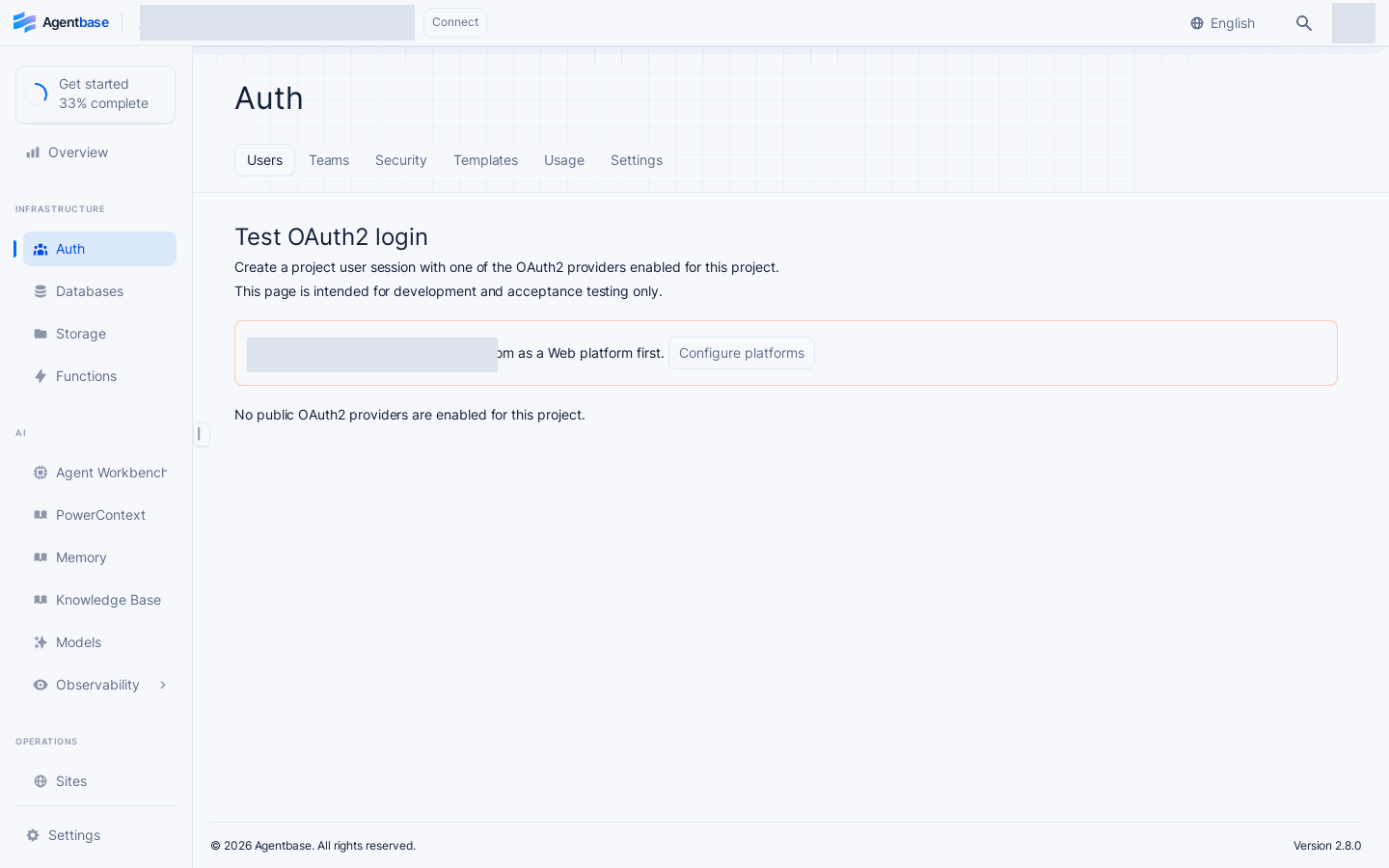
Interface reference: reuses previously registered historical screenshots; demo data may differ from the current project; no new screenshots were taken this time.
Security and isolation mechanisms:
stateThe parameter is consumed once and strongly bound to the project ID, browser session, Callback address, Client ID, and server-sidestate revision; once an administrator modifies the OAuth2 configuration, all historical incomplete oldstatevalues become invalid immediately.Test session isolation: End-user test sessions created by logging in via the Auth → Test tab are fully isolated from the administrator's current Console login state; clicking the logout button on the test page only destroys the end-user session under test and does not log the administrator out of the Console.
3. Permission Strings and Role System in Detail
Agentbase uses a unified declarative model of Permission (operation action) + Role (authorized principal role) to control resource access across Databases, Storage, and Messaging. The four basic permission actions are:
Permission.read(role): Allows reading database rows, viewing or downloading storage bucket files, and subscribing to messaging topics.Permission.create(role): Allows adding rows to database tables or uploading new files to storage buckets.Permission.update(role): Allows updating existing database rows or modifying file metadata/permissions.Permission.delete(role): Allows deleting database rows or storage bucket files.Permission.write(role): A composite shorthand, equivalent to granting the three write permissionscreate,update, anddeletesimultaneously.
The table below lists all supported Role role expressions and their mapping rules in the SDK and the underlying storage:
| Role type | SDK constructor expression | Underlying role string | Authorization matching logic and typical business scenarios |
|---|---|---|---|
| All visitors (including unauthenticated) | Role.any() | any | Matches any request (whether from a logged-in user or an anonymous unauthenticated request). Suitable for public knowledge base attachment downloads or public announcement table reads. |
| All unauthenticated/anonymous guests | Role.guests() | guests | Only matches guests or Anonymous sessions without a valid registered user session. Suitable for public form submission entry points. |
| All logged-in users | Role.users([status]) | users or users/verified, users/unverified | Matches any logged-in end user within the project. When 'verified' is passed (i.e., Role.users('verified')), the user's email or phone number is required to be verified. |
| A specific single user | Role.user(userId, [status]) | user:<USER_ID> (e.g., user:user_zhangwei_001) | Only matches the end user with the specified User ID. Commonly used for customer_tickets row-level security, ensuring that customer Zhang Wei can only view the support tickets he submitted. |
| All members of a specified team | Role.team(teamId) | team:<TEAM_ID> (e.g., team:team_support_ops) | Matches any member who has joined the specified team (regardless of their role within the team). Suitable for departmental shared document libraries or team public boards. |
| Members with a specific role in a specified team | Role.team(teamId, role) | team:<TEAM_ID>/<ROLE> (e.g., team:team_support_ops/admin) | Only matches members holding a specific custom role (e.g., admin, support_lead) in the specified team. Suitable for permission-sensitive operations such as support ticket approval or knowledge base publishing. |
| A specified membership ID | Role.member(membershipId) | member:<MEMBERSHIP_ID> | Precisely matches one specific team membership record (when a user leaves and rejoins a team, producing a new Membership ID, the old authorization automatically becomes invalid). |
| Users holding specific labels | Role.label(name) | label:<LABEL_NAME> (e.g., label:vip, label:architect) | Matches any end user whose labels array contains the label. Suitable for opening a high-priority support ticket channel or dedicated storage bucket access to all vip customers. |
Server-side and Client-side SDK Permission Configuration Code Example
In the enterprise-ai-hub-210 project, when customer Zhang Wei (user_zhangwei_001) submits a customer support ticket, you can use @alipay/agentbase-sdk@2.10.0 (or agentbase-web-sdk@2.10.0) to attach the composite permission of "readable and writable by the owner + readable and processable by the VIP technical support team" to the ticket row:
import { Client, Databases, Permission, Role } from 'agentbase-web-sdk'; // Pin version @2.10.0

const client = new Client()
    .setEndpoint('https://appbuild.oceanbase.com/v1')
    .setProject('enterprise-ai-hub-210');

const databases = new Databases(client);

// Create a support ticket row and declare fine-grained row-level permissions (requires Row security enabled on the table)
const ticket = await databases.createDocument(
    'enterprise_biz_db',
    'customer_tickets',
    'TK-20261022-001',
    {
        title: 'OceanBase 向量索引在高并发混合检索下的 HNSW 参数调优咨询',
        status: 'open',
        priority: 'high',
        creatorUserId: 'user_zhangwei_001'
    },
    [
        // The submitter Zhang Wei himself has read and update permissions
        Permission.read(Role.user('user_zhangwei_001')),
        Permission.update(Role.user('user_zhangwei_001')),
        // All members of the VIP customer technical support group can read support tickets
        Permission.read(Role.team('team_support_ops')),
        // Only the admin role of the VIP customer technical support group can update or delete support tickets
        Permission.update(Role.team('team_support_ops', 'admin')),
        Permission.delete(Role.team('team_support_ops', 'admin'))
    ]
);
FAQ and Troubleshooting
Q1: Why do client-side calls to database or storage APIs return 401 User (role: guests) missing scope (account) or 401 user_unauthorized?
Root cause analysis:
The request did not successfully carry the end user's login Session Cookie or the
X-Appwrite-JWTrequest header, causing the server to identify the request as an unauthenticated guest (role: guests).In a cross-domain web application, the hostname currently accessed by the frontend has not been registered as a trusted Web Platform under Overview → Platforms in the project, causing the browser to block cross-domain cookies or fallback tokens.
The target database table or storage bucket has not granted the corresponding
read/writepermissions toRole.any()or theRole.user(...)/Role.team(...)the current user belongs to.
Troubleshooting steps:
Check the project's Overview → Platforms and confirm that the actual frontend domain has been added to the web platform whitelist.
If the frontend and backend are separated and deployed across top-level domains, it is recommended that after login the client SDK be used to call
account.createJWT()to obtain a short-lived JWT and explicitly passX-Appwrite-JWTin the request headers.Check the target table's Settings → Permissions or the bucket's Settings → Permissions, and confirm there is a matching
Role.users(),Role.user('<USER_ID>')orRole.team('<TEAM_ID>')authorization entry.
Q2: After configuring Custom OAuth2, what should I do when clicking the test login on the Auth → Test page reports an error Invalid state or the email is not marked as verified (Unverified)?
Root cause analysis:
Invalid state: After the OAuth2 redirect was initiated, an administrator modified and re-saved the Custom OAuth2 configuration midway (triggering a server-sidestate revisionincrement), or the callback URL's hostname differs from the hostname used when the request was initiated.Email not marked as
Verified: Custom OAuth2 requires that the configured Email Verified field path in the user JSON returned by the identity provider must strictly return a booleantrue(a string"true", a number1, or a missing field will not be treated as verified).
Troubleshooting steps:
After modifying any Custom OAuth2 parameters, you must close the old authorization tab and click Test OAuth2 login again from the Auth → Test page to generate a brand-new
statesession.Inspect the external IdP's User Info response body; if the external identity source does not support returning a boolean
email_verified: true, after the user's first login your enterprise backend can callusers.updateEmailVerification(userId, true)via a Server SDK holdingusers.writepermission to complete manual or trusted verification synchronization.
Q3: How can backend support staff (e.g., Li Na user_lina_002) safely impersonate (Impersonate) the customer's perspective while investigating issues, without asking for the customer's password?
Root cause analysis and solution: Agentbase provides an audited and governed User Impersonation capability:
The administrator goes to Auth → Users, opens the trusted senior support engineer account (e.g.,
user_lina_002Li Na), and at the bottom of the Overview tab finds the User impersonation card and enables the toggle.Once enabled, when Li Na logs into her own account using the client SDK, she can specify the target user ID to impersonate in requests (e.g.,
user_zhangwei_001) to reproduce frontend support tickets or knowledge retrieval results from Zhang Wei's permission perspective.Security audit safeguards: For all requests initiated via impersonation, the underlying operation audit logs (Activity) are recorded under the account of the operator who initiated the impersonation. Enabling this toggle for ordinary external end users is strictly prohibited.
Q4: After modifying a user's team role (team:team_support_ops/admin) or user labels (label:vip), does the user need to log in again for the changes to take effect?
Answer:
For Session Cookie authentication: No re-login is required! Each time Agentbase receives a request carrying a session, it dynamically loads the user's latest Labels and Team Memberships to compute Effective Roles, so adding/removing labels or removing the user from a team takes effect immediately.
For short-lived JWTs (
X-Appwrite-JWT): If your business side locally caches the issued 15-minute JWT, after permission-sensitive changes it is recommended to guide the client to callaccount.createJWT()again to refresh the token.
Related Documentation
User management (Users): View and search end users, manage user labels (Labels), preferences, session kick-out, and third-party identity unbinding.
Team management (Teams): Configure multi-tenant teams within the project, invite team members, and define custom team roles.
Authentication security policies (Security): Configure session lifetime, per-user concurrent session limits, password strength dictionary policies, MFA multi-factor authentication, and mock phone numbers for testing.
Email templates (Templates): Customize 7 types of notification emails—email verification, Magic URL, OTP codes, team invitations, and more—based on a custom SMTP.
Message targets (Targets): Manage users' associated email, SMS, and device push notification targets.
Core concepts and permission model: Get an overall understanding of Agentbase organizations, projects, resource isolation, and permission evaluation rules.