
Memory Configuration Center and Custom Pipelines
Feature overview and core scenarios
The Memory Configuration Center and custom pipelines (Memory Configuration & Pipelines; the Console tab is Configuration) are the policy and process control hub of Agentbase Memory (v2.10.0). In real enterprise production environments, different business scenarios have vastly different requirements for the granularity of fact extraction, the structure of user profiles, knowledge distillation thresholds, and the decay/forgetting cycle of historical memories. Coupling all prompts and model parameters into a single global monolithic object not only makes concurrent edits overwrite each other easily, but also makes it impossible to safely validate the effect of new prompts before rollout.
To address this, Agentbase Memory provides a two-layer configuration governance system:
Four scenario-based business Pipelines (
add_memory,profile,distillation,forgetting): supports one-click draft creation from system defaults, per-node customization of prompts and model routing, online trial validation via Dry-run samples, and releasing immutable versions and switching the scenario's default pipeline (a single project supports at most 32 custom Pipelines across all four scenario types combined);Versioned Config Center: organized by responsibility into the
provider,policy,prompt,retention, andevolutionnamespaces (plus the underlying runtimeruntime), fully adopting optimistic concurrency control based onexpectedConfigVersionand HTTPIf-Match/If-None-Match(ETag), with version history viewing, Diff comparison, and one-click rollback.
In the flagship project 企业智能客服与知识中台 (enterprise-ai-hub-210) of Agentbase 企业智能中台 (69c6d1aa00062e6bb60), administrators customized a fact extraction pipeline for intelligent customer service via a custom Pipeline, specifically extracting ticket numbers, OceanBase cluster versions, and SLA tiers, and finely managed the 168-hour new-memory protection period and compliance retention cycle through the policy and retention namespaces.
Core Concepts and Architecture
The Config Center decouples frequently iterated “business pipeline node parameters (Pipelines)” from globally effective “system-level governance policies (Config Namespaces)”, and guarantees that in-flight production tasks are not disturbed by configuration changes through a version snapshot freeze mechanism applied at task acceptance.
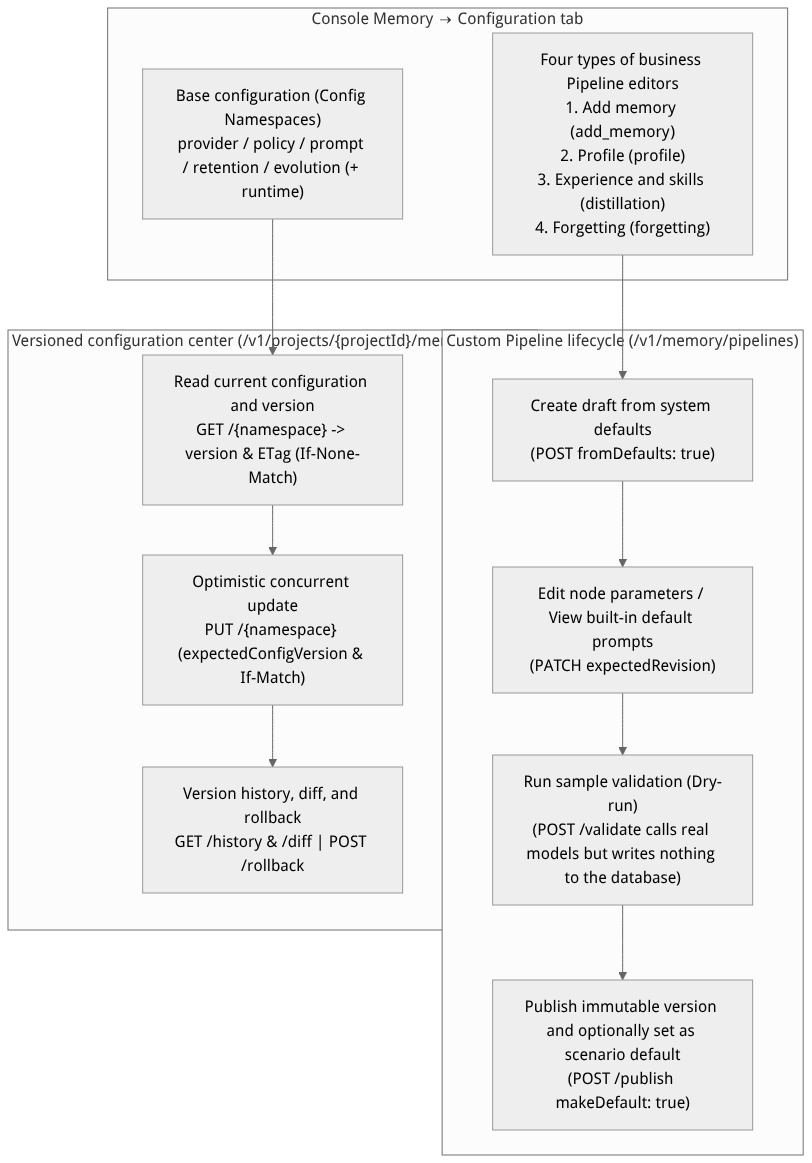
Flow diagram, not a runtime screenshot; read the relationships between steps or states along the arrows.
View the flow diagram in full size
Comparison Table of Fixed Steps and Tunable Parameters for the Four Business Pipelines
Each Pipeline's scenario type (scenario) is fixed after creation and cannot be modified; its internal nodes execute in a predefined topological order (nodes cannot be reordered or deleted, but optional nodes can be enabled/disabled by rule):
Scenario name (scenario) | Fixed node execution topological order | Core tunable node parameters and model routing overrides | Sample validation (Dry-run) behavior |
|---|---|---|---|
Add Memory (add_memory) | receive (receive) → fact_extraction (fact extraction) → conflict_detection (conflict judgment) → memory_operation (memory operations) | - fact_extraction: custom extraction prompt, maximum facts per extraction (maxFacts), Chat model routing (toggleable); - conflict_detection: conflict judgment prompt, retrieval candidates per fact (candidatesPerFact), maximum total candidates (maxCandidates), Chat model routing (toggleable); - Shared models: can override embedding, rerank, and vision routing and the conflict re-ranking toggle rerankEnabled. | Calls real models to perform extraction and conflict comparison, directly displaying the planned ADD/UPDATE/DELETE/NONE results, and does not write to the production memory table. |
Profile (profile) | receive (receive) → profile_generation (profile generation) → profile_operation (profile operations) | - All three steps are mandatory; - profile_generation: allows separately customizing the incremental generation prompt (prompt) and the source-rebuild prompt (rebuildPrompt), and independently specifying the Chat/VLM model routing for the generation node. | Calls the model and returns the generated profile content, does not overwrite the user's existing production profile. |
Experiences & Skills (distillation) | receive → skill_extraction → skill_merge → experience_extraction → experience_merge → validation → knowledge_operation | - At least one of skill_extraction and experience_extraction must be enabled (when one is disabled, its corresponding merge node is automatically skipped, with parameters preserved); - Merge candidate count maxCandidates (1~20), merge threshold mergeThreshold ((0, 1]); - Independent prompts and Chat models per node, with shared models.embedding routing override. | Displays the extracted and merged skill/experience titles, summaries, and node technical details, does not persist production knowledge or confirmation records. |
Forgetting (forgetting) | memory_scan (scan memories) → forgetting_decision (forgetting judgment) → forgetting_operation (execute forgetting) | - Uses deterministic mathematical decay rules (no LLM prompt parameters); - memory_scan: scan batch size batchSize (1~1000); - forgetting_decision (disableable): initial retention rate, decay rate, tier thresholds, minimum protection period (minimum_protection_hours), review intervals, and permanent-forgetting toggle. | Performs a read-only scan of the specified sample user's visible memories, returning scanned along with planned actions (archive, expire, review, promote) and dryRun: true; never executes any deletion or archive writes. |
Feature Entrypoints and Permission Matrix
Console Entry Point and Permission Requirements
The Console entry is located at: Project enterprise-ai-hub-210 → Memory → Configuration tab. This tab contains 5 secondary sub-views: Add Memory Pipeline, Profile Pipeline, Experiences & Skills Pipeline, Forgetting Pipeline, and Base Configuration.
| Operation category | Console entry | REST API endpoint | Required permissions |
|---|---|---|---|
| Query and create Pipelines | Each scenario's Pipeline list → New Pipeline | GET /v1/memory/pipelines?scenario=..., POST /v1/memory/pipelines | projects.read / projects.write |
| Save draft, run sample, and publish | At the top of the editor: Save Draft / Run Sample / Publish | PATCH /v1/memory/pipelines/{pipelineId}, POST .../validate, POST .../publish | projects.write |
| Switch or restore a scenario's default Pipeline | Set as Default / Restore System Default | PUT /v1/memory/pipelines/default | projects.write |
| Read and write 5 major system configuration namespaces | Base Configuration sub-view | GET/PUT /v1/projects/{projectId}/memory/config/{namespace} | projects.read / projects.write |
| View configuration history, Diff, and rollback | Expand Configuration Versions area | GET .../config/{namespace}/history, /diff, POST .../rollback | projects.read / projects.write |
Feature Details and Operation Guide
1. Create, validate, and publish a custom memory Pipeline
Log in to the Agentbase Console, enter the project
企业智能客服与知识中台(enterprise-ai-hub-210), and open the Memory → Configuration tab.
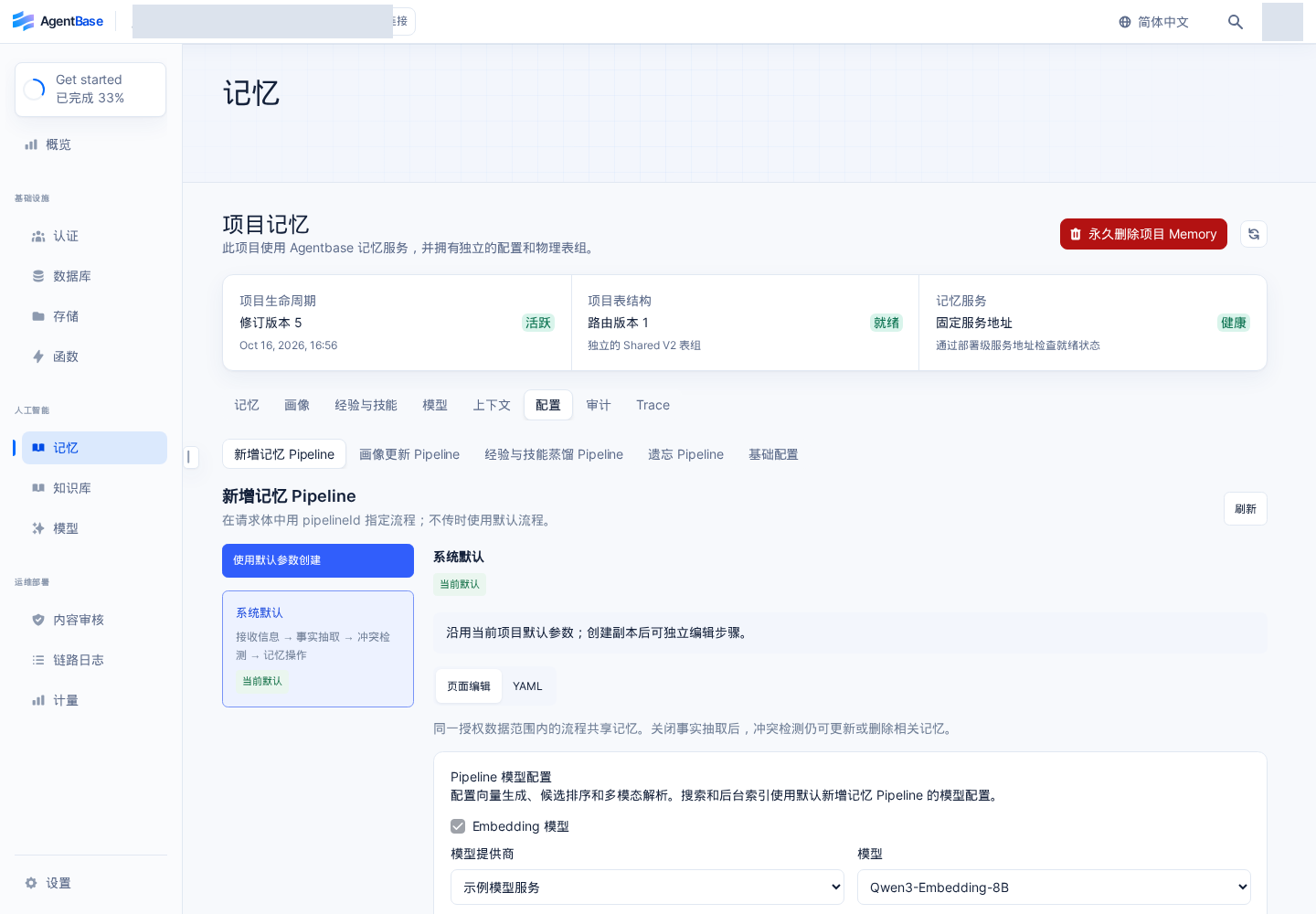
Interface reference: reuses previously registered historical screenshots; demo data may differ from the current project; no new screenshots were taken this time.
Select the business scenario you want to adjust (e.g., Add Memory Pipeline), and click Create Pipeline from Default (corresponding to
POST /v1/memory/pipelineswith{"scenario": "add_memory", "fromDefaults": true}).Expand the pipeline node you want to customize (e.g., Fact Extraction
fact_extraction):Click View Built-in Default Prompt below the prompt input box to view and one-click copy the platform's built-in base prompt template (viewing or copying does not automatically modify the current draft; the system also automatically appends non-overridable safety protocol rules at runtime);
Modify the extraction instructions, the maximum facts per extraction (
maxFacts), or the model routing used by the node to suit your enterprise customer service scenario.
Click Save Draft at the top of the editor (the editor top also provides Duplicate Saved Draft and Delete Pipeline buttons).
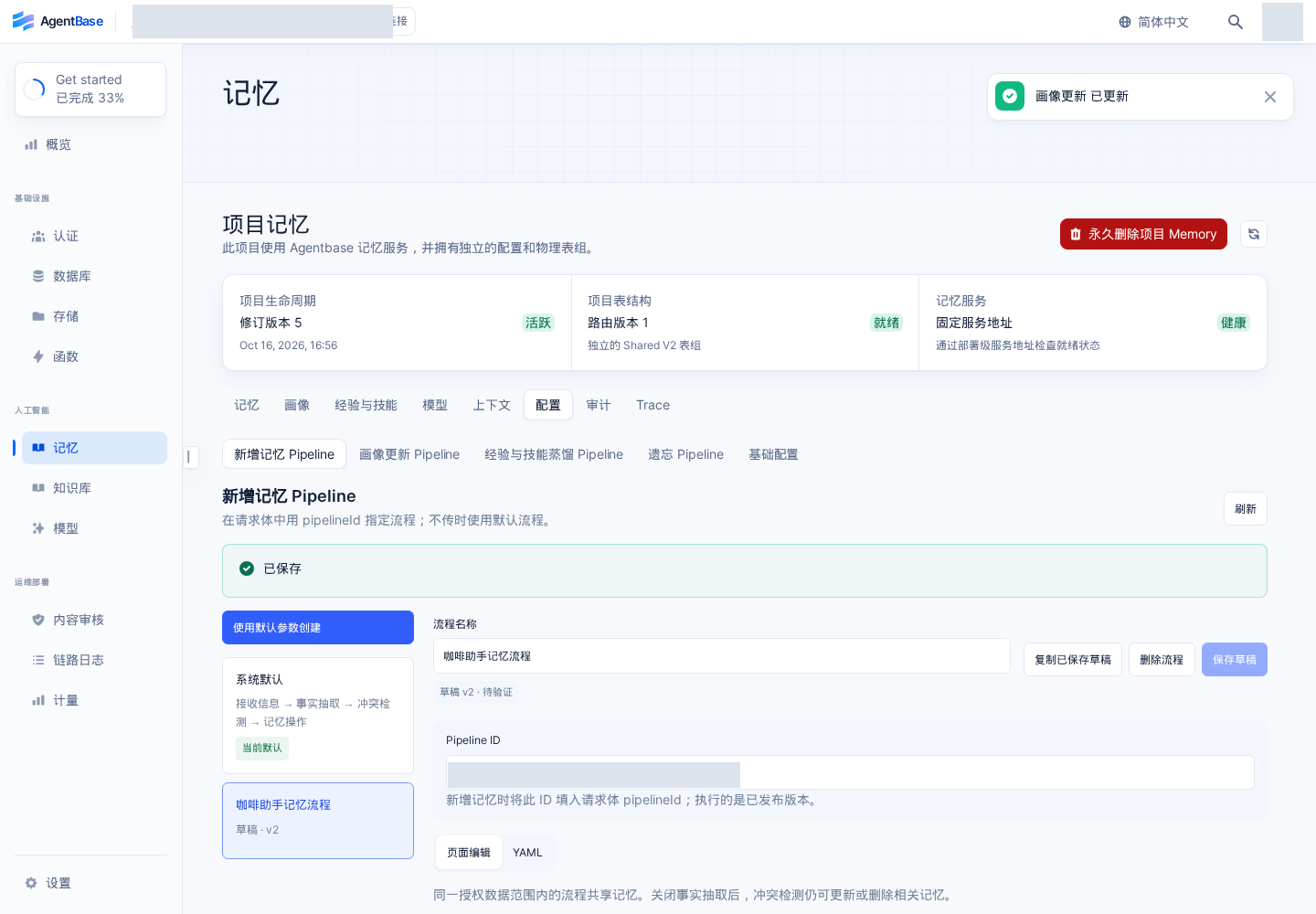
Interface reference: reuses previously registered historical screenshots; demo data may differ from the current project; no new screenshots were taken this time.
Run sample validation (Dry-run):
After the draft is saved, enter a test message or target user ID in the sample area on the right or below, and click Run Sample (calls
POST /v1/memory/pipelines/{pipelineId}/validate);The currently saved draft version must successfully pass a sample validation once before the system allows publishing. The audit of sample requests records only the Pipeline ID, version, and result status; the original sample input is never saved.
Publish the version and set it as default:
After verifying that the sample output meets expectations, click Publish (
POST /v1/memory/pipelines/{pipelineId}/publish); you can simultaneously check Set as the default Pipeline for this scenario (makeDefault: true).After publishing, you can explicitly select the published Pipeline on the memory, profile, or experience & skills pages, or directly inherit the updated scene default Pipeline. Accepted historical tasks continue to use the published version frozen at enqueue time; switching the default will not recompute historical data.
2. Detailed Explanation of the Five Core Configuration Namespaces and Optimistic Concurrency Control
In memory → Configuration → Basic configuration, project configuration is organized into 5 major business namespaces (plus the underlying runtime retrieval fusion namespace):
Namespace (namespace) | Core responsibilities | Key configuration fields and production-recommended values | Failure policy |
|---|---|---|---|
provider | Model providers and default routing for the five model classes | embeddingProviderRef / embeddingModel (text-embedding-v3) / embeddingDims (1024, locked as immutable); sparseEmbeddingEnabled (true); llmProviderRef / chatModel (qwen-plus); structuredOutputMode ("tool_call"); rerankModel (qwen3.7-text-rerank); visionModel (qwen-vl-max). | Fail-closed (reject calls when routing is invalid) |
policy | Capture strategy, search enhancement, observability sampling, and adaptive forgetting | - rerankEnabled (search reranking switch, default false), profileRewriteEnabled (profile rewriting switch, default false), autoProfileExtractionEnabled (automatic profile), requestAuditEnabled (request audit, default true); - observability: enabled, captureContent, successSampleRate, slowThresholdMs; - forgetting: enabled (true), permanent_forgetting_enabled (false), minimum_protection_hours (168), working_threshold (0.3), short_term_threshold, long_term_threshold. | Core access policy Fail-closed |
prompt | Project-level prompt overrides per stage | factExtractionPrompt, memoryUpdatePrompt, profileExtractionPrompt, profileRebuildPrompt, queryRewritePrompt, skillDistillationPrompt, skillMergePrompt, experienceDistillationPrompt, experienceMergePrompt, evolutionValidationPrompt, contextAggregationPrompt, promptVersion. | For nodes migrated into a custom Pipeline, its published version takes precedence |
retention | Physical retention days for various data and task receipts | defaultDays (default retention days), factDays (fact memory retention days), conversationDays (conversation memory retention days), auditEventDays (audit event retention days), terminalJobDays (finished asynchronous task retention days), idempotencyReceiptDays (idempotency receipt retention days). | Expired data immediately becomes invisible online; background asynchronous cleanup follows |
evolution | Experience/skill activation thresholds and Dreaming context scheduling | enabled, autoDistillEnabled, requireConfirmation (self-evolution secondary confirmation, default false), allowSingleVerifiedUserActivation, crossUserPromotionEnabled; activation (minConfidence, minIndependentSessionsForAgent, requireVerifiedSuccess); retrieval (experienceTopK, skillTopK, maxTokens); dreaming (enabled, mode, batchSize, minimumChanged). | Fail-closed (remains shadow until thresholds are met) |
Additional note (
runtimenamespace): The system also supports tuning the underlying retrieval fusion parameters via/v1/projects/{projectId}/memory/config/runtime, such asrecallFusion.method,rrfK,weights(dense/sparse/keyword/graphfour-way weights),candidateThresholds, andqueryEmbeddingCache.maxEntries.
3. Optimistic Concurrency Control (expectedConfigVersion + If-Match / If-None-Match) and Configuration Rollback
To prevent silent overwrites when multiple administrators modify configuration simultaneously, all configuration namespaces enforce strict optimistic concurrency locks with HTTP conditional request header support:
Conditional read (
If-None-Match):GET /v1/projects/{projectId}/memory/config/{namespace}returns the current integerversion, the last event IDlastEventId, and theETagresponse header. When polling, the client may sendIf-None-Match: "<etag>"; if the configuration is unchanged,304 Not Modifiedis returned efficiently.Conditional update (
expectedConfigVersionandIf-Match): ThePUT /v1/projects/{projectId}/memory/config/{namespace}request body must carry the most recently readexpectedConfigVersion(integer) and may also carryIf-Match: "<etag>"in the HTTP request header. If the server detects the version has advanced, it immediately returns409 Conflict; the client must re-read the latest configuration and version before resubmitting.History comparison and rollback (
history/diff/rollback): Expand configuration versions in the Console to load the historical version list and a read-only YAML diff on demand (viewing history does not overwrite the current unsaved draft). CallPOST /v1/projects/{projectId}/memory/config/{namespace}/rollbackwithtargetVersionandexpectedConfigVersionto safely roll configuration parameters back to a specified historical version (rollback restores only the parameters themselves; it does not restore memory data that was physically deleted).
# Example: update a retention policy using expectedConfigVersion and If-Match, and query the version Diff
export APPBASE_ENDPOINT="https://appbuild.oceanbase.com/v1"
export APPBASE_PROJECT_ID="enterprise-ai-hub-210"

# 1. Read the current retention configuration and version number
RETENTION_RESP="$(curl -fsS -D /tmp/retention_headers.txt \
  "${APPBASE_ENDPOINT}/projects/${APPBASE_PROJECT_ID}/memory/config/retention" \
  -H "Cookie: ${APPBASE_CONSOLE_SESSION}" \
  -H "X-Appwrite-Project: ${APPBASE_PROJECT_ID}" \
  -H "X-Appwrite-Mode: admin")"

RET_VER="$(echo "${RETENTION_RESP}" | jq -er '.version')"
RET_ETAG="$(grep -i '^etag:' /tmp/retention_headers.txt | awk '{print $2}' | tr -d '\r')"

# 2. Optimistically update the retention days with expectedConfigVersion and If-Match
curl -fsS -X PUT "${APPBASE_ENDPOINT}/projects/${APPBASE_PROJECT_ID}/memory/config/retention" \
  -H "Cookie: ${APPBASE_CONSOLE_SESSION}" \
  -H "X-Appwrite-Project: ${APPBASE_PROJECT_ID}" \
  -H "X-Appwrite-Mode: admin" \
  -H "If-Match: ${RET_ETAG}" \
  -H "Content-Type: application/json" \
  --data "{
    \"expectedConfigVersion\": ${RET_VER},
    \"reason\": \"按企业合规要求将事实记忆保留期设为 365 天,审计保留期设为 90 天\",
    \"value\": {
      \"defaultDays\": 180,
      \"factDays\": 365,
      \"conversationDays\": 90,
      \"auditEventDays\": 90,
      \"terminalJobDays\": 14,
      \"idempotencyReceiptDays\": 7
    }
  }" | jq .

# 3. Compare version differences (Diff)
curl -fsS "${APPBASE_ENDPOINT}/projects/${APPBASE_PROJECT_ID}/memory/config/retention/diff?fromVersion=${RET_VER}&toVersion=$((RET_VER + 1))" \
  -H "Cookie: ${APPBASE_CONSOLE_SESSION}" \
  -H "X-Appwrite-Project: ${APPBASE_PROJECT_ID}" \
  -H "X-Appwrite-Mode: admin" | jq .
FAQ (Frequently Asked Questions and Troubleshooting)
1. Why does clicking the “Publish” button in a custom Pipeline prompt that it cannot be published?
Root cause: Agentbase Memory enforces that every Pipeline draft version must, before being published and going live, successfully pass one run sample (
POST /validate) validation based on the latest currently saved draft version (versionId). If any node parameters are modified after running the sample without re-saving and re-running the sample, or if the sample execution fails due to a model routing error, the system will block publication.Resolution: First click Save draft, then click Run sample and confirm a successful result; the Publish button then becomes clickable.
2. What is the impact of toggling the “Permanent forgetting (permanent_forgetting_enabled)” switch? Does it affect user-initiated deletion (DELETE)?
Cause analysis: The two concepts “background adaptive decay and archiving” and “explicit privacy deletion” are easily confused.
Resolution:
forgetting.permanent_forgetting_enabled(defaultfalse) only controls whether memories automatically archived by the background forgetting Pipeline due to retention-rate decay falling below a threshold enter physical compaction and cleanup; when it is off, adaptively decayed memories are only marked archived and invisible, without immediate physical erasure.By contrast,
DELETE /v1/memory/memories-initiated explicit deletion by users or applications, memories reaching an explicit expiry time (hard expiration), and project lifecycle destruction always perform irreversible permanent cleanup and are not protected by turning thepermanent_forgetting_enabledswitch off.
3. After modifying the default memory-addition Pipeline or system prompts, are previously written old memories automatically re-extracted?
Cause analysis: No. Asynchronous write, profile extraction, and knowledge distillation tasks freeze the published Pipeline version selected at acceptance into the task snapshot when enqueued; newly published Pipelines or configurations only take effect for subsequently accepted requests and do not automatically recompute existing historical memories.
Resolution: For user profiles or layered contexts, if you want to recompute with newly published prompts, you can explicitly call the profile's rebuild (
/profile/rebuild) or the context's rebuild (/contexts/{contextId}/rebuild) API.