
User Profile Extraction and Management
Feature overview and core scenarios
User Memory Profiles is the core aggregation capability of Agentbase Memory (v2.10.0) for personalized agent services. In real business scenarios, a single user often has dozens or even hundreds of fragmented individual memories (e.g., tech stack preferences, cluster modules they are responsible for, past support ticket background, communication style preferences). If each conversation only retrieves scattered memory entries, it is difficult for the agent to quickly grasp the user's overall identity characteristics. The user profile feature uses a large model (e.g., qwen-plus under dashscope-prod) and a configurable profile Pipeline to organize a user's valid sources and new conversations into highly cohesive content profile (content) and structured topics profile (topics).
In the flagship project 企业智能客服与知识中台 (enterprise-ai-hub-210) of Agentbase 企业智能中台 (69c6d1aa00062e6bb60), the system maintains dynamically evolving dedicated user profiles for the VIP architect user_zhangwei_001 and the front-line engineer user_lina_002:
When
user_zhangwei_001initiates a technical support request (e.g., support ticketTK-20261022-001), the Agent Workbench quickly retrieves their VIP architect profile viaGET /v1/memory/memories/users/user_zhangwei_001/profileor unified retrieval (recall), automatically skipping introductory Q&A and directly providing production-grade OceanBase distributed transaction and vector index troubleshooting instructions;As subsequent sessions progress, the system supports smoothly absorbing new developments via incremental update (
incremental), and also supports correcting profile deviations via regeneration based on evidence (replace) or rebuild from sources (rebuild); deleting a profile does not accidentally delete the underlying raw memories.
Core Concepts and Architecture
User profiles sit above the raw memories/sources (L0/L1) and serve as the user-level global semantic view, working closely with memory retrieval (Query Rewrite profile rewriting) and agent system prompt injection.
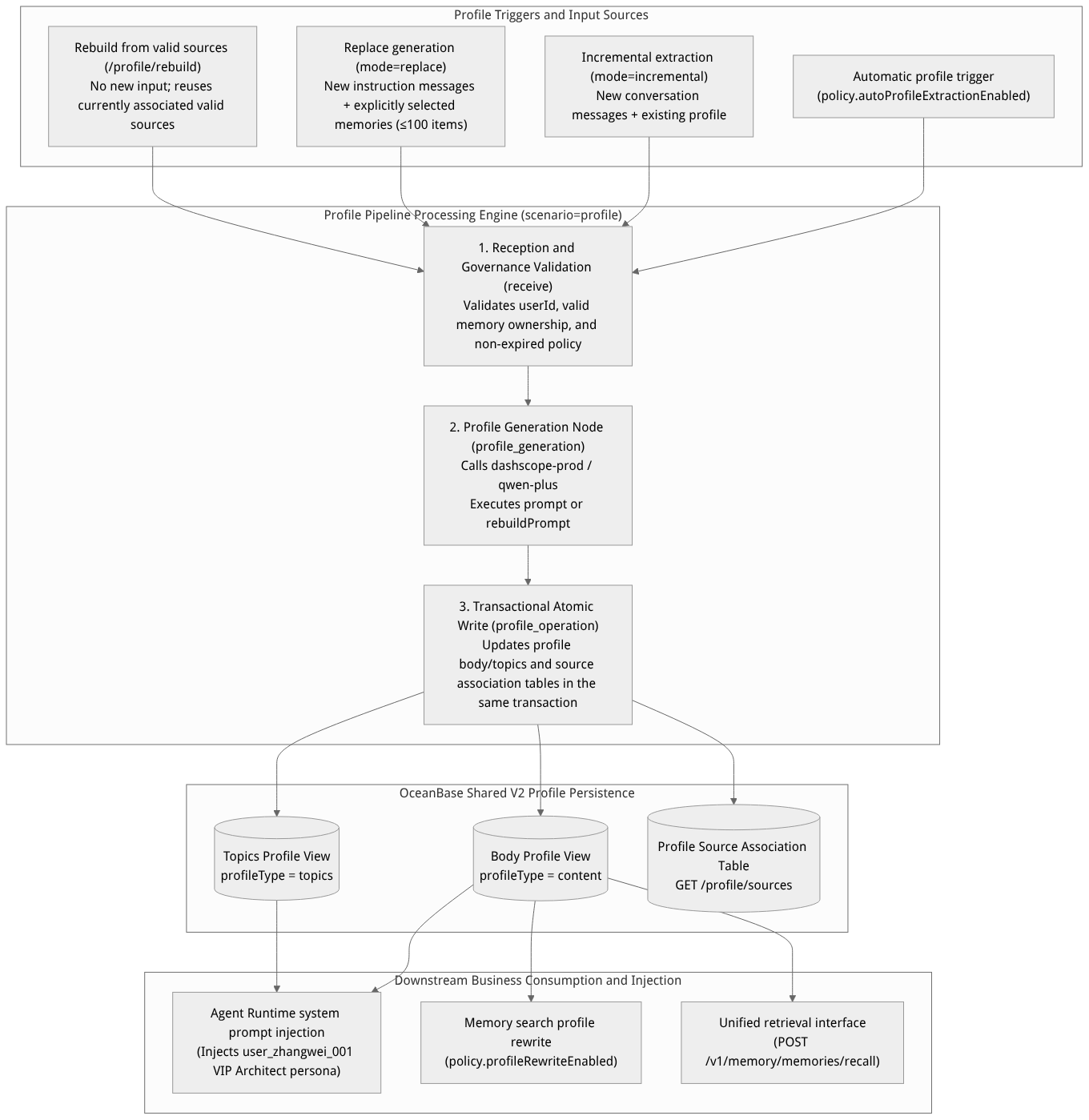
Flow diagram, not a runtime screenshot; read the relationships between steps or states along the arrows.
View the flow diagram in full size
Core Concepts and Mode Comparison
| Concept / operation mode | Parameter identifier | Applicable scenarios and core technical semantics |
|---|---|---|
| Content Profile | profileType: "content" | A coherent, concise natural language paragraph that directly describes the user's role identity, tech stack background, communication preferences, and recent focus areas; best suited for direct inclusion in the Agent System Prompt. |
| Topics Profile | profileType: "topics" | A topic collection organized by structured dimensions (e.g., role function, core systems, preference constraints, recent pain points), following the structure specification defined in runtime.profileSchemaVersion. |
| Incremental extraction (Incremental Mode) | mode: "incremental" (default) | Merges the messages newly passed in this round into the user's current existing profile without deleting the old one beforehand; suitable for continuous evolution after daily conversations. |
| Regeneration (Replace Mode) | mode: "replace" | Centers on the description messages newly passed in this round, combined with the optionally passed sourceMemoryIds (at most 100 valid, unexpired memories of the same project and user), and atomically replaces the current profile and source relations within a single transaction. |
| Rebuild from sources (Rebuild) | POST /profile/rebuild | Does not accept new message input. When the project upgrades its profile model (e.g., from qwen-turbo to qwen-plus), adjusts profileRebuildPrompt, or some underlying sources have been forgotten and cleaned up, the profile is recomputed based on the currently valid associated sources. |
Feature Entrypoints and Permission Matrix
Console Entry Points and API Mapping
The Console entry point is located at: the Project enterprise-ai-hub-210 → Memory → Profiles tab.
| Function action | Console operation entry | REST API endpoint | Required API Key scope | Related notes |
|---|---|---|---|---|
| Query user profile | Enter user ID + select content / topics → Query | GET /v1/memory/memories/users/{userId}/profile | memories.read | Returns 404 profile_not_found if the user has no profile yet |
| Query profile sources | Sources area of profile details | GET /v1/memory/memories/users/{userId}/profile/sources | memories.read | Displays the valid sources and memory associations supporting the current profile version |
| Incremental update / regeneration | Incremental update / Regenerate operation area | POST /v1/memory/memories/users/{userId}/profile/extractions | memories.write | Optionally pass in the published profile pipelineId and sessionId |
| Rebuild from valid sources | Rebuild profile button | POST /v1/memory/memories/users/{userId}/profile/rebuild | memories.write | Call only on demand after the model, prompt, or underlying sources have changed |
| Delete a specified profile type | Delete profile button | DELETE /v1/memory/memories/users/{userId}/profile | memories.delete | Only clears that profile type's aggregation, underlying raw memories are preserved |
Synergy with Other Modules
Relationship with direct memory writes: Calling
POST /v1/memory/memorieswithinfer=falseset directly saves a fact, but does not automatically guarantee the user profile has been generated. Before reading a profile for the first time, ensure the automatic profile task has completed, or explicitly call the profile extraction API once.Relationship with the configuration center (Pipeline): The prompts for profile generation (
profileExtractionPromptandprofileRebuildPrompt) and the generation node model routing can be customized and published in Memory → Configuration → Profile Pipeline; see Memory Configuration Center for details.Relationship with memory retrieval (Query Rewrite): When
policy.profileRewriteEnabled: trueis enabled in the basic configuration,POST /v1/memory/memories/searchuses the target user's profile to automatically complete vague query terms (e.g., rewritinguser_zhangwei_001's query “how to investigate index errors” into “OceanBase Shared V2 vector index HNSW build and query error troubleshooting” based on their profile).
Feature Details and Operation Guide
1. Query and manage user profiles in the Console
Log in to the Agentbase Console, enter the project
企业智能客服与知识中台(enterprise-ai-hub-210), click Memory on the left, and switch to the Profiles tab.Enter the target user ID in the top query bar (e.g.,
user_zhangwei_001oruser_lina_002), select Content (content) or Topics (topics) in the profile type, and click Query.The page displays the currently effective profile content, profile version number, last update time, and the running status of the background profile extraction task.
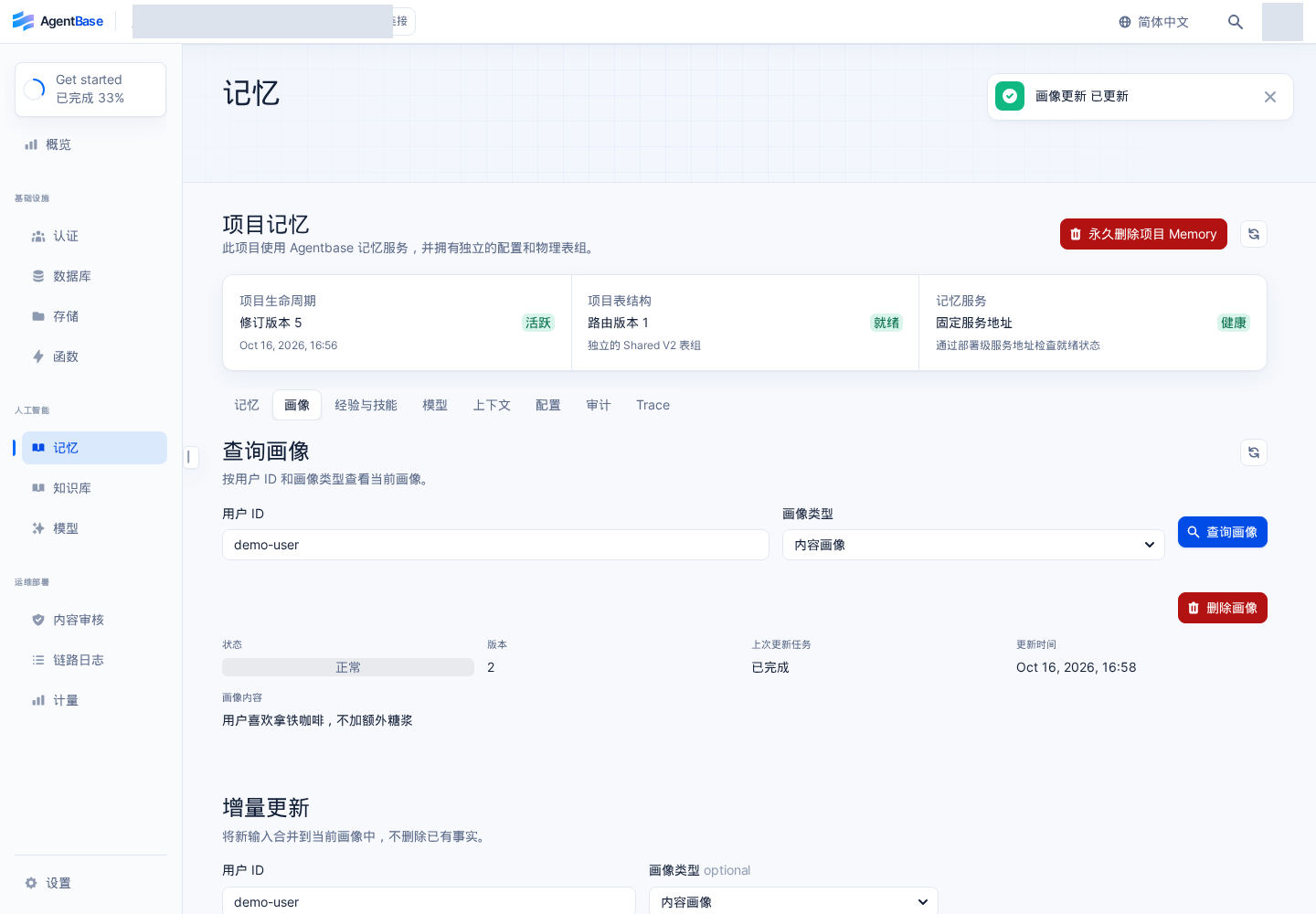
Interface reference: reuses previously registered historical screenshots; demo data may differ from the current project; no new screenshots were taken this time.
2. Perform incremental update (incremental) and regeneration based on evidence (replace)
Method One: Incrementally update the profile (absorbing the latest conversation dynamics)
On the Profile tab action area, select Incremental Update.
Enter the target user ID
user_zhangwei_001, and select Use default Pipeline (or a published custom profile Pipeline) in the Pipeline dropdown.Add the new message and its role (e.g.,
role: "user", content:近期我们核心账务集群正在将向量检索切换为 OceanBase 1024 维 HNSW 索引,并启用了 AI 网关语义缓存 cp-semantic-cache。).Click Submit and wait for the task to complete, then click Query again; you will see the new architectural dynamics seamlessly merged into Zhang Wei's existing profile.
Method Two: Regenerate the profile based on new circumstances (replace mode)
When the user's job responsibilities or system environment change significantly and the profile needs a complete refresh:
Switch to Regenerate in the action area, enter the user ID
user_zhangwei_001and new background description text.Select the evidence source scope:
Use only this new input (corresponding to API
sourceMemoryIds: []);Use all valid memories for this user (automatically selecting up to 100 non-expired, non-forgotten memories);
Manually check specific memory evidence (check core memory IDs from the list as supplementary evidence).
Verify and submit. The system replaces the profile content and source associations within the same database transaction; if the model call fails midway, the transaction rolls back automatically, never exposing a half-updated profile, and no underlying raw memories are deleted.
3. REST API Parameter Specification for Profile Extraction, Rebuild, and Deletion
The following is the complete parameter reference table for the /v1/memory/memories/users/{userId}/profile/* series of APIs:
| API and Method | Parameter Name | Type | Required | Default Value | Detailed Description and Value Constraints |
|---|---|---|---|---|---|
POST .../profile/extractions | mode | string | No | "incremental" | Value "incremental" (incremental merge) or "replace" (full replacement). |
POST .../profile/extractions | profileType | string | No | "content" | Value "content" or "topics". |
POST .../profile/extractions | messages | array | Yes | - | Array of conversation messages for this extraction; each item contains role (user/assistant/system) and a non-empty content. |
POST .../profile/extractions | sourceMemoryIds | string[] | No | - | Only available when mode="replace"; at most 100 valid memory IDs belonging to the same project and the same user. |
POST .../profile/extractions | pipelineId | string | No | Scenario default | Specifies the published profile scenario Pipeline ID for the current project; draft versions will be rejected. |
POST .../profile/extractions | sessionId | string | No | Empty string | Up to 128 characters; used to associate this extraction task and its async Trace with a specified business session. |
POST .../profile/rebuild | profileType | string | No | "content" | Recomputes the specified profile type based on existing valid sources; does not accept messages new input. |
DELETE .../profile | profileType | string | Yes | - | Specifies the profile type to delete ("content" or "topics"); supports including reason and source for audit records. |
4. Hands-on Example: Injecting the user_zhangwei_001 VIP Architect Profile into an Agent Prompt
The following demonstrates how, in an enterprise intelligent customer service backend, to use the REST API with agentbase-node-sdk@2.10.0 to extract the user_zhangwei_001 profile and dynamically inject it into the Agent Runtime or the system prompt of a large model call:
# 1. Use cURL to trigger incremental profile extraction for user_zhangwei_001
curl -fsS -X POST "https://appbuild.oceanbase.com/v1/memory/memories/users/user_zhangwei_001/profile/extractions" \
  -H "X-Appwrite-Project: enterprise-ai-hub-210" \
  -H "X-Appwrite-Key: <APPBASE_API_KEY>" \
  -H "Idempotency-Key: profile-ext-zhangwei-20261022" \
  -H "Content-Type: application/json" \
  --data '{
    "mode": "incremental",
    "profileType": "content",
    "sessionId": "sess_ticket_TK_20261022_001",
    "messages": [
      {
        "role": "user",
        "content": "我是核心账务系统架构师张伟,目前负责 enterprise-ai-hub-210 项目的 OceanBase Shared V2 向量库与 prod-enterprise-ai-gateway 网关高可用治理,排障时请直接给出 SQL 诊断语句和网关限流参数。"
      }
    ]
  }' | jq .
Read the profile on the Node.js server side (using agentbase-node-sdk@2.10.0) and construct a personalized Agent Prompt:
// Use the official server SDK: agentbase-node-sdk@2.10.0
import { Client, Memory } from 'agentbase-node-sdk';

const client = new Client()
    .setEndpoint('https://appbuild.oceanbase.com/v1')
    .setProject('enterprise-ai-hub-210')
    .setKey(process.env.APPBASE_API_KEY);

const memory = new Memory(client);

async function buildPersonalizedSystemPrompt(userId) {
    let personaBlock = '当前用户尚无历史画像,请按标准企业技术支持 SOP 礼貌解答。';

    try {
        const profileRes = await memory.getUserProfile({
            userId,
            profileType: 'content'
        });
        if (profileRes?.profile?.content) {
            personaBlock = [
                `【用户专属画像 (版本 v${profileRes.profile.version})】`,
                profileRes.profile.content,
                '请严格遵循上述画像中的技术深度与沟通偏好进行回复,避免冗余解释。'
            ].join('\n');
        }
    } catch (err) {
        // 404 profile_not_found means a first-time user; safely fall back to the default prompt
        if (err.code !== 404) throw err;
    }

    return `你是 Agentbase 企业智能客服专家,绑定知识库 kb_enterprise_support。\n\n${personaBlock}`;
}

// Generate a dedicated system prompt for VIP architect user_zhangwei_001
const systemPrompt = await buildPersonalizedSystemPrompt('user_zhangwei_001');
FAQ (Frequently Asked Questions and Troubleshooting)
1. Why does the profile query still return 404 profile_not_found even though I have written multiple memories for the user?
Cause analysis: Writing a single memory directly via
infer=falsedoes not automatically trigger profile generation; even with automatic profiling enabled (policy.autoProfileExtractionEnabled), the background profile task runs asynchronously. If profile extraction has not yet been triggered or the background task is still in thequeued/runningstage, the query API returns404 profile_not_found.Solution: On the Memory → Profile tab, manually run Incremental Update or Regenerate once for the user (or call
POST /v1/memory/memories/users/{userId}/profile/extractions); reading works normally once the async task status becomessucceeded.
2. When should I use "Regenerate (mode=replace)" and when should I use "Rebuild Profile (/profile/rebuild)"?
Cause analysis: Both refresh the profile, but their input sources differ.
Resolution:
When you have new user descriptions or conversation input and want to use this batch of new descriptions together with selected memory evidence (
sourceMemoryIds) to overwrite the old profile, use Regenerate (mode=replace);When you have no new business conversation input and merely want to recompute the profile from the remaining valid sources because you changed the profile Pipeline's
rebuildPrompt, swapped theqwen-plusmodel, or deleted several incorrect historical memories, use Rebuild Profile (/profile/rebuild). Never callrebuildfrequently before every ordinary retrieval.
3. After deleting a user's profile, will the historical memories and raw conversations under that user be deleted as well?
Cause analysis: Some developers worry that calling
DELETE /v1/memory/memories/users/{userId}/profilewill wipe the user's underlying memory tables.Solution: No. Deleting a profile only removes the aggregated records for the specified
profileType(contentortopics) and the profile-to-source mapping; the data in the underlyingmemoriesandsourcestables remains intact. If you need to thoroughly clear a user's memory to fulfill privacy-compliance deletion, go to Memory Management to perform single-record or per-user batch deletion (DELETE /v1/memory/memories).