
Memory Model Routing Configuration
Feature overview and core scenarios
Memory model routing (Memory Model Routing, Console tab Models) is the hub connecting Agentbase Memory (v2.10.0) to underlying large models and vector computation capabilities, corresponding to the provider namespace (/v1/projects/{projectId}/memory/config/provider) of the project Memory configuration center. Memory is not a single model call but a composite intelligence engine driven collaboratively by five heterogeneous model classes: dense vectors (Dense Embedding), sparse vectors (Sparse Embedding), chat generation (Chat LLM), semantic reranking (Rerank), and multimodal vision (Vision LLM).
In the example project 企业智能客服与知识中台 (enterprise-ai-hub-210) of Agentbase 企业智能中台 (69c6d1aa00062e6bb60), Memory model routing is uniformly mounted on the project's DashScope production provider dashscope-prod (compatible endpoint https://dashscope.aliyuncs.com/compatible-mode/v1):
Use
text-embedding-v3(1024-dimensional) to build high-dimensional dense vector indexes, combined with DashScope sparse vectors (Sparse) to achieve precise term retrieval of professional terminology (such as OceanBase error codes-4013and support ticket numbersTK-20261022-001);Use
qwen-plusto drive fact extraction, conflict detection, profile summarization, Dreaming context aggregation, and experience/skill distillation, supportingtool_callstructured output mode;Use
qwen3.7-text-rerankto perform high-precision semantic reranking of multi-route recall results and conflict candidates among new memories;Use
qwen-vl-maxto independently handle visual parsing of architecture diagrams (PNG/JPEG/WebP) and troubleshooting manuals (PDF) in Storage (agent_multimedia_bucket), as well as search-memory-by-image conversion.
Core Concepts and Architecture
The Memory service itself never stores any upstream model's API Key in plaintext in business tables or asynchronous Job snapshots. All model requests are initiated as logical references (providerRef: "project:dashscope-prod" + model), and Agentbase's internal Models (LLM Gateway) resolves credentials in real time, performing protocol conversion and observable metering.
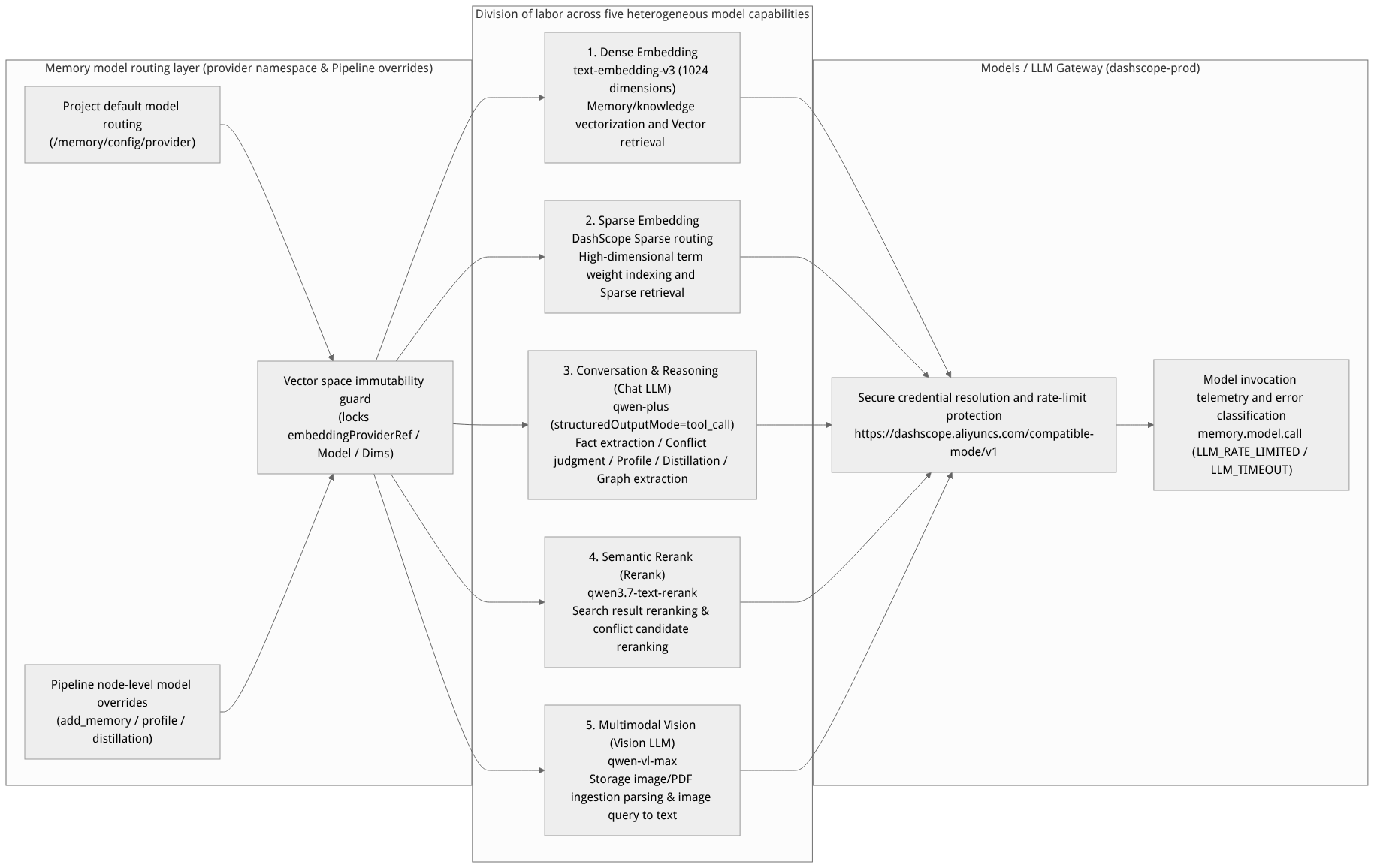
Flow diagram, not a runtime screenshot; read the relationships between steps or states along the arrows.
View the flow diagram in full size
Capability and Responsibility Comparison Table for the Five Model Classes
| Model capability class | provider Configuration field | Benchmark project configuration value (dashscope-prod) | Business stage affected and degradation/failure behavior |
|---|---|---|---|
| Dense vector (Dense Embedding) | embeddingProviderRefembeddingModelembeddingDims | project:dashscope-prodtext-embedding-v31024 | Responsible for vectorizing regular memory, L2/L3 context, Experience, and Skill, and for vector/hybrid retrieval. These three fields are permanently locked after project initialization. |
| Sparse vector (Sparse Embedding) | sparseEmbeddingEnabledsparseEmbeddingProviderRefsparseEmbeddingModel | trueproject:dashscope-prodtext-embedding-v3 (Sparse routing) | Responsible for generating sparse term-weight vectors, supporting the sparse and hybrid retrieval routes. Enabled by default in newly launched wizards; can be explicitly disabled if the provider does not support sparse vectors. |
| Chat and reasoning (Chat LLM) | llmProviderRefchatModelstructuredOutputMode | project:dashscope-prodqwen-plustool_call | Responsible for infer=true fact extraction, ADD/UPDATE/DELETE/NONE conflict resolution, Graph entity-edge extraction, query rewriting, user profiling, and experience distillation. Supports tool_call (recommended) and legacy_json. |
| Semantic reranking (Rerank) | rerankProviderRefrerankModel | project:dashscope-prodqwen3.7-text-rerank | Responsible for reranking multi-route fused candidates during retrieval (policy.rerankEnabled must also be enabled), and for reranking similar memory candidates during conflict detection for new memories. On rerank failure, degradation is flagged in the response's degraded.rerank. |
| Multimodal vision (Vision LLM) | visionProviderRefvisionModel | project:dashscope-prodqwen-vl-max | Independent of the text Chat model, dedicated to parsing Storage images (PNG/JPEG/WebP) and PDF documents, or converting images into text descriptions during image search. Must be configured as a pair; media input is rejected when unconfigured. |
Feature Entrypoints and Permission Matrix
Console Entry and Administrative Permissions
The Console entry is located at: Project enterprise-ai-hub-210 → Memory → Models tab (internally reusing the configuration center's provider namespace view).
| Operation action | Entry location | Underlying REST API | Required permission | Related relationships |
|---|---|---|---|---|
| Register an upstream model Provider | Left navigation bar Models (Model Gateway) | /v1/llm-gateway/providers | projects.write | Provides Memory with the selectable project:<providerId> catalog |
| View the current Memory model routing | Memory → Models tab | GET /v1/projects/{projectId}/memory/config/provider | projects.read | Returns the current version, etag, and full provider routing configuration |
| Update the default model routing | Memory → Models → Save Configuration | PUT /v1/projects/{projectId}/memory/config/provider | projects.write | Must carry the expectedConfigVersion optimistic-lock version number |
| Override per-Pipeline model routing | Memory → Configuration → Per-scenario Pipelines | PATCH /v1/memory/pipelines/{pipelineId} | projects.write | When the override checkbox is unchecked, the provider default routing on this page is inherited automatically |
Inheritance Between Default Routing and Custom Pipeline Routing
Inheritance and override rules: In the four Pipeline classes under Memory → Configuration (new memories, profile, experience and skills, forgetting), each node (e.g., fact extraction, conflict resolution, profile generation) can specify its own model routing; if node-level routing override is unchecked, then the default routing configured on this page (
providernamespace) is inherited automatically (unchecking means “inherit the default”, not “disable this capability”).Shared model routing snapshot: The shared
embedding,rerank, andvisionroutes configured in the current project's default new-memory pipeline also apply to online memory retrieval (search), unified retrieval (recall), image query parsing, and background re-indexing tasks. Async tasks freeze the model routing snapshot at the moment they are enqueued (excluding plaintext keys) to ensure consistent behavior during retries.
Feature Details and Operation Guide
1. View and adjust Memory model routes in the Console
Log in to the Agentbase Console and go to project
企业智能客服与知识中台(enterprise-ai-hub-210).First confirm in the left-side Models (Model Gateway) that provider
dashscope-prodhas been added, and that the model catalog includestext-embedding-v3,qwen-plus,qwen3.7-text-rerank, andqwen-vl-max(vision models registered with thevlmcategory are shown first; multimodal models under thechatcategory are also compatible).Open the left-side Memory and switch to the Models tab.
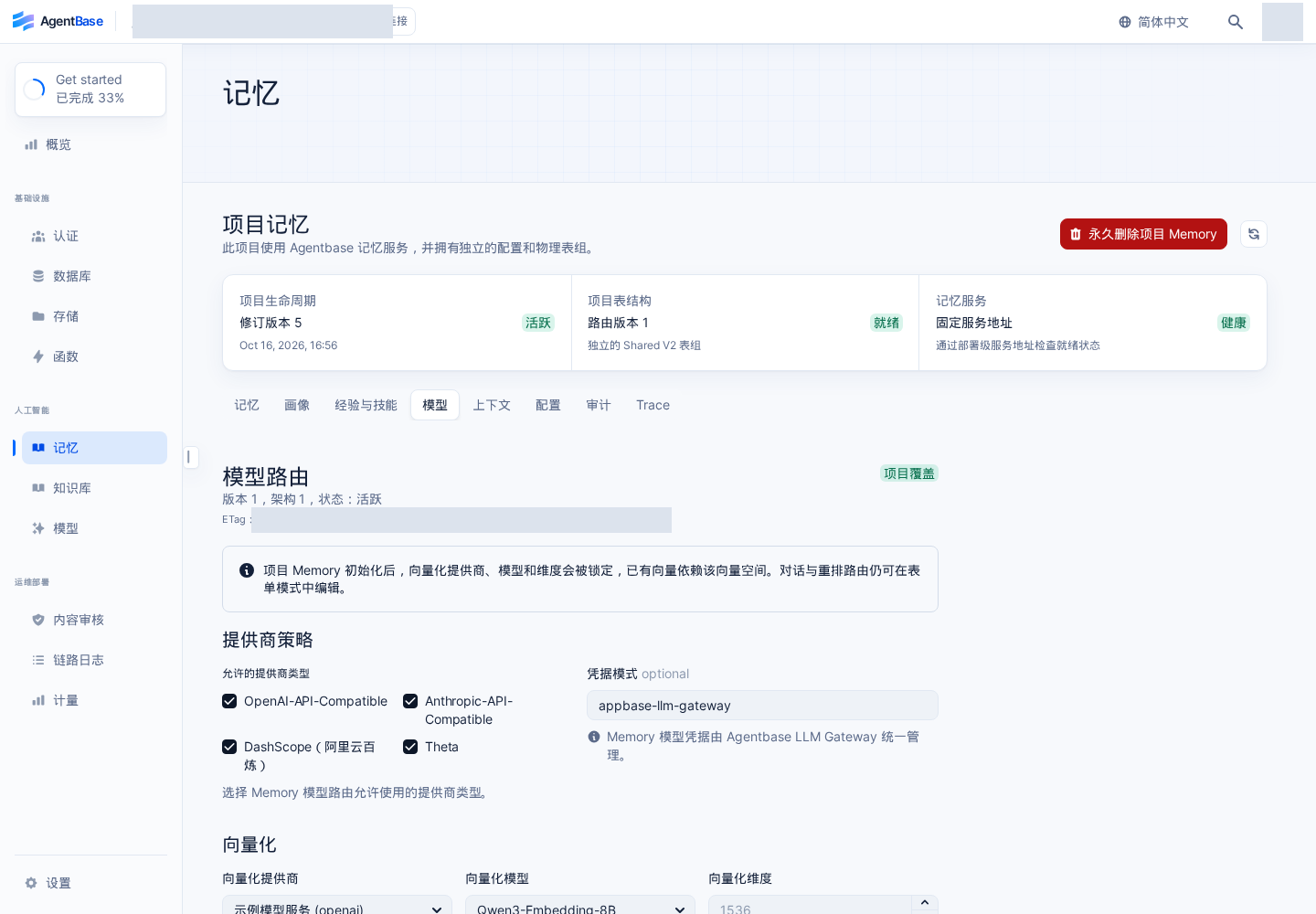
Interface reference: reuses previously registered historical screenshots; demo data may differ from the current project; no new screenshots were taken this time.
Configure or adjust the editable model route fields according to business needs:
Embedding route (read-only, locked): the page shows
embeddingProviderRef(project:dashscope-prod),embeddingModel(text-embedding-v3), andembeddingDims(1024) as locked, preventing damage to the existing OceanBase vector table spaces.Sparse embedding: check to enable and bind a sparse embedding model from
project:dashscope-prod.Chat model route: select provider
project:dashscope-prodand modelqwen-plus, and set structured output mode (structuredOutputMode) totool_call(the LLM Gateway enforces validation of tool names and the JSON Schema, significantly reducing the incidence ofLLM_INVALID_JSON).Rerank model route: select provider
project:dashscope-prodand modelqwen3.7-text-rerank.Vision model route (Vision LLM): select
visionProviderRef(project:dashscope-prod) andvisionModel(qwen-vl-max) as a pair. Note: filling in only one of them is invalid; the project only accepts Storage image/PDF memory writes after the pair is configured and saved.
Enter the change reason (
reason) and click Save.
2. Complete parameter specification for the provider configuration namespace
When reading or writing /v1/projects/{projectId}/memory/config/provider via the control plane API, the complete field definitions are as follows:
| Field name | Type | Modifiable after initialization | Example configuration example | Validation rules and detailed description |
|---|---|---|---|---|
allowedProviders | string[] | Modifiable | ["openai", "dashscope", "anthropic", "theta"] | Whitelist of upstream provider types that project Memory may use. |
credentialMode | string | Modifiable | "project_gateway" | Credentials are always resolved through the project LLM Gateway; inlining plaintext keys in requests is prohibited. |
embeddingProviderRef | string | Immutable | "project:dashscope-prod" | Dense embedding provider reference. Modifying it after Memory initialization triggers the 400/409 immutability guard. |
embeddingModel | string | Immutable | "text-embedding-v3" | Dense embedding model identifier, permanently locked after initialization. |
embeddingDims | integer | Immutable | 1024 | Physical vector column dimension; must match the model's actual output dimension and is permanently locked after initialization. |
sparseEmbeddingEnabled | boolean | Modifiable | true | Whether to enable the sparse embedding index and the sparse retrieval branch. |
sparseEmbeddingProviderRef | string | Modifiable | "project:dashscope-prod" | Sparse embedding provider reference (required when sparse embedding is enabled). |
sparseEmbeddingModel | string | Modifiable | "text-embedding-v3" | Sparse embedding model identifier. |
llmProviderRef | string | Modifiable | "project:dashscope-prod" | Default chat and inference model provider reference. |
chatModel | string | Modifiable | "qwen-plus" | Default chat and inference model name. |
structuredOutputMode | string | Modifiable | "tool_call" | Structured output protocol; supports "tool_call" (recommended, schema enforced) and "legacy_json". |
rerankProviderRef | string | Modifiable | "project:dashscope-prod" | Default rerank model provider reference. |
rerankModel | string | Modifiable | "qwen3.7-text-rerank" | Default rerank model name. |
visionProviderRef | string | Modifiable | "project:dashscope-prod" | Multimodal vision model provider reference; must be set as a pair with visionModel. |
visionModel | string | Modifiable | "qwen-vl-max" | Multimodal vision model name, used for parsing Storage images and PDFs. |
3. Examples of querying and updating model routes via the control plane API
Updating project configuration is a control plane operation that requires a Console administrator session (or an administrator JWT + X-Appwrite-Mode: admin), and must pass in the expectedConfigVersion returned by the most recent GET:
export APPBASE_ENDPOINT="https://appbuild.oceanbase.com/v1"
export APPBASE_PROJECT_ID="enterprise-ai-hub-210"

# 1. Read the current provider namespace configuration and version number (version)
PROVIDER_RESP="$(curl -fsS "${APPBASE_ENDPOINT}/projects/${APPBASE_PROJECT_ID}/memory/config/provider" \
  -H "Cookie: ${APPBASE_CONSOLE_SESSION}" \
  -H "X-Appwrite-Project: ${APPBASE_PROJECT_ID}" \
  -H "X-Appwrite-Mode: admin")"

echo "${PROVIDER_RESP}" | jq .
CURRENT_VERSION="$(echo "${PROVIDER_RESP}" | jq -er '.version')"

# 2. Update the provider configuration (keep the locked embedding triple unchanged; enable qwen-vl-max visual routing and tool_call mode)
curl -fsS -X PUT "${APPBASE_ENDPOINT}/projects/${APPBASE_PROJECT_ID}/memory/config/provider" \
  -H "Cookie: ${APPBASE_CONSOLE_SESSION}" \
  -H "X-Appwrite-Project: ${APPBASE_PROJECT_ID}" \
  -H "X-Appwrite-Mode: admin" \
  -H "Content-Type: application/json" \
  --data "{
    \"expectedConfigVersion\": ${CURRENT_VERSION},
    \"reason\": \"开启 qwen-vl-max 多模态视觉路由并切换 tool_call 结构化输出模式\",
    \"value\": {
      \"allowedProviders\": [\"openai\", \"dashscope\", \"anthropic\", \"theta\"],
      \"credentialMode\": \"project_gateway\",
      \"embeddingProviderRef\": \"project:dashscope-prod\",
      \"embeddingModel\": \"text-embedding-v3\",
      \"embeddingDims\": 1024,
      \"sparseEmbeddingEnabled\": true,
      \"sparseEmbeddingProviderRef\": \"project:dashscope-prod\",
      \"sparseEmbeddingModel\": \"text-embedding-v3\",
      \"llmProviderRef\": \"project:dashscope-prod\",
      \"chatModel\": \"qwen-plus\",
      \"structuredOutputMode\": \"tool_call\",
      \"rerankProviderRef\": \"project:dashscope-prod\",
      \"rerankModel\": \"qwen3.7-text-rerank\",
      \"visionProviderRef\": \"project:dashscope-prod\",
      \"visionModel\": \"qwen-vl-max\"
    }
  }" | jq .
FAQ (Frequently Asked Questions and Troubleshooting)
1. Why can't the embedding model or vector dimension be modified directly on the Models tab after Memory is enabled for a project?
Cause analysis: The project memory vector tables in OceanBase are created at initialization with fixed-length physical vector columns and HNSW indexes according to
embeddingDims(e.g.,1024), and the vector data of existing memories resides in the semantic space of the original model (e.g.,text-embedding-v3). Even if two different models happen to output the same dimension (e.g., both 1024-dimensional), their vector spaces are incompatible with each other; mixing them directly completely distorts cosine similarity computations. Therefore, theIMMUTABLE_EMBEDDING_FIELDSguard inMemoryConfigActionstrictly locksembeddingProviderRef,embeddingModel, andembeddingDimsafter initialization.Resolution: If business evolution genuinely requires changing the underlying embedding model or dimension, first export and back up the current project's memory data, then permanently delete the current project's Memory instance and re-initialize it, then re-import the historical memories to rebuild the full vector index.
2. A qwen3.7-text-rerank rerank model is configured on the Models tab—why is Rerank still not triggered in search response results?
Cause analysis: Configuring
rerankProviderRefandrerankModelon the Models (provider) tab only registers the available rerank model routes; whether rerank is enabled by default in the search pipeline is also controlled by thepolicy.rerankEnabledboolean switch in Configuration → Basic configuration (policynamespace) (defaultfalse).Resolution: Go to Memory → Configuration → Basic configuration, enable the search rerank switch (
policy.rerankEnabled) and save. Note the distinction:rerankEnabledin the new memory Pipeline only controls "conflict candidate reranking" during the write phase and does not replace the rerank switch for online search.
3. How to handle async write or distillation task errors LLM_RATE_LIMITED, LLM_INVALID_JSON, or LLM_REQUEST_REJECTED?
Root cause analysis:
LLM_RATE_LIMITED(corresponding to Gateway HTTP 429) andLLM_TIMEOUT/LLM_PROVIDER_UNAVAILABLEare retryable transient errors (retryable: true); background workers automatically resume retries from the persisted checkpoint with exponential backoff (up to 5 times);LLM_INVALID_JSONmeans the text returned by the Chat model does not conform to the JSON structure required by Memory; if the currentstructuredOutputModeislegacy_json, occasional format drift will cause validation to fail;LLM_REQUEST_REJECTEDmeans the upstream provider rejected the request with an unrecoverable 4xx (e.g., a misspelled model name, arrears, or an unsupported capability); it is not retried automatically.
Resolution: It is recommended to switch the
structuredOutputModeof models that support Function Calling (e.g.,qwen-plus) totool_call; ifLLM_REQUEST_REJECTEDoccurs, go to Model Gateway to check the model identifier and account quota fordashscope-prod, and viewgatewayStatusanderrorCodeat thememory.model.callobservability node in Memory → Trace.