
UI and Routing Quick Reference
This chapter provides the complete browser route dictionary for the Agentbase 2.10.0 Console (Console SPA), the left sidebar menu structure, the URL mapping for multi-level sub-tabs, and the rules governing sidebar visibility. Whether for day-to-day development and operations to reach deep configuration pages quickly, for accessing modules hidden by default (such as Messaging Messaging and agent operations reports Reports), or for embedding precise console jump links in internal enterprise knowledge bases and alert notifications, this chapter serves as the authoritative reference.
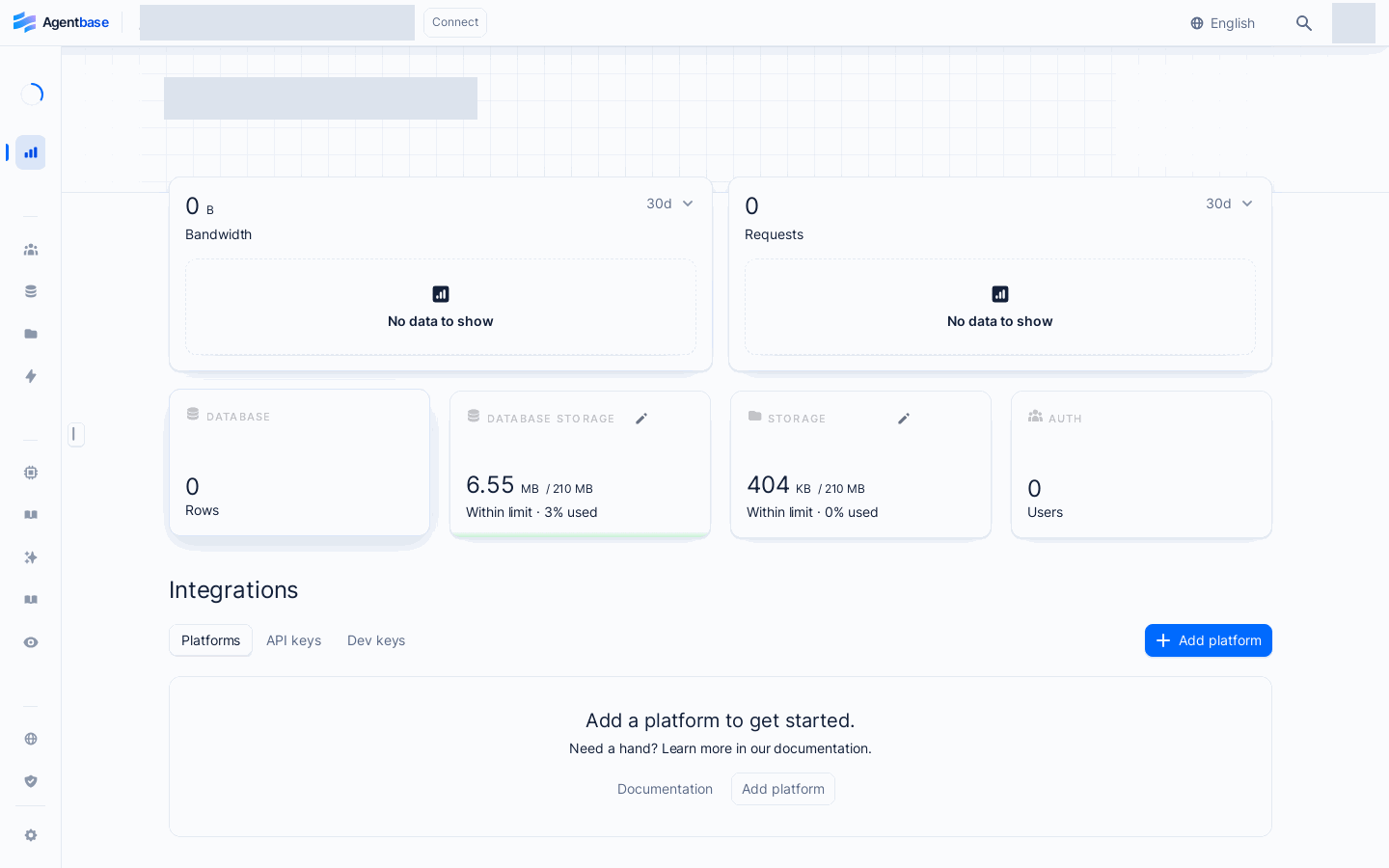
Interface reference: reuses previously registered historical screenshots; demo data may differ from the current project; no new screenshots were taken this time.
Feature Overview
The Agentbase Console single-page application (SPA) is uniformly mounted under the /console base path, and precisely maps a three-level resource tree and sub-pages at each level through structured URL path parameters (such as {organization}, {region}, {project}, {database}, {kb}).
In practice, development and operations staff commonly encounter two types of navigation needs:
Quick access to deep subpages: for example, after receiving a production alert, directly combine the project ID and Trace ID to jump to
/console/project-default-enterprise-ai-hub-210/observability/tracesor the function execution path query page, saving you from clicking through multiple layers.Accessing entries hidden by default in the sidebar or controlled by switches: for example, the Messaging module (
/messaging) and Observability Reports (/observability/reports/overview), which are hidden by default in the sidebar in the current version, can only be entered via direct URLs or the command center.
| Route space level | URL path prefix | Typical examples (production sample scenario) | Core modules carried |
|---|---|---|---|
| Public and authentication entry | /console/* (no tenant prefix) | /console/login · /console/mfa · /console/verify-email | Login, registration, password recovery, invitation acceptance, MFA secondary verification, first-login onboarding |
| Developer Account Center | /console/account/* | /console/account/sessions · /console/account/project-cleanup | Profile, MFA and recovery codes, session list, account 30-day usage, pending-deletion project recovery, table mode conversion records |
| Organization governance space | /console/organization-{organization}/* | /console/organization-69c6d1aa00062e6bb60/members | Organization project list, member invitations and role management, 30-day aggregated organization usage, inactive project cleanup, organization-level workspace |
| Project workspace (Overview and Settings) | /console/project-{region}-{project}/overview/* · .../settings/* | /console/project-default-enterprise-ai-hub-210/overview/api-keys | Platforms, API Keys, Dev Keys, onboarding, 30-day project usage, project settings |
| Project workspace (Build app backend) | /console/project-{region}-{project}/{service}/* | /console/project-default-enterprise-ai-hub-210/databases/database-enterprise_biz_db | Auth, Databases, Storage, Functions, Sites, Messaging, Moderation |
| Project workspace (AI and AgentOps) | /console/project-{region}-{project}/{ai-module}/* | /console/project-default-enterprise-ai-hub-210/knowledge-base/kb-kb_enterprise_support | Agent workspace, context, memory, knowledge base, lexicon, models (LLM Gateway), AI Gateway, agent operations (Observability) |
Core Concepts and Architecture
The Agentbase Console routing adopts a layered routing architecture of “auth guard interception → organization context injection → project area and service capability determination → second/third-level tab rendering”.
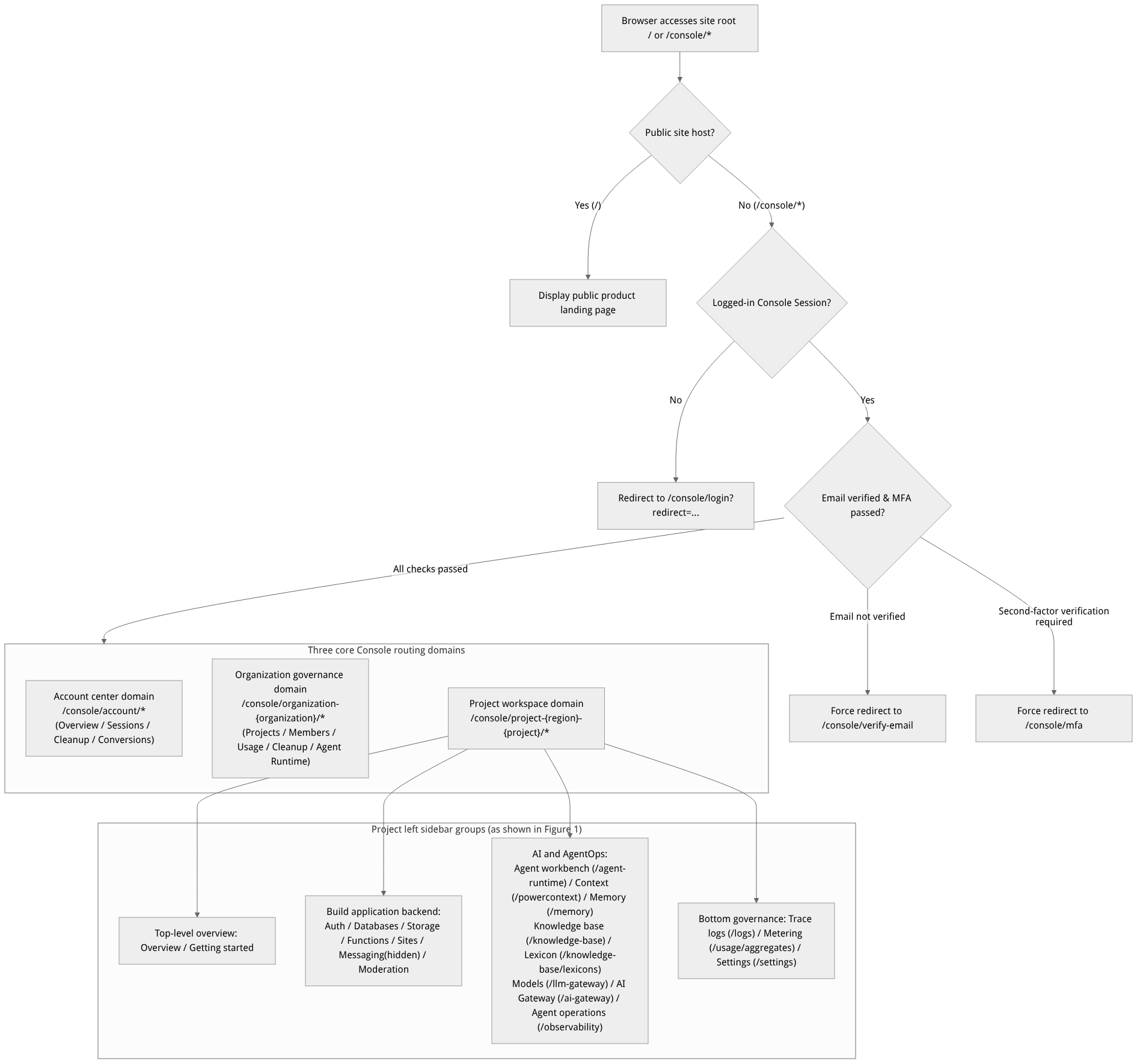
Flow diagram, not a runtime screenshot; read the relationships between steps or states along the arrows.
View the flow diagram in full size
Route Path Variables and Parameter Substitution Reference Table
| Path variable | Meaning and source | Production sample substitution example | Format constraints and notes |
|---|---|---|---|
{organization} | Organization unique ID ($id) | 69c6d1aa00062e6bb60 | Located in /console/organization-{organization}; automatically updated when switching the top organization dropdown. |
{region} | Physical region identifier of the project | default (or a specific availability zone code) | Cannot be changed after being selected at project creation; combined with {project} to form /console/project-{region}-{project}. |
{project} | Project unique ID ($id) | enterprise-ai-hub-210 | The value filled in the data-plane request header X-Appwrite-Project is exactly this {project}. |
{database} / {table} | Database ID / table ID | enterprise_biz_db / customer_tickets | Nested within /databases/database-{database}/table-{table}. |
{bucket} / {file} | Storage bucket ID / file object ID | kb_enterprise_docs / file_arch_whitepaper | Nested within /storage/bucket-{bucket}/file-{file}. |
{kb} / {document} | Knowledge base ID / knowledge document ID | kb_enterprise_support / doc_sop_manual | Nested within /knowledge-base/kb-{kb}/doc-{document}. |
Roles, Entry Points, and Relationships
1. Left Sidebar Entry Visibility Rules
In the project console, not all routes are unconditionally displayed in the left sidebar. Whether a navigation item is visible, and whether buttons are clickable after entering the page, is jointly governed by the following four layers of rules:
| Control dimension | Affected navigation entries | Activation logic and unlocking method |
|---|---|---|
| 1. Instance deployment-level switches (Capability) | Sites, Memory, Agent workspace, Observability, PowerContext | Determined by platform infrastructure environment variables (such as _APP_SITES_ENABLED). If a component is not deployed on the instance, the sidebar hides it or the API returns 412. |
| 2. Project-level service switches (Project Services) | AI Gateway (/ai-gateway) and other optional project capabilities | AI Gateway is off by default; only after a member with projects.write permission manually enables it in the project's Settings → Overview → Services will the sidebar show the entry. |
| 3. Built-in hidden by default in Build (supports direct URL access) | Messaging (/messaging), Observability Reports (/observability/reports/*) | The routes and functionality are retained, but no icons are shown in the sidebar. Users can enter the full route directly in the browser address bar or navigate via the command center. |
| 4. Organization member roles (RBAC) | Write operation buttons (Create / Update / Delete) within all pages | owner, admin, developer, editor have write permission; although the billing and analyst roles can open routes to view data, their write buttons are disabled or blocked server-side. |
2. Difference Between Control-Plane Routes and Data-Plane API Endpoints
Control-plane browser routes (
/console/*): intended only for human developers accessing via session cookies in a browser, returning HTML/JS interface views.Data-plane and management-plane API endpoints (
/v1/*): intended for application SDKs, scripts, orcurlcalls, returning structured JSON or SSE event streams. The public liveness endpointGET /v1/health/versionreturns the current stable service version (such as{"version":"2.10.0"}) without any authentication.
Feature Details and Operation Guide
The following provides complete path quick-reference tables in four parts: public pages and account center, organization governance routes, project Build app backend routes, and project AI and AgentOps routes.
1. Public Authentication Pages and Account Center Routes (/console/* & /console/account/*)
| Category | Exact browser path | Page name and core function description | Related chapter |
|---|---|---|---|
| Public authentication and guards | / | The public site host returns the product landing page; other hosts automatically redirect to /console | Registration and Login |
/console/login · /console/register · /console/recover | Developer login (email password / GitHub / enterprise SSO), new account registration, forgot-password email recovery | Registration and Login | |
/console/invite · /console/register/invite/{slug} | Registered accounts accepting organization invitations; new users registering via invitation-specific links and joining the organization | Registration and Login | |
/console/mfa · /console/verify-email | Login multi-factor authentication challenge page (authenticator/email/SMS/recovery codes), mandatory email verification interception page | Registration and Login | |
/console/onboarding/create-organization · /console/onboarding/create-project | Organization creation wizard and first project creation guidance after first registration and login | Quick Start | |
/console/auth/magic-url · /console/auth/oauth2/success · /console/auth/oauth2/failure | Confirmation page for project Auth end-user Magic URL and OAuth2 authorization login callbacks | Authentication Overview | |
| Developer Account Center | /console/account | Overview: change name, email, password; link external identities (Identities); configure MFA and one-time recovery codes; permanently delete the account | Organization and Account Center |
/console/account/sessions · /console/account/activity | Sessions: view current login devices/IPs and log out all sessions; Activity: account-level operation audit timeline | Organization and Account Center | |
/console/account/organizations | Organizations: view the list of joined organizations, create new organizations (/console/create-organization), manage self-hosted member quotas | Organization and Account Center | |
/console/account/rate-limits · /console/account/quota-limits | Rate / Quota limits: read-only view of the platform request rate limits and resource quota ceilings applicable to the current account | Limits and Quotas | |
/console/account/usage · /console/account/metering | Usage / Metering: account-level aggregation trends and coverage status for four core metrics over the most recent 30 UTC days | Limits and Quotas | |
/console/account/project-cleanup | Project cleanup: view the list of projects pending physical cleanup (Pending / Purging / Purge failed), with support for clicking Restore to recover accidentally deleted projects before physical cleanup begins | Organization and Account Center | |
/console/account/table-mode-conversions | Table mode conversions: track the history and status of shared table/dedicated table/Shared V2 table mode conversion tasks initiated across projects | Project Settings |
2. Organization Governance Routes (Prefix /console/organization-{organization})
| Organization tab name | Path suffix | Core operations and governance description |
|---|---|---|
| Projects | /console/organization-{organization} | Displays cards for all projects in the organization (with region labels) and provides the Create project entry point |
| Members | /members | Invite new members, view 2FA status, search by ID/email, change organization roles (Owner/Admin/Developer/Editor/Billing/Analyst), and remove members |
| Usage / Metering | /usage · /metering | Organization-level aggregated usage for the most recent 30 UTC days (automatically excludes projects already in a deleted state to ensure accurate metering) |
| Project cleanup | /project-cleanup | Available to organization Owners only: search by days of inactivity and the new-project exemption period (listed once the criteria are met for a full 24 hours), and submit up to 50 selected projects per cleanup run |
| Agent Workbench (organization-level workbench) | /agent-runtime | Entry point to the agent run workbench at the organization level |
| Domains / Billing / Invoices | /domains · /billing · /invoices · /change-plan | Organization-level custom domains, cloud billing, invoices, and plan change management |
| Settings (organization settings) | /settings | Change the organization name, view member quotas, and perform the irreversible Delete organization |
3. Project Console: Overview, governance, and Build application backend routes (prefix /console/project-{region}-{project})
| Sidebar group | Module name | Path suffix and sub-route hierarchy | Feature coverage description |
|---|---|---|---|
| Top-level overview | Overview | /overview/platforms · /overview/api-keys · /overview/api-keys/{keyId} · /overview/dev-keys | View project real-time request/storage throughput; register 15 client Platform; create and rotate production API Keys (12-type Scope collapsible selectors) and development Dev Keys |
| Legacy getting-started route | /get-started | Redirects to /overview/platforms; it is no longer a separate onboarding page | |
| Build application backend | Auth | /auth (Users list) · /auth/user-{user} (overview/memberships/sessions/targets/activity/identities) · /auth/teams · /auth/templates · /auth/usage · /auth/settings · /auth/security · /auth/test | End-user lifecycle, notification targets (Targets), teams and member roles, email/SMS templates, password history and personal data validation security policies, and the OAuth2 isolated test page |
| Databases | /databases · /databases/usage · /databases/database-{database} (Tables / usage / settings / sql / schema-versions / backups) · .../table-{table} (rows / columns / indexes / activity / export / moderation / settings / usage) | Multi-database management, table/column/row/index CRUD, an online SQL editor and SQL Proxy, versioned schema snapshot rollback, cloud backup and restore, and per-table write-path text moderation | |
| Storage | /storage · /storage/usage · /storage/bucket-{bucket} (Files / usage / settings / moderation / create / file-{file}) | Bucket permissions (bucket-level vs File Security), chunked file uploads, File Token temporary access tokens, and fail-closed image content moderation | |
| Functions | /functions · /functions/usage · /functions/create-function · /functions/templates · /functions/function-{function} (Deployments / executions / usage / domains / settings / deployment-{deployment}) | Git/template/manual source code (.tar.gz) and Java 17 pre-built JAR (artifactMode=java-jar) deployment, deduplicated execution path queries (supporting path/pathMatch/method filters), and ACS container group resource monitoring | |
| Messaging | /messaging · /messaging/topics · /messaging/providers · /messaging/message-{message} · /messaging/create-{type} | Hidden by default in the sidebar; accessed via direct URL: manage FCM/APNS/SMTP/Twilio and other sending providers, subscription topics (Topics), and immediate/scheduled/draft message delivery | |
| Moderation | /moderation · /moderation/logs · /moderation/logs/{log} | Project-level and platform-level Alibaba Cloud Green content safety credential configuration, 30-day moderation call breakdown statistics, and moderation log details with filtering by table/bucket/result | |
| Sites | /sites · /sites/create-site · /sites/site-{site} (Overview / deployments / logs / domains / usage / settings) | Controlled by _APP_SITES_ENABLED and an email allowlist: host Next.js / SvelteKit and other sites with one-click rollback (Instant rollback) and custom domains | |
| Bottom governance section | Trace logs | /logs | Project-level low-level trace and system trace log search |
| Metering | /usage/aggregates · /usage | Project-level four-metric aggregated trends and data integrity status for the most recent 30 UTC days | |
| Settings | /settings · /settings/domains · /settings/webhooks · /settings/migrations · /settings/smtp · /settings/usage | Column deletion switch, project table mode conversion, client Services switches, Global variables, custom domains, Webhooks, custom SMTP, and data migration |
4. Project Console: AI-native capabilities and AgentOps routes (prefix /console/project-{region}-{project})
| Sidebar visible name | Path suffix and sub-route hierarchy | Core features and 2.10.0 key route highlights | Related sections |
|---|---|---|---|
| Agent Workbench | /agent-runtime | Assemble the main conversation model (e.g. qwen-plus), system prompt, enterprise knowledge base, long-term memory/PowerContext, intervention lexicons, AI Gateway tools, and Skill packages online; supports multi-turn ReAct streaming conversation debugging and project-level configuration persistence (/v1/agent-runtime/project/*) | Agent Workbench overview, Model and lexicon configuration, Sessions and runs, Knowledge base and memory coordination, Tool gateway and skill packages |
| Context (PowerContext) | /powercontext | Managed context initialization validation and visual management (the server supports /v1/projects/{projectId}/powercontext/compaction for explicit preview/commit of context compression) | Memory overview and enablement |
| Memory | /memory (covering overview, memory list and retrieval, user Profiles, experience and skills Evolution, model routing Models, contexts Contexts, Pipeline configuration Configuration, audit Audit, and traces Traces) | Full lifecycle management of long-term memory based on Shared V2: validation and publishing of the four Pipeline types, diff-based approval and rollback of experience and skill candidate versions, and asynchronous image/PDF memory parsing | Memory overview and enablement, Retrieval tuning and Pipeline configuration |
| Knowledge Base | /knowledge-base · /knowledge-base/kb-{kb} (documents / search / wiki / graph / indexes / versions / datasources / settings / doc-{document}) | Rich document ingestion, tag trees with documentTag/subProductId filtering, hybrid retrieval testing, GraphRAG / RAPTOR / LLM Wiki index construction (with progress and interruption control), and version sealing, publishing, and rollback | Knowledge base overview and lexicon management, Wiki, GraphRAG, RAPTOR, and index governance |
| Lexicons | /knowledge-base/lexicons | Independently maintain synonym dictionaries (e.g. lex_enterprise_synonyms) and stopword dictionaries (e.g. lex_support_stopwords), with binding to knowledge bases and the workbench | Knowledge base overview and lexicon management |
| Models | /llm-gateway · /llm-gateway/provider-{provider} · /llm-gateway/keys · /llm-gateway/keys/{key}/usage · /llm-gateway/usage | Manage model provider presets such as DashScope, import Chat/Embedding/Rerank/Vision model catalogs, and issue Gateway Keys with monthly budgets and rate limits | LLM Gateway model management |
| AI Gateway | /ai-gateway · /ai-gateway/gateways · /ai-gateway/models-routes · /ai-gateway/policies-credentials · /ai-gateway/tools-agents · /ai-gateway/traffic-quality | Unified AI gateway governance surface (must be enabled in project Settings → Services): manage gateway instances, logical model primary/standby routing, safety guardrails, semantic caching, MCP tool registration, and traffic quality monitoring | Unified AI gateway |
| Observability / AgentOps | /observability · /observability/traces · /observability/observations · /observability/sessions · /observability/users · /observability/scores · /observability/score-settings · /observability/prompts · /observability/metrics · /observability/evals · /observability/evaluation-skills · /observability/datasets · /observability/annotations · /observability/reports/overview · /observability/reports/agents · /observability/reports/quality | The sidebar section is named AgentOps: end-to-end Trace/Observation tracking, four types of evaluation tasks (general/Memory/parsing/knowledge index quality (GraphRAG/RAPTOR/Wiki)), the built-in evaluation template catalog, metric analysis, and the three Reports dashboards hidden in the sidebar but reachable via direct URL | Observability overview, Evaluations, scoring, and index quality assessment |
FAQ and Troubleshooting
Q1: Why does directly concatenating a URL to a project sub-page return 404 or automatically redirect back to the organization home page?
Cause and troubleshooting steps:
Check the
{region}and{project}parameters: Project Console routes strictly require the format/console/project-{region}-{project}/...(for example/console/project-default-enterprise-ai-hub-210/overview). If theproject-default-prefix is missing or the project ID is misspelled, the route guard cannot resolve the project context.Check the current account's organization permissions: If the currently signed-in developer account has not yet been invited to the organization that owns the project (e.g.
69c6d1aa00062e6bb60), the server will refuse to load project metadata and redirect back to the account's default organization page.
Q2: How do I access the "Messaging" and "Observability Reports" pages that are hidden from the sidebar by default?
Cause and troubleshooting steps: In the current version, these two features adopt a strategy of "keeping the complete frontend routes and backend capabilities while only hiding the sidebar navigation items." Simply replace the project path suffix directly in the browser address bar with:
Messaging module:
/console/project-{region}-{project}/messaging(includes three tabs:Messages,Topics, andProviders).Observability reports:
/console/project-{region}-{project}/observability/reports/overview(includes three tabs:Overview,Agents, andQuality).
Q3: Why can I click into a module from the sidebar (such as Memory or advanced knowledge index), but in-page operations return 412?
Cause and troubleshooting steps: The Console browser route existing only means the frontend UI component has loaded; when clicking a button triggers a backend API call, the server performs real-time validation of instance deployment-level Capability and project Prerequisites. If the project table schema is not Shared V2 (for Memory) or the underlying instance has not enabled the optional indexing Worker (for advanced knowledge index), the backend immediately returns a stable HTTP 412. Please check item by item against the Capability troubleshooting matrix in FAQ.