
Functions
Functions are the event-driven, multi-language Serverless server-side code execution engine provided by Agentbase 2.10.0. They support direct invocation via HTTP requests, automatic triggering by internal business events (such as new support tickets in the database, user registration, or file uploads), or scheduled execution via Cron expressions, and offer complete production-grade capabilities spanning source code builds (.tar.gz / Git) to direct deployment of pre-built Java 17 JAR packages (artifactMode=java-jar), deduplicated execution path queries (Execution Paths), and resource monitoring for cloud sandbox (ACS Sandbox) container groups.
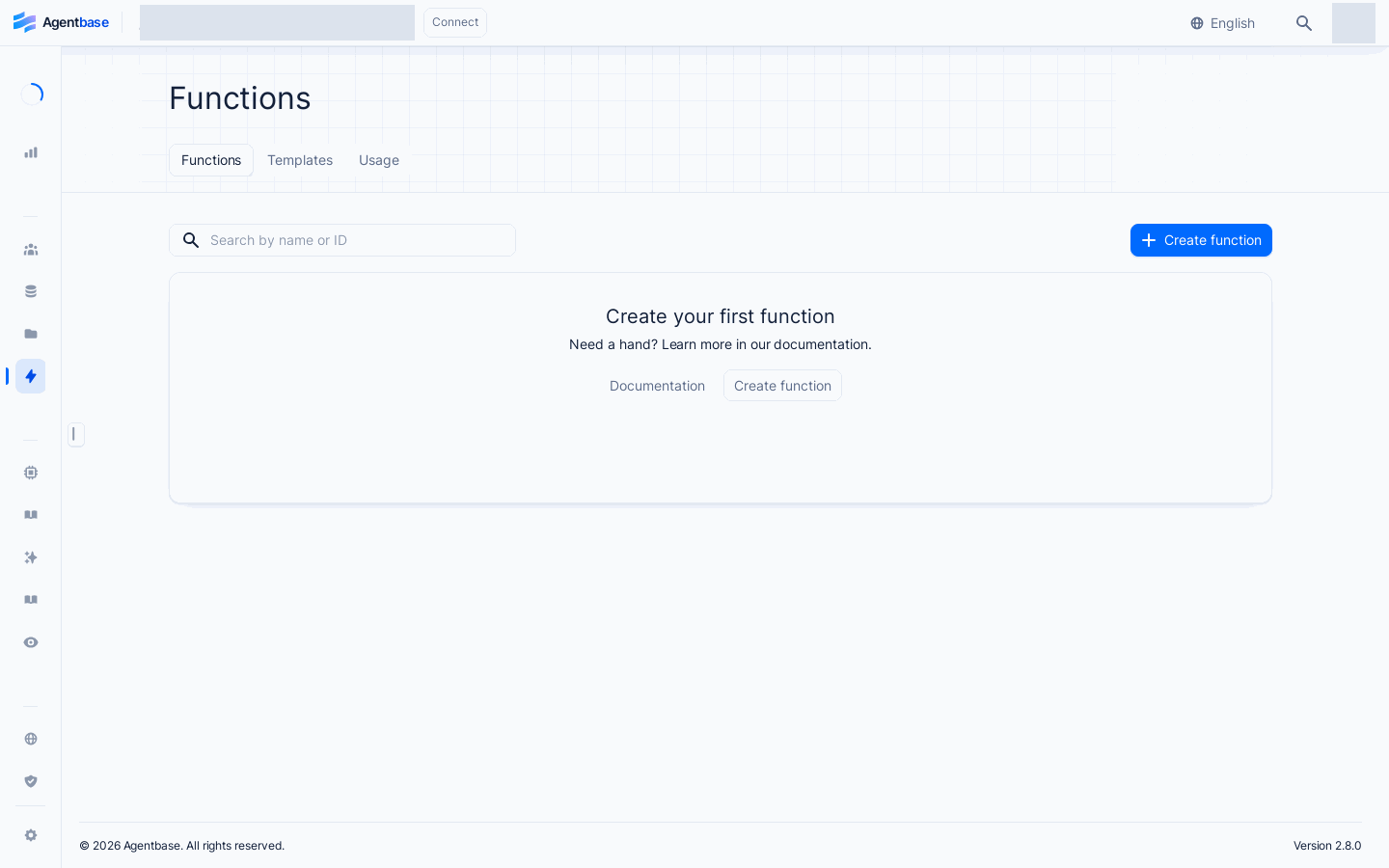
Interface reference: reuses previously registered historical screenshots; demo data may differ from the current project; no new screenshots were taken this time.
Feature Overview
When building enterprise-grade AI and agent applications (such as project 企业智能客服与知识中台 enterprise-ai-hub-210), many custom business logic components need to run in a secure, controlled server-side sandbox: for example, when a customer submits an urgent support ticket (TK-20261022-001) in the customer_tickets table, a function can be automatically triggered to call the enterprise's internal ERP API to verify the contract tier; or complex Java 17 WeCom/DingTalk encryption/decryption logic can be packaged as standalone utility functions for agents to call.
Agentbase Functions provides four core features built around enterprise standards for high concurrency and high security:
Multi-language runtimes and direct upload of pre-built Java 17 JARs (2.10.0 enhancement): Supports Node.js, Python, PHP, Ruby, Deno, and other runtimes such as
java-17.0; for Java 17 enterprise projects, in addition to traditional source code archive builds, a newartifactMode=java-jarpre-built JAR direct deployment mode is added (default JAR configuration limit of 100 MB, also constrained by the plan's deployment limit), eliminating long Maven/Gradle compilation waits in the cloud.Restricted-identity cloud sandbox (ACS Sandbox) and zero-fallback secure execution: Supports local OpenRuntimes as well as multi-instance, multi-replica cloud sandbox (ACS Sandbox) execution environments; all functions are forced to run with a non-privileged Restricted Identity, with built-in outbound SSRF protection and request header credential protection (passing API Keys via URL query string is forbidden).
Deduplicated execution path lookup with regex/method filtering (2.9.0 / 2.10.0 enhancement): Supports deduplicated aggregation by the actual HTTP request paths received by a function (
path), combined with exact match/regex match (pathMatch=exact|regex) and HTTP method (method) filtering to quickly retrieve the historical execution durations and logs of specific business endpoints.Precise decoupling of platform failures from business exceptions: In the execution list and detail logs, sandbox infrastructure exceptions (
502/503/504) are clearly distinguished from business code exceptions (500, with business crash logs fully preserved), and monitoring of ACS container group CPU, memory, network, and disk levels is provided.
| Core capability dimension | Console tab location | Key technical specifications (2.10.0 baseline) | Applicable development and operations scenarios |
|---|---|---|---|
| Create and Deploy (Deployments) | Function details Deployments | Three sources: Git repository, template library, manual upload (.tar.gz source code or java-17.0 pre-built .jar) | Continuous integration releases, one-click activation switching (Activate), and rollback to historical versions |
| Executions and Path Lookup (Executions) | Function details Executions | Supports immediate/scheduled manual triggering; supports paginated deduplicated execution paths with path/pathMatch/method filtering | Online API integration testing, precise troubleshooting of slow requests and errors by specific REST subpath (such as /webhook/erp-sync) |
| Compute Specifications and Monitoring (Usage) | Function details Usage · Settings | Supports configuring CPU/memory specifications (runtimeSpecification) and replica count (runtimeReplicas); supports platform default specifications | Observe execution counts, average duration, and real-time CPU/memory/network/disk curves of ACS cloud sandbox container groups |
| Triggers and Variables (Settings) | Function details Settings · Domains | Event triggers (Events), scheduled tasks (Cron Schedule), function-level variables (automatically merged and injected with project global variables) | Orchestrating event-driven automation workflows, binding function-specific custom domains |
Core Concepts and Architecture
The following diagram shows the full end-to-end architecture of Functions, from code/JAR package deployment, the three trigger methods (HTTP / events / Cron), and project context and variable injection, to execution in the restricted-identity ACS cloud sandbox with production of path indexes and monitoring metrics:
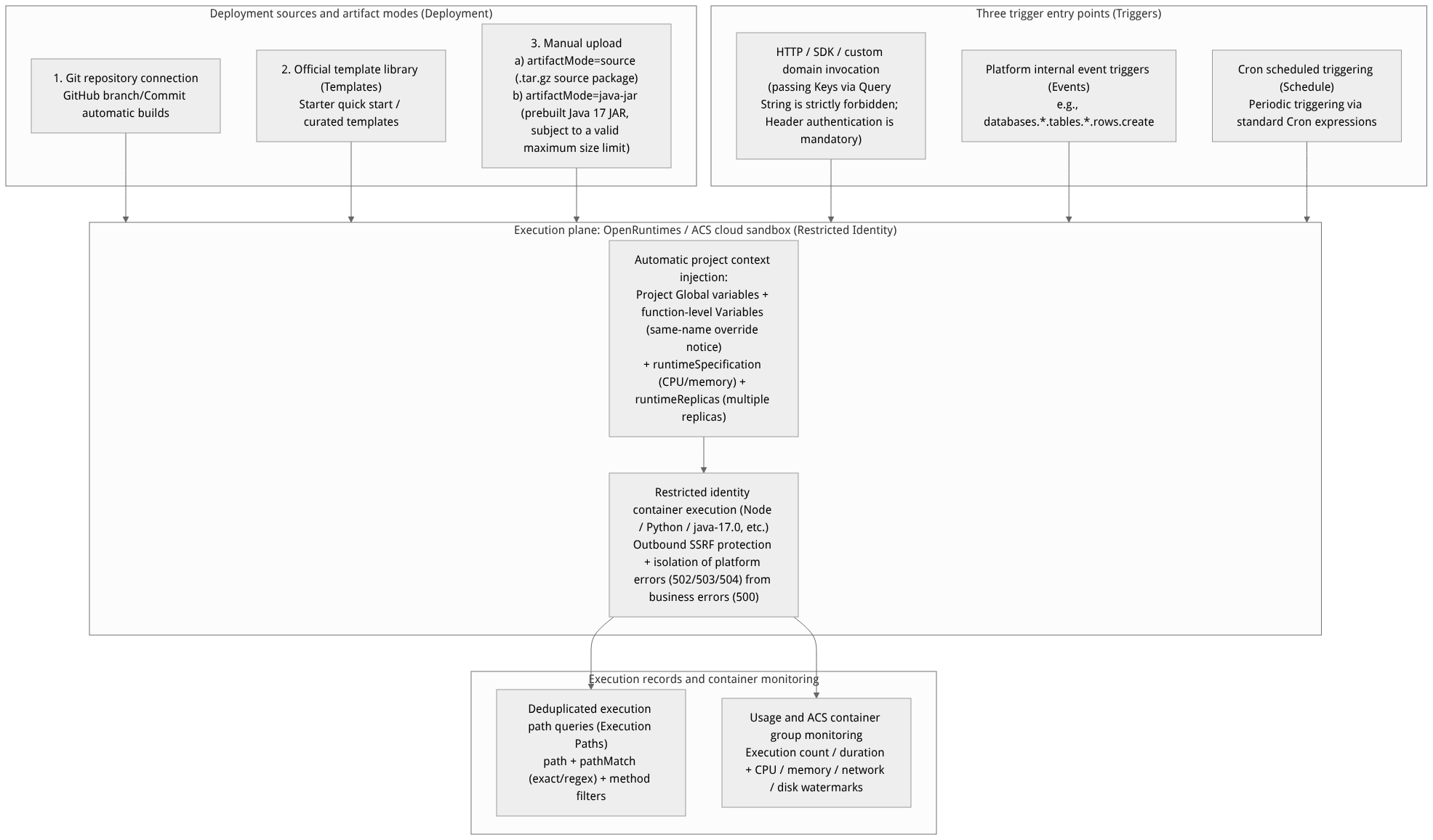
Flow diagram, not a runtime screenshot; read the relationships between steps or states along the arrows.
View the flow diagram in full size
1. Definitions of the Four Core Object Models
| Core object | Lifecycle and unique identifier | Key attributes and architecture notes |
|---|---|---|
| Function (function definition) | Belongs to a Project and has a unique $id | Defines the runtime language (runtime, fixed after creation), compute specification (runtimeSpecification), instance replica count (runtimeReplicas), execution permissions (execute ACL), timeout (timeout), trigger events, and Cron schedule. |
| Deployment (deployment version) | Belongs to a Function; each upload/commit generates a new $id | Carries a specific code artifact or pre-built JAR artifact. Goes through waiting → building → ready / failed build transitions; only one ready deployment can be in the Active (currently activated) state at any given time to serve traffic. |
| Execution (single execution) | Belongs to a Function; each trigger generates a unique record | Records the request method (method), request path (path), duration (duration), HTTP response status code (responseStatusCode), standard output (logs), and error output (errors) of a single call. |
| Execution Path (deduplicated execution path) | Automatically aggregated server-side by request path | Deduplicates and classifies massive Execution records by the actual accessed subpath (such as /v1/sync, /v1/callback), supporting server-side pagination and regex/method filtering. |
2. Comparison of Source Code Build Mode (source) and Java 17 Pre-built JAR Mode (java-jar)
In Agentbase 2.10.0, for the java-17.0 runtime widely used by enterprises, two fundamentally different deployment artifact modes are provided (artifactMode):
| Comparison dimension | Source archive build mode (artifactMode = source) | Java 17 pre-built JAR mode (artifactMode = java-jar, new in 2.10.0) |
|---|---|---|
| Applicable runtimes | All supported runtimes (Node.js, Python, PHP, Ruby, Deno, Go, java-17.0, etc.) | Limited to the java-17.0 runtime only |
| Upload artifact format | .tar.gz Source code archive | .jar file pre-compiled and packaged in advance on the local machine or in an enterprise CI pipeline |
| Build and entry mechanism | Executes install command inside the container to pull dependencies and compile source code, starting per the custom entrypoint | Skips cloud source compilation and directly uses the pre-built JAR as the deployment artifact, using the manifest's Main-Class; Index.java serves only as a compatibility identifier for the deployment record |
| Package size limit and metering | Constrained by the general compute source archive limit (_APP_COMPUTE_SIZE_LIMIT / plan deploymentSize) | Jointly limited by _APP_FUNCTIONS_JAR_SIZE_LIMIT (default 100,000,000 bytes) and the plan's deploymentSize, with the effective limit taking precedence |
Roles, Entry Points, and Relationships
1. Console Navigation Path and Permission Requirements
Enter the Functions module: Click Functions in the left navigation bar of the project Console to enter
/console/project-{region}-{project}/functions(as shown in Figure 1).Permission and Scope mapping:
Creating, modifying configurations, or uploading deployment packages in the Console requires a project write role (
owner/admin/developer/editor, corresponding tofunctions.write).Managing functions via a server-side API Key or querying deduplicated execution paths (
GET /v1/functions/{functionId}/execution-paths) requiresfunctions.read/functions.write/execution.readScopes (note: the execution path query API is designed for server-side governance, and client Web SDK calls are restricted).Direct invocation of functions by client end users (
POST /v1/functions/{functionId}/executions) is governed by the role selector (such asany,users,team:support_team) configured in the function's Settings → Execute access.
2. Injection Priority of Function-Level Variables vs. Project Global Variables
When a function executes, the platform automatically injects environment variables into the container process from two sources of variables:
Project-level global variables (Global variables): maintained in the project's Settings → Overview → Global variables, and take effect for all Functions and Sites under the project.
Function-level dedicated variables (Function variables): maintained in the specific function's Settings → Variables, and take effect only for the current function.
Same-name conflict notice: when a function-level variable has the same key name as a project global variable (
Key), the Console explicitly displays a conflict notice within the function variables list page so developers can verify the actually effective value.
Feature Details and Operation Guide
1. Creating a cloud function (three sources and compute spec configuration)
Click Create function in the upper-right corner of the Functions list page to enter the creation wizard (/functions/create-function). The wizard offers exactly the following three creation methods:
Method One: Create via manual configuration (Manual, supporting .tar.gz source or Java 17 .jar)
Select Manual in the creation wizard.
Fill in the core form parameters step by step:
| Configuration field | Required/Optional | Parameter constraints and production configuration recommendations |
|---|---|---|
| Name (function name) | Required | Enter a clear business name (e.g. erp-ticket-escalation-fn); you may optionally customize a Function ID ($id). |
| Runtime | Required | Select from the runtime list allowed by the current deployment instance (e.g. node-18.0, python-3.11, java-17.0). Note: the runtime type cannot be switched directly after the function is created. |
| Artifact Mode | Required (Java 17) | When the runtime is java-17.0, you can choose source package (source) or pre-built JAR (java-jar):• Choose source: upload a .tar.gz source package and fill in entrypoint and install command;• Choose java-jar: upload a .jar package within the valid size limit; the application entry point is taken from the manifest's Main-Class. |
CPU / memory spec (runtimeSpecification) | Required | Select the compute spec of the function execution container (e.g. 0.5C / 1G, 1C / 2G, etc.). If the platform administrator has configured a default execution spec (defaultRuntimeSpecification), the wizard preselects it automatically; if no spec is available, contact an administrator to publish an execution profile. |
Replica count (runtimeReplicas) | Required | Set the number of sandbox instance replicas serving concurrent requests; for high-concurrency production functions, configure multiple replicas to eliminate cold-start spikes. |
| Execute Access | Optional | Configure the client roles allowed to trigger this function directly (e.g. users); if it is only triggered by a backend API Key or internal events, keeping it empty (client direct calls denied by default) is the safest option. |
Method Two: Create from official templates (Templates)
In the wizard, select Starter (quick-start templates, supporting switching between different language runtimes) or click to browse the full template library (
/functions/templates) to generate an initial function with a standard directory structure and entry code in one click.
Method Three: Create by connecting a Git repository (Git Repository)
Select the target code repository, branch and root directory via an already connected GitHub VCS installation; every subsequent Push of a code commit to that branch can automatically trigger a new Deployment build.
2. Managing deployment versions (Deployments) and one-click rollback
Go to the specific function detail page (/functions/function-{function}), which shows the Deployments tab by default:
Publish a new version: click Create deployment in the upper-right corner and choose Manual (manually upload
.tar.gzor.jar), Git (pull a specified branch/commit), or CLI as needed.Track build status and logs:
While a build is in progress, you can click Cancel at any time to cancel the build.
If the build status becomes
failed, open that Deployment to view the full build output logs (e.g. Maven dependency fetch failures or package format errors); after fixing the issue, click Redeploy on a historical deployment to rebuild.
Activate for release and one-click rollback (Activate):
After the build succeeds (status
ready), if auto-activation was not checked, click the Activate button to the right of that deployment to switch it to the currently effective live version.Production rollback: if a business anomaly is found after the new version goes live, simply locate the previous historical deployment with status
readyin the Deployments list and click Activate to switch the active deployment without recompiling; then check the execution results of new requests. No guarantee is made regarding switching duration or losslessness of in-flight requests.
3. Online trigger execution (Execute) and deduplicated execution path queries (Execution Paths)
Switch to the Executions tab on the function detail page (path /functions/function-{function}/executions):
A. Online manual debugging or scheduled execution
Click the Execute button in the upper-right corner to open the execution wizard dialog.
Fill in the simulated request parameters:
Path: the request sub-path (e.g.
/tickets/validate).Method: select from
GET,POST,PUT,PATCH,DELETE,OPTIONS,HEAD.Headers and Body: add custom request headers and a JSON request body payload.
Execution timing: choose Run now (execute asynchronously immediately) or Scheduled at (single execution at a specific future date and time).
Important security notice: Execute actually runs the container code and may read from or write to the current project's databases or storage buckets; before clicking submit in a production project, be sure to confirm the target environment and request parameters.
B. Search and troubleshoot by deduplicated execution paths (Execution Paths) (enhanced in 2.10.0)
When a single function carries dozens of business sub-interfaces through internal routing, use execution path queries to quickly locate the execution status of a specific interface:
On the Executions page, switch to or expand the path query view (corresponding to the server endpoint
GET /v1/functions/{functionId}/execution-paths).The system automatically deduplicates the request paths of the function's existing execution records and displays them page by page in ascending lexicographic order.
Use advanced filters from 2.10.0:
Path match mode (
pathMatch): supportsexact(exact full-path match, default) orregex(regular expression match, e.g.^/api/v1/tickets/[0-9]+$).Path keyword (
path): enter the target path string or regular expression.HTTP method filter (
method): precisely filter a specific method (e.g. view onlyPOSTrequests).
After clicking a target path, you can invoke
GET /v1/functions/{functionId}/execution-paths/executionsto list all execution details under that path.
C. Distinguishing platform sandbox failures from business code exceptions
When viewing the details of failed execution records, precisely determine the boundary based on the response status code and the log panel:
| Response status code | Failure category | Specific meaning and troubleshooting direction |
|---|---|---|
| 500 | Business Failure | The function container started normally, but your business code threw an uncaught exception or actively returned 500.The Console fully preserves the business logs (Logs / Errors) of that execution; fix the code directly based on the stack trace. |
| 503 | Platform failure: sandbox creation error | The underlying compute cluster lacks capacity or sandbox creation failed. Check the ACS resource pool headroom or contact the platform administrator. |
| 504 | Platform failure: startup or execution timeout | The container cold start timed out, or the business code execution time exceeded the second-level limit set in the function's Settings → Timeout (e.g. waiting on a slow downstream interface). Increase the function Timeout or optimize downstream calls. |
| 502 | Platform failure: execution pipeline error | The internal communication link between the gateway and the runtime sandbox was interrupted, or the user's start command violated the restricted identity security conditions and was terminated directly by the sandbox. |
4. Configuring scheduled tasks (Schedule), event triggers, monitoring, and custom domains
Scheduled execution (Cron Schedule): go to the function's Settings tab, enter a standard Cron expression in the Schedule card (the UI includes real-time Cron syntax validation, e.g.
0 */2 * * *means once at the top of every 2 hours); after saving, the platform scheduler triggers it automatically on a periodic basis.Event triggers (Events): add an internal event subscription (e.g.
databases.enterprise_biz_db.tables.customer_tickets.rows.create) in Settings → Events; when a new support ticket row is added to the business database, the row data automatically triggers the function as the request body.ACS container group compute monitoring (Usage): switch to the Usage tab; besides viewing execution counts and average duration trends, for functions running on the cloud sandbox (ACS), the page provides a dedicated ACS container group resource monitoring panel at the bottom, showing in real time the container instances' CPU utilization, memory usage, network throughput, and disk read/write, providing quantitative evidence for tuning
runtimeSpecificationandruntimeReplicas.Function-specific domains (Domains): switch to the Domains tab to independently bind a custom domain (e.g.
webhook-erp.enterprise.example.com) to the current function; external systems can send requests directly to that domain to trigger the function.
Confirm the execution spec
The creation wizard preselects the platform default spec available for the current project first. Before submitting, check whether the CPU, memory, and replica count suit the actual workload; a manually selected valid spec takes precedence over the default. If no platform default spec is available, choose from the available specs listed on the page rather than copying another project's configuration.
Default values only affect newly created Functions; existing functions do not change when platform defaults change. When editing an existing function, make sure to keep the original execution spec, and in particular do not change the spec incidentally when only adjusting the replica count. Execution specs and build resources are different configurations; adjusting the execution spec does not mean build resources change at the same time, nor that instances are pre-warmed.
Uploading a Java 17 pre-built JAR
Applies to Java HTTP services already built locally or in CI. Prepare an executable JAR supporting Java 17: the manifest must declare Main-Class, the package must contain the corresponding entry class; the application listens on port 3000 and provides a /__opr/health health check. Command-line JARs that only execute and exit cannot be used as function HTTP services.
Open Functions → Create function → Manual and select Java 17 as the runtime; existing Java 17 functions can access manual upload from the deployment list.
Confirm the upload mode is pre-built JAR and select the
.jarfile. To build source online, switch back to source mode and upload.tar.gz; do not merely rename the file extension to JAR.Confirm the execution spec, replica count, variables, and execute access. JAR mode does not require a source entry point, install command, or build spec; the application entry point is taken from the manifest. The
Index.javain the deployment record is a compatibility identifier; there is no need to additionally create a source file with that name.After submitting, wait for the deployment record to appear, note the deployment ID, and check the build status and logs. The default JAR size limit is 100 MB (100,000,000 bytes), further constrained by the plan's deployment limit; if the limit is exceeded, shrink the artifact or contact an administrator to confirm the effective limit.
Once the deployment reaches ready, confirm it has become the currently active deployment; use Activate if needed. Then initiate an actual request via Execute and check the returned status code, response body, and logs.
| Checkpoint | What it can confirm | Next step |
|---|---|---|
| Upload progress reaches 100% | File transfer finished | Wait for the create deployment request to return; do not re-upload |
| Deployment record returned | The service has accepted the deployment | Wait for status to reach ready; check logs on failed/canceled |
| Deployment ready | Artifact preparation complete | Check whether the currently active deployment is this deployment |
| Active deployment matches and request results meet expectations | This code has actually been executed | Then enable production traffic or scheduled tasks |
If you cannot submit, first check the runtime, upload mode, JAR size, and manifest; if the deployment fails, check the build logs; if the deployment is ready but calls fail, check the port, health checks, variables, execution permissions, and execution logs. Do not treat a successful upload as a successful release.
Troubleshooting Executions by Path and Method
In the function detail page, under Executions → Custom filter, fill in the Path, choose exact match or regex match, then select the Method as needed, apply the filter, and review results from the first page. Refreshing preserves the filter conditions; after troubleshooting, use the clear action to restore the full list.
| Troubleshooting target | Example condition | Notes |
|---|---|---|
| A specific complete request path | Path exact match /articles/42 | The query string participates in matching; /articles/42?draft=1 is a different path |
| A group of numbered paths | Path regex ^/articles/[0-9]+$ | Do not add extra /…/ delimiters; this expression does not match paths with query strings |
| View only read requests | Method selection GET | The method and path conditions take effect simultaneously; verify the actual request method first |
An empty list only means the current conditions matched nothing; first clear the filters to confirm the records exist, then add the conditions back one by one. waiting / processing still indicates waiting or processing, and cannot be treated as failed merely because the timeout has passed. Records only enter the failure filter after the service has actually recorded a failure. Running records cannot be deleted; completed and failed records can be deleted, and deleting a scheduled record cancels the corresponding scheduled execution.
FAQ and Troubleshooting
Q1: Why does calling a protected cloud function via URL Query String (e.g., ?key=standard_xxx) from an external system return 401 authentication failure?
Cause and troubleshooting steps: Due to strict security and compliance requirements, Agentbase prohibits passing the Function API Key via URL Query String (because URL parameters easily leak credentials in plaintext in browser history, reverse proxy access logs, and monitoring pipelines). When calling a protected cloud function, you must pass the key in a protected HTTP request header (e.g., X-Appwrite-Key: standard_...), or use the platform-injected runtime internal authentication path.
Q2: When deploying or running a function, why does the error "Restricted Identity security conditions not met" appear, and why does it not automatically run with root privileges?
Cause and troubleshooting steps: Agentbase's Functions and Sites containers enforce a restricted non-privileged identity runtime + Fail-Closed policy: when your build script, startup command, or binary attempts an operation requiring elevated privileges (such as modifying system directories, binding privileged ports, or switching system users), the sandbox immediately terminates and reports the error directly, never silently falling back to running as the high-privilege root identity. Point all temporary file read/write paths to the working directory or /tmp, remove any privilege-escalation instructions, and redeploy.
Q3: What should you pay attention to when uploading a deployment package using the Java 17 pre-built JAR mode (artifactMode=java-jar)?
Cause and troubleshooting steps:
Check the runtime type:
artifactMode=java-jaris only available when the function Runtime isjava-17.0.Check the entry class convention: In pre-built JAR mode, the manifest must declare
Main-Class, and the package must contain the corresponding entry class and runtime dependencies; the application must listen on3000and provide/__opr/health.Index.javais merely a compatibility identifier for the deployment record.Check the JAR file size: Pre-built JARs are jointly constrained by
_APP_FUNCTIONS_JAR_SIZE_LIMIT(default 100 MB, i.e., 100,000,000 bytes) and the plan's deployment limit; when the effective limit is exceeded, trim dependencies or contact an administrator to confirm the plan and deployment configuration.