
GraphRAG, RAPTOR, and Advanced Knowledge Index Build Governance
This manual corresponds to Agentbase v2.10.0 (same version as the Console).
Knowledge Index (Index Capabilities) is the advanced derived-index governance center introduced in Agentbase v2.10.0, built for complex multi-hop reasoning and cross-document macro-level summarization, breaking through the limitations of traditional flat chunk retrieval (Flat Chunk RAG). Via the Knowledge Index (Indexes) tab on the knowledge base details page, enterprises can, on top of basic vector and full-text indexes, enable and finely orchestrate on demand the three advanced index capabilities of GraphRAG (entity-relation knowledge graph and Leiden community reports), RAPTOR (GMM+BIC based recursive abstractive clustering summary tree), and LLM Wiki (structured knowledge encyclopedia compilation). Together with version generation numbers (currentGeneration), staleness reason tracking (staleReason), and process-level dual-semaphore model capacity protection (ModelCapacity), they ensure that large-scale background index builds never preempt the inference and embedding quota of online real-time retrieval (/search).
Feature overview and core scenarios
When serving frontline and second-line engineers on an enterprise knowledge middle platform (such as project 企业智能客服与知识中台, ID: enterprise-ai-hub-210), the traditional "fixed-length chunking + Top-K vector retrieval" often falls short on two typical classes of highly difficult queries:
Pain point one: broken multi-hop associations and root-cause chains (Multi-hop Relational Queries) For example, a user asks:
“当 AI 网关触发上游限流降级时,如果底层 OceanBase 同时报 -4013 错误,按照客服 SOP 应该升级给哪个专家角色并调整什么内核参数?”The answer to this question is scattered across multiple chunks in three different documents —AI Gateway Model Routing and Rate-Limiting Billing Specification.md,OceanBase Distributed Transactions and Vector Index Troubleshooting Guide.md, andIntelligent Customer Service SOP Standard Operating Manual.md— so a single cosine similarity retrieval can easily miss the intermediate bridging chunks.Pain point two: lack of cross-document global summaries and macro-level context (Global Summarization Queries) For example, a technical director asks:
“请全面总结整个知识库在系统高可用容灾、限流降级与故障应急演练方面的核心架构设计。”The traditional Top-5 local chunks see the trees but not the forest, and cannot provide macro-level abstractions spanning the entire knowledge base.
Agentbase's advanced knowledge index build governance thoroughly solves the above pain points through three derived indexes and a rigorous job scheduling mechanism:
GraphRAG (knowledge graph index) with lexicon-enhanced disambiguation:
Automatically extracts domain entities and directed semantic relationships from
readychunks usingqwen-plus, combines them with the project-level lexicon (lexiconEnabled: true) to normalize and merge synonymous entities (such asOBandOceanBase 4.3) into a canonical main entityOceanBaseand filter stopword noise, then applies the Leiden hierarchical community detection algorithm to generate multi-level community summary reports, which are embedded viatext-embedding-v3.
RAPTOR (Recursive Abstractive Processing for Tree-Organized Retrieval):
Takes the underlying chunk vectors (Level 0), automatically determines the optimal number of clusters via Gaussian Mixture Model (GMM) soft clustering + Bayesian Information Criterion (BIC), calls
qwen-plusto generate abstractive summaries for each semantic cluster and embeds them again, recursively building a multi-level semantic summary tree upward (supportingknowledgeBasecross-document global trees anddocumentsingle-document hierarchical trees), so that retrieval has both local detail precision and a global thematic view.
LLM Wiki (knowledge encyclopedia compilation) and the
await_graphragdependency fence:Comprehensively consumes underlying document chunks and the entity/community structures extracted by GraphRAG, automatically compiling a structured encyclopedia chapter tree rooted at
kb-index(for example, the benchmark knowledge base auto-compiles 10 encyclopedia pages), and uses aawait_graphragfence mechanism to ensure that during joint builds, graph extraction completes before Wiki compilation starts.
Dual-axis state machine, staleness awareness, and
ModelCapacitytraffic isolation:Independently maintains each capability's configuration state (
disabled/configured/enabled) and runtime state (building/ready/stale/failed/cancelled), precisely records 6 types of staleness reasons (staleReason), and strictly limits the concurrency of background index builds via a process-levelModelCapacitydual-semaphore mechanism, prioritizing zero latency jitter for online/search.
Core Concepts and Architecture
Architecture diagram of the three advanced derived-index build pipelines and ModelCapacity concurrency governance
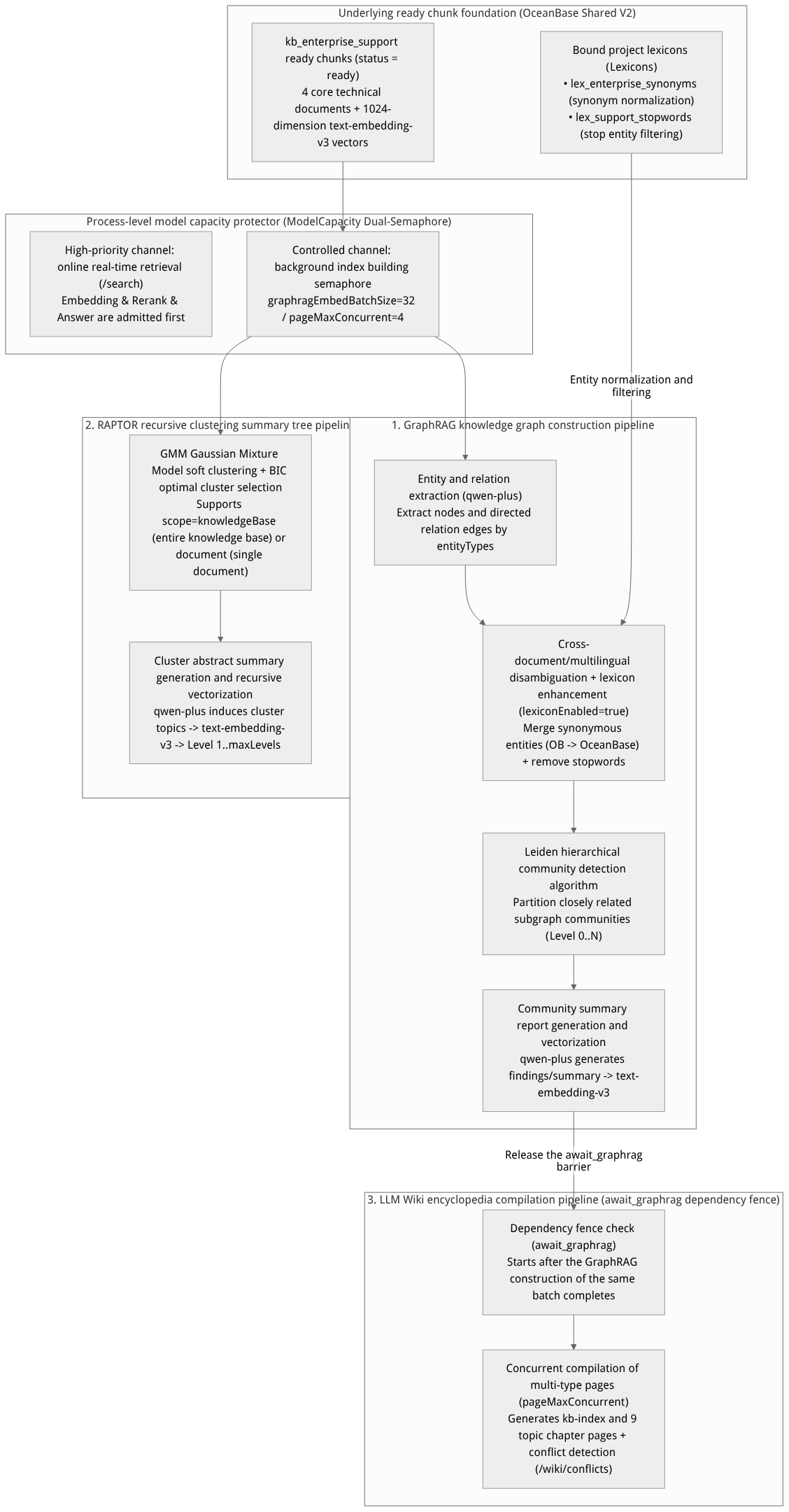
Flow diagram, not a runtime screenshot; read the relationships between steps or states along the arrows.
View the flow diagram in full size
One. GraphRAG (knowledge graph index): deep principles and configuration parameters
GraphRAG transforms unstructured text into a structured three-layer topology network of "Entity — Relation — Community Report":
Five-Step Build Pipeline:
Step 1 (Entity and Relationship Extraction): Iterate over chunks in the knowledge base whose status is
readyand invoke the Chat model (qwen-plusunderdashscope-prod) to extract entity names, types, contextual descriptions, as well as directed semantic relationships between entities and relationship strength weights (Weight), according to predefined or customentityTypes.Step 2 (Knowledge Graph Lexicon Enhancement and Cross-Document Disambiguation): When
lexiconEnabled: trueis enabled, the extractor automatically loads the project lexicon bound to the knowledge base (such aslex_enterprise_synonymsandlex_support_stopwords) before persisting entries: if an extracted entity matches asynonymvariant word (such asOBorOceanBase数据库), it is automatically merged into the canonical main termOceanBase; if it matches astopstopword, the noise entity is discarded directly. It then performs cross-document, cross-language disambiguation of homonyms and description fusion.Step 3 (Leiden Hierarchical Community Detection): Run the Leiden graph clustering algorithm based on the edge weights of the entity relationship graph, partitioning highly cohesive entity nodes into topological communities at different levels (Level 0 fine-grained sub-communities up to high-level global communities).
Step 4 (Community Summary Report Generation): Invoke
qwen-plusto generate a structured report for each Leiden community containing a title (title), core summary (summary), key findings list (findings), and importance score (rating).Step 5 (Knowledge Graph Vectorization and Persistence): Using
graphragEmbedBatchSize(default32) as the batch size, invoketext-embedding-v3(1024dimensions) to generate semantic vectors for all entity descriptions and community summary reports and persist them into the OceanBase vector table.
GraphRAG Core Configuration Parameter Table:
| Parameter field | Type | Default / benchmark value | Detailed description and tuning advice |
|---|---|---|---|
enabled | boolean | true | Whether to enable the GraphRAG knowledge graph capability for the current knowledge base. |
entityTypes | string[] | ["产品模块", "故障码", "API接口", "配置参数", "SOP步骤", "专家角色"] | Restricts the domain entity categories the large model focuses on identifying; focused entity categories significantly reduce the graph extraction rate of meaningless generic nouns. |
lexiconEnabled | boolean | true | Knowledge graph lexicon enhancement switch: When enabled, the synonym normalization rules and stop filtering rules of the bound lexicon are applied in real time during the entity extraction stage. |
language / outputLanguage | string | "zh-CN" | Options are "zh-CN", "en-US", "auto". Controls the generation language of entity consolidated descriptions and Leiden community reports. |
graphragEmbedBatchSize | integer | 32 (range 1–128) | The number of Embedding chunks per batch when vectorizing entity and community summaries, working with ModelCapacity to control concurrent throughput. |
extractionPrompt | string | Platform built-in template | Optionally customize the entity relationship extraction prompt, supporting tailored extraction granularity for database troubleshooting or financial compliance domains. |
Two. RAPTOR (Recursive Abstractive Processing for Tree-Organized Retrieval) In-Depth Principles and Configuration Parameters
RAPTOR (Recursive Abstractive Processing for Tree-Organized Retrieval) builds a multi-level semantic summary tree bottom-up, compensating for the shortcoming that flat chunks lack cross-paragraph macro context:
Four-Step Recursive Clustering Pipeline:
Level 0 (Leaf Node Layer): Use the ready raw document chunks (Leaf Chunks) in the knowledge base and their
1024-dimensionaltext-embedding-v3vectors directly as the leaf nodes of the tree.GMM Soft Clustering + BIC Criterion: Perform dimensionality reduction and Gaussian Mixture Model (GMM) soft clustering on the current layer's node vectors (allowing a single cross-topic chunk to belong to multiple relevant semantic clusters simultaneously), and use the Bayesian Information Criterion (BIC) to automatically compute the optimal number of clusters, avoiding under-clustering or over-clustering caused by manually hard-coding the cluster count.
Cluster Abstract Summary and Re-Vectorization: For the node text within each cluster, invoke
qwen-plusto distill and generate a higher-level abstraction summary node (Summary Node), and invoketext-embedding-v3to compute that summary node's vector.Recursive Convergence (Level 1..
maxLevels): Repeat "GMM+BIC clustering -> LLM abstraction summarization -> vectorization" on the newly generated summary nodes until the configured maximum tree heightmaxLevelsis reached or the remaining node count can no longer be clustered, forming a complete hierarchical semantic tree.
RAPTOR Core Configuration Parameter Table:
| Parameter field | Type | Default / benchmark value | Detailed description and selection advice |
|---|---|---|---|
enabled | boolean | true | Whether to enable the RAPTOR recursive clustering summary tree capability for the current knowledge base. |
scope | string | "knowledgeBase" | Clustering scope: • "knowledgeBase": Cross-document global tree, clustering the chunks of all documents in the entire library in the same vector space, suitable for cross-manual comprehensive Q&A; • "document": Single-document independent tree, building a dedicated section summary tree within each document, suitable for internal summarization of extra-long white papers or hundred-page contracts. |
maxLevels | integer | 3 (range 1–5) | The maximum height of the recursive clustering tree (excluding Level 0 leaf nodes). A mid-sized enterprise knowledge base is recommended to be set to 3. |
clusterSize | integer | 10 (range 3–50) | The upper limit of target child nodes a single semantic cluster can contain, affecting the context aggregation width of each layer's LLM summarization. |
summarizationPrompt | string | Platform built-in template | Optionally customize the cluster summary generation prompt, guiding the large model to retain key parameters, thresholds, and causal conclusions. |
Three. LLM Wiki Compilation and the await_graphrag Dependency Barrier Mechanism
When the user enables GraphRAG and LLM Wiki simultaneously on the Indexes tab and triggers batch builds, Agentbase has a built-in await_graphrag dependency barrier (Dependency Barrier):
Why
await_graphragis needed: When LLM Wiki plans the global encyclopedia outline (kb-index) and writes cross-document topical pages, it not only reads raw document chunks but also consumes theGraphRAG-extracted high-centrality core entities and Leiden community reports to ensure the compiled encyclopedia section structure is fully aligned with the whole-library knowledge graph topology.Barrier scheduling behavior: When there are
GraphRAGbuild tasks running or queued in the same batch, the Wiki build job automatically enters a controlled waiting state (recording barrier stateawait_graphrag), and onceGraphRAGis successfully persisted (status = ready), the Wiki compiler is seamlessly woken immediately, generating 10 structured encyclopedia pages concurrently according topageMaxConcurrent(default4).
Four. Dual-Axis State Machine, Staleness Reasons (staleReason), and ModelCapacity Capacity Governance
1. Index Capability Dual-Axis State Machine and currentGeneration
Each advanced index capability (graphrag / raptor / wiki) is described by two orthogonal state dimensions and a monotonically increasing generation number currentGeneration:
Lifecycle State:
disabled: Not enabled;configured: Parameters saved but currently turned off;enabled: Enabled, allowing builds to be triggered and participation in online hybrid retrieval whenready.
Data Readiness State:
building: The background Worker is executing extraction, clustering, or compilation jobs;ready: The derived index for the current generation (currentGeneration) has been fully built and is fully synchronized with the latest documents;stale: The underlying documents, chunks, data sources, or index configuration have changed; the existing old-generation index can still continue serving online queries (smooth fallback), but aincrementalorrebuildjob needs to be triggered to upgrade to the latest generation;failed: The most recent build job failed due to upstream model unavailability or quota exhaustion;cancelled: The build job was actively cancelled by an administrator.
2. Dictionary of Six Standard Staleness Reasons (staleReason)
Staleness reason enum value (staleReason) | Triggering scenario description | Recommended remediation action (operation + executionMode) |
|---|---|---|
document_ingested | New documents were uploaded to the knowledge base or existing documents were re-ingested (Re-ingest) | operation: "build", executionMode: "incremental" |
document_deleted | A document that had participated in the build was deleted from the knowledge base | operation: "repair" or executionMode: "rebuild" |
chunk_updated | The body content of a chunk was manually modified or the chunk was deleted on the document detail page | operation: "build", executionMode: "incremental" |
data_source_sync | An incremental sync (/datasources/{id}/sync) on an external data source such as Yuque produced new or changed documents | operation: "build", executionMode: "incremental" |
config_changed | entityTypes, lexiconEnabled, scope or the prompt was modified via PATCH /index-capabilities/{capability} | operation: "build", executionMode: "rebuild" |
manual_rebuild | The administrator explicitly requested a forced full rebuild | operation: "build", executionMode: "rebuild" |
3. Process-Level ModelCapacity Dual-Semaphore Concurrency Protection
In production environments, GraphRAG entity extraction and RAPTOR multi-layer summarization generate intensive LLM (qwen-plus) and Embedding (text-embedding-v3) calls. To prevent background build tasks from exhausting the upstream model TPM/RPM quotas and causing front-end customer support Q&A (/search) timeouts, Agentbase implements a ModelCapacity dual-semaphore isolation mechanism at the Worker and API process layers:
High-Priority Online Search Semaphore: Reserves a guaranteed concurrency quota for real-time
/searchrequests, always prioritizing acquisition of model call tokens;Background Indexing Semaphore: Background
graphrag,raptor, andwikijobs claim concurrency slots through an independent restricted semaphore plus adaptive backoff, achieving "zero front-end impact, steady back-end throughput".
Feature Entrypoints and Permission Matrix
| Console entrypoint / feature module | Frontend route path | Corresponding REST API endpoint | Server SDK method (Node.js / Python) | Required RBAC role / API Key scope | Cross-module dependency |
|---|---|---|---|---|---|
| Knowledge base → Knowledge index overview page | /console/project-default-enterprise-ai-hub-210/knowledge-base/kb-kb_enterprise_support/indexes | GET /v1/knowledgebases/{kbId}/index-capabilities | knowledgeBase.listIndexCapabilities() / list_index_capabilities() | Roles: owner, admin, developer, member (read-only)Scope: knowledgebases.read | Requires at least 1 document with status=ready status in the knowledge base |
| Configure GraphRAG / RAPTOR / Wiki capability parameters | /console/.../kb-kb_enterprise_support/indexes (click "Configure" on the corresponding card) | PATCH /v1/knowledgebases/{kbId}/index-capabilities/{capability} | knowledgeBase.updateIndexCapability() | Roles: owner, admin, developerScope: knowledgebases.write | Requires qwen-plus and text-embedding-v3 to be already configured in dashscope-prod; enabling lexiconEnabled requires a bound lexicon |
| Dispatch incremental build, repair, or full rebuild jobs | /console/.../kb-kb_enterprise_support/indexes (click "Build" or "Rebuild") | POST /v1/knowledgebases/{kbId}/index-operationsGET /v1/knowledgebases/{kbId}/index-operations | knowledgeBase.createIndexOperation()knowledgeBase.listIndexOperations() | Roles: owner, admin, developerScope: knowledgebases.write | Linked with the ready gating of version management (Versions) |
| Cancel a running index job | Row action "Cancel" in the recent jobs list | POST /v1/knowledgebases/{kbId}/index-operations/{operationId}/cancel | knowledgeBase.cancelIndexOperation() | Roles: owner, admin, developerScope: knowledgebases.write | Only takes effect on jobs in queued or running status |
| Clear derived index data | Capability card more menu "Clear Index Data (Clear)" | POST /v1/knowledgebases/{kbId}/index-capabilities/{capability}/clear | knowledgeBase.clearIndexCapability() | Roles: owner, adminScope: knowledgebases.write | The request body must explicitly pass in "confirm": true; only derived indexes are cleared, without deleting original documents and base chunks |
Feature Details and Operation Guide
Step 1: Configure and enable the GraphRAG, RAPTOR, and LLM Wiki capabilities
Log in to the Console, go to project
企业智能客服与知识中台 (enterprise-ai-hub-210)-> knowledge base ->企业智能客服与技术支持知识库 (kb_enterprise_support)-> click the top knowledge index (Indexes) tab.Configure GraphRAG (knowledge graph):
Click the Configure button in the upper-right corner of the GraphRAG card;
Turn on the Enabled switch;
In Entity Types, enter:
产品模块,故障码,API接口,配置参数,SOP步骤,专家角色;Check Enable lexicon enhancement (
lexiconEnabled) so that knowledge graph extraction automatically associates the boundlex_enterprise_synonymsandlex_support_stopwords;For Language select
简体中文 (zh-CN), keep vectorization batch size (graphragEmbedBatchSize) at32, and click Save Configuration.
Configure RAPTOR (recursive clustering summary tree):
Click Configure on the RAPTOR card;
Turn on the Enabled switch, set Scope to
整库跨文档聚类 (knowledgeBase), set Max Levels to3, set Cluster Size to10, and click Save Configuration.
Configure LLM Wiki (knowledge encyclopedia compilation):
Click Configure on the LLM Wiki card;
Turn on the Enabled switch, set Output language (
wikiLanguage) tozh-CN, set max page concurrency (pageMaxConcurrent) to4, check Compile after GraphRAG is ready (await_graphrag), and click Save Configuration.
Step 2: Dispatch asynchronous build jobs (build / repair) and monitor generation evolution
Above the Indexes tab, for capability cards in the
configuredorstalestate, click Build:Incremental build (
operation: "build", executionMode: "incremental"): recommended for daily document additions or after Yuque sync (data_source_sync); it only performs extraction and merging on incrementally changed chunks, with the fastest speed and lowest Token consumption;Full rebuild (
operation: "build", executionMode: "rebuild"): use whenentityTypeshas been modified,lexiconEnabledhas been switched, or RAPTOR'sscope(staleReason: config_changed) has been adjusted; it generates a brand-new generation (currentGeneration + 1) based on allreadydocuments in the knowledge base;Index repair (
operation: "repair"): use when a build was interrupted by upstream network jitter or when orphaned edges/nodes need to be aligned.
In the Index Operations list at the bottom of the page, you can view job ID, target capability (
graphrag/raptor/wiki), execution mode, elapsed time, and progress details in real time. After a successful build, all three capability cards display the greenreadystatus, andcurrentGenerationis incremented.
Step 3: Fully operate the three index capabilities and job lifecycles via the REST API
# 1. Query the current status, generation number and staleness reason of the knowledge base's three advanced index capabilities (GET /index-capabilities)
curl -X GET "https://appbuild.oceanbase.com/v1/knowledgebases/kb_enterprise_support/index-capabilities" \
  -H "X-Appwrite-Project: enterprise-ai-hub-210" \
  -H "X-Appwrite-Key: <APPBASE_API_KEY>"

# 2. Configure and enable the GraphRAG indexing capability, turning on lexicon enhancement and custom entity types (PATCH /index-capabilities/graphrag)
curl -X PATCH "https://appbuild.oceanbase.com/v1/knowledgebases/kb_enterprise_support/index-capabilities/graphrag" \
  -H "X-Appwrite-Project: enterprise-ai-hub-210" \
  -H "X-Appwrite-Key: <APPBASE_API_KEY>" \
  -H "Content-Type: application/json" \
  -d '{
    "enabled": true,
    "outputLanguage": "zh-CN",
    "config": {
      "entityTypes": ["产品模块", "故障码", "API接口", "配置参数", "SOP步骤", "专家角色"],
      "lexiconEnabled": true,
      "language": "zh-CN",
      "graphragEmbedBatchSize": 32
    }
  }'

# 3. Configure and enable the RAPTOR recursive clustering summary tree capability (PATCH /index-capabilities/raptor)
curl -X PATCH "https://appbuild.oceanbase.com/v1/knowledgebases/kb_enterprise_support/index-capabilities/raptor" \
  -H "X-Appwrite-Project: enterprise-ai-hub-210" \
  -H "X-Appwrite-Key: <APPBASE_API_KEY>" \
  -H "Content-Type: application/json" \
  -d '{
    "enabled": true,
    "outputLanguage": "zh-CN",
    "config": {
      "scope": "knowledgeBase",
      "maxLevels": 3,
      "clusterSize": 10
    }
  }'

# 4. Configure and enable the LLM Wiki capability with the await_graphrag fence (PATCH /index-capabilities/wiki)
curl -X PATCH "https://appbuild.oceanbase.com/v1/knowledgebases/kb_enterprise_support/index-capabilities/wiki" \
  -H "X-Appwrite-Project: enterprise-ai-hub-210" \
  -H "X-Appwrite-Key: <APPBASE_API_KEY>" \
  -H "Content-Type: application/json" \
  -d '{
    "enabled": true,
    "outputLanguage": "zh-CN",
    "config": {
      "wikiLanguage": "zh-CN",
      "pageMaxConcurrent": 4,
      "await_graphrag": true
    }
  }'

# 5. Trigger an incremental or full index build job with an idempotency key (POST /index-operations)
curl -X POST "https://appbuild.oceanbase.com/v1/knowledgebases/kb_enterprise_support/index-operations" \
  -H "X-Appwrite-Project: enterprise-ai-hub-210" \
  -H "X-Appwrite-Key: <APPBASE_API_KEY>" \
  -H "Content-Type: application/json" \
  -d '{
    "capability": "graphrag",
    "operation": "build",
    "executionMode": "incremental",
    "idempotencyKey": "iop_graphrag_kb_support_20261022_01"
  }'

# 6. Cancel a queued or running build job (POST /index-operations/{operationId}/cancel)
curl -X POST "https://appbuild.oceanbase.com/v1/knowledgebases/kb_enterprise_support/index-operations/iop_7c6b5a4d3e2f1098/cancel" \
  -H "X-Appwrite-Project: enterprise-ai-hub-210" \
  -H "X-Appwrite-Key: <APPBASE_API_KEY>"

# 7. Safely clear the specified derived index artifacts (requires explicitly passing confirm: true; does not affect original documents and chunks)
curl -X POST "https://appbuild.oceanbase.com/v1/knowledgebases/kb_enterprise_support/index-capabilities/raptor/clear" \
  -H "X-Appwrite-Project: enterprise-ai-hub-210" \
  -H "X-Appwrite-Key: <APPBASE_API_KEY>" \
  -H "Content-Type: application/json" \
  -d '{
    "confirm": true
  }'
FAQ (Frequently Asked Questions and Troubleshooting)
Q1: I have newly uploaded documents and the document status changed to ready, but the GraphRAG and RAPTOR card statuses changed to the yellow stale (stale). Will online retrieval report errors at this point?
Root cause analysis: When underlying documents are added (
document_ingested), deleted (document_deleted), chunk-edited (chunk_updated), or the Yuque data source is synchronized (data_source_sync), an incremental difference arises between the built derived index generation and the latest document chunks, so the system marks the status asstale.Online retrieval will never report errors in this state: in thestalestate, the previous generation's (currentGeneration) ready graph and RAPTOR summary tree still participate normally in online hybrid retrieval; they simply do not yet include the graph edges and high-level cluster summaries of the latest changed documents.Resolution: During off-peak business hours or after batch document upload, go to the knowledge index (Indexes) tab and click Build on the corresponding card (select
executionMode: "incremental"); once the incremental build completes, the status returns toready. Note: if you plan to seal (Seal) a draft version in version management (Versions), the readiness gate strictly requires all enabled index capabilities to eliminate thestalestate and reachready.
Q2: I triggered GraphRAG and LLM Wiki builds at the same time; why does the Wiki job stay stuck in the waiting state (await_graphrag) and not start generating pages immediately?
Root cause analysis: This is an intentional
await_graphragdependency fence protection mechanism. When generating the global outline tree (kb-index) and topical chapter pages, the LLM Wiki compiler needs to reference the core entities extracted by GraphRAG and the Leiden community summary reports to improve encyclopedia structural integrity. If GraphRAG is still extracting or clustering communities, the Wiki job will deliberately suspend and wait, avoiding the compilation of inconsistent encyclopedia pages based on an incomplete or outdated graph.Resolution: No manual intervention or job cancellation is needed. Once the
GraphRAGbuild job in the same batch transitions tocompleted, the background scheduler will automatically release the fence within seconds and start Wiki page compilation withpageMaxConcurrentconcurrency.
Q3: After enabling GraphRAG's lexiconEnabled: true, I modified synonym entries in the project lexicon lex_enterprise_synonyms. Will the already generated knowledge graph automatically merge old nodes?
Root cause analysis:
lexiconEnabled: trueis a mechanism that takes effect at GraphRAG index-build time (Index-time) — that is, afterqwen-plusextracts entities and before they are written to the OceanBase knowledge graph table, synonymous variants are normalized to the canonical term according to the lexicon snapshot at that moment. Therefore, adding or modifying synonyms in the lexicon afterwards takes effect immediately for online retrieval (/searchQuery Rewrite), but does not automatically rewrite historical graph nodes already persisted in the database.Resolution: If you have added important core domain synonyms in
lex_enterprise_synonymsand want to update the knowledge graph topology, go to the knowledge index (Indexes) tab, click Rebuild (operation: "build", executionMode: "rebuild") on the GraphRAG card, and the system will re-disambiguate and merge entity nodes using the latest lexicon rules.
Q4: After executing POST .../index-capabilities/{capability}/clear to clear the index, will my 4 uploaded source documents and base vector chunks be deleted?
Root cause analysis: The design boundary of the
clearAPI is to clear only the entity tables, relation edge tables, community reports, or cluster summary tree nodes derived by the specified high-level capability (such asgraphragorraptor), and to reset that capability's readiness state to the initial unbuilt state.Resolution: You can safely execute
clear(requires passing"confirm": true): the original files in the knowledge base (stored inkb_enterprise_docs), document metadata, base chunks, and the1024-dimension base vector index remain 100% intact, and base hybrid retrieval (searchMode=hybrid) is unaffected.
Related Documentation
External data source integration and incremental sync with Yuque
Knowledge Graph Visualization Exploration and Community Reports
Knowledge Base Wiki Compilation, Conflict Adjudication, and Memory Export
Knowledge Base Immutable Version Management and Release Rollback
Project-level lexicons and retrieval/knowledge graph/agent collaborative governance
Knowledge Base Settings Hub, Default Policies, and Multimodal Image Understanding (VLM)