
Knowledge Base Settings Hub, Default Policies, and Multimodal Image Understanding (VLM)
This manual corresponds to Agentbase v2.10.0 (same version as the Console).
Knowledge base settings (Settings) is the high-stakes operations hub in Agentbase v2.10.0 for unified governance of knowledge bases (e.g., kb_enterprise_support): underlying vector space metadata, default parsing and chunking strategies (indexingDefaults), multimodal vision LLM image understanding (imageUnderstanding), default hybrid retrieval and grounded Q&A parameters (retrievalDefaults), ingestion observability tracing (ingestionTracing), as well as full knowledge base rebuild (reindex) and destruction. Through the Settings tab (/console/project-default-enterprise-ai-hub-210/knowledge-base/kb-kb_enterprise_support/settings) on the knowledge base detail page, architects and administrators can smoothly evolve a knowledge base's parsing accuracy and online retrieval default baseline without modifying business caller code.
Feature overview and core scenarios
During the construction and long-term operation of an enterprise knowledge platform (such as project 企业智能客服与知识中台, ID: enterprise-ai-hub-210), documents uploaded by different teams come in complex and varied forms (including pure Markdown specifications as well as PDF/DOCX/PPTX manuals containing large numbers of system architecture diagrams, monitoring screenshots, and sequence diagrams), while multiple downstream business microservices and agent workspaces (Agent Runtime) all share and call this knowledge base. knowledge base Settings Center provides the following core capabilities around the four goals of "consolidated configuration, snapshot isolation, multimodal enhancement, and an observable closed loop":
Basic metadata management and vector space immutability protection (Vector Space Immutability):
Supports updating the knowledge base display name (
name) and business description (description) at any time.Applies a strict read-only lock to the
embeddingProviderRef(project:dashscope-prod),embeddingModel(text-embedding-v3), andembeddingDimension(1024) bound at creation time, eliminating at the source the OceanBase vector index cosine distance distortion caused by mixing different vector spaces or different dimensions.
Default indexing and chunking strategies (
indexingDefaults) and the snapshot isolation mechanism:Centrally defines the default document parser (
text/mineru/vlm/office), chunking strategy (general/title/smart/regex/faq), and fine-grained splitting parameters (chunkTokenNum = 512,overlapPercent = 10,delimiter,regexPattern,minChunkTokens = 128) applied when new documents enter the knowledge base.Adopts a configuration snapshot isolation (Snapshot Isolation) design: after modifying
indexingDefaults, changes only take effect for newly uploaded documents or those explicitly triggering re-ingestion, and never silently alters existing chunks already in thereadystate in production.
Multimodal image understanding (
imageUnderstanding/ VLM visual enhancement):After enabling
enabled: trueand binding the vision large modelproject:dashscope-prodqwen-vl-maxunder it, the ingestion pipeline automatically decomposes embedded images in PDF, DOCX, PPTX, Excel, and Markdown, extracting architecture diagram components, topology flows, and text in error screenshots according to the configured concurrency (maxConcurrency: 1..16) and a custom vision prompt (prompt), then merges the generated semantic descriptions into the corresponding chunks to participate in vectorization and full-text search.
Default retrieval and answer synthesis baseline (
retrievalDefaults):Uniformly configures the default
searchMode(hybrid),vectorWeight(0.7),topK(8),scoreThreshold(0.35), reranking model (qwen3.7-text-rerank), and answer synthesis model (qwen-plus), so that minimal/searchrequests automatically inherit tuned production parameters.
Ingestion observability tracing (
ingestionTracing) and knowledge base-wide operations:Supports enabling OpenTelemetry ingestion pipeline tracing (
tracingEnabled: true), linked with the “knowledge base parsing quality assessment” in the observability center; provides one-click knowledge base-wide index rebuild (POST .../reindex) and a double-confirmed permanent knowledge base deletion (DELETE /v1/knowledgebases/{kbId}).
Core Concepts and Architecture
Architecture diagram of the five configuration domains of the knowledge base settings center and their upstream/downstream effect boundaries
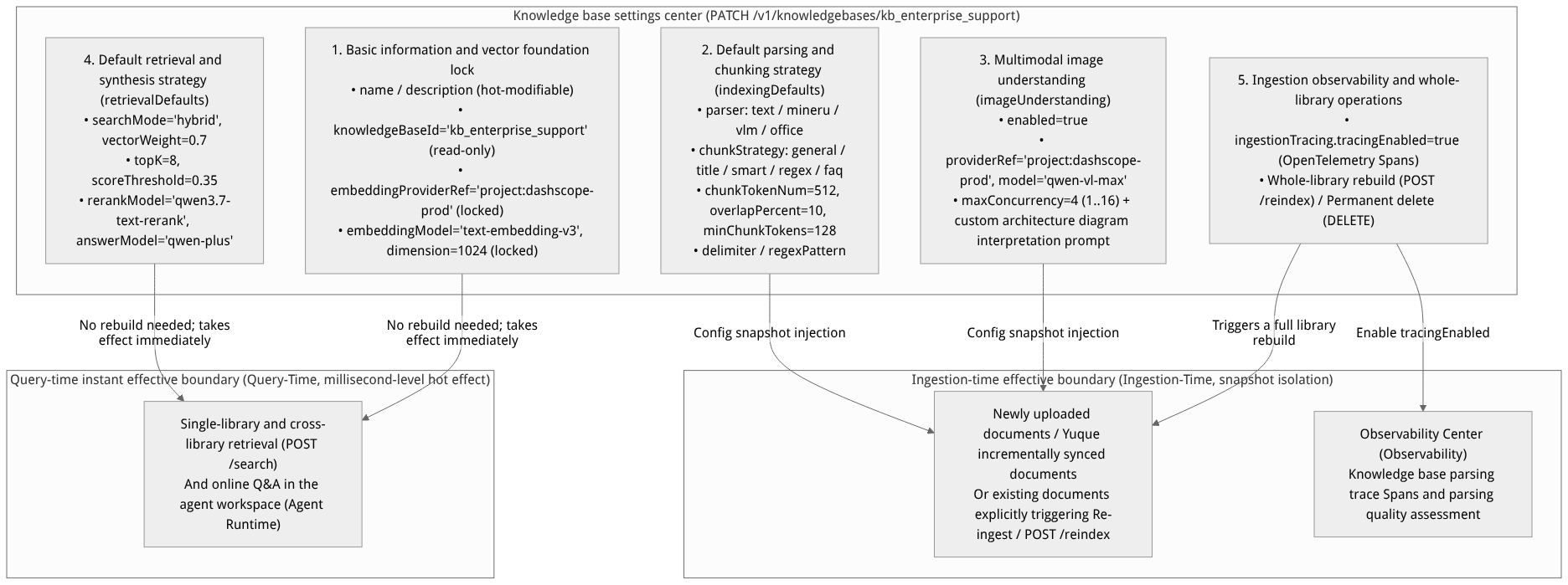
Flow diagram, not a runtime screenshot; read the relationships between steps or states along the arrows.
View the flow diagram in full size
Comparison of settings change effect mechanisms (hot effect vs. effect on new ingestion/rebuild)
Understanding which parameter modifications take effect immediately for production queries and which follow snapshot isolation (requiring re-ingestion to take effect) is central to production operations:
| Configuration group | Field path | Whether changes take effect immediately on existing data | Production effect mechanism explanation |
|---|---|---|---|
| Basic information | name, description | Takes effect immediately | Only updates knowledge base metadata; does not affect underlying vectors or retrieval. |
| Vector foundation | embeddingProviderRef, embeddingModel, embeddingDimension | Cannot be modified after creation | Locked at the project:dashscope-prod / text-embedding-v3 / 1024 dimension. Because OceanBase vector table column dimensions and semantic space are fixed, switching the embedding model requires creating a new knowledge base. |
| Default parsing and chunking | indexingDefaults.* (parser, chunkStrategy, chunkTokenNum, overlapPercent, delimiter, regexPattern, minChunkTokens) | Takes effect only on new ingestion (snapshot isolation) | After saving, existing document chunks in the ready state remain unchanged; newly uploaded documents automatically adopt the new default strategy. To apply the new chunking parameters uniformly across the whole knowledge base, you must invoke POST /v1/knowledgebases/{kbId}/reindex. |
| Multimodal image understanding | imageUnderstanding.* (enabled, providerRef, model, maxConcurrency, prompt) | Takes effect only on new ingestion | Image decomposition and qwen-vl-max visual interpretation occur in the asynchronous document ingestion pipeline. After enabling or modifying prompt, performing “Re-ingest” on a target document containing images generates new image summaries. |
| Default retrieval and Q&A | retrievalDefaults.* (searchMode, vectorWeight, topK, scoreThreshold, rerankModel, answerModel) | Hot effect immediately | These are query-time default parameters. After saving, any production call that does not explicitly override the corresponding fields in the /search request body immediately adopts the new defaults. |
| Ingestion observability tracing | ingestionTracing.tracingEnabled | Takes effect immediately for subsequent ingestion tasks | Once enabled, newly dispatched asynchronous ingestion tasks automatically write parsing and chunking Spans along with intermediate snapshots to OpenTelemetry. |
Feature Entrypoints and Permission Matrix
| Console entrypoint / feature module | Frontend route path | Corresponding REST API endpoint | Server SDK method (Node.js / Python) | Required RBAC role / API Key scope | Cross-module dependency |
|---|---|---|---|---|---|
| Knowledge base → Settings center (view configuration) | /console/project-default-enterprise-ai-hub-210/knowledge-base/kb-kb_enterprise_support/settings | GET /v1/knowledgebases/{kbId} | knowledgeBase.get() / get_knowledge_base() | Roles: owner, admin, developer, member (read-only)Scope: knowledgebases.read | Reads the associated dashscope-prod model status and storage bucket kb_enterprise_docs information |
| Update default parsing/chunking, VLM image understanding, default retrieval, and tracing configuration | /console/.../kb-kb_enterprise_support/settings (the "Save" button in each group) | PATCH /v1/knowledgebases/{kbId} | knowledgeBase.update() / update_knowledge_base() | Roles: owner, admin, developerScope: knowledgebases.write | Depends on models (LLM Gateway) where dashscope-prod is enabled qwen-vl-max, qwen3.7-text-rerank, qwen-plus |
| Trigger a full knowledge base Reindex | The "Reindex All" button on the settings page or document page | POST /v1/knowledgebases/{kbId}/reindex | knowledgeBase.reindex() / reindex_knowledge_base() | Roles: owner, admin, developerScope: knowledgebases.write | Batch-dispatches asynchronous re-ingestion tasks for all documents in the knowledge base and marks the advanced index as stale |
| Permanently delete the knowledge base (Danger Zone) | The danger zone "Delete knowledge base" at the bottom of the settings page | DELETE /v1/knowledgebases/{kbId} | knowledgeBase.delete() / delete_knowledge_base() | Roles: restricted to owner and adminScope: knowledgebases.write | Cascading cleanup of chunks, vectors, knowledge graph, Wiki, and dedicated storage bucket files in OceanBase |
Feature Details and Operation Guide
Step One: View basic information and the vector foundation lock status
Log in to the Console, go to project
企业智能客服与知识中台 (enterprise-ai-hub-210)-> knowledge base ->企业智能客服与技术支持知识库 (kb_enterprise_support)-> and click the top Settings (Settings) tab.In the top General & Embedding Lock (General & Embedding Lock) card:
You can edit the name (
name) (e.g.,企业智能客服与技术支持知识库) and description (description) at any time;View the read-only locked vector space triple:
Knowledge base ID (
knowledgeBaseId):kb_enterprise_supportEmbedding model provider reference (
embeddingProviderRef):project:dashscope-prodEmbedding model and dimension (
embeddingModel/embeddingDimension):text-embedding-v3(1024dimensions, OceanBaseShared V2HNSW vector index).
Step Two: Configure the default parsing and chunking strategy (indexingDefaults)
Scroll down to the default indexing and chunking strategy (Indexing Defaults) card to set standard chunking rules for documents uploaded or synchronized into the knowledge base later:
| Configuration item | Field path (indexingDefaults.*) | Optional values / range | Benchmark production configuration value | Detailed purpose description |
|---|---|---|---|---|
| Default document parser | parser / documentParser | text / mineru / vlm / office | text (for complex PDFs, mineru is recommended) | • text: ultra-fast extraction of native text/Markdown• mineru: deep restoration of complex PDF multi-column layouts, cross-page tables, and formulas• vlm: entire pages parsed by the vision large model• office: structured extraction for Word/PPT/Excel |
| Default chunking strategy | chunkStrategy / chunkingParser | general / title / smart / regex / faq | title | For technical whitepapers and troubleshooting manuals, splitting by title (heading hierarchy) or smart (intelligent semantic boundaries) is recommended |
| Target chunk size | chunkTokenNum | 64–4096 Tokens | 512 | Target token length of a single Chunk; must be smaller than the maximum input limit of text-embedding-v3 |
| Adjacent chunk overlap ratio | overlapPercent | 0–50 (%) | 10 | Retains 10% (about 51 Tokens) of overlapping context between adjacent chunks to prevent cross-paragraph semantics from being cut off |
| Minimum merge chunk threshold | minChunkTokens | 16–1024 Tokens | 128 | In title or smart mode, short paragraphs under 128 Tokens are automatically merged with adjacent paragraphs |
| Custom separator | delimiter | String (e.g., \n\n) | "\n\n" | In general mode, sentences are split by this separator first |
| Regex-based splitting pattern | regexPattern | Valid regular expression | Configure as needed (required only in regex mode) | In regex mode, splits standardized legal clauses or log blocks precisely at match boundaries |
Snapshot isolation tip: After clicking Save, the system only updates the knowledge-base-level default template. If a particular document (such as "FAQ Summary Table.xlsx") needs to use the
faqchunker separately, you can apply a local override when uploading that document or in the per-document settings of the Documents list; per-document configuration takes precedence overindexingDefaults.
Step Three: Enable multimodal image understanding (imageUnderstanding / VLM visual enhancement)
Enterprise technical documents (such as "Agentbase Enterprise Architecture Whitepaper.md" or the PDF version of "OceanBase Distributed Transactions and Vector Index Troubleshooting Guide") often contain large numbers of architecture topology diagrams, state machine flowcharts, and Console error screenshots. After enabling Image Understanding, these images are no longer retrieval blind spots:
On the settings page, locate the multimodal image understanding (Image Understanding) card and turn on the enable image understanding (
enabled) switch.Complete the vision model binding with the following benchmark parameters:
Vision model provider (
providerRef): Selectproject:dashscope-prod(an Alibaba Cloud Bailian connection with thevlmcapability already enabled in the LLM Gateway);Vision large model (
model): selectqwen-vl-max;Maximum image parsing concurrency (
maxConcurrency): value range1–16; a production value of4is recommended (i.e., at most 4 concurrentqwen-vl-maxvision interpretation requests during single-document ingestion, balancing ingestion speed and upstream RPM quota safety);Custom image interpretation prompt (
prompt):请作为资深云原生与数据库架构师,详细提取图片中的系统架构组件名称、调用方向箭头、配置参数名、错误码(如 -4013 / -4024)、监控指标数值以及表格行列对应关系,输出高信息密度的结构化中文描述,切勿遗漏关键英文标识符。
Click Save Configuration. From then on, when the document ingestion pipeline parses images embedded in PDF, DOCX, PPTX, Excel, or Markdown, it will automatically upload the image to the
kb_enterprise_docsstorage bucket, callqwen-vl-maxto generate an accurate text description, anchor that description in the chunk of the paragraph containing the image, and vectorize it together.
Section Four: Configuring Default Retrieval and Q&A Synthesis Parameters (retrievalDefaults)
In the Default Retrieval and Q&A Settings (Retrieval Defaults) card, you can solidify the best parameters validated in the Search (Retrieval Testing) tab as knowledge-base-level defaults:
| Configuration Item | Field Path (retrievalDefaults.*) | Benchmark Configuration Value | Description and Value Range |
|---|---|---|---|
| Default retrieval mode | searchMode | "hybrid" | Options: "hybrid" (hybrid vector + full-text), "vector" (pure vector), "fulltext" (pure full-text) |
| Default vector weight | vectorWeight | 0.7 | Range 0.0–1.0. 0.7 means 70% semantic vector score + 30% full-text BM25 score |
| Default number of returned results | topK / limit | 8 | Default Top-K number of returned chunks (range 1–50) |
| Default similarity threshold | scoreThreshold / similarityThreshold | 0.35 | Range 0.0–1.0; filters out low-relevance noise chunks scoring below 0.35 |
| Default rerank model | rerankModel | "qwen3.7-text-rerank" | Binds the semantic rerank model under project:dashscope-prod |
| Default Q&A synthesis model | answerModel / chatModel | "qwen-plus" | The default conversational model used to generate grounded answers when calling /search with answer: true |
Section Five: Enabling Ingestion Observability Tracing (ingestionTracing) and Whole-Repository Operations
Enable ingestion observability tracing (
ingestionTracing.tracingEnabled: true):In the Observability and Tracing (Ingestion Tracing) area, turn on the
tracingEnabledswitch and save.Once enabled, each document ingestion's parsing duration, chunk boundary snapshots, image understanding call latency, and Embedding token consumption are written in standard OpenTelemetry Span format to the project observability center, supporting automated LLM-as-a-Judge scoring of knowledge base chunk quality in Observability → Evaluations.
Run whole-repository reindex (
POST /v1/knowledgebases/{kbId}/reindex):When you have modified
indexingDefaults(e.g., changedchunkTokenNumto512) and want all 4 existing documents re-chunked with the new parameters, click Reindex All Documents.
Permanently delete the knowledge base (
DELETE /v1/knowledgebases/{kbId}):In the Danger Zone at the bottom of the page, click Delete Knowledge Base, enter
kb_enterprise_supportin full in the confirmation dialog, and confirm deletion (irreversible operation).
Complete REST API Example for Knowledge Base Settings Updates and Whole-Repository Reindex
# 1. Update knowledge base global settings: default chunking strategy, multimodal image understanding (qwen-vl-max), default retrieval parameters and ingestion tracking (PATCH /v1/knowledgebases/{kbId})
curl -X PATCH "https://appbuild.oceanbase.com/v1/knowledgebases/kb_enterprise_support" \
  -H "X-Appwrite-Project: enterprise-ai-hub-210" \
  -H "X-Appwrite-Key: <APPBASE_API_KEY>" \
  -H "Content-Type: application/json" \
  -d '{
    "name": "企业智能客服与技术支持知识库",
    "description": "沉淀架构白皮书、客服 SOP、OceanBase 向量排障与 AI 网关规范",
    "indexingDefaults": {
      "parser": "text",
      "chunkStrategy": "title",
      "chunkTokenNum": 512,
      "overlapPercent": 10,
      "minChunkTokens": 128,
      "delimiter": "\n\n"
    },
    "imageUnderstanding": {
      "enabled": true,
      "providerRef": "project:dashscope-prod",
      "model": "qwen-vl-max",
      "maxConcurrency": 4,
      "prompt": "请详细提取架构图、流程图与报错截图中的组件名称、参数、错误码与调用关系。"
    },
    "retrievalDefaults": {
      "searchMode": "hybrid",
      "vectorWeight": 0.7,
      "topK": 8,
      "scoreThreshold": 0.35,
      "rerankModel": "qwen3.7-text-rerank",
      "answerModel": "qwen-plus"
    },
    "ingestionTracing": {
      "tracingEnabled": true
    }
  }'

# 2. Trigger a full knowledge base reindex so that all existing documents apply the latest indexingDefaults and imageUnderstanding configuration (POST /v1/knowledgebases/{kbId}/reindex)
curl -X POST "https://appbuild.oceanbase.com/v1/knowledgebases/kb_enterprise_support/reindex" \
  -H "X-Appwrite-Project: enterprise-ai-hub-210" \
  -H "X-Appwrite-Key: <APPBASE_API_KEY>"
FAQ (Frequently Asked Questions and Troubleshooting)
Q1: Why can't I modify embeddingModel (text-embedding-v3) or embeddingDimension (1024) on the knowledge base settings page?
Root cause analysis: When a knowledge base is created, a vector column of fixed dimension (e.g.,
VECTOR(1024)) and an HNSW index structure are initialized in the underlying OceanBaseShared V2database. Different Embedding models (or different dimension outputs of the same model) occupy completely incompatible mathematical feature spaces; allowing the vector model to be changed mid-way would cause the vectors of new and old documents to produce meaningless, scrambled rankings in cosine distance calculations.Resolution: The vector foundation follows the immutable-after-creation (Immutable Vector Space) principle. If the enterprise decides to migrate from a
1024-dimension model to a vector model of another dimension, please create a new knowledge base instance and re-import the documents; after testing and validation pass, atomically switch the mounted knowledge base ID in the Agent Runtime.
Q2: After enabling imageUnderstanding (qwen-vl-max) on the settings page and setting maxConcurrency to 16, why do some PDF documents containing many images occasionally ingest slowly or hit upstream 429 rate limiting?
Root cause analysis:
maxConcurrencycontrols the number of concurrent threads with which a single document ingestion task simultaneously issuesqwen-vl-maxvision reasoning requests toproject:dashscope-prod(capped at16). If you batch-upload multiple PDF documents containing dozens of high-resolution screenshots, and each document's concurrency is set to16, the instantaneous stack-up of multimodal concurrent requests may reach the RPM/TPM rate limits of the upstream DashScope account.Resolution:
It is recommended to adjust
imageUnderstanding.maxConcurrencyto a robust4–8in production;Go to Models and AI Gateway → Unified AI Gateway to check whether multi-key load balancing is configured or raise the
qwen-vl-maxconcurrency quota of the upstream Bailian account, then click Re-ingest for the affected documents.
Q3: Why did modifying retrievalDefaults.topK on the settings page (from 5 to 8) take effect online immediately, while after modifying indexingDefaults.chunkTokenNum (from 512 to 800) the retrieved chunks still have the original length?
Root cause analysis: This is because the two types of parameters are at different lifecycle stages:
retrievalDefaultsbelongs to the query-time (Query-Time) default parameters, read in real time on each/searchexecution, so it takes hot effect at millisecond level after saving;indexingDefaultsbelongs to the ingestion-time (Ingestion-Time) default template, protected by snapshot isolation; modifying it will not automatically destroy or re-chunk the existingreadychunks already in storage.
Resolution: If you want existing documents to be re-chunked with the new
chunkTokenNum = 800as well, after savingindexingDefaultsclick Reindex All Documents (POST /v1/knowledgebases/{kbId}/reindex) on the settings page or document page (in production, it is recommended to first create aDRAFTworking copy in Version Management Versions, run the rebuild inside the copy, and only seal and publish it after verifying it is correct).
Related Documentation
External data source integration and incremental sync with Yuque
GraphRAG, RAPTOR, and Advanced Knowledge Index Build Governance
Knowledge Graph Visualization Exploration and Community Reports
Knowledge Base Wiki Compilation, Conflict Adjudication, and Memory Export
Knowledge Base Immutable Version Management and Release Rollback
Project-level lexicons and retrieval/knowledge graph/agent collaborative governance
Evaluation and Scoring (Knowledge Base Parsing Quality Assessment)