
Memory Forgetting Mechanism, Ebbinghaus Decay, and Data Retention Governance
Feature overview and core scenarios
An enterprise-grade memory system that only performs unbounded append writes and lacks a Controlled Forgetting mechanism will inevitably degrade over time:
Outdated facts pollute the context window: temporary configurations from a support ticket investigation three months ago or long-decommissioned test nodes, if they linger in the retrieval candidate set, will interfere with the large model's judgment of the current production state;
High-value memories are drowned out by long-tail noise: unfiltered small talk, one-off debugging drafts (
working), and core architecture baselines (long_term) compete for the limited vector retrieval Top-K slots and the Prompt Token budget;Enterprise data security and privacy compliance requirements (GDPR / personal information protection): enterprise compliance audits explicitly require strict lifecycle retention windows (TTL) and irreversible erasure for conversation records (
conversation), objective facts (fact), request audit events (audit), and data that users explicitly request to delete.
To this end, Agentbase Memory (v2.10.0) has built a full-lifecycle forgetting governance system composed of the Ebbinghaus Adaptive Decay & Promotion model, the three-stage background Forgetting Pipeline, system-level TTL retention policies (retention namespace), and explicit privacy deletion with anti-relearning tombstones (Explicit DELETE).
In the example project 企业智能客服与知识中台 (project ID: enterprise-ai-hub-210, based on the OceanBase Shared V2 storage mode) of Agentbase 企业智能中台 (organization ID: 69c6d1aa00062e6bb60), the operations and architecture teams use the forgetting Pipeline to automatically retire user_lina_002's one-off temporary troubleshooting drafts from daily support tickets, while automatically promoting user_zhangwei_001's frequently retrieved cluster troubleshooting parameters from working to long_term, and use the per-user Dry-Run preview tool to verify, with zero risk, the retention, promotion, and archiving plan for every memory before policies go live.
Core Concepts and Architecture
The forgetting governance architecture of Agentbase Memory clearly decouples "cognitive heat-based adaptive decay and promotion", "compliance calendar-based hard expiry (Hard TTL)", and "user intent-based explicit deletion (Explicit Delete)", as shown in the following diagram:
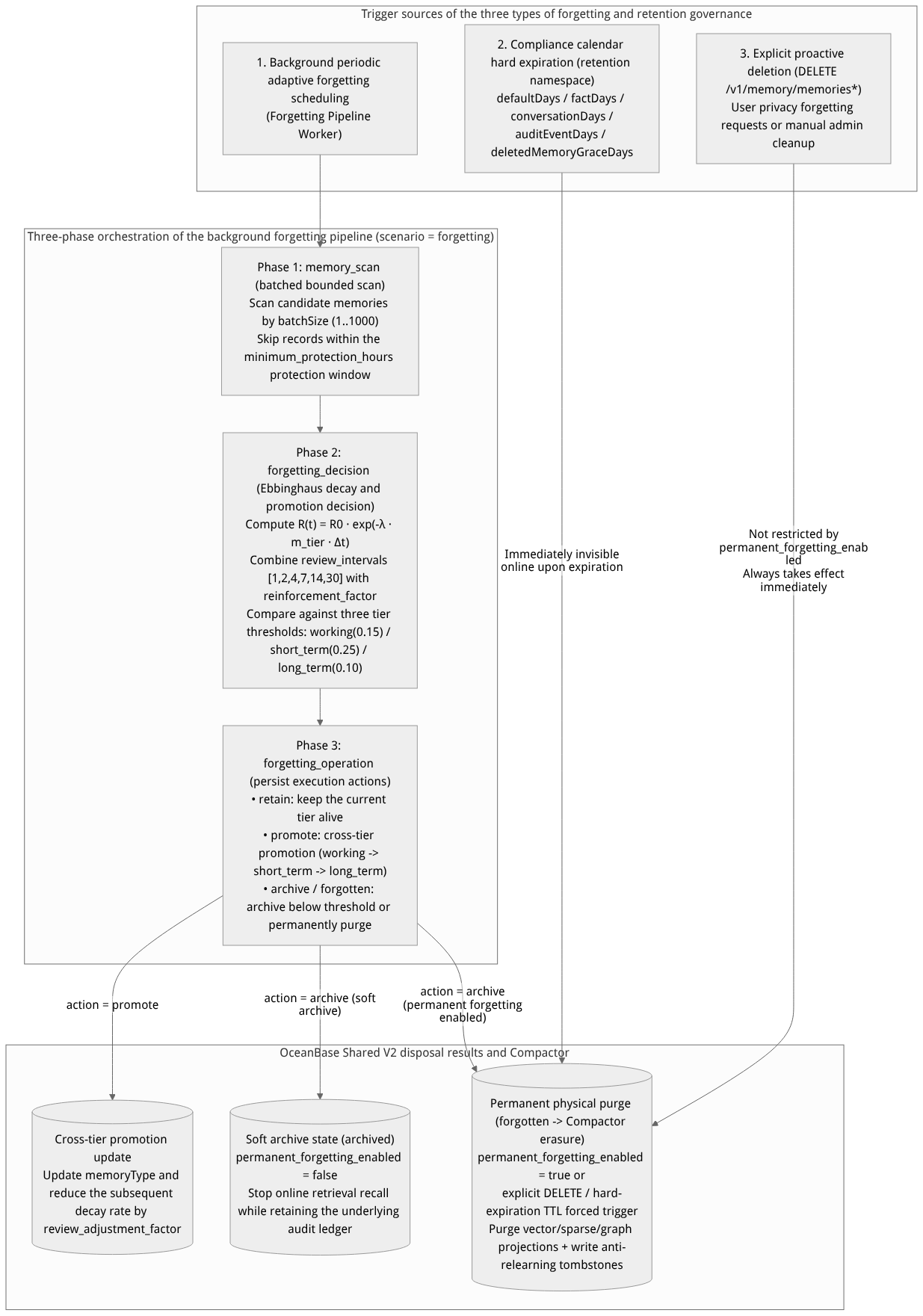
Flow diagram, not a runtime screenshot; read the relationships between steps or states along the arrows.
View the flow diagram in full size
1. Mathematical Model of Ebbinghaus Adaptive Forgetting and the Cross-Tier Promotion Mechanism
The background forgetting pipeline does not rely on uncontrollable subjective guesses by large models; instead, it uses a deterministic Ebbinghaus exponential decay and spaced repetition mathematical model to evaluate the real-time Retention Score of every memory:
(1) Core Retention Score Decay Formula
In the natural passage of time without retrieval reinforcement, the retention score $R(t)$ of a memory at an interval $\Delta t$ since its last reinforcement is computed as:
$$R(t) = R_0 \cdot e^{-\lambda \cdot m_{\text{tier}} \cdot \Delta t}$$
The engineering mapping and default values of each mathematical parameter are as follows:
| Mathematical symbol | Configuration parameter name | Default value / value range | Physical meaning and tuning role |
|---|---|---|---|
| $R_0$ | initial_retention | 1.0 (range 0.1 ~ 1.0) | The baseline initial retention score of a memory right after creation or right after a reinforcement. |
| $\lambda$ | decay_rate | 0.05 (range 0.001 ~ 1.0) | The global baseline time decay constant. The larger $\lambda$ is, the faster memories at all tiers are forgotten overall. |
| $m_{\text{tier}}$ | decay_rate_multipliers | - working: 2.0- short_term: 1.0- long_term: 0.3 | Dedicated decay rate multipliers for the three time-sensitive memory tiers: - working memory ( working) decays rapidly at 2 times the rate; - short-term memory ( short_term) decays at the 1 times standard rate; - long-term memory ( long_term) decays at 0.3 times the slow rate and remains stably retained over the long term. |
| $T_{\text{protect}}$ | minimum_protection_hours | 24 hours (adjustable to 168 hours in policy.forgetting) | Minimum protection window for new memories: within the first $T_{\text{protect}}$ hours after a memory is written, it is in a decay-free protection period, and the background forgetting scan will not retire or archive it, preventing important newly written information from decaying too early before being consumed by the next conversation round. |
(2) Spaced Repetition Reinforcement and Automatic Cross-Tier Promotion (Spaced Repetition & Tier Promotion)
The key to human memory transforming from transient working memory into lifelong long-term memory lies in repeated retrieval (Recall) at specific time intervals. Agentbase Memory encodes this mechanism as deterministic state transitions:
Spaced repetition window (
review_intervals): the default configuration is[1, 2, 4, 7, 14, 30](unit: days).Retrieval reinforcement factor (
reinforcement_factor) and decay damping adjustment (review_adjustment_factor): When a memory is effectively hit in online search (search), unified retrieval (recall), or positive knowledge feedback (feedback) and crosses the current repetition interval node:its current retention score gets a significant boost via
reinforcement_factor(default1.35), capped at1.0;its subsequent effective decay slope is multiplied by
review_adjustment_factor(default0.85), meaning that the more times a memory is successfully reviewed, the flatter its forgetting curve becomes;Automatic cross-tier promotion (
working -> short_term -> long_term): when a temporary memory at theworkingtier reaches the promotion frequency threshold within a review cycle, the decision node of the forgetting Pipeline outputsaction: "promote", automatically promoting it toshort_term(the decay multiplier drops from2.0to1.0); likewise, a continuously high-valueshort_termmemory is automatically promoted tolong_term(the decay multiplier drops to0.3).
(3) Three Independent Forgetting Thresholds (Forgetting Thresholds)
Memories at different tiers serve different context roles, and therefore are subject to independent retirement thresholds:
working_threshold(default0.15): since working memory decays extremely fast ($m_{\text{working}}=2.0$), once its retention score falls below0.15with no recent review hits, it is immediately judged as a temporary draft that has completed its mission and is archived;short_term_threshold(default0.25): short-term memory requires relatively high recent activity; if it is not mentioned again across day boundaries and its retention score is below0.25, it exits the active short-term context;long_term_threshold(default0.10): long-term memory enjoys the lowest retirement threshold (0.10) and the slowest decay speed ($m_{\text{long_term}}=0.3$), ensuring that core architecture facts and personal preferences remain durably available.
2. Three-Stage Orchestration of the Background Forgetting Pipeline
In memory → configuration → forgetting Pipeline, each forgetting pipeline (scenario="forgetting") is always orchestrated by the following three deterministic stages in sequence:
| Stage number | Node identifier (step) | Whether it can be disabled | Detailed execution logic and core configuration items |
|---|---|---|---|
| Stage 1 | memory_scan (scan memories) | Required | Pulls candidate memory records within the project in batches according to the background Worker scheduling cycle. Through batchSize (value range 1~1000, default 200), the single scan batch size is strictly limited, ensuring zero jitter in online reads and writes for highly concurrent production databases (OceanBase Shared V2). |
| Stage 2 | forgetting_decision (forgetting judgment) | Switchable | For each scanned memory, it comprehensively evaluates: whether the minimum_protection_hours protection period has passed, the current Ebbinghaus retention score $R(t)$, the cumulative review stage, manual negative feedback, and whether the hard expiry time has been reached, then outputs a per-record decision action: retain (retain), promote (cross-tier promotion), review (mark for review), or archive / expire (archive/retire). |
| Stage 3 | forgetting_operation (execute forgetting) | Required | In formal background runs, it executes the Stage 2 decisions by persisting them to the database in batches; whereas in the Console run sample (Dry-run) validation mode, this node automatically switches to a read-only simulation state (dryRun: true), only aggregating and outputting the projected action list while never modifying any database records. |
Feature Entrypoints and Permission Matrix
The Console entry is located at: project enterprise-ai-hub-210 → memory (Memory) → configuration → forgetting Pipeline / basic configuration (route: /console/project-{region}-enterprise-ai-hub-210/memory?tab=configuration); the explicit deletion entry is located in the memory → memories tab.
| Feature scenario | Console UI entry | REST API endpoint | Server SDK method (agentbase-node-sdk@2.10.0) | Required RBAC / API Key scope | Associated module and scope of impact |
|---|---|---|---|---|---|
| Configure and publish the forgetting Pipeline | memory → configuration → forgetting Pipeline | GET/POST /v1/memory/pipelines, PATCH /v1/memory/pipelines/{id}, POST .../publish | Control-plane HTTP API | Console administrator or projects.write | Controls the background adaptive decay, review promotion, and scan batch |
| Per-user Dry-Run forgetting plan preview | forgetting Pipeline → run sample | POST /v1/memory/pipelines/{pipelineId}/validate | Control-plane HTTP API | projects.write | Read-only scan of the specified userId memories, returning a retain/promote/archive preview |
Configure the global policy.forgetting parameter | memory → configuration → basic configuration (policy) | GET/PUT /v1/projects/{projectId}/memory/config/policy | Control-plane HTTP API | projects.read / projects.write | Manages permanent_forgetting_enabled and the default decay threshold |
Configure compliance retention days (retention) | memory → configuration → basic configuration (retention) | GET/PUT /v1/projects/{projectId}/memory/config/retention | Control-plane HTTP API | projects.read / projects.write | Manages the TTL days of memories, audit logs, terminal-state tasks, and idempotency receipts |
| Explicit single-item / per-user batch deletion of memories | Memory → Memory at the end of a list row Delete | DELETE /v1/memory/memories/{memoryId},DELETE /v1/memory/memories | memory.delete / memory.deleteMany | memories.delete | Takes effect immediately, triggering the Compactor to clean up indexes and putting the associated L2/L3 contexts into quarantined/rebuilding states |
Feature Details and Operation Guide
Step One: Configure the Forgetting Pipeline and Ebbinghaus decay parameters in the Console
Log in to the Agentbase Console, go to the project
企业智能客服与知识中台(enterprise-ai-hub-210) under organizationAgentbase 企业智能中台(69c6d1aa00062e6bb60), click Memory in the left navigation bar, and switch to the Configuration tab.In the left or top scenario bar, select Forgetting Pipeline (
forgetting). If customizing for the first time, click Create Pipeline from Default to create an editable draft.Expand the three stage nodes one by one and verify/adjust the production parameters:
Node 1:
memory_scan(Scan memories): set the per-batch scan limitbatchSizeto200(range1~1000);Node 2:
forgetting_decision(Forgetting decision):Keep the node enabled (
enabled: true);Verify the initial retention rate
initial_retention: 1.0and the baseline decay ratedecay_rate: 0.05;Verify the three-tier decay multipliers
decay_rate_multipliers:working: 2.0,short_term: 1.0,long_term: 0.3;Verify the three-tier forgetting thresholds:
working_threshold: 0.15,short_term_threshold: 0.25,long_term_threshold: 0.10;Set the minimum protection period for new memories
minimum_protection_hours(default24hours; for high-priority production projects it can be set to168hours, i.e. 7 days);Verify the interval review array
review_intervals: [1, 2, 4, 7, 14, 30], the reinforcement factorreinforcement_factor: 1.35, and the review adjustment coefficientreview_adjustment_factor: 0.85;Set
permanent_forgetting_enabledaccording to compliance requirements (defaultfalsesoft archive; when set totrue, memories whose adaptive decay falls below the threshold will undergo physical cleanup).
Click Save Draft at the top.
Step Two: Run a Single-User Dry-Run Forgetting Plan Preview (POST /v1/memory/pipelines/{pipelineId}/validate)
Before publishing new decay rates or forgetting thresholds to production, the question administrators care about most is: “If these parameters are applied, which memories of VIP customer user_zhangwei_001 will be archived, which will be promoted, and which will be retained?”
In the Dry-run area on the right side of the Forgetting Pipeline editor, enter the test target user ID
user_zhangwei_001.Click Run Dry-run. The system performs a real-time read-only scan of
user_zhangwei_001's currently visible memories, computes each memory's $R(t)$ score using the Ebbinghaus parameters in the draft, and returns a complete preview report (dryRun: true); throughout, there is zero writing to and zero damage to the database.You can also call the Dry-Run preview API directly via the control-plane API:
export APPBASE_ENDPOINT="https://appbuild.oceanbase.com/v1"
export APPBASE_PROJECT_ID="enterprise-ai-hub-210"
export FORGETTING_PIPELINE_ID="pipe_forgetting_ent_210"

# Run the forgetting pipeline Dry-Run preview for the single user user_zhangwei_001 (zero database changes)
curl -fsS -X POST "${APPBASE_ENDPOINT}/memory/pipelines/${FORGETTING_PIPELINE_ID}/validate" \
  -H "Cookie: ${APPBASE_CONSOLE_SESSION}" \
  -H "X-Appwrite-Project: ${APPBASE_PROJECT_ID}" \
  -H "X-Appwrite-Mode: admin" \
  -H "Content-Type: application/json" \
  --data '{
    "userId": "user_zhangwei_001",
    "scope": "user"
  }' | jq .
A typical Dry-Run preview response structure is shown below (it clearly lists the total scan count scanned and the retain / promote / archive action expected for each memory):
{
  "pipelineId": "pipe_forgetting_ent_210",
  "scenario": "forgetting",
  "dryRun": true,
  "scanned": 18,
  "summary": {
    "retain": 13,
    "promote": 3,
    "archive": 2
  },
  "actions": [
    {
      "memoryId": "mem_8f92a1c4b7e011ef",
      "userId": "user_zhangwei_001",
      "currentTier": "long_term",
      "retentionScore": 0.94,
      "threshold": 0.10,
      "action": "retain",
      "reason": "within_protection_or_above_long_term_threshold"
    },
    {
      "memoryId": "mem_3c71d9a0b81244ef",
      "userId": "user_zhangwei_001",
      "currentTier": "working",
      "targetTier": "short_term",
      "retentionScore": 0.88,
      "reviewStage": 2,
      "action": "promote",
      "reason": "spaced_repetition_reinforced_across_intervals"
    },
    {
      "memoryId": "mem_1a09e4f2c33188ab",
      "userId": "user_zhangwei_001",
      "currentTier": "working",
      "retentionScore": 0.09,
      "threshold": 0.15,
      "action": "archive",
      "reason": "retention_below_working_threshold"
    }
  ]
}
After confirming the Dry-Run preview results meet expectations, click Publish and check Set as the default Pipeline for this scenario (
makeDefault: true).
Step Three: Distinguishing Soft Archive, permanent_forgetting_enabled, Explicit DELETE, and the retention Namespace
In production operations, be sure to accurately distinguish the behavioral boundaries among the following three forgetting and data retention mechanisms:
1. Behavior boundary comparison table of the three cleanup mechanisms
| Comparison dimension | Background adaptive decay forgetting (policy.forgetting) | System-level calendar TTL retention policy (retention namespace) | Explicit active deletion (DELETE /v1/memory/memories*) |
|---|---|---|---|
| Trigger condition | Memory retention rate $R(t)$ falls below the corresponding tier threshold (e.g. working < 0.15) | Record age exceeds the calendar day limit configured in retention (hard expiry) | The business server or a Console administrator explicitly calls the DELETE API |
Role of permanent_forgetting_enabled | Directly controlled by this switch: - false (default): only performs soft archiving (Archive), stopping online retrieval recall while retaining the underlying physical rows for compliance audit; - true: marks forgotten and hands the data to the background Compactor to permanently erase vectors and primary-table data. | Not restricted by this switch: once the hard expiry time is reached, online reads immediately become invisible (Fail-closed), and background physical cleanup occurs after the grace period. | Not restricted by this switch: regardless of whether permanent_forgetting_enabled is true or false, explicit DELETE always takes effect immediately and triggers irreversible cleanup. |
| Anti-relearning tombstone protection | Soft-archived records can be restored through subsequent governance | After hard-expiry cleanup, rewrites are treated as new writes | Automatically records a content-hash tombstone, blocking silent relearning of identical content (unless reRemember: true is explicitly passed) |
| Impact on the same project's Storage raw files | Does not delete original images/PDFs in agent_multimedia_bucket | Does not delete raw files in the Storage bucket | Never cascades deletion to raw files in the Storage bucket (to delete files, call the Storage API) |
2. retention Namespace parameter configuration and bounded batch deletion in practice
In Memory → Configuration → Basic Configuration (/v1/projects/{projectId}/memory/config/retention), you can configure retention periods per data type:
defaultDays(or general memory retention periodmemoryRetentionDays, default180days): the default retention days for memories that do not match a specific category;factDays(default365days): retention days for distilled objective fact memories (recordKind: "fact");conversationDays(default90days): retention days for raw conversational memories (recordKind: "conversation");auditEventDays(orauditRetentionDays, default90days): retention days forGET /v1/memory/auditsrequest audit events;deletedMemoryGraceDays/terminalJobDays/idempotencyReceiptDays: the physical erasure grace period for marked-deleted memories, the retention period for terminal asynchronous task records (e.g.14days), and the retention period for idempotency receipts (e.g.7days).
When a customer submits a privacy deregistration request requiring immediate deletion of all memories under their account, use agentbase-node-sdk@2.10.0 to loop through bounded batch deletion (up to 500 records per batch, checking hasMore until it reaches zero):
// Use the official server SDK: agentbase-node-sdk@2.10.0 to perform compliance full-forgetting cleanup per user
import { Client, Memory } from 'agentbase-node-sdk';

const client = new Client()
    .setEndpoint('https://appbuild.oceanbase.com/v1')
    .setProject('enterprise-ai-hub-210')
    .setKey(process.env.APPBASE_API_KEY);

const memory = new Memory(client);

async function purgeAllUserMemories(userId) {
    let hasMore = true;
    let totalDeleted = 0;

    while (hasMore) {
        const batchRes = await memory.deleteMany({
            userId,
            scope: 'user',
            limit: 200,
            reason: '履行用户隐私合规删除请求 (GDPR Right to be Forgotten)'
        });

        totalDeleted += batchRes.deleted || 0;
        if ((batchRes.failed || 0) > 0) {
            throw new Error(`批量遗忘存在失败项: failed=${batchRes.failed}`);
        }
        hasMore = Boolean(batchRes.hasMore);
    }

    console.log(`用户 ${userId} 记忆已全部清理完毕,累计永久遗忘 ${totalDeleted} 条记录。`);
}

await purgeAllUserMemories('user_lina_002');
FAQ (Frequently Asked Questions and Troubleshooting)
1. I set permanent_forgetting_enabled to false, so why was the memory still permanently cleaned up after calling DELETE /v1/memory/memories/{memoryId}?
Cause analysis:
permanent_forgetting_enabledis only used to control the automatic eviction behavior triggered by the background forgetting Pipeline when the Ebbinghaus retention rate naturally decays below the threshold (when set tofalse, soft archiving is used to avoid mistakenly discarding low-frequency memories that still hold reference value). Explicit deletion initiated via the Console delete button or theDELETEAPI, however, represents a definitive data-compliance erasure instruction; the system always immediately marks itforgottenand hands it to the Compactor to clean up all vectors, sparse indexes, and graph projections.Resolution: This is expected behavior designed for privacy compliance. If you only want to pause retrieval of a memory without destroying it, do not call
DELETE; instead, adjust metadata filter conditions or rely on the background soft-archive mechanism.
2. After a user explicitly deleted a memory, why did the system not re-write that memory when the exact same content was mentioned again in later conversations?
Cause analysis: To prevent the agent from silently “re-learning” the same fact against the user's wishes in later conversation turns or retry requests after the user explicitly asked to “forget a piece of information”, Agentbase Memory records an anti-relearning tombstone fingerprint (Tombstone Fingerprint) of the memory content upon explicit deletion. When a later request changes only
Idempotency-Keybut submits identical content, the anti-relearning guard automatically blocks it.Resolution: If the user later changes their mind and explicitly asks the system to remember that information again, you can pass the boolean parameter
"reRemember": trueexplicitly when callingPOST /v1/memory/memoriesto lift the tombstone block.
3. When an underlying L1 memory is forgotten due to expiry or decay, are the built user profile and L2/L3 Dreaming contexts automatically updated?
Root cause analysis:
For L2/L3 tiered contexts (Contexts): the system provides a real-time source-integrity guard. Once an underlying memory supporting an L2/L3 context is forgotten or deleted, the context's signed drill-down token (
expansionToken) immediately becomes invalid, and the context status automatically changes tostale(expired) orquarantine(quarantined), stopping online retrieval (Fail-closed);For User Profile: deleting or forgetting a single underlying memory does not immediately clear the already-generated profile text, but the profile source table automatically removes the invalidated memory associations.
Resolution: After batch cleanup or forgetting of erroneous memories, go to Memory → Profile and click Rebuild Profile (
POST /v1/memory/memories/users/{userId}/profile/rebuild), then go to Memory → Contexts and click Rebuild (POST /v1/memory/memories/contexts/{contextId}/rebuild) for aggregations that have becomestale/quarantine; the clean profile and high-level contexts will then be regenerated based on the remaining valid memories.