
Tiered Context Governance and Dreaming
Feature overview and core scenarios
Tiered context governance (Memory Context Governance; the Console tab is Contexts) is the multi-tier memory summarization, verification, and lifecycle governance center provided by Agentbase Memory (v2.10.0). As enterprise agents run over the long term, underlying raw evidence (L0 Evidence) and discrete fact memories (L1 Fact) can rapidly grow to tens of thousands of entries. Relying solely on flat L1 fact retrieval, the model can get lost in local details and lose the global thread when answering macro-level questions (e.g. “What phased changes did the core accounting cluster undergo over the past month?”).
Agentbase Memory introduces Dreaming (background context aggregation mechanism), organizing the memory system into a strict four-tier pyramid structure (L0 Evidence -> L1 Fact -> L2 Topic / Episode / State -> L3 Overview). In the example project 企业智能客服与知识中台 (enterprise-ai-hub-210) of Agentbase 企业智能中台 (69c6d1aa00062e6bb60), the system uses Dreaming to automatically scan new and changed memories in user_zhangwei_001 and user_lina_002, generate candidate contexts (shadow), and supports administrators checking source integrity in the Console, performing candidate confirmation and activation (confirm), rebuilding from the latest sources (rebuild), and safely rolling back to historical verified versions (rollback), combined with Progressive Retrieval to achieve high signal-to-noise, strongly permission-fenced tiered context retrieval.
Core Concepts and Architecture
Tiered context governance, via the background asynchronous Dreaming scheduler and strongly consistent governance fences (Fence), guarantees that any L2/L3 context aggregation entering online retrieval has a complete underlying evidence chain and valid access policies.
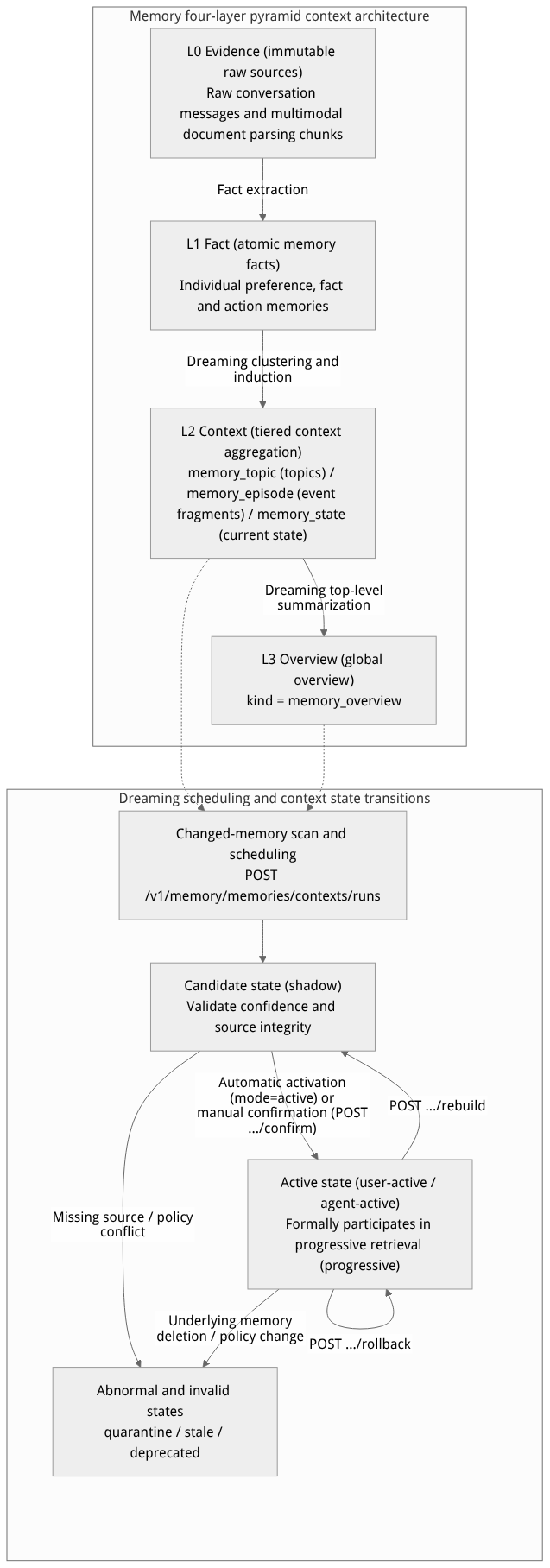
Flow diagram, not a runtime screenshot; read the relationships between steps or states along the arrows.
View the flow diagram in full size
Four-tier context hierarchy and lifecycle state descriptions
| Classification dimension | Enum identifier | Console display name | Core responsibility and retrieval visibility rules |
|---|---|---|---|
Context tier (kind) | memory_topic | L2 Topic (topic context) | Aggregates multiple related facts across sessions around a specific technical domain or business topic (e.g. “OceanBase vector index tuning”). |
Context tier (kind) | memory_episode | L2 Episode (event segment) | Summarizes one complete business event along its timeline and causal thread (e.g. “the full story of deadlock troubleshooting for support ticket TK-20261022-001”). |
Context tier (kind) | memory_state | L2 State (state snapshot) | Reflects the latest valid set of states of the user or system at the current point in time, automatically evicting historical intermediate states that have been overturned. |
Context tier (kind) | memory_overview | L3 Overview (top-level overview) | A panoramic digest formed by aggregating multiple L2 contexts, serving as the first-hop entry point for progressive retrieval (entryLevel: "auto" or "overview"). |
Lifecycle states (status) | shadow | Candidate pending confirmation (Shadow) | A newly generated candidate version. In dreaming.mode="shadow" mode, it becomes visible to normal retrieval only after an administrator calls confirm to activate it. |
Lifecycle states (status) | user-active / agent-active | Active | The version whose sources are complete, policies are valid, and confirmation has passed; it is the currently effective version and formally serves online progressive retrieval. |
Lifecycle states (status) | stale / quarantine / deprecated | Expired / Quarantined / Deprecated | When the underlying supporting memory is deleted or forgotten, sensitive policies are tightened, or compliance conflicts exist, it automatically enters a quarantined or expired state and immediately stops online retrieval (Fail-closed). |
Feature Entrypoints and Permission Matrix
Console entry points and REST API mapping
The console entry point is located at: project enterprise-ai-hub-210 → Memory → Contexts tab.
| Operation | Console entry point | REST API endpoint | SDK method name | Required permission scope |
|---|---|---|---|---|
| Query Dreaming watermark and status | Dreaming status panel in the page header | GET /v1/memory/memories/contexts/status | getContextStatus | memories.read |
| Scan changes and schedule Dreaming | Scan changed memories / Schedule run button | POST /v1/memory/memories/contexts/runs | createContextRun | memories.write |
| List and query layered contexts | Status and hierarchy filter bar + list | GET /v1/memory/memories/contexts | listContexts | memories.read |
| View details and revisions of a single context | Detail panel of an expanded list item | GET /v1/memory/memories/contexts/{contextId} | getContext | memories.read |
| Confirm and activate a Shadow candidate | Detail area Confirm activation button | POST /v1/memory/memories/contexts/{contextId}/confirm | confirmContext | memories.write (requires admin permission) |
| Schedule rebuild of a single context | Detail area Rebuild button | POST /v1/memory/memories/contexts/{contextId}/rebuild | rebuildContext | memories.write |
| Roll back to a historical verified version | Historical revision list Roll back button | POST /v1/memory/memories/contexts/{contextId}/rollback | rollbackContext | memories.write |
Relationships and boundaries with other modules
Relationship with the configuration center (
evolution.dreaming): Whether Dreaming is automatically enabled, whether the run mode is candidate observation (shadow) or auto-activation (active), the number of items processed per batch (batchSize), and the minimum change trigger threshold (minimumChanged) are all managed in Memory → Configuration → Basic Configuration (evolutionnamespace); the context aggregation prompt (contextAggregationPrompt) is managed in thepromptnamespace.Distinction of responsibilities from the forgetting Pipeline: This tab manages the memory upward summarization into L2/L3 aggregations; whereas the rules for time-based memory decay, review reinforcement, and expiry cleanup are maintained in Memory → Configuration → Forgetting Pipeline. The two complement each other but are not configured at the same entry point.
Relationship with the standalone managed PowerContext service: This tab belongs to the layered contexts governance capability of Agentbase native Memory and is not the same resource or data store as the PowerContext managed service shown separately in the sidebar.
Feature Details and Operation Guide
1. View Dreaming status and the layered context list
Log in to the Agentbase Console, enter project
企业智能客服与知识中台(enterprise-ai-hub-210), and open the Memory → Contexts tab.Check the current project's Dreaming configuration and running metrics in the top status bar:
Dreaming toggle status: shows whether background Dreaming is currently enabled (when disabled, existing context records can still be reviewed, but the background will not automatically scan and generate new aggregations);
Run mode (
mode):shadow(generated aggregations first enter a candidate state awaiting confirmation) oractive(activated directly after validation passes);Change watermark and task status: shows the number of changed memories pending processing and the execution status of the most recent background aggregation task.
Use filters to filter context records by status (
shadow,user-active,agent-active,stale,quarantine,deprecated) and hierarchy (kind) (L2 Topic,L2 Episode,L2 State,L3 Overview).
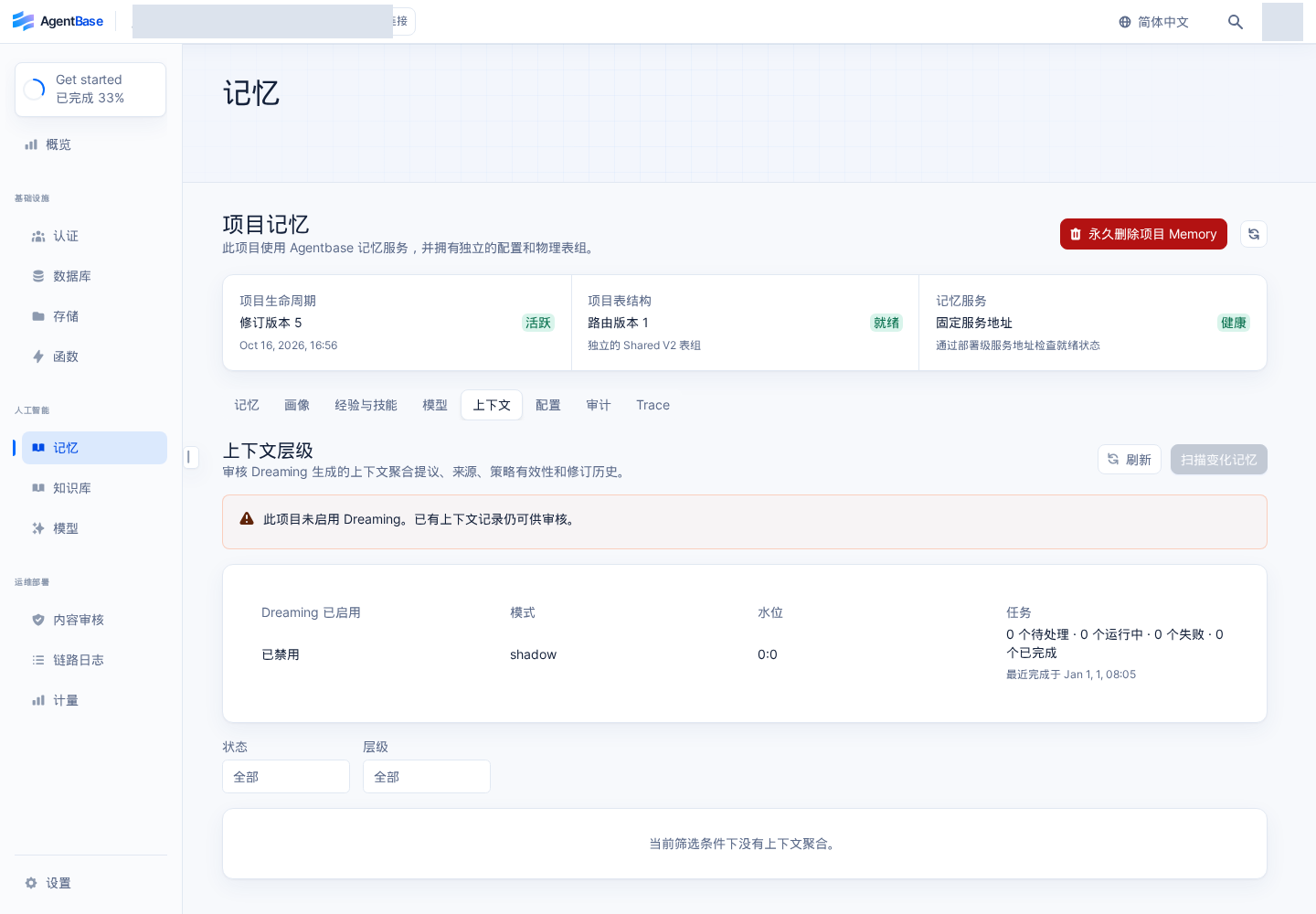
Interface reference: reuses previously registered historical screenshots; demo data may differ from the current project; no new screenshots were taken this time.
2. Configure Dreaming parameters and manually schedule aggregation runs (contexts/runs)
In the evolution configuration namespace, the dreaming sub-object supports the following fine-grained governance parameters:
| Parameter path | Type | Value range / enum | Default value | Parameter description and constraint rules |
|---|---|---|---|---|
dreaming.enabled | boolean | true / false | false | Whether to enable project-level Dreaming context aggregation. |
dreaming.mode | string | "shadow" / "active" | "shadow" | In shadow mode, generated candidate versions require confirmation before activation; in active mode, they are activated automatically when the confidence threshold is met and sources are complete. |
dreaming.batchSize | integer | 2 ~ 100 | 20 | The maximum number of changed memories scanned and aggregated by a single Dreaming task. |
dreaming.minimumChanged | integer | 1 ~ batchSize | 1 | The minimum number of changed memories required to trigger a Dreaming aggregation; it must never be greater than batchSize. |
dreaming.minConfidence | number | 0.0 ~ 1.0 | 0.75 | The minimum model confidence threshold for admitting context aggregation results. |
dreaming.maxJobsPerCycle | integer | Positive integer | 5 | The maximum number of Dreaming tasks that can be created concurrently within a single background scheduling cycle. |
When a batch of troubleshooting memories has been imported or written via user_zhangwei_001, if you want to trigger context summarization immediately without waiting for the next background cycle, you can click the Scan changed memories button on the page, or call POST /v1/memory/memories/contexts/runs:
# 1. Query the current Dreaming watermark and run status
curl -fsS "https://appbuild.oceanbase.com/v1/memory/memories/contexts/status" \
  -H "X-Appwrite-Project: enterprise-ai-hub-210" \
  -H "X-Appwrite-Key: <APPBASE_API_KEY>" | jq .

# 2. Manually trigger a scan for changed memories and schedule Dreaming tasks (returns HTTP 202 Accepted)
curl -fsS -X POST "https://appbuild.oceanbase.com/v1/memory/memories/contexts/runs" \
  -H "X-Appwrite-Project: enterprise-ai-hub-210" \
  -H "X-Appwrite-Key: <APPBASE_API_KEY>" \
  -H "Content-Type: application/json" \
--data '{}' | jq .Note:
POST /v1/memory/memories/contexts/runsreturning HTTP 202 only means the platform has accepted the change scan and task scheduling; it still takes several seconds for the background to complete model summarization. Please observe the final result via the status API or by refreshing the list.
3. Candidate confirmation (confirm), rebuild (rebuild), and version rollback (rollback)
Expand the detail panel of any context aggregation record; an administrator can perform the following three full lifecycle governance actions (all write operations require a governance reason reason, and the server re-verifies permissions, source completeness, and policy version in real time upon submission):
Confirm and activate the candidate (
POST /v1/memory/memories/contexts/{contextId}/confirm):Verify the aggregation body of the current
shadowcandidate version, its supporting source memories (Source Memories), evidence relationships, ownership scope (user/agent), and policy validity period.After confirming that sources are complete (no missing or deleted underlying memories), fill in the governance reason (e.g.,
"已核验张伟核心账务集群架构变更摘要准确无误") and click Confirm activation. The aggregation state will transition touser-activeoragent-active.
Rebuild the context (
POST /v1/memory/memories/contexts/{contextId}/rebuild):When a context has become
stale(expired) because some underlying memories were updated, or after an administrator adjusted thecontextAggregationPromptprompt, click Rebuild (returns HTTP 202); the background will recompute and generate the latest aggregation version based on the underlying memories that are still valid.
Roll back to a historical revision (
POST /v1/memory/memories/contexts/{contextId}/rollback):On the detail page, expand the historical revisions (Revisions) list to compare the aggregation content of different historical versions.
If the newly activated version's summarization quality is unsatisfactory, select a historical
revisionIdthat previously passed validation and whose underlying sources are still legitimate, fill in the rollback reason, and submit to atomically switch the effective pointer back to that historical version.
# Example: confirm activation of a shadow context, trigger rebuilds, and roll back to a historical version via the REST API
export CONTEXT_ID="ctx_9a4b82e10f3c4d5a"

# 1. Confirm activation of the shadow candidate version
curl -fsS -X POST "https://appbuild.oceanbase.com/v1/memory/memories/contexts/${CONTEXT_ID}/confirm" \
  -H "X-Appwrite-Project: enterprise-ai-hub-210" \
  -H "X-Appwrite-Key: <APPBASE_API_KEY>" \
  -H "Content-Type: application/json" \
  --data '{
    "reason": "架构师团队已复核 L2 Topic 聚合内容与底层 4 条排障事实一致"
  }' | jq .

# 2. Schedule an asynchronous rebuild of the context (HTTP 202)
curl -fsS -X POST "https://appbuild.oceanbase.com/v1/memory/memories/contexts/${CONTEXT_ID}/rebuild" \
  -H "X-Appwrite-Project: enterprise-ai-hub-210" \
  -H "X-Appwrite-Key: <APPBASE_API_KEY>" \
  -H "Content-Type: application/json" \
  --data '{
    "reason": "底层新增 TK-20261022-003 限流排障记忆,触发重新归纳"
  }' | jq .

# 3. Roll back to a specified historical verified revision
curl -fsS -X POST "https://appbuild.oceanbase.com/v1/memory/memories/contexts/${CONTEXT_ID}/rollback" \
  -H "X-Appwrite-Project: enterprise-ai-hub-210" \
  -H "X-Appwrite-Key: <APPBASE_API_KEY>" \
  -H "Content-Type: application/json" \
  --data '{
    "targetRevisionId": "crev_01hxyz89ab23cd45",
    "reason": "回退至上一版经过生产验证的集群状态摘要"
  }' | jq .
4. Consume layered contexts in Progressive Search
When a layered context is active and its sources are complete, the application can pass retrieval.strategy: "progressive" when calling POST /v1/memory/memories/search to drill down layer by layer according to L3 Overview -> L2 Context -> L1 Fact -> L0 Evidence:
The online progressive retrieval path is strictly protected by a maximum
450ms(deadlineMs) latency budget and does not invoke slow generation models;Each returned L3/L2 node that meets the drill-down condition (
canExpand: true) carries a signedexpansionTokenvalid for at most 2 minutes;The
expansionTokenis strictly bound to the project, calling principal, target user, group member snapshot, and policy version; once any underlying source memory is deleted or its permissions revoked, the old token immediately fails closed (Fail-closed), preventing unauthorized reading of residual historical summaries.
FAQ (Frequently Asked Questions and Troubleshooting)
1. Why doesn't a new L2/L3 context appear immediately in the list after clicking “Scan changed memories” on the “Contexts” tab?
Cause analysis: Check the following three points: ① Check whether
evolution.dreaming.enabledin Memory → Configuration → Basic Configuration is enabled; ② whether the number of added or changed memories has reached thedreaming.minimumChangedthreshold; ③ whetherPOST /v1/memory/memories/contexts/runsis an asynchronous scheduling API (HTTP 202), and the background worker callingqwen-plusfor clustering and summary generation takes some execution time.Resolution: First check the Dreaming toggle and watermark status in the page header, wait for the background task to complete, then click the refresh button, and switch the status filter to view the
shadow(candidate state) list.
2. Why does a context show as quarantine (quarantined) or stale (expired) and cannot be activated via “Confirm activation”?
Cause analysis: Agentbase Memory enforces strict guards on source completeness and policy consistency for layered contexts. If a supporting underlying L1 memory or L0 source of the L2/L3 aggregation has been actively deleted by the user, forgotten due to expiry policy, or a source's
handlingPolicyhas been tightened tono_model, the system automatically places the aggregation into a quarantined or expired state and forbids direct activation, preventing the agent from leaking deleted underlying private data through high-level summaries.Resolution: Expand the context details to check the missing or invalid source items. If other valid sources still support the topic, click Rebuild so the system removes the invalid sources and regenerates a compliant new candidate version based on the currently surviving valid memories.
3. After enabling Progressive Search (strategy: "progressive"), why does it sometimes directly return L1 Facts without returning L2/L3 contexts?
Cause analysis: When
entryLevelis set to"auto", if the current user has no activated (user-active) L2/L3 contexts with complete sources yet, or the query request includes precise filter conditions supported only by L1 (such as specificmetadata,recordKind,runId, orsessionId), the retrieval engine automatically downgrades to retrieving from the L1 fact layer within the remainingdeadlineMsbudget, avoiding upper-layer summaries that do not support fine-grained filtering from obscuring precise facts.Resolution: This is expected behavior that safeguards retrieval precision. If you prefer to hit L2/L3 overviews first, confirm the target context has been activated via
confirmand avoid layering underlying single-record-specific metadata filters on top of macro overview queries.