
Online and dataset evaluations, knowledge base evaluation, and root cause analysis
Feature Overview
Online and dataset evaluations (Evaluations & Root Cause Analysis, with the AgentOps → Evaluations Console entry and deployment-dependent Evaluation Skills entry) are the full-scenario automated quality measurement and intelligent attribution engine provided by Agentbase. In enterprise LLM application rollout, manual sampling alone cannot cover massive online conversations, nor can it quantify the true benefit or degradation brought by each Prompt adjustment, model switch, or knowledge base chunk/index parameter change.
In the flagship project 企业智能客服与知识中台 (enterprise-ai-hub-210) of Agentbase 企业智能中台 (69c6d1aa00062e6bb60), the evaluation engine, built on dashscope-prod's qwen-plus (default evaluation model) and qwen-vl-max (vision evaluation model), provides four major categories of professional evaluation tasks and an end-to-end root cause diagnosis loop:
General Evaluations: supports platform built-in trilingual templates (correctness, faithfulness, hallucination, RAG query quality, context relevance, SQL semantic equivalence, conversation intent adherence, etc.) and project custom templates (including custom Agent evaluators with bound read-only Evaluation Skills and AI Gateway read-only MCP forensics tools), supporting automatic scoring of online Traces, Observations, Sessions, or Dataset Runs;
Memory Evaluations: fine-grained evaluation across the 10 core stages of the Memory pipeline (fact extraction, update/forget decisions, persona extraction, skill distillation, experience distillation, knowledge merging, knowledge validation, query rewriting, retrieval, etc.);
Knowledge base parsing and chunking quality evaluation (Parsing & Chunking Quality): scores knowledge base
kb_enterprise_supportdocument parsing (integrity, faithfulness, and structure — three dimensions) and chunking (boundaries, context, independent completeness, size, and redundancy — five dimensions), each weighted at 50%, with per-page/per-chunk drill-down and vision model verification;Knowledge index quality evaluation (Knowledge Index Quality, a
v2.10.0flagship capability): performs "full rule-based checks + stratified deterministic sampling model evaluation + secondary independent review (Grounding Review)" on three types of advanced index artifacts — GraphRAG, RAPTOR, and LLM Wiki — and combinesscoreAnalysisroot cause analysis and parameter comparison recommendations to locate quality bottlenecks.
Core Concepts and Architecture
The evaluation system integrates "evaluation template and skill management → multi-source target variable mapping → asynchronous evaluation execution and secondary review → automatic/manual root cause analysis (RCA) for low scores" into a single verifiable, tamper-proof pipeline.
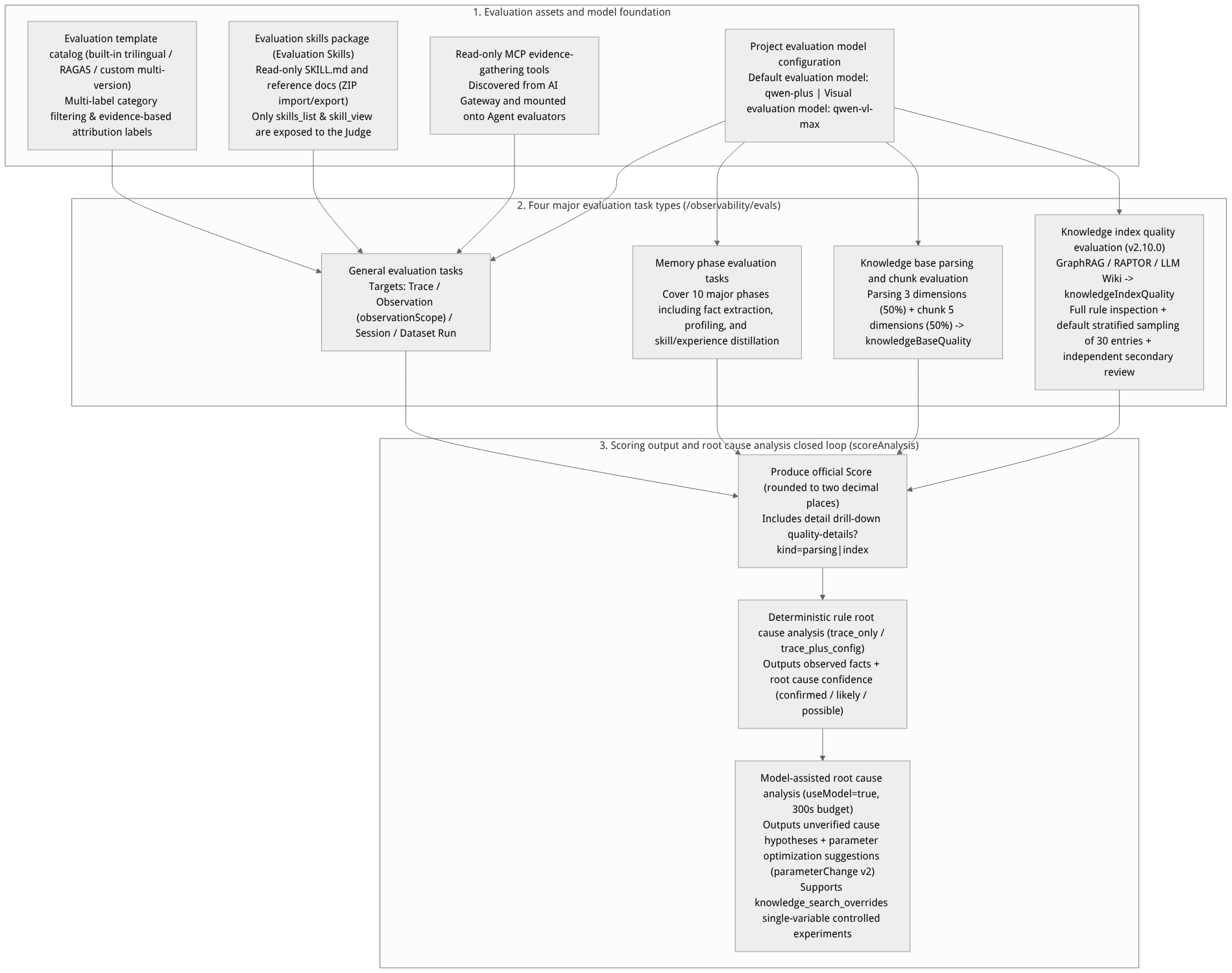
Flow diagram, not a runtime screenshot; read the relationships between steps or states along the arrows.
View the flow diagram in full size
Comparison table of the four major evaluation task types and their applicable scenarios
| Task type | Evaluation targets and data sources | Core evaluation dimensions and algorithm mechanisms | Score metadata identifier |
|---|---|---|---|
| General evaluations | Single/batch Traces, specific Observations (fanned out by type and name rules via observationScope), Sessions, or Dataset Runs | Uses LLM-as-a-Judge templates (Prompt / Program / Agent execution modes) to map variables such as input, output, expected_output, trajectory for scoring. | Standard EVAL Score (the Agent Workbench dedicated RAG template generates ragEvaluation signed metadata) |
| Memory evaluations | Memory operation pipelines with capability:memory in the project | Performs evidence verification across a total of 10 pipeline stage categories: fact extraction, conflict update decisions, persona generation, skill distillation, experience distillation, knowledge merging/validation, query rewriting, and retrieval. | EVAL Score (with associated Memory stage attribution labels) |
| Knowledge Base Parsing Evaluation | Knowledge base documents and chunks (e.g., kb_enterprise_support) with ingestion tracking enabled (tracingEnabled=true) | - Document parsing (50% weight): completeness, faithfulness, structure across 3 dimensions; - Document chunking (50% weight): boundary reasonableness, context preservation, standalone completeness, chunk size, redundancy across 5 dimensions. Supports visual comparison via qwen-vl-max for PDF/image pages. | knowledgeBaseQuality (drill-down interface quality-details) |
Knowledge Index Quality Evaluation (v2.10.0) | Knowledge base versions with successfully built index artifacts (GraphRAG / RAPTOR / LLM Wiki) | - GraphRAG: entity description faithfulness, relationship support, community report faithfulness and coverage; - RAPTOR: summary faithfulness, key content coverage, hierarchical summary consistency; - LLM Wiki: page faithfulness, citation support, content coverage, cross-page consistency. Each of the three types is aggregated independently into a 0~1 capability-level quality score (no overall score is computed). | knowledgeIndexQuality (drill-down interface quality-details?kind=index) |
Roles, Entry Points, and Relationships
Console Entry and REST API Permission Matrix
The Console entry is located at: project enterprise-ai-hub-210 → AgentOps (Observability / AgentOps) → Evals and Evaluation Skills.
| Feature module | Console path suffix | Core REST API endpoint | Required permission scope |
|---|---|---|---|
| Evaluation templates and task management | /observability/evals | /v1/observability/evals/* | observability.evals.read / write |
| Default/visual evaluation models and model RCA switch | /observability/evals (top model settings area) | GET/PUT /v1/observability/evals/root-cause-analysis-settings | observability.models.read / write |
| Knowledge index quality evaluation preview and creation | Create evaluation task → Knowledge base parsing evaluation (check the index capabilities) | POST /v1/observability/evals/index-preview, POST /v1/observability/evals/index | Preview: observability.evals.read; create: observability.evals.write; both also require knowledgebases.read |
| Score detail drill-down (parsing/chunking/indexing) | Score detail page Quality details | GET /v1/observability/scores/{scoreId}/quality-details?kind=index | observability.scores.read |
| Evaluation skill package management and ZIP download | /observability/evaluation-skills | GET/POST /v1/observability/evaluation-skills, GET .../:skillId/versions/:versionId/download | observability.evals.read / write |
| Prompt deterministic parsing | /observability/prompts | GET /v1/observability/prompts/resolve | observability.prompts.read |
Feature Details and Operation Guide
1. Browse the evaluation template catalog and configure the default/visual evaluation model
Go to the AgentOps → Evals page of project
enterprise-ai-hub-210.In the model configuration area at the top of the page, confirm that the project's default evaluation model (e.g.,
qwen-plusunderdashscope-prod) and the visual evaluation model (e.g.,qwen-vl-max) are bound, and enable the use model for root cause analysis (useModel) switch as needed.Switch the page view to Evaluation templates to see template names, versions, execution methods, and tags. Built-in templates and available languages depend on the current deployment; users with permission can create project templates.
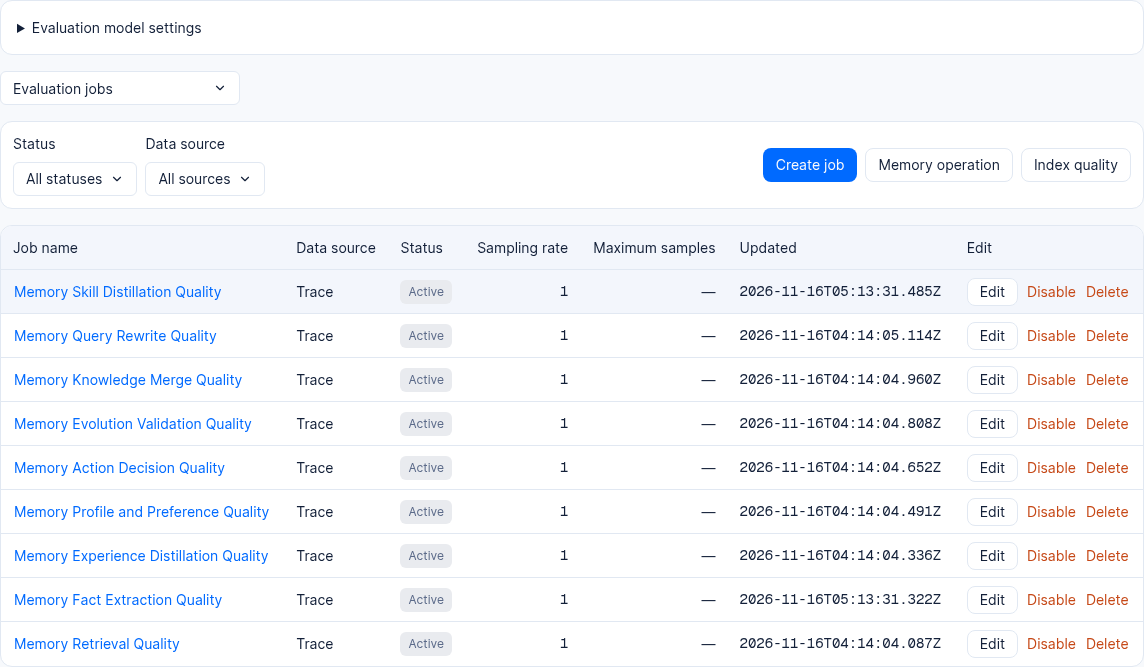
Figure: Evaluation job list in a 2.12.0 test project; contents vary by project.
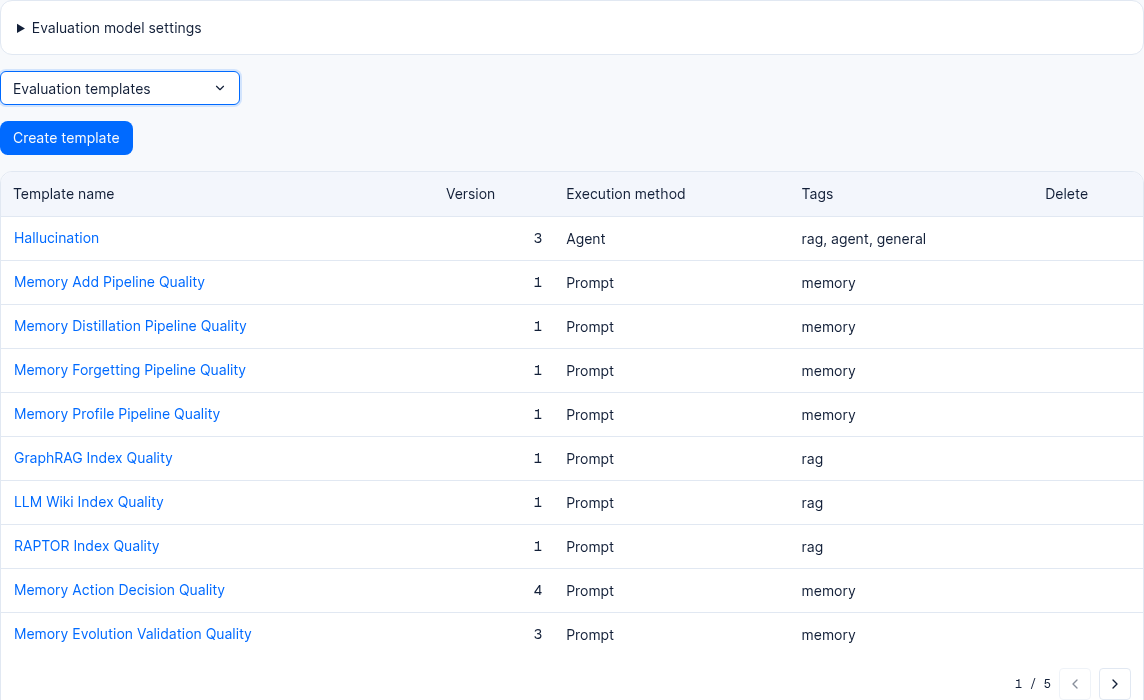
Figure: The evaluation template list in a 2.12.0 test project includes index quality templates.
2. Manage Evaluation Skills and attach read-only MCP tools
When built-in Prompt templates are insufficient to express complex enterprise-specific review standards (such as a financial customer-service compliance manual of dozens of pages or specific SQL style guidelines), you can create project-level, versioned evaluation skills (Evaluation Skills):
If this feature is available in the deployment, open AgentOps → Evaluation Skills in the left navigation bar (route:
/observability/evaluation-skills). If the entry is unavailable, check deployment configuration and permissions.Create or import an evaluation skill package:
Supports creating directly by filling in the skill name (
name), description (description), and Markdown body in the form;Also supports uploading
.zip,.tar.gz, or.tgzarchives (the package root directory must contain aSKILL.mdwithnameanddescriptionfront matter, and may also include arbitrary relative-path reference documents such asguides/rubric.md; server-side security checks strictly prohibit executable scripts, symbolic links, or directory traversal).
Version publishing, frozen snapshots, and ZIP export:
Draft (
DRAFT) versions support online editing, creating, or deleting files within the package; after confirmation, publish as an immutable version (addressed bycontentHash);Only project-custom and
executionMethod=agentevaluation templates can bind an Evaluation Skill (each template can bind published versions of up to 8 different Skills), and can simultaneously attach read-only MCP forensics tools discovered from the AI Gateway (prod-enterprise-ai-gateway);Strict isolation boundary: Evaluation Skills are completely isolated from the Project Skills used by the agent under test in the agent workbench—they never enter the tool list of the agent under test, and only expose the
skills_listandskill_viewread-only tools to the judge model during the final Judge stage of the evaluation task (single read ≤256 KiB, cumulative ≤512 KiB, tool loop at most 8 steps); actually read file paths and hashes are recorded in theevaluationSkillsprovenance of the Score metadata;On the version detail page, click download .zip file (
GET /v1/observability/evaluation-skills/:skillId/versions/:versionId/download) to export the complete<Skill名称>-v<版本号>.ziparchive.
3. Create knowledge base parsing quality and knowledge index quality evaluation tasks (kb_enterprise_support)
For a knowledge base with ingested documents, use the parsing/chunking quality or index quality entry provided by the deployment. Availability depends on deployment configuration:
In the job view under AgentOps → Evals, select the parsing quality or Index quality entry as needed. These are separate entries, not task types inside the general create-job wizard. If an entry is missing, check deployment configuration and permissions.
Select the target knowledge base and the version to evaluate in the relevant form.
Configure knowledge index quality evaluation (
v2.10.0):Below the knowledge base version, check the index capabilities that have been successfully built and have not expired as needed: GraphRAG, RAPTOR, LLM Wiki (none are checked by default);
Layered sampling and rule-based full-inspection mechanism:
Sampling is enabled by default for each index capability type, with a default sample size of
30records (modifiable to any positive integer, or sampling can be disabled to run a full evaluation). Records are counted by specific index artifact: GraphRAG entities, relationships, and community reports; RAPTOR hierarchical summary nodes; LLM Wiki pages;Sampling is stratified by record type, tree level, and document/page type, and bound to frozen results for deterministic selection (task retries reuse exactly the same samples, with no random drift);
Rule checks always traverse all records of the capability (checking source reference validity, entity relationship endpoints, child node hierarchy, Wiki page revision hashes, and whether
payload.modelCompletionis truncated), not limited by the sample size;Before submission, call
POST /v1/observability/evals/index-previewto inspect the number of eligible records. Evaluation size can affect cost and duration, depending on the model and configuration.
Secondary independent review (Grounding Review) and quarantine of the pending-review area:
After the evaluation model scores each applicable dimension of each valid index record, the system uses the same evaluation model to issue another independent review request (
knowledge-index-review-grounding-v10), checking line by line against zero-based non-empty line numbers of the frozen body text whether the model's full scores or deductions are genuinely supported by the underlying source text, and whether prerequisites/exceptions/version numbers of important statements are omitted or altered;If the original record has rule errors (such as generation truncation, missing sources, or inconsistent evidence), it is directly quarantined into the pending-review area, excluded from capability quality score aggregation, and does not generate misleading configuration suggestions;
If the original validation passes, the system officially publishes the
0~1capability-level quality score (marked as "sample quality score" in sampling mode), and saves the secondary review's risk opinions inmodelReviewfor drill-down review.
Step 1: Preview the RAPTOR index; confirm HTTP 2xx and inspect eligible, record count, and identity.resultGeneration.
(
  set +x
  set -o pipefail
  : "${APPBASE_API_KEY:?Set APPBASE_API_KEY}"
: "${APPBASE_ENDPOINT:?Set APPBASE_ENDPOINT to the target API endpoint including /v1}"
APPBASE_ENDPOINT="${APPBASE_ENDPOINT%/}"
: "${APPBASE_PROJECT_ID:?Set APPBASE_PROJECT_ID for the target environment}"
builtin printf 'X-Appwrite-Key: %s\n' "$APPBASE_API_KEY" | curl --disable -fsS -X POST "${APPBASE_ENDPOINT}/observability/evals/index-preview" -i \
  -H "X-Appwrite-Project: ${APPBASE_PROJECT_ID}" \
  --header @- \
  -H "Content-Type: application/json" \
  --data '{
  "knowledgeBaseId": "kb_enterprise_support",
  "versionId": null,
  "capabilities": [
    "raptor"
  ]
}'
)
This example evaluates RAPTOR. If eligible is false, inspect the returned reason first. Copy that members entry’s identity.resultGeneration into the next request; preview again if the result changes. A null versionId targets the legacy unversioned scope; when versioning is enabled, use the target version ID in both requests. Generate a new UUID for idempotencyKey for each independent evaluation, and reuse it only to retry that request. The project API key needs knowledgebases.read, observability.evals.read for preview, and observability.evals.write for submission.
Step 2: Submit the evaluation separately after reviewing the preview.
(
  set +x
  set -o pipefail
  : "${APPBASE_API_KEY:?Set APPBASE_API_KEY}"
: "${APPBASE_ENDPOINT:?Set APPBASE_ENDPOINT to the target API endpoint including /v1}"
APPBASE_ENDPOINT="${APPBASE_ENDPOINT%/}"
: "${APPBASE_PROJECT_ID:?Set APPBASE_PROJECT_ID for the target environment}"
builtin printf 'X-Appwrite-Key: %s\n' "$APPBASE_API_KEY" | curl --disable -fsS -X POST "${APPBASE_ENDPOINT}/observability/evals/index" -i \
  -H "X-Appwrite-Project: ${APPBASE_PROJECT_ID}" \
  --header @- \
  -H "Content-Type: application/json" \
  --data '{
  "knowledgeBaseId": "kb_enterprise_support",
  "versionId": null,
  "scoreName": "Knowledge index quality",
  "idempotencyKey": "<NEW_UUID>",
  "locale": "en-US",
  "members": [
    {
      "capability": "raptor",
      "resultGeneration": "<RESULT_GENERATION_FROM_PREVIEW>",
      "samplingEnabled": true,
      "sampleCount": 30
    }
  ]
}'
)
4. Score root cause analysis (Root Cause Analysis / scoreAnalysis) and parameter comparison validation
When an evaluation produces a low score (numeric scores associated with a Trace and with a normalized value normalizedValue <= 0.5 trigger automatically; users can also manually click root cause analysis on any numeric score associated with a Trace in the score details or "analysis insights" list), the system asynchronously generates a structured scoreAnalysis diagnostic report:
| Diagnostic levels and fields | Runtime mechanism and technical characteristics | Output content and action guidance |
|---|---|---|
Analysis mode (analysisMode) | Automatically identifies trace_only (externally reported or without a configuration snapshot) and trace_plus_config (platform-managed agent / RAG / memory with a server-side signed configuration snapshot). | Strictly based on the frozen evidence of the current run; never fabricates historical runtime state from current mutable configuration. |
Deterministic rule diagnosis (source=rules) | Executes by default at zero model cost, verifying execution status, tool errors, empty retrieval results, context truncation, and rationale consistency. | Outputs verifiable observed facts, root cause classification, and three confidence levels (confirmed confirmed / likely probable / possible possible). |
Model-enhanced attribution (source=model) | Enabled when the project has PUT /v1/observability/evals/root-cause-analysis-settings ({"useModel": true}) turned on, with the per-call timeout budget raised to 300 seconds (24 KB evidence budget). | Compares the question, retrieval candidates, model answer, ground-truth answer, and parsing/indexing source text, and outputs unverified causal hypotheses (highest confidence is probable), such as query_drift, context_irrelevance, answer_ungrounded, threshold_filtering. |
Parameter-level modification suggestions (parameterChange) | Follows the schemaVersion=2 protocol, referencing only whitelisted configuration fields with known historical values from the current run (e.g., RAG's limit, similarityThreshold, vectorWeight, rerank, allowDegraded, or Memory's prompt.skillDistillationPrompt). | Provides 1 primary modification parameters (primary) and up to 2 dependent parameters (dependencies), along with the current actual value, suggested new value (one-hundredth grid precision), supporting candidate IDs, and short source citations. |
| Single-variable controlled experiment validation | The system does not automatically modify production configuration. For RAG parameter suggestions, developers can pass knowledge_search_overrides in an Agent Runtime ReAct Run request to run an isolated controlled comparison on the same question and the same ground-truth answer. | Compare the four RAG scores before and after the modification (query quality, context relevance, faithfulness, answer accuracy) as well as Token consumption, and merge into the official configuration only after confirming genuine improvement. |
Evaluate RAG answers with a dataset
When you need to compare retrieval configurations or answer quality, use Datasets → the target dataset → Runs → Create run. The current version follows this workflow, so there is no need to look for an additional "evaluate RAG" button. Before creating a run, confirm that you have dataset, run, and evaluation permissions, and that the project already has available models and an agent configured with knowledge sources.
Preparation and Creation
In the dataset Items, prepare a fixed set of questions and fill in a reference answer (Expected output) for each. Reference answers must be verified independently; do not directly copy the current actual answers as correct answers. For CSV import steps, see datasets.
First confirm that the knowledge base content and index are available, and use retrieval testing to check that key questions can find sources.
Create a run under Runs, fill in the name and description, and select the Agent execution mode with a project agent or Gateway agent that has knowledge sources configured. When an ordinary Prompt call lacks trusted retrieval evidence, these dedicated RAG metrics cannot be generated. Put only business configuration in the run parameters; do not fill in secrets.
Proceed to the evaluator selection step and choose from the platform built-in templates in the table below as needed; multiple templates can be selected in the same run. The system binds this run's real retrieval, question, and answer evidence; answer accuracy uses the sample's reference answer, so no evidence path needs to be written by hand.
After confirming the execution target, model, templates, and question scope, submit, wait for the run and scoring to complete respectively, and then go to the details to review results question by question.
| Evaluation metric | Question answered | Evidence to check |
|---|---|---|
| Query quality | Whether the retrieval query accurately expresses the original question | User question and actual retrieval query |
| Context relevance | Whether the material used for answering is relevant | Retrieval context of this run |
| Answer faithfulness | Whether the answer is supported by the material | Actual answer and retrieval context |
| Answer accuracy | Whether the answer matches the reference answer | Actual answer and independently prepared reference answer |
Reading Results and Continuing to Improve
Open the run under Runs and compare each item: question, reference answer, actual answer, per-metric scores, and errors; use the linked Trace to inspect the retrieval and generation process, and check the root cause analysis in the scoring details where available. Missing retrieval evidence, unverifiable evidence identity, or a missing reference answer counts as an evaluation error, not a zero score, and does not mean a pass.
First distinguish between the run not succeeding, no material being retrieved, the answer not citing the correct material, and scoring failure, then decide whether to modify the knowledge base, agent, or evaluation configuration. Adjust only one factor to be verified at a time and create the next run with the same set of questions and reference answers; compare per-question results, failure counts, and latency at the same time, not just average scores. High scores and the model's optimization suggestions still require manually verifying key facts.
When the Submission Receipt Is Lost
A timeout or forced refresh may occur after the service has already received the request. Keep the original tab and first check in the run list whether it has already been created. Only while the original tab's page session is retained can you refresh or return to the creation flow in the same tab to recover the pending request identity; at the same time, keep the project, dataset, execution mode, and language consistent, keep the pending name, and re-enter the same configuration.
If prompted that the previous result has not been confirmed, do not repeatedly submit with a different name or changed configuration. When opening a new tab, closing and reopening, clearing browser data, or switching browsers, the pending request identity is not guaranteed to persist; even in the same browser, resubmission cannot be promised to be deduplicated. In this case, first check the existing runs and their statuses; if it cannot be confirmed, contact an administrator for help checking rather than resubmitting directly.
FAQ and Troubleshooting
1. When creating a knowledge base ingestion evaluation or index quality evaluation, why are some knowledge base or index capability options disabled?
Root cause analysis:
Knowledge base ingestion evaluation requires that the target knowledge base has ingestion tracking enabled (
tracingEnabled: true) and the platform hasagentops.ingestionTracingEnabledenabled, and that document ingestion has completed after being enabled;Knowledge index quality evaluation requires that the corresponding capability (GraphRAG / RAPTOR / LLM Wiki) has successfully completed its build, is not expired, and has a valid
generationresult under the selected knowledge base version. If it has not been built or the preview API verification fails, the checkbox is automatically disabled.
Resolution: Go to knowledge base management, confirm that the tracking switch for
kb_enterprise_supportis enabled and that the GraphRAG, RAPTOR, and Wiki index statuses are allready, then reopen the create evaluation task dialog.
2. Why is the knowledge index quality evaluation score marked with "sample quality score" or "partially complete", and why did some records enter the "pending review zone"?
Root cause analysis:
When sampling is enabled (for example, 30 items per category by default), the aggregate score is computed from stratified sampled items, so it is explicitly labeled sample quality score;
When an index artifact experienced model output length truncation during build (
payload.modelCompletionnot a complete terminal state), missing source citations, or internally inconsistent original scoring dimensions, the system does not record it as 0 points to drag down the mean, nor does it let it pass, but instead isolates it into the pending review zone.
Resolution: On the scoring details page, click drill-down to view
quality-details?kind=index, switch to the pending review zone to check the rule warnings for specific records or themodelReviewsecondary review opinion, then fix the source documents or adjust build parameters accordingly and rebuild.
3. After enabling "use model for root cause analysis (useModel: true)", will previously generated low-score Scores automatically trigger new model analysis?
Cause analysis: No. To avoid unexpected bulk LLM call costs, toggling the
useModelswitch, changing the default evaluation model, or merely refreshing the score list page will never automatically recompute existing historical analysis artifacts.Resolution: If you want to re-diagnose a historical low-score Score using the newly enabled model-assisted capability, go to that Score's details page (or select the record in the "Analysis Insights" list), manually click root cause analysis and confirm the second dialog. The system will generate an isolated
reanalysisIdexecution and update the displayed results.
Related Documentation
JSONPath array wildcards
When creating or editing an evaluation task, choose JSONPath extraction → Trace → Output in variable mapping. Use $.results[*].content to extract only the text of each retrieval hit. Load the extraction preview, verify the array, save, and reopen the task. Previewing is not execution; inspect the run and Score separately.
For example, {"results":[{"content":"refund policy"},{"content":"shipping policy"}]} yields ["refund policy","shipping policy"]. Order is preserved; one match is still an array and no matches yield []. Missing fields are skipped, while null, false, zero and empty strings are retained. Prompt interpolation keeps JSON array text. Root arrays and nested wildcards are supported, with a 512 character limit. Recursive descent, filters, scripts, slices and dot wildcards are unsupported. Existing fixed index and single field selectors retain scalar semantics.