
Content Moderation
Content moderation can review database text and bucket images. Availability depends on environment switches, resource configuration, and the moderation service. Database text supports synchronous and, when enabled, asynchronous review; storage images are reviewed after upload according to configuration.
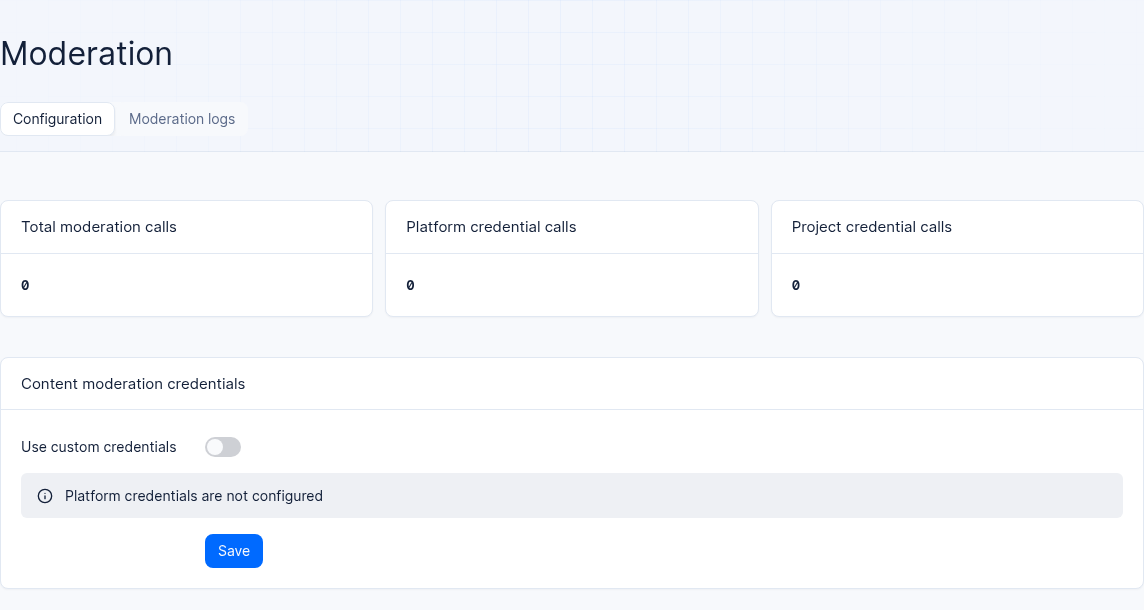
Interface reference: platform moderation credentials are not configured in the test project; configuration varies by environment.
Feature Overview
When an enterprise externally provides services such as customer support ticket submission, user community comments, or knowledge base image attachment uploads (e.g., the ticket table customer_tickets and multimedia storage bucket agent_multimedia_bucket in the example project 企业智能客服与知识中台 enterprise-ai-hub-210), preventing policy-violating content involving politics, pornography, violence and terrorism, prohibited items, or abuse from entering the production database and object storage is a rigid bottom line of enterprise compliance.
Agentbase Moderation frees business developers from manually writing third-party content security SDK call code in every endpoint, implementing a transparent gate directly on the underlying data-plane gateway and storage engine:
Precise dual-domain coverage (database text + storage bucket images):
Database text moderation: for tables with moderation enabled, text content in all string-type fields is automatically extracted and submitted for review upon single-row insertion or update.
Storage image moderation: when platform, project, and bucket image moderation are enabled, the upload path reads image bytes and submits them using the Base64 adapter. The device has already received the file; rejected or unavailable moderation fails the request. When the corresponding cleanup step is reached, deletion is attempted; verify its outcome.
Three-mode moderation strategies and Phase-Two asynchronous state machine (2.9.0 / 2.10.0):
pre(synchronous pre-mode): database text is reviewed before writing. Storage images are first uploaded to the device, then reviewed according to configuration. A rejection or unavailable moderation fails the request; this does not guarantee that no bytes were written or cleanup succeeded.post(asynchronous post-mode) andhybrid(mixed long/short text split mode): writes are persisted first and marked as under moderation (checking), with moderation completed asynchronously in the background; before publication (published), ordinary reads are subject to the moderation-state check, and supports escalation of violations to manual review (quarantined) or private withholding (private_hold) with periodic task self-healing.
Credential priority and model gateway separation: a complete project AK/SK pair takes priority; otherwise the platform pair is used. Endpoint selection is independent: the project endpoint takes priority, with fallback to the platform endpoint when empty. Moderation and model inference credentials are configured separately.
| Core feature view | Console route path | Coverage capabilities and configuration items | Required permissions / role boundaries |
|---|---|---|---|
| Moderation home page (overview and credentials) | /console/project-{region}-{project}/moderation | View total call volume over the last 30 days (split by platform credentials vs. project credential calls); switch credential mode, configure Alibaba Cloud AK/SK, timeout (1–10s), log retention days (1–365 days), and single-image size limit (1–20 MB) | View: any project member; modify project credentials: projects.write (owner/admin/developer/editor) |
| Moderation global logs page | /console/project-{region}-{project}/moderation/logs · .../logs/{log} | Search by resource type (table/bucket), resource ID, moderation result (pass/blocked/review/error), and time range; view hit risk labels (Labels), confidence, and suggested actions | Readable by any project member (logs only record restricted file names and ≤2000-character text previews; no raw image bytes are stored) |
| Table-level moderation configuration and logs | /databases/database-{db}/table-{table}/moderation | Enable text moderation for a specified table, choose the mode (pre / post / hybrid) and the violation-to-manual-review switch, and view the table's dedicated moderation logs | Database table write permission |
| Bucket-level moderation configuration and logs | /storage/bucket-{bucket}/moderation | Enable image (image) moderation for a specified bucket and view the bucket's dedicated moderation logs | Storage bucket write permission |
Core Concepts and Architecture
1. Comparison table of the four single-run moderation verdicts and system actions
Regardless of the detailed classification returned by the underlying Alibaba Cloud Green MultiModalGuard call, Agentbase normalizes it into the following four standard verdicts and fully records the hit risk labels (Labels), confidence (Confidence), and model-suggested action (Suggestion: pass / review / block / mask) in the moderation logs:
| Moderation verdict identifier | Meaning | pre Database write behavior in synchronous pre-mode | Storage bucket (Storage image/*) upload behavior (Fail-Closed) |
|---|---|---|---|
pass (pass) | No violation risk detected or confidence below the interception threshold | Allow as normal: the data row is successfully written to the OceanBase table | Keep as normal: the image file completes upload and is persisted to the bucket |
block (block) | Explicitly detected high-risk content | Reject write | Reject upload: attempt deletion when the cleanup step is reached; verify its outcome |
review (manual review) | The model recommends manual review | Depends on configuration: synchronous mode blocks; asynchronous mode may enter review | Reject upload: attempt deletion when the cleanup step is reached; verify its outcome |
error (error) | Credentials, network, reading, or a size limit prevent review | Depends on moderation configuration | Upload fails: attempt cleanup when the corresponding step is reached; check actual state if an earlier step or cleanup fails |
2. Moderation Phase Two: asynchronous post-moderation (post), mixed split (hybrid), and the document moderation state machine
In environments where the platform administrator has enabled the Phase-Two moderation switch (when Phase Two is disabled, create or update requests cannot select post or hybrid; execution of an existing configuration falls back to synchronous pre-moderation), table text moderation supports asynchronous state transitions:
| Core attribute or state value | Enum values / default value | Precise business semantics and read/write visibility rules |
|---|---|---|
Moderation mode (mode) | pre · post · hybrid | • pre: synchronous check before saving; • post: persist the write first, then submit for review asynchronously in the background; • hybrid: automatically split according to the text length threshold configured for the platform—short text stays on the synchronous path for immediate return, while overly long text moves to the asynchronous path to avoid blocking the write response. |
| Violation-to-human-review switch | requireManualReviewOnViolation (default true) | • When enabled (true): violation records enter the quarantined (Blocked) quarantine state awaiting review; • When disabled ( false): violation records enter the private_hold (Review Exception) state, held privately, with visibility determined by the rules and existing permissions below. |
moderationStatus Status transitions | checking → pending → published / quarantined / private_hold / action_error | The data table displays Chinese status badges inline for intuitive viewing (Reviewing / Pending Review / Blocked / Review Exception / Review Failed); for records stuck in checking due to occasional network jitter, the platform's built-in periodic inspection task automatically re-evaluates and self-heals according to the current configuration semantics, with no manual intervention required. |
| Read isolation and deferred events for unpublished content | For all records not in published status | For rows in checking, pending, quarantined, private_hold, or action_error, the moderation-state check allows the creator or last modifier; API key and privileged project-management identities are exempt from that check. All reads remain subject to applicable authentication and database permissions. For queries with attribute filters, total subtracts hidden rows only on the current page and may overcount; deferred events are handled after publication according to configuration. |
Roles, Entry Points, and Relationships
1. Resource-Level Configuration Status Semantics and Scope Boundaries
When enabling content moderation for a specific data table or storage bucket, the resource configuration object (/v1/moderation-configs) has the following three runtime states:
active(Active): Project-level moderation is enabled, and the resource-level moderation switch for the current data table or storage bucket is also enabled.inactive(Inactive): The resource-level moderation switch for the current data table or storage bucket is turned off.disabled_by_project(Disabled at project level): Although the table or bucket has moderation rules configured, the project's global moderation master switch is turned off, so interception is not currently performed.
Clear scope boundaries:
Supported by moderation: string-type columns (String columns) in Database tables; image files with MIME type
image/*in Storage buckets.Not covered by moderation: non-string columns such as numeric/boolean/date columns, as well as non-image objects uploaded to Storage such as videos (
video/*), audio (audio/*), compressed archives, or PDF/Markdown documents.
2. Strict Distinction Between Content Moderation Credentials and Model Provider Credentials
During enterprise configuration, never confuse Moderation (content moderation credentials) with Models (LLM Gateway model inference credentials). The cloud services they connect to, the authentication protocols, and the configuration entry points are completely independent:
| Comparison dimension | Content moderation credentials (Moderation Credentials) | Model Provider credentials (LLM Gateway Providers) |
|---|---|---|
| Console configuration entry | Project sidebar Moderation (Content Moderation) homepage configuration form | Project sidebar Models (/llm-gateway) → Providers |
| Target cloud service | Alibaba Cloud Content Moderation (Green MultiModalGuard) | Large model inference services (e.g., Alibaba Cloud Model Studio DashScope dashscope-prod, OpenAI, Anthropic, etc.) |
| Required credential fields | Alibaba Cloud Content Moderation HTTPS review endpoint (Endpoint) + AccessKey ID / AccessKey Secret (AK/SK pair) | Model inference Base URL + API Key (e.g., <DASHSCOPE_API_KEY>) + model capability catalog |
| Isolation principle | Dedicated to data table write paths and storage bucket image upload risk control, must not be used for LLM chat or embedding | Dedicated to Chat, Embedding, Rerank, and Vision inference, must not be used for content moderation |
Feature Details and Operation Guide
1. Configuring Project-Level Content Moderation Credentials and Advanced Risk Control Parameters
Log in to the Console and enter project
企业智能客服与知识中台(enterprise-ai-hub-210), then click Moderation (Content Moderation) in the left sidebar (path/console/project-default-enterprise-ai-hub-210/moderation, as shown in Figure 1).Review the usage cards for the last 30 days at the top:
The top of the page displays three key statistics: total moderation calls over the last 30 days, platform credential call volume, and project custom credential call volume, along with a badge indicating the currently active credential source.
Select the credential mode and configure parameters (corresponding to
PATCH /v1/projects/{projectId}/moderationunder the hood):In the configuration form, you can switch between "Use platform credentials" and "Use custom project credentials".
Credential and endpoint fallback: a complete project AK/SK pair is used; otherwise the platform pair is used. The endpoint is resolved separately and falls back to the platform endpoint when the project endpoint is empty. Project credentials can therefore be combined with a platform endpoint; check both the effective credential source and destination.
If you select Use custom project credentials, fill in the following fields according to the table:
| Configuration form field | Value range / constraints | Default value and production configuration recommendation |
|---|---|---|
| Endpoint (moderation service endpoint) | A valid https:// Alibaba Cloud Content Moderation access address | For example https://green-cip.cn-shanghai.aliyuncs.com. Saving validates the HTTPS URL format; use a trusted endpoint and verify destination access against deployment network policies. |
| AccessKey ID & Secret | An Alibaba Cloud RAM sub-account AK/SK with Green Content Moderation permissions | After saving, encrypted server-side storage, one-way masked in the UI without echo display; you can click clear at any time and re-enter a new key pair. |
| Timeout (moderation timeout) | 1 ~ 10 seconds (integer) | Recommended to set to 3 ~ 5 seconds to prevent external network jitter from blocking database writes or image uploads for long periods. |
| Log retention (moderation log retention days) | 1 ~ 365 days (integer) | Recommended to set to 90 or 180 days in production environments to meet compliance audit traceability requirements. |
| Max image size (per-image size limit) | 1 ~ 20 MB (integer) | Sets the maximum size of a single image for moderation; an over-limit upload fails. Deletion is attempted when the cleanup step is reached; verify its outcome. |
2. Enabling Moderation Switches Resource by Resource for Data Tables and Storage Buckets
After confirming the project-level credentials, you need to go to the specific data table to be protected (e.g., the customer support ticket table customer_tickets) or storage bucket (e.g., agent_multimedia_bucket) to enable resource-level moderation configuration (corresponding to the /v1/moderation-configs series of endpoints under the hood):
A. Enabling Text Moderation for Data Tables (Database Table)
Click Databases in the left sidebar → enter the database
enterprise_biz_db→ click the data tablecustomer_tickets→ switch to the Moderation tab at the top of the table details (path.../table-customer_tickets/moderation).Turn on the table's text moderation switch (content type is fixed to
text).Select the moderation mode:
The default selection is
pre(synchronous check before save): any ticket submission containing violating words will be directly intercepted at write time.If the platform has enabled Phase Two moderation capabilities, you can optionally select
post(asynchronous post-hoc moderation) orhybrid(mixed routing for long and short texts), and check whether to enable human review on violation (requireManualReviewOnViolation).
After saving, you can intuitively see the moderation status badge for each record in the table's Rows list, and view the moderation interception logs belonging only to that table under the table's Moderation tab.
B. Enabling Image Moderation for Storage Buckets
Click Storage in the left sidebar → click to enter the target storage bucket (e.g.,
agent_multimedia_bucket) → switch to the Moderation tab at the top of the bucket details (path/storage/bucket-agent_multimedia_bucket/moderation).Turn on the bucket's image moderation switch (content type is fixed to
image) and save.Verify image moderation: confirm platform, project, and bucket image moderation are enabled. This upload path reads image bytes and submits them as Base64; violations, an exceeded moderation limit, or an unavailable service cause upload failure. Deletion is attempted when the corresponding cleanup step is reached; verify its outcome after errors.
3. Querying and Auditing Content Moderation Logs
When end users report "ticket submission rejected" or "image upload failed", administrators can locate the interception reason within 1 minutes via the global or resource-level moderation logs:
Go to the project sidebar Moderation → Logs tab (path
/console/project-default-enterprise-ai-hub-210/moderation/logs, corresponding to the API/v1/moderation-logs).Use the top combined filter bar to narrow the scope:
Resource type: select Table or Bucket.
Resource ID: enter e.g.
customer_ticketsoragent_multimedia_bucket.Result: filter by
pass(pass),blocked(blocked),review(blocked on review), orerror(call exception).Time range: frame the time period in which the interception occurred.
Open any interception record to enter the log detail page (
/moderation/logs/{log}) and verify the following key forensic fields:Basic context: timestamp, associated resource type and ID, content type (
text/image), underlying Provider, and Alibaba Cloud request ID (Request ID).Privacy-safe content preview: text moderation displays a truncated text preview of no more than
2000characters; image moderation only records a restricted file name preview, never storing raw image bytes, Base64 encoding, or full internal object paths in the logs, strictly protecting user data privacy.Decision basis: the matched risk Labels, Confidence (confidence score), Suggestion (model-recommended action:
pass/review/block/mask), and the specific error message.
FAQ and Troubleshooting
Q1: Why does uploading a PDF document or MP4 video after enabling image moderation on a storage bucket not trigger a moderation record, while uploading a 15 MB high-resolution PNG image fails outright and the file cannot be found in the bucket?
Cause and troubleshooting steps:
PDF / videos do not trigger moderation: Agentbase Storage content moderation strictly targets only image files whose MIME type matches
image/*; PDF documents, Markdown files, audio, and videos are not covered by image moderation and are uploaded via the normal file flow.A 15 MB image upload fails: check the project moderation Max image size (1–20 MB). A 15 MB image exceeds the default
10 MBlimit; adjust the limit or compress the image before uploading again. After an error, verify cleanup of the uploaded object and its record.
Q2:After enabling Phase Two moderation post (asynchronous post-moderation) mode, why can user A see their just-submitted comment after refreshing, but user B cannot see it, and no Webhook is triggered either?
Cause and troubleshooting steps: This is the expected security behavior of the Phase Two moderation read isolation for unpublished content :
On the
postorhybridasynchronous path, newly written records start inchecking(under moderation) status, and if they hit suspected violations they may further enterpending(pending review),quarantined(blocked), orprivate_hold(moderation error).Before
published, the creator or last modifier can pass the moderation-state check, and API key and privileged project-management identities are exempt from that check; actual reads remain subject to applicable authentication and database permissions. Other ordinary users are filtered. A list query with attribute filters may overcounttotal, so do not treat it as an exact visible-row count.Meanwhile, to prevent violating content from leaking through events, Realtime broadcasts, Functions event triggers, and Webhooks are all deferred, and will only be automatically delivered retroactively after the backend asynchronous moderation passes and the status switches to
published.
Q3:I have already configured the Alibaba Cloud DashScope API Key on the “Models (LLM Gateway)” page, so why does enabling Moderation content moderation still report invalid credentials?
Cause and troubleshooting steps: Content moderation credentials and model gateway credentials are two completely independent configurations that are never reused:
Models (LLM Gateway
/llm-gateway) connects to large model inference services (e.g., Bailian DashScopeqwen-plus) and uses the inference API Key.Content moderation (Moderation
/moderation) connects to Alibaba Cloud Content Security (Green MultiModalGuard) and uses the Alibaba Cloud RAM AccessKey ID + AccessKey Secret (AK/SK) along with a Green-dedicated access endpoint. Please go to the project's Moderation home page and switch to “Use platform credentials” (if the platform administrator has configured them globally), or enter a dedicated AK/SK pair with the Alibaba Cloud Content Security Green service enabled.
Related Documentation
Storage (Storage buckets and image upload Fail-Closed behavior)
Table, column, row, and index operations (in-row moderation status badge in data tables)
Models and AI gateway overview (distinguishing model credentials from moderation credentials)
Core concepts (platform security defaults and data boundaries)