
Message Targets (User Targets)
Feature Overview
Message Target is a specific message delivery terminal address bound under an Agentbase Auth User, covering three channel types: Email address, SMS short code/mobile number, and client device push token (Push Token, such as APNs / FCM device identifiers). In enterprise applications (for example, "Enterprise Intelligent Customer Service and Knowledge Hub enterprise-ai-hub-210"), the same natural person user (such as architect user_zhangwei_001 Zhang Wei) often simultaneously owns a work email, an on-call mobile number, and a mobile office App device token. When the Messaging service performs P1 incident alert broadcasts, support ticket status change notifications, or knowledge base publication reminders, it does not send physical messages directly to the abstract userId; instead, it resolves the user or Topic into the valid-state Targets under that user, and then routes them by the Target's providerType (email / sms / push) to the corresponding third-party Messaging Provider to complete final delivery.
By decoupling "User Identity (User)" and "Communication Terminal (Target)" into a one-to-many model, Agentbase achieves fine-grained multi-channel reach governance: it supports automatically deriving a primary email and mobile number Target when creating a user, dynamically registering and rotating mobile Push device tokens through the Server API, subscribing specific Targets to different message Topics (Topic Subscriber), and one-click cleanup of invalid terminals from the Console when a user deregisters or a device is reported lost.
Core Concepts and Architecture
Message Targets span three core subsystems: Auth Users, Messaging Topics, and Messaging Providers. Their architectural relationships are as follows:
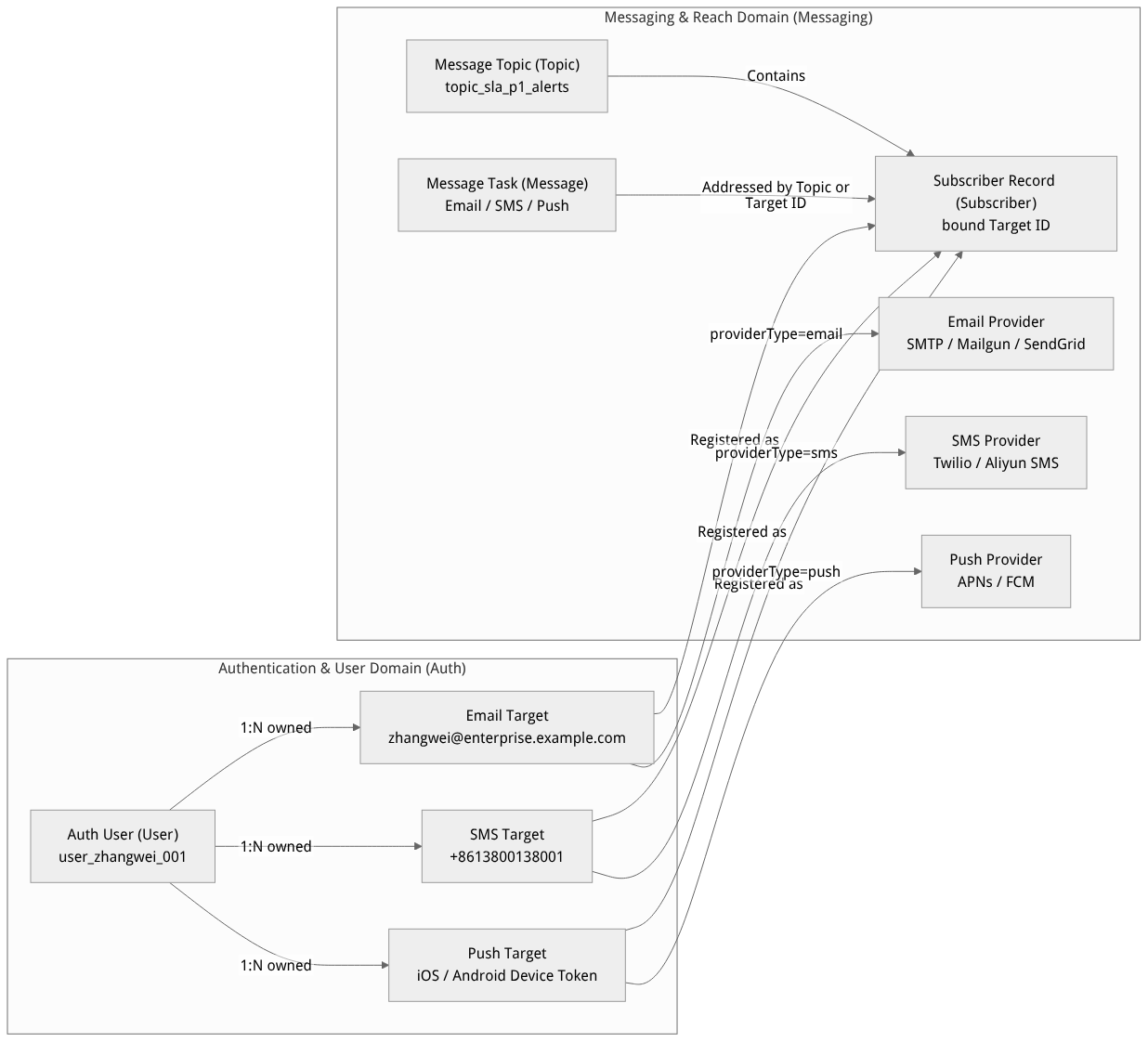
Flow diagram, not a runtime screenshot; read the relationships between steps or states along the arrows.
View the flow diagram in full size
Core Concepts and Field Definitions
| Core concept / attribute field | Identifier / Type | Architectural responsibility and business semantics |
|---|---|---|
| Message Target | $id (targetId) | A communication destination entity belonging to a single userId, globally unique at the user dimension, with a lifecycle controlled by the owning user (deleting a user cascades into cleanup of all of their Targets). |
Channel type (providerType) | email | sms | push | Identifies the communication channel category through which this Target receives messages, determining the Provider type matched during message delivery and the identifier validation format. |
Terminal identifier (identifier) | string | The actual delivery address: email channel uses a standard RFC 5322 email address; sms channel uses an E.164 formatted mobile number with international country code (e.g., +8613800138001); push channel uses an FCM Registration Token or APNs Device Token obtained by the client SDK. |
Bound provider (providerId) | string | null | An optional binding to a specific Messaging Provider instance ID. If empty, messages are automatically routed at send time to the current project's enabled default Provider of the same type. |
Terminal name (name) | string (up to 128 characters) | A human-readable remark name (e.g., 张伟的 iPhone 16 Pro 值班机), mainly used for distinguishing push type devices and for operational identification in the Console. |
Session association (sessionId) | string | null | The optional Session ID associated when the client registers a Push Target through a session; useful for identifying device status when that session logs out or is expired and cleaned up. |
Expired flag (expired) | boolean | Indicates whether this Target has been marked as an invalid terminal by the remote channel (e.g., APNs / FCM reporting Unregistered). |
Roles, Entry Points, and Relationships
Applicable Roles and Responsibility Division
| Role name | Core use scenario | Required permission scope (Role / API Scope) |
|---|---|---|
| Organization administrator / Security administrator | Audit user-bound emails, mobile numbers, and push devices in the Console; clean up Targets of departed employees or reported-lost devices | Console owner / admin / developer roles |
| Backend application development engineer | Use the Server SDK / REST API to batch import backup notification emails, on-call mobile numbers, or bind custom Providers for users | API Key with users.read, targets.read, targets.write |
| Mobile / frontend development engineer | Obtain the system Push Token after user login in the App and register it as a Push Target of the current account | Client Session authentication (calling the Account Push Target endpoint) or proxied registration via the business backend |
| Operations on-call manager | Add Targets of VIP architects and on-call engineers to alert Topics (e.g., topic_sla_p1_alerts) and verify delivery receipts in the Message Center | Console access + messages.read, topics.write, subscribers.write |
Console Entry and Navigation Path
Log in to the Agentbase Console and enter the project
企业智能客服与知识中台(enterprise-ai-hub-210) under the target organization (e.g.,Agentbase 企业智能中台).In the left main navigation bar, select "Build" -> "Auth" (
/auth); the "Users" (Users) list page opens by default.Click the target user row (e.g.,
user_zhangwei_001Zhang Wei) to enter the user details view.In the horizontal tab bar at the top of the user details page, switch to the "Targets" (Message Targets) tab (path:
/console/project-default-enterprise-ai-hub-210/auth/user-user_zhangwei_001/targets).
Relationships with Upstream and Downstream Modules
Upstream identity source (
认证 -> 用户): When a user is created via the Console orPOST /v1/userswithemailorphonesupplied, the system automatically derives the correspondingemailTarget andsmsTarget within a database transaction; when a user updates their primary email or primary mobile number, the system maintains the default Targets in sync.Downstream subscription and broadcast (
消息 -> 主题 Topics): When adding a Subscriber in aMessaging -> Topics(e.g.,topic_sla_p1_alerts"P1 Critical Incident SLA Alert Channel"), you must select a specifictargetIdunder some user; a Topic can contain both Email Targets and SMS and Push Targets, enabling omni-channel alerting.Downstream direct one-off delivery (
消息 -> 消息列表 Messages): When callingPOST /v1/messaging/messages/{email|sms|push}, messages can be delivered viausers[](automatically expanded to all valid Targets of the corresponding channel for that user) or by explicitly specifyingtargets[](precise delivery to a specified device or backup email).
Feature Details and Operation Guide
1. Automatic Generation and Lifecycle Synchronization Mechanism
In Agentbase, a user's basic communication profile stays automatically in sync with Targets, reducing manual repeated configuration:
Automatic derivation on user creation:
In the Console under "Auth -> Users -> Create User" or when calling
POST /v1/users, as long asemailis filled in (e.g.,zhangwei@enterprise.example.com), the system immediately generates aproviderType = "email"Target.If an E.164-compliant
phoneis also filled in (e.g.,+8613800138001), the system simultaneously generates aproviderType = "sms"Target.
Synchronization on user contact info modification:
When an administrator modifies a user's email or mobile number on the user details page, the associated automatic Target identifier (
identifier) is updated accordingly.
Cascade cleanup on user deletion:
When an Auth user is deleted, all Targets under that user and the associated Topic Subscriber records are removed in the same cleanup process, ensuring no marketing or alert messages continue to be sent to deregistered users.
2. Registering Expansion Targets via Server API / SDK (Push Devices and Backup Notification Channels)
On the user details Targets tab, an authorized user can click Create target, choose a channel, and enter the recipient identifier. Name, target ID, and provider ID are optional. Alternatively, call POST /v1/users/{userId}/targets via the Server API or SDK. Actual delivery also requires a provider for the selected channel.
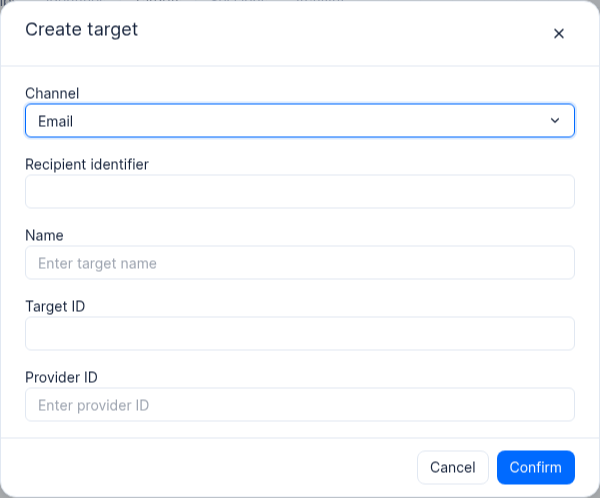
Empty form for a test user; no target was created and no message was sent.
Request Parameter Specification (POST /v1/users/{userId}/targets)
| Parameter name | Type | Required | Validation rules and default value description |
|---|---|---|---|
userId | string | Yes | Path parameter, the $id of the target Auth user (e.g., user_zhangwei_001). |
targetId | string | No | Custom Target ID (up to 36 characters; only letters, digits, periods, hyphens, and underscores allowed, and it must not start with a special character); when "unique()" is passed or omitted, the server automatically generates a unique ID. |
providerType | string | Yes | Channel enum value; only one of email, sms, push is allowed. |
identifier | string | is | delivery endpoint address: email must pass valid email format validation; sms must be an E.164 phone number starting with + and no more than 15 digits; push is a non-empty device Token string. |
providerId | string | No | Associated Messaging Provider ID (e.g., a specified APNs or FCM Provider ID); when omitted, the project's default Provider of the same type is used. |
name | string | No | Terminal display name (1–128 characters); for push devices, a readable name such as iOS-P1-OnCall-Device is recommended. |
Operation Steps and Executable Command Examples
The following example demonstrates how to use the project API Key (with the targets.write and targets.read permission scopes checked) to register an iOS mobile push device Target for VIP architect user_zhangwei_001 and query all valid Targets under that user:
Step 1: Create the device target; confirm HTTP 2xx and inspect the result.
(
  set +x
  set -o pipefail
  : "${APPBASE_API_KEY:?Set APPBASE_API_KEY}"
: "${APPBASE_ENDPOINT:?Set APPBASE_ENDPOINT to the target API endpoint including /v1}"
APPBASE_ENDPOINT="${APPBASE_ENDPOINT%/}"
: "${APPBASE_PROJECT_ID:?Set APPBASE_PROJECT_ID for the target environment}"
builtin printf 'X-Appwrite-Key: %s\n' "$APPBASE_API_KEY" | curl --disable -sS -X POST "${APPBASE_ENDPOINT}/users/user_zhangwei_001/targets" -f -i \
  -H "Content-Type: application/json" \
  -H "X-Appwrite-Project: ${APPBASE_PROJECT_ID}" \
  --header @- \
  -d '{
    "targetId": "tgt_zhangwei_ios_oncall",
    "providerType": "push",
    "identifier": "apns_prod_token_9f8e7d6c5b4a3210fedcba9876543210",
    "name": "张伟-iPhone16Pro-值班终端"
  }'
)
Step 2: List the user’s device targets separately after creation succeeds.
(
  set +x
  set -o pipefail
  : "${APPBASE_API_KEY:?Set APPBASE_API_KEY}"
: "${APPBASE_ENDPOINT:?Set APPBASE_ENDPOINT to the target API endpoint including /v1}"
APPBASE_ENDPOINT="${APPBASE_ENDPOINT%/}"
: "${APPBASE_PROJECT_ID:?Set APPBASE_PROJECT_ID for the target environment}"
builtin printf 'X-Appwrite-Key: %s\n' "$APPBASE_API_KEY" | curl --disable -sS -X GET "${APPBASE_ENDPOINT}/users/user_zhangwei_001/targets" -f -i \
  -H "X-Appwrite-Project: ${APPBASE_PROJECT_ID}" \
  --header @-
)
Expected returns are HTTP 201 Created (creation) and 200 OK (list query); the response body contains the automatically generated Email/SMS Targets and the newly created Push Target:
{
  "total": 3,
  "targets": [
    {
      "$id": "6ad9ec41001122334455",
      "$createdAt": "2026-10-22T10:42:15.000+00:00",
      "$updatedAt": "2026-10-22T10:42:15.000+00:00",
      "name": "",
      "userId": "user_zhangwei_001",
      "providerId": null,
      "providerType": "email",
      "identifier": "zhangwei@enterprise.example.com",
      "expired": false
    },
    {
      "$id": "6ad9ec410066778899aa",
      "$createdAt": "2026-10-22T10:42:15.000+00:00",
      "$updatedAt": "2026-10-22T10:42:15.000+00:00",
      "name": "",
      "userId": "user_zhangwei_001",
      "providerId": null,
      "providerType": "sms",
      "identifier": "+8613800138001",
      "expired": false
    },
    {
      "$id": "tgt_zhangwei_ios_oncall",
      "$createdAt": "2026-10-22T11:20:00.000+00:00",
      "$updatedAt": "2026-10-22T11:20:00.000+00:00",
      "name": "张伟-iPhone16Pro-值班终端",
      "userId": "user_zhangwei_001",
      "providerId": null,
      "providerType": "push",
      "identifier": "apns_prod_token_9f8e7d6c5b4a3210fedcba9876543210",
      "expired": false
    }
  ]
}
3. Viewing, Auditing, and Batch-Cleaning Message Targets in the Console
Navigate to
认证->用户-> clickuser_zhangwei_001->Targetstab.The list table shows the following key operational columns:
Target ID: the target's unique identifier (supports one-click copy
$id, used for configuring precise delivery in Messaging or troubleshooting subscription relationships).Target: for
pushtype, prioritizes display of the readablename(e.g.,张伟-iPhone16Pro-值班终端); foremailandsmstypes, displays the specific email address or mobile numberidentifier.Type: displays the channel label (
Email/SMS/Push).Provider: displays the explicitly bound Messaging Provider name or ID; empty when the project default channel is used.
Created: the target registration timestamp.
Batch unbinding and cleanup of invalid terminals:
When an employee changes phones, uninstalls the client App, or departs, check the corresponding checkboxes on the left side of the table; a batch action bar will appear at the bottom or top.
Click "Delete" and confirm again in the confirmation dialog to immediately remove the selected Targets. After deletion, any messages sent to that user or associated Topic will no longer be delivered to that terminal.
FAQ and Troubleshooting
Issue 1: Calling POST /v1/users/{userId}/targets returns 409 Conflict (user_target_already_exists)?
Cause analysis: A Target with the same
providerTypeand the sameidentifieralready exists under the same user (userId) (for example, when the user was created, the system automatically generated a primary email or primary phone Target, and the business code then redundantly calls the create API to write the same email/phone number), or the provided customtargetIdalready exists.Resolution: First call
GET /v1/users/{userId}/targetsto check the user's existing target list; if the sameidentifieralready exists, simply reuse the returned$id; if a mobile device token has been refreshed, callPATCH /v1/users/{userId}/targets/{targetId}to update theidentifierfield instead of creating a new one redundantly.
Issue 2: When sending a message to a user or topic in the Messaging module, the status shows a failure or an error indicates that no available recipient target was found?
Cause analysis: The message task type (e.g., SMS or Push) does not match the Target types the target user already has (for example, the user only provided an email and has only an
emailTarget, without a boundsmsorpushTarget), or the original Push Target has been marked asexpired: truebecause the client was uninstalled.Resolution: Go to the “Auth -> Users -> Target user -> Targets” tab and confirm whether a valid record exists for the corresponding
Type(Email/SMS/Push); if it is missing, add the user's phone number or register a Target for the corresponding channel via the Server API.
Issue 3: When managing user Targets with an API Key, 401 Unauthorized (missing scopes (["targets.write"])) is returned?
Cause analysis: Since the fine-grained permission split, read and write access to user message targets is controlled by the separate
targets.readandtargets.write; selecting onlyusers.writedoes not includetargets.write.Resolution: Go to “Overview -> API Keys”, edit the API Key currently used by your backend, and in the permission selection panel under the Messaging / Users category, check
targets.readandtargets.write, then save.