
Databases Overview
Feature Overview
The Agentbase structured database (Databases / TablesDB) is built on the OceanBase native distributed database engine, providing strongly consistent, highly available structured data management for enterprise AI agents and business systems. In project 企业智能客服与知识中台 (Project ID: enterprise-ai-hub-210), enterprises can create business databases (such as 企业智能客服业务库, Database ID: enterprise_biz_db) via the Console's Databases module or client/server SDKs (agentbase-web-sdk@2.12.0, agentbase-node-sdk@2.12.0), and under them define structured business tables (such as the customer support ticket table customer_tickets), strongly typed columns, high-performance secondary/unique/full-text indexes, and row records.
Leveraging OceanBase's multi-tenancy and massive table capacity, Agentbase provides two production-grade project storage modes at the underlying layer — Shared V2 (tableMode=shared) and JsonTable (tableMode=jsonTable) — and supports ProjectTableModeConversion to perform bidirectional online conversion between the two storage modes, complete with write-freeze protection windows, data integrity validation, and platform reference remapping. On top of this, the Databases service further integrates Schema multi-version control and rollback (Schema Versions), controlled SQL access surface (SQL Proxy), table-level and row-level security permissions (Row Security), server-side aggregate computation (COUNT / SUM), and cloud backup and restore (Backups), forming a one-stop data foundation for enterprise core production workloads.
Core Concepts and Architecture
Agentbase Databases adopts an architecture in which the "five-layer logical resource model (Project → Database → Table → Column & Index → Row)" maps to the underlying OceanBase storage pools.
1. Five-layer logical resource hierarchy explanation
| Hierarchy object | Example (enterprise-ai-hub-210) | Key attributes and architecture notes |
|---|---|---|
| Database | enterprise_biz_db (企业智能客服业务库) | A namespace for logical tables and a unit for backup/Schema version control. Multiple Databases can be created under a single project; client accessibility can be controlled via the enabled switch. |
| Table | customer_tickets (customer support ticket table) | A collection of similarly structured row records. Supports business comments of up to 256 characters (comment), table-level read/write permissions, and row-level security switches (rowSecurity). |
| Column (column / field) | title, status, priority, creatorUserId | Defines each column's data type (such as varchar, text, integer, float, boolean, datetime, enum, relationship), required constraint (required), default value (default), array flag (array), and column comments of up to 256 characters (comment). |
| Index | idx_status_priority, ft_title | A data structure that accelerates query filtering, sorting, and uniqueness constraints. Supports regular indexes (key), unique indexes (unique), full-text indexes (fulltext), and spatial indexes (spatial). |
| Row | TK-20261022-001 .. TK-20261022-004 | Concrete business data records. In addition to user-defined business columns, the system automatically maintains the $id, $sequence, $createdAt, $updatedAt, $permissions, $databaseId, $tableId system metadata columns. |
2. In-depth comparison of OceanBase storage modes: Shared V2 vs JsonTable
For projects of different scales and business characteristics, Agentbase provides two core storage modes on OceanBase storage pools — Shared V2 (tableMode=shared) and JsonTable (tableMode=jsonTable) (the legacy collection separate-table and Shared V1 modes are retained only for compatibility and are not intended for new projects):
| Comparison dimension | Shared V2 mode (tableMode=shared) | JsonTable mode (tableMode=jsonTable) | Selection and architecture impact |
|---|---|---|---|
| Physical storage structure | System tables are shared across tenants; user business tables map each field to a real typed physical column in OceanBase ****, with multi-tenant row-level isolation implemented via the _tenant column. | All logical tables of all projects are consolidated into a fixed set of 7 _jt_* physical tables (_jt_documents, _jt_permissions, _jt_index_values, _jt_unique_index_values, _jt_fulltext_index_values, _jt_table_catalog, _jt_table_sequences), with user fields stored in a _data JSON column, isolated by project_seq + catalog_id. | High-concurrency core business & full AI suite: prefer Shared V2 (e.g., enterprise-ai-hub-210); choose JsonTable for ultra-large-scale long-tail projects / high-frequency dynamic table creation when physical table count needs to be flattened. |
| Table creation and column-addition DDL cost | Executes real OceanBase physical CREATE TABLE / ALTER TABLE DDL, asynchronously materialized by a background database Worker. | Catalog-only pure metadata writes (only updates _jt_table_catalog), with zero physical DDL; table creation, column addition, and index creation complete instantly without locking large physical tables. | JsonTable Completely eliminates the OceanBase Schema memory and DDL blocking overhead caused by the proliferation of massive logical tables. |
| Index implementation mechanism | Directly uses OceanBase native secondary indexes, UNIQUE indexes, native FULLTEXT full-text indexes, and SPATIAL spatial indexes; queries and ORDER BY are pushed down directly to the storage layer. | Regular indexes are accelerated via _jt_index_values typed side tables INNER JOIN; unique indexes use _jt_unique_index_values side tables with SHA-256 composite unique constraint strong validation; side tables are maintained synchronously with every write operation (with some write amplification). | Shared V2 Native indexes deliver the best performance; JsonTable guarantees equality/range/unique index semantics, but ORDER BY performs in-scope JSON_EXTRACT sorting. |
| Full-text search and complex operators | Native MATCH ... AGAINST full-text search; native support for array multi-value indexes (MVI) and spatial geometry operators. | Operators such as search / notSearch, array contains*, and regex first narrow the candidate set via SQL, then perform exact filtering in memory on the candidate set (default limit 1 MB); does not support Spatial spatial types and spatial operators. | If your business heavily relies on full-text search over massive data, complex aggregation on large tables, or spatial location queries, you must choose Shared V2. |
| AI module compatibility | Full support for Databases, Storage, Knowledge Base, Memory (long-term memory), PowerContext and AI Gateway. | Supports common project resources such as Databases, Storage, Knowledge Base, Lexicons, and Scenarios; but Memory, PowerContext, and AI Gateway currently require the project to run in Shared V2 mode. | Projects that enable agent memory or the AI Gateway must use, or first convert to, Shared V2 mode. |
3. Bidirectional online conversion of project storage modes (ProjectTableModeConversion)
Agentbase supports conversion between Shared V2 and JsonTable using ProjectTableModeConversion when its preflight checks pass. The service checks for an existing conversion, Memory data, and PowerContext configuration, among other conditions. Memory data or PowerContext configuration blocks conversion. Evaluate retention and migration needs before acting; do not delete business data merely to pass preflight. Available target pools and other restrictions depend on the actual preflight result.
Probe available target pools: Call
GET /v1/project/table-mode-conversions/targets(or use the Console table mode conversion page) to query the current project's source pool (sourcePool/sourceTableMode) as well as the convertible target mode (targetModes[]) and available storage pool labels (tags[]).Create and start the task: Creating it leaves it in
preflight; it does not start conversion automatically. Once the conditions are confirmed, select Start to begin the write freeze, target preparation, and backfill.Review verification and confirm cutover: Monitor the task and verification report. After verification passes the task remains in
verify; an operator must confirm and perform cutover rather than wait for it automatically. Account for the impact of the write freeze. If the task fails, inspect the error and use the available recovery or rollback action.Check the result and source retention: After cutover, verify application reads, writes, and target data. Source data deletion is irreversible and prevents rollback; perform it only when rollback is no longer needed and retention requirements are met.
Roles, Entry Points, and Relationships
Console Entry and Routes
Main navigation path: Log in to the Agentbase Console → enter the project
企业智能客服与知识中台(enterprise-ai-hub-210) → select Infrastructure → Databases in the left navigation.Route addresses:
Database list page:
/console/project-{region}-{project}/databasesIndividual database detail page:
/console/project-{region}-{project}/databases/database-{databaseId}(containing sub-tabs such as Tables, Backups, Schema Versions, SQL, Usage, and Settings).
Role and permission control model
Databases adopts a dual-layer authentication mechanism: "Console management permissions (organization roles / API Key Scopes)" and "end-user data access permissions (table-level / row-level ACL)":
| Permission level | Scope of control | Authorized principals and configuration entry | Effective rule description |
|---|---|---|---|
| Control plane permissions (Control Plane) | Creating/deleting databases, creating tables/columns/indexes, submitting Schema versions, managing backup policies | Organization roles owner, admin, developer, editor; or a Server API Key carrying databases.read / databases.write, tables.read / tables.write | Organization billing and analyst roles lack projects.read by default and cannot enter a project on those roles alone in self-hosted deployments. Other access depends on deployment and granted permissions. |
| Table-level data permissions (Table Permissions) | End users' create, read, update, delete permissions on all rows of the table | Add roles such as Role.any(), Role.users(), Role.team('team_support_ops') in the table's Settings → Permissions | As long as an end user matches the table-level read (or update/delete) permission, they can read (or modify/delete) all rows in the table. |
| Row-level security permissions (Row Security) | Isolated access at single-row record granularity (e.g., customer Zhang Wei can only see his own support tickets) | Turn on the switch in the table's Settings → Row security and configure the row's $permissions when creating/editing rows | After enabling Row security, a user who does not match table-level permissions but matches the Permission.read(Role.user('user_zhangwei_001')) on a single row can only read or operate on that specific row. |
Feature Details and Operation Guide
1. Browsing and searching the database list
After entering the project's Databases page, all databases under the current project are displayed by default in a table view (e.g., enterprise_biz_db enterprise intelligent customer service business database):
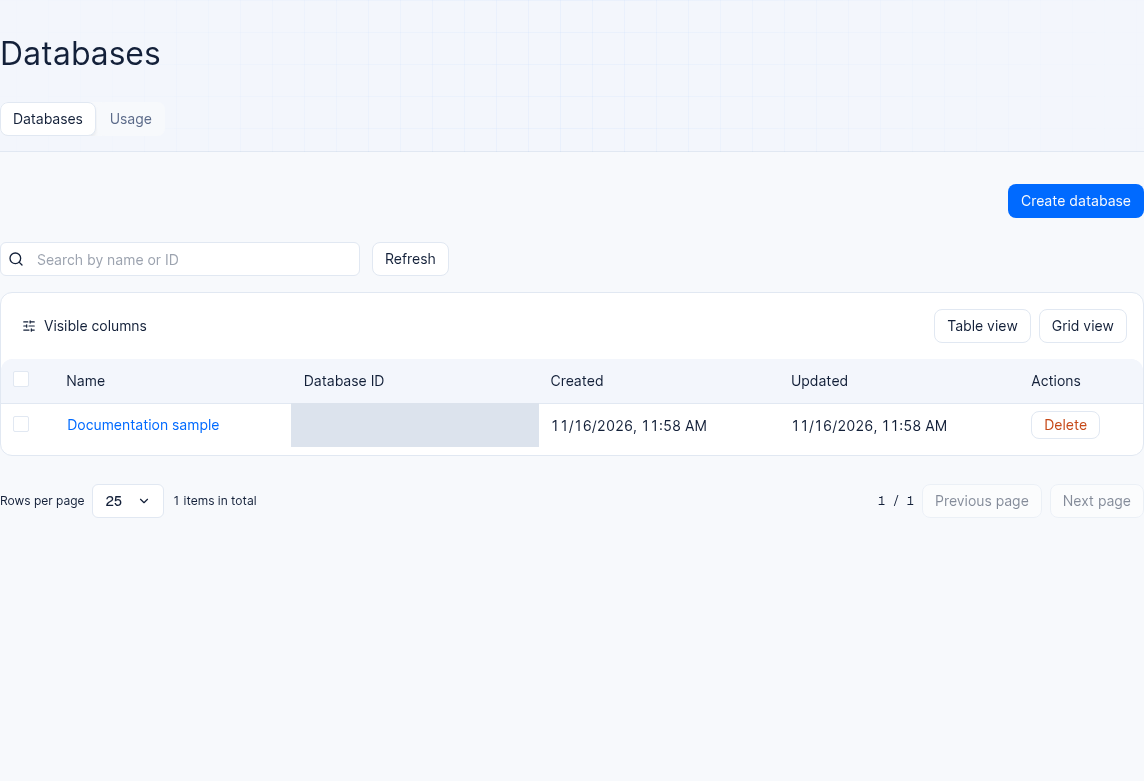
Figure 1: Database list in a 2.12.0 environment. The sample database ID is masked.
Table column descriptions:
Database ID: The database's unique identifier (e.g.,
enterprise_biz_db), supports one-click copy.Name: The database's business name (e.g.,
企业智能客服业务库).Backups (shown only when a backup plan is enabled in the cloud): Displays in real time the status of the scheduled backup policy currently bound to the database (e.g.,
Daily backup) or an unbacked-up warning.Created / Updated: The database's creation time and the most recent structure or property update time.
View and search toolbar: Supports real-time search by database name or ID, switching between the table view (Table view) and the grid card view (Grid view), customizing displayed columns, and adjusting rows per page.
2. Steps to create a database (Create database)
On the Databases list page, click Create database. If the button is unavailable, check the account’s database write permission.
Fill in the following parameters in the pop-up creation window:
| Field name | Required | Validation rules and example values (enterprise-ai-hub-210) |
|---|---|---|
| Name | Required | The database's display name, up to 128 characters. Example: 企业智能客服业务库 |
| Database ID | Optional | Enter a custom identifier in the Database ID field. Only a-z, A-Z, 0-9, periods (.), hyphens (-), and underscores (_) are allowed, up to 36 characters, and the first character cannot be a special symbol; if left blank, the system automatically generates a unique ID. Example: enterprise_biz_db |
| Backup policy (visible with cloud plans) | Optional | In environments that support backups, you can enable a backup policy and enter a schedule and retention period. The option depends on environment capabilities. |
Click Confirm to submit. After creation succeeds, the database detail page opens and you can create tables.
3. Database enable/disable (enabled) and settings management
In the database detail page's Settings tab (or by calling databases.update(databaseId, name, enabled) via the Server SDK), administrators can maintain the database's basic properties:
Modify the database name (Name): The display name can be adjusted at any time without affecting the
Database IDor SDK calls in business code.Enable / disable the database (
enabledproperty semantics):Databases created via the Console default to
enabled = true.When a database is set to
enabled = falsevia the API, all read and write requests to any table in that database from end-user clients (Client SDK / Session / JWT) are immediately blocked and rejected; but servers holding a valid API Key (Server SDK) can still read and write data in the database normally, and the underlying business data is fully preserved. This mechanism is well suited for temporarily blocking front-end access during business cutover or emergency hotfix maintenance.
4. Deleting a database (Delete database) and the asynchronous cascading cleanup mechanism
When a test database is no longer needed, you can delete it via the following safety confirmation process:
Go to the target database's Settings tab, scroll to the bottom Danger zone, and click Delete database to open the deletion confirmation dialog.
Review the list of affected tables: The dialog clearly lists the business table names under the database that will be destroyed along with it (showing at most the first 25 tables), and warns that all backup snapshots associated with the database will also be permanently destroyed simultaneously and cannot be recovered.
Check the strong confirmation checkbox: You must manually check the "I understand and confirm" checkbox before the red Delete button in the lower right corner becomes enabled.
Understand the asynchronous cascading deletion behavior: After clicking confirm deletion, the server accepts the request and returns success, then hands it off to a background asynchronous deletion task (Worker) that cleans up all row records, indexes, and column metadata table by table, and finally removes the database's main document and associated backups. For databases containing massive rows, the list page may briefly retain the database record during asynchronous cleanup until the background cascading cleanup is fully complete.
FAQ and Troubleshooting
Q1: When creating a new project or planning the business architecture, how should you decide whether the project should use the Shared V2 or JsonTable storage mode?
Decision guide:
Scenarios where
Shared V2(tableMode=shared) is preferred:The project needs to use agent long-term memory (Memory), PowerContext, or the AI Gateway (e.g., demo project
enterprise-ai-hub-210).Business tables have large single-table data volumes and heavily rely on OceanBase native secondary index sorting, native
FULLTEXTfull-text search relevance ranking, array multi-value indexes (MVI), orPoint/Line/Polygonspatial location queries.
Scenarios for choosing
JsonTable(tableMode=jsonTable):The tenant needs to dynamically and frequently create hundreds or thousands of logical tables, and wants table creation, column addition, and index changes to have zero physical DDL (Catalog-only) second-level response, while keeping the underlying OceanBase physical table count consistently converged within 7
_jt_*shared tables.If you later need native column indexes or Memory, you can use
ProjectTableModeConversionto convert toShared V2once preflight checks pass.
Q2: Why does a client query on the customer_tickets table under enterprise_biz_db return success but with an empty documents / rows array (total: 0), while the Console clearly shows 4 support ticket records?
Root cause analysis: The Agentbase database follows the Default Deny zero-trust security principle by default. The Console admin view uses organization management permissions to read full table data directly, while client SDK requests are strictly filtered by the table's Permissions (table-level permissions) and Row security (row-level security): if neither the Read permission has been granted to the current user role in the table's Settings → Permissions, nor Row security has been enabled with that user granted the Read permission on individual rows, the query will not throw an error but will automatically filter out all rows the user has no access to and return an empty list.
Troubleshooting steps:
Go to
enterprise_biz_db→ open thecustomer_ticketstable → switch to the Settings tab.In the Permissions card, add read roles suited to your business (for example, add
Role.users()to allow all signed-in users to read, or addRole.team('team_support_ops')to allow the technical support team to read); if row-level isolation is needed, enable Row security and addRole.user('<USER_ID>')via Manage permissions in each row's data menu.
Q3: After executing a database deletion (or deleting a large table), why does the database still briefly appear for a few seconds when I refresh the page?
Root cause analysis: To prevent gateway timeouts or long-transaction table locks from synchronous HTTP requests when deleting a database or large table containing millions of rows, both database deletion and table deletion in Agentbase adopt an asynchronous cascading cleanup architecture. The HTTP endpoint returns immediately after registering the deletion intent and locking the resource; a background database Worker then safely deletes the underlying row data, side-table indexes, and backup files in bounded batches, and the top-level database metadata record is removed only after all cleanup is complete. Simply wait a few seconds and refresh again.
Related Documentation
Tables, Columns, Rows, and Indexes (Tables): Learn field types in depth, building composite/full-text indexes, spreadsheet-style row editing, and hands-on practice with the
customer_ticketssupport ticket table.Schema Versions and Rollback (Schema Versions): Manage database structure changes with version snapshots, view schema diffs, and perform one-click safe rollbacks.
SQL Access Surface (SQL Proxy): Execute controlled SQL queries and operations via HTTP
/v1/sql, the MySQL Wire protocol, or the Console SQL terminal.Backups and Restore (Backups): Configure manual backup snapshots, scheduled backup retention policies, and cross-database/same-database data restore.
Auth Overview (Auth Overview): Understand the
RoleandPermissionexpressions used to control table-level and row-level database security.