
Tables, Columns, Rows and Indexes
Feature Overview
Tables, columns, indexes, and rows make up the core data operation interface of the Agentbase structured database (Databases / TablesDB). In the business database 企业智能客服业务库 (Database ID: enterprise_biz_db) of project 企业智能客服与知识中台 (Project ID: enterprise-ai-hub-210), developers and operations staff can not only use the Console's intuitive spreadsheet view to manage the field definitions, secondary and full-text indexes, row record CRUD, row-level security, and CSV import/export of the customer support ticket table (customer_tickets) in real time, but can also use client-side and server-side SDKs with rich query operators (such as Query.equal, Query.search, Query.orderDesc, Query.cursorAfter) as well as bulk and transaction APIs to handle business logic.
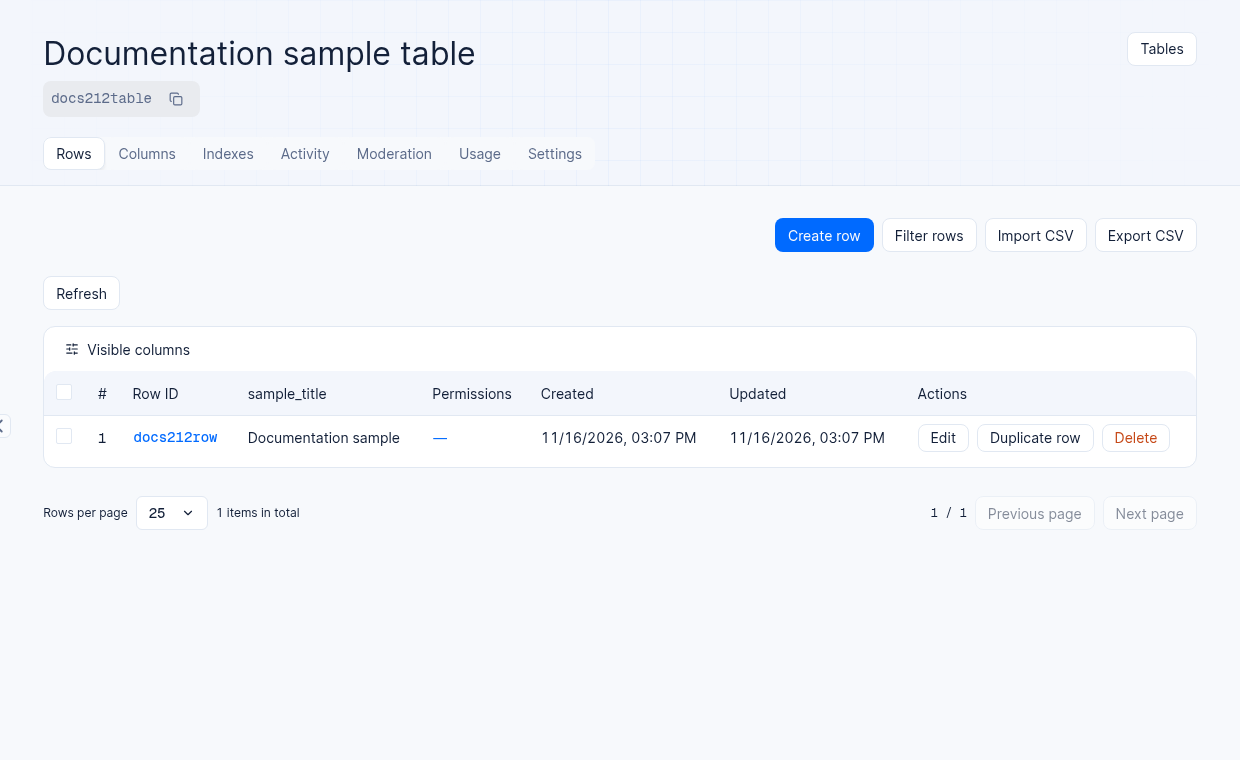
A test project table containing a synthetic sample row; available actions may vary by permissions and environment.
Agentbase's table structure engine supports more than 15 fine-grained column types (covering short text varchar, long text text/mediumtext/longtext, numeric integer/float, boolean boolean, datetime datetime, format-validated email/ip/url, enum enum, cross-table relationship relationship, and spatial geometry types point/line/polygon), and provides business comments (Comments) of up to 256 characters for tables and columns, giving agents accurate contextual grounding when automatically generating SQL or understanding the semantics of business tables.
Core Concepts and Architecture
In Agentbase, changes to table structures (Columns / Indexes) are safely driven by a background asynchronous DDL state machine, while reads and writes of row data (Rows) are persisted to OceanBase after permission trimming, field type/required constraint validation, and index synchronization updates.
Example: customer_tickets customer support table
Suppose a project has a customer_tickets table in its enterprise_biz_db database for technical support tickets. The data below is fictional:
The table below shows four example tickets and their business context:
Row $id (Ticket number) | Ticket title (title) | Priority (priority) | Status (status) | Ticket submitter (creatorUserId) | Responsible team and handling expert |
|---|---|---|---|---|---|
TK-20261022-001 | OceanBase 向量索引在高并发混合检索下的 HNSW 参数调优咨询 | P0 | processing | user_zhangwei_001 (Zhang Wei) | team_support_ops / user_lina_002 (Li Na) |
TK-20261022-002 | AI 网关 prod-enterprise-ai-gateway 工具接入与配额验证 | P1 | resolved | user_zhangwei_001 (Zhang Wei) | team_ai_platform / user_lina_002 (Li Na) |
TK-20261022-003 | 知识库 kb_enterprise_support 同义词词典与 GraphRAG 实体抽取联调 | P1 | open | user_zhangwei_001 (Zhang Wei) | team_kb_governance |
TK-20261022-004 | Shared V2 模式下智能体长期记忆蒸馏(Context Dreaming)触发策略确认 | P2 | resolved | user_lina_002 (Li Na) | team_ai_platform |
Roles, Entry Points, and Relationships
Console Entry and Routes
Navigation path: Log in to the Agentbase Console → enter project
企业智能客服与知识中台(enterprise-ai-hub-210) → click Databases in the left sidebar → click into database企业智能客服业务库(enterprise_biz_db) → click tablecustomer_tickets.Route URL:
/console/project-{region}-{project}/databases/database-{databaseId}/table-{tableId}In-table secondary tab structure:
Rows (default spreadsheet page): Browse, filter, create, and edit rows, configure row permissions, and import or export CSV.
Columns: View and create strongly typed columns, configure required/default/array/encrypted attributes, and edit column comments of up to 256 characters.
Indexes: Create and manage
Key(regular index),Unique(unique index),Fulltext(full-text index), andSpatial(spatial index).Activity: View the operation audit trail of the table and row records.
Usage: View recent row read/write trend metrics for this table.
Moderation: Open the table content moderation page. CSV import and export are available in the Rows toolbar.
Settings: Configure the table's enabled status (Status), display name (Name), table comment (Table comment), table-level permissions and row-level security (Permissions & Row security), and table deletion (Danger zone).
Permissions and relationships
Structure management permissions: Creating/deleting tables and creating/modifying/deleting columns and indexes requires the organization role to have
databases.write/tables.writepermissions (owner,admin,developer,editor).Mutual exclusion protection with Schema versioning: If the current database has a Schema version enabled and in the
activestate, directly modifying table/column/index structures through standalone APIs is protected by a version lock (returning409); it is recommended to advance structural changes uniformly by submitting a new Schema version or aupdateTablewith complete column definitions. However, modifying column comments (updateColumnComment) is a zero-DDL metadata operation and can be executed directly even under an active version.Integration with the agent workbench and SQL Proxy: Table comments (
Table comment) and column comments (Column comment) are not only displayed in the Console table headers, but are also synchronized to the SQL access surface (SQL Proxy) and agent tool calls, helping large language models accurately understand the meaning of business fields.
Feature Details and Operation Guide
1. Create a table
Go to the Tables tab of database
enterprise_biz_dband click the Create table button in the upper-right corner.Fill in the table definition information in the dialog:
Name (required): The business display name of the table, e.g.,
客户工单表orcustomer_tickets.Display name / comment (optional): The business description or alias of the table, up to 256 characters (e.g.,
存储企业客户提交的技术支持工单、SLA 等级与处理状态). This comment only enhances readability and AI semantic understanding, and does not changeTable IDorName.Table ID (optional): Enter a custom ID, or leave it blank for the system to generate one. Only
a-z,A-Z,0-9,.,-,_are allowed, the first character must be a letter or digit, and the maximum length is 36 characters (e.g.,customer_tickets).
Click Confirm to create the table and open it.
2. Full set of column types and creating a column
Switch to the table's Columns tab and click Create column to create a new column.
Each column contains three basic identifying attributes:
Key (required): The API field name of the column, which must match the regex
^[A-Za-z0-9][A-Za-z0-9._\-]*$(e.g.,ticketNo,title,priority). Application code and query conditions directly depend on thisKey, so keep the naming stable after creation.Type (required): The data type of the column (see the table below for details).
Comment (optional): The business comment of the column, up to 256 characters (e.g.,
工单紧急程度:P0特急 / P1高 / P2普通), which can be independently updated at any time with zero DDL.
Detailed table of column data types and constraint parameters
| Category | Column type (Type) | Underlying storage and capacity specification | Type-specific configurable attributes and usage boundaries |
|---|---|---|---|
| String and text types | Varchar (default on creation) | Variable-length string with a required maximum character count Size (limit 16,383) | Suitable for fields with clear length limits that need frequent indexing, such as ticket numbers, titles, and User IDs. Supports Required, Array, Default, Encrypt. |
| String and text types | Text / Mediumtext / Longtext | Corresponding to a maximum of approximately 64 KB / 16 MB / 4 GB of text content respectively | Suitable for detailed ticket descriptions, Markdown body content, and JSON payloads. Supports enabling Encrypt (server-side encrypted storage) — note: encrypted columns with Encrypt enabled cannot be used for query filtering (Query) or indexing. |
| String and text types | Email / IP / URL | Specialized string types with built-in format validators | On write, the server automatically validates valid email addresses, IPv4/IPv6 addresses, or standard URL formats. Supports creating regular or unique indexes. |
| String and Text Types | String (deprecated) | Legacy string type kept for backward compatibility | Marked as Deprecated in the Console; for new columns, use Varchar or Text instead. |
| Numeric and Boolean Types | Integer | 64-bit signed integer (or big integer) | Supports setting a minimum value (Min), maximum value (Max), required (Required), default value (Default), and array (Array). Can be used for slaHours, counting, and atomic increment/decrement. |
| Numeric and Boolean Types | Float | Double-precision floating-point number (Double / Decimal) | Supports setting Min, Max, Required, Default, Array. Suitable for metrics such as satisfactionScore (satisfaction ratings), amounts, and ratios. |
| Numeric and Boolean Types | Boolean | Boolean value (true / false) | Supports Required, Default, Array. Suitable for status flags such as isEscalated (whether escalation handling is required). |
| Time and Enumeration Types | Datetime | ISO-8601 standard date and time (millisecond precision, stored in UTC) | Supports Required, Default, Array, and range comparison queries (greaterThan, between). |
| Time and Enumeration Types | Enum | A set of enumeration values (Elements list) | Written values must strictly fall within the predefined Elements enum items (e.g., ["open", "processing", "resolved", "closed"]), effectively preventing dirty data from entering the database. |
| Cross-Table Relationship Types | Relationship | Cross-table relationship column (supports One-to-One, One-to-Many, Many-to-One, Many-to-Many) | Requires the instance to have relationship support enabled. You can configure one-way or two-way associations (Two-way), the target table, and the cascade delete policy (Restrict restrict delete, Cascade cascade delete, Set null set null). Note: Relationship columns cannot be directly added to index Fields. |
| Spatial Geometry Types | Point / Line / Polygon | Spatial geometry objects for latitude/longitude points, polylines, and polygons | Only available when using Shared V2 (or collection) with spatial support enabled on the instance; JsonTable mode does not support spatial columns or spatial operators. |
Tip for creating columns consecutively: Check the consecutive creation mode at the bottom of the Create column dialog to keep the dialog open after saving the current column, allowing you to quickly enter all fields of a table in sequence.
3. Index Types and Creating an Index (Create index)
Building proper indexes for frequently filtered (WHERE) and sorted (ORDER BY) fields is key to ensuring low-latency queries in production. Switch to the Indexes tab and click Create index (or start from the column header shortcut menu):
| Index type (Type) | Applicable scenarios and behavioral semantics | Multi-column composition and sort direction (Order) rules | Storage mode differences (Shared V2 vs JsonTable) |
|---|---|---|---|
| Key (regular secondary index) | Accelerates equality filtering (equal), range filtering (greaterThan, between), prefix matching (startsWith), and sorting (orderAsc / orderDesc). For example idx_status_priority (status + priority). | Supports single-column or multi-column composition (following the leftmost prefix principle); each column can independently choose Asc (ascending) or Desc (descending). | Shared V2 Creates a native OceanBase secondary index; JsonTable synchronously maintains a _jt_index_values typed side table to accelerate filtering. |
| Unique (unique index) | Enforces global uniqueness of a single column or column combination within the table (a conflict error is thrown immediately on duplicate writes), e.g., support ticket number uk_ticket_no (ticketNo). | Supports single-column or multi-column composite unique constraints; each column can choose Asc / Desc. | Shared V2 Uses a native UNIQUE index; JsonTable enforces zero concurrency penetration via a _jt_unique_index_values side table plus a database-level composite unique index. |
| Fulltext (full-text index) | Enables keyword search capability for text columns (varchar / text). Before calling Query.search(attr, keyword), you must first create a Fulltext index on that column, e.g., ft_title (title). | Supports selecting text columns to build the full-text index. | Shared V2 Uses the underlying native FULLTEXT index; JsonTable still requires declaring a Fulltext index and performs in-memory substring matching over a small candidate set. |
| Spatial (spatial index) | Accelerates distance and intersection computations on Point, Line, Polygon spatial geometry columns. | Only a single spatial-type column can be selected; Asc / Desc sort directions do not apply. | Supported only in Shared V2 (and collection); JsonTable is not supported. |
4. Spreadsheet Row Operations, Import/Export, and SDK Queries/Bulk Transactions
(1) Efficient Operations in the Console Spreadsheet View (Rows)
In the table's Rows tab, manage data as follows:
Create and edit rows: With write permission and at least one column in
availablestatus, click Create row. For an existing row, click its ID or Edit to modify and save it in the drawer.Duplicate and delete: Use Duplicate in the row actions to create a new row, or Delete to remove it. Available actions depend on your permissions.
Bulk CSV import and export: The toolbar supports bulk import of local CSV files into rows via column mapping; click Export CSV in the toolbar to customize the exported columns, choose the delimiter (comma
,, semicolon;, tabTab, or pipe|), and set whether to include headers and whether to export only the current filtered results.
(2) SDK Query Operators and Cursor Pagination in Practice
The following examples show how to use agentbase-node-sdk@2.12.0 to execute multi-condition combined filtering, full-text search, sorting, and high-performance cursor pagination (cursorAfter) on the customer_tickets table in enterprise_biz_db:
Before running, replace <APPBASE_ENDPOINT_WITH_V1> and <APPBASE_PROJECT_ID> with the confirmed target API endpoint and project ID. Until replaced, the SDK rejects the invalid endpoint before making a request.
import { Client, Databases, Query } from 'agentbase-node-sdk'; // Pin version @2.12.0

const client = new Client()
    .setEndpoint('<APPBASE_ENDPOINT_WITH_V1>')
    .setProject('<APPBASE_PROJECT_ID>')
    .setKey('<APPBASE_API_KEY>');

const databases = new Databases(client);

// 1. Combined query: filter support tickets with status open or processing, priority P0/P1, and title containing “vector index”; take the first 20 in descending order by creation time
const page1 = await databases.listDocuments(
    'enterprise_biz_db',
    'customer_tickets',
    [
        Query.equal('status', ['open', 'processing']),
        Query.equal('priority', ['P0', 'P1']),
        Query.search('title', '向量索引'), // A Fulltext index must already be created on the title column
        Query.orderDesc('$createdAt'),
        Query.limit(20)
    ]
);

// 2. High-performance deep pagination: use the $id of the last record on the previous page as the cursorAfter cursor, avoiding large-offset scan degradation
if (page1.documents.length === 20) {
    const lastId = page1.documents[page1.documents.length - 1].$id;
    const page2 = await databases.listDocuments(
        'enterprise_biz_db',
        'customer_tickets',
        [
            Query.equal('status', ['open', 'processing']),
            Query.equal('priority', ['P0', 'P1']),
            Query.search('title', '向量索引'),
            Query.orderDesc('$createdAt'),
            Query.cursorAfter(lastId),
            Query.limit(20)
        ]
    );
}
Quick Reference for Common Query Operators
| Operator category | SDK method call examples | Behavior description and index utilization recommendations |
|---|---|---|
| Equality and set matching | Query.equal('status', ['open', 'processing']) / Query.notEqual('priority', 'P2') | Passing an array to a single field means IN (...) (logical OR); multiple Query clauses on different fields are combined with AND (logical AND). It is recommended to build a Key index on filtered columns. |
| Numeric and time ranges | Query.greaterThan('slaHours', 4), Query.lessThanEqual('satisfactionScore', 4.5), Query.between('$createdAt', '2026-10-01T00:00:00Z', '2026-10-22T23:59:59Z') | Efficient range pruning for integer, float, datetime columns. |
| String and full-text matching | Query.startsWith('ticketNo', 'TK-202610'), Query.contains('title', '网关'), Query.search('title', 'OceanBase 向量') | startsWith can leverage the index's leftmost prefix; search requires a Fulltext index on the target column. |
| Null checks and logical composition | Query.isNull('resolvedAt'), Query.isNotNull('resolvedAt'), Query.or([...]), Query.and([...]) | Supports building complex nested boolean filter condition trees. |
| Sorting, projection, and pagination | Query.orderAsc('priority'), Query.orderDesc('$createdAt'), Query.select(['$id', 'title', 'status']), Query.limit(25), Query.cursorAfter(docId) | Consider a cursor for deep pagination; keep the filters and sort order consistent between pages. |
(3) Bulk operations and transactions
Bulk APIs can create, update, or delete multiple records, but multiple requests are not necessarily committed as one transaction. To commit multiple operations atomically, use the transaction API for the corresponding database: create a transaction, pass its transactionId to supported writes or stage operations, then explicitly commit or roll back. Successful staging does not mean the transaction has been committed. If it expires, conflicts, or its outcome is unknown, check the transaction status and data before proceeding.
FAQ and Troubleshooting
Q1: I just created a new column or index in the Console. Why does writing data or querying immediately afterwards report that the field does not exist or the index is not ready?
Root cause analysis: To prevent large-table DDL from blocking concurrent production requests, Agentbase uses an asynchronous processing mechanism for both column creation and index building: after submission, the status first enters processing (processing), and only after the underlying physical column is added or the index is built does the status switch to available (available).
Solution:
Watch the status badges in the Console's Columns or Indexes tab, and wait for them to change from processing to a normally available state before initiating business writes or calling
Query.search().If you occasionally see the message "column created but comment not saved", there is no need to delete and recreate the column; simply click the menu on the right side of that column, enter Edit column, and re-save the Comment.
Q2: What should I do when calling Query.search('title', '向量索引') returns the error Requires a fulltext index?
Root cause analysis: The Query.search() and Query.notSearch() operators strictly require that the target column being searched (e.g., title) already has a Fulltext-type index in the available state; a regular Key or Unique index cannot support the search operator.
Troubleshooting steps: Go to the target table customer_tickets → switch to the Indexes tab → click Create index → set Type to Fulltext, select the title column in Fields, and save. Once the index is built, Query.search() can be called normally.
Q3: After enabling the Encrypt (encryption) option on a sensitive text column, why can't I use that column in query filters?
Root cause analysis: Text columns with the Encrypt attribute enabled are encrypted server-side with strong encryption before being written to the database, so what is stored is ciphertext rather than plaintext. Since ciphertext does not support relational index matching or substring scanning, encrypted columns are by design not supported as Query filter conditions or in any index. If you need exact lookups on a sensitive identifier (such as a masked card number or external ID number), it is recommended to store an additional one-way HMAC-SHA256 digest column at the business layer (varchar type with a Key / Unique index) for exact matching, while storing the original sensitive content in a Encrypt column.
Related Documentation
Databases Overview: Understand the differences between OceanBase
Shared V2andJsonTablestorage modes and project-level storage mode conversion.Schema Versions and Rollback (Schema Versions): Perform database-level snapshot management and zero-data-loss rollback for tables, columns, indexes, and comments.
SQL Access Interface (SQL Proxy): Use standard SQL to perform join queries, aggregate statistics, and controlled DML on business tables such as
customer_tickets.Backups:Create manual backup snapshots before performing large-scale deletions or restructuring on core business tables.
Auth Overview:Review the
Rolesyntax used in table-level Permissions and Row Security.