
Memory Overview and Quick Start
Feature overview and core scenarios
Memory provides project-level long-term memory. It can store information from conversations or business events for retrieval in later interactions, such as user preferences, historical facts, and task experience. Results depend on the data, models, and retrieval settings.
Before enabling it, check the project table mode, permissions, and available models. Project names, model names, and user IDs below are examples; use the actual settings in your environment.
Memory provides the following core capability boundaries:
Project-level independent isolation and lifecycle management: Supports one-click enabling per project, status inspection, quota governance, pausing/disabling, and permanent cleanup, using project-specific
_<projectSequence>physical table groups at the underlying level to isolate business data.Dual-mode memory writing and multimodal ingestion: Supports deterministic direct writing (
infer=false) and Pipeline-based async intelligent inference (infer=true), and supports parsing PNG, JPEG, WebP images and PDF documents in the same project's Storage (e.g.,agent_multimedia_bucket).Multi-path hybrid retrieval and unified recall: Fuses OceanBase dense embeddings, DashScope sparse embeddings, full-text keywords, and entity relationship knowledge graphs, providing unified recall with token budget control.
Full-lifecycle self-evolution and observability: Covers user Profiles, layered context governance (Contexts & Dreaming), Experience and Skill distillation (Evolution), custom processing Pipelines, request Audit, and end-to-end Trace.
Core Concepts and Architecture
Agentbase adopts an architecture in which a single logical Memory service serves multiple tenants and multiple projects. External clients or server-side SDKs make calls uniformly through the Agentbase /v1/memory/* Facade; the platform completes project authentication, API Key scope validation, lifecycle state checks, and dynamic data source routing, then issues short-lived trusted contexts for execution by the Memory data plane.
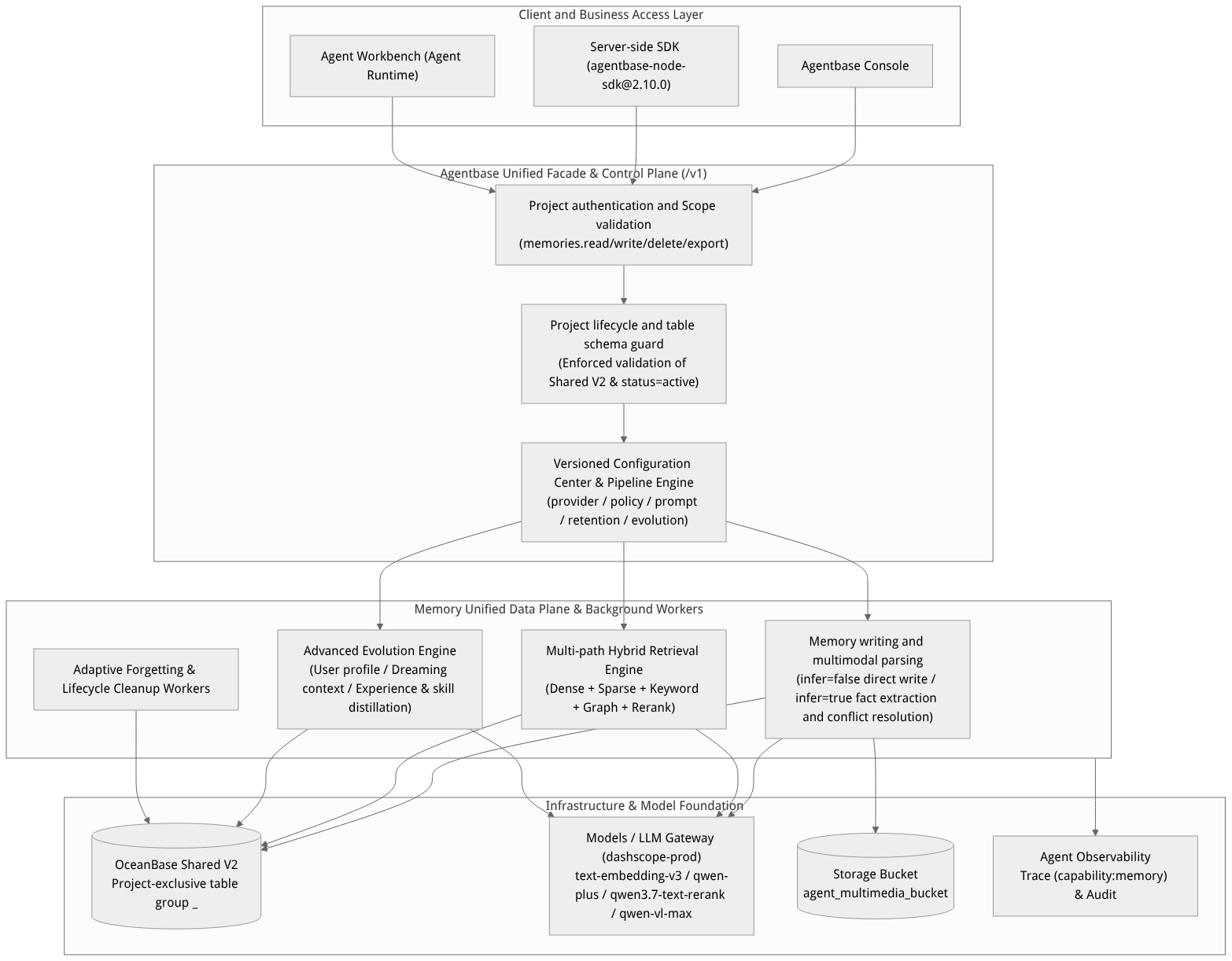
Flow diagram, not a runtime screenshot; read the relationships between steps or states along the arrows.
View the flow diagram in full size
Core Concepts
| Core concept | Identifier and example | Architectural responsibilities and key technical constraints |
|---|---|---|
| Project Memory (project memory instance) | Project enterprise-ai-hub-210 | The bearer unit for project-level quotas, model routes, database route versions (databaseRouteVersion), and lifecycle version numbers (revision). Must run in a project with the OceanBase Shared V2 table mode. |
| Memory (memory record) | mem_8f92a1c4... | A single retrievable memory unit, containing the body (content), memory type (memoryType), record kind (recordKind: fact fact, conversation conversation, action action), visibility scope (scope), and optimistic lock version number (version). |
| Source (Immutable Source) | src_7b31e0d2... | The original conversation, text, or multimodal file reference that triggers memory writes, profile updates, or knowledge distillation. Used for provenance explanations, conversation history hydration, and idempotent checkpoint recovery. |
| Profile (User Profile) | User user_zhangwei_001 | A panoramic description distilled from valid memory sources of the same user, supporting both the body view (content) and the topic view (topics), with incremental merge and full replacement. |
| Context & Dreaming (Layered Context) | L2 Topic / Episode / State, L3 Overview | The background Dreaming task asynchronously scans changed memories and aggregates them into L2 topics/events/states and an L3 global overview, supporting Progressive Retrieval and manual confirmation. |
| Experience & Skill | dst_3e5b09f456c5d5c332507ec1dbe3eb6d | Reusable troubleshooting experience (Experience) and standardized operating procedures (Skill) distilled from customer support troubleshooting conversations or tool call traces, supporting shadow -> active state transitions and secondary confirmation. |
| Pipeline (Business Processing Pipeline) | New memory / profile / experience & skill / forgetting | A versioned pipeline configuration that fixes the order of processing steps, supporting node-level Prompt and model routing overrides, draft saving, Dry-run sample testing, and one-click publishing. |
Project Memory Lifecycle State Machine
The project Memory manages state transitions through the control plane interface /v1/projects/{projectId}/memory and strictly follows optimistic concurrency control (expectedRevision):
| State value | Console display name | State description and allowed operations |
|---|---|---|
null (Not Enabled) | Memory not enabled | The project has not yet initialized Memory; the API returns HTTP 200 and project: null. A project administrator can click Enable Memory to launch the configuration wizard. |
initializing | Provisioning | The enable request has been submitted (HTTP 202), and a background Worker is idempotently creating the _<projectSequence> exclusive table group in the Shared V2 database owned by the project and validating the vector index. The page polls automatically every 1.5 seconds; if it ultimately fails, the lastError error code and stage are displayed, and you can re-enable after fixing the model configuration. |
active | Active | When project.status=active, project.schema.status=ready, and serviceHealth.status=healthy, the data plane is ready for reads and writes, and the Console opens the Memory feature tabs. |
disabled | Disabled / Suspended | The project enters this state after an administrator performs a suspend/disable (passing enabled: false via PATCH). Data plane read/write access stops immediately, but the underlying physical table data and configuration are fully retained. You can restore to active by re-invoking the enable workflow (POST), or perform a permanent deletion. |
deleting | Deleting | The project enters this state after an administrator confirms permanent deletion (DELETE). A deletion fence is established in the background and the project Memory's physical table group and artifacts are cleaned up, while project configuration drafts are retained for future re-enabling. Deletion is irreversible. |
Feature Entrypoints and Permission Matrix
Console Entry Point and Navigation
Log in to the Agentbase Console, select the target project, and click Memory in the left navigation bar (route: /console/project-{region}-{projectId}/memory). When project Memory is active, the page displays seven feature tabs and a separate Memory traces entry:
| Tab name | Internal view identifier | Core functionality | Required permission / Scope | Detailed documentation entry |
|---|---|---|---|---|
| Memories | memories | Write facts directly, extract memories asynchronously from conversations, retrieve memories in different modes, and delete individual entries. | memories.read / memories.write / memories.delete | Memory management, Multi-layer memory division |
| Profiles | profiles | Query user profiles (content / topics), trigger incremental updates, regenerate or delete profiles based on evidence. | memories.read / memories.write / memories.delete | User profile |
| Evolution | evolution | Submit execution evidence distillation by user/agent/project scope; view, edit, approve, or roll back experience and skill versions. | memories.read / memories.write / projects.write (approval) | Experience & skill knowledge distillation, Experience & skill evolution |
| Models | models | Centrally view and maintain the default model routes (Embedding, Sparse, Chat, Rerank, Vision) for the provider namespace. | projects.read / projects.write | Memory model routing |
| Governance | governance | View Dreaming watermarks and task statuses, filter layered context by L2/L3, and perform confirmation, rebuilding, and version rollback. | memories.read / memories.write / projects.write | Context governance, Multi-layer memory division |
| Configuration | configuration | Manage the four business Pipeline types (new memory, profile, experience & skill, forgetting) and 5 system configuration namespaces. | projects.read / projects.write | Memory configuration center, Memory forgetting mechanism |
| Audit | audit | Verify execution receipts and latency of write, retrieval, governance, and other requests by request ID, task ID, user ID, or operation name. | memories.read | Memory audit logs |
| Memory traces (separate entry) | traces (jump link) | Open Agent Operations → Traces with the ?tag=memory filter. | observability.traces.read | Memory trace tracking, Trace tracking |
Cross-Module Dependencies and Mutual Exclusion Rules
Hard requirement on storage table schema (
Shared V2): Memory strongly depends on the dynamic project table groups and vector index capabilities of the OceanBaseShared V2table schema. Existing projects inCollection,Shared V1, andJsonTableschemas do not support enabling Memory. If you see a table-schema-unsupported warning in the Console, go to Project Settings to check the table schema or create a newShared V2project.Dependency on model management (LLM Gateway): Before enabling Memory, you must first configure a model provider (e.g.,
dashscope-prod) in the project's LLM Gateway. After Memory initialization completes, the dense vector provider (embeddingProviderRef), model name (embeddingModel), and vector dimension (embeddingDims) in the basic configuration will be permanently locked to prevent mixing vector spaces within the same physical table.Mutual exclusion rules between Memory and PowerContext in the Agent Runtime: In the project's Agent Workbench (configuration interface
/v1/agent-runtime/project/config), long-term memory offers two options: Standalone Memory (memory_enabled) and managed PowerContext (powercontext_enabled). The two are strictly mutually exclusive and cannot be enabled at the same time (but both may be disabled at the same time):When Memory is enabled in the Agent Workbench, the system atomically switches
powercontext_enabledtofalseupon saving the configuration;When PowerContext is enabled, the system automatically atomically switches
memory_enabledtofalse;If an API request passes both
memory_enabled: trueandpowercontext_enabled: trueat the same time, the server directly rejects it and returns the400 general_argument_invalidparameter error, protecting the existing configuration from corruption.Knowledge Search (e.g., binding
kb_enterprise_supportand the lexiconlex_enterprise_synonyms) is independent of the two memory switches above and can be enabled alongside them.
Feature Details and Operation Guide
The following steps prepare a project and models, then enable Memory. Use the project, models, and permissions available in your environment.
Step One: Create or Check a Project
Sign in to the console and select an organization. To create one, see organization and account management.
Select Create project and enter a name. Set a project ID or leave it blank to generate one. Select a database pool tag according to your environment administrator's configuration, then submit.
Check the table mode in project settings. Memory requires a supported table mode; if it is unsupported, ask the environment administrator about an appropriate pool or migration.
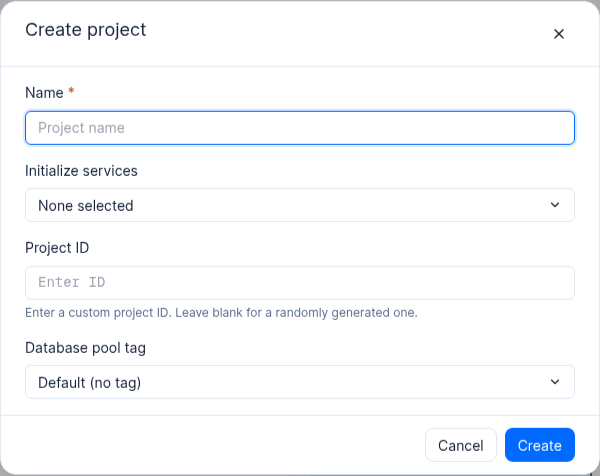
Figure: The create-project form in a 2.12.0 environment.
Step Two: Prepare Models
In the project's Models page, configure an available provider and embedding model, and check its supported output dimensions. Prepare chat, sparse embedding, and reranking models as needed. Availability and charges depend on the provider and deployment.
Step Three: Enable Project Memory
Select Memory in the project sidebar. Before it is enabled, the page shows Enable Memory. The entry and button depend on project permissions and table mode.
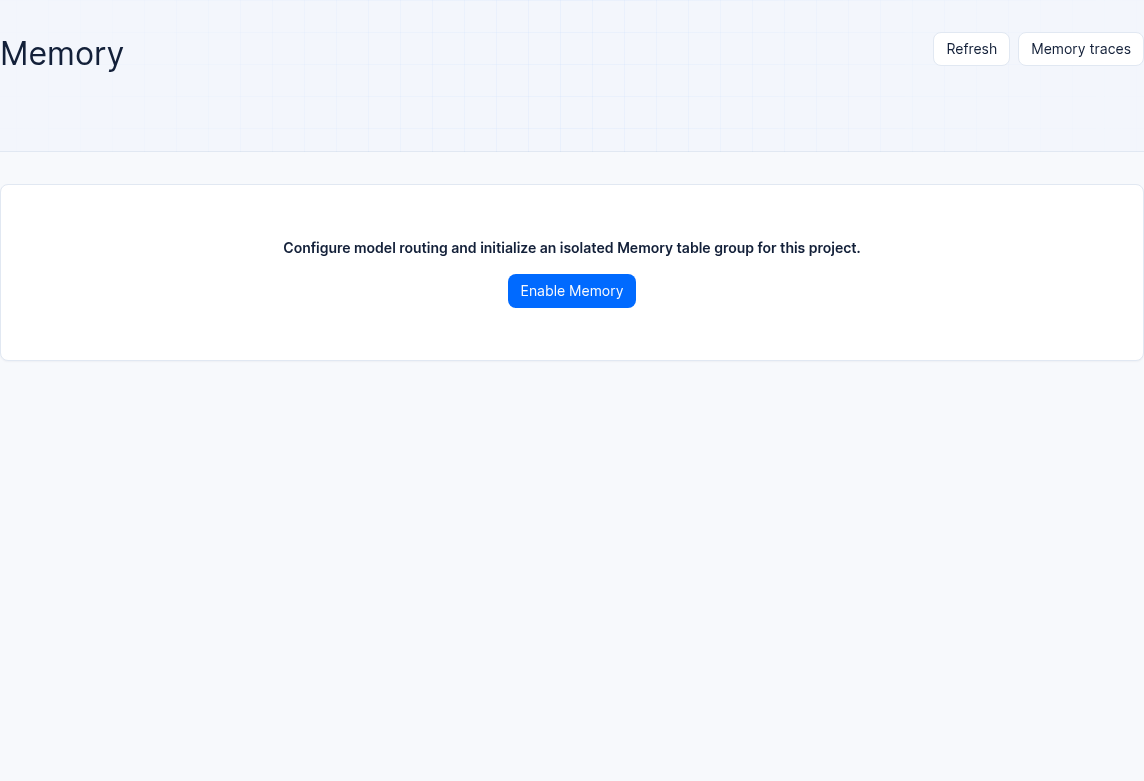
Figure: Memory is not yet enabled in a 2.12.0 test project.
Select Enable Memory. In the dialog, choose an embedding provider, model, and dimension; configure a chat model, sparse embeddings, and reranking as needed. The model and dimension must match an available provider. Check them carefully before initialization because embedding settings may become immutable. Model tests may incur charges.
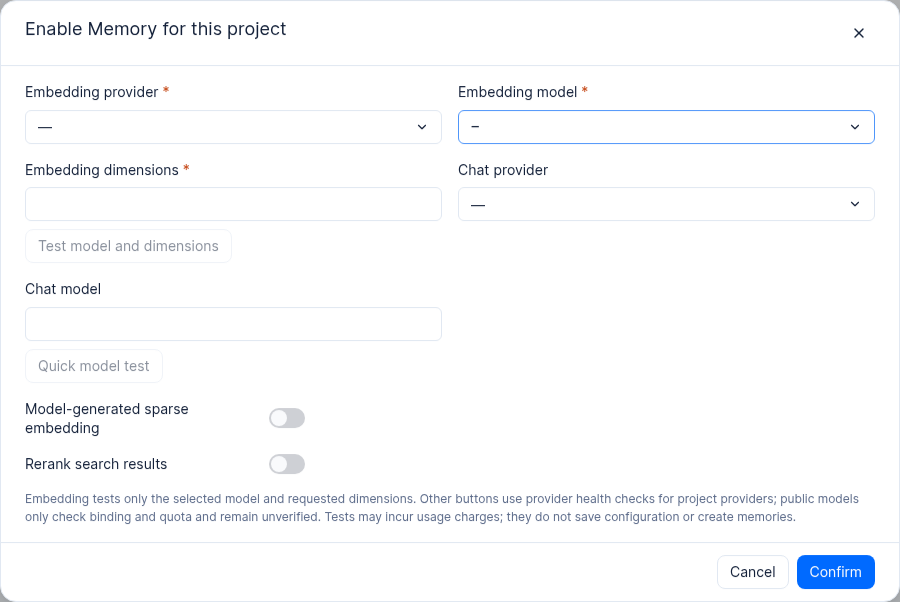
Figure: The enablement dialog before models are configured in a 2.12.0 test project.
Review the settings and select Confirm to submit and enable Memory. Wait for the initialization status to update and check the status or error message; duration depends on the environment. The separate test project below has completed initialization.
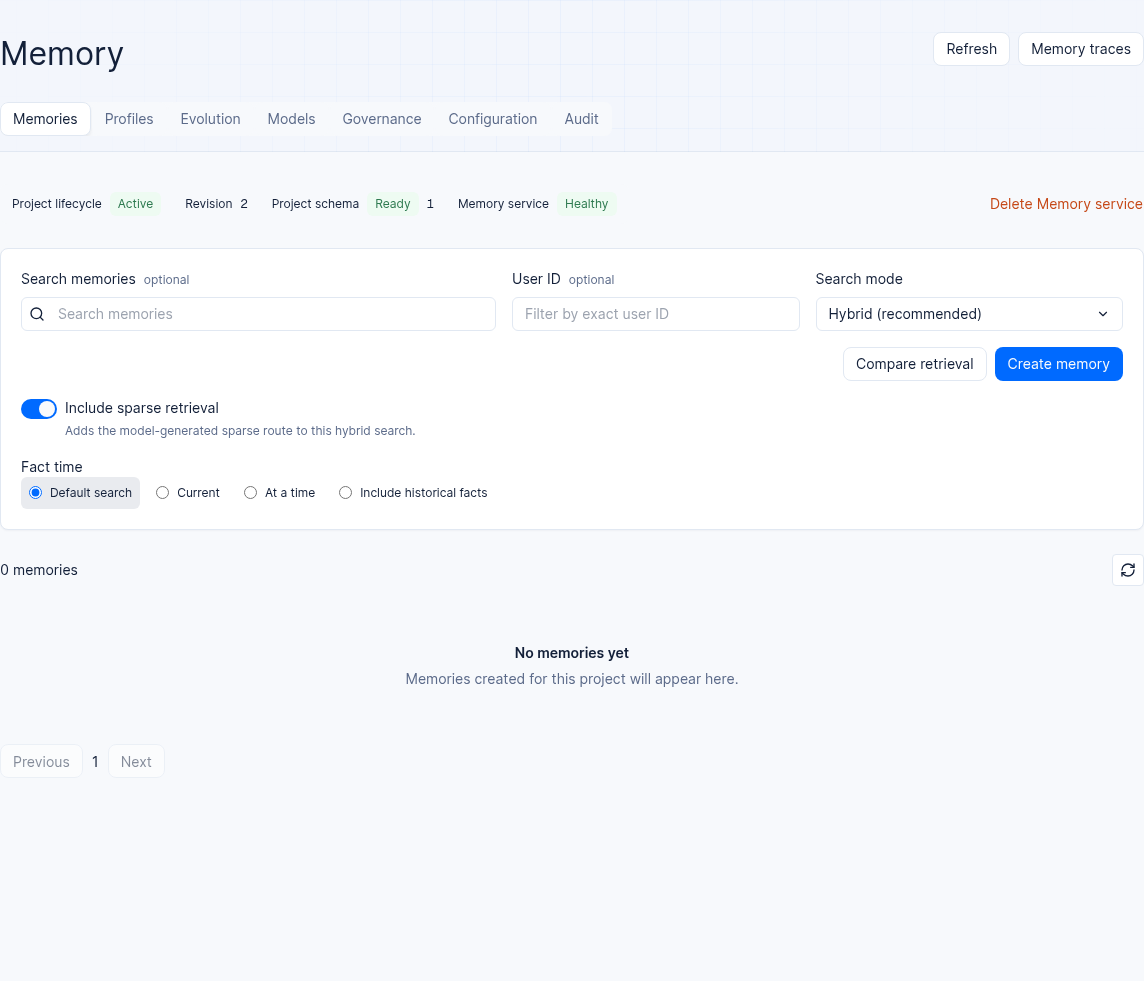
Figure: Memory is active and the project schema is ready in a 2.12.0 test project.
Step Four: Verify the lifecycle via API / SDK and write the first memory
Create a project-level server API key. The requests below need memories.read and memories.write, respectively. Replace the endpoint and project ID with your actual values; keep the key out of shell history and command arguments:
Set a unique MEMORY_IDEMPOTENCY_KEY for each new write; reuse the original key and identical request content only when retrying that write.
APPBASE_ENDPOINT="https://your-agentbase.example.com/v1"
APPBASE_PROJECT_ID="your-project-id"
read -r -s -p 'API key: ' APPBASE_API_KEY
printf '\n'

(
  set +x
  set -e -o pipefail
  : "${MEMORY_IDEMPOTENCY_KEY:?Set a unique key for this new write}"
  # 1. Verify Memory data plane health and statistics
  HEALTH_RESPONSE="$(builtin printf 'X-Appwrite-Key: %s\n' "$APPBASE_API_KEY" | \
    curl --disable --header @- -fsS -w '\n%{http_code}' \
      -H "X-Appwrite-Project: ${APPBASE_PROJECT_ID}" \
      "${APPBASE_ENDPOINT}/memory/memories/stats")"
  case "${HEALTH_RESPONSE##*$'\n'}" in
    2??) builtin printf '%s\n' "${HEALTH_RESPONSE%$'\n'*}" ;;
    *) builtin printf 'Memory health check returned a non-2xx response\n' >&2; exit 1 ;;
  esac

  # 2. Write the first architecture preference memory for VIP architect user_zhangwei_001
  builtin printf 'X-Appwrite-Key: %s\n' "$APPBASE_API_KEY" | \
    curl --disable --header @- -fsS -w '\nHTTP %{http_code}\n' -X POST "${APPBASE_ENDPOINT}/memory/memories" \
    -H "X-Appwrite-Project: ${APPBASE_PROJECT_ID}" \
    -H "Idempotency-Key: ${MEMORY_IDEMPOTENCY_KEY}" \
    -H "Content-Type: application/json" \
    --data '{
      "userId": "user_zhangwei_001",
      "scope": "user",
      "memoryType": "preference",
      "recordKind": "fact",
      "content": "张伟架构师负责核心账务集群,偏好直接给出 OceanBase 分布式事务与向量索引 SQL 排障命令,不需要基础概念解释。",
      "metadata": {
        "department": "core-banking-arch",
        "slaTier": "P0-VIP"
      },
      "infer": false
    }'
)
APPBASE_RESULT=$?
unset APPBASE_API_KEY
(exit "$APPBASE_RESULT")
Check the HTTP status and response for the write result. One successful request verifies only that operation; separately verify reads, permissions, and your actual workflows.
FAQ (Frequently Asked Questions and Troubleshooting)
1. Why does entering the Memory page in the Console prompt “the current project's table mode does not support enabling Memory”?
Cause analysis: Memory at the underlying layer needs to create 9 relational and vector tables containing vector indexes, full-text indexes, and transaction fences in the project's independent table namespace; currently only the OceanBase
Shared V2storage mode is supported. If the project was created inCollection,Shared V1, orJsonTablemode, the control plane guard will intercept the enable request.Resolution: Go to Project Settings to view the current project's
sourceTableMode. If it is not anShared V2project, we recommend creating a new project based on theShared V2resource pool (e.g.,enterprise-ai-hub-210), or contact the platform administrator to evaluate table mode conversion.
2. What to do if Memory is stuck in the initializing status or shows lastError initialization failure?
Cause analysis: The initialization process verifies model route connectivity (e.g., sending a dimension probing request to
text-embedding-v3) and creates table structures in the database. If thedashscope-prodAPI Key is invalid, the providedembeddingDimsdoes not match (e.g., mistakenly entered as1536when the model actually returns1024), or the database connection pool is momentarily busy, initialization will fail andlastError.codeandlastError.stagewill be recorded.Resolution: Do not delete or recreate the entire project. First, based on the
stageandmessagein the red error banner on the page, go to Model Gateway to correct the Provider credentials or dimension parameters, then return to the Memory page and click Re-enable (Retry Enable) in the upper-right corner; the system will incrementrevisionand idempotently complete the remaining initialization steps.
3. After enabling Memory in the Agent Workbench, why does the previously enabled PowerContext turn off automatically?
Cause analysis: The Agent Runtime's long-term memory provider adopts a single-active mutually exclusive design (
memory_enabledandpowercontext_enabledare mutually exclusive), to avoid the same Agent Run simultaneously writing duplicated content and retrieving conflicting context into two long-term memory engines.Resolution: This is expected behavior by design. If your business uses Agentbase native Memory (including the memory, profiles, Dreaming context, and experience distillation described in this document), keep
memory_enabled: trueandpowercontext_enabled: false.
4. What is the difference between temporarily disabling (Disable) and permanently deleting (Delete) project Memory?
Cause analysis: Some operations personnel worry that the disable operation will lose accumulated customer memories and profiles.
Resolution: Disable only closes the
/v1/memory/*data plane access entry (status changes todisabled); all physical tables, vector indexes, profiles, and knowledge versions are safely retained, and the service can be re-enabled at any time to recover. In contrast, Delete (permanent deletion) (status changes todeleting) asynchronously destroys all Memory physical table groups and generated artifacts under the project, and is irreversible. Before performing permanent deletion, be sure to back up core data via the export API first.
5. Can Memory use a Shared V2 database name containing hyphens?
Yes. The updated service supports registered resource pools with physical database names such as appbase-linkque-sharedv2. Names contain 1–64 ASCII characters, start with a letter or digit, and subsequently allow letters, digits, underscores, and hyphens. This compatibility fix preserves project isolation: signed routing must still match the registered pool database and project namespace.
Business users do not need to enter physical database names in Memory forms, SDK calls, or request bodies. Do not rename an existing database or change internal routing fields to bypass initialization errors. If a project using a pool with a hyphenated database name still fails initialization or is rejected, retain the project ID, time, and error stage, and ask an administrator to check the Memory service deployment version and pool registration. Model, permission, and other routing errors require their own diagnosis.