
Knowledge Base Version Management (Versions)
Version Management (Versions) is an immutable snapshot governance system in Agentbase knowledge bases for managing content changes and version switches. Through the Version Management (Versions) tab on the knowledge base detail page, teams can smoothly migrate existing non-versioned knowledge bases to versioned management (Version Adoption), create isolated editable working copies (Working Copy / DRAFT) from any ready snapshot, safely complete document additions/deletions, chunk tuning, and advanced index building inside the copy, and after passing the strict Readiness Gate check seal (Seal) it as an immutable read-only version (READY), then with one click publish (Publish) to switch it to the currently active online version, or in the event of a business anomaly roll back (Rollback) to the retained rollback target.
Feature overview and core scenarios
In an enterprise intelligent customer service production environment (e.g., kb_enterprise_support), if knowledge operations staff directly delete documents in bulk, upload unverified new documents, or trigger a lengthy full-repository reindex on a live knowledge base that is actively serving Q&A, online retrieval may suffer missing results, chunk discontinuities, or contradictory answers during the change window.
Agentbase's knowledge base version management draws on the best practices of modern cloud-native databases and software release engineering to provide the following core capabilities:
Smooth version adoption (Version Adoption,
POST /version-adoptions):For knowledge bases without version management enabled, an asynchronous adoption operation can be initiated with one click; without interrupting existing read traffic, it completely seals existing documents, chunks, vectors, and derived indexes as the first baseline immutable version (e.g.,
v1).
Asynchronous full materialization of isolated working copies (Working Copy,
POST /versions):Create a draft copy (
DRAFT) from any historical version inREADYstatus. The draft copy only becomes publicly visible after the backend asynchronously completes row-, object-, artifact-, and byte-level copying and integrity verification; edits are made in the working copy while the current version remains active.
Four-fold strict Readiness Gate (
GET /versions/{versionId}/readiness) and Seal:To seal a draft copy as a
READYsnapshot, it must pass automated Readiness checks (ensuring no unfinished tasks, all documents arereadyand need no rebuild, all enabledGraphRAG/RAPTOR/Wikiindexes are built and ready, and, when Wiki is enabled, there are no unresolved Wiki conflicts).
Optimistic-lock-protected atomic publish (Publish) and one-click rollback (Rollback):
The publish operation atomically switches the specified
READYversion to the currently active version and sets the previous active version as the rollback target; subsequent retention cleanup can remove that target.Both publish and rollback mandatorily validate the expected binding revision (Expected Binding Revision) to guard against concurrent change conflicts by multiple users.
Automatic retention policy (Retention Policy) and irreversible safe cleanup:
Supports configuring the number of historical versions to retain automatically (default retains
3), and supports launching asynchronous safe cleanup of redundant versions that are neither current nor rollback targets.
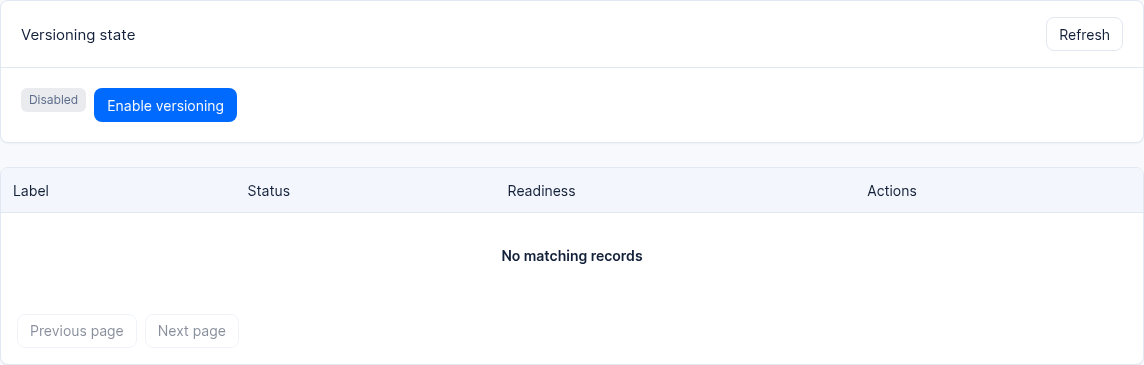
Figure: Versioning is not enabled in this 2.12.0 test knowledge base.
Core Concepts and Architecture
Knowledge Base Immutable Version Lifecycle State Machine
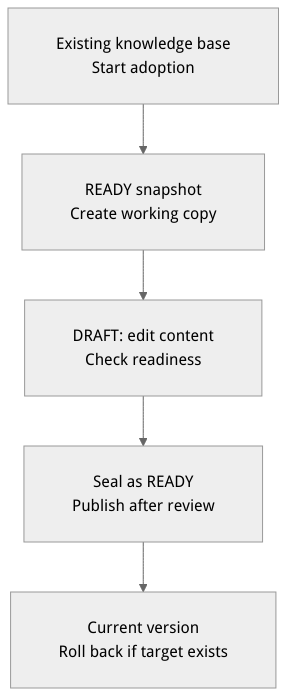
Flow diagram, not a runtime screenshot; read the relationships between steps or states along the arrows.
View the flow diagram in full size
Version Status, Roles, and Core Concepts Table
| Concept Category | Identifier Name | Detailed Meaning and Constraint Rules |
|---|---|---|
| Version status | DRAFT | Editable working copy: appears in the version list after backend copying and integrity verification pass; allows adding, deleting, and modifying documents, chunks, and derived indexes. |
| Version status | READY | Sealed read-only snapshot: an immutable version created after passing Readiness checks and executing Seal. Any write operation against a READY version is rejected. |
| Deletion state | deletionState | The deletion operation is tracked separately as REQUESTED, RUNNING, RETRYABLE_FAILED, or COMPLETED; inspect both version and deletion states. |
| Version role | Current(当前版本) | The currently active online version hit by default routing when a client calls a retrieval or Q&A endpoint without explicitly specifying a version. |
| Version role | Rollback(回滚目标) | Each time Publish publishes a new version, the system sets the previous Current version as the rollback target; retention cleanup may later remove that target. |
| Optimistic-lock revision number | bindingRevision | The incrementing revision number of the knowledge base version pointer binding. When calling Publish or Rollback, the currently observed revision number must be passed in to prevent concurrent overwrites. |
| Retention policy | versionRetentionCount | The number of previously published versions to retain (default 3, excluding the current version); eligible excess versions are processed in the background. |
Feature Entrypoints and Permission Matrix
Console Entry Points, REST API, and Permissions
| Console entrypoint / feature module | Frontend route path | Corresponding REST API endpoint | Write API Key scope | Cross-module dependency |
|---|---|---|---|---|
| Versioning adoption (Adoption) for existing knowledge bases | /console/project-default-enterprise-ai-hub-210/knowledge-base/kb-kb_enterprise_support/versions (the "Adopt Versioning" wizard) | POST /v1/knowledgebases/{kbId}/version-adoptions | knowledgebases.write | Seal existing documents, chunks, vectors and derived indexes as the first READY version |
Create a DRAFT working copy from a READY version | /console/.../kb-kb_enterprise_support/versions (click "Create working copy") | POST /v1/knowledgebases/{kbId}/versionsGET /v1/knowledgebases/{kbId}/versions | knowledgebases.write | Isolation after full materialization for document, data source, advanced index and Wiki edits |
| Readiness Gate validation and sealing (Seal) | Expand "Readiness" and "Seal" buttons in the version list | GET /v1/knowledgebases/{kbId}/versions/{versionId}/readinessPOST .../versions/{versionId}/seal | knowledgebases.write | Enforces verification that no tasks are running, all documents are ready, enabled advanced indexes are built, and, when Wiki is enabled, there are no unresolved Wiki conflicts |
| Atomic publish and one-click rollback (Rollback) | "Publish" in the version list and "Rollback" at the top | POST /v1/knowledgebases/{kbId}/versions/{versionId}/publishPOST .../versions/{versionId}/rollback | knowledgebases.write | Validates expectedBindingRevision optimistic locking and atomically switches the default version hit by live hybrid retrieval |
| Asynchronous safe cleanup of historical versions | "Delete" action on non-Current/Rollback rows in the version list | DELETE /v1/knowledgebases/{kbId}/versions/{versionId} | knowledgebases.write | The backend physically reclaims underlying vectors, chunks and knowledge graph storage in batches while retaining audit records |
Read operations such as listing versions, getting a version, and checking readiness require knowledgebases.read. Available Console actions also depend on the current project's authorization.
Feature Details and Operation Guide
Step One: Enabling versioning for an existing knowledge base: version adoption (POST /version-adoptions)
If the knowledge base was created in an earlier release or versioning governance has not yet been enabled, you will see the "Adopt Versioning" wizard card when you first open the Versions tab:
Click the Adopt Versioning (Adopt Versioning) button (or call
POST /v1/knowledgebases/{knowledgeBaseId}/version-adoptions).The system starts an asynchronous adoption operation and displays its current state. Cancellation can be attempted while both the status and phase are
queued,preflight, ordraining; otherwise follow the available controls and server response. Wait for completion and check the result; address failures using the displayed message.After adoption completes, all existing knowledge base content automatically becomes the first immutable
READYandCurrentbaseline version.
Step Two: Creating a working copy (POST /versions) and completing incremental revisions
When you need to add quarterly troubleshooting guidelines to kb_enterprise_support or adjust the chunking strategy, the standard workflow is as follows:
In the Working copies area of the Versions tab, click Create working copy (Create working copy).
Fill in the working copy creation form:
Source Version: select the baseline version currently in the
READYstate (e.g.,v1.0-baseline).Version label (Label, required and unique within the knowledge base): for example,
v2.10.0-q4-support-upgrade.Version description (Description, optional): for example,
新增 AI 网关限流规范并完成 10 篇 Wiki 页面重编译.
After clicking Create, the backend starts asynchronously copying the source version's documents, chunks, vectors and derived index artifacts, and the UI shows available copy progress:
An incomplete copy does not appear as a half-finished version in the official list. Cancellation can be requested only in
queued,preflight,copying, orvalidating; an accepted request first enterscancelling. Poll the operation and wait for cleanup. Failed cleanup dispatch may require background reconciliation.Retry only when the original operation is
failedorcancelled, the source version matches, and cleanup has completed.retryOfrefers to the original operation ID. Otherwise, continue checking its status and error details.
After copy verification completes and the copy status becomes
DRAFT, select thatDRAFTversion in the top version switcher and go to the Documents, knowledge index and Wiki tabs to complete new document ingestion and index updates.
Step Three: Checking the Readiness Gate and performing sealing (POST /versions/{versionId}/seal)
Before a DRAFT working copy is sealed as a READY snapshot, the system enforces four readiness gate checks. In the Versions tab, expand the Readiness Summary for the DRAFT version and verify that all four of the following metrics are green and passing:
| Readiness check item | Typical causes of Seal Blocked | Resolution and remediation |
|---|---|---|
1. Active task check (activeTaskCount) | The current version still has document ingestion, data source sync or index build tasks queued or running | Wait for the asynchronous tasks to finish, or manually cancel unneeded tasks |
2. Document readiness and configuration consistency (documents) | Documents in failed / processing state exist, or default chunking parameters were modified but a rebuild has not been run on existing documents | Fix failed documents and trigger Re-ingest or a full-knowledge-base Reindex, ensuring all documents are ready |
3. Derived index integrity (capabilities) | The GraphRAG, RAPTOR or Wiki switch is enabled, but the latest document changes have not finished building or the build failed | Build on the Indexes tab; confirm that the build operation is succeeded and each enabled capability is ready with an active result generation. Rebuild if it becomes stale |
4. Zero Wiki conflicts (wikiConflicts) | Wiki is enabled and the current version has unresolved cross-document Wiki knowledge conflict tickets | Go to Wiki -> Conflicts and resolve each conflict (Resolve) one by one |
When all four checks above pass (sealable = true), click the Seal button to the right of that version. The version status immediately changes from DRAFT to the immutable READY (note: sealing only freezes the snapshot and does not automatically publish it as the live current version).
Step Four: Performing atomic publish, one-click rollback (Rollback) and REST API operations
Publishing a new version (Publish):
In the version list, locate the
v2.10.0-q4-support-upgradealready in theREADYstate and click Publish.After confirming the dialog, that version immediately becomes the new Current, and retrieval requests without an explicit version use the new current version; the previous current version initially becomes the Rollback Target, subject to retention.
One-click rollback on anomaly (Rollback):
If, after a new version goes live, business feedback indicates that retrieval quality does not meet expectations, click Rollback at the top of the Versions tab; the system immediately restores the retained rollback target as the currently active version, and swaps the just-retired version in as the new rollback target.
Complete version lifecycle REST API call example:
The IDs and revisions below are illustrative. Read the latest knowledge base and version revisions before each write. Adoption and working-copy requests return 202 when accepted; query the operation until it completes. Use a distinct Idempotency-Key for each new adoption, copy, or seal operation and reuse it for retries of the same request.
Set APPBASE_ENDPOINT to the target environment API endpoint (including /v1) and confirm the project and credentials belong to that environment.
Adopt versioning first.
(
  set +x
  set -o pipefail
  : "${APPBASE_API_KEY:?Set API key}"
: "${APPBASE_ENDPOINT:?Set APPBASE_ENDPOINT to the target API endpoint including /v1}"
APPBASE_ENDPOINT="${APPBASE_ENDPOINT%/}"
builtin printf 'X-Appwrite-Key: %s\n' "$APPBASE_API_KEY" | curl --disable --header @- -X POST "${APPBASE_ENDPOINT}/knowledgebases/kb_enterprise_support/version-adoptions" \
  -H "X-Appwrite-Project: enterprise-ai-hub-210" \
  -H "Idempotency-Key: example-adoption-001" \
  -H "Content-Type: application/json" \
  -d '{"expectedBindingRevision": 0}'
)
After adoption completes, read the current binding revision before creating a working copy.
(
  set +x
  set -o pipefail
  : "${APPBASE_API_KEY:?Set API key}"
: "${APPBASE_ENDPOINT:?Set APPBASE_ENDPOINT to the target API endpoint including /v1}"
APPBASE_ENDPOINT="${APPBASE_ENDPOINT%/}"
builtin printf 'X-Appwrite-Key: %s\n' "$APPBASE_API_KEY" | curl --disable --header @- -X POST "${APPBASE_ENDPOINT}/knowledgebases/kb_enterprise_support/versions" \
  -H "X-Appwrite-Project: enterprise-ai-hub-210" \
  -H "Idempotency-Key: example-copy-001" \
  -H "Content-Type: application/json" \
  -d '{"sourceVersionId": "ver_baseline_001", "expectedSourceVersionRevision": 1, "expectedBindingRevision": 1, "label": "support-update"}'
)
After the working-copy operation completes, check readiness using its returned version ID.
(
  set +x
  set -o pipefail
  : "${APPBASE_API_KEY:?Set API key}"
: "${APPBASE_ENDPOINT:?Set APPBASE_ENDPOINT to the target API endpoint including /v1}"
APPBASE_ENDPOINT="${APPBASE_ENDPOINT%/}"
builtin printf 'X-Appwrite-Key: %s\n' "$APPBASE_API_KEY" | curl --disable --header @- -X GET "${APPBASE_ENDPOINT}/knowledgebases/kb_enterprise_support/versions/ver_draft_002/readiness" \
  -H "X-Appwrite-Project: enterprise-ai-hub-210"
)
After readiness passes, read the latest revisions before sealing.
(
  set +x
  set -o pipefail
  : "${APPBASE_API_KEY:?Set API key}"
: "${APPBASE_ENDPOINT:?Set APPBASE_ENDPOINT to the target API endpoint including /v1}"
APPBASE_ENDPOINT="${APPBASE_ENDPOINT%/}"
builtin printf 'X-Appwrite-Key: %s\n' "$APPBASE_API_KEY" | curl --disable --header @- -X POST "${APPBASE_ENDPOINT}/knowledgebases/kb_enterprise_support/versions/ver_draft_002/seal" \
  -H "X-Appwrite-Project: enterprise-ai-hub-210" \
  -H "Idempotency-Key: example-seal-001" \
  -H "Content-Type: application/json" \
  -d '{"expectedDefinitionRevision": 1, "expectedVersionRevision": 1}'
)
After confirming the version is sealed, read current revisions and publish only when intended.
(
  set +x
  set -o pipefail
  : "${APPBASE_API_KEY:?Set API key}"
: "${APPBASE_ENDPOINT:?Set APPBASE_ENDPOINT to the target API endpoint including /v1}"
APPBASE_ENDPOINT="${APPBASE_ENDPOINT%/}"
builtin printf 'X-Appwrite-Key: %s\n' "$APPBASE_API_KEY" | curl --disable --header @- -X POST "${APPBASE_ENDPOINT}/knowledgebases/kb_enterprise_support/versions/ver_draft_002/publish" \
  -H "X-Appwrite-Project: enterprise-ai-hub-210" \
  -H "Content-Type: application/json" \
  -d '{"expectedBindingRevision": 1, "expectedVersionRevision": 2}'
)
Only when rollback is needed, read the latest revisions and rollback target before running this step.
(
  set +x
  set -o pipefail
  : "${APPBASE_API_KEY:?Set API key}"
: "${APPBASE_ENDPOINT:?Set APPBASE_ENDPOINT to the target API endpoint including /v1}"
APPBASE_ENDPOINT="${APPBASE_ENDPOINT%/}"
builtin printf 'X-Appwrite-Key: %s\n' "$APPBASE_API_KEY" | curl --disable --header @- -X POST "${APPBASE_ENDPOINT}/knowledgebases/kb_enterprise_support/versions/ver_baseline_001/rollback" \
  -H "X-Appwrite-Project: enterprise-ai-hub-210" \
  -H "Content-Type: application/json" \
  -d '{"expectedBindingRevision": 2, "expectedVersionRevision": 2}'
)
Lifecycle
A version passes through the following stages in its lifecycle:
| Stage | Meaning |
|---|---|
| DRAFT | Working copy: an editable draft version; it appears in the version list only after the backend copy and verification pass |
| READY | Sealed read-only snapshot: can be published or used as a rollback target |
| Current | New version resolution requests use this version by default |
| Rollback Target (Rollback) | The previous current version automatically retained at publish time, used for one-click rollback |
A DRAFT becomes READY via sealing; a READY becomes the current version via publishing; rollback restores the retained rollback target as the current version.
State relationship diagram (not a Console screenshot):
DRAFT ── Seal(Readiness 通过)──> READY ── Publish──> Current
                                           │                 │
                                           │                 └─ 下一个 READY 发布后
                                           │                    保留为 Rollback target
                                           └─ 仍是只读快照

Rollback target ── Rollback──> Current
To safely publish new content, first create a working copy from a READY source version, complete edits and readiness checks in DRAFT, then seal it as READY. Sealing does not automatically change the live Current; confirm the version content before executing Publish.
Working copies
In the Working copies area, click Create working copy, select a READY source version and fill in the label (required) and description (optional). Copying happens in the background, and the tab shows available copy progress; the DRAFT becomes visible only after verification succeeds, without affecting the currently active version. Cancellation can be requested only in queued, preflight, copying, or validating. An accepted request enters cancelling; poll it and wait for cleanup. Retry only after the original operation is failed or cancelled, the source version matches, and cleanup has completed (retryOf identifies the original operation).
Readiness sealing (Seal)
A DRAFT must pass readiness checks before it can be set to READY. The tab shows the Readiness summary and blocking reasons for each version: unfinished active tasks, documents not ready or requiring rebuilds under the current configuration, enabled index capabilities pending rebuild or failed builds, and unresolved Wiki conflicts when Wiki is enabled all block sealing. After sealing succeeds, the version becomes a read-only snapshot and is not automatically published.
Publish and rollback
Publish: switches a READY version to the currently active version; subsequent version resolution requests use the new current version, and the previous current version initially becomes the rollback target, subject to retention cleanup.
Rollback: restores the retained rollback target as the current version; the original current version becomes the new rollback target. You cannot designate an arbitrary historical version as the rollback target.
Version deletion
Only versions that are neither current nor in the rollback role can be deleted. Deletion is an irreversible asynchronous operation: once the request is accepted, the version becomes immediately inaccessible, and the backend cleans up data in batches; the tab shows the deletion operation status (queued, deleting, needs attention, data purged), and progress can be queried. Versions whose cleanup fails remain inaccessible, and deletion can be retried. After deletion completes, the version record is retained as an audit trail; the data is purged and cannot be recovered.
Retention policy
The auto-retention setting controls how many previously published versions to retain (default 3, excluding the current version). Eligible excess versions are processed in the background; this does not mean all READY drafts are automatically deleted. Setting the count to 0 retains only the current published version; background cleanup may clear the rollback target, so it may no longer be available for rollback.
Usage boundaries
Publish and rollback require that the expected bound revision number submitted matches the current one; concurrent version status changes by others will be rejected — refresh the page to see the latest status and retry.
Deleted versions cannot be recovered: once a version enters the deletion process it is inaccessible, and after the data is purged it cannot be retrieved.
The version list only shows committed versions; working copies still undergoing copy verification will not appear as half-finished DRAFTs.
Labels must be unique; creating a working copy with an identical label will be rejected.
FAQ (Frequently Asked Questions and Troubleshooting)
Q1: What should I do when clicking "Publish" or "Rollback" reports a revision conflict (Revision Mismatch / 409 Conflict)?
Root cause analysis: Publish and rollback operations are protected by
expectedBindingRevisionoptimistic locking. After you open the page, if another administrator on your team has just published or rolled back a version, the server-side current bound revision number has incremented, and your stale page request will be safely rejected to prevent accidental overwrites.Resolution: Simply refresh the current page (or read the knowledge base and version details separately) to fetch the latest
bindingRevisionandversionRevision, confirm everything is correct, and then execute the publish or rollback operation again.
Q2: Why can't I directly select any earlier historical version in the list and click "Rollback"?
Root cause analysis: To ensure determinism and extremely fast convergence of the production emergency rollback path, Agentbase specifies that the rollback operation only targets the single "Rollback Target" version automatically retained at release time (i.e., the immediately preceding
Currentversion).Resolution: If you want to switch the live environment back to an earlier historical
READYversion (rather than the current Rollback Target), you simply need to publish (Publish) that historicalREADYversion directly (POST .../versions/{versionId}/publish), which atomically sets it as the currently active version.
Q3: After deleting a historical version, can the document chunk data inside it be recovered?
Root cause analysis: Version deletion is an irreversible asynchronous physical cleanup operation (it can only be initiated on versions that are neither
CurrentnorRollbackroles). Once the request is accepted, the version immediately becomes inaccessible, and a background Worker physically purges its associated underlying chunks, vectors, and derived index data in batches.Resolution: After cleanup completes, the list retains only a lightweight audit record marked "Data Cleaned" (deletion operation status
completed); the data itself cannot be recovered. Before deleting a critical milestone version, please confirm it is no longer needed as a working copy base.
Related Documentation
External data source integration and incremental sync with Yuque
GraphRAG, RAPTOR, and Advanced Knowledge Index Build Governance
Knowledge Graph Visualization Exploration and Community Reports
Knowledge Base Wiki Compilation, Conflict Adjudication, and Memory Export
Project-level lexicons and retrieval/knowledge graph/agent collaborative governance
Knowledge Base Settings Hub, Default Policies, and Multimodal Image Understanding (VLM)