
Agent Workbench (Agent Runtime) Overview, Architecture, and Quick Enablement
The project workbench knowledge-base selection guidance has been checked against the 2.12.0 release code; other operations depend on the deployed environment.
The Agent Workbench (Agent Runtime / Agent Workbench) is the project-level managed agent runtime and debugging hub provided by Agentbase. Unlike the underlying LLM inference API that only completes a single text completion, Agent Runtime fully takes over the agent's multi-turn ReAct (Reasoning + Acting) reasoning-execution loop within a project space (e.g., 企业智能客服与知识中台, ID: enterprise-ai-hub-210) — from parsing user intent, retrieving cross-session long-term Memory or persistent context (PowerContext), searching enterprise knowledge base evidence (Knowledge Base), calling unified AI Gateway / MCP server-side tools or pausing to await Client Tool callbacks, to pushing reasoning and answer deltas in real time via a resumable AG-UI SSE event stream, and fully persisting session messages, tool call facts, and per-step model consumption.
Feature Overview
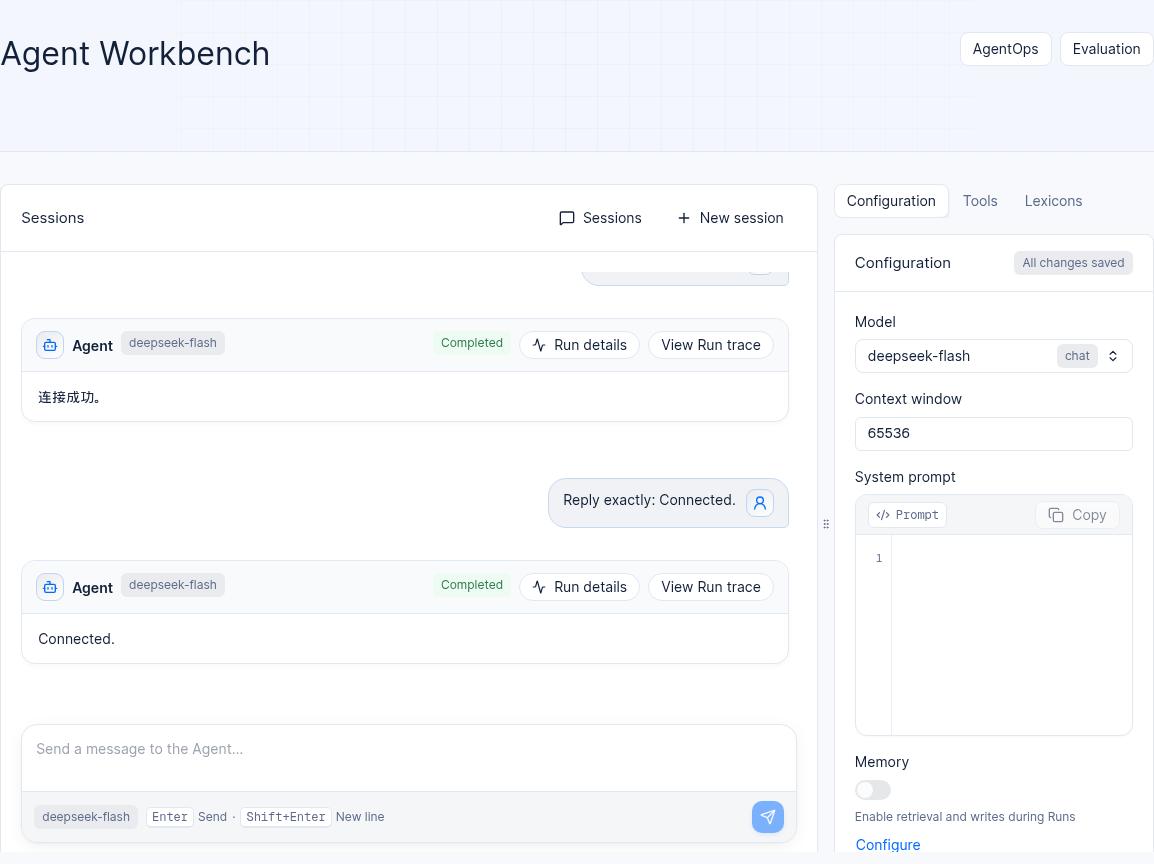
Figure: An example conversation with Chinese content in a 2.12.0 test project. Actual models and messages depend on your project.
When deploying intelligent customer service, troubleshooting expert assistants, and business automation agents in enterprises, relying solely on the underlying Chat Completions API forces engineering teams to assemble in their business backend the multi-turn session state table, prompt history truncation and summary compression, RAG retrieval tool injection, concurrent multi-tool scheduling, SSE reconnect cursor caching, and exception-cancel state machines. Once concurrency rises or tool latency fluctuates, problems such as context-limit errors, duplicate tool executions, or lost answers after browser refresh easily occur.
The Agentbase Agent Workbench (Agent Runtime) provides these runtime mechanisms within each project, while providing a visual three-pane Console workbench and project-level HTTP APIs (/v1/agent-runtime/project/*), helping R&D and knowledge operations teams achieve "no-code assembly and debugging, one-line production integration" within a single project:
Managed multi-step ReAct reasoning and tool orchestration loop:
Within a single run (
Run), the Runtime automatically drives the LLM to loop through "understand the question → select and call a tool → read the tool result → continue reasoning" until it generates the final answer, pauses to await a client tool result (WAITING_CLIENT_TOOL), or hits the configured maximum step count (max_steps) and maximum execution duration (max_duration_ms) boundaries.A single model output supports concurrently requesting multiple tools; the Runtime uses the unique
toolCallIdto precisely correlate input parameters, execution status, and returned results.
Project-level full-stack AI capabilities with on-demand hot assembly:
Zero-barrier basic conversation startup: without pre-enabling long-term Memory or PowerContext, you only need to configure an available chat model (e.g.,
qwen-plusunderdashscope-prod) in the project's Models (LLM Gateway) to initialize the workbench and start multi-turn streaming conversations.Enterprise-grade optional integrations: as your business evolves, check to attach at any time enterprise knowledge bases (up to 10 selected in the console), project-level intervention lexicons (Lexicons, supporting synonym rewriting and
stopInterceptstopword zero-token blocking), long-term Memory or persistent context (PowerContext; the two are strictly either-or and mutually exclusive), AI Gateway / MCP business tools, and Skill description packages.
Resumable asynchronous runs and bounded SSE event streams:
Task submission (
POST /v1/agent-runtime/project/runs) uses asynchronous acceptance semantics (returning HTTP202 Accepted); closing a browser tab or a mobile network blip does not interrupt the task executing in the background.Real-time deltas use the standard AG-UI SSE protocol (
GET .../runs/{runId}/events), supportingLast-Event-IDcheckpoint resume and idempotent deduplication; after task completion, all user questions, model answers, tool calls, and tool results are persisted as message records with incrementing sequence numbers (message_seq).
A single project API Key carrying multi-tenant business user isolation (
userId):The business backend only needs to hold a project API Key with the
agent-runtime.projectpermission scope (Scope); by explicitly passing the target business user'suserIdin the request (e.g.,user_zhangwei_001,user_lina_002), it can isolate session lists (Threads), run statuses (Runs), and long-term memory context for thousands of external end customers under the same project, without pre-creating Agentbase Console accounts for each external business user.
Core Concepts and Architecture
Core Object Hierarchy and Responsibility Matrix
Agent Runtime builds a complete data model around the five-layer core objects Project → Config → Thread → Run → Message plus the Tool / Skill extension entities:
| Core object | Unique identifier and key status fields | Ownership granularity | Architecture responsibilities and engineering constraint notes |
|---|---|---|---|
| Project | projectId (e.g., enterprise-ai-hub-210)Initialization status: initialized: true/false | Project-level | The physical security boundary for Runtime configuration, model catalog, knowledge bases, lexicons, AI Gateway, and Skill packages. First use requires idempotent initialization (POST /v1/agent-runtime/project). |
| Run configuration (Config) | config_hash (read-only snapshot hash)Contains model_id, system_prompt, etc. | Shared at project level | Defines the agent's main chat model, sampling parameters, context window budget, maximum reasoning steps/duration, and knowledge base and Memory/PowerContext switches. A Run locks in the effective configuration at the moment of acceptance; subsequent configuration changes only apply to newly initiated Runs. |
| Session (Thread) | thread_idStatus: ACTIVE (active), ARCHIVED (archived) | Business user level (bound to userId) | Carries a continuous multi-turn exchange for the same business user, organizing the historical messages of multiple Runs in chronological order. Archiving a session (DELETE /threads/{threadId}) only hides the session itself and does not delete the user's long-term Memory or PowerContext. |
| Run | run_idStatus: SUBMITTING → QUEUED → RUNNING ↔ WAITING_CLIENT_TOOL → SUCCEEDED / FAILED / CANCELLED | Thread-scoped (bound to thread_id + userId) | An asynchronous ReAct task execution triggered by a single user message.At most one unfinished Run may exist on the same Thread at any given time (concurrent submissions return 409 THREAD_BUSY). |
| Message | message_id + incrementing sequence number within the thread message_seqTypes: USER, ASSISTANT, TOOL_CALL, TOOL_RESULT | Thread / Run level | Persistently stored user input, model final answers, tool call requests, and tool return results. Supports stable incremental fetching via the after={message_seq} cursor, used for history reconstruction and Citations rendering. |
| Tool & Skill | gateway_id + toolCallIdskill_id + skill_catalog_hash | Shared at project level | Tool is provided by the bound AI Gateway (including server-side execution tools and toolCallSource="CLIENT" client-side tools); Skill is an uploaded .zip/.tar.gz task specification package (containing SKILL.md) that the model consults on demand during inference. |
Roles, Entry Points, and Relationships
1. Console navigation path and three-column workbench layout
Log in to the Agentbase Console, switch at the top to organization Agentbase 企业智能中台 (69c6d1aa00062e6bb60) and project 企业智能客服与知识中台 (enterprise-ai-hub-210, Shared V2 mode), then click Agent Workbench under the AI section in the left navigation bar to enter the precise route:
Project workbench main route:
/console/project-default-enterprise-ai-hub-210/agent-runtime
After initialization, the agent workbench adopts a high-density three-column engineering layout:
Left column (Threads Sidebar): The top provides a New Thread (
+) button, and below it, the list of active threads under the current debugging identity (ACTIVE) is displayed in descending order of most recent update, supporting one-click switching to historical threads or archiving and cleaning up test threads that are no longer in use.Middle column (multi-turn conversation and ReAct execution timeline canvas): Displays user questions, an expandable Execution Timeline panel (containing model thinking snippets, knowledge base retrieval calls, Gateway/Client tool parameters and results, and automatic context compaction markers), streaming Markdown answers, expandable Knowledge Sources citation cards at the bottom, and the associated Trace jump entry. When a task is running, an explicit Stop/Cancel button is provided next to the bottom input box.
Right column (real-time auto-save Configuration Panel): Centrally configure the main conversation model (
model_id), temperature and nucleus sampling parameters (temperature/top_p), system prompt (system_prompt), context window and output reserve budget (context_window_tokens/reserved_output_tokens), maximum steps and timeout limits (max_steps/max_duration_ms), as well as Knowledge Search, long-term context (Memory / PowerContext, choose one), Lexicons, AI Gateway tool gateway and Skills packages. All configuration changes are auto-saved via optimistic locking, and the top of the panel displays the All changes saved status badge in real time.
2. Permission matrix and userId multi-tenant data isolation contract
| Access channel | Authentication credentials and permission requirements | userId Passing rules and isolation boundaries | Applicable scenarios |
|---|---|---|---|
| Console browser workbench | Developer login session cookie Organization roles: owner, admin, developer, editor; a billing or analyst role alone cannot access the workbench. Additional roles or platform administrator privileges depend on the actual authorization | Automatically binds the currently logged-in developer identity; used only for interactive assembly and conversation validation within the Console.Strictly forbidden to embed the Console cookie in external customer applications. | Prompt tuning, RAG retrieval validation, tool integration testing, and fault reproduction |
| Server-side HTTP API (project shared configuration plane) | Header: X-Appwrite-Project + X-Appwrite-KeyRequired Scope: agent-runtime.project | No need to pass userId (covering /project status and initialization, /config, /models, /lexicons, /gateway, /skills — project-level endpoints). | Automated CI/CD deployment of agent configuration, batch synchronization of lexicons, and uploading of Skill packages |
| Server-side HTTP API (user thread and run data plane) | Header: X-Appwrite-Project + X-Appwrite-KeyRequired Scope: agent-runtime.project | Every request must include userId: • POST requests place it in the JSON body (e.g., {"userId": "user_zhangwei_001", ...}) • GET / DELETE requests place it in the URL Query parameters (e.g., ?userId=user_zhangwei_001) | Enterprise business backends create threads, initiate Q&A, and subscribe to SSE event streams on behalf of different end customers (e.g., Zhang Wei, Li Na) |
userIdFormat and security requirements:
Character set and length:
userIdmust be a string composed of 1–128 ASCII letters, digits, or underscores (regex:^[A-Za-z0-9_]{1,128}$), and the field name is fixed as camelCaseuserId(user_id, numeric types, empty strings, or whitespace characters are not accepted).Case-insensitivity and automatic normalization: The server uniformly normalizes the incoming
userIdto lowercase for storage and comparison (e.g.,"User_ZhangWei_001"and"user_zhangwei_001"point to the same business user space). The reserved wordsystem(in any casing) is forbidden for business use.Strict ownership validation: Once a
thread_idorrun_idis created byuser_zhangwei_001, subsequent queries, SSE subscriptions, cancellations, tool result callbacks, and archival operations on that resource must pass the sameuserId. If a differentuser_lina_002is used to access Zhang Wei's thread, the server will directly reject it as resource not visible (HTTP404 NOT_FOUND); cross-tenant privilege escalation or ownership tampering never occurs.
3. Five thematic handbook navigation matrix
This handbook breaks down the full production capabilities of the agent workbench into five cohesive thematic chapters, which readers can read in order of development stage:
| Thematic chapter | Document link | Core coverage | Key REST API endpoints |
|---|---|---|---|
| 1. Overview, architecture, and quick enablement (this article) | overview.md | ReAct execution principles, five-layer object model, userId isolation contract, one-click initialization, and end-to-end quick start | GET/POST /v1/agent-runtime/projectGET /models · PATCH /configPOST /threads · POST /runs |
| 2. Model, prompt, context compaction, and lexicon interception | configuration.md | Model and sampling parameters, optimistic auto-save of the system prompt, context window budget, automatic context compaction, and project lexicon stopIntercept interception | GET/PATCH /v1/agent-runtime/project/configGET .../context-compactionsGET/PUT /v1/agent-runtime/project/lexicons |
| 3. Multi-turn threads, asynchronous runs, and resumable SSE event streams | threads-runs.md | Thread lifecycle and message_seq pagination, Run state machine and idempotency keys, full AG-UI SSE event protocol, Last-Event-ID resumable streaming and model call auditing | POST/GET/DELETE .../threadsPOST/GET .../runs · POST .../cancelGET .../events · GET .../model-invocations |
| 4. Enterprise knowledge base retrieval, long-term memory, and PowerContext | knowledge-memory.md | Selecting 1–10 knowledge bases in the console and tracing citations, enabling long-term Memory or PowerContext persistent context and task handoff, and the mutually exclusive either-or contract | PATCH /v1/agent-runtime/project/config( knowledge_search_enabled / memory_enabled / powercontext_enabled) |
| 5. Business tool gateway, client tools, and Skills packages | tools-skills.md | AI Gateway / MCP server-side tool binding, Client Tool 5-step pause-and-callback protocol, Skill archive upload management, Trace diagnostics, and Dataset RAG quality evaluation | GET/PUT .../gatewayPOST .../runs/{runId}/tool-messagesGET/POST/PUT/DELETE .../skills |
Feature Details and Operation Guide
This section uses the example project 企业智能客服与知识中台 (enterprise-ai-hub-210) as an example to demonstrate how to complete, from scratch, the agent workbench service initialization, base model assembly, the first multi-turn conversation, and server-side API closed-loop validation.
Step 1: Check prerequisites and initialize the project agent workbench
1. Prerequisites confirmation
Project
enterprise-ai-hub-210has registered an available model providerdashscope-prodin the left navigation Models (/llm-gateway), and imported a modelqwen-pluswithchatcapability (see LLM Gateway Model Management).If operating via a server-side script, a project API Key with the
agent-runtime.projectScope checked must already have been created in Overview → Integrations → API keys:: "${APPBASE_ENDPOINT:?Set endpoint including /v1}" : "${APPBASE_PROJECT_ID:?Set project ID}" : "${APPBASE_API_KEY:?Set API key}" export APPBASE_ENDPOINT APPBASE_PROJECT_ID APPBASE_API_KEY
2. One-click Console and API initialization (GET / POST /v1/agent-runtime/project)
Console operations: Navigate to
/console/project-default-enterprise-ai-hub-210/agent-runtime. If the agent workbench is being opened for the first time in the current project (statusinitialized: false), the page will display an initialization guide card in the center. Click the Initialize / Enable Agent Workbench button, and the system will complete project runtime metadata initialization within seconds and expand the three-column workbench.Server-side
curlvalidation and idempotent initialization:( set +x set -o pipefail : "${APPBASE_API_KEY:?Set APPBASE_API_KEY}" # 1. Query whether the project Agent Runtime has been initialized (no userId required) builtin printf 'X-Appwrite-Key: %s\n' "$APPBASE_API_KEY" | curl --disable -fsS -i -X GET "${APPBASE_ENDPOINT}/agent-runtime/project" \ -H "X-Appwrite-Project: ${APPBASE_PROJECT_ID}" \ --header @- )If the return is
{"initialized": false}, execute the followingPOSTrequest to complete initialization (repeated calls remain idempotent and will not clear existing configuration or thread data):( set +x set -o pipefail : "${APPBASE_API_KEY:?Set APPBASE_API_KEY}" # 2. Explicitly initialize the project's Agent Runtime service builtin printf 'X-Appwrite-Key: %s\n' "$APPBASE_API_KEY" | curl --disable -fsS -i -X POST "${APPBASE_ENDPOINT}/agent-runtime/project" \ -H "X-Appwrite-Project: ${APPBASE_PROJECT_ID}" \ --header @- \ -H "Content-Type: application/json" \ -d '{}' )Expected success response (HTTP
200 OK):{ "initialized": true }
Step 2: Query available models and save the base run configuration
After initialization, you need to bind a conversation model to the workbench and set reasonable context window and execution limits. For first-time onboarding, it is recommended to first disable the optional Memory, PowerContext, and Knowledge Search, verify basic pipeline connectivity with pure model conversation, then enable enhanced capabilities item by item as needed.
Query the list of models available for agent conversation within the project (
GET /v1/agent-runtime/project/models):( set +x set -o pipefail : "${APPBASE_API_KEY:?Set APPBASE_API_KEY}" builtin printf 'X-Appwrite-Key: %s\n' "$APPBASE_API_KEY" | curl --disable -fsS -i -X GET "${APPBASE_ENDPOINT}/agent-runtime/project/models" \ -H "X-Appwrite-Project: ${APPBASE_PROJECT_ID}" \ --header @- )Expected response (HTTP
200 OK):{ "models": [ { "model_id": "qwen-plus", "capabilities": ["chat"] }, { "model_id": "qwen-turbo", "capabilities": ["chat"] }, { "model_id": "text-embedding-v3", "capabilities": ["embedding"] } ] }Save the project-level run configuration (
PATCH /v1/agent-runtime/project/config): In the Console's right-side configuration panel, select modelqwen-plus, fill in the system prompt and set window parameters (the panel automatically triggers saving and shows "All changes saved"); or write directly via the API:( set +x set -o pipefail : "${APPBASE_API_KEY:?Set APPBASE_API_KEY}" builtin printf 'X-Appwrite-Key: %s\n' "$APPBASE_API_KEY" | curl --disable -fsS -i -X PATCH "${APPBASE_ENDPOINT}/agent-runtime/project/config" \ -H "X-Appwrite-Project: ${APPBASE_PROJECT_ID}" \ --header @- \ -H "Content-Type: application/json" \ -d '{ "system_prompt": "你是 Agentbase 企业智能客服与技术支持专家。请使用清晰、准确、结构化的中文回答用户的技术架构与运维排障问题。", "model_id": "qwen-plus", "model_parameters": { "temperature": 0.3, "top_p": 0.9 }, "context_window_tokens": 65536, "reserved_output_tokens": 4096, "max_steps": 16, "max_duration_ms": 180000, "memory_enabled": false, "powercontext_enabled": false, "knowledge_search_enabled": false }' )Expected response (HTTP
200 OK): returns the completeConfigobject along with the newly generated read-only snapshot identifier"config_hash": "cfg_9f8e7d6c5b4a3210".
Step 3: Create a thread for the business user and submit an asynchronous Run
When the enterprise customer service portal backend receives an inquiry from end customer Zhang Wei (user_zhangwei_001), create the thread and submit the question using the following standard sequence:
Create a new thread for business user
user_zhangwei_001(POST /v1/agent-runtime/project/threads):( set +x set -o pipefail : "${APPBASE_API_KEY:?Set APPBASE_API_KEY}" builtin printf 'X-Appwrite-Key: %s\n' "$APPBASE_API_KEY" | curl --disable -fsS -i -X POST "${APPBASE_ENDPOINT}/agent-runtime/project/threads" \ -H "X-Appwrite-Project: ${APPBASE_PROJECT_ID}" \ --header @- \ -H "Content-Type: application/json" \ -d '{ "userId": "user_zhangwei_001" }' )Expected response (HTTP
201 Created):{ "thread_id": "thd_01j8x9k2m4n6p8q0r2s4t6u8v0", "title": null, "status": "ACTIVE" }Submit the user question to that thread and start an asynchronous run (
POST /v1/agent-runtime/project/runs): IncludeIdempotency-Keyto prevent duplicate task creation caused by network timeout retries, anduserIdmust be exactly identical to the one used when thethread_idwas created:( set +x set -o pipefail : "${APPBASE_API_KEY:?Set APPBASE_API_KEY}" builtin printf 'X-Appwrite-Key: %s\n' "$APPBASE_API_KEY" | curl --disable -fsS -i -X POST "${APPBASE_ENDPOINT}/agent-runtime/project/runs" \ -H "X-Appwrite-Project: ${APPBASE_PROJECT_ID}" \ --header @- \ -H "Content-Type: application/json" \ -H "Accept: application/json" \ -H "Idempotency-Key: msg-zhangwei-20261022-001" \ -d '{ "userId": "user_zhangwei_001", "thread_id": "thd_01j8x9k2m4n6p8q0r2s4t6u8v0", "user_message": "请简要说明 OceanBase Shared V2 项目表模式相比传统模式有哪些核心优势?" }' )Expected response (HTTP
202 Accepted):{ "run_id": "run_01j8x9k5a7b9c1d3e5f7g9h1j3", "status": "QUEUED", "created_at": "2026-10-22T09:15:00Z" }
Step 4: Subscribe to the real-time SSE event stream and read the persisted final message
After the task is accepted, the business backend can use both or either of SSE streaming subscription (for real-time typewriter rendering on the frontend) and persisted message fetching (for database reconciliation and history display):
Subscribe to the AG-UI real-time event stream (
GET /v1/agent-runtime/project/runs/{runId}/events): Note that theuserIdof theGETrequest must be passed via URL Query parameters:( set +x set -o pipefail : "${APPBASE_API_KEY:?Set APPBASE_API_KEY}" builtin printf 'X-Appwrite-Key: %s\n' "$APPBASE_API_KEY" | curl --disable -N -X GET "${APPBASE_ENDPOINT}/agent-runtime/project/runs/run_01j8x9k5a7b9c1d3e5f7g9h1j3/events?userId=user_zhangwei_001" \ -H "X-Appwrite-Project: ${APPBASE_PROJECT_ID}" \ --header @- \ -H "Accept: text/event-stream" )Typical SSE frame sequence output:
id: 1
event: RUN_STARTED
data: {"type":"RUN_STARTED","runId":"run_01j8x9k5a7b9c1d3e5f7g9h1j3","threadId":"thd_01j8x9k2m4n6p8q0r2s4t6u8v0"}

id: 2
event: TEXT_MESSAGE_START
data: {"type":"TEXT_MESSAGE_START","messageId":"msg_ast_001","role":"assistant"}

id: 3
event: TEXT_MESSAGE_CONTENT
data: {"type":"TEXT_MESSAGE_CONTENT","messageId":"msg_ast_001","delta":"OceanBase Shared V2 表模式具有以下核心优势:\n1. 原生高性能列类型与向量索引支持..."}

id: 4
event: TEXT_MESSAGE_END
data: {"type":"TEXT_MESSAGE_END","messageId":"msg_ast_001"}

id: 5
event: RUN_FINISHED
data: {"type":"RUN_FINISHED","runId":"run_01j8x9k5a7b9c1d3e5f7g9h1j3","threadId":"thd_01j8x9k2m4n6p8q0r2s4t6u8v0"}
Confirm the run terminal state and fetch persisted messages (
GET /v1/agent-runtime/project/runs/{runId}/messages):( set +x set -o pipefail : "${APPBASE_API_KEY:?Set APPBASE_API_KEY}" builtin printf 'X-Appwrite-Key: %s\n' "$APPBASE_API_KEY" | curl --disable -fsS -i -X GET "${APPBASE_ENDPOINT}/agent-runtime/project/runs/run_01j8x9k5a7b9c1d3e5f7g9h1j3/messages?userId=user_zhangwei_001&after=0&limit=100" \ -H "X-Appwrite-Project: ${APPBASE_PROJECT_ID}" \ --header @- )Expected response (HTTP
200 OK):[ { "message_id": "msg_usr_001", "thread_id": "thd_01j8x9k2m4n6p8q0r2s4t6u8v0", "run_id": "run_01j8x9k5a7b9c1d3e5f7g9h1j3", "message_seq": 1, "message_type": "USER", "payload": "请简要说明 OceanBase Shared V2 项目表模式相比传统模式有哪些核心优势?", "tool_call_id": null, "created_at": "2026-10-22T09:15:00Z" }, { "message_id": "msg_ast_001", "thread_id": "thd_01j8x9k2m4n6p8q0r2s4t6u8v0", "run_id": "run_01j8x9k5a7b9c1d3e5f7g9h1j3", "trace_id": "4b9c8d7e6f5a4b3c2d1e0f9a8b7c6d5e", "message_seq": 2, "message_type": "ASSISTANT", "payload": "OceanBase Shared V2 表模式具有以下核心优势:\n1. 原生高性能列类型与向量索引支持;\n2. 支撑 AI Memory 长期记忆独占表组隔离与统一 AI Gateway 挂载;\n3. 显著降低海量半结构化与向量混合查询的解析开销。", "tool_call_id": null, "created_at": "2026-10-22T09:15:03Z" } ]
FAQ and Troubleshooting
Q1: Why does the first call to /v1/agent-runtime/project/config or /threads return HTTP 409 STATE_CONFLICT?
Cause and troubleshooting steps: The project has not yet performed Agent Runtime initialization (i.e., GET /v1/agent-runtime/project returns {"initialized": false}). First click the enable button on the Console agent workspace page, or call POST /v1/agent-runtime/project from the server side (passing an empty object {}) to complete initialization, and only save the configuration or create a session after {"initialized": true} is returned.
Q2: Why does calling the /v1/agent-runtime/project/* endpoint with a project API Key return 401 general_unauthorized_scope?
Cause and troubleshooting steps: The project configuration and session execution APIs covered here require the agent-runtime.project permission scope. Other project paths may use different permissions; for example, version binding lookup uses agent-runtime.read and depends on the Agent Management switch. Check each endpoint's requirements. Go to the Console Overview → Integrations → API keys, edit the Key currently in use, check agent-runtime.project, save, and retry.
Q3: Why do session or run endpoints return 400 general_argument_invalid with an userId error?
Cause and troubleshooting steps: Please verify each of the four protocol rules for userId:
Wrong parameter location:
POSTrequests (create session, submit Run, cancel Run, return tool results) must placeuserIdin the JSON request body;GETandDELETErequests (query sessions, messages, event streams, model invocation records, archive session) must placeuserIdin the URL Query parameters, and passing the parameter in both Query and Body simultaneously is forbidden.Wrong field name or type: field names are case-sensitive and must be
userId(notuser_id), and the value must be a JSON string (e.g.,"10086"; do not pass the number10086).Illegal characters or reserved words: only
1~128-bit ASCII letters, digits, and underscores are allowed ([A-Za-z0-9_]); hyphens-, spaces, Chinese characters, or the reserved wordsystemare not supported.
Q4: Can an API Key with agent-runtime.project permission be placed directly in frontend browser code, with the frontend passing different userId values to distinguish users?
Cause and troubleshooting steps: This is strictly forbidden. A caller holding a project API Key has the highest delegated authority over any userId in the specified project. Once a project API Key is exposed in a browser or mobile app bundle, malicious users can freely construct other users' userId to read or tamper with their sessions and long-term memory. The correct architecture is: strictly keep the project API Key in a trusted enterprise business backend, have the backend verify the end customer's login state (such as a project Auth Session or the enterprise's own SSO), and then have the backend map the authenticated user identity to a stable lowercase userId before forwarding it to the Agent Runtime.
Related Documentation
Agent model, prompts, context compaction, and lexicon interception configuration
Multi-turn conversations (Threads), asynchronous Runs, and resumable SSE event streams
Mounting enterprise knowledge base retrieval, long-term memory, and PowerContext synergy
Business tool gateway (AI Gateway / MCP), client-side tools and skill packages (Skills)