
Knowledge Base Wiki (Encyclopedia Compilation, Conflict Adjudication, and Memory Export)
Knowledge Base Wiki (LLM Wiki) generates readable pages from knowledge-base content to help teams organize and trace information. Open the Wiki tab in a knowledge base to view pages, sources, and links where available. Conflict handling, update proposals, and memory export also depend on deployment configuration and permissions.
Feature overview and core scenarios
During long-term operation of an enterprise knowledge base, documents uploaded by different departments often exhibit two prominent problems: first, knowledge is scattered across dozens of fragmented documents, making it difficult for new employees and agents to build a global structured understanding; second, manuals written in different periods may contain conflicting parameters or procedures (for example, an old document states "the support ticket escalation time limit is 30 minutes" while the new SOP states "P1 tickets must be escalated within 15 minutes"), causing RAG retrieval to retrieve contradictory evidence simultaneously.
Agentbase's Knowledge Base Wiki provides the following capabilities to help organize and review knowledge:
Fully automatic encyclopedia outline planning and multi-type page compilation:
After enabling the
LLM Wikiindex capability and starting a build, the system generates Wiki pages from configured sources. The number and content of pages depend on the sources, models, and build result.Page objects use
entity,topic,survey,agent_practice, orcategory_index; compilation prompt templates are configured separately.
Versioned online collaborative editing and one-click restore (Revisions & Rollback):
Knowledge operators can not only create or manually polish any Wiki page online; the system also generates revision records (Revisions), supporting diff comparison at any time and one-click restore to any historical version.
Cross-document knowledge conflict workbench (Conflict Workbench):
During Wiki compilation and incremental updates, the engine automatically identifies contradictions between different source documents or chunks in values, rules, and process definitions, generating structured conflict entries that enter the Conflict Workbench (
/wiki/conflicts), where domain experts can filter bydocumentTag/subProductIdand adjudicate (Resolve) each entry one by one.
AI update suggestions (Proposals) and link relationship graph (Wiki Graph):
When underlying documents are updated, the system generates non-destructive update suggestions (Proposals) for affected Wiki pages, and administrators can choose to accept (Accept) or dismiss (Dismiss) them.
The built-in Wiki Graph visually displays the topology of bidirectional reference links (Backlinks & Outbound Links) between encyclopedia pages.
One-click export to the Memory Center (Export to Memory):
Supports one-click export of authoritative Wiki pages that have undergone manual review or conflict adjudication to the project's Memory Center (Memory), directly converting them into long-term domain memory that agents can retrieve on demand across sessions.
Core Concepts and Architecture
Architecture Diagram of the Knowledge Base Wiki Compilation, Conflict Adjudication, and Memory Export Loop
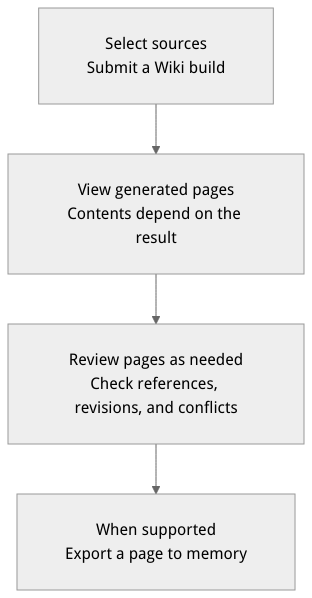
Flow diagram, not a runtime screenshot; read the relationships between steps or states along the arrows.
View the flow diagram in full size
Table of Wiki Core Objects and Interfaces
| Core Object | Key Identifier / Route Path | Detailed Description |
|---|---|---|
| Overview Home Page | slug = "kb-index" | The root entry page automatically generated by Knowledge Base Wiki compilation, summarizing the core domain architecture, module breakdown, and sub-page navigation links of the entire knowledge base. |
| Topical Encyclopedia Page | /wiki/pages/{slug} | A structured Markdown encyclopedia page generated by aggregating evidence from multiple source documents by topic . |
| Page Revision History | /wiki/pages/{slug}/revisions | Records all version snapshots of a page since its creation (including version number, editor/compilation task ID, timestamp, and body snapshot), with restore by version. |
| Page Reference Graph | /wiki/graph | Describes the directed graph structure of Wiki pages referencing each other via internal links (Nodes are pages, Edges are reference relationships). |
| AI Update Suggestion | /wiki/proposals | A suggestion of incremental content that can be added to an existing Wiki page, discovered when new documents are ingested or recompilation occurs; supports accept (accept and generate a new revision) or dismiss (dismiss). |
| Knowledge Conflict Ticket | /wiki/conflicts | A cross-document factual contradiction or outdated definition detected by the compiler. Unresolved severe conflicts are not only highlighted in the Conflict Workbench but also closely verified during the readiness check for version sealing (Seal). |
| Export to Memory | /wiki/pages/{slug}/export-to-memory | Synchronizes the structured content of a specified Wiki page into the project's Memory service, converting the knowledge base's static encyclopedia into the agent's dynamic memory. |
Feature Entrypoints and Permission Matrix
Console Entry Points, REST API, SDK Methods, and Permission Matrix
| Console entrypoint / feature module | Frontend route path | Corresponding REST API endpoint | Server SDK method (Node.js / Python) | Required RBAC role / API Key scope | Cross-module dependency |
|---|---|---|---|---|---|
| Wiki Page Section Tree and Body Browsing | /console/project-default-enterprise-ai-hub-210/knowledge-base/kb-kb_enterprise_support/wiki | GET /v1/knowledgebases/{kbId}/wiki/pagesGET /v1/knowledgebases/{kbId}/wiki/pages/{slug} | knowledgeBase.listWikiPages()knowledgeBase.getWikiPage() | Roles: owner, admin, developer, member (read-only)Scope: knowledgebases.read | Depends on the Advanced Index Build wiki capability being enabled and compilation completed |
Online Markdown Editing with contentRevision Optimistic Lock Save | "Edit" and "Create page" at the top right of a Wiki page | POST /v1/knowledgebases/{kbId}/wiki/pagesPATCH /v1/knowledgebases/{kbId}/wiki/pages/{slug} | knowledgeBase.createWikiPage()knowledgeBase.updateWikiPage() | Roles: owner, admin, developerScope: knowledgebases.write | Uses contentRevision (Compare-And-Swap, CAS) to prevent concurrent multi-user edit overwrites |
| Page Revision History and One-Click Rollback | "Revisions" drawer at the top right of a Wiki page | GET /v1/knowledgebases/{kbId}/wiki/pages/{slug}/revisionsPOST .../wiki/pages/{slug}/restore | knowledgeBase.listWikiPageRevisions()knowledgeBase.restoreWikiPage() | Roles: owner, admin, developerScope: GET knowledgebases.read; POST knowledgebases.write | Every AI compilation, proposal merge, or manual save generates an immutable revision snapshot |
| Cross-Document Knowledge Conflict Detection and Adjudication | /console/.../kb-kb_enterprise_support/wiki ("Conflicts" sub-view of the Conflict Workbench) | GET /v1/knowledgebases/{kbId}/wiki/conflictsPOST /v1/knowledgebases/{kbId}/wiki/conflicts/{slug}/resolve | knowledgeBase.listWikiConflicts()knowledgeBase.resolveWikiConflict() | Roles: owner, admin, developerScope: GET knowledgebases.read; POST knowledgebases.write | Unresolved conflicts block the ready seal (Seal) gate of Version Management (Versions) |
| Incremental Update Suggestion (Proposals) Review | /console/.../kb-kb_enterprise_support/wiki ("Proposals" sub-view of Update Suggestions) | GET /v1/knowledgebases/{kbId}/wiki/proposalsPOST .../proposals/{id}/accept | knowledgeBase.listWikiProposals()knowledgeBase.acceptWikiProposal() | Roles: owner, admin, developerScope: GET knowledgebases.read; POST knowledgebases.write | After incremental documents are ingested, non-destructive proposals suggest merging into existing pages |
| Wiki Page Reference Topology Graph (Wiki Graph) | /console/.../kb-kb_enterprise_support/wiki ("Wiki Graph" sub-view of the Link Graph) | GET /v1/knowledgebases/{kbId}/wiki/graph | knowledgeBase.getWikiGraph() / get_wiki_graph() | Roles: owner, admin, developer, memberScope: knowledgebases.read | Displays the internal bidirectional reference network within [[slug]] (see Knowledge Graph for the entity-relationship graph) |
| One-Click Export to the Memory Center (Memory) | "Export to Memory" at the top right of a Wiki page | POST /v1/knowledgebases/{kbId}/wiki/pages/{slug}/export-to-memory | knowledgeBase.createWikiPageMemoryExport() | Roles: owner, admin, developerScope: knowledgebases.write | Requires the project to have enabled the memory capability in the Memory Center (Memory) |
Destructive Wiki Reset (reset:wiki) | "Reset Wiki" in the Wiki settings menu | POST /v1/knowledgebases/{kbId}/wiki/reset (confirmation passphrase reset:wiki) | knowledgeBase.resetWiki() | Roles: owner and admin onlyScope: knowledgebases.write | Completely clears all Wiki pages, revision history, proposals, and conflict tickets |
Feature Details and Operation Guide
One. Browse and edit Wiki pages
After the Wiki build completes, open the target knowledge base Wiki page. The page count and contents depend on the build result:
Page navigation: Select content from the page list. The build result may include a
kb-indexoverview page.Online Editing and Creating New Pages:
Click the Edit button at the top right of any page to use the Markdown editor to adjust the body structure and add internal page reference links; saving automatically generates a new revision version number.
Click Create page at the top of the left directory tree, select an appropriate page type, and fill in the title and a unique
slugto manually add a wiki entry.
View revision history and one-click restore:
Click Revisions at the top right of the page, review past revision records in the drawer, and click Restore next to any historical version to safely roll back.
Two. Reviewing update proposals (Proposals) and adjudicating knowledge conflicts (Conflicts)
In the top switcher bar of the Wiki tab, besides the default Pages and Wiki Graph views, two governance sub-views are also provided: Proposals and Conflicts:
1. Handling update proposals (/wiki/proposals)
Switch to the Proposals sub-view. The list shows incremental paragraph changes that the AI compiler suggests merging into existing Wiki pages after the underlying documents are added or revised.
Click a single proposal to view the Diff Preview and the source document chunking rationale:
If the content is accurate, click Accept; the system automatically merges the proposed content into the target Wiki page and generates a new version;
If it should not be merged, click Dismiss to archive the proposal.
2. Adjudicating cross-document contradictions in the Conflicts workbench (/wiki/conflicts)
Switch to the Conflicts sub-view (you can filter conflicts for a specific sub-product by
documentTagorsubProductId).Each conflict record clearly lists:
Conflict topic description: e.g., two documents describe the same alert threshold inconsistently;
Evidence source A and evidence source B: the two contradictory source document chunks displayed side by side, along with their respective upload times and
documentTag;
Choose the authoritative wording or enter a merged standard formulation, then click Resolve Conflict. The adjudication result is synchronized to the corresponding Wiki page and removes the conflict blocker from the version seal (Seal) gate.
Three. One-click export of Wiki pages to the Memory center (Export to Memory)
For core encyclopedia pages that have passed team review (such as "Frontline/Second-line Support Ticket Routing and Escalation SOP Standards" or "OceanBase Vector Index Troubleshooting Quick Reference"), you can consolidate them into the project memory center through the following steps:
Select the target page in the Wiki page tree (e.g.,
slugasoceanbase-vector-index-troubleshooting).Click the Export to Memory button in the action bar at the top right of the page.
Check the export result. The endpoint writes project-scoped knowledge; callers cannot choose a target user or supply custom export metadata through this endpoint.
The corresponding REST API operation command set is as follows:
Set APPBASE_ENDPOINT to the target environment API endpoint (including /v1) and confirm the project and credentials belong to that environment. Wiki reset deletes pages, revision history, and conflicts; confirm the target and consequences before running it.
List knowledge base Wiki pages
(
  set +x
  set -o pipefail
  : "${APPBASE_API_KEY:?Set APPBASE_API_KEY}"
: "${APPBASE_ENDPOINT:?Set APPBASE_ENDPOINT to the target API endpoint including /v1}"
APPBASE_ENDPOINT="${APPBASE_ENDPOINT%/}"
builtin printf 'X-Appwrite-Key: %s\n' "$APPBASE_API_KEY" | curl --disable -X GET "${APPBASE_ENDPOINT}/knowledgebases/kb_enterprise_support/wiki/pages" \
  -H "X-Appwrite-Project: enterprise-ai-hub-210" \
  --header @-
)
View the citation link topology graph between Wiki pages
(
  set +x
  set -o pipefail
  : "${APPBASE_API_KEY:?Set APPBASE_API_KEY}"
: "${APPBASE_ENDPOINT:?Set APPBASE_ENDPOINT to the target API endpoint including /v1}"
APPBASE_ENDPOINT="${APPBASE_ENDPOINT%/}"
builtin printf 'X-Appwrite-Key: %s\n' "$APPBASE_API_KEY" | curl --disable -X GET "${APPBASE_ENDPOINT}/knowledgebases/kb_enterprise_support/wiki/graph" \
  -H "X-Appwrite-Project: enterprise-ai-hub-210" \
  --header @-
)
Query the list of pending Wiki knowledge conflicts (supports filtering by subProductId or documentTag)
(
  set +x
  set -o pipefail
  : "${APPBASE_API_KEY:?Set APPBASE_API_KEY}"
: "${APPBASE_ENDPOINT:?Set APPBASE_ENDPOINT to the target API endpoint including /v1}"
APPBASE_ENDPOINT="${APPBASE_ENDPOINT%/}"
builtin printf 'X-Appwrite-Key: %s\n' "$APPBASE_API_KEY" | curl --disable -X GET "${APPBASE_ENDPOINT}/knowledgebases/kb_enterprise_support/wiki/conflicts?subProductId=ob" \
  -H "X-Appwrite-Project: enterprise-ai-hub-210" \
  --header @-
)
Export the specified Wiki page to the project memory hub (POST /wiki/pages/{slug}/export-to-memory)
(
  set +x
  set -o pipefail
  : "${APPBASE_API_KEY:?Set APPBASE_API_KEY}"
: "${APPBASE_ENDPOINT:?Set APPBASE_ENDPOINT to the target API endpoint including /v1}"
APPBASE_ENDPOINT="${APPBASE_ENDPOINT%/}"
builtin printf 'X-Appwrite-Key: %s\n' "$APPBASE_API_KEY" | curl --disable -X POST "${APPBASE_ENDPOINT}/knowledgebases/kb_enterprise_support/wiki/pages/kb-index/export-to-memory" \
  -H "X-Appwrite-Project: enterprise-ai-hub-210" \
  --header @- \
  -H "Content-Type: application/json" \
  -d '{
    "agentId": "wiki-export"
  }'
)
Four. Wiki page types, contentRevision CAS concurrency control, and the reset:wiki reset mechanism
1. Wiki page types and compilation templates
A page object supports entity, topic, survey, agent_practice, and category_index as pageType. Compilation prompt templates are configured separately; see advanced knowledge index build governance. Do not use template categories as pageType values.
2. Markdown online editing and contentRevision CAS optimistic lock protection
When multiple domain experts simultaneously polish the same Wiki page online, or when manual editing and background proposal merging (Accept Proposal) occur concurrently, Agentbase uses the contentRevision (Compare-And-Swap, CAS) mechanism to guarantee zero data loss from overwrites:
Each call to
GET /v1/knowledgebases/{kbId}/wiki/pages/{slug}to get page details returns a response body containing the current monotonically increasing integer revision numbercontentRevision(e.g.,contentRevision: 3);When submitting a modification via
PATCH /v1/knowledgebases/{kbId}/wiki/pages/{slug}, the request body must carry the currentcontentRevision: 3; if the server detects that the latest revision number has changed to4, it immediately returns HTTP409 Conflict, prompting the frontend to load the latest revision diff before saving.
3. Destructive reset operation (reset:wiki) and advanced index linkage
Division of labor with GraphRAG / RAPTOR: to configure
GraphRAG,RAPTOR, or set theautoCompileWaitForGraphRagdependency fence andwikiPageMaxConcurrentconcurrency ofLLM Wiki, go to GraphRAG, RAPTOR, and advanced knowledge index build governance; to explore the entity relationship force-directed graph and Leiden community summary reports, go to knowledge graph (Graph) visual exploration and community reports.Performing the
reset:wikidestructive reset: when the enterprise completely restructures the knowledge base document structure and wants to discard all existing manually edited Wiki pages and recompile from scratch, you can call the reset endpoint and explicitly pass the confirmation token"confirmation": "reset:wiki"and a stableidempotencyKey. Revision numbers below are examples; first read the current page revision. When knowledge base versioning is active, all writes also require a draftversionId:
Update the specified Wiki page with a contentRevision CAS optimistic lock (PATCH /v1/knowledgebases/{kbId}/wiki/pages/{slug})
(
  set +x
  set -o pipefail
  : "${APPBASE_API_KEY:?Set APPBASE_API_KEY}"
: "${APPBASE_ENDPOINT:?Set APPBASE_ENDPOINT to the target API endpoint including /v1}"
APPBASE_ENDPOINT="${APPBASE_ENDPOINT%/}"
builtin printf 'X-Appwrite-Key: %s\n' "$APPBASE_API_KEY" | curl --disable -X PATCH "${APPBASE_ENDPOINT}/knowledgebases/kb_enterprise_support/wiki/pages/oceanbase-vector-index-troubleshooting" \
  -H "X-Appwrite-Project: enterprise-ai-hub-210" \
  --header @- \
  -H "Content-Type: application/json" \
  -d '{
    "contentRevision": 3,
    "page": {
      "title": "Wiki example",
      "contentMd": "## Example\n\nSee [[kb-index]]."
    }
  }'
)
Adjudicate and resolve cross-document knowledge conflicts (POST /v1/knowledgebases/{kbId}/wiki/conflicts/{slug}/resolve). First read the current revision and pending conflict and its options.
(
  set +x
  set -o pipefail
  : "${APPBASE_API_KEY:?Set APPBASE_API_KEY}"
: "${APPBASE_ENDPOINT:?Set APPBASE_ENDPOINT to the target API endpoint including /v1}"
APPBASE_ENDPOINT="${APPBASE_ENDPOINT%/}"
builtin printf 'X-Appwrite-Key: %s\n' "$APPBASE_API_KEY" | curl --disable -X POST "${APPBASE_ENDPOINT}/knowledgebases/kb_enterprise_support/wiki/conflicts/oceanbase-vector-index-troubleshooting/resolve" \
  -H "X-Appwrite-Project: enterprise-ai-hub-210" \
  --header @- \
  -H "Content-Type: application/json" \
  -d '{
    "contentRevision": 4,
    "resolvedConflictId": "<pending-conflict-id>",
    "resolvedConflictOptionText": "<selected-option-text>"
  }'
)
Destructively reset the entire knowledge base's Wiki pages, revision history, and conflict records (the confirmation passphrase reset:wiki is required). This destructive operation must be run separately only after confirming the target and consequences.
(
  set +x
  set -o pipefail
  : "${APPBASE_API_KEY:?Set APPBASE_API_KEY}"
: "${APPBASE_ENDPOINT:?Set APPBASE_ENDPOINT to the target API endpoint including /v1}"
APPBASE_ENDPOINT="${APPBASE_ENDPOINT%/}"
builtin printf 'X-Appwrite-Key: %s\n' "$APPBASE_API_KEY" | curl --disable -X POST "${APPBASE_ENDPOINT}/knowledgebases/kb_enterprise_support/wiki/reset" \
  -H "X-Appwrite-Project: enterprise-ai-hub-210" \
  --header @- \
  -H "Content-Type: application/json" \
  -d '{
    "confirmation": "reset:wiki",
    "idempotencyKey": "<unique-reset-operation-id>"
  }'
)
Knowledge Indexes (Indexes)
The Indexes tab centrally manages three types of derived indexes: GraphRAG, RAPTOR, and LLM Wiki.
For the first build, operate in the order “select index → enable and configure → start build → view task → check artifacts”:
In Indexes, select the index capability you want to use. Capabilities that are not enabled will not produce corresponding artifacts.
Set the output language and prompts according to your purpose; before starting a build, confirm that the required model providers are available.
After starting a build, check status and logs under Recent tasks; on failure, read the logs before deciding to retry, and avoid starting duplicate builds for tasks still running.
After the GraphRAG build completes, view the Graph; after the LLM Wiki build completes, view the Wiki pages and link graph. RAPTOR is a derived index capability and is not equivalent to Wiki pages.
Raw documents and chunks are inputs; derived indexes are rebuildable artifacts. Clearing an index does not delete raw documents. Wiki Reset deletes the Wiki pages themselves; before operating, confirm this is the intended behavior.
Each index type can be independently enabled / configured / built / cleared / force-rebuilt; when not enabled, the capability is unavailable.
The output language configuration determines the generation language of derived knowledge (Wiki pages, graph reports, etc.) (from 2.9.0 the configuration item is renamed to “Output language”).
Custom prompts (2.9.0): GraphRAG supports custom prompts for entity extraction, description summarization, and community reports; Wiki supports prompts by template category (Chapter / Document / Document overview / Memory); leaving them blank falls back to built-in templates. Builds support concurrency / batch / buffer operation controls (such as
graphragEmbedBatchSizeandwikiPageMaxConcurrent); explicit values only save valid integers within the upper limit, and when not provided, the worker default applies.The Recent tasks list shows index build/cleanup tasks, supporting cancel, retry, and viewing logs; tasks run asynchronously, so you can leave the page and come back to check results.
Graph
The Graph tab browses GraphRAG artifacts: a visual graph of entities, relations, and community reports. This tab requires the GraphRAG index to be enabled and built (the deployment must have the GraphRAG capability).
Wiki
The Wiki tab organizes knowledge base content into encyclopedia-style pages:
| Capability | Description |
|---|---|
| Page management | Wiki page list, create page, page details and editing; pages retain revision history, allowing you to view revision records and restore historical versions |
| Link graph | Wiki Graph displays reference link relationships between pages |
| Update proposals | The system provides update proposals for Wiki pages, to be accepted or dismissed one by one |
| Conflict adjudication | Knowledge conflicts enter the Conflicts workbench and are adjudicated and resolved one by one |
| Page types | Page objects use entity, topic, survey, agent_practice, or category_index; compilation prompts are configured separately |
| Export to Memory | Wiki pages can be one-click exported to Memory, persisting as Agent long-term memory (see memory) |
Usage boundaries
Building the three types of derived indexes consumes LLM and embedding quota, and large libraries take a long time to build; before rebuilding, first confirm the status of existing tasks.
Clearing only deletes derived index data and does not affect raw documents and chunks; the Wiki reset deletes the Wiki pages themselves and is a destructive operation.
Exporting to Memory requires the project to have the Memory capability enabled.
FAQ (Frequently Asked Questions and Troubleshooting)
Q1: What is the essential difference between clearing the Wiki index on the “Knowledge Indexes (Indexes)” tab and performing the “Reset (reset:wiki)” on the Wiki tab?
Root cause analysis: Wiki assets in a knowledge base consist of two parts: the “background derived compilation index state” and the “consolidated, manually reviewed Wiki page document tree (including Revisions, Proposals, Conflicts)”.
Resolution:
Clear Index: only cleans up background auxiliary compilation state, preserving the body of Wiki pages that have been written and manually revised.
Reset Wiki (
reset:wiki): this is an irreversible destructive operation that thoroughly deletes all Wiki pages themselves, revision history, update proposals, and conflict records under the current knowledge base. Before performing a reset, be sure to confirm you do not need to keep existing manual editing results, or that historical snapshots have already been sealed via knowledge base version management (Versions).
Q2: Why does clicking the “Export to Memory” button show a message that the memory service is not enabled (412 Precondition Failed or a service-disabled notice)?
Root cause analysis: The “Export to Memory” (
POST .../wiki/pages/{slug}/export-to-memory) feature requires vectorizing the wiki pages and writing them into the project'sShared V2memory table group, so it strongly depends on the current project having the Memory module enabled and initialized.Resolution: Go to the Memory page in the Console left navigation bar (see Memory center overview and configuration), confirm that the project's memory capability is enabled and bound to models required by its memory configuration, then check the export result.
Q3: How can automatically compiled Wiki pages follow our enterprise's specific writing style or chapter template?
Root cause analysis: By default, the LLM Wiki compiler uses built-in prompt templates. Prompt template categories differ from the
pageTypeof a page object.Resolution: Open the knowledge base’s Knowledge Indexes (Indexes) tab (see GraphRAG, RAPTOR, and advanced knowledge index governance). Click LLM Wiki → Configure. In Custom Prompts, write dedicated System Prompt templates for the four template categories: Index, Section, Document, and Memory. Specify the output language (for example,
zh-CN), then trigger a rebuild to generate wiki pages that follow your organization’s standards.
Q4: What should I do when multiple people edit the same Wiki page simultaneously and an error 409 Conflict (contentRevision mismatch) occurs?
Root cause analysis: While you had the editor open, another team member or a background "Accept Proposal" operation saved a new version, causing the page's
contentRevisionto increment; the optimistic lock (CAS) automatically prevented the old version from overwriting it.Resolution: First copy the paragraphs you have edited. Refresh the page or open the Revisions drawer in the upper-right corner to review the latest changes. Paste and merge your edits into the latest revision, then save again.
Related Documentation
GraphRAG, RAPTOR, and Advanced Knowledge Index Build Governance
Knowledge Graph Visualization Exploration and Community Reports
External data source integration and incremental sync with Yuque
Knowledge Base Immutable Version Management and Release Rollback
Project-level lexicons and retrieval/knowledge graph/agent collaborative governance
Knowledge Base Settings Hub, Default Policies, and Multimodal Image Understanding (VLM)
Page capacity, citations and safely stale results
Entity, topic and overview page counts are no longer constrained by the previous product caps of 200 / 64 / 100. Saved configuration applies, while any deployment hard ceiling remains authoritative. Categories with more than 200 entries continue in parts labeled x/n and retain their full count in the heading. Rebuild and verify page counts after changing settings; saving is not a completed build.
Citations with unambiguous source evidence appear as numbered footnotes. Click a footnote, or focus it and press Enter, to expand and locate its evidence below. Repeated references to one source share a number. Unresolved markers remain unchanged. After changing pages, check the current page evidence; code blocks and existing links are not converted.
Following a safe document or chunk update, the last successful Wiki can remain readable and searchable with a stale and rebuild notice. It does not contain the latest source changes. Source deletion, disabling, model or configuration changes, damaged snapshots and version mismatches are excluded. Rebuild when current content is needed and verify retrieval after the index returns to ready. A false hasWiki flag alone does not prove that no historical result is readable.