
Project Lexicons for Search, Graphs, and Agents
Lexicons maintain synonyms, expansion terms, and stop terms. Manage them at the project level, then bind them to a knowledge base or an agent. Use preview to check the actual rewrite before binding. Lexicon rules do not replace comprehensive security controls or content moderation.
Feature overview and core scenarios
In customer support, users may ask with abbreviations, common names, or error codes while reference material uses standard terminology. Lexicons let teams maintain relationships between those terms for search and agent use.
Core concepts and architecture
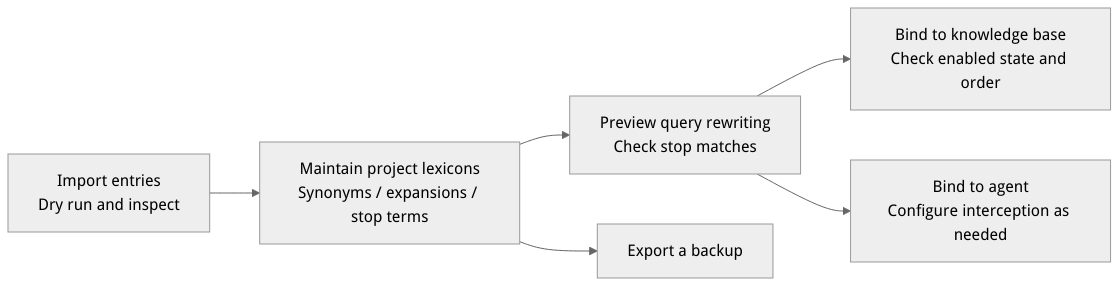
Illustrative flow, not a runtime screenshot.
Entries use entryType, terms, and optional expansions:
| Entry type | Purpose | Example |
|---|---|---|
synonym | Treat a group as synonyms; rewriting depends on the lexicon's synonymRewriteMode. | terms: ["OceanBase", "OB"] |
expansion | Append related terms when a term in terms matches. | terms: ["4024"], expansions: ["lock contention"] |
stop | Mark a stop-term match; agent bindings can configure how to intercept it. | terms: ["example blocked term"] |
terms and expansions each contain at most 100 non-empty UTF-8 strings, each at most 256 characters. expansion requires a non-empty expansions list; other types cannot supply expansions. Use preview to check the actual matching and rewrite.
Entry points and operation guide
| Operation | Endpoint | Required access and conditions |
|---|---|---|
| View lexicons, entries, and preview | GET /v1/lexicons, GET /v1/lexicons/{lexiconId}/entries, POST /v1/lexicons/{lexiconId}/preview | lexicons.read and read access to the relevant lexicon |
| Create lexicons and entries, import or update | POST /v1/lexicons, POST /v1/lexicons/{lexiconId}/entries, POST /v1/lexicons/{lexiconId}/import | lexicons.write and write access to the target resource |
| Knowledge base lexicon bindings | GET /v1/knowledgebases/{knowledgeBaseId}/lexicons, PUT /v1/knowledgebases/{knowledgeBaseId}/lexicons | lexicons.read or lexicons.write respectively, plus the appropriate access to the knowledge base and selected lexicons |
| Agent workbench bindings | GET /v1/agent-runtime/project/lexicons, PUT /v1/agent-runtime/project/lexicons | agent-runtime.project and appropriate access to the project, agent, and lexicons; writes must meet the current version-management requirements |
Create and preview
In the project, open Knowledge Base → Lexicons, create a lexicon, and enter a name and optional description.
Open the lexicon and add synonym, expansion, or stop entries on the entries tab.
Open the Preview tab, enter a query, and submit it. The page shows the original query, rewrite, tokens, stop matches, and mappings.
Bind the lexicons to the knowledge base or agent and check the enabled state and order. Graph index use also depends on the index configuration; check its status to determine whether it needs rebuilding after a change.
Import and export
On the lexicon's Import/Export tab, select a JSON, CSV, or XLSX file. The Console limits each file to 5 MiB; a JSON file must be an array of entries. Select a mode and run a dry run first, then inspect the per-row results. When the dry run has no errors and includes entries to import, confirm the application. Changing the file or mode requires another dry run.
merge: retain existing entries, skip entries with the same deduplication key, and add the rest; it does not merge variants into an existing entry.overwrite: replace the lexicon's existing entry set, not only entries with the same name. Export a backup and inspect the dry run first; overwrite is unavailable when there are more than 1,000 existing entries.
Export supports JSON, CSV, and XLSX. The import API accepts at most 1,000 entries per request; use the actual response for error details.
Bind to a knowledge base and an agent
Read the target knowledge base’s existing bindings and decide which lexicons to keep; an update replaces the entire binding list.
Set the top-level
enabledand providebindingsas needed: each entry containslexiconIdandpriority. Read back the bindings after saving, then check the result with the same query.Agent workbench bindings are configured separately; check the selected lexicons and priority in the workbench. To intercept a stop match, enable
stopInterceptand configurestopReply; disabling interception does not strip stop terms. Lexicon rules do not replace content moderation.
For example, this body binds one lexicon; include existing bindings as well if they must be retained:
{"enabled": true, "bindings": [{"lexiconId": "support_terms", "priority": 1}]}Manage lexicons through the API
These examples assume APPBASE_ENDPOINT ends with /v1 and use a project API key with the required lexicon permissions. IDs and content are examples.
Set APPBASE_ENDPOINT to the target API endpoint (including /v1), and confirm the project and credentials belong to that environment. Run each step separately in order and verify the previous result.
Create a lexicon
(
  set +x
  set -o pipefail
  : "${APPBASE_API_KEY:?Set APPBASE_API_KEY}"
  : "${APPBASE_ENDPOINT:?Set APPBASE_ENDPOINT to the target API endpoint including /v1}"
  APPBASE_ENDPOINT="${APPBASE_ENDPOINT%/}"
  builtin printf 'X-Appwrite-Key: %s\n' "${APPBASE_API_KEY:?Set APPBASE_API_KEY}" | curl --disable --header @- -fsS -X POST "${APPBASE_ENDPOINT}/lexicons" \
    -H "X-Appwrite-Project: ${APPBASE_PROJECT_ID}" \
    -H 'Content-Type: application/json' \
    -d '{"lexiconId":"support_terms","name":"Support terms"}'
)
Create a synonym entry separately
(
  set +x
  set -o pipefail
  : "${APPBASE_API_KEY:?Set APPBASE_API_KEY}"
  : "${APPBASE_ENDPOINT:?Set APPBASE_ENDPOINT to the target API endpoint including /v1}"
  APPBASE_ENDPOINT="${APPBASE_ENDPOINT%/}"
  builtin printf 'X-Appwrite-Key: %s\n' "${APPBASE_API_KEY:?Set APPBASE_API_KEY}" | curl --disable --header @- -fsS -X POST "${APPBASE_ENDPOINT}/lexicons/support_terms/entries" \
    -H "X-Appwrite-Project: ${APPBASE_PROJECT_ID}" \
    -H 'Content-Type: application/json' \
    -d '{"entryType":"synonym","terms":["OceanBase","OB"]}'
)
Preview query rewriting
(
  set +x
  set -o pipefail
  : "${APPBASE_API_KEY:?Set APPBASE_API_KEY}"
  : "${APPBASE_ENDPOINT:?Set APPBASE_ENDPOINT to the target API endpoint including /v1}"
  APPBASE_ENDPOINT="${APPBASE_ENDPOINT%/}"
  builtin printf 'X-Appwrite-Key: %s\n' "${APPBASE_API_KEY:?Set APPBASE_API_KEY}" | curl --disable --header @- -fsS -X POST "${APPBASE_ENDPOINT}/lexicons/support_terms/preview" \
    -H "X-Appwrite-Project: ${APPBASE_PROJECT_ID}" \
    -H 'Content-Type: application/json' \
    -d '{"query":"How do I use OB?"}'
)
For knowledge base binding, PUT /v1/knowledgebases/{knowledgeBaseId}/lexicons takes a top-level enabled and a bindings array containing lexiconId and priority in each entry. This replaces the binding list: read and retain bindings you still need. Agent bindings also have stopIntercept and stopReply; the required permissions and entry points depend on the project and agent version.
Troubleshooting
When should I use synonym or expansion? Use synonyms for terms referring to the same entity, such as OB and OceanBase; use expansion terms to add troubleshooting terms to an error code. The synonym rewrite depends on the lexicon configuration, so verify it in preview.
Can stop terms intercept normal questions? If an agent binding enables stopIntercept, a normal expression that matches a stop term may be intercepted. Separate search noise reduction from interception and test the rules against representative normal questions.
What if creating a lexicon returns a server error? Preserve the request time and error details, and ask an administrator to check whether the environment’s lexicon schema matches its service version. Do not repeatedly submit the request or modify the database schema yourself.
Preview matches a stop term: Check whether the rule includes normal user language before changing entries or bindings. Interception is not general prompt-injection protection.
Import cannot be applied: Check the file format, dry-run errors, and the number of entries to import. Run the dry run again after changing the file or mode.
Results do not change after binding: Check whether the binding is enabled, whether the lexicon is readable, and the relevant search or index configuration; preview and test with the same input.