
Knowledge Graph visualization exploration and community reports
The knowledge base's Graph tab is used to browse the entities, relationships, and community reports built by GraphRAG. First narrow the results by keyword, entity type, or community, then inspect node neighbors and report evidence. It is suitable for checking knowledge extraction results and analyzing cross-document associations. The associations shown in the graph must be judged against the original text; do not conclude that a business claim holds merely because nodes are connected.
This article uses example resources such as kb_enterprise_support and ent_ob_err_4013 to describe the operations; projects, knowledge bases, entities, models, and locator values must all be replaced with actual resources. The example queries do not imply that this data already exists in the current environment or that online acceptance testing has been completed.
Feature overview and core scenarios
Taking a database troubleshooting knowledge base as an example, a team can use the graph to answer three check questions: whether fault symptoms are associated with relevant parameters, whether handling steps are associated with responsible roles, and whether community reports correctly summarize the common themes across multiple manuals. During checks, retain the retrieval conditions, knowledge base version, and result generation so colleagues can review the same scope of data.
Interactive graph canvas: displays nodes and edges, and supports zooming, panning, dragging nodes, and hover highlighting. Node colors are grouped by entity type, and node size is based on the returned
rank; the page has no control for manually switching color modes.Manual loading and pagination: in the Console, fill in keywords, entity type, community, seed entities, and hops, select the page size, then click Load. Modifying inputs does not immediately issue a query; pagination reuses the already loaded conditions.
Neighbor exploration: clicking a node loads its neighbors according to the current hops and page size and replaces the current canvas with the neighbor results; you can return to the original graph results to continue examining.
Community reports: report cards are located below the canvas, showing the title, weight, entities, and the body of reports/evidence that have content. Clicking a group in the canvas narrows related reports; clicking an entity in a report shows its neighbors.
The HTTP graph API also supports documentId, documentTag, and subProductId filters. These API fields differ from the inputs actually provided in the Console; do not look for interface controls based on the API parameter list.
Core Concepts and Architecture
Operational relationships among graph browsing, neighbors, and reports
The following is an operational flow illustration; the actual interface is subject to the current project.
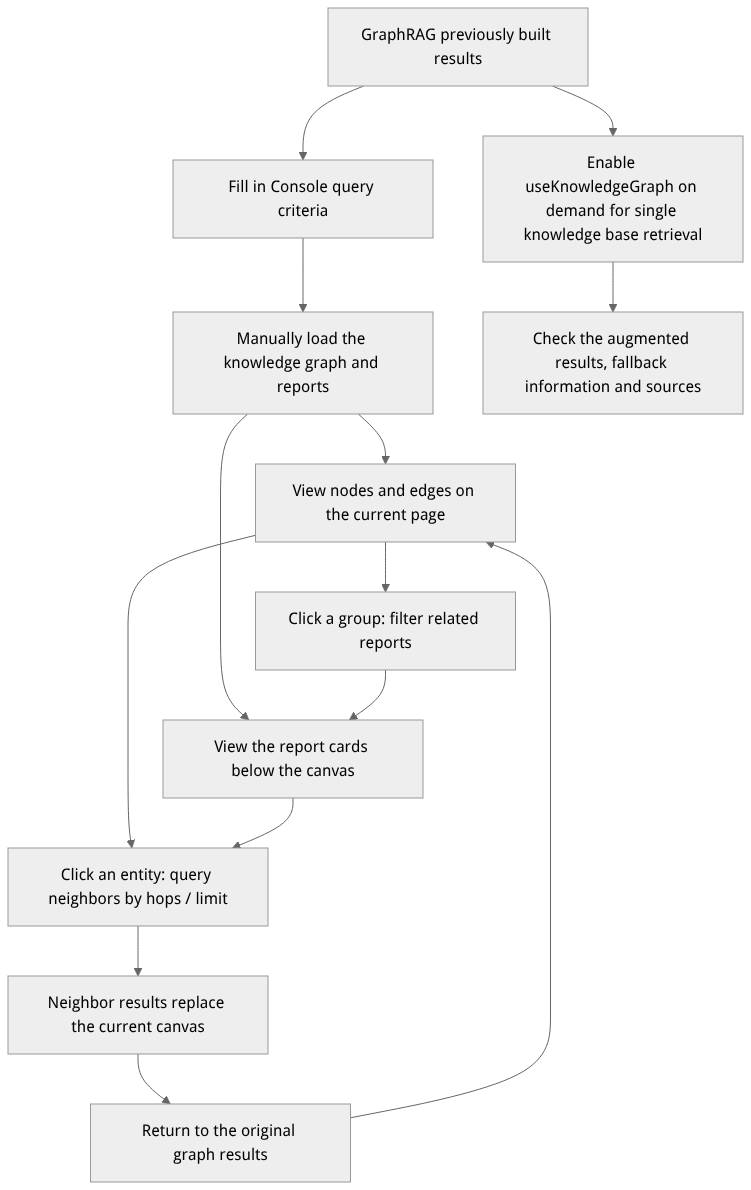
Flow diagram, not a runtime screenshot; read the relationships between steps or states along the arrows.
View the flow diagram in full size
Graph results and field descriptions
| Object | Field | How to read |
|---|---|---|
| Graph result | resultGeneration, versionId | Identify the result generation and the resolved knowledge base version; when troubleshooting different results, first confirm whether they come from the same version and generation. |
| Graph result | graph | Contains nodes and edges; the canvas consumes nodes / edges, nodes use id and labels, and edges use source / target. |
| Graph result | totalNodes, hasMore, nextCursor | The total number of matched nodes and subsequent pagination information; the cursor should use the value returned by the last response and must not be constructed manually. |
| Graph / neighbor result | truncated | Indicates the result is subject to boundary limits; the current canvas cannot be treated as the complete graph of the entire knowledge base. |
| Neighbor result | nodes, edges | Nodes and edges expanded from the specified entity; different from the graph wrapper in the whole-graph response. |
| Community report | id, communityId, title | Report identifier, community it belongs to, and title. |
| Community report | entities, weight, content | The report's associated entities, weight, and structured body; the Console displays the text that can be rendered in content.report and content.evidences. |
Additional attributes of nodes and edges vary by graph artifact. When you need to verify sources, check the actually returned source information and open the corresponding document to view the original text; do not assume that every node has complete chunk information, and do not treat canvas colors or sizes as answer accuracy.
Feature Entrypoints and Permission Matrix
| Feature | Console entry | REST API | Node.js / Python methods | Prerequisites and permissions |
|---|---|---|---|---|
| Graph and filtering | Knowledge base → Graph | GET /v1/knowledgebases/{kbId}/graph | getGraph() / get_graph() | The current user must have read permission on the knowledge base; the API Key requires knowledgebases.read, and an existing readable graph result. |
| Neighbor expansion | Click a canvas node or an entity in a report | GET /v1/knowledgebases/{kbId}/graph/entities/{entityId}/neighbors | getGraphEntityNeighbors() / get_graph_entity_neighbors() | Use the entity identifiers actually returned; hop count and node limits constrain results. |
| Community reports | Report cards below the canvas | GET /v1/knowledgebases/{kbId}/graph/community-reports | listGraphCommunityReports() / list_graph_community_reports() | Reports already generated in the same knowledge base and version. |
| Graph-enhanced retrieval | Knowledge base → Retrieval test; whether the toggle appears is controlled by deployment capabilities | POST /v1/knowledgebases/{kbId}/search | createSearch() / create_search() | Related capabilities and models must be configured; answer synthesis additionally requires a single knowledge base answer: true. |
Feature Details and Operation Guide
One. Load the graph and filter the current query (GET /graph)
Log in to the Console, go to the target project and knowledge base details, then open the Graph tab. On first entry only a loading hint is shown; you must manually click load.
In the input box at the top, enter keywords, entity types, communities, or seed entities. Entity types and communities are both text inputs; when you do not know valid values, set fewer conditions first, inspect existing nodes, then narrow down.
Set the hop count
hops(0to5, default1), and choose20,50, or100nodes per page, default20. Seed entities are used for bounded neighbor expansion.Click load, wait for the request to finish, then check the node count, result generation, canvas, and reports. Results are only updated after you load again after modifying conditions; when using previous/next page, the page continues using the query conditions already loaded.
Use the mouse to zoom and pan the canvas, and hover to view adjacent relationships. If you want to re-inspect the entire query result, you can clear the keyword, entity type, community, and seed conditions and load again. Switching knowledge base versions clears the old display; you need to reload results for the new version.
Specifying document scope via API: the Console currently has no input boxes for documentId, documentTag, or subProductId. When you need these conditions, you can use the HTTP graph APIs, such as subProductId = ob or documentTag = ob_12_4a8b9c0d1e2f3a4b5c6d7e8f9a0b1c2d. Multiple non-empty comma-separated tags and segment-aligned matching are supported; an independent sub-product code submitted with a tag filters by intersection. Replace with actual document locator values; for the format see document and ingestion management.
| HTTP parameter | Purpose and boundaries |
|---|---|
query, type, community | Keyword, entity type, and community filters; the HTTP fields use type and community. |
seed, hops | Seed entities and expansion hops; hops ranges from 0 to 5, default 1. |
limit, cursor | Node limit and pagination cursor; the API's limit defaults to 100 with a range of 1 to 1000, separate from the Console's default page size. |
documentId, documentTag, subProductId | Restrict source documents or sub-products; free-form tags are supported, with any-match for comma-separated tags. |
versionId | Optional knowledge base version; verify the parsed version and result generation in the response before comparing different queries. |
Two. View neighbors and return to the original graph (/graph/entities/{entityId}/neighbors)
In the loaded canvas, click an entity, or click an entity name in a report card. The Console uses that entity ID, the current
hops, and the page size to request neighbors.After the request succeeds, the canvas shows the nodes and edges from the neighbor response, and related reports are filtered by the selected entity. This is a switch of the result view, not an unlimited appending of nodes to the original graph, and it does not open an entity details drawer.
To widen or narrow the scope, adjust the hop count and page size, then select an entity or reload. Note that
truncated; request limits may leave some associations temporarily absent from the results.Click the return-to-graph-result button to restore the previously loaded full-graph result. To verify a given business conclusion, check it against actual source documents, retrieval results, and report evidence; do not rely on a nonexistent "one-click chunk original-text drawer".
The HTTP neighbor API uses hops, with the same range of 0 to 5; limit defaults to 100 with a range of 1 to 1000. Entity IDs should come from nodes returned by the current version; do not use IDs from other knowledge bases, and do not assume a display name is an entity ID.
Three. Read community reports and use graph-enhanced retrieval
1. Read community reports (GET /graph/community-reports)
Loading the graph also requests reports, which appear as report cards below the canvas. Review the titles, weights, and associated entities, then read the report bodies and evidence; when no corresponding text exists, that body area is not shown. Clicking a canvas group filters related reports, and clearing the report filter restores the list. Groups in the graph are visual groupings of current node relationships; do not infer backend community hierarchy solely from their appearance.
The Console's report request limit is 100. To fetch more reports via the API use limit / offset, with limit ranging from 1 to 1024, and check hasMore; the API has no hierarchy filter parameter. The weight in the report structure is a business rating generated by the model itself and must not be interpreted as a fixed 0–10 accuracy rate.
2. Graph-enhanced single-knowledge-base retrieval (useKnowledgeGraph: true)
Single-knowledge-base retrieval can set useKnowledgeGraph: true to request graph enhancement and optionally set answer: true to synthesize answers. The answer model is taken from the knowledge base's indexingDefaults.chatModel / chatProviderRef. Check the returned capabilities, degradation information, hit evidence, and answer status; a browsable graph does not guarantee that model calls or answer synthesis will succeed.
allowDegraded controls whether ordinary results may degrade when enhanced retrieval fails, and cannot be used to swallow explicit reranking model or Provider errors. For complete defaults and explanations of reranking and answer status, see retrieval test.
3. Graph, neighbor, report, and enhanced retrieval HTTP examples
The following requests use the project API Key, and the example models must already be available in the project. The first three are reads; the fourth invokes the configured retrieval and answer models.
(
  set +x
  set -o pipefail
  : "${APPBASE_API_KEY:?Set APPBASE_API_KEY}"
: "${APPBASE_ENDPOINT:?Set APPBASE_ENDPOINT to the target API endpoint including /v1}"
APPBASE_ENDPOINT="${APPBASE_ENDPOINT%/}"
: "${APPBASE_PROJECT_ID:?Set APPBASE_PROJECT_ID for the target environment}"
# 1. Query the knowledge graph: the HTTP field for entity type is type
builtin printf 'X-Appwrite-Key: %s\n' "$APPBASE_API_KEY" | curl --disable -X GET "${APPBASE_ENDPOINT}/knowledgebases/kb_enterprise_support/graph?query=4013&type=%E6%95%85%E9%9A%9C%E7%A0%81&subProductId=ob&limit=50" \
  -H "X-Appwrite-Project: ${APPBASE_PROJECT_ID}" \
  --header @-

# 2. Query neighbors: hops specifies the number of expansion hops
builtin printf 'X-Appwrite-Key: %s\n' "$APPBASE_API_KEY" | curl --disable -X GET "${APPBASE_ENDPOINT}/knowledgebases/kb_enterprise_support/graph/entities/ent_ob_err_4013/neighbors?hops=2&limit=30" \
  -H "X-Appwrite-Project: ${APPBASE_PROJECT_ID}" \
  --header @-

# 3. Read community reports with pagination
builtin printf 'X-Appwrite-Key: %s\n' "$APPBASE_API_KEY" | curl --disable -X GET "${APPBASE_ENDPOINT}/knowledgebases/kb_enterprise_support/graph/community-reports?offset=0&limit=20" \
  -H "X-Appwrite-Project: ${APPBASE_PROJECT_ID}" \
  --header @-

# 4. Single knowledge base graph-enhanced retrieval and answer synthesis
builtin printf 'X-Appwrite-Key: %s\n' "$APPBASE_API_KEY" | curl --disable -X POST "${APPBASE_ENDPOINT}/knowledgebases/kb_enterprise_support/search" \
  -H "X-Appwrite-Project: ${APPBASE_PROJECT_ID}" \
  --header @- \
  -H "Content-Type: application/json" \
  -d '{
    "query": "OceanBase 报 -4013 时应先检查哪些排障步骤?",
    "searchMode": "hybrid",
    "vectorWeight": 0.7,
    "useKnowledgeGraph": true,
    "rerank": true,
    "rerankModel": "qwen3.7-text-rerank",
    "allowDegraded": true,
    "answer": true,
    "limit": 5
  }'

)
FAQ (Frequently Asked Questions and Troubleshooting)
Q1: There are no nodes after entering the graph page — how do I determine the cause?
First distinguish among not yet loaded, load failure, and a successful but empty result. On first entry you must load manually; if there is a request error, troubleshoot permissions, version, and index availability according to the error message. If the request succeeds but nodes are empty, clear overly narrow conditions and load again, and confirm that GraphRAG has already been built for this knowledge base. Document ingestion completion does not mean graph construction is complete; check the build result under advanced knowledge index, then return to the graph page and reload once it succeeds.
Q2: Synonymous entities were not merged — what should I check?
First inspect the actual input documents and the bound lexicon rules, then verify the GraphRAG configuration and build generation. After lexicon or index configuration changes, an existing graph is not re-extracted merely by refreshing the page; rebuild using the operations supported on the index page and check the new results. Avoid concluding that entities should be merged simply because their display names are similar, and do not mix old and new generations in comparisons. For lexicon usage instructions see project-level lexicon.
Q3: After specifying document locator values, I still see shared entities — does this mean filtering is broken?
The same entity may come from multiple documents. Retaining shared entities in the filtered graph does not by itself prove that locator filtering is ineffective. First verify that the passed locator value is the complete identifier of the target document and that the two filter conditions intersect, then check the actually returned sources and versions. For derivation and clearing rules of locators and the independent sub-product field, see document management; after clearing only the independent field, reads may still use the first segment of an existing locator.
Related Documentation
Community expansion and stale graphs
For builds with a community directory, opening the graph automatically loads community entities and relationships and shows the loaded count. Click a community name to focus it. Use its separate collapse control to hide members; cancel a load in progress or retry a failed load. Several communities can load together while existing node positions remain stable. If the display budget is exceeded, collapse communities or narrow the search. Older builds without a directory show a limited entity set; rebuild to obtain the community overview.
After a safe document or chunk update, the page may display the last successful graph with an explicit stale notice. This does not enable stale graph retrieval. The full rebuild action only navigates to the current knowledge base index page; select GraphRAG and create the operation there. Deleted or disabled sources, model/configuration changes, version mismatches, broken snapshots or exceeded safety budgets still prevent reading the old graph.