
SQL Proxy
Feature Overview
The SQL Proxy is a multi-tenant controlled SQL parsing, rewriting, and secure execution gateway built by Agentbase on top of the OceanBase storage engine. In project 企业智能客服与知识中台 (Project ID: enterprise-ai-hub-210), in addition to operating database 企业智能客服业务库 (Database ID: enterprise_biz_db) via the standard REST / SDK document and table APIs (listDocuments, createDocument), developers, data analysts, and AI agents can also use familiar SQL syntax directly against business tables such as customer_tickets to perform query projections, multi-table joins (JOIN), grouped aggregation (GROUP BY / HAVING), window functions, parameterized queries, and controlled DML / DDL operations through the HTTP SQL API (/v1/sql), the built-in controlled SQL terminal in the Console, and the MySQL Wire protocol direct-connection entry for trusted backends.
Unlike connecting directly to the underlying database, before SQL actually reaches OceanBase, the Agentbase SQL Proxy enforces identity path identification (User Session vs Server API Key), SQL syntax tree whitelist validation (AST Validation), automatic tenant and storage-mode rewriting (automatically injecting the Shared V2 _tenant isolation condition or transparently compiling logical table queries into JsonTable _jt_* queries), and table-level/row-level security permission (Row Security ACL) trimming, releasing the powerful expressive capability of SQL while strictly maintaining multi-tenant isolation and the zero-trust data security boundary.
Core Concepts and Architecture
Determining whether any SQL statement can execute in Agentbase and what data it can see follows a strict four-dimensional decision model: 执行入口(Entrypoint) × 认证路径(Auth Path) × SQL 形态(SQL Shape) × 存储模式(tableMode: Shared V2 / JsonTable). The diagram below shows the core parsing, rewriting, and security gate architecture of the SQL Proxy:
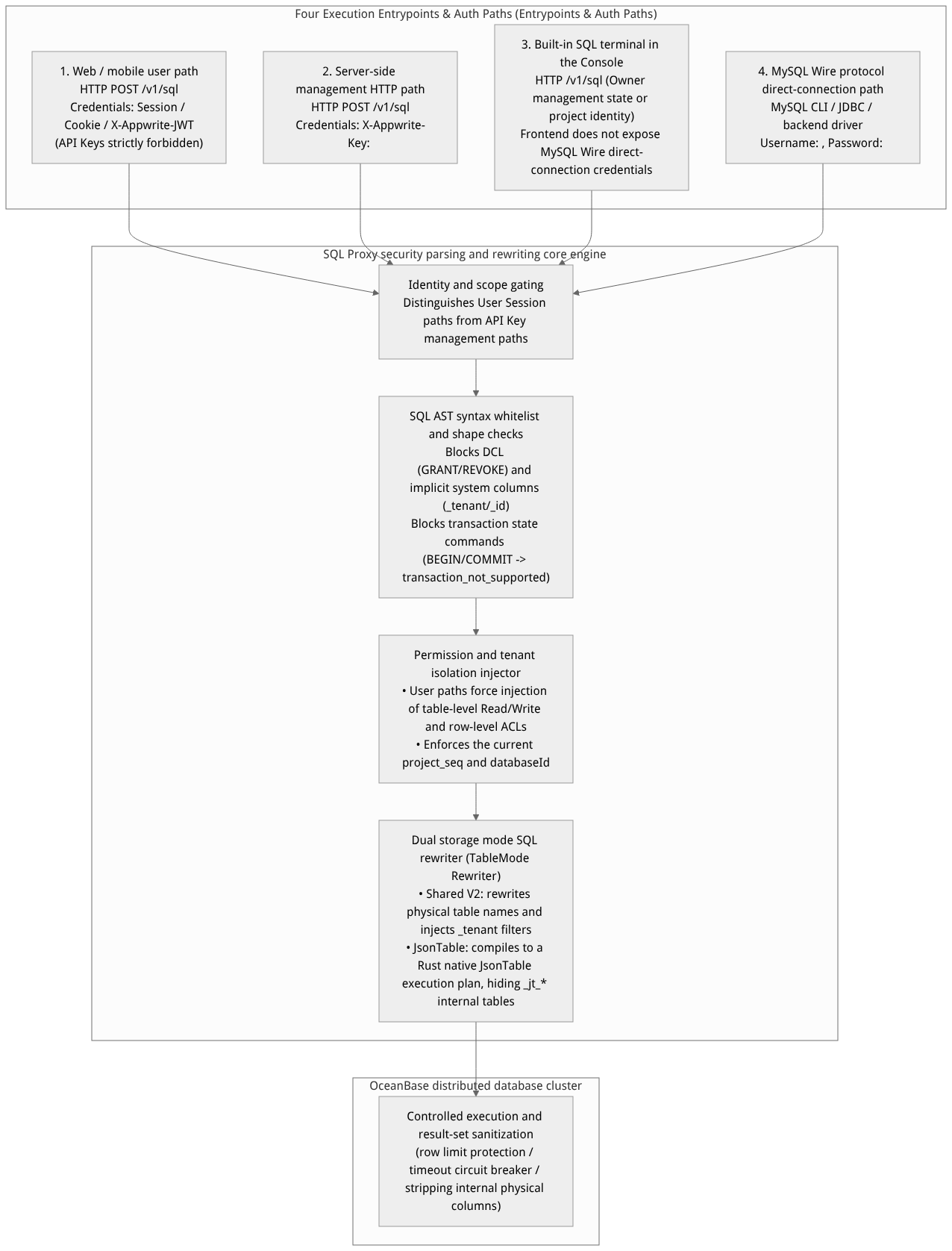
Flow diagram, not a runtime screenshot; read the relationships between steps or states along the arrows.
View the flow diagram in full size
Capability comparison of the four execution entry points and authentication paths
| Execution entry | Authentication path and credential requirements | Allowed SQL capability scope | Explicitly rejected (Fail-Closed) SQL and operations |
|---|---|---|---|
| 1. Web browser / client user path | User Session Path: Use the user's login Session Cookie or a short-term X-Appwrite-JWT to call HTTP /v1/sql. | • Basic single-table SELECT (including projection, aliases, WHERE, ORDER BY, LIMIT)• A single INNER JOIN ... ON between two different logical tables (equality conditions, with read permission or row ACL checked separately for each table)• Single-layer non-correlated forward IN (SELECT ...) subqueries• Simple single-table INSERT ... VALUES, UPDATE, DELETE (must satisfy the corresponding table/row write permissions)• Non-transactional initialization commands within the whitelist (e.g., SET NAMES) | • Strictly forbidden to carry X-Appwrite-Key from the browser surface• Metadata queries ( SHOW TABLES, information_schema.*)• Any DDL ( CREATE/ALTER/DROP/TRUNCATE TABLE)• LEFT/RIGHT/FULL JOIN, multi-table or self joins, GROUP BY/HAVING/aggregate functions, UNION, CTEs, cursors (Cursor)• Transaction control commands ( BEGIN/COMMIT/ROLLBACK) |
2. Backend service HTTP /v1/sql | API Key Path: Call HTTP /v1/sql from a trusted backend via X-Appwrite-Key: <APPBASE_API_KEY>. | • Metadata introspection (SHOW TABLES, SHOW COLUMNS, SHOW INDEX, information_schema)• Complex SELECT (INNER JOIN, LEFT JOIN, GROUP BY, HAVING, aggregate functions, controlled subqueries, derived tables, UNION, CTEs, window functions ROW_NUMBER/RANK/DENSE_RANK, EXPLAIN SELECT)• Full controlled DML ( INSERT, UPDATE, DELETE) and controlled DDL (CREATE/ALTER/DROP/TRUNCATE TABLE, CREATE/DROP INDEX)• Standard API Keys with a stable Key ID support parameterized APPBASE SECURITY permission management clauses | • MySQL Wire protocol cursors (DECLARE/OPEN/FETCH CURSOR)• DCL and instance management commands ( GRANT, REVOKE, modifying global variables)• Uncovered DDL such as views (View), stored procedures, triggers, foreign keys, and partitioning • Explicit transaction state commands (uniformly return transaction_not_supported) |
| 3. MySQL Wire protocol direct connection | MySQL Wire Path: Use a standard MySQL client to connect to the controlled port, with username <PROJECT_ID> (e.g., enterprise-ai-hub-210) and password <APPBASE_API_KEY>. | • All query, metadata, DML, controlled DDL, and Prepared Statement capabilities of the backend service HTTP API Key Path • Exclusive support for MySQL Wire cursors (Cursor): DECLARE c CURSOR FOR SELECT ..., OPEN c, FETCH, CLOSE c, CLOSE ALL | • Does not support browser user-state Session / JWT authentication • Does not apply the mode / params wrapping semantics of the HTTP JSON request body• Also rejects DCL, management commands, and explicit transaction state commands |
| 4. Console SQL terminal | Console management state: Executed via the HTTP /v1/sql endpoint protected by the currently logged-in identity. | • When the organization owner executes in the Console management state, after the server confirms the owner identity via introspection, it inherits the Server HTTP management query and controlled operation capabilities (but the dynamic session Actor does not perform APPBASE SECURITY permission changes) | • Security disclosure boundary: The Console frontend never sends the MySQL Wire host address, CA certificate, connection string, or creates direct-connection Keys to the browser; non-owner members cannot view the secret plaintext of management API Keys |
Roles, Entry Points, and Relationships
Console entry point and disclosure security boundary
Navigation path: Log in to the Agentbase Console → go to project
企业智能客服与知识中台(enterprise-ai-hub-210) → click Databases in the left sidebar → select database企业智能客服业务库(enterprise_biz_db) → click the built-in SQL access entry.Unified HTTP API entry:
POST <APPBASE_ENDPOINT_WITH_V1>/sqlFrontend disclosure containment boundary (important security contract):
The Console SQL page executes queries only through the HTTP
/v1/sqlendpoint protected by the current project identity; it no longer builds variables from the frontend or/v1/console/variablesdelivers the MySQL Wire Host, TLS CA, or direct-connection strings to the browser. The page explicitly indicates that direct-connection information is not exposed in the browser.When non-
ownermembers of the organization view project API Keys, they can only see metadata such as the Key's name, Scopes, and expiration time, and cannot view or copy thesecretplaintext of an API Key, preventing unauthorized personnel from taking keys and bypassing frontend auditing via MySQL Wire.If an enterprise-controlled backend service truly requires direct connection via the MySQL Wire protocol, the connection endpoint and a least-privilege API Key must be obtained by an organization
owneror instance administrator through a controlled server-side configuration process (<APPBASE_API_KEY>).
Relationship with the dual storage modes (Shared V2 vs JsonTable)
SQL Proxy shields upper-layer callers from the underlying physical table structure differences between Shared V2 and JsonTable:
Whether the project is in
Shared V2orJsonTablemode, when writing SQL you write logical table names (e.g.,customer_tickets) and logical column names (e.g.,ticketNo,title,priority,status) directly.Never directly access internal physical tables or hidden system columns in SQL: any SQL statement that attempts to query internal columns such as
_id,_tenant, or_permissions, or directly queries internal storage objects such as_jt_documents,_jt_permissions,_jt_index_values,_jt_unique_index_values,_jt_fulltext_index_values,_jt_table_catalog, or_jt_table_sequenceswill be intercepted and rejected by the SQL Proxy at the parsing stage (Fail-Closed).
Feature Details and Operation Guide
1. SQL capability matrix details (by authentication path and SQL type)
Before writing business SQL, use the table below to confirm the support status of the target syntax under the corresponding path:
| SQL capability domain | Specific syntax and features | Web user-state path (Session / JWT) | Server-side API Key path (HTTP /v1/sql & MySQL Wire) | Key constraints and governance rules |
|---|---|---|---|---|
| Basic queries | SELECT col1, col2 AS alias FROM tbl WHERE ... ORDER BY ... LIMIT N | ✅ Supported | ✅ Supported | The User path automatically injects table-level read or row-level security (rowSecurity) filters. |
| Table joins (JOIN) | INNER JOIN / LEFT JOIN | ⚠️ Only two different logical tables, unique aliases, and a single INNER JOIN are supported (ON being one or more AND equality conditions on cross-table public columns) | ✅ Supports controlled INNER JOIN and LEFT JOIN ... ON ... | Not supported on any path: RIGHT JOIN, FULL JOIN, NATURAL JOIN. Under the User path, the two tables participating in the INNER JOIN have their read permissions validated independently. |
| Subqueries | WHERE col IN (SELECT ...) | ⚠️ Only single-level, non-correlated, forward IN (SELECT ...) is supported (the outer and inner tables must be different logical tables and are authorized separately) | ✅ Supports controlled IN / EXISTS and simple derived-table subqueries | The User path does not support NOT IN (SELECT ...), EXISTS, correlated subqueries, or multi-level nested subqueries. |
| Grouping and aggregation | GROUP BY, HAVING, COUNT, SUM, AVG, MIN, MAX, COUNT(DISTINCT ...) | ❌ Rejected | ✅ Supported | Complex statistical reports and aggregate analysis should be executed uniformly via the backend API Key path or server-side interfaces. |
| Advanced analytics and windowing | CTEs (WITH ... AS), UNION [ALL], ROW_NUMBER() / RANK() / DENSE_RANK() | ❌ Rejected | ✅ Supports a controlled subset | JsonTable mode likewise supports DATE, controlled CAST, SUBSTRING, CONCAT, and basic window functions, isolated automatically by project_seq + catalog_id. |
| Data changes (DML) | INSERT INTO ... VALUES, UPDATE ... SET ... WHERE, DELETE FROM ... WHERE | ✅ Supports simple single-table DML (must match the table/row's create / update / delete permissions) | ✅ Supports single-table and controlled bulk DML | Under the User path, executing INSERT requires table-level create/write permissions; UPDATE/DELETE without table-level permissions must be filtered by row ACL when rowSecurity is enabled. |
| Structure changes (DDL) | CREATE TABLE, ALTER TABLE, CREATE/DROP INDEX, DROP/TRUNCATE TABLE | ❌ Rejected | ✅ Supports a controlled DDL subset | Only the server-side API Key management path can execute controlled DDL, and it is likewise subject to the Schema version mutex constraint. |
| Metadata introspection | SHOW TABLES, SHOW COLUMNS, SHOW INDEX, information_schema.tables | ❌ Rejected | ✅ Supported | Returned results only show logical tables and logical columns under the current project and database, without leaking cross-tenant metadata. |
| Session and transaction commands | SET NAMES utf8mb4 vs BEGIN / COMMIT / ROLLBACK / SET autocommit | Within the whitelist, SET NAMES returns an empty OK; transaction state commands are uniformly rejected | Within the whitelist, SET NAMES returns an empty OK; transaction state commands are uniformly rejected | SQL Proxy is a stateless controlled proxy; all explicit transaction commands (START TRANSACTION, BEGIN, COMMIT, ROLLBACK) explicitly return transaction_not_supported. |
2. Executing parameterized queries and read/write operations via HTTP /v1/sql
In application development, strongly prefer parameterized binding (params array + ? parameter markers) over string-concatenated SQL to eliminate SQL injection risk at the source, while also benefiting from execution plan reuse.
Example 1: Server-side API Key path executing multi-dimensional aggregate analysis on support tickets (read-only query)
The following example shows using <APPBASE_API_KEY> from a trusted backend to call /v1/sql, counting the number of support tickets and average satisfaction scores by priority and status in the enterprise_biz_db database's customer_tickets table:
(
  set +x
  set -o pipefail
  : "${APPBASE_API_KEY:?Set APPBASE_API_KEY}"
: "${APPBASE_ENDPOINT:?Set APPBASE_ENDPOINT to the target API endpoint including /v1}"
APPBASE_ENDPOINT="${APPBASE_ENDPOINT%/}"
: "${APPBASE_PROJECT_ID:?Set APPBASE_PROJECT_ID for the target environment}"
builtin printf 'X-Appwrite-Key: %s\n' "$APPBASE_API_KEY" | curl --disable -X POST "${APPBASE_ENDPOINT}/sql" \
  -H "Content-Type: application/json" \
  -H "X-Appwrite-Project: ${APPBASE_PROJECT_ID}" \
  --header @- \
  -d '{
    "databaseId": "enterprise_biz_db",
    "sql": "SELECT priority, status, COUNT(*) AS ticket_count, AVG(satisfactionScore) AS avg_score FROM customer_tickets WHERE creatorUserId = ? GROUP BY priority, status ORDER BY priority ASC",
    "params": ["user_zhangwei_001"]
  }'
)
Example 2: Client user-state path (X-Appwrite-JWT) executing row-level ACL-protected queries and a two-table join
After end user Zhang Wei (user_zhangwei_001) logs in on the frontend, they can use a short-term JWT (X-Appwrite-JWT) to call /v1/sql and query the support ticket records they have permission to access (never pass X-Appwrite-Key from the frontend):
: "${APPBASE_ENDPOINT:?Set APPBASE_ENDPOINT to the target API endpoint including /v1}"
APPBASE_ENDPOINT="${APPBASE_ENDPOINT%/}"
: "${APPBASE_PROJECT_ID:?Set APPBASE_PROJECT_ID for the target environment}"
curl -X POST "${APPBASE_ENDPOINT}/sql" \
  -H "Content-Type: application/json" \
  -H "X-Appwrite-Project: ${APPBASE_PROJECT_ID}" \
  -H "X-Appwrite-JWT: <USER_SHORT_LIVED_JWT>" \
  -d '{
    "databaseId": "enterprise_biz_db",
    "sql": "SELECT t.ticketNo, t.title, t.priority, t.status FROM customer_tickets AS t WHERE t.status = ? ORDER BY t.ticketNo DESC LIMIT 10",
    "params": ["processing"]
  }'
Example 3: Using APPBASE SECURITY syntax to bind row-level permissions under the server-side management path
In the server-side management path holding a standard API Key (with a stable Key ID), SQL Proxy provides a proprietary APPBASE SECURITY extension syntax that allows directly specifying Agentbase role permission arrays via parameterized binding when INSERT, UPDATE, or CREATE/ALTER TABLE:
(
  set +x
  set -o pipefail
  : "${APPBASE_API_KEY:?Set APPBASE_API_KEY}"
: "${APPBASE_ENDPOINT:?Set APPBASE_ENDPOINT to the target API endpoint including /v1}"
APPBASE_ENDPOINT="${APPBASE_ENDPOINT%/}"
: "${APPBASE_PROJECT_ID:?Set APPBASE_PROJECT_ID for the target environment}"
builtin printf 'X-Appwrite-Key: %s\n' "$APPBASE_API_KEY" | curl --disable -X POST "${APPBASE_ENDPOINT}/sql" \
  -H "Content-Type: application/json" \
  -H "X-Appwrite-Project: ${APPBASE_PROJECT_ID}" \
  --header @- \
  -d '{
    "databaseId": "enterprise_biz_db",
    "sql": "INSERT INTO customer_tickets (ticketNo, title, priority, status, creatorUserId) VALUES (?, ?, ?, ?, ?) APPBASE SECURITY READ ? UPDATE ? DELETE ?",
    "params": [
      "TK-20261022-005",
      "SQL Proxy 参数化写入与行级 ACL 联调验证",
      "P1",
      "open",
      "user_zhangwei_001",
      ["user:user_zhangwei_001", "team:team_support_ops"],
      ["user:user_zhangwei_001", "team:team_support_ops/admin"],
      ["team:team_support_ops/admin"]
    ]
  }'
)
3. Connection recovery, row limits, and timeout governance rules
To prevent slow queries or overly large result sets from overwhelming the multi-tenant shared connection pool, SQL Proxy has strict runtime protection mechanisms built in:
Read-only vs read-write gate (Read-Only vs Read-Write Gate):
When the project is in read-only maintenance mode (Project Read-Only) or in a write-freeze window during a storage mode transition (
tableModeConversionStatus), all DML (INSERT/UPDATE/DELETE) and DDL requests are intercepted immediately, and only safe read-onlySELECTqueries are allowed through.
Result set row limits and cursor materialization limits (Row Limits):
The maximum number of rows returned by a single HTTP
/v1/sqlquery is protected by the system quota cap; when usingDECLARE c CURSOR FOR SELECT ...cursors over the MySQL Wire path, the cursor's materialized result set likewise reuses the HTTP row limit, preventing unbounded full-table fetches from exhausting memory. All business queries are advised to include a reasonableLIMITclause explicitly.
Timeout circuit breaking and automatic idle connection recovery (Timeout & Connection Recovery):
The execution time of a single SQL statement is constrained by the API database timeout threshold (
APP_DATABASE_TIMEOUT_MILLISECONDS_API), and timed-out queries are automatically aborted.When an underlying OceanBase idle connection is disconnected due to timeout, new non-transactional requests automatically and transparently restore the connection; if the operation already involved write state before the abnormal interruption, the system will not blindly auto-replay write requests to avoid duplicate inserts. The caller should first verify the result and then retry by idempotency key (e.g., a unique
$idoruk_ticket_no).
Entry points and identity
| Entry point | Applicable scenario | Identity and permission boundary |
|---|---|---|
| Console SQL terminal | Interactive queries or controlled SQL execution within a project | The currently logged-in user must be the project owner. The terminal works via HTTP requests; the page only shows the HTTP endpoint and does not provide MySQL Wire direct-connection configuration. |
| User-identity HTTP | Accessing data on behalf of the current application user | Uses user session, JWT, or Cookie; still governed by table permissions and row-level permissions. |
| Server-side HTTP / MySQL Wire | Accessed by trusted server-side programs | Uses a project API Key; keys must be stored only on the server, never in browser code. MySQL Wire availability is subject to instance configuration. |
Executing SQL in the Console
Console entry path illustration (not a runtime screenshot): Project → Databases → select a database → SQL → HTTP SQL terminal.
Open the target project, select a database under Databases, then go to the SQL page. The Console SQL page supports Legacy and TablesDB types; unsupported database types show a notice.
Select query or execute mode and enter one SQL statement. Click the execute button or press Ctrl+Enter (Command+Enter on macOS) to submit it. Press Enter to insert a line break.
View results: queries display returned rows or an empty result, write operations display the number of affected rows, and request errors are shown below the corresponding statement.
The page displays the HTTP endpoint. The Console currently does not expose MySQL Wire direct-connection configuration; the SQL terminal remains usable via HTTP.
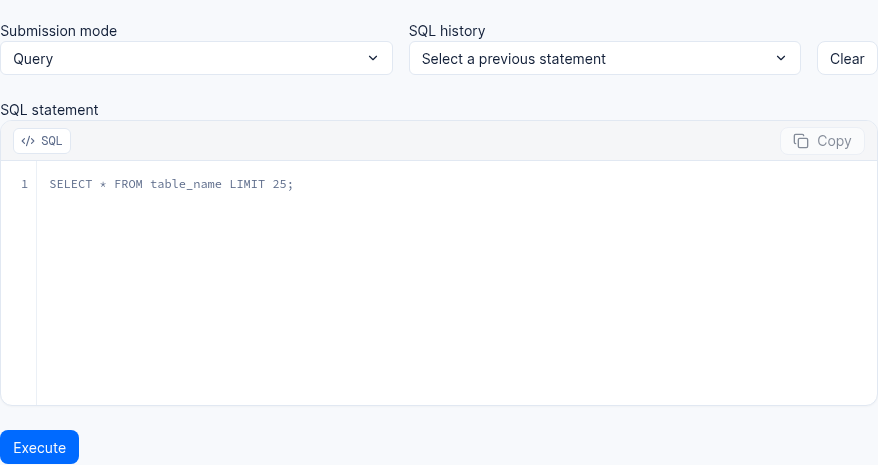
The image shows an empty terminal in a test environment. The SQL text is placeholder text; the endpoint address is cropped out.
SQL Proxy implements only a controlled SQL subset and does not guarantee compatibility with all MySQL syntax or extensions. If a statement is rejected, first check whether it is a single statement, whether the current entry point supports the operation, and whether the current identity has the required permissions.
Transactions and write results
SQL Proxy does not provide public transaction state. Statements such as BEGIN, START TRANSACTION, COMMIT, ROLLBACK, SET TRANSACTION, and those modifying autocommit are all rejected and return transaction_not_supported. Therefore, you cannot treat multiple commits as one atomic transaction, nor use ROLLBACK to undo previously executed SQL.
If a write operation encounters a timeout or connection interruption without a definite result, first query the affected data, then decide whether to retry according to the business idempotency policy; do not assume the service will automatically replay the request.
FAQ and Troubleshooting
Q1: Why do I get error transaction_not_supported when executing SQL in a client or ORM tool?
Root cause analysis: Many generic database drivers or ORM frameworks automatically send START TRANSACTION, BEGIN, COMMIT, ROLLBACK, SET SESSION TRANSACTION ISOLATION LEVEL ..., or SET autocommit=0 before executing SQL by default. Since the Agentbase SQL Proxy is a security gateway designed for multi-tenant stateless HTTP and controlled proxying, it does not promise external clients cross-request connection exclusivity or long-lived transaction state preservation, so it uniformly and explicitly returns transaction_not_supported for all transaction state control statements (while compatibly returning an empty OK for side-effect-free non-transaction initialization commands such as SET NAMES utf8mb4).
Solution:
When connecting to SQL Proxy, configure the driver or client in autocommit mode and disable driver-level explicit transaction wrapping (
BEGIN/COMMIT).To commit multiple database writes as a transaction, use the transaction API for the corresponding database; see Bulk operations and transactions. Bulk APIs alone do not combine multiple requests into a transaction.
Q2: Why does the same query statement containing GROUP BY or LEFT JOIN succeed when called from the backend via /v1/sql, but get rejected when called from a frontend browser as a logged-in user?
Root cause analysis: This is the tiered authentication path security design of the SQL Proxy:
When the backend carries
X-Appwrite-Key, it uses the API Key administrative path, which allows executingGROUP BY,HAVING,LEFT JOIN, CTEs, window functions, and metadata queries.When the frontend browser carries a Session or
X-Appwrite-JWT, it uses the User Session user path. To prevent malicious end users from constructing highly complex multi-table Cartesian products or full-table aggregation queries to launch denial-of-service (DoS) attacks or side-channel probing, the User path is strictly limited to whitelisted single-table queries, two-table equalityINNER JOIN, and single-level forwardINsubqueries.
Solution: If a frontend page needs to display complex statistical reports or multi-table LEFT JOIN aggregation results, have the enterprise backend service (or the Agentbase cloud Functions) use the Server API Key to call /v1/sql to perform the aggregation, and then return the sanitized results to the frontend.
Q3: Why can't I find the Host, port, and connection password for direct MySQL connection in the Console page?
Answer: According to Agentbase's production security convergence specification, the Console browser frontend does not disclose to clients the underlying MySQL Wire host address, CA certificate, or direct connection string, and ordinary members who are not organization owner cannot view the secret plaintext of administrative API Keys. To debug SQL within the Console UI, use the built-in HTTP controlled SQL terminal on the page; if a controlled backend microservice needs a direct connection via the MySQL Wire protocol, contact the organization owner to obtain the project API Key and get the access address from the server-side configuration list approved by the instance administrator.
Related Documentation
Databases Overview: Understand the underlying architectural differences between OceanBase's dual storage modes (
Shared V2andJsonTable).Tables, Columns, Rows and Indexes (Tables): Manage column definitions, indexes, and row-level security permissions for business tables such as
customer_tickets.Schema Versions and Rollback (Schema Versions): Manage database structure evolution through declarative version snapshots.
Auth Overview: Understand the generation and permission boundaries of User Sessions, short-term JWTs, and server-side API Keys.
Data API fixed queries for signed in users
Use Data API → Fixed query interfaces when project users should run a controlled query with a button. An interface saves a published policy and fixed SQL, rather than providing an interactive SQL console. In interface management, create from a published policy set, select signed in access, save SQL and fixed parameters, and grant selected users or all currently valid project users access with an expiration. Select users from synchronized profiles or enter a known external user identifier.
Invited users sign in, open My queries and execute the interface. Policies with user Providers use the current executor profile. Anonymous sharing relies on a link credential and does not support user Providers. The mode is immutable; create another interface to change it. Expiration, revocation, leaving the project or tightened upstream permissions are checked again on each request. Failures clear previous results so that stale data is not mistaken for a new successful response.
Access expiration cannot override policies or upstream authorization. Revoke the login grant to pause access while preserving the interface. Another qualified administrator can take over. Managing an interface does not mean that a regular project key can perform all Data API management operations; do not reuse SQL Proxy authentication assumptions.