
Models (LLM Gateway)
Models (LLM Gateway) is the unified foundational entry point through which Agentbase projects access large language models, embedding models, reranking models, and multimodal vision models. Via the Models page in the left navigation bar of the Console, development and operations teams can centrally manage model provider connection credentials, import model parameters with one click from the built-in vendor preset catalog, run per-model health checks, issue restricted gateway keys (Gateway Key), and provide out-of-the-box model compute support for the project's knowledge base, memory center, agent workbench, and observability evaluation.
Feature Overview
In enterprise AI application development, distributing raw API keys from upstream LLM vendors (such as Alibaba Cloud DashScope, OpenAI, Anthropic, or self-hosted vLLM/Ollama) directly to individual microservices or frontend clients brings serious pain points such as key leakage risk, inconsistent timeout retries, and the inability to aggregate usage billing by project.
The Agentbase Models (LLM Gateway) solves these problems through three core function tabs:
Model Providers:
Provides vendor presets and a model catalog; counts, metadata, and availability depend on the environment.
Supports registering multiple provider connections per project (such as the production primary connection
dashscope-prod), with configurable priority failover order, request timeout, and automatic retry count.Provides real-time Model Discovery and per-model Health Probe to ensure the underlying compute remains in the
HEALTHYstate.
Gateway Keys:
Issues restricted execution keys prefixed with
abk_(such asgw-key-support-bot); the plaintext is shown only once at creation, and the server stores only a strong hash and the prefix.Supports configuring per-key allowed model whitelist, requests-per-minute rate limit (RPM), and monthly Token budget cap, and only inference execution endpoints may be called, naturally isolating management plane permissions.
Usage statistics (Usage):
Real-time statistics of request counts, input/output Token consumption, and error distribution generated within the project via gateway keys and internal platform services (knowledge base, memory, agent workbench, evaluation).
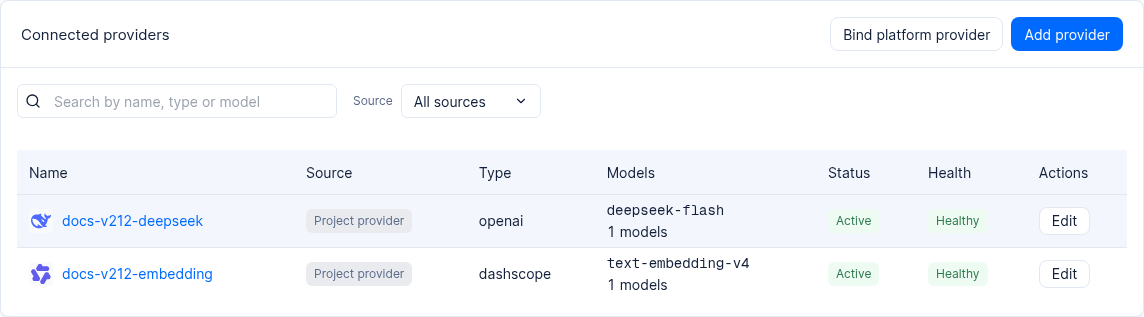
Figure: Example providers configured in a 2.12.0 test project; available models depend on the project configuration.
Core Concepts and Architecture
Core concepts table
| Core concept | English identifier | Detailed description |
|---|---|---|
| Model provider connection | Provider | An encrypted connection instance between the project and upstream LLM inference services (such as dashscope-prod). Contains protocol type, Base URL, encrypted API Key storage, enabled capability set, and model parameter table. |
| Vendor preset catalog | Provider Preset Catalog | Provides vendor and model presets such as Qwen, DeepSeek, and OpenAI; available entries and model settings depend on the environment. |
| Model capability classification | Capabilities | Divided into four standard capabilities: chat (dialogue and text generation), embedding (text and multimodal embedding), rerank (semantic reranking of retrieval results), vlm (visual image understanding). Downstream modules filter selectable models by capability tag. |
| By model parameters | Model Parameters | Fine-grained specification parameters bound to specific model entries, including contextWindow (context window), maxOutputTokens (maximum output Tokens), embeddingDimension (embedding dimensions, such as 1024), maxInputTokens (maximum embedding input Tokens), etc. |
| Gateway key | Gateway Key | A project-level inference-dedicated key in the format abk_... (such as gw-key-support-bot). It carries project routing context built in, so no additional X-Appwrite-Project header is required when calling. |
| Platform trial models | Trial Model Binding | Managed models configured globally by platform administrators and authorized for project trial use. Project members can directly use trial models for prototype validation without ever touching the underlying vendor keys. |
Roles, Entry Points, and Relationships
Role permission requirements
| Operation | Owner / Admin | Developer | Read-only member / Guest |
|---|---|---|---|
| View registered provider list, model catalog, and health status | Supported | Supported | Supported |
| Add, edit, or delete provider connections or update upstream API Keys | Supported | Authorized developers only | Not supported |
| Trigger model discovery and health checks | Supported | Supported | Not supported |
| Create, edit limits for, or revoke gateway keys (Gateway Key) | Supported | Authorized developers only | Not supported |
| View project model call volume and Token statistics reports | Supported | Supported | Supported |
Console entry and downstream module mapping
Console path: Enter the organization
Agentbase 企业智能中台-> select the project企业智能客服与知识中台 (enterprise-ai-hub-210)-> click Models in the left navigation bar.Downstream capability binding mapping (using the benchmark connection
dashscope-prodas an example):qwen-plus(Chat): Bound to Agent Runtime as the primary online customer service dialogue model, and also used for knowledge base grounded answer synthesis withanswer=true, GraphRAG entity-relation extraction, Wiki automatic compilation, and long-term fact extraction in the memory center.qwen-turbo(Chat): A lightweight chat model; availability depends on provider configuration.text-embedding-v3(Embedding, 1024 dimensions): Bound to the knowledge basekb_enterprise_supportand the memory center, responsible for document chunk embedding, knowledge graph node embedding, and query vector generation.qwen3.7-text-rerank(Rerank): Bound to the knowledge base hybrid retrieval (searchMode=hybrid) pipeline, performing Cross-Encoder semantic reranking on candidate chunks retrieved via vector and full-text retrieval.qwen-vl-max(Vision / VLM): Bound to the knowledge base image understanding (Image Understanding) and VLM document parsers, automatically interpreting architecture diagrams, flowcharts, and scanned tables in documents.
Feature Details and Operation Guide
Part One: Register a Production-Grade Provider via a Vendor Preset (dashscope-prod)
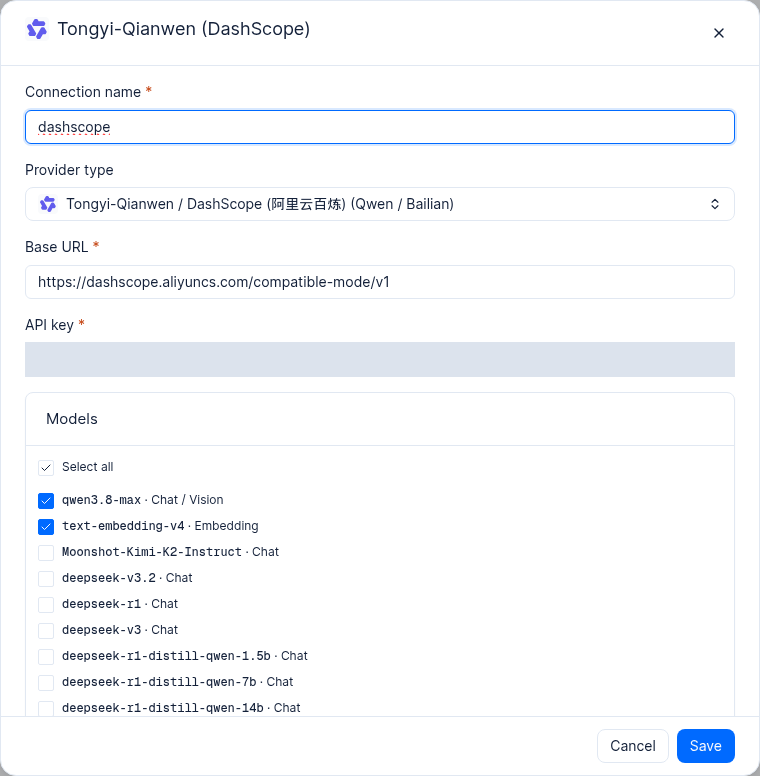
Interface reference: a vendor preset dialog in a test project. No key was entered or saved; available models depend on the current catalog and your access.
Procedure
On the Models page, open Providers and find Tongyi-Qianwen (DashScope) in the provider preset cards.
Select Connect with API key on the card, then review the connection name, type, base URL, key, and model selection in the dialog.
Enter the required values and select models. The table also lists corresponding API fields; availability and permissions depend on the provider and environment:
| Configuration field | Parameter name | Example configuration value | Field description and validation rules |
|---|---|---|---|
| Connection name | connectionName | dashscope-prod | Unique name within the project; the “vendor-environment” naming convention is recommended |
| Protocol type | providerType | openai / dashscope | The preset automatically matches the OpenAI-compatible protocol and Bailian native extension interfaces |
| Service address (Base URL) | baseUrl | https://dashscope.aliyuncs.com/compatible-mode/v1 | Auto-filled by the preset; the server enforces URL/DNS security policy validation and forbids pointing to intranet loopback or metadata-sensitive addresses |
| API Key | apiKey | <DASHSCOPE_API_KEY> | Alibaba Cloud Bailian API key; stored encrypted with AES-GCM at write time, and no read interface returns the plaintext |
| Allowed capabilities | allowedCapabilities | ["chat", "embedding", "rerank", "vlm"] | Check the categories of model capabilities exposed by this connection |
| Default primary model | defaultModel | qwen-plus | The model used when the caller does not explicitly specify a model, or when an internal platform task requests the default Chat model |
| Chat model list | chatModels | qwen-plus, qwen-turbo | Used for agent conversations, knowledge base answer synthesis, knowledge graph construction, and memory extraction |
| Embedding model list | embeddingModels | text-embedding-v3 | Used for embedding of chunked knowledge base documents and memory vectorization |
| Rerank model list | rerankModels | qwen3.7-text-rerank | Used for reranking of multi-path knowledge base retrieval results (Rerank) |
| Vision model list | vlmModels | qwen-vl-max | Used for knowledge base image understanding and multimodal parsing |
| Timeout (seconds) | timeoutSeconds | 120 | Timeout threshold for a single upstream HTTP inference request, default 120 seconds |
| Maximum retries | maxRetries | 2 | Number of automatic retries on transient network jitter or 502/503/504 |
| Routing priority | priority | 10 | Lower values indicate higher priority; used for failover ordering of identically named models across Providers |
| Set as default connection | isDefault | true (enabled) | Marks this as the default model provider connection for the current project |
In the built-in model import and per-model parameters area, check the model entries to import, then review and confirm each model's detailed parameters:
| Model identifier | Capability type | Context window (contextWindow) | Maximum output (maxOutputTokens) | Vector dimension (embeddingDimension) | Maximum embedding input (maxInputTokens) | Tool calling (supportsTools) |
|---|---|---|---|---|---|---|
qwen-plus | chat | 131072 (128K) | 8192 | - | - | true |
qwen-turbo | chat | 131072 (128K) | 8192 | - | - | true |
text-embedding-v3 | embedding | - | - | 1024 | 8192 | - |
qwen3.7-text-rerank | rerank | 32768 | - | - | 4000 | - |
qwen-vl-max | vlm / chat | 32768 | 4096 | - | - | true |
Click Create to complete the registration.
Part Two: Perform Model Discovery and Health Probing
After the provider is created, it is recommended to immediately verify upstream connectivity and the availability of each capability endpoint:
In the model provider list, find the
dashscope-prodconnection row.Click the Health Check button in the actions column (or invoke the probe via the management API).
The system will automatically send lightweight probe requests to enabled models such as
qwen-plus,text-embedding-v3, andqwen3.7-text-rerank:If upstream authentication passes and the response is normal, the connection status updates to green
HEALTHY, and the probe latency is recorded.If the upstream returns
401 InvalidApiKeyor404 ModelNotFound, the status is marked redUNHEALTHYand a specific error summary is displayed.
When the upstream vendor adds new models or adjusts the model list, you can click Discover Models and Refresh Cache to sync the latest available models to the project's model catalog.
Part Three: Issue and Manage Gateway Keys (gw-key-support-bot)
To allow external business services to securely call the model capabilities within the project, issue restricted keys on the Gateway Keys tab:
Switch to the Gateway Keys tab and click Create key.
Fill in the key configuration items:
Key Name (Name):
gw-key-support-bot(used for the enterprise intelligent customer service bot backend)Allowed Models whitelist (Allowed Models): Check the specific models allowed for access (e.g.,
qwen-plus,qwen-turbo,text-embedding-v3,qwen3.7-text-rerank); if left empty, all models in the project catalog are allowed by default.Per-minute rate limit (Rate Limit RPM): For example, enter
120(the default endpoint rate limit is60requests/minute).Monthly Token Budget: for example, enter
10000000(1,000 ten-thousand Tokens); once the budget is exceeded, requests will return429 Too Many Requests.Expiration time (Expires At): Optionally set the timestamp when the key automatically becomes invalid.
After clicking Create, the dialog will display the plaintext key only once (in a format like
abk_live_...). Immediately copy and store it securely in the business system's Key Management Service (KMS) or environment variables.
Part Four: Verify Model Calls via OpenAI / Anthropic Compatible Endpoints
After the abk_ gateway key is issued, business applications can directly use the standard OpenAI SDK, Anthropic SDK, or native HTTP requests to access the following four types of execution endpoints:
1. Chat Completions (POST /v1/ai/chat/completions)
(
  set +x
  set -o pipefail
  : "${APPBASE_GATEWAY_KEY:?Set APPBASE_GATEWAY_KEY}"
  : "${APPBASE_ENDPOINT:?Set APPBASE_ENDPOINT to the target API endpoint including /v1}"
  APPBASE_ENDPOINT="${APPBASE_ENDPOINT%/}"
  builtin printf 'Authorization: Bearer %s\n' "${APPBASE_GATEWAY_KEY:?Set APPBASE_GATEWAY_KEY}" | curl --disable --header @- -X POST "${APPBASE_ENDPOINT}/ai/chat/completions" \
    -H "Content-Type: application/json" \
    -d '{
      "model": "qwen-plus",
      "messages": [
        {"role": "system", "content": "你是企业智能客服与知识中台助手。"},
        {"role": "user", "content": "如何排查 OceanBase 向量索引构建超时?"}
      ],
      "stream": false,
      "temperature": 0.3
    }'
)
2. Text Embeddings (POST /v1/ai/embeddings)
(
  set +x
  set -o pipefail
  : "${APPBASE_GATEWAY_KEY:?Set APPBASE_GATEWAY_KEY}"
  : "${APPBASE_ENDPOINT:?Set APPBASE_ENDPOINT to the target API endpoint including /v1}"
  APPBASE_ENDPOINT="${APPBASE_ENDPOINT%/}"
  builtin printf 'Authorization: Bearer %s\n' "${APPBASE_GATEWAY_KEY:?Set APPBASE_GATEWAY_KEY}" | curl --disable --header @- -X POST "${APPBASE_ENDPOINT}/ai/embeddings" \
    -H "Content-Type: application/json" \
    -d '{
      "model": "text-embedding-v3",
      "input": [
        "OceanBase 分布式事务与向量索引排障指南",
        "AI 网关工具接入与限流规范"
      ],
      "dimensions": 1024
    }'
)
3. Semantic Rerank (POST /v1/ai/rerank)
(
  set +x
  set -o pipefail
  : "${APPBASE_GATEWAY_KEY:?Set APPBASE_GATEWAY_KEY}"
  : "${APPBASE_ENDPOINT:?Set APPBASE_ENDPOINT to the target API endpoint including /v1}"
  APPBASE_ENDPOINT="${APPBASE_ENDPOINT%/}"
  builtin printf 'Authorization: Bearer %s\n' "${APPBASE_GATEWAY_KEY:?Set APPBASE_GATEWAY_KEY}" | curl --disable --header @- -X POST "${APPBASE_ENDPOINT}/ai/rerank" \
    -H "Content-Type: application/json" \
    -d '{
      "model": "qwen3.7-text-rerank",
      "query": "向量索引内存不足报错 4013 怎么处理?",
      "documents": [
        "当出现 OB_ALLOCATE_MEMORY_FAILED (-4013) 时,请结合版本文档、日志和资源指标排查。",
        "智能客服工单流转遵循一线坐席初审、二线专家复核的标准作业程序(SOP)。"
      ],
      "top_n": 2
    }'
)
4. Query the project's available model catalog (Models:GET /v1/ai/models)
(
  set +x
  set -o pipefail
  : "${APPBASE_GATEWAY_KEY:?Set APPBASE_GATEWAY_KEY}"
  builtin printf 'Authorization: Bearer %s\n' "${APPBASE_GATEWAY_KEY:?Set APPBASE_GATEWAY_KEY}" | curl --disable --header @- -X GET "${APPBASE_ENDPOINT:?Set endpoint including /v1}/ai/models"
)
Verification result:
/v1/ai/modelsreturns the aggregated model list, includingqwen-plus,qwen-turbo,text-embedding-v3,qwen3.7-text-rerank, andqwen-vl-max, along with their capability annotations and source information.Switch to the Console Models -> Usage tab to see, in real time, the request counts and Token consumption details of the Chat, Embedding, and Rerank calls above.
FAQ and Troubleshooting
Q1: When adding an Alibaba Cloud Bailian (DashScope) connection, which Base URL should be used? Why do Rerank models also work correctly?
When using the built-in Tongyi Qianwen (DashScope) vendor preset, it is recommended to keep the Base URL at the default https://dashscope.aliyuncs.com/compatible-mode/v1. Agentbase's DashScope adapter handles protocol routing automatically: qwen-plus, qwen-turbo, text-embedding-v3, and qwen-vl-max go through the OpenAI-compatible path, while for rerank models such as qwen3.7-text-rerank, the gateway under the hood automatically aligns with the Bailian native Rerank protocol endpoint and returns a standardized ranking structure, so callers need not worry about underlying differences.
Q2: When ingesting long documents into the knowledge base, an error says the Embedding input length exceeds the maximum allowed tokens — how do I adjust this?
In Models -> Model Providers, edit dashscope-prod, expand Model Parameters to find text-embedding-v3, and check its Max Input Tokens configuration (text-embedding-v3 supports up to 8192 Tokens). Meanwhile, in the knowledge base's chunking parser configuration, it is recommended to set chunkTokenNum between 512 and 1024, ensuring that a single chunk plus its heading prefix stays well below the embedding model's input limit.
Q3: Can a gateway key (abk_...) be used to call administrative interfaces such as creating knowledge bases or modifying Providers?
No. Gateway keys follow a strict least-privilege principle and are only authorized to access /v1/ai/* model execution endpoints (Chat Completions, Embeddings, Rerank, Anthropic Messages, and model list queries). Any create, delete, or modify administrative operation against Providers, Gateway Keys, knowledge bases, or the database must use the Server API Key issued under Overview -> API Keys for the project, or a Console administrator session.
Q4: When the same model name exists in multiple Providers, how does the LLM Gateway decide which connection to route to?
If no connection identifier is explicitly specified in the request, the LLM Gateway follows this automatic routing order:
If the project is bound to a matching platform Trial Model and no project connection is explicitly specified, trial model routing is attempted first;
Among the project's self-built Providers, the provider marked as the default connection (
isDefault = true) is selected first;If multiple connections are available, routing proceeds from highest to lowest according to the connection's configured priority (
priority), and upon a timeout or 5xx failure on the primary connection, failover to backup connections occurs automatically per the retry policy.