
Memory Forgetting and Data Retention
Overview
The value of a memory can change with time and usage. Agentbase Memory provides adaptive decay, expiration handling, and explicit deletion to help manage accumulated data. Before changing a policy, preview it with test data and review the retention, deletion, and recovery process against your business and compliance requirements.
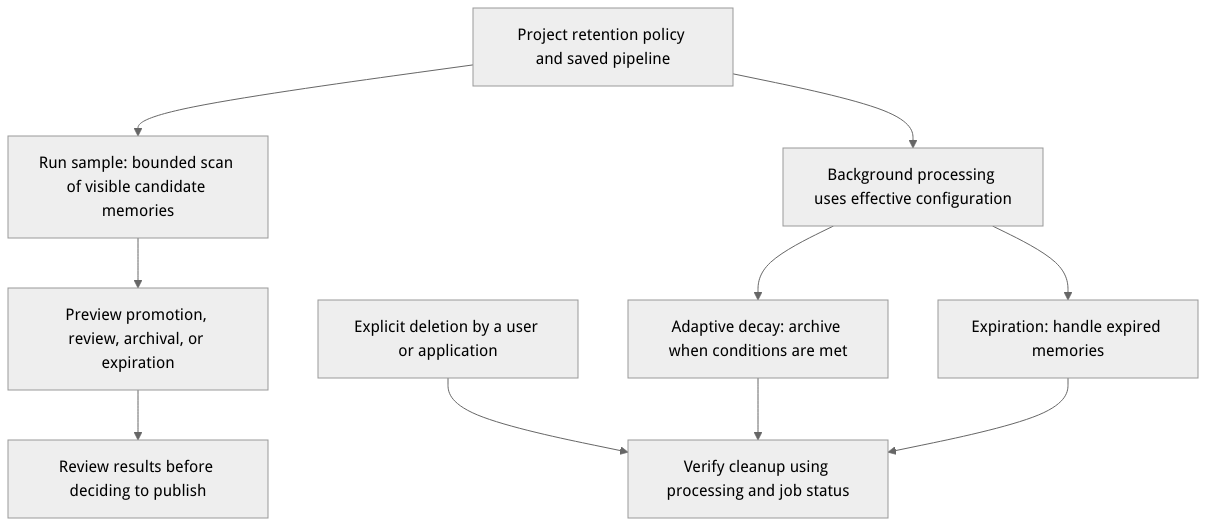
This is a workflow diagram, not a runtime screenshot; actual results depend on project configuration and job status.
Decay and retention policy
The system calculates a retention score from a memory's creation or latest review time, type, and access count. Memories that meet the protection-period and threshold conditions may be archived. Expiration and adaptive archival are separate decisions, while explicit deletion is initiated by a user or application. Check the effective project configuration and background job status for actual archival and physical cleanup behavior.
The following fallback defaults come from the 2.12.0 service source. Existing project or pipeline configuration may override them; check the effective configuration.
| Parameter | Fallback default | Description |
|---|---|---|
initial_retention | 1 | Initial retention score |
decay_rate | 1.5 | Base decay parameter |
decay_rate_multipliers | working: 1, short_term: 7, long_term: 60 | Adjusts the decay parameter by memory type |
reinforcement_factor | 0.3 | Effect of access count on the decay parameter |
working_threshold / short_term_threshold / long_term_threshold | 0.3 / 0.6 / 0.8 | Type thresholds; configured values must be nondecreasing |
review_intervals | [1, 6, 24, 72, 168] | Review intervals in hours |
review_adjustment_factor / review_interval_min_hours | 0.3 / 0.5 | Review adjustment factor and minimum review interval in hours |
minimum_protection_hours | 168 | Default protection period for new memories in hours |
permanent_forgetting_enabled | false | Controls whether adaptive archival enters the background physical cleanup queue |
These parameters do not guarantee processing of every memory at a fixed time. Correct invalid configurations first; the defaults are not recommendations for every workload.
Preview a forgetting policy in the console
In the target project, open Memory → Configuration → Forgetting Pipeline and select or create an editable pipeline draft.
Adjust and save the draft for your use case, then enter a test user ID in Run sample.
Run the sample and inspect each stage. The preview reads only candidate memories visible to the current user, and the pipeline batch size limits the scan, so the result is not necessarily a complete list of the user's memories. The preview does not perform business memory writes.
Review the result and its impact before publishing. Setting the pipeline as the scenario default is a separate choice; confirm it before proceeding.
The preview uses POST /v1/memory/pipelines/{pipelineId}/validate. The request requires a saved versionId and a data object containing userId, for example:
{
  "versionId": "DRAFT_VERSION_ID",
  "data": { "userId": "TEST_USER_ID" }
}
Results are returned by stages such as memory_scan, forgetting_decision, and forgetting_operation. Candidate operations may include promote, review, archive, or expire; records with no operation do not necessarily appear individually in the decisions list. The endpoint requires projects.write and memories.read. A normal project API key cannot provide projects.write; use an authorized Console administrator session.
Deletion and expiration
The memory list and DELETE /v1/memory/memories/{memoryId} support explicit deletion; see Memory management for batch operations. Retention policies, expiration, explicit deletion, and background cleanup are distinct operations. Check the impact before deleting, then verify completion using job and data status. A deletion request alone does not mean every underlying record has been physically erased immediately.
If source files or downstream profiles and contexts also need attention, check each resource and the applicable business requirements separately. See the related guides for pipeline configuration and memory operations.