
Knowledge Base
Overview and use cases
Knowledge Bases provide a managed RAG pipeline: upload/import documents → parse and chunk → Embedding → store in vector database → retrieval (vector / fulltext / hybrid, optional rerank). Starting in 2.6.0, rich-document RAG supports PDF (text layer / per-page VLM / MinerU), Office documents (DOC/DOCX/PPT/PPTX direct extraction or parse after PDF conversion), tables (CSV/TSV/XLS/XLSX structured extraction), image assets, and optional image understanding; Python Server SDK 15.4.0 completes the full Knowledge Bases surface.
Prerequisites
Models and parsers
The project must have a usable LLM Gateway embedding model configured (optional rerank / VLM): when creating a KB, exact matching is done by model name; creation fails if the Gateway lacks the model or the Provider is not activated.
documentParser accepts text / vlm / mineru (default vlm; vlm must be paired with a usable visionModel; the legacy value auto will be rejected; do not automatically switch parsers when MinerU is unavailable).
Permission scopes
| Permission scope | Purpose |
|---|---|
| Knowledge base | knowledgebases.read (read/retrieval), knowledgebases.write (write/ingestion) |
| Project lexicon | Lexicon management requires lexicons.read (read lexicons, entries, references, and previews) and lexicons.write (create/update/delete lexicons and entries, import entries) |
Knowledge base lexicon binding (GET/PUT /v1/knowledgebases/{knowledgeBaseId}/lexicons) validates both read/write permission on the target knowledge base and read permission on the bound lexicon; browsers use the user Session and do not hold the project API Key.
Usage workflow
1. Create a knowledge base
create({ name, embeddingModel, ... }) creates the KB — embeddingModel cannot be changed after creation; if probing fails, creation fails (switch model names or activate the Provider first).
Starting with 2.9.0, optional embeddingDimension (1–65535: validates against the selected model via probing; creation fails if it does not match the model's output dimensions) and tracingEnabled (ingestion tracing switch, recording parsing / chunking intermediate artifacts for parse evaluation; depends on a platform administrator's global switch, and after enabling it, documents must be re-ingested to have complete evidence).
2. Ingest documents and wait for ready
Ingest documents: createDocument + createIngestion({ documentId, ... }) (or batch createDocumentsBatch); the ingestion state machine is queued → running → ready | failed | cancelled, poll getIngestion. createIngestion returning HTTP 202 only means the task was accepted, not that it is immediately retrievable; confirm the ingestion is ready and that the Document's status=ready, activeGeneration match this ingestion's generation before retrieving by the new generation.
The parser configuration (parserId + parserConfig) determines the chunking method; common parameters are in the next section.
3. Configure image understanding (optional)
(Optional) Image understanding: configure enabled / model / providerRef / prompt / limit parameters in imageUnderstanding — this is an independent step after parsing that generates descriptions for informative images and adds them to the retrieval text, but does not modify the original chunk's content/span/locator.
4. Configure and bind the lexicon (optional)
(Optional) Lexicon configuration and binding: create a project lexicon via /v1/lexicons (e.g., an enterprise synonym lexicon lex_enterprise_synonyms, a customer-service stopword lexicon lex_support_stopwords), call /v1/lexicons/{lexiconId}/entries to maintain the three types of entries synonym / expansion / stop (or batch import JSON/CSV/XLSX via /v1/lexicons/{lexiconId}/import), use /v1/lexicons/{lexiconId}/preview to preview native-v1 tokenization and query rewriting effects, and finally call PUT /v1/knowledgebases/{knowledgeBaseId}/lexicons to bind to the target knowledge base (e.g., kb_enterprise_support) and enable enabled: true.
5. Retrieval and answer synthesis
Retrieval: createSearch (single library) and createMultiSearch (multi-library), passing query, searchMode (default hybrid; the parameter name is searchMode, not mode), limit, similarityThreshold, vectorWeight, rerank / rerankModel.
Starting with 2.9.0, you can pass answer: true to enable answer synthesis: the chat model from the knowledge base's indexingDefaults performs grounded synthesis over merged evidence (up to 12 evidence rows, answer ≤1024 tokens), and the result carries answer (status / text / model / latency).
Starting with 2.10.0, retrieval accepts documentTag ({subProductId}_{sectionCode}_{fileKey} exact match) and subProductId (AND semantics) to narrow chunk / GraphRAG / Wiki retrieval; createMultiSearch additionally supports metadataFilter (keyed by knowledge base, with "*" as fallback) and offset (pagination after fusion ranking). Document registration (createDocument) / update (updateDocument) can write documentTag / subProductId; only creation supports sectionCode, and listDocuments supports documentTag / subProductId filtering.
6. Verify against the original source
Source tracing: result chunks carry content, source (source URI), and locator (section/text offset); reading the source via getDocumentSource supports Range/206 and only requires knowledgebases.read.
7. Full rebuild
Full rebuild: createReindex (returns 202, a bounded bulk re-ingestion entry point; it does not change embeddingModel).
8. Build enhanced indexes (optional)
(Optional) enhanced indexes: configure and enable GraphRAG / RAPTOR / Wiki via updateIndexCapability → build asynchronously with createIndexOperation → poll the operation until its terminal state; for Wiki pages / versions / proposals / conflicts and knowledge graph browsing, see wiki.md.
Integration flow diagram
The diagram below summarizes the complete path of "create knowledge base → ingest documents → wait until ready → retrieve → verify against source", so you can match it against the SDK call steps above. Models, Documents, Search, and View source in the diagram are Console entry points; when integrating via SDK, use the methods in this document plus Documents and Ingestion and Retrieval and Source Tracing.
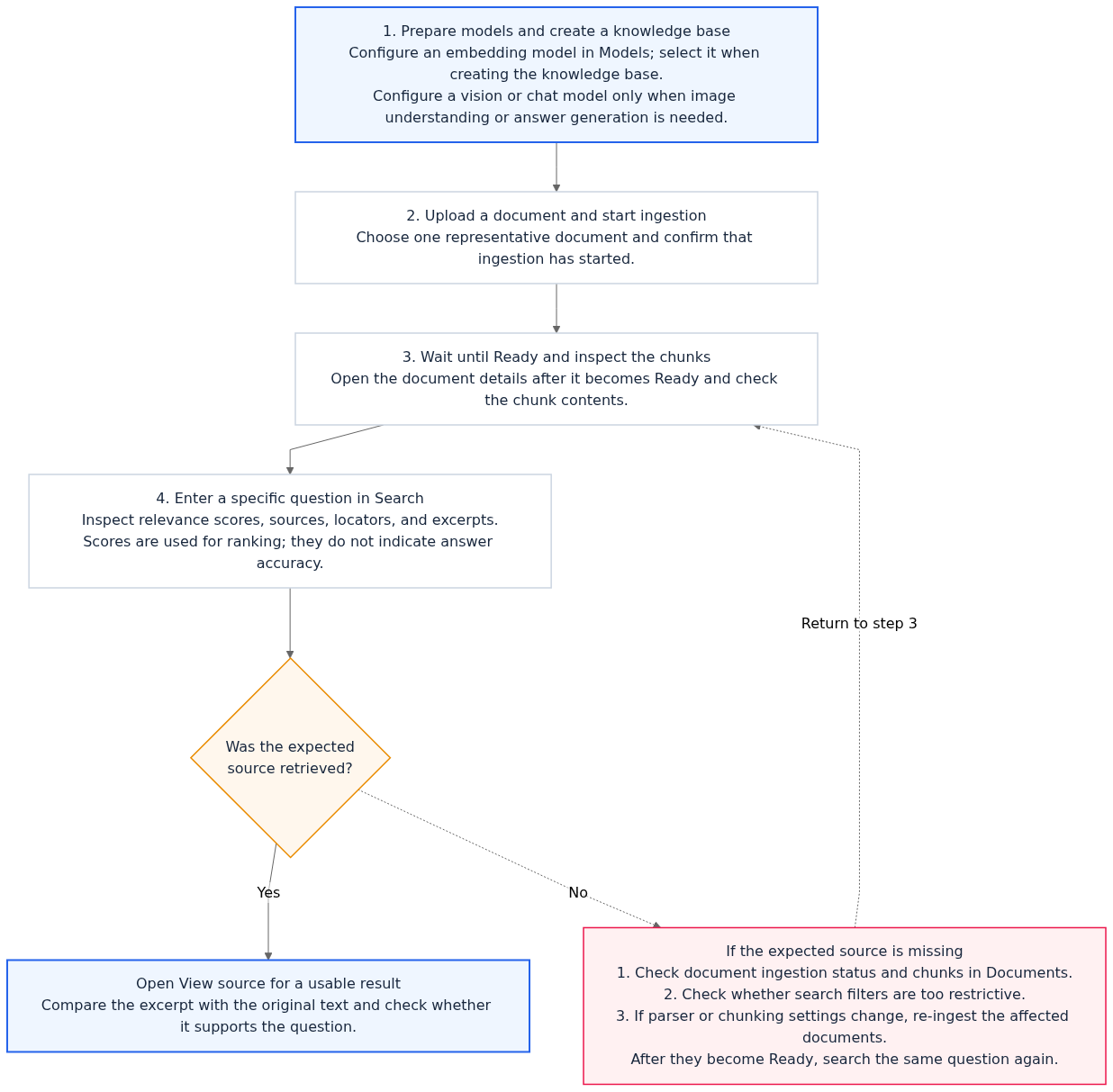
Flow diagram, not a live screenshot. Confirm documents are ready before retrieving and verifying sources; open the full-size image to view text details.
View the flow diagram in full size
Resource model and enhanced capabilities
Resource relationships
Resource model: KB (embeddingModel required at creation; the server probes the LLM Gateway once for embeddings to obtain the dimension automatically, and automatically creates the accompanying vector store and Storage resources) → Document → generation (each successful ingestion produces one generation; retrieval only returns the active generation) → ingestion (async task) → chunk (the basic unit of retrieval); data sources (datasource, currently Yuque) can sync documents into the same pipeline.
Enhanced indexes
Starting with 2.7.0, enhanced indexes are added on top of basic RAG: GraphRAG (entity knowledge graph), RAPTOR (summary tree), and LLM Wiki (canonical Wiki pages, versions, proposals, and conflict governance), plus the accompanying index capability configuration and async build operations — for the management plane and examples by language, see Wiki and GraphRAG (Index Governance); on the retrieval side, enhanced results are accessed via useKnowledgeGraph / useWiki / allowDegraded.
Project-level lexicon
2.10.0 (aligned with the release-2.10.2 baseline) adds project-level lexicon (Lexicon) binding to knowledge bases: manage synonym (synonym), associated expansion term (expansion), and stopword (stop) lexicon entries via /v1/lexicons, and bind the lexicon to a knowledge base via /v1/knowledgebases/{knowledgeBaseId}/lexicons.
Once binding is enabled, single- and cross-knowledge-base retrieval automatically performs synonym normalization and expansion term augmentation based on the native-v1 tokenization strategy before entering vector/full-text retrieval (no need to rebuild document vectors); if lexiconEnabled is enabled in the knowledge index configuration, GraphRAG knowledge graph construction also reuses the bound lexicon to apply deterministic canonical-name normalization to extracted entities and relation endpoints.
Key parameters and returns
FAQ: Can knowledge base retrieval use mode?
No. The retrieval mode field name for KnowledgeBases.createSearch and createMultiSearch is searchMode; mode cannot substitute for this SDK/API request field. When asked "why use searchMode", the reason is that the parameter name defined by the API contract is searchMode.
parserId:general(default) /title/smart/regex/faq/sheet(added in 2.7.0, Excel-specific; see Documents and Ingestion for details). CommonparserConfig:chunkTokenNumdefaults to 512 (must be ≥1 at ingestion);overlapPercentdefaults to 10 (0–99, execution cap 90);titleLeveldefaults to 2 (1–6);minChunkTokensdefaults to 128 (must not exceedchunkTokenNum);regexPatterndefaults to[.!?]+\s*(PCRE).imageUnderstanding:prompt≤4000 characters;maxImagesPerDocumentdefaults to 20 (1–20);maxDescriptionCharsdefaults to 800 (1–800);maxConcurrencydefaults to 4 (1–8).Retrieval:
limitdefaults to 10 (1–100);similarityThreshold0–1;vectorWeightcommonly 0.7 (defaults to the KB's retrievalDefaults); withrerank=true, retrieval is first expanded and then reranked via the Gateway; withrerankModel, selection is automatic. Call exceptions wherererankModelorrerankProviderRefis explicitly specified return an error; if automatic selection with neither specified fails, it can degrade and returnreranked: false.When Document-level
parserConfigis non-empty, it fully replaces the KB defaults (not a per-field merge); the ingestionoverrides.parserConfigthen performs a shallow merge.Lexicon parameter contract:
tokenizerProfile: fixed tonative-v1(UTF-8 Unicode lowercase normalization; consecutive ASCII letters/digits/underscores form words, Chinese characters are tokenized character by character, matched by set inclusion, with no second-order recursive triggering).entryType:synonym(synonym groups; the first word intermsis the canonical name and the rest are synonyms; on the first consecutive match in the original text, full-width parenthesesOB(OceanBase)are inserted in place),expansion(expansion terms; after matching the first word ofterms,命中词:expansionsis appended at the end),stop(stopwords, used for interception in the agent workbench; direct knowledge base retrieval ignores stopwords). Each lexicon entry'stermsandexpansionseach allow at most 100 items, each 1–256 characters.Knowledge base lexicon binding (
PUT /v1/knowledgebases/{knowledgeBaseId}/lexicons): the request body is{ enabled: boolean, bindings: [{ lexiconId: string, priority: number }] }(executed in ascending order bypriority, at most 100 bindings per resource; the lexicon object itself has noenabledfield — enable/disable is controlled independently byenabledon the resource binding side andlexiconEnabledon the knowledge index side).
Errors and boundaries
ingestion returns 409: the same document already has an in-progress task (single-task concurrency control per document), or overrides attempts to change embedding — wait for the task to finish or cancel it, and do not change embedding in overrides.
Changing the KB parser configuration does not silently rewrite historical chunks; only new ingestion or explicit re-ingestion uses the new parsing/image descriptions.
Lexicon rule changes take effect in real time for subsequent query rewriting with no need to rebuild document vectors; however, if used for lexicon-enhanced GraphRAG knowledge graph construction (
lexiconEnabled: true), modifying entries or switching bindings requires re-triggering GraphRAG index construction to update existing graph entities.Lexicons still bound to knowledge bases or agents are forbidden from deletion (
DELETE /v1/lexicons/{lexiconId}returns a conflict error); you must query references via/v1/lexicons/{lexiconId}/referencesand unbind before deleting.Common causes of empty retrieval results: documents not ready, threshold too high, generation not active.
List
totaldoes not fully applyqueries[]filtering; do not treat it as an exact hit count.Deleting a KB asynchronously tears down its bound vector store and cleans up lexicon bindings; do not manually delete the underlying resources occupied by a KB.
SDK Category Differences
Server SDK (server-sdk/nodejs.md): the full set — KB/Document/Chunk/Ingestion/DataSource/Search (single-KB + multi-KB)/Yuque; starting with 2.7.0, Node / Python / Go / Java also cover the Knowledge Index and Wiki management plane (see wiki.md). Lexicons (
/v1/lexiconsand/v1/knowledgebases/{knowledgeBaseId}/lexicons) in released 2.10.0 Server SDKs are accessed viaclient.callor standard HTTP REST calls.Client SDK (client-sdk/web.md): only Yuque OAuth session-related methods (authorization, listing documents, creating Yuque documents, deleting credentials); the full RAG flow belongs on the server side, and Wiki / GraphRAG / index governance / lexicon management are not exposed to the browser.
Console SDK (console-sdk/nodejs.md): the local development Console SDK provides
Lexiconsservice wrappers (list/create/get/update/delete/listEntries/createEntry/preview/importEntries/exportEntries/listReferences/getKnowledgeBaseBindings/updateKnowledgeBaseBindings); the Java Console SDK hasKnowledgeBasesservices (starting with 2.7.0, the console packages for Java / Python / Go are isomorphic with the Server plane, including Wiki / index governance).Python Server SDK 15.4.0 completes the Knowledge Bases surface (for artifact verification after installation, see integration.md).
Examples by language
Knowledge base creation examples are on this page; for ingestion and data sources see Documents and Ingestion, and for retrieval and source tracing see Retrieval and Source Tracing. Each card can switch languages (synchronized across the whole page).
Create a knowledge base
KB creation is a synchronous call, while the accompanying VectorsDB / Storage resources become ready asynchronously during provisioning. The Web (user Session) plane has no KB management capability (only Yuque OAuth-related methods), so this card has no Web tab.
- Node.js (Server)
- Java
- Python
- Go
- REST (curl)
import { KnowledgeBases, ID } from 'agentbase-node-sdk';

const kb = new KnowledgeBases(client);

const base = await kb.create({
    knowledgeBaseId: ID.unique(),        // Custom or ID.unique()
    name: '产品手册',
    embeddingModel: 'text-embedding-v3'  // Dimension is probed once from the Gateway at creation time and cannot be changed afterward
});KnowledgeBases kb = new KnowledgeBases(client); // For client initialization, see server-sdk/java.md
var base = kb.create(ID.unique(), "产品手册", "text-embedding-v3",
null, null, null, null, null, null); // description / embeddingProviderRef / parserId / parserConfig / retrievalDefaults / ingestRoutes
// Dimensions are probed from the Gateway once at creation; embeddingModel cannot be changed afterwardsfrom agentbase.id import ID
from agentbase.services.knowledge_bases import KnowledgeBases # Starting from 15.4.0, complete the KB invocation surface
kb = KnowledgeBases(client)
base = kb.create(knowledge_base_id=ID.unique(), name='产品手册',
embedding_model='text-embedding-v3') # Dimension is probed once from the Gateway at creation time and cannot be changed afterwardkb := agentbase.NewKnowledgeBases(cl) // facade constructor; cl is a Client already loaded with an API Key
base, err := kb.Create(id.Unique(), "产品手册", "text-embedding-v3") // Dimension is probed once from the Gateway at creation time and cannot be changed afterward
// Other optional parameters via With* options: WithCreateDescription / WithCreateParserId / WithCreateParserConfig (loaded via interface{}) etc.curl -sS -X POST "$APPBASE_ENDPOINT/knowledgebases" \
-H 'Content-Type: application/json' \
-H "X-Appwrite-Project: $APPBASE_PROJECT_ID" \
-H "X-Appwrite-Key: $APPBASE_API_KEY" \
-d '{"knowledgeBaseId":"kb_product_docs","name":"产品文档库","embeddingModel":"text-embedding-v3"}'
# 201 returns embeddingDimension and the automatically provisioned vectorsdbDatabaseId / vectorsdbCollectionId / bucketId
# provisioning is asynchronous: these fields may briefly be null; later confirm via GET /knowledgebases/{kbId}Lexicon management and knowledge base binding
Use /v1/lexicons to create a project-level lexicon, write synonym/expansion term/stopword entries, and preview native-v1 query rewriting results, then bind the lexicon to a knowledge base via PUT /v1/knowledgebases/{knowledgeBaseId}/lexicons (e.g., kb_enterprise_support). Released 2.10.0 Server SDKs uniformly use the underlying client.call or standard REST calls, while the local Console SDK provides Lexicons service wrappers.
- Node.js (Server)
- Java
- Python
- Go
- REST (curl)
import { Client } from 'agentbase-node-sdk';

// An initialized Server Client (with lexicons.read / lexicons.write and knowledgebases.write scopes)
const endpoint = process.env.APPBASE_ENDPOINT!; // e.g. https://appbuild-sit.oceanbase.com/v1

// 1. Create the enterprise synonym dictionary
const lexicon = await client.call('post', new URL(`${endpoint}/lexicons`), {
    'content-type': 'application/json',
}, {
    lexiconId: 'lex_enterprise_synonyms',
    name: '企业核心产品同义词词典',
    description: '统一 OB / OceanBase / Agentbase 等标准术语',
    tokenizerProfile: 'native-v1',
});

// 2. Add synonym entries (the first item in terms is the canonical term; the rest are synonyms)
await client.call('post', new URL(`${endpoint}/lexicons/${lexicon.$id}/entries`), {
    'content-type': 'application/json',
}, {
    entryType: 'synonym',
    terms: ['OceanBase', 'OB', '分布式数据库OB'],
});

// 3. Preview the query rewrite effect
const preview = await client.call('post', new URL(`${endpoint}/lexicons/${lexicon.$id}/preview`), {
    'content-type': 'application/json',
}, {
    query: 'OB 向量索引怎么排障?',
});

// 4. Bind the lexicon to the knowledge base kb_enterprise_support and enable retrieval rewriting
const bindings = await client.call('put', new URL(`${endpoint}/knowledgebases/kb_enterprise_support/lexicons`), {
    'content-type': 'application/json',
}, {
    enabled: true,
    bindings: [
        { lexiconId: 'lex_enterprise_synonyms', priority: 1 },
        { lexiconId: 'lex_support_stopwords', priority: 2 },
    ],
});// Java Server SDK 2.10.0 does not yet include a standalone Lexicons wrapper class; lexicons and bindings go through standard HTTP calls to /v1/lexicons and /v1/knowledgebases/{knowledgeBaseId}/lexicons
java.net.http.HttpClient http = java.net.http.HttpClient.newHttpClient();
String bindJson = "{\"enabled\":true,\"bindings\":[{\"lexiconId\":\"lex_enterprise_synonyms\",\"priority\":1}]}";
java.net.http.HttpRequest req = java.net.http.HttpRequest.newBuilder()
.uri(java.net.URI.create(System.getenv("APPBASE_ENDPOINT") + "/knowledgebases/kb_enterprise_support/lexicons"))
.header("Content-Type", "application/json")
.header("X-Appwrite-Project", System.getenv("APPBASE_PROJECT_ID"))
.header("X-Appwrite-Key", System.getenv("APPBASE_API_KEY"))
.PUT(java.net.http.HttpRequest.BodyPublishers.ofString(bindJson))
.build();
java.net.http.HttpResponse<String> resp = http.send(req, java.net.http.HttpResponse.BodyHandlers.ofString());#Reuse the Python Server SDK Client.call with a loaded API Key to access lexicon and knowledge base binding endpoints
lexicon = client.call(
'post',
'/lexicons',
headers={'content-type': 'application/json'},
params={
'lexiconId': 'lex_enterprise_synonyms',
'name': '企业核心产品同义词词典',
'tokenizerProfile': 'native-v1',
},
)
client.call(
'post',
f"/lexicons/{lexicon['$id']}/entries",
headers={'content-type': 'application/json'},
params={'entryType': 'synonym', 'terms': ['OceanBase', 'OB', '分布式数据库OB']},
)
bindings = client.call(
'put',
'/knowledgebases/kb_enterprise_support/lexicons',
headers={'content-type': 'application/json'},
params={
'enabled': True,
'bindings': [{'lexiconId': 'lex_enterprise_synonyms', 'priority': 1}],
},
)// Go Server SDK 2.10.0 accesses /v1/lexicons and /v1/knowledgebases/{knowledgeBaseId}/lexicons via the underlying Call
headers := map[string]interface{}{"content-type": "application/json"}
body := map[string]interface{}{
"enabled": true,
"bindings": []map[string]interface{}{
{"lexiconId": "lex_enterprise_synonyms", "priority": 1},
},
}
resp, err := cl.Call("PUT", "/knowledgebases/kb_enterprise_support/lexicons", headers, body)
_ = resp
_ = err# 1. Create a lexicon (POST /v1/lexicons)
curl -sS -X POST "$APPBASE_ENDPOINT/lexicons" \
-H 'Content-Type: application/json' \
-H "X-Appwrite-Project: $APPBASE_PROJECT_ID" \
-H "X-Appwrite-Key: $APPBASE_API_KEY" \
-d '{"lexiconId":"lex_enterprise_synonyms","name":"企业核心产品同义词词典","tokenizerProfile":"native-v1"}'
# 2. Create a synonym entry (POST /v1/lexicons/{lexiconId}/entries)
curl -sS -X POST "$APPBASE_ENDPOINT/lexicons/lex_enterprise_synonyms/entries" \
-H 'Content-Type: application/json' \
-H "X-Appwrite-Project: $APPBASE_PROJECT_ID" \
-H "X-Appwrite-Key: $APPBASE_API_KEY" \
-d '{"entryType":"synonym","terms":["OceanBase","OB","分布式数据库OB"]}'
# 3. Preview query rewriting (POST /v1/lexicons/{lexiconId}/preview)
curl -sS -X POST "$APPBASE_ENDPOINT/lexicons/lex_enterprise_synonyms/preview" \
-H 'Content-Type: application/json' \
-H "X-Appwrite-Project: $APPBASE_PROJECT_ID" \
-H "X-Appwrite-Key: $APPBASE_API_KEY" \
-d '{"query":"OB 分布式事务怎么排障?"}'
# 4. Bind the lexicon to the knowledge base and enable retrieval rewriting (PUT /v1/knowledgebases/{knowledgeBaseId}/lexicons)
curl -sS -X PUT "$APPBASE_ENDPOINT/knowledgebases/kb_enterprise_support/lexicons" \
-H 'Content-Type: application/json' \
-H "X-Appwrite-Project: $APPBASE_PROJECT_ID" \
-H "X-Appwrite-Key: $APPBASE_API_KEY" \
-d '{"enabled":true,"bindings":[{"lexiconId":"lex_enterprise_synonyms","priority":1},{"lexiconId":"lex_support_stopwords","priority":2}]}'
# 5. Query the knowledge base's current lexicon bindings (GET /v1/knowledgebases/{knowledgeBaseId}/lexicons)
curl -sS "$APPBASE_ENDPOINT/knowledgebases/kb_enterprise_support/lexicons" \
-H "X-Appwrite-Project: $APPBASE_PROJECT_ID" \
-H "X-Appwrite-Key: $APPBASE_API_KEY"Example Guide
JavaScript (Node ingestion and retrieval): examples/javascript.md
Java (Server / Console SDK call examples): examples/java.md